Restored 1959 IBM 1401 Inverts Hilbert Matrix With Tape-Based FORTRAN
CuriousMarc
Software subroutines and a 63-pass magnetic tape overlay allow the business-oriented IBM 1401 to execute scientific floating-point calculations despite lacking native mathematical hardware.
AI-assisted summary of The IBM 1401 compiles and runs FORTRAN II — original source. Check the original for full context.
Source published:
Key ideas
- Restorers at the Computer History Museum successfully compiled and executed a FORTRAN II scientific benchmark on an original 1959 IBM 1401 decimal mainframe. (0:10)
- Because the IBM 1401's 16K core memory cannot hold the full FORTRAN compiler, the system relies on an intricate 63-pass overlay architecture streaming off magnetic tape. (21:39)
- The benchmark successfully inverted an ill-conditioned Hilbert matrix and computed an identity matrix using software-synthesized 15-digit floating-point arithmetic. (6:14)
- To achieve period-accurate operation without modern assist devices during runtime, the team used a custom FPGA-based tape emulator to write historical tape images onto physical magnetic reels before unplugging it. (11:34)
Detailed notes
## Background Published on YouTube by CuriousMarc on February 2, 2018, this video documents an effort to compile and run a FORTRAN program on a vintage 1959 IBM 1401 mainframe at the Computer History Museum. The project tests the limits of the museum's 16K decimal computer, which was engineered for commercial accounting rather than scientific computation.
## TL;DR CuriousMarc and restorer Mike Albaugh work through the steps required to execute FORTRAN II code on the Computer History Museum's IBM 1401 mainframe. To prepare the run, the team constructs a viable physical compiler tape using a custom hardware tape emulator and punches a period-accurate source deck from an emulated tape image using an IBM 1402 and an IBM 026 keypunch. After overcoming an initial parity check and storage error caused by a missing check bit, the team detaches all modern gear to achieve a historically authentic configuration. The 1401 completes all 63 compiler overlay passes from magnetic tape and successfully runs a scientific benchmark that inverts and multiplies an ill-conditioned Hilbert matrix, printing floating-point results on the IBM 1403 line printer.
## Atmosphere & style The video carries an earnest, hands-on workshop energy balanced by deep reverence for early computing history. The rapport between Marc and Mike Albaugh is playful yet technically meticulous, marked by deadpan quips in the face of register parity alarms and genuine awe when the 1950s machine handles floating-point math. Watching the demonstration feels tactile and mechanical—filled with the rhythmic clatter of punched-card hoppers, the hum of vacuum columns, and the sharp strike of line-printer chains delivering a triumphant calculation.
## Bulletin - [00:10](https://www.youtube.com/watch?v=uFQ3sajIdaM&t=10s) Restorers at the Computer History Museum successfully compiled and executed a FORTRAN II scientific benchmark on an original 1959 IBM 1401 decimal mainframe. - [21:39](https://www.youtube.com/watch?v=uFQ3sajIdaM&t=1299s) Because the IBM 1401's 16K core memory cannot hold the full FORTRAN compiler, the system relies on an intricate 63-pass overlay architecture streaming off magnetic tape. - [06:14](https://www.youtube.com/watch?v=uFQ3sajIdaM&t=374s) The benchmark successfully inverted an ill-conditioned Hilbert matrix and computed an identity matrix using software-synthesized 15-digit floating-point arithmetic. - [11:34](https://www.youtube.com/watch?v=uFQ3sajIdaM&t=694s) To achieve period-accurate operation without modern assist devices during runtime, the team used a custom FPGA-based tape emulator to write historical tape images onto physical magnetic reels before unplugging it.
## Key takeaways - [00:10](https://www.youtube.com/watch?v=uFQ3sajIdaM&t=10s) The IBM 1401 is an architecture designed strictly for commercial accounting with a 90 kHz clock and decimal core memory, making scientific computation in FORTRAN an immense technical challenge. - [00:10](https://www.youtube.com/watch?v=uFQ3sajIdaM&t=10s) Rebuilding the physical magnetic tape compiler required roughly a month of daily effort to accurately recreate working media from historical digital archives. - [00:10](https://www.youtube.com/watch?v=uFQ3sajIdaM&t=10s) Loading magnetic tape relies on a physical Beginning of Tape (BOT) reflective marker; failing to detect it will cause the transport to run off the reel during rewind. - [03:42](https://www.youtube.com/watch?v=uFQ3sajIdaM&t=222s) An initial compilation attempt aborted due to missing odd parity on a halt instruction byte, triggering process, reader, and register parity checks. - [06:14](https://www.youtube.com/watch?v=uFQ3sajIdaM&t=374s) Because the 1401 core memory lacks native floating-point math and optional integer multiply/divide hardware, floating-point arithmetic must be entirely synthesized via software routines. - [06:14](https://www.youtube.com/watch?v=uFQ3sajIdaM&t=374s) The test program sets a floating-point mantissa precision of 15 digits and an integer size of 5 digits within an 8,000-character partition on a 16,000-character machine. - [06:14](https://www.youtube.com/watch?v=uFQ3sajIdaM&t=374s) The executed benchmark inverts an ill-conditioned Hilbert matrix, multiplies it by the original to yield an identity matrix, and calculates a second matrix inversion. - [11:34](https://www.youtube.com/watch?v=uFQ3sajIdaM&t=694s) A custom black-box tape emulator capable of mimicking up to six IBM 729 vacuum-column drives allowed an emulated utility to write tape records onto a physical reel. - [16:13](https://www.youtube.com/watch?v=uFQ3sajIdaM&t=973s) The IBM 1402 Card Read-Punch requires cards to be fed 9-edge leading on the reader end and 12-edge leading on the punch end to ensure identical orientation in the output stackers. - [16:13](https://www.youtube.com/watch?v=uFQ3sajIdaM&t=973s) An IBM 026 Keypunch in duplicate mode was used as an interpreter to print human-readable text along the top edge of cards punched by the high-speed 1402 unit. - [20:22](https://www.youtube.com/watch?v=uFQ3sajIdaM&t=1222s) Before starting the live demonstration, the modern tape emulator was completely unplugged to guarantee historically authentic execution purely on vintage hardware. - [21:39](https://www.youtube.com/watch?v=uFQ3sajIdaM&t=1299s) Compiling FORTRAN II on the IBM 1401 requires 63 sequential passes, reading overlays back and forth off magnetic tape before executing the final binary in core memory.
## Detailed walkthrough ### [00:10](https://www.youtube.com/watch?v=uFQ3sajIdaM&t=10s) Attempting FORTRAN on the IBM 1401
At the Computer History Museum in Mountain View, California, Marc and vintage computer restorer Mike Albaugh prepare to compile and execute a program on the museum's IBM 1401 mainframe, specifically the system nicknamed "Connecticut." The IBM 1401 is a business-oriented decimal computer from 1959 with a 90 kHz internal clock, making scientific computation in FORTRAN a massive stretch. The team decides to test the software using the first practical sample program found directly in the original IBM 1401 FORTRAN manual, reasoning that it represents the most sensible baseline for a revival attempt.
Loading the software requires mounting a freshly prepared magnetic tape containing the FORTRAN compiler. The team spent roughly a month of intermittent daily effort just trying to recreate a viable compiler tape. As they mount the reel, there is immediate concern that the Beginning of Tape (BOT) reflective marker might have peeled off or been overlooked during manual threading. If the optical sensor fails to detect the load point foil marker, the drive will fail to halt its rewind cycle and whip the tape clean off the physical reel. Fortunately, the drive senses the reflective tab properly, settles at the load point, and transitions into the ready state.
With the card deck queued in the IBM 1402 Card Read-Punch hopper, reading begins. The 1401 ingests the first few cards and pulses the magnetic tape forward. A momentary pause and a reader check halt the machine; the compiler was attempting to send output to the IBM 1403 line printer before reading the rest of the cards. Once the printer cycle completes, the system resumes card feeding, printing the source statements directly onto the green-bar paper as it pulls them into core memory.
- Machine used: IBM 1401 mainframe ("Connecticut" unit at CHM). - Test subject: First sample program from the original IBM 1401 FORTRAN reference manual. - Input media: Punched card source deck loaded via the IBM 1402 Card Read-Punch. - System software: FORTRAN compiler restored onto an IBM magnetic tape unit.
---
[03:42](https://www.youtube.com/watch?v=uFQ3sajIdaM&t=222s) Parity Errors and the "Try It Again" Fix
After reading through the deck, Mike initiates the usual last-card restart procedure, noting in hindsight that he should have placed an extra blank card at the rear of the card deck. Immediately, the console lights up with alarming warning indicators. Marc announces the sudden failure: “Houston, we have a process error, a reader error, a storage error.” In addition to these major alarms, both the A-register and B-register show parity failure indicators, signaling that core storage logic has violated the machine's strict internal odd-parity checking rules.
```mermaid flowchart TD accTitle: IBM 1401 Parity Check Diagnostic Flow accDescr: Diagram illustrating how reading an invalid character into memory causes parity and storage errors.
subgraph Hardware_Check ["Console Register Check"] A["Console Register Indicator: B, A, 8, 2, 1"] --> B["Identified Character: Period / Halt Opcode"] B --> C{"Parity Bit (C) Status"} end
subgraph Error_State ["Fault Trigger"] C -->|"Bit Missing (Even Parity)"| D["Odd-Parity Rule Violated"] D --> E["Trigger Alarms: Process, Storage, & Reg Parity"] end
subgraph Resolution ["Operator Intervention"] E --> F["Reset Console & Clear Errors"] F --> G["Retry Card Read & Tape Bootstrap"] end ```
Investigating the instruction address registers and the character display cheat sheet, Mike and Marc decode the faulting byte. The machine was executing a load instruction (Opcode `L`), which corresponds to a magnetic tape read routine, and stalled on a character encoded as bits `B, A, 8, 2, 1`. In the IBM 1401 character set, this bit combination represents a period (`.`), which Mike identifies as an assembly Halt instruction. However, memory characters require odd parity, meaning a check bit (`C`) should have been present to keep the total count of active bits odd. Because the parity bit was absent, the memory logic flagged an illegal byte and aborted execution. Rather than tearing down the chassis, they resort to the quintessential computing solution: Marc notes, “We can do the time-honored thing that customer support always tells you to do: try it again!”
- Console error indicators triggered: Process Error, Storage Error, Reader Error, A-Register Parity, and B-Register Parity. - Character evaluated: `B, A, 8, 2, 1` (equivalent to a dot/period `.`, serving as a Halt instruction in 1401 machine code). - Failure root cause: Missing parity bit (`C` bit) violating core memory odd-parity design. - Corrective action: Console system reset, reloading the hopper, and restarting the tape sequence.
---
[06:14](https://www.youtube.com/watch?v=uFQ3sajIdaM&t=374s) Successful Compilation and Hilbert Matrix Execution
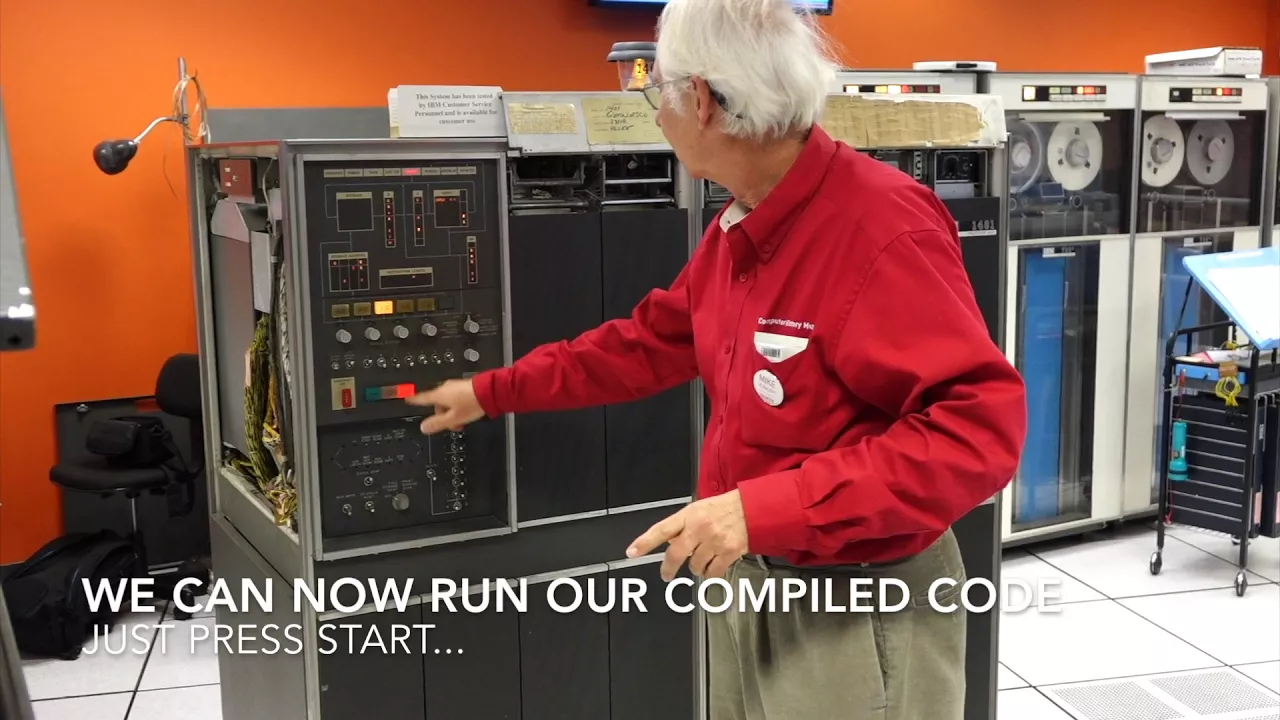
The second attempt clears the hurdle cleanly. The tape spins, the IBM 1402 card reader digests the source cards without tripping a check, and the tape drive churns continuously as the multi-phase compiler transforms the FORTRAN statements into executable machine instructions. After completing compilation, the CPU executes an intentional programmed halt. Mike presses the console Start button to run the compiled object code residing in core memory.
The system immediately dives into calculation. Because the 1401 was architected strictly for character-manipulation accounting tasks, scientific computations run at a snail's pace; integer multiplication and division are optional hardware modifications, and floating-point math must be synthesized through complex software subroutines. Marc remarks on the sheer unlikeliness of running scientific software on this architecture: “So Fortran is really a stretch for the 1401. I mean, it's totally amazing that they were able to put it in there.” After a lengthy calculation pause, the 1403 line printer springs to life, hammering out rows of scientific numbers before halting.
Examining the printed continuous form confirms a successful run: 1. **Compilation Header**: Records that 8,000 characters of memory were requested by compilation parameters, while acknowledging the host machine possesses the maximum configuration of 16,000 characters. 2. **Precision Definitions**: Specifies an integer variable size (modulus) of 5 digits and a floating-point mantissa length of 15 digits. 3. **Program Function**: An 800-character source code routine executing complex matrix arithmetic—specifically creating an ill-conditioned Hilbert matrix, calculating its inverse, multiplying it, and inverting it a second time.
A fellow museum restorer walks in, visibly stunned at the sight of scientific output on the line printer paper, asking, “Did you ever imagine floating point format out of the 1401?” Mike Albaugh replies, “I'm not only imagining it, I did it.” The observer notes that the output numbers are not in IEEE format, to which Mike quips that the IEEE floating-point standard did not even exist when the 1401 was designed.
---
[11:34](https://www.youtube.com/watch?v=uFQ3sajIdaM&t=694s) Recreating the FORTRAN Compiler Tape via Custom Tape Emulator
Getting the compiler to run required solving a major prerequisite: reconstructing a physical magnetic tape reel carrying the IBM 1401 FORTRAN compiler. Marc steps behind the tape drive bay to show the custom setup that made this possible. Connected to the back of the vintage hardware via an authentic IBM cabling interface is a modern flat ribbon cable routed into a specialized black box designed and built by the museum’s restoration engineers.
```mermaid flowchart LR accTitle: Tape Generation Pipeline accDescr: Pipeline showing data movement from modern PC controller through hardware emulator to the IBM 1401 and physical tape drive.
subgraph Modern_Control ["Emulation Host"] PC["Host PC Controller Interface"] BOX["Custom Hardware Tape Emulator\n(Simulates up to 6 IBM 729 Drives)"] PC --> BOX end
subgraph Vintage_Mainframe ["IBM 1401 System"] I1401["IBM 1401 CPU\n(Executes Tape Copy Routine)"] BOX -->|"Emulated Drive 1 & 2"| I1401 end
subgraph Real_Peripherals ["Physical Output Units"] TAPE3["Physical IBM 729 Tape Drive\n(Assigned as Tape 3)"] P1403["IBM 1403 Line Printer\n(Logs Records Written)"] I1401 -->|"Writes Magnetic Records"| TAPE3 I1401 -->|"Prints Record Listing"| P1403 end ```
This emulator hardware transparently mimics up to six authentic IBM 729 magnetic tape drives to the 1401 CPU. On a connected control laptop, the restorers mount digital tape image files: - **Drive 1**: Holds a self-executing utility program designed to read an emulated image and write it to an attached drive. - **Drive 2**: Holds raw data records extracted from the historical digital archive of the FORTRAN compiler tape. - **Drive 3**: Assigned to a real, physical vacuum-column IBM 729 tape drive loaded with a blank reel.
To prepare the physical tape, Marc winds the magnetic ribbon past the physical Beginning of Tape (BOT) reflective tab so the drive can sense the marker when executing a Load Rewind cycle. Once both the virtual drives and the physical drive are set to ready status, the 1401 begins execution. As the emulator feeds blocks across the virtual interface (tallying past record 1093, 1122, and onward), the 1401 writes them out to Drive 3, while simultaneously logging a full duplicate trace of every record onto the 1403 printer.
- Emulator capabilities: Emulates up to six IBM vacuum-column tape units simultaneously. - Configuration: Drive 1 runs the merge/copy program; Drive 2 serves the raw FORTRAN image; Drive 3 is the physical tape unit receiving data. - Tape positioning: Manual advance past the BOT reflective marker ensures clean rewind seeking to load point.
---
[16:13](https://www.youtube.com/watch?v=uFQ3sajIdaM&t=973s) Punching and Verifying the FORTRAN Source Deck
Reconstructing the magnetic tape compiler was only half the preparation; the team also needed the physical punched card deck for the FORTRAN source program. Unwilling to punch hundreds of lines manually on a standalone keypunch, they automated the process using an emulated tape image containing the source statements coupled to a small self-executing punch routine.
At the IBM 1402 Card Read-Punch, Marc highlights the physical mechanics of the dual-purpose peripheral. The machine features two distinct operational ends: - The **Reader** feed hopper, where cards must be placed face-down with the **9-edge** leading. - The **Punch** feed hopper, where blank card stock is loaded face-down with the **12-edge** leading.
This differing mechanical orientation ensures that when cards from both paths feed into shared intermediate stacker pockets, all cards finish oriented in the exact same direction.
Blank cards are placed into the punch side, and the 1401 rapidly cycles through the emulated card-punch tape program, perforating a fresh deck of source cards. While the IBM 1402 punches holes at high speed, it lacks an internal interpreter mechanism to ink the human-readable text along the top margin.
To inspect their newly created deck and confirm that the contents match the manual, Mike takes the unprinted cards over to a standalone IBM 026 Keypunch equipped with an interpretive printing feature. By feeding the cards through the 026 in duplicate mode, the machine reads the punched holes and prints the corresponding text along the top edge of a fresh card: - The first card reproduces compiler option flags: `PARAM I 990 0515` (specifying precision and allocation settings). - The subsequent cards reveal program comments denoting the matrix arithmetic routine. - The next cards produce actual executable statements, starting with matrix array declarations: `DIMENSION A(7,7), VECTOR(7), B(7,7)`. - The final card in the stack verifies the routine termination with an explicit `END` statement.
With the compiler tape written and the source card deck punched, validated, and human-readable, the entire toolchain is primed to run historical FORTRAN code directly on early 1960s commercial hardware.
[20:22](https://www.youtube.com/watch?v=uFQ3sajIdaM&t=1222s) Prepping the Card Deck and Restoring Historical Authenticity
The source deck for the demonstration is assembled in standard punch card fashion: a leading parameter card sets up the run, followed line by line by the FORTRAN statements, and capped off with an `END` card. With the source code physically stacked in the card reader, the team prepares the magnetic tape drives for an authentic, period-accurate compilation. Marc confirms that unit one is designated as Tape 1, which holds their freshly generated FORTRAN compiler tape, and initiates a rewind on the physical transport.
To ensure the run relies entirely on genuine vintage hardware rather than modern bridge equipment, Marc unplugs and unloads the modern tape emulator that had previously interfaced with the system. He relishes returning the system to pure vintage operation, declaring: “So now we're back into a historically correct state.” With a solid mechanical clonk, the emulator is detached and stowed away, clearing out what Marc jokingly dismisses as modern, ugly gear so the mainframe can execute the compilation using only its original core logic and tape units.
```mermaid flowchart TD accTitle: FORTRAN Compilation and Execution Workflow accDescr: Pipeline from punched card deck through 63 compiler passes on magnetic tape to final matrix calculation and printed output.
subgraph Input ["Input Setup"] A["Punched Card Deck<br>(Parameter + FORTRAN + END)"] B["Compiler Tape (Tape 1)"] end
subgraph Compile ["1401 Multi-Pass Compilation"] C["IBM 1402 Card Reader"] --> D["IBM 1401 CPU"] B <-->|"63 Overlay Passes"| D A --> C end
subgraph Exec ["Execution & Output"] D --> E["Invert Hilbert Matrix"] E --> F["Multiply Matrix x Inverse"] F --> G["Print Identity Matrix (IBM 1403)"] end ```
[21:39](https://www.youtube.com/watch?v=uFQ3sajIdaM&t=1299s) Running the 63-Pass Compiler and Inverting the Hilbert Matrix
After confirming that the IBM 1403 chain printer is online and ready, Marc triggers the compilation process. The 1401 pauses briefly, waiting on the IBM 1402 card-read-punch unit before feeding the cards through with rhythmic mechanical clicks. Once the final card clears the reader throat, the central processor dives into the massive multi-pass compilation task. Because the IBM 1401 has only 16K of core memory and lacks native floating-point hardware, the FORTRAN II compiler relies on an intricate series of tape-based overlays, stepping through 63 distinct passes as the magnetic tape drive shuffles back and forth reading successive compiler phases.
As soon as the 63rd pass finishes, the tape drive automatically rewinds to the beginning, signaling that compilation has completed cleanly. Marc hits the start key on the console to initiate the compiled binary. The machine begins grinding through the floating-point arithmetic of the scientific benchmark, and Marc sums up the completed run: “And that was the end of the FORTRAN scientific demo.” The printer outputs the final calculations, successfully demonstrating that the business-oriented mainframe could tackle heavy scientific computations.
- The scientific demo generates an ill-conditioned Hilbert matrix, inverts it, and multiplies the inverted matrix by the original. - The resulting printed product yields an identity matrix—bearing ones along the diagonal and zeros elsewhere, within floating-point precision limits—before computing a second matrix inversion.
## Notable quotes > [06:14](https://www.youtube.com/watch?v=uFQ3sajIdaM&t=374s) Fortran is really a stretch for the 1401. I mean, it's totally amazing that they were able to put it in there. — Marc
## Mentioned Computer History Museum, CuriousMarc, FORTRAN, FORTRAN II, IBM, IBM 026 Keypunch, IBM 1401, IBM 1402 Card Read-Punch, IBM 1403 Line Printer, IBM 729 Tape Drive, IEEE floating-point standard, Mike Albaugh
## Video description We attempt to compile and run a simple FORTRAN program on our vintage 1959 IBM mainframe computer at the Computer History Museum. FORTRAN is a big stretch for this business oriented machine, with 16k memory and a CPU not meant at all for scientific applications. Even integer multiply and divide instructions are an optional feature on the base machine! Success not guaranteed.
Come see the IBM 1401 computer at the Computer History Museum in Mountain View, California, USA: https://computerhistory.org/exhibits/ibm1401/
Simulation and programming environment available here: https://github.com/lucaseverini/ROPE.
Mike Albaugh has made a page that explains how to run the same demonstration in the SIMH simulation: http://nulli.us/f1401/package.html
Some pointers on how to start programming the IBM 1401 on my website (work in progress): https://www.curiousmarc.com/computing/ibm-1401-mainframe/ibm-1401-programming
Details on this implementation of FORTRAN: http://ibm-1401.info/1401-IBM-Systems-Journal-FORTRAN.html IBM 1401 FORTRAN compiler source code: http://ibm-1401.info/1401-FORTRAN-Illustrated.html E-mail exchanges with the original developers of the IBM 1401 FORTRAN: http://ibm-1401.info/FORTRAN-e-mails.html
Official CHM IBM 1401 Video: https://youtu.be/ZPpV8X91neQ
More CuriousMarc IBM 1401 videos: https://www.youtube.com/watch?v=7Lh4CMz_Z6M&list=PL-_93BVApb59MH7pDttB_aUnP0w3sB6B1
Our sponsor for PCBs: https://www.pcbway.com Support the team on Patreon: https://www.patreon.com/curiousmarc Merch on Teespring: https://teespring.com/stores/curiousmarcs-store Learn more on companion site: https://www.curiousmarc.com Contact info: https://www.youtube.com/curiousmarc/about
[Source](https://www.youtube.com/watch?v=uFQ3sajIdaM)