Modos Tests 4-Level Grayscale to Speed Paper Monitor Typing
Modos
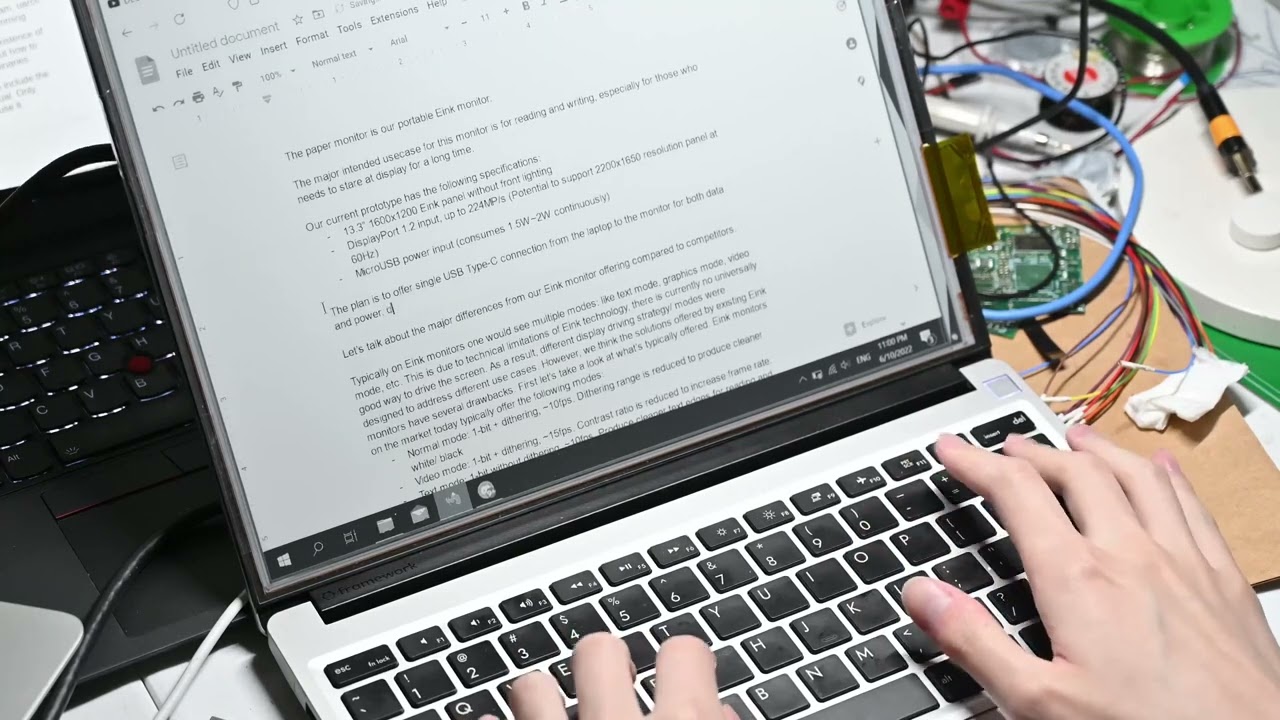
Modos uses a four-level grayscale rendering mode to balance screen refresh speed and text clarity during real-time keyboard input.
AI-assisted summary of Modos Paper Monitor Typing Demo — original source. Check the original for full context.
Source published:
Key ideas
- Modos demonstrated real-time text input and display refresh behavior on the Paper Monitor. (0:00)
- The monitor operated in a 4-level grayscale rendering mode to balance refresh speed with text clarity. (0:00)
- The demonstration serves as a direct hardware performance test without spoken commentary or dialogue. (0:00)
Detailed notes
## Background Published on YouTube by Modos on June 22, 2022, this video demonstrates real-time typing on the company's Paper Monitor. According to the page description, the showcase focuses specifically on text input performance using a 4-level grayscale display mode.
## TL;DR The video serves as a direct, brief hardware test evaluating the typing responsiveness and screen refresh rate of the Modos Paper Monitor. Operating in 4-level grayscale, the display balances update speed with legibility as keystrokes are entered in real time. Because the showcase contains no verbal commentary or spoken dialogue, the audio captures only the acoustic profile of keyboard typing and room ambience.
## Atmosphere & style The presentation carries an austere, utilitarian, and minimalist tone typical of an unvarnished lab benchmark. Without any host presentation, dialogue, or background soundtrack, the experience feels quietly focused on the mechanical and visual rhythm of text rendering on an e-paper display. It offers an objective, documentary-style snapshot of hardware in action rather than an energetic product pitch.
## Bulletin - [00:00](https://www.youtube.com/watch?v=480xteW2wq4&t=0s) Modos demonstrated real-time text input and display refresh behavior on the Paper Monitor. - [00:00](https://www.youtube.com/watch?v=480xteW2wq4&t=0s) The monitor operated in a 4-level grayscale rendering mode to balance refresh speed with text clarity. - [00:00](https://www.youtube.com/watch?v=480xteW2wq4&t=0s) The demonstration serves as a direct hardware performance test without spoken commentary or dialogue.
## Key takeaways - [00:00](https://www.youtube.com/watch?v=480xteW2wq4&t=0s) The video provides a hardware typing demonstration of the Modos Paper Monitor. - [00:00](https://www.youtube.com/watch?v=480xteW2wq4&t=0s) Real-time text input is rendered directly on the e-paper display to evaluate responsiveness. - [00:00](https://www.youtube.com/watch?v=480xteW2wq4&t=0s) The display is set to a 4-level grayscale rendering mode during the test. - [00:00](https://www.youtube.com/watch?v=480xteW2wq4&t=0s) Using 4-level grayscale helps strike a balance between fast refresh rates and readable text. - [00:00](https://www.youtube.com/watch?v=480xteW2wq4&t=0s) The demonstration focuses on screen refresh behavior and input latency under active typing. - [00:00](https://www.youtube.com/watch?v=480xteW2wq4&t=0s) The test is structured entirely as a visual hardware demonstration rather than an instructional lecture. - [00:00](https://www.youtube.com/watch?v=480xteW2wq4&t=0s) No verbal commentary, technical dialogue, or spoken explanations are present in the audio track. - [00:00](https://www.youtube.com/watch?v=480xteW2wq4&t=0s) Keystroke audio and ambient room noise led speech recognition software to output repeated transcription artifacts.
## Detailed walkthrough ### [00:00](https://www.youtube.com/watch?v=480xteW2wq4&t=0s) Modos Paper Monitor Typing Demonstration Audio
The audio transcript for this demonstration consists entirely of the automated speech recognition system transcribing the ambient sound and keyboard input as a repeated cycle of the words “Thank you.” This audio stream accompanies a technical showcase of the Modos Paper Monitor, in which real-time text input is tested and displayed using a 4-level grayscale rendering mode.
Because the video is a direct hardware typing test rather than a spoken dialogue, lecture, or presentation, no verbal arguments, technical commentary, or conversational exchanges occur. The entire recorded text registered by the speech-to-text system repeats the same phrase throughout the playback, with the transcription noting: “Thank you.”
- The video is designed as a focused hardware demonstration highlighting typing responsiveness and refresh behavior on the Modos Paper Monitor. - The display operates under a 4-level grayscale mode to balance screen refresh speed and text clarity during active typing. - The recorded audio track contains no spoken presentation or dialogue, resulting in automated recognition capturing keystrokes and room audio as repeated transcript artifacts.
## Mentioned Modos, Modos Paper Monitor
## Video description Demonstrating typing on our Paper Monitor using 4-level grayscale.
[Source](https://www.youtube.com/watch?v=480xteW2wq4)