Granger Uses Live ClojureScript Tool to End Game Tuning Guesswork
ibdknox
Pairing instant code re-evaluation with projected trajectory timelines eliminates blind trial-and-error variable tuning and exposes emergent gameplay mechanics.
AI-assisted summary of Live ClojureScript Game Editor — original source. Check the original for full context.
Source published:
Key ideas
- Chris Granger implemented a live ClojureScript game editor inspired by Bret Victor's 'Inventing On Principle' talk, featuring a side-by-side code editor and game canvas with instant re-evaluation. (0:02)
- The editor enables real-time visual trajectory prediction, rendering ghost avatars to display the jump arc and letting developers adjust physics variables like speed and jump height on the fly. (1:48)
- Level terrain can be modified directly within the canvas during runtime, recalculating collision physics and bounce paths against projected trajectories in real time. (3:13)
- A physics logic bug regarding ceiling edge collision and jump state reset turned into an unintended sticky-ceiling mechanic, illustrating Victor's thesis on accidental discoveries in interactive environments. (3:13)
Detailed notes
## Background Published on YouTube by Chris Granger (ibdknox) on February 27, 2012, this video presents a live ClojureScript game editor prototype. According to the page description, the project was directly inspired by Bret Victor's demo in his landmark talk "Inventing On Principle" and Granger's exploration of connecting directly to one's creations.
## TL;DR Chris Granger demonstrates a split-screen ClojureScript environment where source code edits and canvas interactions update a running 2D platformer in real time without recompilation or page reloads. Granger adjusts player parameters like speed, jump height, and sprite color on the fly, while directly clicking the canvas to spawn or erase terrain beneath the active avatar. The centerpiece of the demo is a pause-state action projection feature that renders translucent ghost trails across the screen, allowing developers to visually tune physics values or build mid-air obstacle courses to hit precise landing targets. Throughout the walkthrough, Granger highlights how real-time tactile editing uncovers emergent gameplay, such as an accidental sticky-ceiling bug, turning tedious calibration into an intuitive, playful process.
## Atmosphere & style The presentation has the relaxed, unhurried feel of an authentic late-night coding breakthrough, capturing the excitement of a developer tinkering with a fresh idea. Granger's delivery is understated and conversational, allowing the visual power of instant feedback to take center stage without hype or pretense. There is a palpable sense of playful delight as abstract programming theories materialize into responsive ghost trails and accidental mechanics, leaving the viewer with an inspiring glimpse into the future of creative programming tools.
## Bulletin - [00:02](https://www.youtube.com/watch?v=7XUWpze_A_s&t=2s) Chris Granger implemented a live ClojureScript game editor inspired by Bret Victor's 'Inventing On Principle' talk, featuring a side-by-side code editor and game canvas with instant re-evaluation. - [01:48](https://www.youtube.com/watch?v=7XUWpze_A_s&t=108s) The editor enables real-time visual trajectory prediction, rendering ghost avatars to display the jump arc and letting developers adjust physics variables like speed and jump height on the fly. - [03:13](https://www.youtube.com/watch?v=7XUWpze_A_s&t=193s) Level terrain can be modified directly within the canvas during runtime, recalculating collision physics and bounce paths against projected trajectories in real time. - [03:13](https://www.youtube.com/watch?v=7XUWpze_A_s&t=193s) A physics logic bug regarding ceiling edge collision and jump state reset turned into an unintended sticky-ceiling mechanic, illustrating Victor's thesis on accidental discoveries in interactive environments.
## Key takeaways - [00:02](https://www.youtube.com/watch?v=7XUWpze_A_s&t=2s) Granger set out to recreate the live-editing concepts from Bret Victor's 'Inventing On Principle' talk using ClojureScript. - [00:02](https://www.youtube.com/watch?v=7XUWpze_A_s&t=2s) The environment pairs source code on the left with an active canvas on the right to eliminate traditional compile and refresh cycles. - [00:02](https://www.youtube.com/watch?v=7XUWpze_A_s&t=2s) Aesthetic adjustments, such as changing player sprite colors in the `draw-player` function, update instantaneously in the running game. - [00:02](https://www.youtube.com/watch?v=7XUWpze_A_s&t=2s) Core movement parameters like speed and jump height can be modified in real time, immediately altering physics behavior. - [00:02](https://www.youtube.com/watch?v=7XUWpze_A_s&t=2s) Direct canvas interactions allow clicking empty space to spawn terrain or clicking existing blocks to delete them while physics are running. - [01:48](https://www.youtube.com/watch?v=7XUWpze_A_s&t=108s) Pressing 'S' pauses execution to display a trail of ghost avatars representing recorded player input and projected forward trajectory. - [01:48](https://www.youtube.com/watch?v=7XUWpze_A_s&t=108s) Visualizing projected jump trajectories removes black-box guesswork when tuning multi-variable physics to clear specific platform gaps. - [01:48](https://www.youtube.com/watch?v=7XUWpze_A_s&t=108s) Adjusting jump height to 14 and run speed to 7 allows precise visual alignment with a target ledge before unpausing. - [03:13](https://www.youtube.com/watch?v=7XUWpze_A_s&t=193s) Placing terrain blocks directly into the projected ghost trajectory causes the simulation to instantly recalculate collision bounces and ricochets. - [03:13](https://www.youtube.com/watch?v=7XUWpze_A_s&t=193s) A flaw in jump-state reset logic inadvertently created a mechanic allowing the player to stick to ceilings by holding the spacebar. - [03:13](https://www.youtube.com/watch?v=7XUWpze_A_s&t=193s) Directly manipulating a creation in real time leads to emergent gameplay discoveries and validates Victor's philosophy of creative immediacy.
## Detailed walkthrough ### [00:02](https://www.youtube.com/watch?v=7XUWpze_A_s&t=2s) Recreating Bret Victor's Live Coding Demo
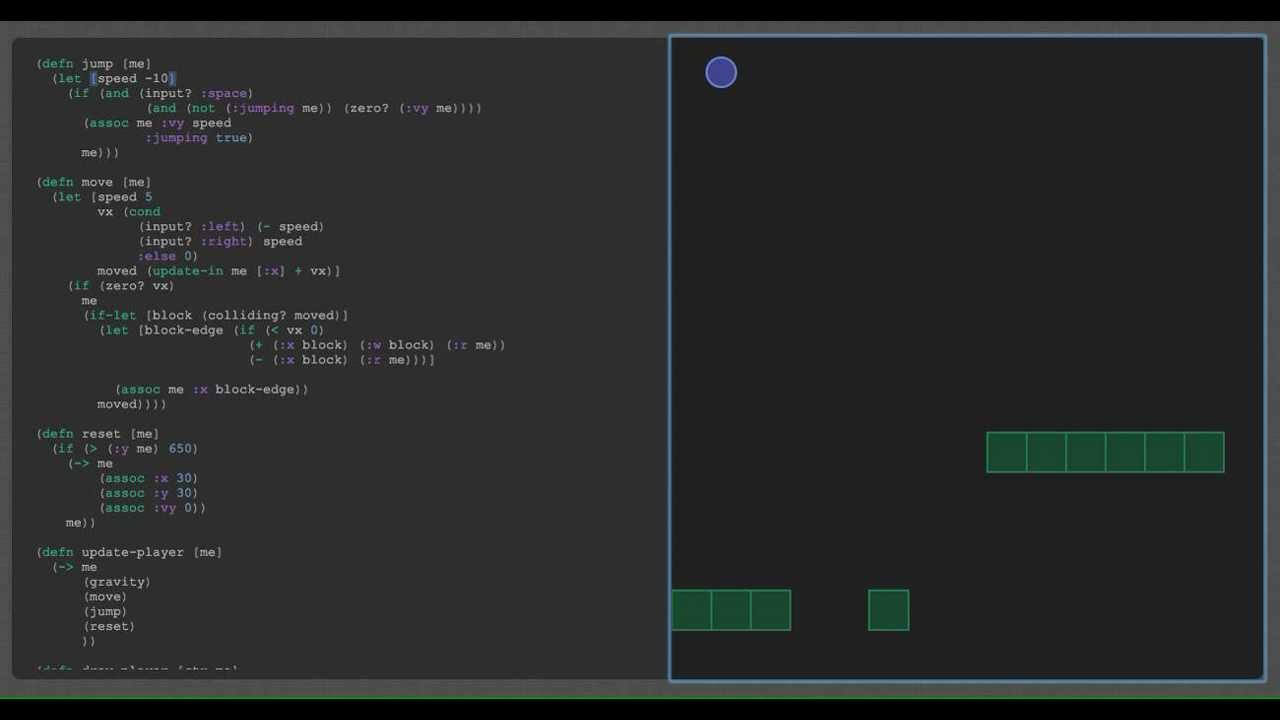
Inspired by Bret Victor's influential "Inventing On Principle" talk, Chris Granger wanted to test how difficult it would actually be to build a live editable game environment for himself. Setting up a two-pane layout, he displays ClojureScript source code on the left-hand side and the game canvas running on the right-hand side. The baseline mechanics function as a standard platformer: the player can run around, jump, interact with collision surfaces, and if the avatar falls off the edge, it dies and restarts. Granger emphasizes that Bret Victor's core thesis was that creators need an immediate connection to their work: “the point he was making with his game was that you wanted to be, you know, connected with the thing you had created, and that means being able to edit it in place.”
To illustrate this direct connection, Granger demonstrates modifying code parameters and viewing instant updates without triggering a manual rebuild or page refresh. Editing the `draw-player` function allows him to instantly swap the player sprite's color to pink. Moving past aesthetic changes, he tweaks fundamental mechanics on the fly: modifying the movement speed from a baseline of 5 up to 8 makes the character move swiftly, while lower values reduce the movement to a painfully slow crawl. Similarly, adjusting the jump height from normal values up to an exaggerated 22 sends the character soaring into the air.
Beyond code-level variable manipulation, the editor allows in-game environment creation. Granger demonstrates clicking directly into the game canvas to spawn terrain blocks or clicking existing blocks to delete them while the game engine is actively running. When the floor blocks underneath the avatar are deleted, the character immediately drops and falls continuously, showcasing that collision and physics respond to level-geometry edits in real time.
```mermaid flowchart LR accTitle: Live Game Editing Loop accDescr: Diagram showing how live ClojureScript code edits and direct canvas clicks update the running game state in real time.
subgraph Editor ["Editor Environment"] Code["ClojureScript Source<br/>(speed, jump, color)"] CanvasClicks["Direct Mouse Input<br/>(place / remove blocks)"] end
subgraph Runtime ["Live Game Runtime"] Engine["Physics & Collision Engine"] Renderer["Canvas Renderer<br/>(player & terrain)"] end
Code -->|"live re-eval"| Engine Code -->|"instant restyle"| Renderer CanvasClicks -->|"update geometry"| Engine Engine --> Renderer ```
- **Player Speed Range Demoed**: Altered between 5 (default), 8 (fast), and lower values (painfully slow). - **Jump Height Range Demoed**: Pushed from base level up to 22 for extreme leaps. - **Direct Canvas Editing**: Left-clicking empty space spawns ground blocks; clicking existing blocks deletes them instantly while physics remain active.
---
[01:48](https://www.youtube.com/watch?v=7XUWpze_A_s&t=108s) Action Projection and Trajectory Prediction
The most powerful concept borrowed from Bret Victor's presentation is recording a sequence of player actions, pausing execution, and rendering a projected path through time while tweaking physics constants. Granger walks through this by attempting to reach an elevated ledge on the right side of the screen. He presses `S` to pause the game, which freezes the canvas and reveals a timeline of translucent ghost avatars marking every point along his recent trajectory. Because his current stats are insufficient to clear the gap, the ghost trail drops short of the destination.
With the game paused, Granger tweaks the code variables while watching the visual projection shift dynamically across the canvas. Raising the jump parameter to 14 elevates the peak of the arc, and bumping the run speed to 7 stretches the horizontal leap far enough to land securely on the upper ledge. Once the projected ghosts align with the target platform, he presses `S` again to resume the game, successfully executing the leap on the first try. Granger underscores the efficiency of this workflow compared to traditional black-box development: “one of the points he was making is it's significantly more efficient to be able to modify a game in this way, otherwise you would have had to have sat there and go, 'Well, is is 10 enough? Is 11 enough?' And in the case like this where you needed to edit multiple variables, could have taken you quite a while to figure it out.”
- **Pause Toggle**: Bound to the `S` key to freeze time and visualize previous and projected actions. - **Ghost Projections**: Displays historical positions and forward-looking trajectory calculations directly on screen. - **Target Platform Adjustments**: Tuned jump to approximately 14 and speed to 7 to land precisely on the ledge.
---
[03:13](https://www.youtube.com/watch?v=7XUWpze_A_s&t=193s) Environmental Modification and the Sticky-Ceiling Bug
Granger highlights an emergent capability that arose while experimenting with the system: pausing mid-jump and dropping obstacle blocks directly into the ghost trajectory. Placing blocks in the projected path forces the simulation to recalculate collisions instantly, revealing where the character would ricochet or become trapped. Granger builds walls directly around the ghost figures, observing how the projected avatar hits ceilings, deflects off walls, and redirects its landing site before unpausing.
```mermaid flowchart TD accTitle: Ghost Trajectory Recalculation Flow accDescr: Flowchart illustrating how pausing and modifying environmental obstacles updates the projected path of the player.
Pause["Press 'S' to Pause Game"] --> Record["Capture Inputs & Trajectory"] Record --> RenderGhost["Render Ghost Projections"] RenderGhost --> EditEnv["Place/Remove Blocks in Path"] EditEnv --> Recalc["Recalculate Collision Bounces"] Recalc --> RenderGhost RenderGhost --> Unpause["Press 'S' to Resume Gameplay"] ```
This live experimentation also surfaced an entertaining bug echoing a sentiment from Victor's presentation—that accidental glitches can spark innovative game mechanics. Granger's code intended to restrict jumping to moments when the player was moving upward, preventing jumps while descending. However, an earlier logic flaw reset the jumping state to `false` whenever an edge was touched from above. As a result, holding down the spacebar while colliding with the underside of an overhead surface caused the player to stick to the ceiling. Rather than an annoying flaw, Granger found himself clinging to high overhangs, placing new blocks across ceilings, and flinging the avatar across the screen. Reflecting on the experiment, Granger notes: “I definitely buy into the the the statements he made, right, that connecting to your creation really does, I don't know, bring you more into it and actually makes it a lot more fun.”
- **Dynamic Path Rerouting**: Drawing terrain over the projected ghost trail recalculates ceiling bounces and redirects exit paths live. - **Sticky-Ceiling Mechanic**: Caused by checking upward velocity and resetting jump state upon edge contact, allowing the player to latch onto ceilings by holding the spacebar. - **Source Code**: Released publicly on GitHub for the community to explore live ClojureScript game authoring.
## Notable quotes > [03:13](https://www.youtube.com/watch?v=7XUWpze_A_s&t=193s) connecting to your creation really does, I don't know, bring you more into it and actually makes it a lot more fun. — Chris Granger
## Mentioned Bret Victor, Chris Granger, ClojureScript, GitHub, Inventing On Principle
## Video description A live ClojureScript game editor based on the demo that Bret Victor did in his "Inventing On Principle" talk.
http://www.chris-granger.com/2012/02/26/connecting-to-your-creation/
[Source](https://www.youtube.com/watch?v=7XUWpze_A_s)