Lest We Remember: Cold Boot Attacks on Encryption Keys
pucitp
AI-assisted summary of Lest We Remember: Cold Boot Attacks on Encryption Keys — original source. Check the original for full context.
Source published:
Key ideas
- Researchers demonstrated that DRAM retains readable data across seconds to minutes after power loss, debunking the assumption that volatile memory instantly erases its state. (0:10)
- Cooling memory modules to roughly -50°C using inverted canned air dusters preserves RAM contents for over ten minutes, allowing physical module removal and transplantation into analysis rigs. (1:33)
- Using an automated utility named BitUnlocker, attackers can cut power to a locked machine, reboot from external media, reconstruct partially decayed bits, and decrypt drives within minutes without user passphrases. (2:37)
- The vulnerability affects all major disk encryption platforms—including BitLocker, FileVault, TrueCrypt, and dm-crypt—especially when machines are awake, sleeping, or configured to boot without a pre-boot PIN. (4:24)
Detailed notes
## Background Published on YouTube by pucitp on February 21, 2008, 'Lest We Remember: Cold Boot Attacks on Encryption Keys' documents groundbreaking research from Princeton's Center for Information Technology Policy. The video outlines how cryptographic keys linger in dynamic RAM after power loss, allowing practical attacks that completely circumvent modern disk encryption systems.
## TL;DR Researchers demonstrate that dynamic random-access memory (DRAM) retains its data for seconds to minutes after losing power, debunking the conventional assumption of instantaneous volatility. By chilling memory chips to roughly -50°C using inverted canned air or leveraging error-correcting algorithms at room temperature, attackers can reboot a machine into an external OS and dump intact memory contents. Because active operating systems store disk encryption keys directly in RAM, automated tools like BitUnlocker can recover keys and decrypt drives protected by BitLocker, FileVault, TrueCrypt, and dm-crypt in just minutes.
## Atmosphere & style The presentation carries a calm, understated academic tone that makes its disruptive technical revelations all the more striking. Watching sophisticated modern cryptographic protections dismantled using ordinary compressed air duster cans and swiftly removed laptop batteries creates a captivating contrast between high-stakes security theory and gritty physical reality. The methodical, step-by-step demonstrations convey an eye-opening sense of vulnerability, quietly unraveling a foundational assumption of computer security in real time.
## Bulletin - [00:10](https://www.youtube.com/watch?v=JDaicPIgn9U&t=10s) Researchers demonstrated that DRAM retains readable data across seconds to minutes after power loss, debunking the assumption that volatile memory instantly erases its state. - [01:33](https://www.youtube.com/watch?v=JDaicPIgn9U&t=93s) Cooling memory modules to roughly -50°C using inverted canned air dusters preserves RAM contents for over ten minutes, allowing physical module removal and transplantation into analysis rigs. - [02:37](https://www.youtube.com/watch?v=JDaicPIgn9U&t=157s) Using an automated utility named BitUnlocker, attackers can cut power to a locked machine, reboot from external media, reconstruct partially decayed bits, and decrypt drives within minutes without user passphrases. - [04:24](https://www.youtube.com/watch?v=JDaicPIgn9U&t=264s) The vulnerability affects all major disk encryption platforms—including BitLocker, FileVault, TrueCrypt, and dm-crypt—especially when machines are awake, sleeping, or configured to boot without a pre-boot PIN.
## Key takeaways - [00:10](https://www.youtube.com/watch?v=JDaicPIgn9U&t=10s) Conventional computer security models incorrectly assume dynamic random-access memory immediately loses its contents once electrical power is severed. - [00:10](https://www.youtube.com/watch?v=JDaicPIgn9U&t=10s) Physical charge in DRAM decays gradually over an interval ranging from seconds to several minutes at normal room temperature. - [00:10](https://www.youtube.com/watch?v=JDaicPIgn9U&t=10s) Cold boot attacks bypass native disk encryption on Windows, Mac OS X, and Linux without requiring specialized or expensive laboratory hardware. - [01:33](https://www.youtube.com/watch?v=JDaicPIgn9U&t=93s) Bit decay follows predictable, repeatable physical patterns rather than wiping cleanly to uniform values. - [01:33](https://www.youtube.com/watch?v=JDaicPIgn9U&t=93s) Spraying liquid refrigerant from inverted compressed air cans drops memory chip temperatures to approximately -50°C, drastically slowing data decay. - [01:33](https://www.youtube.com/watch?v=JDaicPIgn9U&t=93s) Chilled memory modules can be physically removed from a host motherboard and transplanted into another computer with minimal bit loss after up to ten minutes. - [02:37](https://www.youtube.com/watch?v=JDaicPIgn9U&t=157s) Operating systems must keep active symmetric disk encryption keys resident in system RAM while running to handle on-the-fly read and write operations. - [02:37](https://www.youtube.com/watch?v=JDaicPIgn9U&t=157s) The automated attack tool BitUnlocker targets Microsoft BitLocker by dumping physical memory immediately upon reboot and locating cryptographic key structures. - [02:37](https://www.youtube.com/watch?v=JDaicPIgn9U&t=157s) Error-correcting algorithms can reconstruct partially degraded memory states, enabling key extraction on some hardware at room temperature without cooling agents. - [02:37](https://www.youtube.com/watch?v=JDaicPIgn9U&t=157s) Locked screensavers and standard login prompts do not protect systems against cold boot extraction because keys remain loaded in volatile memory. - [04:24](https://www.youtube.com/watch?v=JDaicPIgn9U&t=264s) Default Windows Vista BitLocker configurations booting directly to the Windows login screen release keys from the TPM before user authentication, leaving powered-off machines vulnerable. - [04:24](https://www.youtube.com/watch?v=JDaicPIgn9U&t=264s) Pre-boot authentication, such as a BitLocker startup PIN, keeps powered-off systems protected against cold boot attacks until the credentials are entered. - [04:24](https://www.youtube.com/watch?v=JDaicPIgn9U&t=264s) The memory remanence vulnerability is an architectural hardware property of DRAM rather than an implementation bug in specific encryption products.
## Detailed walkthrough ### [00:10](https://www.youtube.com/watch?v=JDaicPIgn9U&t=10s) The Myth of Volatile Memory and Disk Encryption Vulnerabilities
Disk encryption has become an essential defense mechanism against data theft, scrambling hard drive contents so that personal information such as Social Security numbers and banking records cannot be accessed without an encryption key. Built-in disk encryption tools have been widely adopted across major operating systems, including Windows Vista, Mac OS X, and Linux. However, researchers have uncovered practical attacks that can completely bypass most disk encryption products if an adversary obtains physical access to a machine. Rather than requiring specialized laboratory hardware or exotic supplies, these attacks typically take only a matter of minutes to execute. While most attacks require the computer to be powered on or placed in sleep mode, certain disk encryption setups remain vulnerable even when the machine is shut down entirely.
The attack targets a widespread, fundamental misconception about dynamic random-access memory (DRAM). Conventional security models assume that memory loses all state the moment electrical power is interrupted. In reality, the physical charge stored across memory cells decays gradually over an interval lasting from seconds to several minutes at room temperature. Because residual data persists after a sudden power interruption, an attacker can reboot the machine into a minimal operating environment and dump the remaining memory contents before they completely vanish. Addressing this common assumption, the narrator explains: “Most people, even many experts, will tell you that it's erased, but the truth is more complex.”
- Disk encryption scrambles drive contents to prevent unauthorized access if physical laptops are lost or stolen. - Operating systems supporting native disk encryption include Windows Vista, Mac OS X, and Linux. - Physical access allows attackers to recover keys and unscramble drive contents within minutes without specialized lab gear. - DRAM does not clear instantaneously upon losing power; its contents decay progressively over seconds or minutes.
---
[01:33](https://www.youtube.com/watch?v=JDaicPIgn9U&t=93s) Cryogenic Freezing of DRAM and Bit Decay
To visually illustrate the physical reality of memory decay, the researchers demonstrate what occurs when an image file is loaded into RAM and the power is severed. Rather than disappearing instantly, the stored bits degrade gradually and follow predictable decay patterns, eventually settling into visible artifacts like horizontal bars. The exact decay rate depends on the specific hardware architecture of different memory chips, but almost all chips retain readable data for several seconds at ambient room temperature.
Crucially, lowering the physical temperature of DRAM dramatically slows the rate of decay. Using an ordinary can of compressed air duster held upside down, the researchers spray liquid propellant directly onto the memory modules, dropping the temperature of the chips to roughly -50°C. At this cryogenic temperature, the decay process slows to a crawl, allowing modules to be removed physically from the motherboard without losing their state. As the presenter notes: “Once it has been cooled, we can even remove the RAM from the computer without disrupting the contents.” Even after ten minutes away from a power source, chips preserved at low temperatures exhibit minimal bit degradation, allowing them to be transplanted into an entirely separate computer to extract a near-perfect copy of the memory.
```mermaid flowchart TD accTitle: Cold Boot Attack Process accDescr: Diagram illustrating how memory is chilled, preserved, and extracted to decrypt a target hard drive.
subgraph Prep["Memory Freezing"] A["Running Target PC with Keys in RAM"] --> B["Invert Duster Can to Spray Liquid Refrigerant"] B --> C["Cool DRAM Chips to -50°C"] end
subgraph Extraction["Reboot & Capture"] C --> D["Cut Power or Transplant RAM"] D --> E["Boot Attack Environment: USB or External Drive"] E --> F["Dump Raw Memory Contents via BitUnlocker"] end
subgraph Decryption["Key Recovery"] F --> G["Run Key Search Algorithm"] G --> H["Recover Disk Encryption Keys"] H --> I["Decrypt Hard Drive Files"] end ```
- Inverted canned air dusters release cold liquid propellant capable of chilling RAM chips to around -50°C. - Chilled memory modules retain their state for over 10 minutes with negligible bit loss. - Frozen RAM sticks can be extracted from the host machine and placed into a secondary analysis rig without corrupting stored data. - Bit decay manifests in repeatable, predictable physical patterns across DRAM cells.
---
[02:37](https://www.youtube.com/watch?v=JDaicPIgn9U&t=157s) Automated Memory Extraction: The BitUnlocker Attack
While disk encryption software requires the user to input a passphrase or supply a hardware token during system boot, the operating system must keep the unlocked cryptographic key stored inside RAM for as long as the machine is active so it can perform real-time reads and writes. If an attacker gains physical access to a running machine, they can extract the running memory image, identify the symmetric key, and unlock the volume without ever guessing or bruteforcing the user's password.
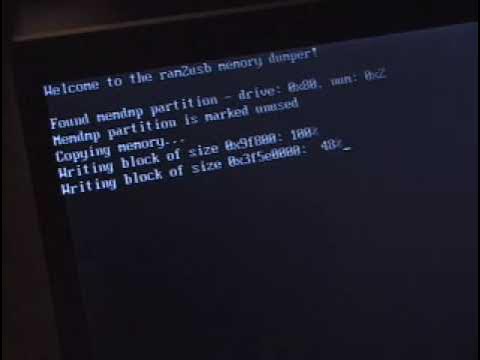
To prove the feasibility of this attack, the researchers developed an automated demonstration tool called BitUnlocker, designed to target Microsoft's BitLocker disk encryption on Windows Vista. Starting with a locked Vista laptop requiring user authentication, the attacker plugs in an external USB drive containing the BitUnlocker software. Power is cut instantaneously by yanking the battery, then the battery is reinserted and the laptop is rebooted directly from the external drive. On laptops where the RAM decays slowly enough at room temperature, physical cooling is unnecessary because error-correcting algorithms can reconstruct damaged data. The BitUnlocker program immediately copies all physical memory to preserve it, searches the captured memory image for cryptographic key structures, and uses the discovered keys to mount and decrypt the hard disk within minutes. The narrator summarizes the straightforward nature of the operation: “All we need to do is attach an external hard disk or USB memory stick containing our attack software, then we cut power to the machine by removing its battery, then we quickly reconnect the battery and turn it back on.”
- Unlocking disk encryption loads active encryption keys directly into system RAM, where they remain continuously while the OS operates. - BitUnlocker automates the cold boot exploitation process against Windows Vista BitLocker. - The attack functions against locked laptops with password-protected screensavers. - Power disruption is achieved by physically removing the laptop battery and reseating it immediately. - Custom software algorithms reconstruct partially decayed bits, enabling recovery on many systems without physical coolant. - Memory capture takes an immediate snapshot, giving the attacker unlimited time to scan for keys and decrypt local files.
---
[04:24](https://www.youtube.com/watch?v=JDaicPIgn9U&t=264s) System Exposure, Sleep Modes, and Pre-Boot Authentication
The real-world vulnerability of an encrypted machine depends primarily on the encryption architecture used and the system state at the moment the attacker intercepts the hardware. Virtually every modern disk encryption utility is vulnerable if physical access occurs while the computer is awake, in sleep mode, or locked behind a password-protected screensaver, because the keys remain active in volatile memory during those states.
Windows Vista's BitLocker implementation can even be compromised when the laptop is powered off, depending on its boot security configuration. If the machine is set to start up directly to the standard Windows logon screen, the decryption key is released automatically by the TPM to RAM during the initial boot sequence before user authentication, leaving it exposed even from a cold start. Conversely, systems configured to require a pre-boot PIN or passphrase before loading Windows are protected while off. As the narrator warns: “If a computer running Vista normally starts up to the Windows login or password prompt, it's vulnerable when it's off; if it starts with the black BitLocker pre-boot password screen, it's safe unless it's stolen after you enter this password.” The researchers verified the exact same fundamental weakness across multiple major disk encryption platforms, confirming successful key recovery against TrueCrypt, Apple's FileVault, and Linux's dm-crypt, underscoring that the vulnerability stems from hardware memory characteristics rather than specific implementation bugs.
| Disk Encryption System | Operating System / Platform | Vulnerable System States | |:--- |:--- |:--- | | **BitLocker** (Default TPM / No PIN) | Windows Vista | Running, Sleep Mode, Screen Lock, and Powered Off | | **BitLocker** (Pre-Boot PIN / Password) | Windows Vista | Running, Sleep Mode, Screen Lock (Safe when fully powered off prior to PIN entry) | | **FileVault** | Mac OS X | Running, Sleep Mode, Password Screen Saver | | **dm-crypt** | Linux | Running, Sleep Mode, Screen Lock | | **TrueCrypt** | Cross-platform | Running, Sleep Mode, Active Volumes |
- Systems using BitLocker without pre-boot authentication decrypt the volume key before the Windows login prompt appears. - Pre-boot authentication screens (the black BitLocker startup screen) shield powered-off systems against cold boot attacks until the user enters the PIN. - TrueCrypt, Apple FileVault, and Linux dm-crypt were all empirically tested and proven vulnerable to cold boot key extraction.
## Notable quotes > [04:24](https://www.youtube.com/watch?v=JDaicPIgn9U&t=264s) If a computer running Vista normally starts up to the Windows login or password prompt, it's vulnerable when it's off; if it starts with the black BitLocker pre-boot password screen, it's safe unless it's stolen after you enter this password.
## Mentioned Apple, BitLocker, BitUnlocker, dm-crypt, DRAM, FileVault, Linux, Mac OS X, Microsoft, TPM, TrueCrypt, Windows Vista
## Video description Describes the attacks that result from the remanence of encryption keys in DRAM after power loss.
For more information, visit: http://citp.princeton.edu/memory
[Source](https://www.youtube.com/watch?v=JDaicPIgn9U)