Girba Pitches Moldable Toolkit to Slash Developer Code-Reading Time
Curry On!
Because developers spend over half their time manually reading code to make decisions, engineering environments must allow programmers to generate custom visual tools in ten lines of code rather than parse raw text.
AI-assisted summary of Tudor Gîrba - Moldable development — original source. Check the original for full context.
Source published:
Key ideas
- Developers spend at least 50% of their working hours reading code rather than writing it, making information assessment the largest and most expensive activity in software development. (0:05)
- Glamorous Toolkit demonstrates moldable development by replacing uniform generic object inspectors with contextual, domain-specific visual views that reflect human mental models. (5:16)
- Creating custom view extensions requires minimal overhead: across 725 active view methods in the demonstration image, each custom presentation averaged only 10 lines of actual logic. (32:34)
- Moldable tooling drives software architecture improvements by pushing developers to reify algorithms and intermediate execution states into first-class, inspectable objects. (34:32)
Detailed notes
## Background This talk was delivered by Tudor Gîrba and published by the Curry On! channel on YouTube on July 18, 2019. The presentation runs for roughly 38 minutes, though no additional show notes or description were provided on the source page.
## TL;DR Tudor Gîrba challenges the conventional focus of software engineering on construction, arguing that developers spend over half their time reading code to make decisions—an activity he calls assessment. To overcome the stagnation of modern IDEs, he introduces moldable development through Glamorous Toolkit, where tools, object inspectors, search, and documentation adapt dynamically to human cognition and specific domain contexts. Demonstrating live custom views, ad-hoc graphing, executable documentation, and lightweight plugins, Gîrba shows that authoring domain-specific representations costs on average just ten lines of code. He concludes that because our tools shape the way we think, software systems must make tools moldable to collapse the cognitive gap between code, data, and human understanding.
## Atmosphere & style The session has the energetic, persuasive cadence of an intellectual manifesto mixed with live hacker craftsmanship. Gîrba is dynamic, candid, and deliberately provocative, frequently polling the audience, challenging their habits, and urging them to feel the cognitive shift when dry data transforms into meaningful visual forms. The audience's audible reactions and spontaneous technical questions create an intimate, workshop-like environment where radical ideas about software interaction are validated through immediate, tangible live demos.
## Bulletin - [00:05](https://www.youtube.com/watch?v=Pot9GnHFOVU&t=5s) Developers spend at least 50% of their working hours reading code rather than writing it, making information assessment the largest and most expensive activity in software development. - [05:16](https://www.youtube.com/watch?v=Pot9GnHFOVU&t=316s) Glamorous Toolkit demonstrates moldable development by replacing uniform generic object inspectors with contextual, domain-specific visual views that reflect human mental models. - [32:34](https://www.youtube.com/watch?v=Pot9GnHFOVU&t=1954s) Creating custom view extensions requires minimal overhead: across 725 active view methods in the demonstration image, each custom presentation averaged only 10 lines of actual logic. - [34:32](https://www.youtube.com/watch?v=Pot9GnHFOVU&t=2072s) Moldable tooling drives software architecture improvements by pushing developers to reify algorithms and intermediate execution states into first-class, inspectable objects.
## Key takeaways - [00:05](https://www.youtube.com/watch?v=Pot9GnHFOVU&t=5s) Modern mainstream IDEs have remained largely uniform and stagnant for decades because tool design continues to ask the same narrow questions focused exclusively on code construction. - [03:09](https://www.youtube.com/watch?v=Pot9GnHFOVU&t=189s) Reading code is an expensive, manual decision-making strategy that must be formally recognized and treated as an explicit discipline called assessment. - [05:16](https://www.youtube.com/watch?v=Pot9GnHFOVU&t=316s) Traditional object inspectors fail human cognition by presenting all objects as identical, generic tables of internal variables rather than domain-relevant representations. - [10:41](https://www.youtube.com/watch?v=Pot9GnHFOVU&t=641s) An integrated development environment should function as an extensible visual language where clicking and programmatic execution are equivalent first-class operations. - [10:41](https://www.youtube.com/watch?v=Pot9GnHFOVU&t=641s) Manual scrolling and visual scanning of structured data like JSON or XML is an unsophisticated waste of developer effort when ad-hoc programmatic querying is directly available. - [13:56](https://www.youtube.com/watch?v=Pot9GnHFOVU&t=836s) Ad-hoc interactive visualizations built inside live inspector canvases allow developers to navigate directly into downstream target domain objects. - [13:56](https://www.youtube.com/watch?v=Pot9GnHFOVU&t=836s) Inspectors can be extended on the fly by adding view methods with pragmas like `<gtView>` that take effect immediately without requiring tool restarts. - [18:43](https://www.youtube.com/watch?v=Pot9GnHFOVU&t=1123s) Artificial silos between file browsers, visualization tools, text editors, and query engines can be dismantled when custom views are treated as standard source code tracked in version control. - [21:43](https://www.youtube.com/watch?v=Pot9GnHFOVU&t=1303s) Providing dual perspectives—technical raw data alongside human-readable domain views—bridges communication gaps between programmers and non-technical stakeholders. - [24:14](https://www.youtube.com/watch?v=Pot9GnHFOVU&t=1454s) Static documentation rots, but live executable storytelling documents eliminate manual code duplication while visually communicating human rationale and design decisions. - [30:36](https://www.youtube.com/watch?v=Pot9GnHFOVU&t=1836s) System search can be moldable and scoped, adapting dynamically to the specific object context rather than overwhelming developers with monolithic global search results. - [32:34](https://www.youtube.com/watch?v=Pot9GnHFOVU&t=1954s) The marginal cost of building custom plugins is negligible in a moldable system, enabling hundreds of lightweight domain-specific views to coexist seamlessly in one IDE. - [32:34](https://www.youtube.com/watch?v=Pot9GnHFOVU&t=1954s) Echoing Marshall McLuhan's warning that tools shape the human mind, software engineers must recognize that rigid tooling dictates how they think about software architecture. - [34:32](https://www.youtube.com/watch?v=Pot9GnHFOVU&t=2072s) Difficulty in visualizing or explaining an algorithm indicates missing design abstractions, prompting developers to reify intermediate steps into first-class objects.
## Detailed walkthrough ### [00:05](https://www.youtube.com/watch?v=Pot9GnHFOVU&t=5s) The Stagnation of IDEs and the Real Nature of Software Engineering
The session opens with the host inviting the audience to interrupt with questions at any point during the talk. Taking the stage, Tudor Gîrba warms up the crowd and sets out his ambitious premise: he is here to sell the audience on the idea that tools are foundational to software engineering and that they must become moldable. He invites them to engage deeply, be as skeptical as possible, and challenge him vigorously. Introducing his background, Gîrba notes that he co-founded feenk, a consulting company whose ultimate objective is not merely software consulting, but transforming the development experience—an experience that he insists must encompass everyone working with a software system, not just programmers.
Gîrba points out that our conversations about the development experience inevitably center around the Integrated Development Environment (IDE). Flipping through slides showing screenshots of multiple mainstream modern IDEs, he observes how strikingly uniform they are: if you squint from afar, it is virtually impossible to tell them apart. This prompts a fundamental design critique: is this uniformity proof that we have reached the pinnacle of design, or have development tools failed to evolve over the last twenty years because we keep asking the exact same questions? Gîrba asserts that the latter is true, and that breaking out of this evolutionary rut requires fundamentally reframing what software engineering actually is.
When industry professionals speak of "development environments," they almost universally focus on construction—the empowering sensation of creating something out of nothing. As Gîrba puts it: “I mean whenever we talk about development we think about the construction part, the empowering part that is: I don't have it, I develop it, and then I have it, right?” Yet, empirical studies and his own conversations with roughly 3,000 developers reveal a starkly different reality: developers spend 50% or more of their total time reading code rather than writing it.
```mermaid flowchart TD accTitle: The Reality of Developer Time Allocation accDescr: Diagram contrasting the perceived activity of construction with the actual primary activity of code reading and assessment.
subgraph Perceived["Perceived Activity"] Const["Construction & Coding<br/>('Empowering creation')"] end
subgraph Actual["Actual Activity (>50% of Time)"] Read["Reading Code"] Assess["Assessment & Decision Making<br/>(Extracting information to act)"] Read -->|"Most manual strategy"| Assess end
Perceived -.->|"Overshadows"| Actual ```
[03:09](https://www.youtube.com/watch?v=Pot9GnHFOVU&t=189s) Assessment: Reframing Reading as Manual Decision-Making
To emphasize the disconnect in the industry, Gîrba asks audience members who agree that developers spend over half their time reading code to raise their hands—and then asks those who regularly hear developers talk about *how* they read code to keep their hands up. Predictably, almost every hand in the room drops. Reading code represents the single largest, most expensive activity in software engineering, yet it is almost never treated as an explicit topic of engineering discussion.
Gîrba deconstructs why developers read code in the first place: they read in order to understand what to do next and to make informed choices. The fundamental activity is not reading itself, but decision-making. Viewed this way, reading text is simply one specific strategy for extracting information from data to inform decisions—and it happens to be the slowest, most manual strategy available. To shift the paradigm from manual labor to intentional engineering, Gîrba argues that we must give this practice a dedicated name: *assessment*.
> “Perhaps, given that this takes most of our time, perhaps it's actually useful to start regarding software engineering as being, you know, less of a construction business and more of a decision-making business.”
- Developers spend 50% or more of their working hours reading source code. - Gîrba has validated this figure through direct conversations with approximately 3,000 software developers. - Despite reading code being the single largest expense in software development, teams rarely discuss reading strategies or methodologies. - Naming the practice *assessment* elevates decision-making and information extraction into an explicit, improvable engineering discipline.
[05:16](https://www.youtube.com/watch?v=Pot9GnHFOVU&t=316s) Rethinking the Object Inspector with Glamorous Toolkit
To demonstrate how tooling can support assessment instead of passive reading, Gîrba introduces Glamorous Toolkit, a moldable development environment constructed in Pharo (a modern Smalltalk system). Glamorous Toolkit replaces the traditional Smalltalk interface with an entirely new graphical stack designed to foster novel workflows. Rather than focusing on how systems are constructed from scratch, Gîrba turns his attention to how developers inspect and reason about existing software systems. In an object-oriented paradigm, the smallest fundamental unit—the metaphorical biological cell—is the object.
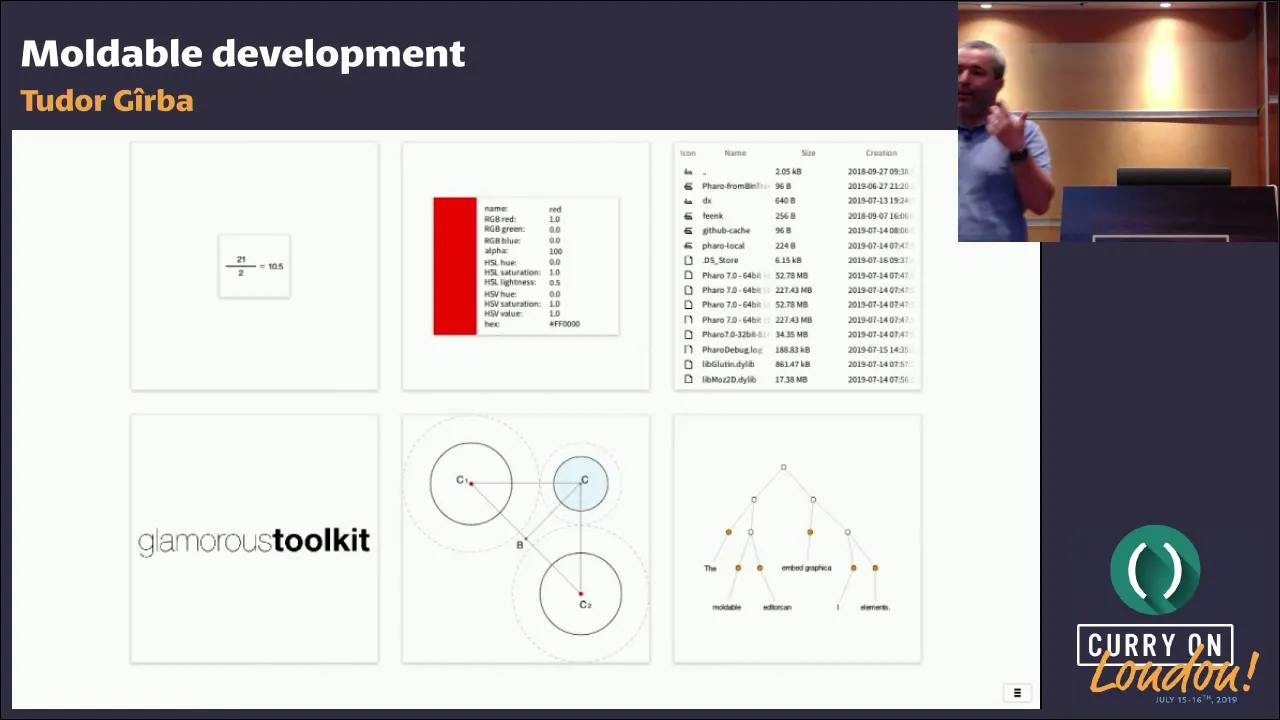
In traditional IDE debuggers and inspectors, every object is rendered identically as a generic list of internal variables and raw values. Gîrba displays six side-by-side standard inspector panes showing six different objects; each one looks like an identical, dry two-column table. While accurate about the object’s internal memory representation, this view fails to convey what the object actually *means* or how a human brain processes it. Gîrba then switches the display to show domain-specific, visual views for each of the six objects:
1. A fraction displayed as formatted mathematical notation. 2. A color rendered as a physical color swatch. 3. A file folder displaying its filesystem hierarchy and file contents. 4. An image object showing the rendered graphical picture. 5. A geometric neighborhood algorithm rendered as a visual neighborhood circle graph. 6. A text string rendered to expose its underlying rope data structure tree.
When the switch occurs, the audience reacts visibly. Gîrba pounces on the moment: “Did you feel something here? Not seriously, did you feel something? It's the same thing, right? It's really literally exactly the same object... Do you feel how your brain completely changes how it engages with that?” By molding the visual shape of an object to fit human cognition, the developer's ability to reason about the system is transformed.
An audience member chimes in to ask why the string object is visualized as a branching tree. Gîrba clarifies that the editor represents text internally using a rope data structure. In Glamorous Toolkit, a developer can seamlessly flip between different contextual perspectives of that single entity: view it as rendered rich text, inspect the raw underlying character string, or examine the binary tree nodes of the rope data structure itself.
```mermaid flowchart LR accTitle: Multiple Inspector Perspectives on an Object accDescr: A single object yielding different contextual views inside the Glamorous Toolkit inspector.
Obj["Single Object<br/>(e.g., Text Rope / Folder / Color)"]
subgraph Views["Contextual Perspectives"] V1["Raw Internals<br/>(Variables & Values)"] V2["Domain Rendering<br/>(Visualized Swatch / Tree / Math)"] V3["Interactive Structure<br/>(Navigable Filesystem / Nodes)"] end
Obj --> V1 Obj --> V2 Obj --> V3 ```
[09:43](https://www.youtube.com/watch?v=Pot9GnHFOVU&t=583s) Interactive Exploration in the Playground
Gîrba transitions from static examples to a live interactive demonstration using the Glamorous Toolkit *Playground*. The Playground serves as an exploratory workspace where code can be evaluated interactively and connected directly to downstream inspection views. To illustrate, he evaluates an expression referencing his local directory in the filesystem:
> “So now what do I see here? Instead of seeing this, which is again, this is accurate, it's a completely an accurate description of what is inside that object, but this is useful.”
Rather than confronting the user with an internal heap-dump listing raw pointer references, file descriptors, or internal byte offsets, the resulting inspector pane displays a purposeful file-system navigation view. This highlights the three foundational pillars of the Glamorous Toolkit inspector architecture: - **Multiple contextual views:** Every single object can project multiple distinct views depending on the specific questions the developer wants to answer. - **Side-by-side object chaining:** Executing an expression or selecting a child element immediately spawns the resulting object into a connected pane to the right, creating a continuous, navigable trail of thought. - **Actionable domain utility:** Views prioritize domain utility and cognitive alignment over pure internal implementation details.
[10:41](https://www.youtube.com/watch?v=Pot9GnHFOVU&t=641s) The IDE as an Extensible Visual Language
Tudor Gîrba demonstrates how navigating an object graph through visual interactions and executing code are fundamentally equivalent actions within Glamorous Toolkit. Clicking on an item to dive into it is not distinct from executing an expression in code; the boundaries between traditional user interface interactions and programming dissolve. Instead of treating the integrated development environment as an inert collection of features, Gîrba introduces a core design philosophy: “In fact we look at the IDE as a language, not an IDE as a set of features, but as a language—a language made of visual and interactive operators that basically can extend the host language.”
```mermaid flowchart TD accTitle: Unified Flow of IDE Navigation and Code accDescr: Diagram illustrating how visual interaction and code execution blend seamlessly within the inspector environment.
subgraph Interaction["Unified Modality"] A["Click / Visual Navigation"] <-->|"Equivalent"| B["Code Execution in Playground"] end
subgraph Inspection["Host Object Environment"] B --> C["Inspector Context (`self`)"] C --> D["Custom Live Views & Embedded Editors"] end ```
To illustrate this fluidity, Gîrba inspects a JSON file. Rather than presenting the file merely as raw text, the inspector exposes a JSON-aware view with an inline editor where changes can be made immediately. When looking at an embedded JSON array, the user might want to know how many elements it holds. While one could manually scroll down the file to count them, Gîrba rejects that instinct outright: “I could potentially go and scroll here, right? I could do that, but this would imply now that I'm gonna read my way to finding out this answer, and that's a highly unsophisticated—is it a highly manual way, and we should go away from doing that.”
Because JSON is structured data rather than raw text, the developer can open an ad-hoc playground directly on the file object, where `self` represents the file target (similar to a live Smalltalk REPL). By writing `STONJSON fromString: self contents`, the string is parsed into an in-memory object on the spot, instantly revealing that there are exactly nine items. Navigating through the resulting objects proceeds seamlessly from UI to code and back again. Furthermore, once an operation like parsing JSON becomes a common need, it can be surfaced directly in the UI as an icon, letting the environment grow organically alongside the programmer's habits.
- Navigation through clicking and navigation through running code are treated as identical, first-class operations. - The inspector is redefined from being the simplest, lowest-level inspection tool into a fully editable, programmable environment. - Manual reading and scrolling of structured artifacts is framed as a waste of developer effort when programmatic querying is instantly accessible.
---
[13:56](https://www.youtube.com/watch?v=Pot9GnHFOVU&t=836s) Interactive Graphing and Extending Tools on the Fly
Gîrba moves to inspecting a collection of folders to understand their hierarchical depth. Instead of navigating each folder manually or leaving the environment to run an external visualization script, he scripts an ad-hoc graph visualization right inside the inspector playground. He queries the directory structure for its nodes (`allDirectories`), sets up edges connecting each directory to its parent, and applies a tree layout.
The resulting visual hierarchy is not a static picture or an exported dead-end image; it remains a live Smalltalk canvas where clicking on any node immediately navigates directly to that folder's inspector.
```mermaid flowchart LR accTitle: Ad-Hoc Visualization Pipeline accDescr: Pipeline showing the quick steps to build an interactive directory tree visualization inside the inspector.
subgraph BuildVisual["Inspector Playground"] N["Query Nodes: allDirectories"] --> E["Map Edges: parent relation"] E --> L["Apply Tree Layout"] end
BuildVisual --> O["Live Graph View"] O -->|"Click Node"| Nav["Dive into Folder Inspector"] ```
He then inspects an XML file cataloging books by author and title. While XML may not be universally beloved—Gîrba polls the room on who dislikes it to a wave of knowing laughs—it remains a structured tree and deserves to be manipulated as such. To extract author tags without clicking through nested tree nodes, an XPath query is the obvious solution (`self xpath: '//author'`), returning 12 author elements.
However, because querying an XPath requires an arbitrary input string, it cannot be modeled as a simple unary action button. Gîrba shows how to alter the tool itself in real time:
- He clicks over to the **Meta** tab, which embeds a live source code browser targeting the class of the object currently being inspected (`XMLNode`). - He locates the method `gtXPathFor:` which defines how an XPath query presentation is constructed with a text editor and an action button. - By adding the appropriate view annotation (such as `<gtView>`) and saving the method, a brand-new tab appears immediately in the active inspector without needing to reload or restart. - Entering `//author` into the new input field evaluates the expression and directly returns the target elements.
Gîrba emphasizes the significance of this rapid customization: “What just happened here: while I was working with the tool, I noticed that I want to extend the tool, and I take a little few minutes, and then I extend that tool and I continue, because the way we look—the way objects and everything around our software system, the way those look, they determine the way we're going to think about them, and that's the premise of moldable development.”
---
[18:43](https://www.youtube.com/watch?v=Pot9GnHFOVU&t=1123s) Dismantling Tool Silos and Versioning Custom Views
Stepping back from the demo, Gîrba challenges the audience to classify the interface they have just witnessed: is it a file browser, a visualization tool, a text editor, or a query engine? It encompasses all of them at once. He argues that the rigid boundaries dividing modern developer tools are artificial: “Tool silos are just an arbitrary artifact that were produced by, you know, essentially by tool vendors, and I think that's a wrong way to look at this problem.”
An audience member asks how extensions made directly in the live environment can be shared across a wider team and whether partial changes can be reviewed or rejected. Gîrba clarifies that because Glamorous Toolkit is fundamentally a code-centric Smalltalk environment, view extension methods are standard source code:
- The newly authored presentation methods live in the system packages alongside standard domain code. - Developers commit them to Git just like any other feature, library, or test. - When team members pull the code or CI constructs the next build, the custom views and inspectors assemble automatically into their environments.
---
[19:52](https://www.youtube.com/watch?v=Pot9GnHFOVU&t=1192s) Real-World Case Study: PolyPedia and GDPR Data Pods
Gîrba transitions from technical demonstrations to real-world deployment, noting that moldable development is not merely an academic theory. His team has been refining the practice for five years, building across four years on what is now the second generation of the Glamorous Toolkit. To showcase its efficacy, he introduces their work with **polyPOP**, a company focused on helping end users reclaim control over their personal digital footprints.
Under modern data privacy regulations like Europe's GDPR, online platforms are legally mandated to allow users to export the personal data collected about them. In polyPOP's architecture, this scattered data is downloaded and consolidated into a local **pod** that resides directly on the user's personal machine. Gîrba inspects a live pod object containing exports across multiple platforms:
- A personal LinkedIn account (`tgirba`) - The company Twitter account (`feenkcom`) - A personal Twitter profile - A Facebook data archive
When raw platform exports are opened, they consist of dense, cryptic files and unstructured bundles. However, using moldable development, custom views inspect the pod to render a familiar, high-fidelity experience—such as turning a raw Twitter data export directly into an interactive, readable feed layout that mirrors Twitter itself, bridging the gap between raw machine data and human comprehension.
[21:43](https://www.youtube.com/watch?v=Pot9GnHFOVU&t=1303s) Introspecting Raw Data and Bridging Developer Perspectives
Examining a real-world Twitter data dump, Tudor Gîrba demonstrates that while the export complies with regulations, it delivers JSON wrapped inside JavaScript that is practically unreadable for a human brain. To make sense of it, the environment translates the payload into an interactive, intuitive representation. This rapid alternation between technical details and higher-level user views is essential, because software development constantly requires developers to jump meta-levels on the fly. By surfacing views that a non-technical end user can intuitively understand alongside raw structural data, the tooling collapses the traditional gap between programmers and stakeholders.
```mermaid flowchart LR accTitle: Introspection and Perspective Transformation accDescr: Raw payload transforms into both technical inspector data and domain-level user presentations. subgraph S1["Raw Ingestion"] A["JSON inside JS Payload"] end subgraph S2["Transformation"] B["Translator / Engine"] end subgraph S3["Dual Perspectives"] C["Low-Level Technical Data"] D["Human-Readable User View"] end A --> B B --> C B --> D ```
Misunderstandings in software projects regularly arise from misaligned vantage points. When those diverse perspectives are surfaced inside the same tool, team conversations fundamentally change. Gîrba emphasizes that in this moldable workflow, developers spend the overwhelming majority of their time inside the inspector rather than in static source code browsers or debuggers, because the inspector guarantees the constant presence of `self`.
- “Because it is not understandable for us either, we translate it, all right, so again it's the same thing but now you look at it differently and so this ability to introspect and go quickly and then change the perspective is super important.” - “Communication problems will come or are generated because of the differences in perspectives, but if we make those perspectives apparent, the conversation completely changes.” - “We're spending the largest majority of the time, the development time, in the inspector and not in the code browser.”
[24:14](https://www.youtube.com/watch?v=Pot9GnHFOVU&t=1454s) Live Storytelling and Whiteboard Representations in Documents
Broadening the concept of integration, Gîrba turns to bridging technical teams and business domain experts through a live document engine. The environment uses a custom markup language where formatting syntax disappears naturally as the author types, eliminating a jarring modal "edit mode." Rather than treating documentation as static text, it serves as an interactive canvas. By evaluating code directly within the document, he constructs an example of price calculations: a base price of €100 wrapped in a €10 money discount decorator, which is then wrapped in a 10% discount decorator to yield €81.
```mermaid flowchart TD accTitle: Discount Decorator Architecture accDescr: Base price flows through sequential discount decorators to produce the final price. subgraph Prices["Price Calculation Pipeline"] P1["Base Price: €100"] P2["Discount Decorator (-€10) = €90"] P3["Percentage Decorator (-10%) = €81"] P1 --> P2 P2 --> P3 end ```
While code states cold facts, it cannot communicate human reasoning or design rationale. Gîrba argues that cultures share knowledge through storytelling, and development environments should serve as platforms for narrative. Navigating this decorator chain step-by-step through standard object properties causes the reader to lose the broader mental model. To fix this, the team built a custom visual presentation that mirrors the precise diagram domain experts drew on a whiteboard: a clear visual breakdown showing €81 as 10% off €90, which in turn is €100 minus €10.
- “Software, like the only truth, the main truth is in the code, but the code shows you facts, it doesn't tell you reasons, it doesn't tell you why it is like that, and why it is like that, why something, or anything is the way we share it as a, you know, through our culture is through narratives: you want to tell stories about the kinds, about the things that are less easy to understand.” - “Once a human deems a representation of a fact as meaningful, it's the responsibility of the system to carry it forward.”
[28:14](https://www.youtube.com/watch?v=Pot9GnHFOVU&t=1694s) Executable Examples and Interactive Workflow Documentation
To prevent documentation from rotting, Gîrba avoids pasting raw code snippets directly into documents. Instead, the documentation engine links to live, executable examples that function like tests returning concrete domain objects. Authors can embed code snippets into the text without manual copy-pasting, execute them dynamically, or strip away the technical code entirely to present only a clean, live preview tab (such as an overview widget) for business stakeholders.
He showcases an actual production system documented with this engine, featuring a restaurant workflow set in a "cozy corner" with a kitchen, a guest room, and actor models. Within the prose document, readers can interact with live checklist items: checking an order placed by a customer named Alice immediately triggers actor messages that visibly flow down the pipeline to the cook.
- “I don't want to write any code into my, into my documentation, because then I have to deal with this idea of how do I synchronize the code between the real code and documentation, and so there's a whole set of problems.” - “As I move away, I'm left with the live document, right, it's just a document that has no technical detail, I can just ship to non-technical people, and what is interesting about this is the cost of this document on top of, after that, if the normal development, is very, very small.”
[30:36](https://www.youtube.com/watch?v=Pot9GnHFOVU&t=1836s) Moldable, Context-Sensitive Search
Moldability extends beyond views into system search. Rather than relying on a monolithic search bar that yields overwhelming global results, objects define their own contextual search capabilities. Searching for a common method like `do` globally returns a massive list of implementers across the entire image. However, when the user navigates into the `Collection` class, the search instantly adapts to that specific scope, restricting matches strictly to methods defined within collection classes.
```mermaid flowchart TD accTitle: Scoped Search Hierarchy accDescr: Search queries change scope based on the active object context. subgraph Global["Global Context"] G1["Query: 'do'"] --> G2["All system implementers"] end subgraph ClassScope["Collection Class Context"] C1["Query: 'do'"] --> C2["Collection-only methods"] end subgraph AccountScope["Account Context"] A1["Query: 'GT6'"] --> A2["Account-specific posts"] end ```
Gîrba shows that this principle applies identically to domain-level entities. In a multi-account social media aggregation tool, querying `GT6` from the root searches across all configured feeds (such as Twitter accounts and personal feeds). Diving into a specific account node immediately narrows subsequent queries exclusively to that account's timeline.
- “The idea here is that not only does an object know how to present itself in many ways, it also knows how to search, it's how to get searched.” - “The search is also scoped, and it's very simple, it's what is interesting here is that these are just some examples, right, they didn't handpick, I mean I hand-picked those, but out of many.”
[32:34](https://www.youtube.com/watch?v=Pot9GnHFOVU&t=1954s) The Economics of Plugins and Marshall McLuhan's Warning
Tudor Gîrba inspects the implementation of the custom view he demonstrated earlier. In Glamorous Toolkit, these custom presentations are defined simply as methods annotated with the `<gtView>` pragma. To illustrate how pervasive and lightweight this mechanism is, he queries the running environment for all occurrences of `#gtView` pragmas. The search returns a browser listing 725 such methods across the image.
```mermaid flowchart LR accTitle: Custom View Economics in Glamorous Toolkit accDescr: Diagram showing how 725 custom view plugins average only 10 lines of actual code each.
subgraph Metrics ["View Economics"] A["725 gtView Pragmas"] --> B["~8,700 Lines of Code"] B --> C["~12 Lines per Method"] C --> D["10 Lines of Real Logic<br/>(Excl. Pragma & Signature)"] end ```
Running a quick calculation on the total code volume reveals around 8,700 lines of code across all these views, averaging roughly 12 lines of code per method. Once subtracting the method signature and the pragma annotation line itself, each custom inspector view requires just 10 lines of actual logic. Gîrba emphasizes that this represents the real marginal cost of building an extension: in effect, he has over 700 custom plugins coexisting smoothly in the same IDE during the demo.
Gîrba concludes his talk with a philosophical reminder about technology and human cognition, invoking media theorist Marshall McLuhan and his student John M. Culkin:
> “We shape our tools and thereafter our tools shape us.”
Because our development environments fundamentally dictate how developers think and approach software construction, engineers must remain vigilant about the properties of the tools they adopt. As Gîrba puts it:
> “Tools are essential in software engineering and they should be moldable.”
- A search for the `#gtView` annotation (pragma) yields 725 custom presentations currently active in the running environment. - The total size across all 725 methods is approximately 8,700 lines of code. - With an average method size of 12 lines (including one line for signature and one for the pragma), a fully functional domain-specific view plugin costs only 10 lines of executable code.
---
[34:32](https://www.youtube.com/watch?v=Pot9GnHFOVU&t=2072s) Q&A: Decoupling Interactions from the Language and Explaining Algorithms
During the question-and-answer period, an attendee asks whether this interactive paradigm can be isolated from the underlying Smalltalk/Pharo platform so developers could experience the same workflows across multiple programming languages. Gîrba confirms that Glamorous Toolkit is conceived as an extensible platform rather than a single-language IDE. It already incorporates a multi-language software analysis platform and extensive parsing frameworks (such as SmaCC), with explicit plans to support other languages directly.
Another audience member points out that while Glamorous Toolkit clearly visualizes static data and domain objects, developers spending time reading code frequently need to understand execution processes and algorithms. Gîrba explains that moldable development alters how engineers write software by introducing a tight feedback loop between the tool and the code design:
> “The interesting thing here is that when we work and we have a problem we don’t just solve the problem we don’t just write a test and solve the problem we build the tools write the tests and solve the problem.”
When an algorithm is difficult to explain or visualize within a tool, it usually signals that the steps or execution flow are not reified. To resolve this, developers decompose the algorithm and turn intermediate states or execution steps into first-class objects—often applying functional decomposition principles within an object-oriented codebase. Gîrba references the earlier messaging workflow demo, where a message and its routing across actors were made first-class entities precisely so the algorithm's propagation could be inspected and reasoned about interactively.
- Of the roughly 725 views present in Gîrba's working image, approximately 400 ship as generic or baseline views in the default Glamorous Toolkit distribution, meaning roughly 250 to 300 views were created specifically for that demo system. - Designing domain-specific views often drives architectural improvements, pushing developers to reify algorithms and execution steps as first-class objects rather than keeping them hidden in opaque procedural code.
## Notable quotes > [32:34](https://www.youtube.com/watch?v=Pot9GnHFOVU&t=1954s) Tools are essential in software engineering and they should be moldable. — Tudor Gîrba
> [03:09](https://www.youtube.com/watch?v=Pot9GnHFOVU&t=189s) it's actually useful to start regarding software engineering as being, you know, less of a construction business and more of a decision-making business. — Tudor Gîrba
> [24:14](https://www.youtube.com/watch?v=Pot9GnHFOVU&t=1454s) Once a human deems a representation of a fact as meaningful, it's the responsibility of the system to carry it forward. — Tudor Gîrba
> [21:43](https://www.youtube.com/watch?v=Pot9GnHFOVU&t=1303s) Communication problems will come or are generated because of the differences in perspectives, but if we make those perspectives apparent, the conversation completely changes. — Tudor Gîrba
## Mentioned Tudor Gîrba, feenk, Glamorous Toolkit, Pharo, Smalltalk, polyPOP, LinkedIn, Twitter, Facebook, Marshall McLuhan, John M. Culkin, SmaCC
[Source](https://www.youtube.com/watch?v=Pot9GnHFOVU)