Apple Lisa UI Diverges From Xerox Star to Disprove Copying Myth
Vintage Computer Federation
While the Apple Lisa drew inspiration from Xerox PARC, its shift to a mouse-driven direct-manipulation interface represents a fundamental engineering divergence rather than a direct copy of the Xerox Star.
AI-assisted summary of VCF East: Xerox Star vs. Apple Lisa — original source. Check the original for full context.
Source published:
Key ideas
- The Xerox Star 8010 and Apple Lisa adopted fundamentally opposing UI paradigms: the Star relied on a two-handed noun-verb model with dedicated physical keyboard command keys, while the Lisa pioneered direct mouse manipulation and pull-down menus. (4:36)
- Internal computing architectures diverged sharply, as the 1981 Star utilized a custom 16-bit processor built from four 4-bit AMD 2900-series bit-slice chips executing microcode, whereas the 1983 Lisa ran an off-the-shelf Motorola 68000 CPU throttled to 5 MHz. (22:17)
- Apple transformed experimental mouse engineering into a consumer-viable peripheral, replacing Xerox's costly machined-aluminum, bearing-driven mechanism with an inexpensive injection-molded chassis and optical interrupters costing roughly $40. (31:46)
- Both machines targeted high-level 'knowledge workers' rather than typists, but the Lisa achieved superior intuitive usability, allowing untrained users to construct integrated text-and-graphics documents in around ten minutes. (15:25)
Detailed notes
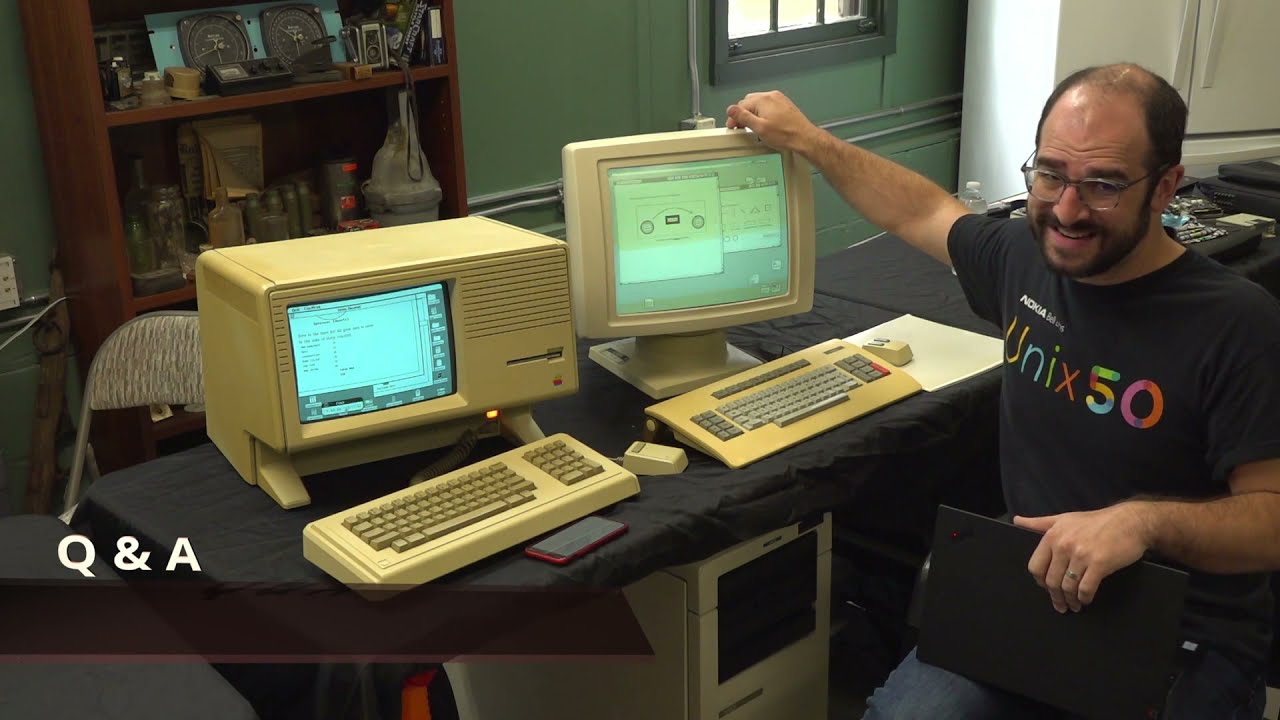
## Background Presented by Jason Perkins at the virtual Vintage Computer Festival East 2020 and published to YouTube by the Vintage Computer Federation on December 30, 2020, this presentation compares the graphical user interfaces of the Xerox Star 8010 and the Apple Lisa. Filmed live at the InfoAge Technology Center in Wall, New Jersey, the talk demonstrates live original hardware to examine the design philosophies and functional differences between the two landmark systems.
## TL;DR Presenter Jason Perkins delivers an in-depth hardware and software comparison between the Xerox 8010 Star (running Viewpoint) and the Apple Lisa (running the Lisa Office System) to challenge the persistent myth that Apple simply copied Xerox. Demonstrating live document creation, document editing, and graphic manipulation on both machines, Perkins highlights how the Star uses a two-handed, noun-then-verb paradigm driven by dedicated keyboard keys and microcode, whereas the Lisa champions direct mouse manipulation, pull-down menus, and real-time screen repainting. During a detailed audience Q&A, Perkins explores the internal architectures, including the Star's custom AMD 2900 bit-slice processor and delicate Alps mechanical mouse versus the Lisa's Motorola 68000 and cost-engineered optical mouse. Ultimately, Perkins argues that while both workstations targeted professional 'knowledge workers,' each possesses a fundamentally distinct engineering depth, proving the Lisa was heavily inspired by Xerox rather than an exact copy.
## Atmosphere & style The presentation carries the warm, conversational authenticity of a passionate computer historian delivering a hands-on workshop to a dedicated community of enthusiasts. Viewers experience real-time engineering quirks as they happen—such as adjusting camera settings to tame the Star's flicker-prone 38.5 Hz CRT, diagnosing delayed screen repaints, and chuckling over missing font licenses. The tone is relaxed yet deeply technical, balancing self-deprecating humor and relatable anecdotes with insightful architectural breakdowns of microcode and hardware bus timings.
## Bulletin - [04:36](https://www.youtube.com/watch?v=pBiWtJJN5zk&t=276s) The Xerox Star 8010 and Apple Lisa adopted fundamentally opposing UI paradigms: the Star relied on a two-handed noun-verb model with dedicated physical keyboard command keys, while the Lisa pioneered direct mouse manipulation and pull-down menus. - [22:17](https://www.youtube.com/watch?v=pBiWtJJN5zk&t=1337s) Internal computing architectures diverged sharply, as the 1981 Star utilized a custom 16-bit processor built from four 4-bit AMD 2900-series bit-slice chips executing microcode, whereas the 1983 Lisa ran an off-the-shelf Motorola 68000 CPU throttled to 5 MHz. - [31:46](https://www.youtube.com/watch?v=pBiWtJJN5zk&t=1906s) Apple transformed experimental mouse engineering into a consumer-viable peripheral, replacing Xerox's costly machined-aluminum, bearing-driven mechanism with an inexpensive injection-molded chassis and optical interrupters costing roughly $40. - [15:25](https://www.youtube.com/watch?v=pBiWtJJN5zk&t=925s) Both machines targeted high-level 'knowledge workers' rather than typists, but the Lisa achieved superior intuitive usability, allowing untrained users to construct integrated text-and-graphics documents in around ten minutes.
## Key takeaways - [00:02](https://www.youtube.com/watch?v=pBiWtJJN5zk&t=2s) The Xerox Star 8010 was housed in a massive, caster-mounted pedestal cabinet featuring seven-segment diagnostic displays and an internal 600 KB 8-inch Shugart floppy drive. - [01:15](https://www.youtube.com/watch?v=pBiWtJJN5zk&t=75s) The common narrative that Apple simply cloned Xerox's GUI overlooks deep architectural, operational, and hardware differences between the two systems. - [02:57](https://www.youtube.com/watch?v=pBiWtJJN5zk&t=177s) The Star's monochrome CRT used a 38.5 Hz interlaced refresh rate with dual long-persistence phosphors to produce a high-contrast 'paper white' image. - [04:36](https://www.youtube.com/watch?v=pBiWtJJN5zk&t=276s) Interactions in Xerox Viewpoint operated on a strict select-key-click sequence using dedicated physical keyboard keys (such as Copy, Move, and Properties) rather than click-and-drag mouse actions. - [08:21](https://www.youtube.com/watch?v=pBiWtJJN5zk&t=501s) Viewpoint documents required illustrations to sit inside isolated graphics frames populated by copying shapes from digital 'transfer sheet' palettes inspired by rub-on dry transfers. - [08:21](https://www.youtube.com/watch?v=pBiWtJJN5zk&t=501s) Hardware performance limitations on the Star often required manual 'repaginate' or redisplay commands to force the frame buffer to redraw moved elements. - [12:14](https://www.youtube.com/watch?v=pBiWtJJN5zk&t=734s) The Apple Lisa eliminated dedicated task keys in favor of single-button mouse manipulation, drag-and-drop tool palettes, pull-down menus, and real-time screen redrawing. - [12:14](https://www.youtube.com/watch?v=pBiWtJJN5zk&t=734s) Both platforms abandoned traditional application launchers in favor of document stationery templates, but the Lisa automated creation via menu commands and double-clicking. - [15:25](https://www.youtube.com/watch?v=pBiWtJJN5zk&t=925s) Lisa's integrated Office System enabled seamless cross-application clipboard sharing across LisaDraw, LisaCalc, and charting tools without file conversions. - [17:29](https://www.youtube.com/watch?v=pBiWtJJN5zk&t=1049s) Apple originally conceived the Lisa as a character-based text system in 1979 before pivoting to a bitmapped GUI after viewing Xerox PARC Smalltalk demonstrations. - [19:39](https://www.youtube.com/watch?v=pBiWtJJN5zk&t=1179s) The Xerox Star was the first commercial workstation engineered with built-in 10 Mbps Ethernet via an AUI port, while Apple's early Lisa Ethernet hardware was canceled before release. - [22:17](https://www.youtube.com/watch?v=pBiWtJJN5zk&t=1337s) Extreme hardware costs in the early 1980s were driven primarily by RAM, with the Lisa's 1 MB memory configuration representing roughly $5,000 in raw parts. - [25:54](https://www.youtube.com/watch?v=pBiWtJJN5zk&t=1554s) Xerox enforced strict per-workstation software licensing, actively disabling standard capabilities like bold text formatting if the machine lacked the appropriate license key. - [29:04](https://www.youtube.com/watch?v=pBiWtJJN5zk&t=1744s) The Xerox Star executed its graphics rendering, video scanning, and Mesa runtime directly through loadable microcode rather than discrete blitter chips or static ROM routines. - [35:01](https://www.youtube.com/watch?v=pBiWtJJN5zk&t=2101s) Neither machine's CPU can be easily overclocked because internal clock rates are rigidly tied to peripheral timing loops, floppy drive signaling, and CRT scan-line drawing. - [38:42](https://www.youtube.com/watch?v=pBiWtJJN5zk&t=2322s) Both systems were created specifically for high-level knowledge workers dealing with business analysis, presentations, and process problems rather than clerical data entry.
## Detailed walkthrough ### [00:02](https://www.youtube.com/watch?v=pBiWtJJN5zk&t=2s) Physical Hardware of the Xerox Star 8010
Presenter Jason Perkins introduces the Xerox 8010 Star workstation, providing immediate perspective on the sheer physical scale of the machine. Positioned alongside everyday items, the Star's floor-standing main processor cabinet dwarfs contemporary desktop hardware. Perkins holds up a modern 3.5-inch floppy diskette, an 8-inch floppy disk, and a standard Sharpie marker against the massive chassis to emphasize that it is anything but a compact setup.
The front of the cabinet houses the essential user controls and diagnostic readouts. A dedicated maintenance panel features multi-digit seven-segment LED displays that report real-time system status codes and hardware diagnostics during initialization. Flanking these indicators are the system power switch, a hardware reset button, and an alternate boot toggle. Removable storage is handled directly by an internal Shugart 8-inch floppy disk drive capable of storing 600 kilobytes of data per diskette. After showcasing the chassis features, Perkins wheels the heavy enclosure back under the presentation counter to clear workspace for the display, mouse, and keyboard.
- **Storage Media:** Shugart 8-inch floppy disk drive holding 600 KB. - **Diagnostics and Controls:** Front maintenance panel equipped with seven-segment status displays, power switch, hardware reset, and alternate boot selectors. - **Form Factor:** Heavy floor-standing pedestal cabinet mounted on casters.
---
[01:15](https://www.youtube.com/watch?v=pBiWtJJN5zk&t=75s) Xerox Viewpoint GUI and the Apple Lisa Connection
Perkins moves to the desktop environment, explaining that the graphical operating system running on the 8010 is Xerox Viewpoint (the evolution of the original Star software). While experimental graphical interfaces existed earlier within research laboratories like Xerox PARC, Star Viewpoint was arguably the first commercial graphical user interface engineered and sold for public office use.
Addressing historical debates surrounding Apple's relationship with Xerox, Perkins addresses the common narrative that Apple flatly copied Xerox's work when creating the Lisa. While several software engineers from Xerox famously migrated to Cupertino to develop the Lisa platform, Perkins argues that reducing the relationship to outright copying ignores substantial engineering divergence. Jason Perkins states: “I don't think that's entirely fair to say because while certainly there are concepts in both that were invented on this system that the Lisa implemented, there are enough differences and innovations between these two systems that they each stand on their own.” To illustrate these distinctions, Perkins prepares to walk through retrieving, creating, and editing a visual document on the Star before contrasting the same tasks on the Apple Lisa.
---
[02:57](https://www.youtube.com/watch?v=pBiWtJJN5zk&t=177s) Display Oddities and Dedicated Keyboard Workflow
Before demonstrating the graphical environment, Perkins and the production team address the visual artifacts appearing on the camera recording. The production team intentionally slows down and adjusts camera playback while zooming in because the Xerox monitor relies on a non-standard 38.5 Hz interlaced refresh rate that causes severe banding and flicker on video. Perkins clarifies that the physical CRT screen utilizes dual phosphors, including a long-persistence phosphor; while the monitor appears noticeably green on video, to an in-person operator it renders a crisp, high-contrast "paper white" image designed to simulate an actual printed sheet.
Turning attention to the physical user interface, Perkins emphasizes that understanding the Xerox Star requires understanding its keyboard. Unlike later desktop computers that delegated nearly all operational commands to on-screen pull-down menus, the Star relies on a distinct two-handed paradigm. The keyboard pairs a standard typewriter core with dedicated clusters of labeled operational keys arranged along the sides and top. Jason Perkins explains: “When you're using the computer, you'll select an object, a file, text, and then operate on it with these function keys, which are you know, like delete, copy, move, properties, skip next, font, margin, stop.” Rather than searching through on-screen menus, the operator indicates an item with the mouse cursor and then dispatches the action with a dedicated hardware key.
- **Display Specifications:** 38.5 Hz interlaced monochrome cathode-ray tube with dual phosphors, presenting a simulated paper-white image. - **Dedicated Function Keys:** Hardware keys including `Delete`, `Copy`, `Move`, `Show Properties`, `Skip`, `Next`, `Font`, `Margin`, and `Stop`. - **Interaction Architecture:** Two-handed noun-then-verb model; objects on screen are highlighted with the mouse, then acted upon via dedicated hardware keystrokes.
---
[04:36](https://www.youtube.com/watch?v=pBiWtJJN5zk&t=276s) Working with Files and Documents in Viewpoint
To edit a document stored on an 8-inch disk, the operator must first bring the peripheral into the desktop environment. In Viewpoint, all application binaries, file systems, and hardware peripherals reside within a system hierarchical Directory. Perkins navigates into the Directory, opens the "workstation node," drills down into "local devices," and locates the floppy drive icon.
```mermaid flowchart TD accTitle: Command Paradigm Comparison between Xerox Star and Apple Lisa accDescr: Flowchart illustrating the contrasting operational steps for manipulating objects on the Xerox Star Viewpoint versus the Apple Lisa.
subgraph Star["Xerox Star (Noun-Verb via Hardware)"] S1["Select Target Object with Mouse"] --> S2["Press Dedicated Key (Copy / Move)"] S2 --> S3["Top Info Bar Prompts for Target"] S3 --> S4["Click Final Desktop Destination"] end
subgraph Lisa["Apple Lisa (Direct Manipulation)"] L1["Click and Hold Object with Mouse"] --> L2["Drag Object Across Screen"] L2 --> L3["Release at Desired Location"] end ```
Moving and manipulating objects in Viewpoint differs fundamentally from modern window managers. Highlighting the floppy drive icon, Perkins taps the physical `Copy` key on the keyboard. The persistent black strip spanning the very top of the screen is not an Apple-style pull-down menu bar; it functions strictly as an information and dialogue prompt area. Upon pressing `Copy`, the message prompt updates to *"Please select a destination,"* and the cursor shifts to an angled transfer arrow. Perkins clicks an open space on the desktop canvas, instantiating the floppy drive shortcut.
Perkins notes that intuitive modern mouse behaviors do not exist here: “There is no click and drag. I can't click and drag this.” Relocating an icon requires selecting it, hitting the physical `Move` key, watching for the information bar prompt, and clicking the final destination coordinate.
Opening the floppy disk reveals its directory listing. Perkins observes a system constraint: files cannot be opened and edited directly from the floppy media; documents must first be copied onto the local desktop workspace using the `Copy` key sequence. Once duplicated onto the desktop, document metadata is altered via the physical `Show Properties` key. Pressing this button spawns a dedicated properties sheet window where parameters such as document titles can be entered and committed with an `Apply` button. Windows support overlapping arrangements and can be dragged by holding the mouse until the info bar confirms destination positioning, while right-clicking allows dynamic window resizing.
- **Top Screen Banner:** Serves as a persistent status, prompt, and error bar rather than an interactive pull-down menu bar. - **Relocation Mechanism:** Strict select-key-click sequence (`Move` key followed by destination click) rather than continuous mouse dragging. - **Storage Constraints:** Documents stored on floppy diskettes are read-only until copied into the local workstation environment.
---
[08:21](https://www.youtube.com/watch?v=pBiWtJJN5zk&t=501s) Document Editing and the Transfer Sheet Paradigm
Opening a document places it into read-only viewing mode by default until the user explicitly toggles it into edit mode. Within Viewpoint documents, graphic elements cannot simply be drawn anywhere; they must reside inside an explicit bounding box termed a "graphics frame."
To populate artwork into a graphics frame, the Star relies on an intentional skeuomorphic metaphor derived from traditional graphic arts: rub-on carbon transfer sheets. Historically, draftspeople and office workers purchased plastic carrier sheets preprinted with dry-transfer shapes, lettering, and symbols, burnishing them onto paper with a stylus. Viewpoint recreates this exact process digitally through a built-in "basic transfer sheet" palette populated with geometric primitives. Perkins selects a rectangular box from the digital transfer sheet, pushes the physical `Copy` key, and pastes it directly into the document's graphics frame.
Fine-tuning the placed box requires interacting with dynamic "soft keys." When graphics are selected, the row of function keys along the top edge of the physical keyboard correspond to labels rendered dynamically along the top margin of the display. Perkins hits the soft key mapped to "stretch" to pull the rectangle horizontally and vertically, then depresses the `Properties` key to adjust line weight, stroke style, and interior fill patterns. Text frames are handled identically: Perkins copies a text container from the transfer palette, moves it into the box, and types the pangram *"the quick brown fox jumps over the lazy dog"*.
When Perkins attempts to reposition the completed illustration to the bottom of the document layout, the screen fails to refresh, revealing a known hardware performance bottleneck. Perkins remarks that during his initial testing, diagnosing why elements did not move took an hour and a half because the operations had succeeded internally without updating the frame buffer. Jason Perkins explains: “Unfortunately, the system is slow enough they can't always update in real time, so you have to go to one of these little menus at the top and choose to redisplay.” Triggering a manual "repaginating" or redisplay command forces the monitor to blank momentarily while recalculating the visual layout before drawing the shifted graphic in its new location.
- **Graphics Frame Architecture:** Freeform illustrations cannot exist in loose margins; they require an isolated graphics frame container. - **Transfer Sheet Metaphor:** Digital reproduction of commercial rub-on dry-transfer sheets supplying basic shapes, lines, and text frames. - **Soft Keys:** Physical function keys mapped to contextual on-screen actions (such as stretch, shrink, and orientation controls). - **Repagination/Redisplay:** Manual redraw routines required to force the display hardware to refresh complex visual document adjustments.
---
[12:14](https://www.youtube.com/watch?v=pBiWtJJN5zk&t=734s) Apple Lisa Workflow: Direct Manipulation and LisaDraw
Transitioning across the desk to the Apple Lisa, Perkins turns on the workstation and inserts a floppy diskette. The Lisa immediately demonstrates a stark philosophical divergence: upon insertion, the operating system automatically mounts the disk media and immediately resumes the exact document state left open during the prior session.
Perkins highlights how both systems handle document creation without traditional application launching: “In both of these systems, there is no file new.” Instead of opening an application and selecting an empty file, both systems rely on stationery templates. However, their execution differs completely. On the Star, creating a new document requires finding a template, hitting the physical `Copy` key, and designating a destination coordinate. On the Lisa, an operator simply double-clicks a pad of stationery or uses the mouse to select "Tear off stationery" directly from the pull-down menu.
This operational contrast defines the entire user experience. Jason Perkins observes: “It's it's a very different interaction where and the Xerox it's almost like right hand left hand is each one is doing a um different parts of the operation. And on the Lisa everything is done simply with the mouse and the keyboard has no function keys on it.” The Lisa's keyboard eliminates dedicated action keys in favor of a single Command key modifier, shifting nearly all command issuing, positioning, and window manipulation to the single-button mouse.
Launching LisaDraw, Perkins demonstrates direct manipulation. Tools are chosen directly from an on-screen visual palette, shapes are drawn and dragged across the canvas fluidly with mouse clicks, and pattern fills are applied from pull-down menus without touching the physical keyboard. Perkins creates a box, fills it, layers text inside, drags a selection marquee around both elements, and selects `Group` to combine them into an indivisible graphical object. Copying the graphic, he switches open documents seamlessly using the system Desk menu, pulls down the Edit menu to choose `Paste`, and inserts the illustration into the target document, which automatically redraws its layout in real time.
| Feature / Workflow | Xerox 8010 Star (Viewpoint) | Apple Lisa (Lisa Office System) | |:--- |:--- |:--- | | **Primary Input Paradigm** | Two-handed coordination: mouse coordinates target, dedicated keyboard keys execute actions. | Direct manipulation: single-button mouse drives commands, dragging, and tool selection. | | **Keyboard Design** | Complex layout with dedicated clusters (`Copy`, `Move`, `Properties`, `Delete`, soft keys). | Streamlined typewriter keyboard with Command modifier key; no dedicated task function keys. | | **Document Creation** | Target stationery template on desktop, press `Copy` key, click destination point. | Tear off stationery pad via mouse pull-down menu or double-click gesture. | | **Graphics Workflow** | Copy shapes out of a digital "transfer sheet" into an isolated graphics frame container. | Dedicated vector drawing application (LisaDraw) utilizing a persistent visual tool palette. | | **Display Repainting** | Often requires explicit manual "redisplay" or "repaginate" calls to update the frame buffer. | Automatic real-time layout recalculation and screen repainting upon pasting or resizing. |
[15:25](https://www.youtube.com/watch?v=pBiWtJJN5zk&t=925s) Business Graphics and Document Assembly on the Lisa
Demonstrating the integrated office capabilities of the Apple Lisa, Jason shows how easily different media types combine into a single document. He displays vector-based illustrations, noting that while the graphics redraw cleanly during navigation, scrolling through complex vector images is definitely sluggish on the hardware. To illustrate the seamless workflow, he explains how he created a composite chart: he generated a basic pie chart in the dedicated charting tool, pasted it into LisaDraw to pull out an individual wedge for emphasis, and brought in tabular data directly from LisaCalc. Every element was transferred with standard copy-and-paste commands without needing to issue cumbersome conversion instructions.
To test just how intuitive this workflow was, Jason conducted an informal usability experiment prior to the festival. He sat several newcomers down in front of the Lisa—people who had never touched the machine before—and asked them to produce a finished page containing both formatted text and an illustration, offering them virtually no guidance. Every participant succeeded without trouble. Jason shares with a laugh that even their roommate, who was about six beers in at the time, managed to figure it out and produce a complete document in around ten minutes. Reflecting on how Apple adapted Xerox’s initial breakthroughs, Jason observes: “So the refinements that Apple did building upon concepts started with the Star really makes this software I think, a a big iteration compared to this earlier system.”
- Complex vector illustrations redraw on the fly during document scrolling, though performance slows noticeably on intricate graphics. - Applications featured include the dedicated business charting tool, the drawing program (LisaDraw), and the spreadsheet (LisaCalc), all sharing a unified clipboard. - Novice users given minimal instruction were able to assemble mixed-media documents in roughly ten minutes.
---
[17:29](https://www.youtube.com/watch?v=pBiWtJJN5zk&t=1049s) Display Resolution and System Lineage
Opening the presentation to the Vintage Computer Festival Discord Q&A, Jason addresses an attendee's question regarding the Xerox Star’s crisp monochrome display. The Star features a resolution of 1024 by 809 pixels. Its video subsystem drives an illuminated, borderless CRT canvas where an active bitmap region displays application data while an outer border texture fills the remainder of the viewable raster area.
```mermaid flowchart TD accTitle: Evolution of GUI Systems from Alto to Lisa accDescr: Diagram tracing Xerox Alto research to Xerox Star and Apple Lisa development milestones.
subgraph XeroxPath["Xerox PARC Lineage"] Alto["1972: Xerox Alto<br>(PARC Research Platform)"] Star["1981: Xerox Star 8010<br>(Commercial Workstation)"] Alto -->|"Engineers & concepts"| Star end
subgraph ApplePath["Apple Computer Lineage"] LisaText["1979: Apple Lisa Project<br>(Originally text-based UI)"] LisaGUI["1979–1980: GUI Pivot<br>(Inspired by Smalltalk demo)"] LisaShip["1983: Apple Lisa Ships<br>(Modern desktop filer UI)"] LisaText -->|"Xerox demo visit"| LisaGUI LisaGUI -->|"UI overhaul 6 mos before ship"| LisaShip end
Alto -.->|"Smalltalk GUI demo"| LisaGUI ```
The discussion turns to the development timelines and shared heritage of both platforms. Jason explains that the Star was developed by the same engineering talent responsible for the groundbreaking Xerox Alto of 1972, culminating in the commercial launch of the Star 8010 in 1981. Meanwhile, Apple began developing the Lisa in 1979. The Lisa was initially conceived with an entirely character-based text interface. That trajectory changed fundamentally after Apple executives and engineers were invited to Xerox PARC to view Smalltalk demonstrations showcasing overlapping windows and mouse-driven interaction. Apple immediately pivoted the project toward a bitmapped GUI, later overhauling the desktop filer interface roughly six months before the Lisa’s commercial release in 1983 into the desktop metaphor that remains standard today.
---
[19:39](https://www.youtube.com/watch?v=pBiWtJJN5zk&t=1179s) Networking Architecture and File Servers
Fielding questions on connectivity, Jason highlights that the Xerox Star holds a historic milestone as the first commercial computer engineered from the ground up with 10 Mbps Ethernet support. The back of the chassis features a standard Attachment Unit Interface (AUI) port, allowing users to attach an external transceiver and connect the vintage workstation directly to modern twisted-pair Ethernet switches with standard cabling modules.
Inside Apple, engineers developed an Ethernet-like network architecture alongside proprietary network cards for the Lisa. Although the hardware was completed and deployed internally throughout Apple’s offices and manufacturing facilities, it was ultimately canceled before shipping to consumers. The networking software stack survived, however, evolving into AppleTalk and rolling out over the RS-422 serial ports of the Lisa and subsequent Macintosh computers. When asked if either workstation could operate as an ad-hoc local file server, Jason points out key software boundaries:
- **Apple Lisa:** Shipped strictly as a standalone workstation under the Lisa Office System; networking was limited to serial terminal emulation for mainframe text transfer, with planned local file sharing never reaching release. - **Xerox Star:** In its standard workstation configuration running Xerox ViewPoint (or Star office software), the machine operates as a network client; running file-server tasks required distinct Xerox server operating software and dedicated mass-storage configurations.
---
[22:17](https://www.youtube.com/watch?v=pBiWtJJN5zk&t=1337s) Processing Architecture, RAM Costs, and the Learning Curve
Responding to an audience comment comparing the systems' visual pacing to modern electronic paper screens, Jason contrasts their internal hardware architectures. The Lisa relies on an off-the-shelf Motorola 68000 CPU clocked at 5 MHz. The Xerox Star, having been architected years earlier when commercial 16-bit microprocessors were either nonexistent or inadequate for bitmapped computing, contains no monolithic microprocessor. Instead, Xerox built a custom CPU out of four 4-bit AMD 2900-series bit-slice chips coupled with proprietary microcode to execute 16-bit operations, yielding overall performance roughly comparable to a Macintosh Plus.
| Machine | CPU Architecture | RAM Capacity | Era Context / Cost | |:--- |:--- |:--- |:--- | | **Xerox Star** (1981) | Custom 16-bit CPU via four 4-bit AMD bit-slice processors running microcode | 768 KB (standard/max configuration shown) | Equivalent compute power to a Mac Plus; predecessor to off-the-shelf 16-bit chips | | **Apple Lisa** (1983) | Motorola 68000 @ 5 MHz | 1 MB (1,024 KB) standard | RAM alone cost Apple ~$5,000 per machine in raw parts; contemporary home PCs had 64 KB |
Both platforms were extraordinarily expensive, with RAM chips accounting for a huge percentage of their manufacturing bill of materials. When asked about his personal experience mastering each interface, Jason explains that anyone familiar with System 7, Mac OS 8, or Mac OS 9 will feel right at home on the Lisa. “The Lisa, if—uh I'll quote the comment of my husband, the if you've used a classic Mac OS, uh you know, system 7 8 9, the Lisa is very familiar,” Jason notes, explaining that the primary conceptual hurdle is the Lisa's stationery-pad, document-centric metaphor rather than opening an application directly. The Xerox Star, by contrast, proved far more challenging. Jason spent many hours training on the Living Computer Museum’s software emulator and studying vintage video demonstrations from the original engineering team just to grasp core interactions, remarking that it took him an hour and a half simply to figure out how to transfer graphics into a text frame.
---
[25:54](https://www.youtube.com/watch?v=pBiWtJJN5zk&t=1554s) Software Licensing and Hard Drives
Turning back to the Discord feed, Jason addresses whether the Star supported peer-to-peer sharing. While recalling that Xerox showcased distributed networking, central print spoolers, and remote file servers at events like the 1998 ACM SIGCHI conference—where users printed simply by selecting a document, pressing the `Copy` key, and clicking a network printer icon—he notes that Xerox enforced tight commercial control over individual workstations. Xerox aimed to collect recurring fees on every workstation feature, requiring unique software license keys to unlock basic capabilities. Demonstrating this live, Jason highlights a block of text using the Star's two-button mouse convention (left-click to anchor the start, right-click to define the end) and presses the `Properties` key to display the formatting sheet:
> “Corey, if you could pull in on this line when I click apply, you'll see what happens. Uh if I click apply, oops. We're not licensed for bold. So, uh there is a lot more functionality in this system that this particular instance doesn't have right now.”
The segment concludes with a discussion of storage hardware. Jason explains that the Star workstation uses an 8-inch hard drive based on the Shugart Associates SA1000 interface, which originally came in capacities such as 10 megabytes to store the microcode, operating software, and local desktop files.
[29:04](https://www.youtube.com/watch?v=pBiWtJJN5zk&t=1744s) Storage Hardware and the Role of Microcode
Jason Perkins discusses the storage configurations of both machines on display. Originally, the Xerox Star system came with either a 60 MB (or 63 MB) or an 83 MB hard drive, but it no longer uses the original spinning disk. Instead, it relies on an MFM emulator board designed by David Gesswein, built around a BeagleBone single-board computer using solid-state storage. Jason emphasizes the importance of this modern preservation effort: “We would not I would not be able to get this demo without the work that he did.” The Apple Lisa demonstrated is also fitted with a modern replacement hard drive; while not solid-state, it is significantly faster and far quieter than the original Apple 10 MB drive. The hosts joke that if the Lisa were running its factory drive, the roar would drown out everyone in the room—an amusing irony given that the machine was marketed for quiet corporate offices.
```mermaid flowchart LR accTitle: Drive and Microcode Architecture accDescr: Diagram showing how modern storage emulation feeds the Xerox Star's microcode-driven graphics pipeline versus the Lisa's ROM toolbox.
subgraph StarStorage["Xerox Star Setup"] BB["BeagleBone MFM Emulator<br/>(David Gesswein)"] --> MBR["Minimal Boot ROM"] MBR --> MC["Loadable Microcode<br/>(Drives logic, CRT scan lines)"] MC --> Mesa["Mesa Language Runtime"] end
subgraph LisaStorage["Apple Lisa Setup"] HD["Modern Hard Disk<br/>(Replaces 10 MB Drive)"] --> LisaROM["Lisa ROM Toolbox /<br/>MacWorks in RAM"] LisaROM --> Pascal["Pascal & 68000 Assembly"] end ```
When asked whether the Star utilizes dedicated hardware blitter circuitry for graphics manipulation, Jason clarifies that the machine relies on custom microcode rather than discrete TTL graphics hardware like the Lisa. The Xerox architecture features a minimal boot ROM that quickly hands off control to loadable microcode: “Loadable Yeah, it's everything on the Star is in microcode.” Unlike the Lisa—which relies heavily on its built-in ROM toolbox or loads Mac system ROM into RAM when running MacWorks—the Star executes its core graphics operations, screen refresh, and operating environment straight out of microcode.
- The Xerox Star originally came with a 60/63 MB or 83 MB hard drive; it currently boots from David Gesswein’s BeagleBone-based MFM emulator. - The Lisa on stage uses an upgraded, quieter hard drive rather than the notoriously loud original Apple 10 MB drive. - Xerox Star graphics and logic are driven by downloadable microcode rather than dedicated blitter chips.
---
[31:46](https://www.youtube.com/watch?v=pBiWtJJN5zk&t=1906s) Museum Status and the Tale of Two Mice
Addressing viewer questions about hardware upgrade plans, the hosts clarify that the Xerox Star belongs to the Vintage Computer Federation (VCF) Museum at InfoAge. Outside of pandemic-related capacity restrictions, visitors can see and actually interact with the machine. Jason and his co-host note that this machine is likely the only working Xerox Star currently on public display in the world that members of the public are permitted to touch.
This discussion prompts Jason to highlight the radical engineering contrast between the Xerox mouse and the Apple Lisa mouse:
| Component | Xerox Star Mouse (Alps Electric) | Apple Lisa Mouse | |:--- |:--- |:--- | | **Housing & Frame** | Machined aluminum clamped together | Injection-molded plastic frame | | **Ball & Tracking** | Heavy steel ball bearing on steel-caged ball bearings | Removable rubberized ball held by a twist-lock plastic ring | | **Rollers & Encoders** | Steel rollers; encoder drums with delicate contacting wire fingers | Plastic rollers on metal shafts (no bearings); optical LED interrupter wheels | | **Manufacturing** | Intricate, likely hand-soldered, delicate, costly | Mass-manufactured, simplified, cost Apple around $40 | | **Maintenance** | Fragile; requires complete, risky disassembly to clean | Easily twisted open by the user to dump and clean the ball |
Jason describes the Xerox mouse as “a beautiful piece of mechanical engineering inside” that was generously donated to VCF, but warns of its real-world shortcomings: “This is an amazing bit of machining and craftsmanship that is very delicate, sensitive to dirt, and difficult to clean.” In contrast, the Lisa mouse stripped out luxury materials in favor of inexpensive opto-interrupters and injection molding: “This was something that was cheap enough to put on everyone's desk.”
---
[35:01](https://www.youtube.com/watch?v=pBiWtJJN5zk&t=2101s) Architecture: Daybreak, Mesa vs. Pascal, and Timing Loops
Jason confirms that the museum's Xerox Star is effectively at its maximum configuration, leaving no further hardware upgrades to perform. He mentions that Xerox later released the Daybreak (Xerox 6085), which condensed the Star's multi-board architecture into a smaller enclosure with fewer chips and faster peripheral processors. At its heart, however, the Daybreak still executed microcode to interpret Mesa, Xerox’s proprietary object-oriented programming language. In comparison, the Lisa's software was authored predominantly in Pascal alongside Motorola 68000 assembly language. While Pascal was less CPU-efficient than the tight, hand-crafted machine code later required by the memory-starved 128K Macintosh, it granted Lisa engineers an exceptionally productive and flexible high-level development environment.
```mermaid flowchart TD accTitle: System Bottlenecks and Timing Interlocking accDescr: Comparison of how CPU speed in both systems is locked directly to peripherals and CRT refresh rates.
subgraph LisaTiming["Apple Lisa Interlocking"] LCPU["Motorola 68000<br/>(Rated 8 MHz, run at 5 MHz)"] LCPU --- LVideo["Drives Video Clock"] LCPU --- LFloppy["Controls Floppy Timing"] end
subgraph StarTiming["Xerox Star Interlocking"] SCPU["Microcoded Processor Tasks"] SCPU --- T1["Task: Background Logic"] SCPU --- T2["Task: Bit-banging Graphics"] SCPU --- T3["Task: Draw CRT Scan Line"] Emu["Dark Star Emulator"] -.->|"Requires Clock Limiter"| SCPU end ```
When a viewer asks whether modern optimizing compilers or faster CPUs could dramatically speed up redraws and system operations, Jason explains why the hardware cannot simply be overclocked. Both systems run software intimately intertwined with the bare metal: - **Lisa clock lock:** The Lisa’s 68000 processor is rated for 8 MHz but is throttled to 5 MHz because that exact clock also drives the video display timing and floppy disk controller. Increasing CPU frequency disrupts peripheral timing and breaks the Lisa Office System. - **Xerox bit-banged video:** The Xerox processor acts much like the Apollo Guidance Computer featured on CuriousMarc's channel, cycling through scheduled micro-tasks. One mandatory task is manually bit-banging and drawing individual CRT scan lines: “You can't speed up the processor without it throwing everything else off.” - **Emulator clock limiting:** Jason notes that the Dark Star emulator software includes an explicit clock-speed limiter because running the emulated Star microcode too fast causes the operating system to crash.
---
[38:42](https://www.youtube.com/watch?v=pBiWtJJN5zk&t=2322s) The Xerox PARC Legacy and the Knowledge Worker
In the final question of the session, an audience member asks which division within Xerox developed and sold the Star, and who the intended customer was. Jason explains that while he is primarily an Apple Lisa specialist, the technology originated at Xerox PARC (Palo Alto Research Center) under what he recalls as the Advanced Products team.
Jason stresses that both Xerox and Apple aimed their systems at an identical demographic: “The intended audience for this, actually the intended audience for both of these systems is the same. It was the knowledge worker, the person who is not a typist, who is not clerical, but is someone who is dealing with ideas and preparing presentations and charts and solving business process issues.” Rather than replacing pool typists, these machines were intended as high-level professional workstations. The host concludes by expressing gratitude for the live demonstration, noting how rare it is to see a real Xerox Star operational and observing that having both computers running side-by-side finally cuts through the simplistic pop-history myth that “Apple stole from Xerox.”
[40:51](https://www.youtube.com/watch?v=pBiWtJJN5zk&t=2451s) Inspiration Versus Duplication and Final Wrap-up
Jason Perkins addresses the enduring pop-culture myth—frequently dramatized in movies and popular histories—that Apple simply stole its graphical user interface wholesale from Xerox. While acknowledging that core paradigms and visual elements pioneered by Xerox undeniably made their way into the Apple Lisa, he stresses that the relationship between the two environments is far more nuanced than simple duplication. He recalls a comparison video he previously produced for his YouTube channel, which prompted Andy to invite him to present at VCF East, where he compared the Lisa Office System to Digital Research's GEM (DRI GEM). In that scenario, DRI GEM replicated the outward look and feel of the Apple desktop environment without capturing the genuine architectural depth of functionality running underneath.
By contrast, the dynamic between the Xerox Star and the Apple Lisa is fundamentally different. While both platforms share visual motifs and foundational desktop concepts, each system engineered its own deep, highly distinct functionality and operational model behind the screen. Jason concludes that while the Lisa was undeniably inspired by Xerox's groundbreaking work, it was by no means a clone, delivering a fitting pun to summarize his verdict: “Inspired by yes, copied exactly. This is not a Xerox of this.” Wrapping up his presentation, Jason thanks the audience and introduces the next Vintage Computer Festival East session, welcoming Ian Primus to present on CRT monitor repair.
- **Look-and-feel comparisons**: Jason contrasts Apple's relationship with Xerox against Digital Research's GEM, noting that DRI GEM mimicked Apple's surface aesthetics without implementing the deep underlying functionality. - **Independent depth**: Both the Xerox Star and Apple Lisa feature rich, highly evolved functional architectures that diverge significantly in how actions, document models, and desktop metaphors actually operate. - **Next up on the schedule**: Jason transitions the stream over to Ian Primus for a technical presentation on CRT repair.
## Mentioned Xerox Star 8010, Apple Lisa, Jason Perkins, Xerox Viewpoint, Xerox PARC, Shugart Associates, LisaDraw, LisaCalc, Motorola 68000, AMD 2900, Mesa, David Gesswein, BeagleBone, Alps Electric, Xerox Daybreak, Dark Star, AppleTalk, Vintage Computer Federation, Digital Research GEM, Ian Primus
## Video description 0:00 Start of Video 1:43 First Commercial GUI 8:06 Editing Document 12:30 Apple Lisa 17:43 Q & A 33:18 Star Mouse Detail 42:20 Wrap up
A Live presentation by Jason Perkins at Vintage Computer Festival East 2020, a virtual event held October 10th & 11th, 2020.
Jason compares the UI from the Xerox Star to the UI in the Apple Lisa.
Filmed at the Vintage Computer Festival East 2020 at InfoAge Technology Center, Camp Evans, in Wall New Jersey.
Vintage Computer Federation: https://vcfed.org VCF Discord: https://discord.gg/u4ybsBK
#vcfeast #vintagecomputerfestival #vintagecomputers #vintagecomputerfederation
[Source](https://www.youtube.com/watch?v=pBiWtJJN5zk)