Google Cuts Java Stack and JIT to Fit Android on 64MB Devices
Google for Developers
Android replaces standard Java stack execution and omits runtime JIT compilation because severe memory limits demand deduplicated bytecode and copy-on-write process sharing to avoid RAM exhaustion.
Dalvik replaces Java's multi-class constant pools with a unified DEX format, resulting in uncompressed .dex files that are slightly smaller than standard compressed JAR archives containing identical classes. (7:24)
To support concurrent sandboxed processes on devices with as little as 64 MB of RAM and no swap space, Android relies on a master 'Zygote' process that preloads core classes and forks app processes via copy-on-write memory. (11:45)
Dalvik 1.0 excludes a JIT compiler due to RAM constraints and code bloat, opting instead for a register-based bytecode interpreter and ahead-of-time optimization (dexopt) run during installation. (18:58)
Dalvik's custom ARM assembly interpreter eliminates memory loads during instruction dispatch by allocating fixed-width slots for opcode handlers and calculating jump destinations via register arithmetic. (34:08)
Detailed notes
## Background
Published on YouTube by Google for Developers on June 3, 2008, this session from Google I/O 2008 features Dan Bornstein exploring the inner workings of the Dalvik Virtual Machine. The video description highlights the motivations behind Dalvik's architecture, explains how it executes code on the Android platform, and offers technical guidance to help developers write efficient software for mobile devices.
## TL;DR
Dan Bornstein details how the Dalvik Virtual Machine was engineered to overcome severe mobile constraints, including 64 MB hardware RAM baselines, lack of virtual memory swap, and strict battery limits. The presentation examines Dalvik's core architectural innovations, including monolithic DEX files that collapse redundant constant pools, the Zygote process model that uses copy-on-write memory sharing, and an out-of-line garbage collection marking strategy. Bornstein also explains Dalvik's switch to a register-based instruction set, its hand-coded assembly interpreter with fixed-slot dispatch, the deliberate omission of a JIT compiler in Android 1.0, and practical developer strategies for conserving battery by minimizing computer-scale object allocations.
## Atmosphere & style
The presentation carries the candid, deeply technical feel of a foundational systems architecture lecture delivered right at the dawn of the modern smartphone era. Bornstein speaks in an approachable, pragmatic tone, balancing low-level technical rigor with dry humor when defending practices like computed gotos and assembly optimization. Watching the session evokes a palpable sense of early Android history, where developers and platform engineers gathered in a conference hall to work through the raw physical realities of mobile hardware before the operating system's first public release.
## Bulletin
- [07:24](https://www.youtube.com/watch?v=ptjedOZEXPM&t=444s) Dalvik replaces Java's multi-class constant pools with a unified DEX format, resulting in uncompressed .dex files that are slightly smaller than standard compressed JAR archives containing identical classes.
- [11:45](https://www.youtube.com/watch?v=ptjedOZEXPM&t=705s) To support concurrent sandboxed processes on devices with as little as 64 MB of RAM and no swap space, Android relies on a master 'Zygote' process that preloads core classes and forks app processes via copy-on-write memory.
- [18:58](https://www.youtube.com/watch?v=ptjedOZEXPM&t=1138s) Dalvik 1.0 excludes a JIT compiler due to RAM constraints and code bloat, opting instead for a register-based bytecode interpreter and ahead-of-time optimization (dexopt) run during installation.
- [34:08](https://www.youtube.com/watch?v=ptjedOZEXPM&t=2048s) Dalvik's custom ARM assembly interpreter eliminates memory loads during instruction dispatch by allocating fixed-width slots for opcode handlers and calculating jump destinations via register arithmetic.
## Key takeaways
- [02:50](https://www.youtube.com/watch?v=ptjedOZEXPM&t=170s) Early Android devices operated under severe hardware constraints: around 64 MB of total RAM, no virtual memory swap space, and only about 20 MB available for applications post-boot.
- [05:44](https://www.youtube.com/watch?v=ptjedOZEXPM&t=344s) The DEX file format eliminates redundant class metadata by consolidating strings, types, prototypes, fields, and methods into monolithic shared constant pools.
- [10:40](https://www.youtube.com/watch?v=ptjedOZEXPM&t=640s) Android prioritizes clean and shared memory pages over private dirty memory, which cannot be dropped or easily reclaimed by the Linux kernel.
- [11:45](https://www.youtube.com/watch?v=ptjedOZEXPM&t=705s) The Zygote daemon initializes shared framework structures at boot, allowing child application processes created via fork() to inherit runtime heap data through copy-on-write pages.
- [15:36](https://www.youtube.com/watch?v=ptjedOZEXPM&t=936s) Dalvik detaches garbage collection mark bits from object headers to prevent collection sweeps from writing to shared pages and converting them into private dirty memory.
- [18:58](https://www.youtube.com/watch?v=ptjedOZEXPM&t=1138s) Android 1.0 omits a JIT compiler to conserve dirty RAM and avoid code size expansion, relying instead on pre-optimized native C/C++ libraries for heavy workloads.
- [23:56](https://www.youtube.com/watch?v=ptjedOZEXPM&t=1436s) DEX verification and optimization (dexopt) occur ahead of time, resolving symbolic references into direct vtable offsets and skipping empty constructors like java.lang.Object.<init>.
- [25:01](https://www.youtube.com/watch?v=ptjedOZEXPM&t=1501s) Dalvik utilizes an infinite register-based instruction set rather than a stack-based model, cutting opcode dispatches and intraframe memory reads and writes by more than half.
- [28:45](https://www.youtube.com/watch?v=ptjedOZEXPM&t=1725s) The fill-array-data bytecode instruction stores raw primitive array payloads directly, saving ~100 KB across system libraries compared to standard Java class initialization.
- [34:08](https://www.youtube.com/watch?v=ptjedOZEXPM&t=2048s) Dalvik avoids switch-based dispatch overhead using computed goto in C, and further optimizes ARM assembly execution by pacing opcodes into fixed-width slots indexed by register arithmetic.
- [36:23](https://www.youtube.com/watch?v=ptjedOZEXPM&t=2183s) Developers are urged to optimize for battery life by matching computation to human interaction time scales rather than allowing code to churn continuously at computer scale.
- [38:54](https://www.youtube.com/watch?v=ptjedOZEXPM&t=2334s) Object-based iterators inside tight computer-scale loops cause excessive heap allocations and trigger battery-draining garbage collection cycles.
- [44:10](https://www.youtube.com/watch?v=ptjedOZEXPM&t=2650s) Dalvik 1.0 allocates all objects on the heap without stack allocation or escape analysis, while the Linux kernel low memory killer reclaims RAM by terminating least-recently-used processes.
- [48:50](https://www.youtube.com/watch?v=ptjedOZEXPM&t=2930s) Translating standard Java .class bytecode into DEX files allowed Android to leverage mature development tools like Eclipse and NetBeans while enabling other JVM languages to target the platform.
- [53:55](https://www.youtube.com/watch?v=ptjedOZEXPM&t=3235s) Alternative dynamic language runtimes like Jython cannot run on Dalvik without major modifications because the VM cannot execute raw .class bytecode generated on the fly.
- [54:57](https://www.youtube.com/watch?v=ptjedOZEXPM&t=3297s) Application lockups are isolated from the OS; hardware buttons like Home and End hook into low-level interrupts that bypass the Dalvik runtime entirely.
## Detailed walkthrough
### [00:02](https://www.youtube.com/watch?v=ptjedOZEXPM&t=2s) Introduction and the Origins of Dalvik
Dan Bornstein kicks off the session by welcoming attendees back to Google I/O 2008 and introducing the Dalvik Virtual Machine. Giving some background on his journey, Bornstein explains that he joined Google in 2005 specifically to work on the Android project and has been focused on Dalvik almost the entire time. Before his tenure at Google, he worked on several different virtual machines across various companies, including the HipTop virtual machine immediately prior to joining Google. While he originated the Dalvik project at Google, Bornstein makes sure to share credit with his colleagues: “And although I did start the Dalvik project at Google, the virtual machine and the libraries wouldn't be where they are today without the work of a whole lot of other people, about half a dozen core contributors and a slew of other help throughout the team.”
Bornstein also clears up the trivia behind the platform's unusual name. Dalvík is a town located in the northern part of Iceland, which Bornstein notes is the place where “if you want to go to the Arctic Circle, you can catch a ferry there.” He then points to the familiar Android architecture stack, explaining that Android is a complete software stack spanning from the Linux OS kernel and drivers at the bottom, up through the application framework, to the applications themselves at the top. While developers write their code in the Java programming language, that code is compiled and translated into a specialized format tailored to run directly on the Dalvik VM. The presentation focuses strictly on the internals of this virtual machine, exploring how hardware constraints dictated its design and offering architectural insights for application developers.
[02:50](https://www.youtube.com/watch?v=ptjedOZEXPM&t=170s) Platform Constraints and the Problem with Memory
The Dalvik VM was architected directly around the severe physical and hardware constraints of mobile devices. Bornstein characterizes typical target devices as having modest CPUs and very limited RAM by contemporary desktop standards. As a rule of thumb, he suggests thinking of an early Android device as “approximately equivalent to like a late '90s desktop machine with a little more modern operating system, but with one very important constraint.” That paramount constraint is battery capacity. While CPUs and memory densities continue to scale aggressively with Moore's law, battery technology fails to keep pace, making energy and resource efficiency a primary concern for any mobile software stack.
To illustrate the memory bottleneck, Bornstein walks through the profile of a low-end device possessing just 64 megabytes of total RAM. Once the operating system, base services, and kernel boot up, only around 20 megabytes remain available for user applications. Compounding this challenge, Android enforces strict security boundaries using modern process isolation: each application executes within its own separate process, complete with its own isolated address space and memory. Bornstein emphasizes that without clever optimizations, having a shared system library of roughly 10 megabytes would instantly deplete the available 20 megabytes across isolated processes. Furthermore, there is zero swap space to fall back on; as Bornstein puts it, “if you have 64 megs of RAM, you have 64 megs of RAM, and that's kind of the size of it.”
- Target profile: Comparable to a late-1990s desktop PC running a modern operating system.
- Memory ceiling: ~64 MB total physical RAM with no virtual memory swap space.
- Available application memory: Only ~20 MB left after boot for running applications.
- Security model: Process-level sandboxing (distinct processes, distinct address spaces) prevents direct cross-app interference.
- Rich system library footprint: ~10 MB, demanding extreme sharing efficiency across processes.
[05:44](https://www.youtube.com/watch?v=ptjedOZEXPM&t=344s) Anatomy of the DEX (Dalvik Executable) Format
To overcome the overhead of standard Java bytecode in resource-starved environments, the Android build toolchain translates standard Java `.class` files into a single, unified container called a DEX (Dalvik Executable) file. In standard Java packaging, each individual class file carries its own redundant metadata. The DEX format eliminates this duplication by reorganizing code into monolithic, typed constant pools followed by class definitions and raw data.
```mermaid
flowchart TD
accTitle: Dalvik Executable File Layout
accDescr: Layout of a DEX file showing header, typed constant pool sections, class definitions, and shared data.
subgraph HeaderSection["Header"]
H["File Header"]
end
subgraph ClassAndData["Classes and Data"]
C["Class Definitions"]
D["General Data Section"]
end
H --> ConstantPools
S --> D
T --> S
P --> S
P --> T
F --> S
F --> T
M --> S
M --> P
M --> T
C --> D
C --> ConstantPools
```
The header is immediately followed by five distinct, typed constant pool sections: String IDs, Type IDs, Proto (method prototype/signature) IDs, Field IDs, and Method IDs. The String ID table references all string literals, field names, and method identifiers. These tables cross-reference one another—for instance, a Type ID references a string for its name, and a Method ID references both a Proto ID and a String ID. Below these pools sit the Class Definitions, followed by a shared data pool containing the actual executable bytecode and payload data.
[07:24](https://www.youtube.com/watch?v=ptjedOZEXPM&t=444s) Collapsing Constant Pools: JAR vs. DEX Efficiency
To show why this refactoring matters, Bornstein presents a concrete code example consisting of three related classes: an interface, an implementation class, and a consumer class. In traditional Java bytecode, each compiled `.class` file contains its own private constant pool. If all three classes mention a method with an identical signature (identical parameter types and return type), that entire method signature string is duplicated independently in all three files, alongside redundant internal class-tag strings.
```mermaid
flowchart LR
accTitle: Java Class Files to Dalvik DEX Conversion
accDescr: Transformation from multiple individual class files inside a JAR to a unified DEX file with a shared constant pool.
subgraph TraditionalJava["Traditional Java Packaging"]
C1["Class A (.class)\nPrivate Constant Pool"]
C2["Class B (.class)\nPrivate Constant Pool"]
C3["Class C (.class)\nPrivate Constant Pool"]
end
In a DEX file, the `dx` build tool collapses these disjoint pools into a single unified constant pool for the entire application or library. Even though internal structures require more cross-referencing pointers, the aggregate data volume decreases dramatically. Bornstein highlights concrete benchmark numbers measured across the Android system libraries and sample applications just two weeks prior to the conference: “So, what you can see there is that a normal JAR file is generally about half the size of the uncompressed class files. And at the same time, the uncompressed DEX file that represents the exact same code is usually a couple percentage points even smaller than that compressed JAR file.”
- Redundancy removal: Method signatures, parameter types, and identifier strings are deduplicated into single global entries.
- Uncompressed class files vs. JAR: Standard ZIP compression in a JAR reduces raw `.class` files to roughly 50% of their original size.
- Uncompressed DEX density: An uncompressed `.dex` file is smaller than a fully compressed `.jar` archive containing the identical classes.
[10:40](https://www.youtube.com/watch?v=ptjedOZEXPM&t=640s) Memory Categorization: Clean vs. Dirty, Shared vs. Private
Achieving high uncompressed storage efficiency is directly tied to the operating system's virtual memory management. Bornstein establishes that any modern operating system manages memory along two primary orthogonal axes: clean memory versus dirty memory, and shared memory versus private memory.
| Memory Dimension | Definition & System Behavior |
|:--- |:--- |
| **Clean Memory** | Memory pages that the OS kernel can drop instantly from RAM under memory pressure without corrupting system semantics, because they can be recreated on demand (e.g., zero-filled pages or read-only pages backed by files on the filesystem via `mmap`). |
| **Dirty Memory** | Modified or dynamically allocated memory (such as process stacks and heaps) that cannot be dropped without data loss because no backup copy exists, requiring swap space (which Android lacks) to evict. |
| **Shared Memory** | Physical memory pages mapped into the address spaces of multiple distinct processes simultaneously. |
| **Private Memory** | Memory mapped exclusively into one process, inaccessible to others. |
Bornstein defines clean memory as “simply any memory that the operating system kernel can drop from main memory and not have any impact on the kind of the the overall semantics of the system.” Because clean pages can simply be re-read from storage or recreated on demand when needed, keeping code pages read-only and uncompressed in memory allows Android to map them efficiently across process boundaries without consuming precious dirty RAM.
[11:45](https://www.youtube.com/watch?v=ptjedOZEXPM&t=705s) Memory Types and the Zygote Architecture
Dan Bornstein outlines the taxonomy of memory management on Android, contrasting private versus shared memory, and clean versus dirty memory. Private memory belongs exclusively to a single process, whereas shared memory is accessed across multiple processes. Clean memory represents the ideal state because the Linux kernel can discard or eject those pages from RAM at will when memory pressure mounts, knowing they can simply be re-read from disk. Shared memory is preferable to private memory because whatever resident cost must remain in RAM until freed is amortized across multiple running processes. While shared clean memory represents the best-case scenario and private clean memory is still acceptable, Bornstein emphasizes that “Private dirty is the is the kind of memory that we want to minimize.”
```mermaid
flowchart TD
accTitle: Zygote Process Forking Model
accDescr: Diagram showing the Zygote process initializing shared structures and forking into separate application processes.
subgraph ZygoteProcess["Zygote (Boot Time)"]
Z["Zygote Daemon"]
ZH["Preloaded Class Objects & Live DEX Structures"]
Z --> ZH
end
subgraph ForkedApps["Running Applications (Unix Fork)"]
App1["App Process 1"]
App2["App Process 2"]
end
In Android's memory map, uncompressed DEX files—both system libraries and individual application code—are memory-mapped as clean pages. Conversely, private dirty memory is generated the moment the Dalvik virtual machine spins up, loads classes, links method tables, and constructs objects within the active application heap. To solve the problem of turning runtime structures into shared dirty memory rather than private dirty memory, Android introduces the "zygote":
- The zygote process starts up early in the Android boot sequence.
- It proactively loads and initializes common classes and core framework libraries anticipated to be shared across many applications, creating their runtime heap representation up front.
- It then sits listening on a socket, waiting for application launch commands.
- When an application launches, the zygote executes a standard Unix `fork()`, turning the child process into the target application.
- Because of copy-on-write (COW) memory sharing, each child application immediately inherits access to the pre-populated object heap and Dalvik data structures without duplicating them in private dirty memory.
[15:36](https://www.youtube.com/watch?v=ptjedOZEXPM&t=936s) Garbage Collection Strategy: Separate Mark Bits
Memory-sharing constraints dictate Dalvik's garbage collection design. Bornstein explains the two primary industry patterns for storing GC metadata such as mark bits: embedding mark bits directly adjacent to each allocated object on the heap, or maintaining a separate bit vector allocation detached from the heap. In general VM design, the argument can go either way: in-line bits ensure cache lines are already warm when scanning an object during a GC cycle, whereas detached mark bits provide a more cache-dense layout during standard non-GC application execution.
For Dalvik, the multi-process architecture settled the debate. Each application runs in its own process with its own independent heap and independent collector. If Dalvik had embedded mark bits inside object headers, every time an application ran a garbage collection sweep, touching those headers in the shared Zygote heap would trigger copy-on-write page faults in the Linux kernel. As Bornstein warns, “we would very quickly find that instead of having shared dirty memory, we would have private dirty memory and that would kill kill the memory performance on the system.”
- Because of copy-on-write implications with the Zygote heap, having separate mark bits is considered the only viable design for Android.
- Storing mark bits out-of-line allows Dalvik to defer allocating the mark array entirely until an active collection actually occurs, saving memory while an application is simply running.
- Freeing up that memory overhead ensures that more applications can remain resident and active simultaneously.
[18:58](https://www.youtube.com/watch?v=ptjedOZEXPM&t=1138s) CPU Constraints and Why Android 1.0 Excludes a JIT
Turning to CPU efficiency, Bornstein contextualizes the hardware targets of the 2008 era. Dalvik is engineered for devices with hardware specs akin to a desktop computer from a decade prior: slow system buses, virtually nonexistent data caches, and scarce available RAM once primary device functions (handling phone calls, receiving SMS messages, and other essential system services) take their cut.
Given these strict constraints, Dalvik explicitly avoids incorporating a Just-In-Time (JIT) compiler in the Android 1.0 release. Bornstein explains: “So, we're not doing a just-in-time compiler.” He attributes this directly to memory overhead: compiling bytecode into machine assembly inherently causes code size expansion, and unless handled with complex paging mechanisms, a JIT code cache occupies precious private dirty memory. Furthermore, Dalvik offloads performance-intensive workloads—such as 2D and 3D graphics, audio processing, and video playback—to optimized native C/C++ libraries. Because the interpreter does not handle the platform's raw heavy lifting, standard application performance remains snappy with careful coding, and platform engineers retain the escape hatch of writing performance-sensitive routines using JNI.
[21:58](https://www.youtube.com/watch?v=ptjedOZEXPM&t=1318s) Ahead-of-Time DEX Verification and Optimization
To achieve execution speed without relying on a memory-heavy JIT compiler, Dalvik shifts processing upstream, performing intensive analysis during installation and first boot rather than at runtime. One core phase is DEX verification, which ensures that incoming bytecode adheres strictly to type-safety and reference-safety constraints.
Bornstein clarifies that within Android, verification serves primarily as a quality and stability safeguard against software defects rather than a sandboxing mechanism: “again, this is because for Android, the platform security is really being guarded by the process boundaries as opposed to anything that we're doing within a single process.” Because each app runs in its own Unix process with distinct OS-level permissions, memory isolation is handled by the kernel; however, verification remains critical for catching bugs in core system services where unexpected faults could produce security vulnerabilities. Alongside verification, the system runs a DEX optimization step (`dexopt`) upon first receiving a DEX file, restructuring data structures, performing necessary byte-swapping for the target architecture, and padding out alignment tables.
[23:56](https://www.youtube.com/watch?v=ptjedOZEXPM&t=1436s) Pre-Execution Optimizations and Static Linking
Dan Bornstein explains that before code is ever executed on a device, the Dalvik toolchain applies a series of static linking steps and preparatory transformations so the virtual machine can run significantly faster. When a standard DEX file arrives on an Android device, it initially contains symbolic references to methods and fields. During installation and optimization, these symbolic references are resolved and rewritten—often replaced by simple integer virtual table (vtable) offsets. Consequently, when invoking a virtual method at runtime, Dalvik does not need to perform expensive string-based lookups or traverse class hierarchies; it simply uses the precomputed offset to index directly into a vtable.
Another optimization targets empty constructors. In standard Java, every constructor must call its superclass constructor all the way up to `java.lang.Object`. Bornstein notes that the constructor for `java.lang.Object` contains no executable code whatsoever, and the Dalvik system recognizes this at optimization time. Dalvik simply skips issuing the call entirely whenever an object is constructed. While omitting an empty method call might seem minor in isolation, Bornstein points out that avoiding that dispatch across every object creation makes a substantial difference, noting: “And that that actually does make a significant performance impact.”
- **Symbolic Resolution to Vtable Offsets:** Method invocations bypass runtime name lookups in favor of direct indexed lookups into virtual method tables.
- **Skipping `java.lang.Object.<init>`:** Recognizing that the root constructor does nothing allows Dalvik to completely elide constructor calls to `java.lang.Object`.
---
[25:01](https://www.youtube.com/watch?v=ptjedOZEXPM&t=1501s) The Register-Based DEX Architecture and Instruction Density
Bornstein describes the switch to an entirely new bytecode format as the most fundamental design decision in Dalvik. Unlike the standard Java virtual machine, which uses a stack-based execution model, Dalvik’s bytecode is built around an infinite register machine with no intraframe operand stack. While a conventional stack is still maintained across methods to handle call frames, intra-method computation occurs purely within registers. Bornstein highlights the rationale: “The most radical thing that we do in DEX files is to have an entirely new bytecode instruction set.” Dalvik chose this model because register-based instructions are semantically denser, enabling a far more efficient interpreter loop.
When comparing a collection of Java `.class` files against a Dalvik `.dex` file, the conversion yields significantly fewer instructions and fewer code units, even though the raw bytecode footprint can sometimes be slightly higher in byte count. The underlying distinction lies in the width of a code unit: a code unit in a `.class` file is a single byte, whereas in Dalvik it is a 16-bit word (two bytes). Because the Dalvik interpreter is engineered to fetch instructions in two-byte chunks in a single read operation, it mitigates the penalty of having a slightly larger byte count while executing far fewer total instruction dispatches. Bornstein emphasizes that his comparisons are not theoretical exercises or “hand-waving,” having used real on-device compilation and dumping tools to produce the concrete disassembly metrics.
```mermaid
flowchart LR
accTitle: Comparison of Java Stack vs Dalvik Register Execution Models
accDescr: Diagram contrasting Java stack operations with Dalvik direct register execution.
subgraph JVM ["Standard JVM (Stack-Based)"]
direction TB
J1["iload_1 (local to stack)"]
J2["iload_2 (local to stack)"]
J3["iadd (pop 2, add, push)"]
J4["istore_3 (pop to local)"]
J1 --> J2 --> J3 --> J4
end
subgraph Dalvik ["Dalvik VM (Register-Based)"]
direction TB
D1["add-int v0, v1, v2"]
end
```
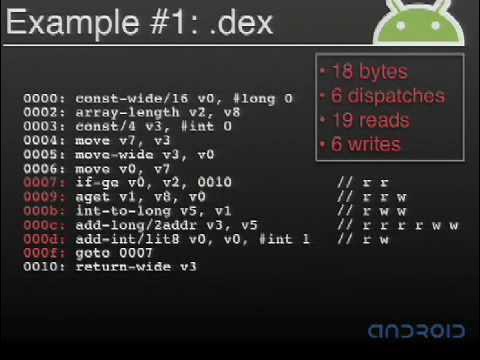
To illustrate the concrete advantages of the register architecture, Bornstein presents a realistic benchmark method that iterates over an integer array, sums its contents, and returns the accumulated result. In standard Java `.class` bytecode, this loop requires heavy manipulation of the operand stack. A naive JVM interpreter executing this loop incurs 45 reads (broken down into 25 instruction byte fetches, 12 stack reads, and 8 local variable reads) alongside numerous memory writes. Even a highly optimized JVM interpreter could at best eliminate around six reads and six writes.
When compiled to Dalvik `.dex` bytecode, the identical loop executes with far fewer bytes, less than half the total memory reads and writes, and dramatically fewer opcode dispatches. Bornstein points out that instruction dispatch is inherently expensive in software interpreters because each dispatch introduces branching overhead and instruction cache penalties. As Bornstein warns: “And I should add instruction dispatch is one of the big killers of interpreter performance. So, it really helps to be able to to dispatch fewer opcodes in your especially in your inner loops.”
- **Standard Java Bytecode (`.class`):** Naive interpreter requires 45 reads (25 instruction bytes, 12 stack reads, 8 local variable reads) and multiple writes per iteration.
- **Dalvik Bytecode (`.dex`):** Cuts memory reads and writes by more than 50% and eliminates intraframe stack traffic by operating directly on virtual registers.
---
[28:45](https://www.youtube.com/watch?v=ptjedOZEXPM&t=1725s) Array Initialization: Java Workarounds vs. DEX `fill-array-data`
Bornstein shifts to a notorious pain point in standard Java bytecode: initializing large static arrays of primitive data. In a standard `.class` file, hardcoding an integer array creates bloated bytecode. For a small array example, the `.class` representation burns 44 bytes of bytecode instructions, consumes 35 bytes in the constant pool, and forces four instruction dispatches per element just to push constants and store them into array slots. Each additional integer element adds 11 combined bytes of code and constants alongside four more instruction dispatches.
Developers frequently attempt to circumvent this bloat by packing binary array data into string literals within Java source code and decoding them at runtime. Bornstein explains why this traditional trick is flawed: decoding strings requires custom loop code that actually executes more instructions at runtime than direct initialization. Furthermore, because string literals in `.class` constant pools are encoded in modified UTF-8, multi-byte characters often inflate to three bytes per element, wiping out the intended space savings.
Dalvik solves this natively using the specialized `fill-array-data` bytecode instruction. In DEX format, the entire initialization in the example takes only 46 bytes total. Adding elements scales at exactly four bytes per integer—the precise physical size of the data—with zero constant-pool overhead. The VM executes only a single opcode dispatch to populate the array table directly from the payload. To optimize hardware memory operations, Dalvik inserts a `nop` padding instruction before the payload table so that primitive array payloads align cleanly on 32-bit integer boundaries. Bornstein reports that this single architectural optimization saved approximately 100 KB across Android's core system libraries.
| Initialization Characteristic | Standard Java `.class` Format | Workaround (Packed Strings) | Dalvik `.dex` (`fill-array-data`) |
|:--- |:--- |:--- |:--- |
| **Element Scaling** | 11 bytes + 4 dispatches per `int` | String data + decode loop instructions | Exactly 4 bytes per `int` |
| **Runtime Dispatch Cost** | 4 dispatches per array slot | High (runtime string parsing loop) | Exactly 1 opcode dispatch |
| **Encoding Overhead** | Stack-push & array-store opcodes | Inflates up to 3 bytes/char in UTF-8 | Raw binary, aligned via `nop` |
| **System Library Impact** | Massive constant pool & code bloat | High CPU overhead on initial decode | Saved ~100 KB across system libraries |
---
[32:11](https://www.youtube.com/watch?v=ptjedOZEXPM&t=1931s) The Evolution of Interpreter Dispatch: From Switches to Computed Goto
Bornstein turns to the mechanics of building fast virtual machine interpreters, beginning with a naive "toy" interpreter implemented with a `for` loop wrapped around a C `switch` statement. While conceptually straightforward, this structure suffers from severe branching overhead. Each interpreted opcode requires branching from the bottom of the loop back to the top, evaluating the switch condition, jumping to the target opcode handler, and branching back out at the end of the handler—accumulating roughly four branch instructions per bytecode operation.
To eradicate this overhead, modern C interpreters rely on a GCC extension known as threaded code or computed goto:
Bornstein humorously defends the technique, declaring: “So, this is one case where goto really isn't evil.” By embedding direct jumps inside each opcode handler, the interpreter replaces the centralized loop and switch with direct jumps to the next handler address via a lookup table, slashing the dispatch cost down to a single branch per opcode.
```mermaid
flowchart TD
accTitle: Naive Switch vs Computed Goto Branching Overhead
accDescr: Flow diagram showing how computed goto eliminates the centralized loop and switch dispatcher.
subgraph Naive ["Naive Switch Loop (~4 branches/opcode)"]
direction TB
LTop["Top of Loop"] --> STest["Switch Evaluation / Jump"]
STest --> OpExec1["Execute Opcode Handler"]
OpExec1 --> LBot["Break / Jump to Loop Bottom"]
LBot --> LTop
end
subgraph ComputedGoto ["Computed Goto (1 branch/opcode)"]
direction TB
CG1["Handler N"] -->|"Direct jump: goto *table[*pc++]"| CG2["Handler N+1"]
CG2 -->|"Direct jump: goto *table[*pc++]"| CG3["Handler N+2"]
end
```
---
[34:08](https://www.youtube.com/watch?v=ptjedOZEXPM&t=2048s) Hand-Coded Assembly and Fixed-Width Opcode Slots
While a C computed goto interpreter is fast, Bornstein explains that human assembly programmers can still outperform optimizing compilers when managing critical processor registers and data structure layouts. In a standard hand-written assembly computed goto interpreter, dispatching each opcode still requires two distinct memory loads:
1. Reading the next opcode byte/word from the memory location pointed to by the virtual program counter (`PC`).
2. Indexing into the opcode handler table to load the actual target memory address of that opcode’s executable handler.
Because any memory access imposes latency and cache pressure, Dalvik’s primary assembly interpreter eliminates that second memory read entirely. Dalvik dedicates an ARM register to hold the base address of the entire interpreter table and enforces a strict architectural rule: every single opcode handler occupies the exact same fixed number of bytes. Instead of loading an address from an opcode lookup table, the interpreter calculates the target handler's address mathematically by scaling the opcode value and adding it to the base register.
```mermaid
flowchart LR
accTitle: Dalvik Address Calculation vs Table Lookup Dispatch
accDescr: Comparison showing Dalvik's register arithmetic dispatch replacing an extra memory load.
subgraph StandardAssembly ["Standard Assembly Dispatch"]
direction TB
R1["1. Load opcode from [PC]"] --> R2["2. Load handler address from [Table + opcode*4]"]
R2 --> J1["3. Branch to handler"]
end
subgraph DalvikAssembly ["Dalvik Fixed-Slot Dispatch"]
direction TB
D_R1["1. Load opcode from [PC]"] --> D_C1["2. Compute: Target = Base_Reg + (opcode * Slot_Size)"]
D_C1 --> D_J1["3. Direct branch into slot"]
end
```
If an opcode’s implementation is very small, Dalvik pads the unused space with `nop` instructions so it still matches the slot size. If an opcode represents an inherently heavyweight operation—such as method invocation or field resolution—Dalvik places a branch instruction inside the slot to jump out to a helper routine elsewhere. This fixed-width layout delivers a dual benefit: it eliminates memory reads during instruction dispatch and aligns every opcode handler directly on hardware cache line boundaries. Infrequently executed opcodes remain cold and never pollute active CPU instruction cache lines, keeping Dalvik’s hot interpreter path exceptionally fast and compact.
[36:23](https://www.youtube.com/watch?v=ptjedOZEXPM&t=2183s) Time Scales of Optimization and the Battery Constraint
Dan Bornstein transitions from Dalvik's internal VM architecture to practical guidance for developers writing code for Android and mobile devices in general. The fundamental constraint dominating mobile development is the battery: any work code performs draws milliwatts, and without an AC wall connection, that power source will inevitably run out. Bornstein frames the optimization problem not around instruction counts alone, but around matching computation to human versus computer time scales.
```mermaid
flowchart TD
accTitle: Optimization Hierarchy by Time Scale
accDescr: Three operating time scales showing where application work should live to conserve battery power.
subgraph Human["Human Time Scales (Battery Friendly)"]
UI["Interactive Scale<br/>Typing: ~10 cps<br/>Touch/gestures: 15–30 pts/sec"]
Perception["Perceptual Scale<br/>Video: 25–30 fps<br/>Synchronized audio stream"]
end
subgraph Machine["Computer Time Scale (Battery Costly)"]
Compute["Computer Scale<br/>Unbounded computation / loops<br/>Cranking full-speed regardless of user"]
end
UI -->|"Sleeps between events"| Perception
Compute -.->|"Prolongs agony unless reduced to"| Human
```
Interactive human tasks occur slowly: a fast typist enters roughly 10 characters per second, while smooth dragging or finger gestures require sampling only 15 to 30 points per second. Perceptual tasks demand slightly higher rates, such as 25 to 30 frames per second for video and uninterrupted, synchronized audio. By contrast, computer-scale execution runs flat-out with no inherent limit, consuming battery as quickly as possible. As Bornstein warns:
> “And if your if your code really has to has to run at computer scale, any optimization that you do that doesn't sort of bring you up to one of the other scales is really it's sort of prolonging the agony before death.”
[38:54](https://www.youtube.com/watch?v=ptjedOZEXPM&t=2334s) Getting Plenty of Rest and Looping Wisely
Bornstein’s primary directive for well-behaved mobile applications is simple: “get plenty of rest.” A well-written app waits idly for user or network input, processes an incoming event, updates the display or state, and immediately sleeps again. Even an animated blinking cursor should merely update every half-second and spend the vast majority of its time asleep to protect battery life.
When an application genuinely must enter a tight loop at computer scale, developers need to choose their loop patterns carefully. Presenting seven typical `for` loop headers ordered from most to least efficient, Bornstein notes that the top three perform similarly, though downward-counting loops feel unnatural and are unnecessary unless the code demands it. The real danger lies in generic, object-based iterators at high iteration counts. Each iterator instantiation allocates an object; allocating continuously at computer scale forces Dalvik into frequent garbage collections.
```mermaid
flowchart LR
accTitle: Object Allocation and GC Pressure in Tight Loops
accDescr: Flow diagram showing how using iterators in tight loops creates high allocation and GC frequency.
Loop["Computer-Scale Loop"] -->|"Iterates over collection"| Alloc["Object Allocation<br/>(Iterator instances)"]
Alloc --> Heap["Rapid Heap Growth"]
Heap --> GC["Frequent Garbage Collection"]
GC -->|"Wastes CPU time & milliwatts"| Drain["Severe Battery Drain"]
```
- Top loop patterns perform comparably; rewriting natural upward loops into downward counters is rarely worth the awkwardness.
- Caveat: loop header micro-optimizations are irrelevant unless code runs at computer scale.
- Iterator-based generic loops trigger object allocations that quickly saturate Dalvik’s garbage collector under sustained throughput.
[41:48](https://www.youtube.com/watch?v=ptjedOZEXPM&t=2508s) Frugal Allocation: Balancing Short-Lived and Long-Lived Objects
Bornstein addresses memory allocation strategies, presenting what appears to be a paradox: developers must avoid short-lived objects because they trigger CPU-intensive garbage collection passes, but they must also avoid long-lived objects because they tie up dirty RAM. On Android, users expect to run multiple concurrent applications seamlessly; large amounts of pinned dirty memory directly reduce how many applications can reside in RAM before processes must be dropped.
The resolution is intentional frugality. Bornstein advises allocating long-lived structures only when they directly support interactions at human time scales, rather than supporting raw computer-scale churn. Wrapping up his talk before taking audience questions, Bornstein highlights Dalvik's origin story and reminds developers of their shared responsibility:
> “As I said, the the design was really a result of these system pressures and we've done we've done what we can to help minimize the pain for developers, but of course we can we can only go so far.”
An attendee asks whether Dalvik's 64 MB design target means the entire system never exceeds 64 MB. Bornstein clarifies that 64 megabytes is an architectural baseline for the engineering team—a defined lower bound for minimum supported hardware rather than a hard ceiling. If an OEM provides more memory, Android readily uses the headroom to cache more running processes and expand system library functionality.
The discussion then turns to the Android kernel's low memory killer (LMK) and its interaction with Dalvik. Bornstein explains that the LMK exists to preserve the user illusion that every app remains open simultaneously. When free memory is exhausted, the LMK reclaims RAM by terminating least-recently-used processes. Because the LMK operates at the Linux process level, it treats a Dalvik VM instance identically to any native C or C++ process. Finally, responding to an inquiry about whether small iterator objects escape heap allocation via stack allocation, Bornstein confirms that Dalvik 1.0 does not perform stack allocation or escape analysis:
> “No, actually, we we do all allocation for uh for the for the 1.0 version. All all allocations are done on the heap.”
[48:06](https://www.youtube.com/watch?v=ptjedOZEXPM&t=2886s) Heap vs. Stack Allocation and Post-1.0 Plans
An audience member asks about object allocations—specifically when creating objects via `new` or when the code allocates small objects under the covers, placing them on the heap—and whether the Dalvik team plans to introduce stack allocation or optimizations to avoid heap churn. Dan Bornstein responds that the team is always focused on performance: “So, um, I think the, the, the very general answer is we always want to make it better.”
While he is not certain whether performing escape analysis and stack allocation for temporary objects would provide a net win on the platform, he acknowledges it could be beneficial. However, Android is currently focused on its initial delivery, noting that “we're, we're actually just on the cusp of exploring what we want to do after, after 1.0.”
[48:50](https://www.youtube.com/watch?v=ptjedOZEXPM&t=2930s) Tooling Ecosystem: Why Target the Java Language over CLR or a Custom Compiler?
A questioner inquires why the Dalvik team chose to translate Java `.class` bytecode into Dalvik Executable (`.dex`) files rather than targeting Microsoft's Common Language Runtime (CLR) or developing an entirely new compiler that compiles directly from source code to DEX. Bornstein explains that the primary driver was the maturity and reach of the existing Java developer ecosystem. Tools like Eclipse, NetBeans, IntelliJ IDEA, Emacs, and command-line debuggers like JDB or JSwat already had deep adoption across the software engineering world, particularly within open-source communities.
```mermaid
flowchart TD
accTitle: Java Toolchain to Dalvik Translation
accDescr: Diagram illustrating multiple source languages and compilers targeting class files, which are then processed into DEX format.
subgraph Sources["Source Languages & Compilers"]
JavaSrc["Java Source Code"] --> StandardComp["Standard Compilers (javac, ECJ)"]
OtherSrc["Other JVM Languages"] --> JVMComp["Alternative Compilers"]
end
Bornstein emphasizes that the team avoided introducing an unfamiliar, bespoke environment: “And when we were building this platform, we really didn't want to throw something totally new out there that was, was unfamiliar and didn't have rich tool support.” Evaluating the landscape led them to determine that the “local maximum” was embracing the Java programming language. Addressing CLR, Bornstein notes that his perception was that Java maintained significantly broader open-source activity. Furthermore, by placing the translation boundary at the compiled `.class` level rather than writing a single-language source-to-DEX compiler, Android automatically works with any standard Java compiler while leaving the door open for other JVM languages to be translated into `.dex` files.
- Ecosystem tooling supported out of the box: Eclipse, NetBeans, IntelliJ, Emacs, JDB, and JSwat.
- Multiple standard Java compilers can be used without altering Android's build pipeline.
- Converting `.class` files rather than compiling source directly ensures any language emitting standard JVM bytecode can potentially run on Dalvik.
[51:46](https://www.youtube.com/watch?v=ptjedOZEXPM&t=3106s) Linux Kernel Basis and Open-Source Contributions
When asked what Linux kernel version powers Android and what modifications were made, Bornstein notes that kernel engineering is outside his immediate specialization, but confirms Android runs on the Linux 2.6 series (an audience member suggests 2.6.24). He highlights that Google has already open-sourced all kernel patches, distributing them through a public Git repository alongside the initial SDK release, with ongoing updates pushed upstream.
Another audience member asks whether Dalvik's bytecode optimizations can be backported to standard Java bytecode. Bornstein explains that because the standard `.class` format is rigid and long-established, Dalvik's structural changes cannot easily be fed back directly into JVM bytecode specifications. Instead, Android's entire source code will be made open source, allowing the architecture and ideas to inform other projects: “And my, my hope is that this code, while it may not, say, you know, trans- transfer into some other project directly, at least, you know, the ideas that we've explored, um, can help inform other, other projects on, you know, their, their decisions for how they, they build similar systems.”
[53:55](https://www.youtube.com/watch?v=ptjedOZEXPM&t=3235s) Dynamic Runtimes and the On-Device Class Limitation
The discussion moves to whether alternative JVM runtimes like Jython can run on Android. Bornstein clarifies a critical structural constraint of the Dalvik VM: the runtime environment on the device does not understand or execute `.class` files directly.
Because runtimes such as Jython rely heavily on generating JVM `.class` bytecode dynamically in memory during program execution, they cannot execute on Android without extensive modifications. Android devices do not currently ship with on-the-fly `.class`-to-`.dex` compilation mechanisms: “So, any, um, any language runtime that requires that, um, isn't going to be able to operate on, uh, on a Dalvik VM without having some major surgery done to it.”
[54:57](https://www.youtube.com/watch?v=ptjedOZEXPM&t=3297s) Activity Lifecycle, Process Isolation, and Native Call Blocking
An attendee asks whether starting an Activity versus a sub-activity translates to a standard `fork` versus a `vfork` from the Zygote process, and how Dalvik handles blocking native calls that could potentially freeze the operating system or trigger watchdog timer resets. Bornstein clarifies that the distinction between Activities is not about `fork` vs. `vfork`, but about process boundaries: when the platform resolves an Intent, it evaluates whether the target application (APK) already has an active process running; if not, an entirely new process is spawned.
Addressing native blocking calls, Bornstein points out that whether a thread executes interpreted bytecode or native C/C++ code makes no difference to the underlying Linux scheduler; time slices and thread scheduling remain consistent. Developers should offload blocking tasks away from the main UI thread into worker threads to keep interfaces smooth.
```mermaid
flowchart TD
accTitle: Process Isolation and Unresponsive Process Handling
accDescr: Flowchart demonstrating how hardware keys bypass a blocked process to ensure the OS UI remains responsive.
subgraph SystemIntervention["Hardware & System Management"]
HardwareKey["Hardware Button (Home / End)"] -->|"Low-level Interrupt"| SystemServer["Linux / Android System Server"]
SystemServer -->|"Bypasses Dalvik App"| RestoreHome["Restore Home Screen"]
SystemServer -.->|"If Unresponsive"| ProcKiller["System Process Killer"]
ProcKiller -->|"Terminate"| StuckProc
end
```
Crucially, system reliability does not hinge on trusting individual application threads. Bornstein highlights the design philosophy isolating application crashes from the rest of the OS: “So, for us, um, the, uh, this may be a, a little, uh, a little oversimplified, but our, our aim really is that if a process is misbehaving, it's, it's really sort of limited to just that process having trouble and not affecting the rest of the system.” Android reserves physical hardware buttons—such as the Home or End keys—which hook into low-level interrupts below the Dalvik VM. An application cannot capture or block these keys; pressing Home immediately pulls up the launcher, leaving the background system killer free to reap any non-responsive task. With the session winding down, Bornstein opens the floor for a final question.
[59:37](https://www.youtube.com/watch?v=ptjedOZEXPM&t=3577s) Nested Loop Performance and JNI Optimization
An audience member presents a performance scenario involving an image manipulation routine built with two nested loops iterating from 1 to 100 or 200, wrapped around basic arithmetic calculations. The developer observes that the routine takes around a full second to execute, which feels unusually slow for such a straightforward task. This prompts a two-part question: first, how one should best optimize that kind of nested loop math in Java to run quickly under the Dalvik VM; and second, whether the Dalvik team has introduced any specific optimizations to accelerate Java Native Interface (JNI) calls beyond standard JNI implementations.
Due to strict time limits at the end of the session, Dan Bornstein explains that he only has enough time to address the second half of the question regarding JNI performance. He confirms that Dalvik provides full support for standard JNI, and the team focused on refining the internal mechanics of the VM so that native boundary crossings are as streamlined as possible for application code.
Dan Bornstein summarizes the state of standard JNI execution and native platform hooks:
> “And what we have done is a couple of tweaks to how we implement that to to make it about as painless as painless and efficient as a JNI call could possibly be.”
- **Application vs. Platform Native Calls**: Standard JNI is fully supported for third-party application developers with internal VM tweaks to minimize dispatch overhead.
- **Low-Overhead Platform Alternatives**: Android provides an alternative native calling convention internally that bypasses standard JNI overhead entirely; however, it remains restricted to low-level platform code to preserve application portability.
[01:01:16](https://www.youtube.com/watch?v=ptjedOZEXPM&t=3676s) Session Wrap-Up and Android Booth Q&A
With the allotted presentation time exhausted, Dan Bornstein thanks the audience for attending the session. He invites anyone with remaining questions—including topics cut short by the clock—to meet up with him in the hallway at the Android booth for further discussion.
Dan Bornstein concludes the presentation:
> “So, with that, thank you very, very much for coming.”
## Notable quotes
> [25:01](https://www.youtube.com/watch?v=ptjedOZEXPM&t=1501s) The most radical thing that we do in DEX files is to have an entirely new bytecode instruction set. — Dan Bornstein
> [21:58](https://www.youtube.com/watch?v=ptjedOZEXPM&t=1318s) for Android, the platform security is really being guarded by the process boundaries as opposed to anything that we're doing within a single process. — Dan Bornstein
## Mentioned
Dan Bornstein, Dalvik Virtual Machine, Dalvik Executable, Android, Google, Google I/O 2008, Linux, Zygote, Java, JVM, JNI, Jython, ARM, GCC, Eclipse, NetBeans, IntelliJ IDEA, Emacs, JDB, JSwat, Common Language Runtime
## Video description
Dalvik VM Internals
Dan Bornstein (Google)
Dalvik — the virtual machine with the unusual name — runs your code on Android. Join us to learn about the motivation for its design and get some details about how it works. You'll also walk away with a few tips for how to write code that works well with the platform. Be prepared for a deep dive into technical details. Questions encouraged!
At Google I/O 2008, engineer Dan Bornstein presented the Dalvik Virtual Machine, explaining how extreme mobile hardware constraints—particularly limited RAM and battery capacity—dictated a ground-up departure from standard Java Virtual Machine architecture. Android achieved efficient multi-process execution by combining a custom register-based executable format with deep Linux memory-sharing mechanisms.
Hardware Constraints and Memory Architecture (2:50)
Dalvik was engineered around a baseline hardware profile comparable to a late-1990s desktop computer: a modest CPU, no virtual memory swap space, and approximately 64 MB of total physical RAM, leaving only about 20 MB for user applications once system services boot. To enforce security, Android runs each application inside an isolated Unix process. However, because duplicating 10 MB system libraries across multiple isolated heaps would immediately exhaust available memory, the runtime relies on virtual memory management that categorizes memory along clean versus dirty and shared versus private axes. The system aims to minimize private dirty memory, which cannot be dropped or shared by the kernel under pressure.
The Zygote Process and Memory Optimization (11:45)
To maximize shared memory, Android initiates a core daemon called the Zygote during system boot. The Zygote preloads and links common system classes and core libraries into live heap structures, then listens on a socket to spawn application processes using the standard Unix fork() command. Child processes inherit the pre-populated runtime structures through copy-on-write memory sharing, avoiding private allocations until pages are modified. To preserve this shared state, Dalvik maintains garbage collection mark bits in detached bit vectors rather than inside object headers; in-line object mark bits would dirty memory pages during routine garbage collection sweeps and trigger copy-on-write faults across the system.
DEX File Structure and Redundancy Elimination (5:44)
Standard Java packaging stores compiled code across individual .class files, each containing redundant constant pools with duplicate strings, types, and method signatures. Dalvik replaces this model with the Dalvik Executable (DEX) format, generated at build time via the dx tool. The DEX format consolidates redundant metadata into unified, typed constant pools for strings, types, prototypes, fields, and methods. An uncompressed DEX file is typically smaller than a compressed JAR archive of the same code. Dalvik also optimizes primitive data using the specialized fill-array-data bytecode instruction, which scales at exactly four bytes per 32-bit integer payload aligned via nop instructions, eliminating runtime string-decoding workarounds and saving roughly 100 KB across Android system libraries.
Register-Based Bytecode and Interpreter Mechanics (25:01)
Dalvik replaces the standard JVM stack-based model with an infinite register machine using 16-bit code units. Operating directly on registers eliminates intermediate stack pushes and pops, cutting memory reads and writes by more than 50% in tight benchmark loops and reducing dispatch frequency. Android 1.0 explicitly excluded a Just-In-Time (JIT) compiler to avoid code expansion and private dirty memory bloat, relying instead on ahead-of-time verification and optimization (dexopt) to resolve symbolic references to vtable offsets and elide empty Object constructor calls. For dispatch, Dalvik progressed beyond C switch loops and computed-goto threading to a hand-coded assembly interpreter with fixed-width opcode slots, calculating handler target addresses via register arithmetic to eliminate table-lookup memory loads.
Developer Guidelines and Runtime Limitations (36:23)
Bornstein emphasized that battery longevity requires applications to run primarily at interactive human scales (10 to 30 events per second) or perceptual scales (25 to 30 frames per second) and sleep between events rather than running unconstrained at computer scale. In tight loops, generic iterator objects should be avoided because Dalvik 1.0 performs all object allocations on the heap without escape analysis or stack allocation, rapidly triggering garbage collection passes. Furthermore, because Dalvik executes DEX files rather than Java bytecode directly, dynamic runtimes like Jython that generate in-memory .class files cannot operate on Android without significant architectural modification.
Dalvik addresses extreme mobile resource constraints through ahead-of-time optimization, unified binary packaging, and OS-level memory sharing rather than dynamic compilation. However, Dalvik 1.0 relies entirely on heap allocations without escape analysis and lacks on-device bytecode translation, leaving dynamic language runtimes and stack-based allocation optimizations as post-1.0 development considerations.
[25:01] Dan Bornstein: The most radical thing that we do in DEX files is to have an entirely new bytecode instruction set.
[21:58] Dan Bornstein: for Android, the platform security is really being guarded by the process boundaries as opposed to anything that we're doing within a single process.
Original transcript
[0:02] Hi everyone.
[0:03] Welcome back to Google IO. Hope you had
[0:06] a good time yesterday. I hope you have a
[0:07] good day today.
[0:09] I'm Dan Bornstein. I'm here to tell you
[0:11] about the Dalvik virtual machine.
[0:17] So, a little bit about my background. I
[0:19] joined Google in 2005 to work on the
[0:22] Android project.
[0:23] And I've been working on Dalvik almost
[0:26] the entire time.
[0:27] Uh before Google, I worked at on a
[0:30] couple different VMs at a few different
[0:32] companies
[0:33] uh including on the HipTop virtual
[0:35] machine uh immediately prior to Google.
[0:38] And uh although I did start the Dalvik
[0:41] project at Google, um the virtual
[0:44] machine and the libraries uh wouldn't be
[0:47] where they are today without the work of
[0:50] a whole lot of other people um
[0:52] ha- about half a dozen core contributors
[0:54] and a slew of other uh
[0:57] slew of other help throughout the team.
[0:59] So,
[1:00] thanks to those guys.
[1:03] Um if you're curious about the name,
[1:05] uh Dalvik Iceland is in the northern
[1:08] part of the country uh northern part of
[1:10] Iceland. Uh it's if you want to go to
[1:13] the Arctic Circle, you can catch a ferry
[1:15] there.
[1:19] Okay. If if you're familiar with Android
[1:21] at all, you've probably seen this
[1:23] diagram.
[1:25] Uh very briefly, Android is a it's a new
[1:28] platform for mobile devices and it
[1:31] really is the complete stack. Includes
[1:33] layers from the OS kernel at the bottom
[1:36] uh and drivers uh up through an
[1:38] application framework at the top and uh
[1:40] even includes a few applications.
[1:43] Uh
[1:44] You write your you write your
[1:45] applications in the Java programming
[1:47] language and they get translated after
[1:50] compilation into a form that that runs
[1:52] on the Dalvik virtual machine.
[1:55] And the rest of this talk is really just
[1:57] about the virtual machine.
[2:00] Uh I'm going to give you a couple a tour
[2:01] of a a couple aspects of the VM's
[2:04] design. And uh in particular how it was
[2:07] uh influenced by the constraints imposed
[2:09] by the rest of the platform.
[2:11] And uh at the end I'm going to distill
[2:13] out uh just a couple pieces of advice uh
[2:16] for your application development on on
[2:19] this platform.
[2:20] Um
[2:21] I'm going to assume you're generally
[2:24] familiar with the Java programming
[2:25] language uh and know at least a little
[2:28] bit about what it means to be a virtual
[2:30] machine.
[2:31] And uh if I
[2:33] if I omit a few details, I'm going to
[2:35] try to leave plenty of time for Q&A at
[2:37] the end.
[2:38] So
[2:39] just
[2:40] be aware of that and if just hold your
[2:42] questions and I will try to answer
[2:44] anything you have
[2:46] after the talk.
[2:50] So
[2:51] the the virtual machine again is is
[2:54] designed based on the constraints of the
[2:55] platform.
[2:56] And you can see a a few of the the key
[2:59] ones. We're assuming not not a
[3:02] particularly powerful CPU, not very much
[3:04] RAM, especially by say today's desktop
[3:07] standards. An easy way to think about it
[3:09] is as approximately equivalent to a like
[3:13] a late '90s desktop machine with a
[3:15] little more modern operating system, but
[3:17] with one very important constraint.
[3:24] So battery you know, batteries are
[3:26] getting better as time goes on just like
[3:28] any technology.
[3:30] Um unfortunately, it doesn't look like
[3:32] it's keeping up with Moore's law. So you
[3:36] know, 18 months your your CPUs are
[3:38] getting faster, your your memory density
[3:40] is getting
[3:41] you know, twice twice as much, but your
[3:43] battery life isn't quite keeping up.
[3:46] So that really that really is a a key
[3:48] concern for any kind of mobile
[3:50] development.
[3:54] So, now that you know a little bit about
[3:55] our constraints, uh let's see how we
[3:57] address a couple of them.
[3:59] Um as I said, we're expecting to run on
[4:02] fairly low memory devices by desktop
[4:04] standards.
[4:06] So, in particular, this is this is kind
[4:08] of how a
[4:09] low a low-end Android device is going to
[4:12] look in terms of uh
[4:14] sort of system characteristics.
[4:17] Um
[4:18] so, you know, once once everything is
[4:20] started up on the system, we're not
[4:22] really expecting there to be that much
[4:24] memory left for applications.
[4:26] And of course, so we try to to make the
[4:29] most of that.
[4:30] But, one wrinkle in the works is that
[4:34] our the Android platform security relies
[4:37] on modern process separation. So, each
[4:41] application is running in a separate
[4:43] process, there's a separate address
[4:44] space, it has separate memory, and apps
[4:48] are not allowed to to interfere with
[4:50] each other at at that level.
[4:52] And and so that that means that if
[4:54] unless you do something special,
[4:57] that 20 megs really isn't going to go go
[4:59] far at all.
[5:00] And in addition to this,
[5:02] a modern
[5:04] platform that we we try to make it, you
[5:05] know, have a rich have a rich set of
[5:07] APIs for developers to use,
[5:09] we have a fairly large system library.
[5:12] And so, again, if you
[5:14] don't do anything special,
[5:16] well, with a 10 meg library, 20 megs
[5:19] left for apps, that really really
[5:21] doesn't leave much space at all.
[5:24] Uh and I
[5:25] think I
[5:26] uh
[5:27] had a previous slide that we don't have
[5:29] swap space.
[5:30] So, just want to emphasize that. So, mhm
[5:33] uh there's no if you have 64 megs of
[5:35] RAM, you have 64 megs of RAM, and
[5:38] that's that's kind of the the size of
[5:40] it.
[5:42] Okay.
[5:44] So,
[5:45] as I said, we translate
[5:47] Java Java class files into a new form to
[5:51] execute on the device. That form is
[5:53] called a DEX file. It stands for Dalvik
[5:56] executable.
[5:57] And here is in a very general way what a
[6:00] what a DEX file looks like.
[6:02] The sizes of those areas aren't to
[6:04] scale, but it's meant to give you at
[6:06] least a general impression.
[6:09] After the header, there's there are
[6:10] these five separate constant pool
[6:13] sections. Each constant pool section is
[6:15] of a particular type. You can see what
[6:17] they are there.
[6:18] And just for example, the top there, the
[6:20] string ID section identifies literally
[6:23] strings. So, any string that you have in
[6:25] your file, be it a
[6:27] in your in your code either an explicit
[6:29] quoted string in the source or say the
[6:32] name of a method, name of a field, those
[6:34] will all end up having references in the
[6:35] string ID section.
[6:37] And then towards the bottom, there are a
[6:40] series of class definitions. So,
[6:43] DEX file contains multiple classes. Each
[6:46] one of those has a little
[6:48] a little section there. And then at the
[6:50] bottom, there's general data. So, all of
[6:53] these other sections are going to are
[6:55] pointing will end up pointing at that
[6:57] data. And actually
[6:59] the sections will point back and forth
[7:01] at each other. So, for example, a type
[7:04] ID, so this is something that names a
[7:05] type such as a class or a primitive
[7:07] type, well, that the name of that is
[7:10] represented in the strings. A method has
[7:13] a name and a signature, and you can see
[7:15] how those point around.
[7:24] As I said, there's
[7:26] there's a a build time tool that does
[7:28] this translation. So, this is just a
[7:30] simple illustration of how say a several
[7:33] classes in a JAR file turn into a single
[7:36] DEX file.
[7:42] Okay. And this is just just a few
[7:44] classes I'm going to use as as an
[7:46] example.
[7:47] So, there's a interface, an implementer
[7:50] of that interface, and uh use of that
[7:54] of that implemented interface.
[7:58] Here is approximately what that looks
[7:59] like as separate dot class files.
[8:02] Um this is a very oversimplified
[8:05] diagram, but it again it's it's meant to
[8:07] give you a flavor of the of the strings
[8:10] in in that in those files and
[8:12] the the various references.
[8:16] And you can see that there's a fair
[8:18] amount of duplication.
[8:20] Um what I'm pointing at here are the
[8:21] method signatures. So, each one of these
[8:24] classes refers to a method which takes
[8:27] the same arguments and the same return
[8:28] type. And so, each one of those classes
[8:31] is going to have that that full
[8:32] signature there.
[8:33] And in addition, there's a fair amount
[8:35] of strings that label internal bits of
[8:39] the class files themselves.
[8:44] On the other hand, this is what it looks
[8:46] like as a DEX file.
[8:50] Again, we we've collapsed all of those
[8:53] con- the separate constant pools into
[8:55] one constant pool.
[8:56] And as a result, there's there's a bit
[8:58] more pointing around inside a DEX file.
[9:01] But as a result, we get to share a lot
[9:04] more.
[9:05] So, you can see that there's
[9:07] there are many fewer boxes in this
[9:09] diagram than there than there were in
[9:11] the
[9:13] in in the previous one, and that really
[9:15] does represent that there's there's less
[9:17] total
[9:18] uh storage required for this shared
[9:21] constant pool in a DEX.
[9:26] So, the point here again is that
[9:28] sharing these separately typed constant
[9:31] pools among all all of the classes, it's
[9:34] it's reducing the amount of data that
[9:35] you need to to represent all of them
[9:37] together.
[9:38] And in addition to this this sharing
[9:41] just at the constant pool level, we were
[9:44] fairly careful about how we lay out all
[9:46] of the structures in the file.
[9:48] And uh
[9:49] I'm not going to talk about that more,
[9:51] but I'd be happy to answer questions
[9:53] later about that.
[9:55] But, I wanted to
[9:57] just show you kind of
[9:59] the high-level conclusion.
[10:01] So, these numbers are sizes in bytes uh
[10:04] of the the system libraries of the
[10:07] Android platform along with a couple of
[10:09] sample applications. I took these
[10:12] numbers about 2 weeks ago, so
[10:15] they're reasonably accurate. So, what
[10:17] you can see there is that a normal JAR
[10:20] file
[10:21] is generally about half the size of the
[10:24] uncompressed class files.
[10:27] And
[10:28] at the same time, the uncompressed DEX
[10:30] file that represents the exact same code
[10:32] is is usually a couple percentage
[10:35] points even smaller than that compressed
[10:37] JAR file.
[10:40] And you may be wondering why we we care
[10:42] so much about having these good
[10:44] uncompressed characteristics.
[10:45] Well,
[10:47] so here's why.
[10:49] So, on really any modern operating
[10:53] system you can think of there is being
[10:55] four different kinds of memory in a in a
[10:57] very general sense. And that's two
[11:00] variants along two act on sort of two
[11:03] axes. There's clean memory versus dirty
[11:05] memory.
[11:06] And there's shared memory versus pri-
[11:08] private memory.
[11:10] Clean memory is simply any memory that
[11:13] the operating system kernel can drop
[11:16] from from main memory and not have any
[11:18] impact on the kind of the the overall uh
[11:23] semantics of the system.
[11:25] And the reason it can drop it is either
[11:27] because it is, say, just a page full of
[11:31] zeros and the kernel knows that oh, if
[11:33] if it's zeros, I can recreate a page of
[11:35] zeros on demand. And similarly, if it's
[11:38] backed by a file, you can you can map in
[11:41] those pages from the file again as you
[11:43] need to on demand.
[11:45] Shared Shared versus private.
[11:47] Private memory is simply memory that is
[11:49] used only by one process, and shared
[11:51] memory is memory that's used by multiple
[11:53] processes.
[11:55] As I said, clean memory is is ideal
[11:59] because the kernel can just eject those
[12:01] pages from RAM pretty much at will.
[12:03] And shared is better because any cost of
[12:06] that memory that is going to have to
[12:07] stay in main main memory until it gets
[12:10] freed,
[12:11] that that cost is at least amortized
[12:13] across multiple processes.
[12:17] So,
[12:18] shared shared clean uh is even is even
[12:21] better than than private clean, but
[12:23] but either kind of clean memory is good.
[12:26] Private dirty is the is the kind of
[12:28] memory that we want to minimize.
[12:36] So, on the Android platform, this is
[12:38] kind of how it shakes up.
[12:41] As as clean memory, these these
[12:44] uncompressed DEX files get mapped in.
[12:47] Uh and these are either the the system
[12:49] library, obviously, and also any any
[12:52] application DEX file. These all get to
[12:54] get to be mapped into memory.
[12:56] And private dirty memory is any of the
[13:00] the associated structures once you start
[13:02] up the virtual machine uh when you load
[13:05] when you load a class, when you refer to
[13:06] methods, these require some amount of
[13:09] live of live dirty memory to represent,
[13:11] as well as the general application heap
[13:13] when you, you know, construct objects.
[13:16] They have to go into memory, and that
[13:17] that becomes dirty memory.
[13:19] In
[13:22] uh for for any given application, it's
[13:24] going to have some code generally going
[13:27] to have some code that is private to it.
[13:30] It's going to have its own heap. So,
[13:31] these are going going to be private
[13:33] memory. Or private private dirty memory.
[13:35] And the important question is
[13:37] what can we do to have shared dirty
[13:39] memory?
[13:42] And
[13:43] our solution to that is this thing that
[13:44] we call the zygote.
[13:47] Uh
[13:47] what we do with the zygote, as it as its
[13:49] name implies,
[13:51] uh it's it comes into existence fairly
[13:54] early on during the boot of an Android
[13:56] system.
[13:57] And
[13:58] its job is to load up those classes that
[14:02] we believe will be used across many
[14:04] applications.
[14:06] So, it goes and creates
[14:09] it's it goes and creates a heap, it goes
[14:11] and creates that dirty memory for
[14:14] all to represent those classes and
[14:16] methods.
[14:17] And then it sort of sits it sits on a
[14:19] socket and it waits for commands. And
[14:22] when it gets a command to start up a new
[14:24] application, it it does a normal Unix
[14:27] fork. And then that child process
[14:31] becomes that target application.
[14:36] And the result of that
[14:39] is this.
[14:43] So, the zygote again
[14:45] has made
[14:47] has made this
[14:48] uh this heap of objects, it's made this
[14:51] uh live deck structures. And then each
[14:53] application that then then starts up,
[14:56] instead of having its own memory for
[14:58] those things, it just shares it with the
[15:01] zygote and also with any other app
[15:03] that's also on the system.
[15:07] So, back to that that slide, answer this
[15:10] answers the question.
[15:13] So,
[15:13] our goal again is to get as much as much
[15:16] memory to be mapped clean as possible.
[15:20] But, we at least have have this out for
[15:23] where we really do have to allocate that
[15:25] we can reduce the cost in terms of the
[15:28] the whole system performance.
[15:36] So, garbage collection actually throws a
[15:38] little bit of
[15:39] of a wrinkle into things.
[15:41] Um in
[15:43] in general, in uh there are two
[15:46] strategies for how one represents the
[15:50] the meta information that you need when
[15:52] doing a garbage collection uh garbage
[15:54] collection.
[15:56] Uh on the left, you can see one one
[15:58] style is you have this associated
[16:01] information
[16:02] um say mark bits
[16:04] uh
[16:05] sitting next to each object that's
[16:07] allocated so that when you when you do a
[16:09] garbage collection, that data is is
[16:12] right there. So, if you're going to scan
[16:13] an object, you'll have the say the mark
[16:15] bits right right there ready to go. On
[16:18] the other hand, you can keep the the
[16:21] kind of the live object data together
[16:23] and have the separate allocation for
[16:26] your garbage collection information.
[16:28] And the argument can really go either
[16:30] way um at least in in the larger sense.
[16:34] Um
[16:36] for like on the one hand, if you are if
[16:39] you have the the mark bits embedded with
[16:41] the object, well, that means that when
[16:43] you're garbage collecting, those the the
[16:45] cache lines for that object will will
[16:47] already be warm by the time you need to
[16:48] scan the object. On the other hand, you
[16:51] have better
[16:53] when you're not garbage collecting, if
[16:55] you keep the if you keep the garbage
[16:56] collection information separately, when
[16:58] you're not collecting,
[17:00] then you have a a more dense cache.
[17:05] So, that's that's the big picture.
[17:07] However,
[17:10] again, with with the Android platform,
[17:12] we we do have
[17:14] uh we we We always have to keep in mind
[17:16] that we are
[17:18] trying to exist in in a world where
[17:19] there are these multiple processes all
[17:21] living on a a fairly constrained device.
[17:24] And
[17:26] you know, they are separate processes.
[17:27] Each process has a separate heap. Each
[17:29] heap uh is garbage collected
[17:32] independently.
[17:35] And that really led us to the conclusion
[17:37] that
[17:39] for Android at least
[17:41] having separate having the separate uh
[17:44] garbage collection information having
[17:45] having mark bits to be separate is the
[17:47] only viable solution.
[17:50] And this is particularly true because of
[17:52] that of because of that zygote process.
[17:54] Remember, the zygote has its own heap
[17:57] and that that heap is shared. So, if we
[18:00] had mark bits interspersed in that
[18:02] zygote heap, the moment that we did a
[18:05] garbage collect
[18:07] uh the process would try to touch those
[18:10] those pages in the zygote and therefore
[18:12] force them to be unshared. So, we would
[18:15] very quickly find that instead of having
[18:17] shared dirty memory, we would have
[18:18] private dirty memory and that would kill
[18:22] kill the memory performance on the
[18:23] system.
[18:29] And I should add
[18:32] one one additional benefit is because
[18:35] most processes aren't garbage collecting
[18:38] most of the time,
[18:40] we don't actually have to allocate that
[18:42] that mark array except during those
[18:45] moments when we're we're doing the
[18:47] garbage collect.
[18:49] And again, that means that there's that
[18:51] much more memory for additional apps to
[18:53] be running simultaneously.
[18:58] Okay. Now, I just want to take a few
[19:00] minutes to tell you what we do on the
[19:03] CPU front.
[19:07] Again, as I said at the beginning, we're
[19:10] running on
[19:11] a platform or expecting to run on on a
[19:14] platform that that looks like
[19:17] what you might have had on your desktop
[19:19] 10 years ago.
[19:22] And, you know, you can you can see that
[19:25] it's a fairly slow bus, almost no data
[19:27] cache at all. And I just want to
[19:29] re-emphasize that there's very little
[19:32] RAM for an app for for applications once
[19:34] you consider all of the things that your
[19:37] device is doing
[19:38] say as a phone. It has to answer phone
[19:40] calls, it has to be able to take take in
[19:43] send SMSs. All of these things are
[19:45] essential services as far as the user is
[19:47] concerned.
[19:50] So, before I tell you what we are doing
[19:52] to address these, I'm going to tell you
[19:54] one thing that we're not doing at least
[19:56] in the 1.0 time frame.
[20:00] So, we're not doing a just-in-time
[20:01] compiler.
[20:03] And
[20:04] the reason we don't is it gets right
[20:08] back to that memory issue.
[20:10] When you when you compile code from from
[20:13] set from a byte code to assembly, that's
[20:16] typically going to make the code grow at
[20:17] least a bit.
[20:19] If unless you're unless you're doing
[20:21] something
[20:22] fairly clever, you're not going to be
[20:25] you're you're you won't be
[20:27] you you'll be using uh
[20:29] you'll you'll be using dirty memory for
[20:31] that for that JIT cache.
[20:33] So, that again increases the memory
[20:35] pressure.
[20:37] And in addition, if you look at the the
[20:40] big picture of the system, we're we are
[20:42] providing a lot of
[20:45] of native code to do the the really
[20:47] heavy lifting. So, to do the the 2D and
[20:50] the 3D graphics, to do audio and video.
[20:54] So, we're we we provide native libraries
[20:57] for all of those things. So,
[20:59] it so that the interpreter performance
[21:01] or the the the the high-level language
[21:04] performance really
[21:05] doesn't come into play for at least a
[21:08] large class of things that that you'll
[21:10] be doing a lot of the time.
[21:12] And
[21:14] if you're if you're a platform developer
[21:16] as opposed to an app developer, you can
[21:18] always add new functionality that you
[21:20] need via via JNI.
[21:26] So,
[21:27] the the short version really is is you
[21:28] can you can always imagine an
[21:29] application that you would want to write
[21:31] that could could use just a little bit
[21:33] more
[21:34] uh CPU efficiency. However, you can you
[21:37] can There there are plenty of apps that
[21:39] that are that will do just fine. And And
[21:41] generally, just with with a little
[21:43] careful coding, you can you can really
[21:45] mitigate any any negative effects that
[21:47] there otherwise would have been. And
[21:49] I'll I'll talk a little bit about that
[21:50] later.
[21:58] So, what What are we doing to actually
[22:01] be efficient on the platform?
[22:04] So,
[22:05] first of all, when an application gets
[22:07] installed, and also when the system
[22:08] itself gets installed,
[22:10] the the
[22:12] the platform will the the system will
[22:14] will do a a lot of work up front to
[22:16] avoid doing work at runtime.
[22:20] So, one of the major things we're do we
[22:22] do is verification of DEX files.
[22:26] And what this means is that
[22:30] as a as a type-safe, reference-safe
[22:33] runtime, we want to ensure that the code
[22:35] that we're running doesn't violate the
[22:37] the constraints of of of the system.
[22:40] Doesn't violate type safety. Doesn't
[22:42] doesn't doesn't violate uh reference
[22:45] safety.
[22:46] And for Android, this is really more
[22:49] about minimizing the app the the impact
[22:51] of bugs in an application as opposed to
[22:54] being a security consideration in and of
[22:56] itself. Uh again, this is because for
[22:59] Android, the platform security is really
[23:03] being guarded by the process boundaries
[23:05] as opposed to anything that we're doing
[23:07] within a single process.
[23:09] Although
[23:11] this is at least a little bit of a
[23:12] concern
[23:13] uh and for our more sensitive, say,
[23:17] system processes, where we where we
[23:18] really want to to try to guard against
[23:20] bugs because those bugs could turn into
[23:23] security violations.
[23:26] In addition to verification,
[23:29] we do
[23:30] Mhm.
[23:32] Mhm.
[23:34] we do optimization.
[23:36] And
[23:38] so the first time that that uh a DEX
[23:41] file lands on a device, we
[23:44] we do that verification work. We also
[23:47] we also uh augment that file. If we have
[23:51] to, we will do byte swapping and pads
[23:54] pad out structures.
[23:56] And in addition, we we have a bunch of
[23:59] other things that we do such that when
[24:02] when it comes time to run, we can run
[24:04] that much faster.
[24:06] So, as an example of static linking,
[24:08] wh before
[24:10] when when a DEX file arrives on a on a
[24:11] device, it will have symbolic references
[24:13] to methods and fields.
[24:16] But afterwards, it might just be a
[24:18] simple a simple integer V table offset.
[24:20] So that when you for for invoking a
[24:22] method, instead it instead of having to
[24:25] do, say, a string-based lookup, it can
[24:28] just simply index into a V table.
[24:31] Uh and uh just as another example,
[24:34] uh you
[24:35] are probably aware that the the
[24:37] constructor for java.lang.Object
[24:40] has has nothing does nothing in inside
[24:42] it. And the system can tell.
[24:44] Uh so, instead of instead of actually
[24:47] doing that anytime you're constructing
[24:49] an object, we know to avoid just making
[24:51] that call. And that that actually does
[24:53] make a significant performance impact.
[25:01] The most radical thing that we do
[25:03] in DEX files is to have an entirely new
[25:07] bytecode instruction set.
[25:09] Uh DEX bytecode is defined in terms of
[25:12] an infinite register machine
[25:14] with no intraframe stack. So, there's
[25:17] there's a a normal machine stack in
[25:18] terms of one method calling another,
[25:21] but with within a method, it's all just
[25:23] registers.
[25:25] And we we chose this because it it lets
[25:28] us have a
[25:29] very efficient interpreter because each
[25:32] instruction that we interpret is
[25:34] semantically more dense.
[25:37] And I'll show an example of that in
[25:40] a couple of slides.
[25:43] So, here's
[25:45] a couple statistics.
[25:47] Um this is uh just a
[25:50] general general expectation what you can
[25:52] what you can find when you're converting
[25:54] a set of dot class files into a DEX
[25:56] file.
[25:57] We have We have fewer instructions,
[26:00] and we have fewer code units,
[26:03] and I'll talk about that in a second,
[26:05] but we do have we do have more bytes.
[26:07] And
[26:09] the the the distinction here is that a
[26:12] code unit in
[26:14] in a dot class file is a single byte,
[26:16] and a code unit in DEX is is two bytes.
[26:20] And in the interpreter itself, we can we
[26:23] can issue reads to read those pairs of
[26:25] bytes at a time, and so that helps
[26:27] mitigate the the impact of having more
[26:30] bytes typically.
[26:32] And I'm just going to go walk through a
[26:34] couple of actual examples.
[26:36] Um these are all real. I
[26:39] uh
[26:40] used the the real tools on our device to
[26:43] to to compile these and dump the
[26:46] results. So,
[26:48] no no hand-waving at least for the next
[26:51] few slides.
[26:57] So, this is just a short but I hope
[27:00] realistic method
[27:01] so that we can compare the the the
[27:04] various bytecode.
[27:07] And it is simply adding adding up the
[27:10] contents of an array and returning that
[27:12] value.
[27:13] So, this is what it looks like as
[27:16] a .class file or the the bytecode of a
[27:19] .class file.
[27:21] And I've highlighted the loop in red and
[27:24] I've annotated it so that you can see
[27:26] what it each instruction is doing in
[27:27] terms of reading or writing a local
[27:29] variable or
[27:32] or a stack location.
[27:35] And you can see the the summary stats up
[27:36] up at the top right. Um those say those
[27:40] 45 reads are really 25 byte byte reads
[27:44] to read those instructions in, 12 reads
[27:46] of the stack, uh eight reads of the
[27:48] local, so that that all that's all 45.
[27:51] Similarly, you can you can break down
[27:52] the the rights.
[27:54] Um
[27:55] and this is I should I should say that
[27:57] those stats are for effectively a a
[27:58] naive interpreter. And you can save a
[28:00] you can save a bit if you if you're a
[28:02] little more clever. Um you can probably
[28:04] save at at least six six reads, at least
[28:06] six writes um with a with a fancier
[28:09] interpreter.
[28:11] But that that gives you a general
[28:12] picture.
[28:13] Here's what it looks like
[28:15] as a .dex file.
[28:17] So, you can see there's many fewer
[28:18] bytes, many fewer instruction
[28:20] dispatches,
[28:22] um less than half the number of of reads
[28:25] and writes.
[28:27] And I should add instruction dispatch is
[28:31] one of the big killers of interpreter
[28:33] performance. So, it really helps to be
[28:35] able to to dispatch fewer opcodes in
[28:39] your especially in your inner loops.
[28:45] Okay.
[28:47] So,
[28:49] sometimes you really need to have just a
[28:52] big array of data.
[28:54] And
[28:56] uh if you've ever looked at what
[28:58] something like this looks like at at a
[29:00] in a dot class file,
[29:03] it's not pretty.
[29:05] Um so, that this really is the code
[29:08] that's needed to initialize that
[29:11] previous array. It's 44 bytes of
[29:13] instructions, another 35 bytes in the
[29:15] constant pool,
[29:17] um
[29:18] and a and it's four instruction
[29:21] dispatches just to initialize each
[29:22] element.
[29:24] And each time you add another element to
[29:26] say an an int array, it's 11 bytes of
[29:29] code and constant combined and another
[29:32] four instruction dispatches.
[29:34] So,
[29:35] a lot of people are aware that of this
[29:37] particular problem, and there's a
[29:39] standard workaround for that.
[29:46] So, here you can see that
[29:48] what we're what we're doing is
[29:50] representing that int data instead as a
[29:52] string because strings are a little more
[29:57] compactly represented in a dot class
[29:59] file.
[30:00] Unfortunately, this still has a couple
[30:02] of problems.
[30:03] One is that in order to decode that
[30:07] string, you have to you have to have uh
[30:11] a bit of code in a loop, and it's going
[30:13] to end up doing even more work than the
[30:16] original version that I showed.
[30:18] And in addition, that string is
[30:20] represented less than ideally
[30:24] uh in a in a in a dot class file because
[30:26] it's encoded as UTF-8. Each Each one of
[30:29] those
[30:31] Each one of those those characters
[30:33] really will turn into three bytes. So,
[30:35] you're you still have some expansion
[30:36] compared to your original data.
[30:41] So, knowing that,
[30:43] this is what we do in a DEX file. This
[30:45] is the same code uh turn
[30:49] uh which has been translated into a .dex
[30:51] file.
[30:52] You can see that it for in this case
[30:54] we're really we're only using 46 bytes
[30:57] for for this example and
[31:00] as you add elements to that int array,
[31:02] it's just four more bytes per element,
[31:04] which is exactly the data represented.
[31:07] And we only have to interpret one opcode
[31:11] to do that entire initialization.
[31:13] And that's the the third one down, the
[31:15] fill array data.
[31:17] As I said, if we wanted to add, say, six
[31:20] more elements, it's really just adding
[31:22] the six more elements worth of data.
[31:25] And this is uh both a speed and a a
[31:27] space efficiency win.
[31:30] Um measured on our system libraries, it
[31:32] saves us something like 100k.
[31:37] Um oh, and just wanted to mention, if
[31:39] you look at uh
[31:40] uh number nine there, the no-op, we do
[31:43] that so that the the array data itself
[31:47] is aligned on an int boundary and that
[31:50] makes the reading that data a little
[31:52] more efficient in the interpreter.
[32:04] Um
[32:05] uh ask that question during during Q&A,
[32:07] I'll get to it.
[32:10] Okay.
[32:11] I'm going to give you a very brief
[32:12] introduction to how bytecode
[32:15] interpreters are put together.
[32:17] This is just a toy interpreter. I will
[32:19] give you exactly one guess about the
[32:21] output of this program.
[32:24] Um you can imagine that instead of
[32:25] consuming characters from from a string,
[32:28] uh
[32:29] each one of those characters could be a
[32:31] complex opcode with a non-trivial
[32:33] implementation.
[32:36] Uh
[32:37] and this is a a
[32:40] perfectly uh reasonable way to to put
[32:41] together an an interpreter if
[32:44] performance is not a consideration.
[32:46] And the the two the the the big problem
[32:49] with with this is there's a lot of of
[32:53] excess branching. So, with that outer
[32:56] for loop at the end of each op code,
[32:58] you're branching from back from the
[32:59] bottom of the loop back to the top.
[33:01] Within each op code, at the end of uh uh
[33:04] at the end of it, you're branching to
[33:05] the bottom again at the at the top at
[33:07] the at the top of the loop, you're
[33:09] branching into an op code. There's So,
[33:12] something like four branches just to do
[33:14] one op code.
[33:17] So, uh the fine folks who put together
[33:21] the GCC compiler were very aware of this
[33:24] problem, and there's a great extension
[33:28] to the length to the C language that
[33:29] helps with it.
[33:31] And it's
[33:33] called computed go to.
[33:35] So, this is one case where go to really
[33:36] isn't evil.
[33:38] Um
[33:39] So, in in this case,
[33:41] instead of having that having an
[33:43] explicit loop and an explicit switch
[33:45] statement, we build in that switch into
[33:49] the into each op code. So, that when
[33:52] you're done interpreting one op code,
[33:54] you you immediately can load up the next
[33:58] op code and branch to it directly. So,
[34:00] just one branch
[34:02] per op code.
[34:08] So,
[34:09] at here's where this toy example will
[34:11] break down a little bit, but suffice it
[34:14] to say that there are still cases where
[34:17] a human can do better than a compiler at
[34:19] things like uh
[34:21] register allocation and laying out
[34:25] laying out some data structures.
[34:27] So,
[34:28] it's possible to write effectively the
[34:30] same technique as that as that last last
[34:32] one in assembly.
[34:34] So, here you can see I've I've lighted a
[34:37] lot of the details, but but the dispatch
[34:40] I've written I've fully written out. You
[34:42] can see there's still two two reads of
[34:44] memory to do that dispatch. The first
[34:46] read is reading from your interpreted
[34:49] program counter.
[34:51] And the second read is reading from your
[34:53] op code table to find the address of
[34:55] that next op code.
[34:58] So,
[34:59] as I've implied before at least,
[35:02] any memory activity that you have is is
[35:05] going to be a significant performance
[35:07] impact. So, if you can get rid of a of a
[35:09] read, you're you're doing pretty good.
[35:12] And
[35:14] that's exactly what we do.
[35:17] So, instead of having that second
[35:21] memory read, what we do is have the base
[35:24] address
[35:25] of the entire interpreter sitting in a
[35:28] register.
[35:30] And we we guarantee that each op code
[35:32] takes up the exact same number of bytes.
[35:35] So, we will pad it if it if if an if an
[35:38] op code happens to to be short, there
[35:40] are a few of those. We won't we won't
[35:41] use the the entire space allocated for
[35:43] that op code.
[35:45] And
[35:46] similarly, or if a op code happens to be
[35:50] one of the the more heavier weight ones
[35:51] such as a method invocation or field
[35:55] access, stuff like that, we will branch
[35:57] off to a helper function.
[36:00] But what that what that means So,
[36:03] there's there's really two benefits
[36:04] here. One is again, we're we're avoiding
[36:06] that dispatch.
[36:07] And another one is that we get to align
[36:11] the implementation of each op code on on
[36:13] a cache line boundary. So, if there's an
[36:15] if there is an an op code which doesn't
[36:18] happen to be used a lot, it won't won't
[36:20] be taking up any space in the cache. And
[36:23] that helps that helps with the with
[36:27] you know, leaving space for for any
[36:29] other data accesses that that your code
[36:33] might want to do.
[36:39] So, now that you know a little bit more
[36:41] about how the VM is put together,
[36:43] I just want to take a couple minutes to
[36:45] talk about
[36:47] how you can optimize your code for for
[36:49] Dalvik or really for for mobile devices
[36:51] in general.
[36:55] Again, the really big difference is the
[36:56] battery.
[36:58] So, if you do if you do anything, I
[37:00] mean, if your code does anything, this
[37:02] means that your code is consuming
[37:04] milliwatts and those milliwatts have to
[37:06] come from somewhere. That somewhere is
[37:08] the battery.
[37:09] Again, battery technology keeps getting
[37:10] better,
[37:12] but
[37:13] if it's not plugged into the wall, it's
[37:14] going to it's going to run out
[37:15] eventually.
[37:20] So, I tend to think of the optimization
[37:22] problem in terms of the of in terms of
[37:25] time scales.
[37:27] So, there's really there's human human
[37:29] time scale versus computer time scale.
[37:31] On the on the human side, there's human
[37:32] human interaction is say a fast typist
[37:35] who can type at let's say 10 characters
[37:38] per second or so. Uh if you're dragging
[37:41] a mouse or doing a finger gesture,
[37:44] say 15 to 30
[37:46] points per second is a is really about
[37:49] uh what you need to register.
[37:51] On the perception on the perception
[37:54] scale, that's more like if you're
[37:56] listening to audio or watching video,
[37:58] you you'll have to have say 25 to 30
[38:00] frames per second and you'll want
[38:03] continuous audio that's that's
[38:04] reasonably synchronized.
[38:07] At the computer scale, this is when when
[38:09] you're doing some computation and you're
[38:10] just computing all out and it doesn't
[38:13] matter what what the what the user is
[38:16] interested in. The computer just needs
[38:17] to to crank through.
[38:20] And the optimization problem is is
[38:22] really a matter of trying to avoid
[38:25] having to do computer scale
[38:27] computations.
[38:31] So, and you know, at at computer scale,
[38:34] that's when you're really eating through
[38:36] the eating through the battery.
[38:38] And if your if your code really has to
[38:41] has to run at computer scale, any
[38:44] optimization that you do
[38:46] that doesn't sort of bring you up to one
[38:48] of the other scales is really it's sort
[38:50] of prolonging the agony before death.
[38:54] So, with that, my my first advice for
[38:58] well-behaved applications is to get
[39:00] plenty of rest.
[39:03] So, a a good app is one that that's
[39:06] sitting and patiently waiting for for
[39:08] user input, for network input,
[39:11] and when that input comes in, it
[39:14] looks at that input, it reacts to it,
[39:16] and then just goes back to sleep.
[39:18] So,
[39:19] uh so, for example, um you know, as
[39:22] you're typing on
[39:24] the on a keyboard, you get that key key
[39:27] input, and you want to react to it, you
[39:30] want to, you know, display the next that
[39:32] display that character, move the cursor
[39:34] forward, and then again, go back to
[39:36] sleep.
[39:37] And help that that cursor.
[39:40] That's just an animation, and so, it
[39:42] should be sleeping, say, for a half a
[39:45] second, and redrawing the next one,
[39:47] sleeping a half a second. Again, you add
[39:50] it up, hopefully you're you're you end
[39:51] up sleeping most of the time, and that
[39:54] helps prolong your battery life.
[39:57] But, sometimes you do have to have a
[39:59] loop,
[40:00] and sometimes it really does have to
[40:03] operate at least briefly on computer
[40:04] scale.
[40:06] And
[40:07] so, with that,
[40:10] my advice is to loop wisely.
[40:15] This is just seven typical headers of a
[40:19] of a for loop.
[40:21] I've arranged them approximately in in
[40:23] order from most efficient to least
[40:26] efficient.
[40:28] Um and just I should just add as as a
[40:31] caveat
[40:32] in really unless you're operating at
[40:34] computer scale, this this this advice
[40:36] doesn't matter.
[40:39] So, the the first three of those are all
[40:42] about in the same territory of
[40:43] efficiency.
[40:45] But, the the first one you can see is
[40:47] seems a little unnatural at least in
[40:49] many circumstances. So, I I wouldn't go
[40:52] crazy sort of making all your loops
[40:54] count down unless it really
[40:56] makes sense for for the code. So, I
[40:59] would I would really advise if you can
[41:00] manage to to fit your fit your loop into
[41:02] one of those two, then you're doing
[41:04] you're doing pretty good.
[41:06] However,
[41:08] if you find that you have to do
[41:10] a lot of
[41:13] generic
[41:15] uh object-based iterators at computer
[41:18] scale,
[41:19] then you have a problem.
[41:20] And the it's generally a solvable
[41:23] problem, but just be aware that if you
[41:25] find yourself doing that, that you
[41:27] should probably try to find a different
[41:30] way
[41:31] to help give your give your user a
[41:33] little more battery.
[41:36] Um so, especially because doing
[41:39] like making an iterator, it's going to
[41:40] do an object allocation. And if you keep
[41:43] on allocating objects at computer scale,
[41:45] that means you're garbage collecting at
[41:47] computer scale.
[41:48] And
[41:50] GCs although
[41:51] although
[41:52] aren't
[41:54] aren't too bad, uh if you do enough of
[41:56] them, they they are going to impact your
[41:57] performance. And that really gets to my
[42:00] last piece of advice,
[42:02] which is just avoid allocation.
[42:04] And on the one hand, if you have uh
[42:08] short-lived objects, so you you know,
[42:10] for example, those iterators probably
[42:11] aren't each each one is aren't isn't
[42:13] going to last too long, but they do need
[42:15] to get garbage collected and garbage
[42:16] collected garbage collection takes CPU
[42:19] time, takes energy.
[42:21] And on the other hand, if you have a
[42:22] long-lived object, well, that's dirty
[42:25] memory and your user wants to do
[42:27] something else with that.
[42:29] It's, you know, they want to be able to
[42:31] run every app under the sun
[42:33] simultaneously and the more long
[42:36] long-lived allocation you have, the
[42:38] fewer apps that you're that the user is
[42:40] actually going to be able to to run.
[42:42] And I know this is a little bit of a
[42:44] bind. I'm saying don't allocate short,
[42:46] don't allocate long.
[42:48] Really boils down to to be frugal in how
[42:51] you allocate. If you're allocating a a
[42:55] say a long-lived object, make sure that
[42:57] that allocation is in support of
[43:01] operating at one of the human time
[43:02] scales as opposed to operating at one of
[43:05] the computer time scales.
[43:07] So, that's the extent of my advice for
[43:10] you.
[43:12] And that's about all I have to to tell
[43:14] you today.
[43:16] Oh.
[43:22] Thanks.
[43:23] As I said, the the design was really a
[43:25] result of these system pressures
[43:28] and we've done we've done what we can to
[43:31] help minimize the pain for developers,
[43:33] but of course we can we can only go so
[43:35] far.
[43:36] So, I I hope that that with this
[43:38] knowledge you can you can go and write
[43:40] even better applications for the for the
[43:43] platform and give the users batteries a
[43:44] little bit of a break.
[43:46] So, with that, I think we have a few
[43:49] minutes for questions and I'd be happy
[43:50] to take them.
[43:55] Oh, and before we get started, I I
[43:56] believe that you all have little cards
[43:59] for speaker evaluations.
[44:01] Uh all of us would appreciate it if you
[44:03] if you would take a couple minutes to
[44:04] fill those out and
[44:06] tell us what we got right and what we
[44:07] got wrong.
[44:10] Okay, sir?
[44:14] So, you mentioned that the virtual
[44:16] machine was designed to be run on the uh
[44:19] 64 megabytes.
[44:22] Mhm. Does that mean that uh
[44:26] everything won't exceed 64 megabytes?
[44:31] So,
[44:32] um
[44:34] we we that that 64 megabyte number is
[44:37] really it's a it's a design
[44:39] consideration for the software
[44:41] development work.
[44:43] So, as a software developer on the
[44:45] Android project, my my job is to put
[44:48] together the software. I'm I don't put
[44:50] together the hardware. And
[44:53] from project perspective, we we hope
[44:54] there to be a lot of pieces of hardware
[44:57] that that run the Android platform. What
[44:59] what we wanted to do was define kind of
[45:02] what the low end of what we expected to
[45:04] be able to run on
[45:05] as opposed to saying it must be 64 megs.
[45:08] We're just saying we don't we don't
[45:09] expect to run with fewer than 64 megs.
[45:12] If you have if you have more than that,
[45:14] we are happy to to you know, to to have
[45:17] have that extra memory to again run run
[45:20] more applications. Um
[45:22] and
[45:23] um
[45:25] you know, or eventually say, you know,
[45:27] augment the system libraries with even
[45:28] more functionality.
[45:31] Oh, sure.
[45:33] And from yesterday's session that uh
[45:37] somebody mentioned that there is a low
[45:39] memory killer
[45:40] in the uh kernel. Mhm.
[45:43] So, how does it work with this uh Dalvik
[45:46] virtual machine?
[45:48] So, the uh the the low memory killer
[45:53] is This is a part of This is part of the
[45:55] the larger system design of Android. Um
[45:57] I'm no no expert on it, but I can I can
[45:59] talk about it a a a little bit at least.
[46:01] Um as as I said, we're you know, we want
[46:04] to be able to run as many applications
[46:06] as the user wants to run. And the the
[46:08] aim of the platform is to give the user
[46:11] the impression that all apps are always
[46:13] running. So, if they switch to email,
[46:16] their email should just show up. If they
[46:19] switch to maps, say, the maps should
[46:21] just show up. Under the covers, however,
[46:23] if, you know, loading up the the email
[46:26] application means that there's not
[46:28] enough memory in in not enough not
[46:31] enough application memory to support all
[46:33] the simultaneous uses, the the low
[46:35] memory killer will find the application
[46:37] that was, say, used least recently and
[46:41] kill it to make more memory. Make make
[46:43] more memory available for the the
[46:46] processes that are actually active on
[46:48] the system.
[46:51] Okay, so the uh
[46:54] the bottom line is that uh
[46:56] we can have more hardware memory.
[46:58] I'm sorry, say again?
[47:00] So,
[47:01] we can provide as many of hardware
[47:03] memory
[47:05] as possible. Mhm. But the the low memory
[47:08] killer won't matter how the virtual
[47:11] machine work.
[47:12] Yeah, the the low memory killer really
[47:14] is um
[47:16] it's it doesn't it it it's uh it
[47:19] operates at the the process level. So,
[47:22] the low memory killer can kill a virtual
[47:24] machine just as easily as it could kill
[47:26] a
[47:27] you know, a a program written in C or
[47:29] C++. Okay.
[47:31] Perfect.
[47:32] Hi.
[47:33] I have a question about your for loop
[47:35] example. Um,
[47:37] so,
[47:38] when so, certainly using the iterator is
[47:40] a bad uh thing just because of object
[47:42] creation and stuff like that. Um, but is
[47:44] it is it really an issue in terms of the
[47:47] uh garbage collector? Like, are those
[47:48] things are all objects always allocated
[47:50] on the heap or are simple examples like
[47:52] that going to be on the stack? No,
[47:54] actually, we we do all allocation for uh
[47:58] for the for the 1.0 version. All all
[48:01] allocations are done
[48:03] on the heap. Okay. And so you say you
[48:06] say new something or other or Mhm. code
[48:08] does it sort of under the covers for
[48:10] you. That really turns into a little
[48:12] piece of code on the heap. Are there any
[48:14] um plans to change that in the future or
[48:17] is it not a big deal
[48:19] um in most cases or
[48:21] So um I think the the the very general
[48:23] answer is we always want to make it
[48:25] better. Okay. Um
[48:27] offhand I don't know whether doing uh
[48:31] doing stack allocation of of that that
[48:33] kind of object will turn into a a net
[48:36] win for the the platform. Very it very
[48:38] well might. Mhm. Um we're we're actually
[48:41] just
[48:42] on the cusp of exploring what we want to
[48:44] do after after 1.0.
[48:47] Okay. Thanks. Mhm.
[48:50] Nope, over here.
[48:52] Um
[48:53] so
[48:54] you go ahead and give a lot of examples
[48:56] of converting class files to DEX files
[48:58] and converting Java to class to Java
[49:02] bytecode to DEX. Mhm. Um is there any
[49:04] reason that you started with Java rather
[49:06] than say the common lang
[49:09] or the CLR or even writing a new
[49:12] compiler that goes directly from some
[49:15] language to DEX?
[49:16] Yeah. Um
[49:18] actually I I think I can answer the
[49:20] second ones with a a more definitive
[49:22] answer.
[49:23] Um
[49:24] if you look at the
[49:27] the sort of the ecology of of um
[49:31] computer systems, there's there's a lot
[49:33] of support for the Java programming
[49:36] language. So there's you know, there's
[49:38] Eclipse, there's NetBeans, there's
[49:40] IntelliJ, um
[49:42] you know, there's Emacs support and even
[49:44] there's there's JDB, there's um
[49:47] J I happen to be fond of of this
[49:49] debugger called JSwat.
[49:51] Um and there's there's a lot of activity
[49:53] in terms of of Java development,
[49:55] especially in the open source world.
[49:58] Um,
[49:59] and
[50:01] when we were building this platform, we
[50:03] really didn't want to throw something
[50:05] totally new out there that was was
[50:07] unfamiliar and didn't have rich tool
[50:10] support. And
[50:12] sort of we we we surveyed things and it
[50:15] seemed like the the local maximum really
[50:18] was supporting programming in the Java
[50:20] programming language. And and again,
[50:23] supporting the supporting the debuggers,
[50:26] the IDEs, and all that.
[50:28] Um,
[50:30] in terms of CLR in particular
[50:33] versus Java,
[50:36] I'll have to say my my impression is
[50:37] that that there's there's more open
[50:40] source activity in the Java world. Um,
[50:44] I I don't know if that's strictly true
[50:45] or not, but it did seem like a
[50:47] reasonable choice. Um, and I guess there
[50:50] was one less you said um, compile
[50:53] some language say directly into
[50:55] a an some other language directly into
[50:58] the the DEX format. Yes.
[50:59] Um,
[51:01] you know, eventually that that could
[51:02] happen. Um, there's there's nothing that
[51:04] should should keep anyone from being
[51:05] able to to do that.
[51:08] Uh, however,
[51:09] there's you know, there were already
[51:11] reasonable compilers for the the
[51:13] programming language that that that we
[51:14] cared cared about. Um, in fact, there
[51:16] are multiple compilers and and we will
[51:19] work with
[51:20] with pretty much any of them. And in
[51:22] addition, there there are other source
[51:24] languages that compile to dot class
[51:26] files. And we can already take advantage
[51:30] of or rather,
[51:32] the platform can already execute those
[51:34] by virtue of the translation from dot
[51:35] class files. Whereas, if we wrote a
[51:37] source compiler, we would only have that
[51:39] one source language.
[51:41] Okay, thank you.
[51:46] Over here. My question is, uh,
[51:49] what kind of Linux kernel are you
[51:51] running and what modifications have you
[51:53] made for your environment?
[51:55] Okay. Um, I'm
[51:58] far from the best person to to answer
[51:59] this. Um, we are on currently on the
[52:03] Linux 2.6 series.
[52:06] I don't remember which minor version
[52:09] we're we're on. 24, someone said?
[52:12] Okay.
[52:13] See, um,
[52:15] uh,
[52:17] we have we've actually published all of
[52:20] our modifications. So, with the first
[52:23] SDK release, we also published a Git
[52:25] repository.
[52:27] Um, you I'm sure you can find a find a
[52:29] URL for it. It's, you know, and we I I
[52:32] believe we we push
[52:34] push regular updates to it.
[52:39] Um,
[52:41] so, uh, the improvements you mentioned
[52:43] you did to
[52:44] to the, uh,
[52:45] the the class files, the DEX,
[52:48] any improvements that you can actually
[52:49] push back to to the the the bytecode,
[52:52] uh, Java bytecode or or so some some
[52:55] tweaks that you found that you you could
[52:57] actually push back to the the Java
[52:59] world? Um,
[53:01] well, the the dot class format is fairly
[53:03] well set in stone.
[53:05] So,
[53:06] I don't know that there's
[53:08] much say direct influence that our work
[53:12] can have on the dot class format.
[53:15] However,
[53:16] the just as as with with uh, the vast
[53:20] majority of the Android source code, all
[53:22] of this is going to get open sourced.
[53:24] And my my hope is that this code, while
[53:29] it may not say,
[53:30] you know, trans- transfer into
[53:33] some other project directly, at least,
[53:35] you know, the ideas that we've explored,
[53:38] um, can help inform other other projects
[53:41] on, you know, their their decisions for
[53:43] how they they build similar systems.
[53:46] Yeah, for for example, just building um
[53:49] a better just
[53:50] J2ME like a better mobile version of
[53:53] Java, something like that. I mean
[53:55] Um and the second question is uh
[53:58] it goes along the lines of previous. You
[54:00] can actually John run Jython in in So
[54:06] Um I don't know about Jython in
[54:08] particular. Um
[54:10] there's one major thing that
[54:13] we don't support in the current
[54:16] incarnation.
[54:18] Um at least not not directly.
[54:20] Because our executable format isn't
[54:23] isn't dot class files.
[54:25] Once you're on a device, there's nothing
[54:27] to read a dot class file. So,
[54:29] um I believe Jython will generate new
[54:31] class files on the fly. We don't
[54:33] currently have a mechanism for reading
[54:35] those dot class files in and translating
[54:36] them on the fly into DEX files. So, any
[54:40] um any language runtime that requires
[54:43] that
[54:45] um isn't going to be able to operate on
[54:48] uh on a Dalvik VM without having some
[54:51] major surgery done to it. Yeah.
[54:53] Thank you.
[54:57] Hi. Um when you create an activity or
[55:00] sub activity, they make a little bit of
[55:01] a difference there in the SDK. Um I
[55:05] think one will translate to a fork and
[55:07] the other one will translate to a vfork
[55:09] or how how do they actually work
[55:10] internally?
[55:12] When you start sub activity as opposed
[55:14] to an activity.
[55:16] Um Like the zygote, for example, you
[55:17] said that it will start the home screen,
[55:19] right? So, it will start an activity
[55:21] very much, right? So, the zygote will
[55:23] fork
[55:24] the home APK.
[55:27] So, um the it's not so much um
[55:32] say fork versus vfork. It's really
[55:35] whether whether you're within the same
[55:37] process or within a different process.
[55:39] And
[55:41] each um
[55:43] Actually, caveat, I'm also not the best
[55:44] person to answer this question, but I'll
[55:46] I'll I'll try to try to give it a go. Um
[55:48] each intent that the the system
[55:52] that the system receives,
[55:54] uh it will try to figure out which uh
[55:57] which APK is the best best one to deal
[56:00] with it. If that if if the if the kind
[56:04] of the application hasn't yet been
[56:06] started, then the the act of responding
[56:09] to that intent will cause a new process
[56:11] to come into existence.
[56:13] Um yeah. Okay, finally, like on Java,
[56:16] basically, when you implement uh
[56:19] a a VM, basically, like do you have a
[56:21] lot of native native calls that you're
[56:22] currently executing on the phone? Some
[56:24] of those native calls are are blocked or
[56:26] blocking calls. And if we say one of
[56:28] those calls blocks and the phone fails,
[56:31] uh the device pretty much, then you have
[56:34] like a watchdog timer reset or something
[56:36] of thing like that. How
[56:38] the Dalvik VM or what do we need to do
[56:40] to
[56:41] get those non-blocking call? Or or do we
[56:44] have Do we need to implement some sort
[56:46] of timer task before we actually
[56:49] make the the the the the native call? Or
[56:52] how how will that work? No. Um you
[56:55] you don't generally have to worry about
[56:58] quite that that level of detail. Uh the
[57:01] the way I would put it is
[57:05] that you want your your user interface
[57:06] to be fairly responsive.
[57:09] So, if you're going to do a do a
[57:11] blocking operation, especially one that
[57:12] that's going to really block for say for
[57:14] seconds, you don't want to do that in
[57:16] your your UI thread. You you'd much
[57:19] rather do that, say, in a in a side
[57:20] thread. Right. Uh but what I'm saying is
[57:22] like the OS
[57:24] I mean, the VM will be executing
[57:25] actually the native call. So, the time
[57:27] of slice will belong to the native,
[57:29] right? So, independently of what you
[57:31] have of thread thread-wise on on the VM,
[57:34] it does doesn't matter because you're
[57:35] actually executing a native call. So,
[57:37] the the native call is
[57:40] from the from the system perspective,
[57:42] whether a call happens to be native or
[57:44] interpreted really doesn't make that
[57:47] much difference.
[57:48] Um it's it really does it's really more
[57:50] about what what thread is is doing that
[57:53] and um in sort of
[57:57] which and which applications are are
[57:59] being particularly active. So,
[58:02] um I think I thought your your original
[58:03] question had to do about like not
[58:05] wanting to lock up lock up the system.
[58:07] Was that Right, like exactly because
[58:09] when you're implemented on Java, let's
[58:10] say a Java VM, you you shouldn't run
[58:12] into that specific problem. So, so for
[58:16] us um
[58:17] the
[58:19] uh
[58:20] this may be a a little uh a little
[58:22] oversimplified, but our our aim really
[58:25] is that if a process is misbehaving,
[58:28] it's it's really sort of limited to just
[58:30] that process having trouble and not
[58:33] affecting the rest of the system. So,
[58:35] for example, um there are uh we we
[58:39] define there to to to be say like
[58:41] physical buttons
[58:43] that aren't intercepted by or aren't
[58:46] interceptable by the application. So,
[58:48] the the easy example of that is like the
[58:51] the send like the sender the end button
[58:53] the the home button. So, if you happen
[58:56] to be as a user you see this application
[58:58] that's misbehaving, you should like just
[59:00] hit the home key and that app may
[59:03] continue to misbehave in the background,
[59:04] but then your home screen will come back
[59:06] up. You can do do other stuff and
[59:07] eventually if it turns into a
[59:10] kind of system problem, that system
[59:12] process killer can can go ahead and kill
[59:14] that.
[59:14] I see. So, basically what you're just
[59:15] trigger an interrupt and that's actually
[59:17] hooked to the Dalvik VM and it will
[59:19] Yeah, it's it's even it's actually
[59:20] hooked at even lower lower level than
[59:22] the the VM itself.
[59:23] Yeah, like it yeah. And I okay. Thanks.
[59:25] Mhm.
[59:27] Okay, I think I've time for one more
[59:29] question.
[59:30] Okay, good. This is a long one. Uh-oh.
[59:33] No.
[59:34] Um I was recently working on an example
[59:37] that needed to perform some image
[59:39] manipulation.
[59:41] And it had a had two nested do loops,
[59:45] you know, going from one to 100, one to
[59:47] 100.
[59:48] And just a really simple piece of math
[59:50] in the middle. I noticed that I could
[59:52] tell it was running it depending on how
[59:54] well, it was 100 or 200, it might take a
[59:56] second or so, which was kind of long.
[59:59] First part is how would I optimize that
[60:02] in in Java so it would run fast on
[60:05] Dalvik? And second part is
[60:07] uh let's say there was a JNI call to do
[60:10] that. Have you done anything with
[60:11] optimizing the the JMI JNI calls to to
[60:15] speed them up over straight JNI?
[60:18] Well,
[60:19] um
[60:20] actually, I think I only have time to
[60:21] answer half of that. I'm I I apologize.
[60:23] I'm going to I'll answer the the JNI
[60:24] question. So, we haven't
[60:28] we we support real JNI. And what we have
[60:30] done is
[60:32] uh
[60:33] a couple of tweaks to how we implement
[60:36] that to to make it
[60:39] about as painless as
[60:41] painless and efficient as a JNI JNI call
[60:43] could possibly be.
[60:45] Um
[60:46] so, in terms of application level code,
[60:50] that's about that's about all we can do.
[60:52] In terms of the platform code, if you're
[60:54] a platform developer as opposed to an
[60:56] application developer, there there is a
[61:00] a way to do a a
[61:02] a native call that that avoids a lot of
[61:04] the the JNI overhead. However, for for
[61:07] the sake of portability,
[61:09] we we only expose that as kind of like a
[61:11] low very low-level uh platform feature.
[61:16] So,
[61:17] with that, thank you very, very much for
[61:19] coming.
[61:20] Uh
[61:24] And
[61:26] if you are interested in asking further
[61:28] questions, I will be at the Android
[61:31] booth out in the in the hall.