Chained PCIe Risers Match Native GPU Speed Across Three Meters
Linus Tech Tips
Shielded PCIe riser cables sustain uncompromised frame rates across three meters of daisy-chained links before trace attenuation causes signal collapse at 3.6 meters under load.
AI-assisted summary of How many PCIe Extensions is TOO MANY?? — original source. Check the original for full context.
Source published:
Key ideas
- Linus Tech Tips tested the physical limits of daisy-chaining PCIe risers after successfully using a 1.3-meter chain in their wall-mounted computer build. (0:00)
- An older NVIDIA GeForce GTX 650 Ti functioned normally up to 1.9 meters of chained extenders but failed to POST or output a display at 2.3 meters. (2:03)
- Upgrading to a modern NVIDIA Titan Xp allowed the system to achieve a fully stable 3.0-meter (approximately 10 feet) chain, maintaining an uncompromised 120 FPS in FurMark. (3:42)
- Extending the chain to 3.6 meters reached the breaking point; while the Titan Xp booted into Windows, FurMark experienced severe frame drops before crashing completely. (5:44)
Detailed notes
## Background Published on YouTube by Linus Tech Tips on August 31, 2017, this video investigates whether chaining multiple PCI Express extension cables together causes drops in graphics card performance. Sponsored by LG to promote the LG gram laptop and its "Share the Art" contest, the experiment pushes PCIe signal integrity to its physical limits.
## TL;DR Following an unconventional 1.3-meter daisy-chained PCIe riser setup in their wall-mounted PC build, Linus and Ivan set out to find the absolute breaking point of chained riser cables. An older GTX 650 Ti passes tests up to 1.9 meters before failing to boot at 2.3 meters, prompting a swap to a flagship NVIDIA Titan Xp with superior signal transceivers. The Titan Xp achieves an uncompromised 120 FPS in FurMark across three meters of chained Thermaltake cables, matching native motherboard performance. Pushing to a 3.6-meter chain allows Windows to boot, but heavy stuttering and crashes under load establish three meters (~10 feet) as the functional limit for unpowered high-end extensions.
## Atmosphere & style The video captures Linus Tech Tips at its quintessential chaotic-experimental best, blending scrappy garage-style workbench testing with rapid-fire buddy comedy between Linus and Ivan. Playful military callouts over dual power supplies and escalating squabbles over studio furniture keep the energy brisk as a massive ribbon-cable snake overtakes the room. There is genuine technical suspense watching whether each successive link will post, rounded out by Ivan gamely holding a blistering 85°C bare graphics card and a perfectly timed system crash right as the credits roll.
## Bulletin - [00:00](https://www.youtube.com/watch?v=q5xvwPa3r7M&t=0s) Linus Tech Tips tested the physical limits of daisy-chaining PCIe risers after successfully using a 1.3-meter chain in their wall-mounted computer build. - [02:03](https://www.youtube.com/watch?v=q5xvwPa3r7M&t=123s) An older NVIDIA GeForce GTX 650 Ti functioned normally up to 1.9 meters of chained extenders but failed to POST or output a display at 2.3 meters. - [03:42](https://www.youtube.com/watch?v=q5xvwPa3r7M&t=222s) Upgrading to a modern NVIDIA Titan Xp allowed the system to achieve a fully stable 3.0-meter (approximately 10 feet) chain, maintaining an uncompromised 120 FPS in FurMark. - [05:44](https://www.youtube.com/watch?v=q5xvwPa3r7M&t=344s) Extending the chain to 3.6 meters reached the breaking point; while the Titan Xp booted into Windows, FurMark experienced severe frame drops before crashing completely.
## Key takeaways - [00:00](https://www.youtube.com/watch?v=q5xvwPa3r7M&t=0s) The experiment was inspired by the 'wallputer' build, which successfully bridged a motherboard and GPU across 1.3 meters using daisy-chained Thermaltake risers without performance degradation. - [00:35](https://www.youtube.com/watch?v=q5xvwPa3r7M&t=35s) PCIe is a high-speed serial bus vulnerable to signal degradation, trace impedance, and interference over long distances. - [01:18](https://www.youtube.com/watch?v=q5xvwPa3r7M&t=78s) The test bench incorporated an independent auxiliary power supply dedicated to the graphics card to eliminate internal PSU cable length constraints. - [02:19](https://www.youtube.com/watch?v=q5xvwPa3r7M&t=139s) Thermaltake's heavily shielded premium riser cables proved significantly more resilient than standard unshielded ribbon cables, which often fail after just two links. - [01:45](https://www.youtube.com/watch?v=q5xvwPa3r7M&t=105s) The Kepler-era GTX 650 Ti maintained full 120 FPS rendering across 1.3 m, 1.6 m, and 1.9 m chains before completely failing at 2.3 meters. - [03:42](https://www.youtube.com/watch?v=q5xvwPa3r7M&t=222s) Swapping to a flagship Titan Xp bypassed the 2.3-meter barrier, likely due to superior PCIe Gen 3 transceivers and modern controller signaling. - [05:08](https://www.youtube.com/watch?v=q5xvwPa3r7M&t=308s) At a 3.0-meter chain length spanning across the room, the Titan Xp matched native motherboard slot performance at an unthrottled 120 FPS. - [06:01](https://www.youtube.com/watch?v=q5xvwPa3r7M&t=361s) At 3.6 meters, the system initially hung on POST code 40 due to potential 12V and 3.3V bus power attenuation over unpowered riser joints. - [06:35](https://www.youtube.com/watch?v=q5xvwPa3r7M&t=395s) Although the 3.6-meter setup managed to load Windows, heavy 3D rendering in FurMark caused severe frame rate stuttering from 86 FPS down to 14 FPS before freezing. - [07:15](https://www.youtube.com/watch?v=q5xvwPa3r7M&t=435s) The testing established 3.0 meters (~10 feet) as the functional limit for unpowered high-end shielded PCIe riser chains under heavy GPU loads. - [09:11](https://www.youtube.com/watch?v=q5xvwPa3r7M&t=551s) During the video outro, the highly stressed test bench suffered an unprompted spontaneous hard shutdown, dropping the motherboard debug display to zero.
## Detailed walkthrough ### [00:00](https://www.youtube.com/watch?v=q5xvwPa3r7M&t=0s) The Wallputer Precedent and Daisy-Chaining Risers
When building their wall-mounted computer—the "wallputer"—the Linus Tech Tips team encountered a major layout hurdle: the graphics card sat on the opposite side of the mounting frame from the motherboard. The gap was far wider than any single commercially available PCI Express riser cable could bridge. To solve the problem, they decided to daisy-chain riser cables together, combining a one-meter Thermaltake TT Premium extender with a 30-centimeter extension for a total run of 1.3 meters. To their surprise, the setup ran without a hitch. As Linus explains, “We actually ended up with a one meter Thermaltake premium extender chained to a 30 centimeter one and we pulled it off with no performance degradation whatsoever the system works perfectly fine.”
That unexpected success sparked curiosity about the actual physical limits of PCI Express signal integrity. High-speed serial interfaces like PCIe are notoriously sensitive to trace length, impedance variations, electromagnetic interference, and connector degradation. Seeing a chained cable setup work flawlessly in the wallputer prompted Linus and his team to push the concept to its breaking point: how many extenders can you string together before the video signal corrupts, frames drop, or the system refuses to function altogether?
[01:18](https://www.youtube.com/watch?v=q5xvwPa3r7M&t=78s) Bench Setup and Testing the GTX 650 Ti to Failure
The crew builds a dedicated test rig using a standard, known-good GPU benchmarking motherboard to ensure optimal PCIe signal integrity at the host. Because they anticipate chaining cables across multiple tables, they also attach an independent auxiliary power supply exclusively for the graphics card. This guarantees that standard internal PSU cable lengths will not artificially restrict how far away the GPU can physically travel. The dual-PSU setup provides an excuse for comedic military-style callouts between Linus and Ivan, who coordinate flipping power switches across the room with shouts of "engaging auxiliary power now" and "Roger Dodger."
```mermaid flowchart LR accTitle: PCIe Daisy Chain Testing Sequence accDescr: Diagram illustrating the progressive extension lengths and GPU results from 1.3 meters to 3.6 meters.
subgraph Phase1["GTX 650 Ti Runs"] A["1.3m Cable Chain"] -->|"Stable 120 FPS"| B["1.6m Cable Chain"] B -->|"Stable 120 FPS"| C["1.9m Cable Chain"] C -->|"Fails POST at 2.3m"| D["Crash / No Signal"] end
subgraph Phase2["Titan Xp Runs"] E["Titan Xp Swapped In"] -->|"Stable 120 FPS"| F["3.0m Chain (10 ft)"] F -->|"Add Final Extender"| G["3.6m Chain"] G -->|"FurMark Stutter / Freeze"| H["Limit Reached"] end
D -.->|"Upgrade GPU"| E ```
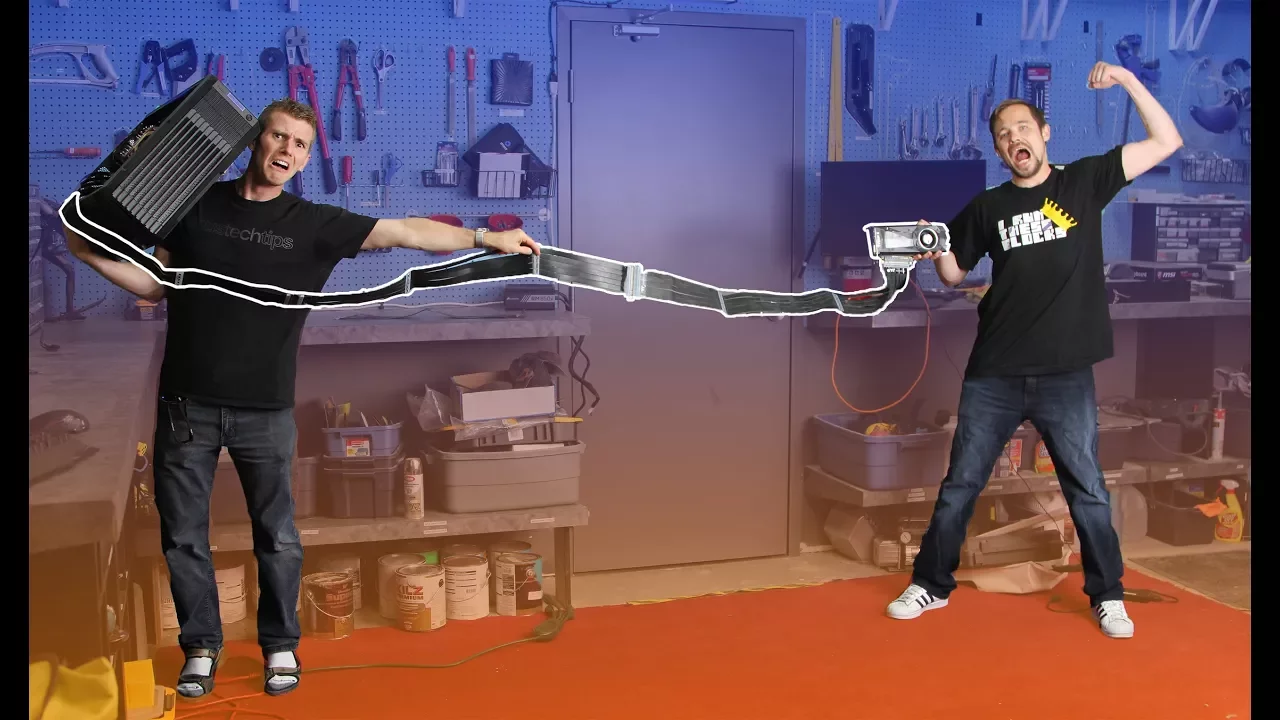
Testing begins conservatively at 130 centimeters (a 1-meter Thermaltake cable joined to a 30-centimeter cable), matching the wallputer configuration. Under a synthetic stress test, the system maintains a flawless framerate without dropped frames. Linus and Ivan then add another segment, bringing the total length to 160 centimeters, where performance remains identical. Pushing further to 1.9 meters—a cable snake Linus notes is "almost the height of Darth Vader"—the card continues to render smoothly without any artifacting.
Trouble strikes when they add another 40-centimeter segment to reach 2.3 meters. Linus observes that unshielded budget ribbon risers often fail after only two segments, contrasting them with Thermaltake's heavily shielded premium cables: “These you legitimately can't go very far with like I tried daisy-chaining even two of these together and I had trouble with it, so oh do we have failure?” The 2.3-meter chain fails to produce a display. Even after power cycling and reseating every connector link, the system refuses to run the stress test. When Linus asks if the legacy card is running PCIe Gen 3, Ivan flatly responds with a Russian "Nyet," leaving the crew to ponder whether the older interface or insufficient load is causing the crash.
- Rig configuration: Standard open-air test bench platform with dedicated auxiliary PSU for PCIe power. - Initial test card: NVIDIA GeForce GTX 650 Ti (PCIe 3.0 compatible bus, but older Kepler-era controller behavior). - Extension lengths cleared by GTX 650 Ti: 1.3 m, 1.6 m, and 1.9 m. - Failure threshold for GTX 650 Ti: 2.3 meters (no display/POST).
[03:42](https://www.youtube.com/watch?v=q5xvwPa3r7M&t=222s) Swapping to the Titan Xp and Conquering Three Meters
Determined to eliminate GPU-side hardware bottlenecks, the team swaps out the GTX 650 Ti for a flagship NVIDIA Titan Xp. Linus inspects the card's golden edge connector and recalls the launch controversy surrounding missing PCIe contact pins on high-end boards, where enthusiasts debated whether omitted pins affected bandwidth or lane integrity while NVIDIA insisted it made zero difference. Whether attributable to superior Gen 3 signal transceivers or pin configuration, the Titan Xp immediately boots and stabilizes across lengths that choked the older card.
Emboldened, Linus and Ivan decide to bypass minor increments and jump straight to three full meters of chained risers. The physical layout quickly outgrows their workbench. Linus demands more furniture while Ivan is forced to physically balance the external monitor on the edge of the space. As tensions flare over table real estate, Ivan playfully warns Linus not to shout, prompting Linus's defense: “I'm not yelling at you I'm yelling with you.”
Against their expectations, the three-meter run—roughly ten feet of daisy-chained ribbon cable snaking across the floor—initializes without video artifacts. Launching the FurMark stress benchmark yields an unwavering 120 FPS, identical to the card being slotted directly into the motherboard's native PCIe x16 slot.
- Test card upgrade: NVIDIA Titan Xp. - Benchmark: FurMark stress test running at native resolution. - Performance at 3.0 meters: Exactly 120 FPS with zero dropped frames or visual artifacts.
[05:44](https://www.youtube.com/watch?v=q5xvwPa3r7M&t=344s) The 3.6-Meter Breaking Point and Final Verdict
Pushing for an absolute maximum, Linus chains in their final remaining riser segment to reach an astonishing 3.6 meters (nearly 12 feet). The setup now extends clear across the room, forcing them to warn staff not to open the studio door lest someone trip over the high-speed bus. Ivan supports the loose graphics card by hand while Linus toggles the bench. The motherboard initially stalls at debug POST code 40. Ivan points out that none of the intermediate riser joints are powered, theorizing that the issue might stem from 12V and 3.3V power attenuation across the slender ribbon traces rather than high-frequency data corruption alone.
After power-cycling and firmly reseating all inter-cable links, the monitor flickers to life, proving a Windows desktop can display across 3.6 meters of chained PCIe extenders. However, launching the 3D rendering load immediately breaks signal integrity. FurMark starts, but the framerate stutters erratically—fluctuating from 55 FPS up to 86, then plummeting down to 25 and 14 FPS before locking up entirely. Linus laments the near-miss while Ivan dryly quips, “Welcome to my personal life.”
The test establishes 3.0 meters as the reliable limit for unpowered high-end shielded riser chains. Linus summarizes the outcome with satisfaction: “Ultimately we failed when we tried to yolo too hard, but I still consider this a success three meters of PCI Express extension and we managed to get it running at an equivalent to having it right in the socket 120 FPS.” He thanks Thermaltake for supplying the mountain of hardware and checks in on Ivan, who spent the final minutes holding a bare GPU radiating 85°C heat against his palms.
| Metric / Test Parameter | GTX 650 Ti | Titan Xp | |:--- |:--- |:--- | | **1.3 m (Wallputer baseline)** | Passed (Full performance) | Not tested (Assumed pass) | | **1.6 m** | Passed (Full performance) | Not tested (Assumed pass) | | **1.9 m** | Passed (Full performance) | Not tested (Assumed pass) | | **2.3 m** | **Failed** (No display/boot) | Passed | | **3.0 m (~10 feet)** | Untested | **Passed (Stable 120 FPS)** | | **3.6 m (~11.8 feet)** | Untested | **Failed** (POSTs, but heavy throttling & crashes in 3D load) |
[08:11](https://www.youtube.com/watch?v=q5xvwPa3r7M&t=491s) Sponsor Spot and Abrupt Bench Failure
Linus transitions into the video sponsor spot for the LG gram ultra-lightweight laptop and its "Share the Art" campaign. LG collaborated with a coffee artist to produce three original artworks inspired by the laptop's portability. Linus outlines the contest rules running through September 14, 2017: viewers can share campaign posts to social media, submit URLs to LG's event page, or comment on a behind-the-scenes video detailing their favorite gram features—such as battery life and light weight—for a chance to win LG monitors, Amazon gift cards, or one of 14 LG gram units.
Wrapping up the episode, Linus delivers his closing thoughts: “Alright, so thanks guys for watching if you disliked this video you must not like fun.” Right as he begins prompting viewers to hit the like button and visit the merchandise store, the test bench behind him suddenly suffers an unprompted hard reset and turns completely off. The motherboard's digital debug readout drops directly to zero, providing an unexpected, comedic full-stop to an afternoon spent abusing PCI Express signal margins.
## Mentioned Amazon, FurMark, Ivan, LG, LG gram, Linus, Linus Tech Tips, Newegg, NVIDIA, NVIDIA GeForce GTX 650 Ti, NVIDIA Titan Xp, PCIe, Thermaltake, TunnelBear
## Video description Thanks to LG for sponsoring this video! Check out their Share the Art #LG gram campaign: https://www.lggramevent.com https://youtu.be/6oKU9APBrwI Learn more about LG gram laptops http://www.lg.com/us/laptops/
Can PCIe extensions cause a loss in GPU performance? We investigate!!
Tunnelbear sponsor link: Visit https://www.tunnelbear.com/LTT and start your 7-day free trial today!
Buy PCIe extensions Amazon: http://geni.us/Ej85Tkv Newegg: http://geni.us/Xu5qQN
Discuss on the forum: https://linustechtips.com/main/topic/829258-how-many-pcie-extensions-is-too-many/
Our Affiliates, Referral Programs, and Sponsors: https://linustechtips.com/main/topic/75969-linus-tech-tips-affiliates-referral-programs-and-sponsors
Linus Tech Tips merchandise at http://www.designbyhumans.com/shop/LinusTechTips/ Linus Tech Tips posters at http://crowdmade.com/linustechtips Our production gear: http://geni.us/cvOS
Twitter - https://twitter.com/linustech Facebook - http://www.facebook.com/LinusTech Instagram - https://www.instagram.com/linustech Twitch - https://www.twitch.tv/linustech
Intro Screen Music Credit: Title: Laszlo - Supernova Video Link: https://www.youtube.com/watch?v=PKfxmFU3lWY iTunes Download Link: https://itunes.apple.com/us/album/supernova/id936805712 Artist Link: https://soundcloud.com/laszlomusic
Outro Screen Music Credit: Approaching Nirvana - Sugar High http://www.youtube.com/approachingnirvana
Sound effects provided by http://www.freesfx.co.uk/sfx/
[Source](https://www.youtube.com/watch?v=q5xvwPa3r7M)