Google Previews Project Glass Eyewear to Replace Smartphone Screens
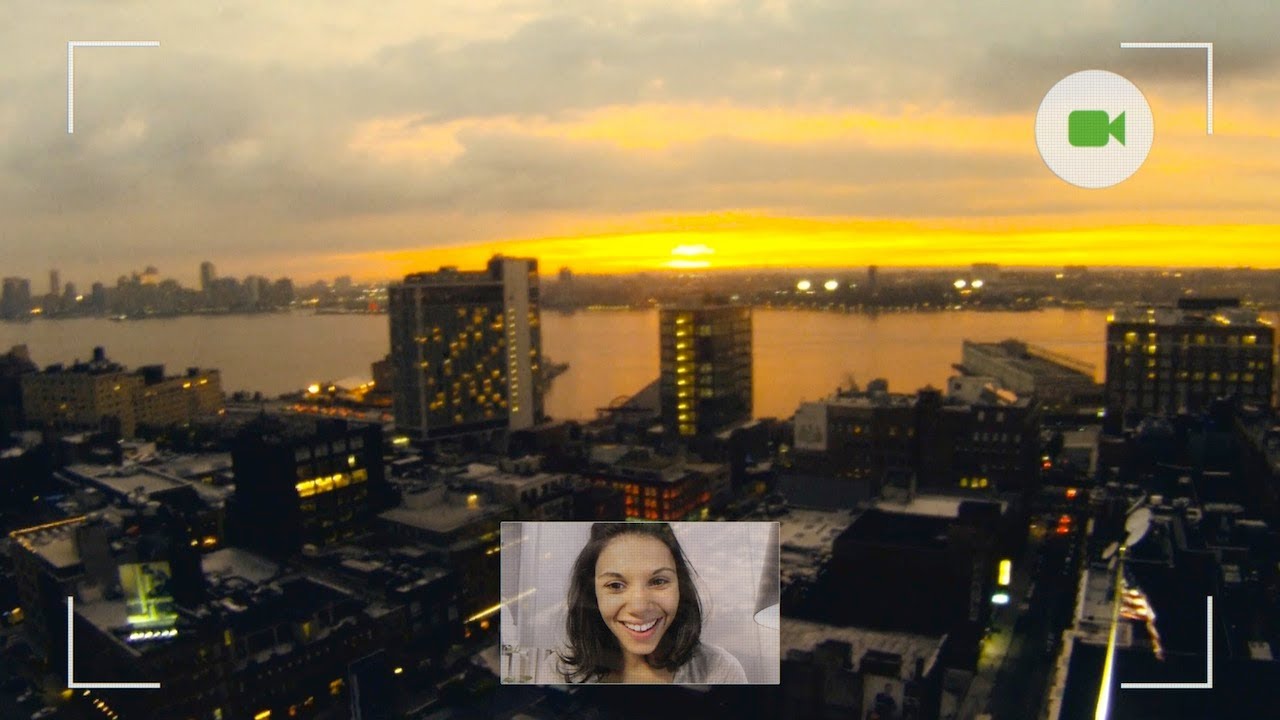
Contextual heads-up displays and voice controls eliminate the friction of handheld devices by embedding navigation, retail payments, and live video streaming directly into daily sightlines.
AI-assisted summary of Project Glass: One day... — original source. Check the original for full context.
Source published:
Key ideas
- Google's Project Glass concept envisions an ambient heads-up display delivering contextual time, weather, and transit alerts without requiring smartphone interaction. (0:03)
- The prototype interface highlights granular indoor wayfinding and peer proximity tracking to eliminate friction during retail shopping and social meetups. (1:04)
- Hands-free voice recognition enables integrated digital payments, contextual reminders from physical posters, and direct photo distribution to Google+ Circles. (1:04)
- Real-time first-person video calling allows wearers to broadcast live point-of-view experiences, such as musical performances, directly to remote callers. (1:58)
Detailed notes
## Background Published by Google on YouTube on April 4, 2012, this concept video illustrates the early vision for Project Glass. The description explains that it was created during the project's inception to demonstrate the core motivation of getting technology out of the way, pointing viewers to subsequent material to see how Glass feels in reality.
## TL;DR The video follows a protagonist navigating a typical day in New York City entirely through the first-person perspective of the Project Glass heads-up display. Morning interactions showcase contextual schedule reminders, speech-to-text messaging, transit delay alerts, and street-level walking navigation. The wearer then demonstrates indoor retail wayfinding at Strand Book Store, friend location tracking, food truck purchasing, and voice-activated photo sharing to Google+ Circles. The concept culminates at sunset on a Manhattan rooftop, where the user initiates a hands-free POV video call to share a live ukulele performance against the skyline.
## Atmosphere & style The presentation carries an optimistic, breezy, and effortlessly futuristic tone, capturing the seamless flow of a dynamic urban routine. Experiencing the city strictly through an immersive first-person lens makes the interface feel unobtrusive and deeply personal, blending routine city sounds with subtle digital prompts. The emotional arc gently shifts from the active bustle of daytime navigation and friendly social encounters to an intimate, serene rooftop sunset.
## Bulletin - [00:03](https://www.youtube.com/watch?v=9c6W4CCU9M4&t=3s) Google's Project Glass concept envisions an ambient heads-up display delivering contextual time, weather, and transit alerts without requiring smartphone interaction. - [01:04](https://www.youtube.com/watch?v=9c6W4CCU9M4&t=64s) The prototype interface highlights granular indoor wayfinding and peer proximity tracking to eliminate friction during retail shopping and social meetups. - [01:04](https://www.youtube.com/watch?v=9c6W4CCU9M4&t=64s) Hands-free voice recognition enables integrated digital payments, contextual reminders from physical posters, and direct photo distribution to Google+ Circles. - [01:58](https://www.youtube.com/watch?v=9c6W4CCU9M4&t=118s) Real-time first-person video calling allows wearers to broadcast live point-of-view experiences, such as musical performances, directly to remote callers.
## Key takeaways - [00:03](https://www.youtube.com/watch?v=9c6W4CCU9M4&t=3s) Ambient contextual data such as calendar agendas, local weather, and time are displayed in the upper peripheral field of view upon waking. - [00:03](https://www.youtube.com/watch?v=9c6W4CCU9M4&t=3s) Voice dictation enables seamless outbound messaging to coordinate meetups hands-free. - [00:03](https://www.youtube.com/watch?v=9c6W4CCU9M4&t=3s) Real-time transit alerts proactively notify users of subway disruptions and dynamically switch to walking navigation overlays. - [00:03](https://www.youtube.com/watch?v=9c6W4CCU9M4&t=3s) Visual cues in the real world, such as physical event posters, can instantly be converted into scheduled reminders via voice commands. - [01:04](https://www.youtube.com/watch?v=9c6W4CCU9M4&t=64s) Indoor navigation maps provide granular, turn-by-turn guidance to pinpoint specific inventory sections inside retail stores. - [01:04](https://www.youtube.com/watch?v=9c6W4CCU9M4&t=64s) Social proximity indicators overlay a friend's real-time physical direction and distance to facilitate effortless street-level meetups. - [01:04](https://www.youtube.com/watch?v=9c6W4CCU9M4&t=64s) Point-of-sale food truck transactions can be approved and executed through the heads-up display without physical wallets. - [01:04](https://www.youtube.com/watch?v=9c6W4CCU9M4&t=64s) Hands-free voice commands permit instant photo capture and immediate publishing to Google+ Circles on the go. - [01:58](https://www.youtube.com/watch?v=9c6W4CCU9M4&t=118s) Background audio playback can be paused or controlled on demand using direct spoken commands. - [01:58](https://www.youtube.com/watch?v=9c6W4CCU9M4&t=118s) Two-way video calling shifts into an authentic first-person POV broadcast, enabling live sharing of personal activities and surrounding views.
## Detailed walkthrough ### [00:03](https://www.youtube.com/watch?v=9c6W4CCU9M4&t=3s) A Morning in New York: Scheduling and Navigating the City
The concept demonstration opens through a first-person perspective as the wearer wakes up in a sunlit New York apartment, letting out a yawn before starting their day through the Project Glass heads-up display. Looking out the window, ambient contextual information appears unobtrusively in the upper visual field, showing the time, weather, and calendar agenda. Dictating a quick voice message to coordinate afternoon plans, the protagonist says, “Yeah! Um. Meet me in front of Strand books. At 2.”
Heading down into the city streets, the display seamlessly handles unexpected urban friction. As the wearer approaches a subway entrance, an alert appears indicating that subway service on that line is suspended, prompting the frustrated reaction: “Oh, man. Really?” Glass immediately pivots to provide real-time walking navigation directly overlaid across the city streets, keeping the user moving toward their destination without requiring them to pull a phone from their pocket. Along the walk, casual slice-of-life moments punctuate the journey—the wearer pauses to greet a passing dog on the sidewalk with “Hey there, guy. Hey there, little guy.” Spotting an event poster pasted on an exterior brick wall, the user immediately offloads the task to the assistant by commanding, “Sweet. Remind me to buy tickets for Monsieur Gayno tonight.”
```mermaid flowchart TD accTitle: Project Glass User Journey Overview accDescr: Flowchart illustrating the sequence of contextual interactions experienced through the heads-up display during a typical day.
subgraph Morning["Morning Routine & Transit"] A["Morning HUD Overview"] --> B["Dictate Message for Strand Meetup"] B --> C["Subway Disruption Alert"] C --> D["Walking Navigation Route"] end
subgraph Afternoon["Errands & Social Meetup"] E["Indoor Bookstore Navigation"] --> F["Check Friend Location"] F --> G["Food Truck Payment"] G --> H["Capture & Share Street Art"] end
subgraph Evening["Evening & Rooftop Call"] I["Stop Music Playback"] --> J["Hands-Free Video Call"] J --> K["POV Ukulele Performance"] end
D --> E H --> I ```
[01:04](https://www.youtube.com/watch?v=9c6W4CCU9M4&t=64s) Bookstore Navigation, Food Trucks, and Social Sharing
Arriving at the iconic Strand Book Store, the wearer steps inside to test Glass’s indoor location and inventory search capabilities. Speaking directly to the interface, the wearer asks, “Where's the music section?” An indoor navigational map immediately illuminates within the display, guiding the user through the aisles until they reach the designated shelf, remarking, “Errrr. Oh yes. This is it.” Stepping back outside, the wearer inquires about their companion’s proximity by asking, “Is Paul here yet?”—prompting a heads-up locator icon showing his friend's real-time position just down the sidewalk.
Reuniting moments later, the two catch up casually: “Hey, dude. How's it going?” Paul asks, “Wanna go check out that new place I was telling you about?” to which the protagonist responds, “Sure!” At a nearby food truck, Paul endorses the food, noting, “This truck is really good.” The wearer pays for their meal seamlessly through the display interface, briefly saying, “Hey, just a second,” before completing the transaction with a quick “Cool.” Parting ways with warm exchanges of “Good to see you again!” and “See you, dude!”, the protagonist spots vibrant street art on a wall down an alleyway. Captivated by the mural, the user issues hands-free commands: “Woah, cool! Take a photo of this,” followed immediately by “Share it to my Circles,” distributing the high-resolution shot directly to their Google+ Circles before realizing the time and remarking, “Oh, I'm running late.”
- **Indoor wayfinding:** Glass provides granular turn-by-turn guidance inside retail spaces to pinpoint specific sections and shelves. - **Proximity alerts:** Real-time social location sharing enables frictionless meetups by pinpointing a friend's exact distance and heading. - **Hands-free media capture:** Voice commands capture photographs and instantly broadcast them across customized social circles without breaking physical stride.
[01:58](https://www.youtube.com/watch?v=9c6W4CCU9M4&t=118s) Sunset Rooftop Video Call and Ukulele Performance
The experience culminates at dusk on a Manhattan rooftop overlooking the evening skyline. The wearer first silences their background audio stream by instructing, “Music, stop.” An incoming video call appears in the field of view, connecting the wearer with a friend. The caller greets them with “Hi, what's up?”, and the wearer enthusiastically asks, “Hey. You want to see something cool?”
The friend responds, “Yeah, sure,” and immediately spots the instrument the protagonist is holding in their hands, asking, “Is that a Ukulele?” The protagonist confirms, “Yep. K. Here goes.” Shifting into a live point-of-view stream, the wearer strums a lighthearted melody on the ukulele while looking directly across the glowing sunset over the cityscape. Experiencing the intimate view and musical performance in real time through the wearer's own eyes, the caller smiles and says, “That's beautiful.”
## Mentioned Google, Project Glass, Strand Book Store, Monsieur Gayno, Paul, Google+ Circles
## Video description This is an early concept video that was made when Project Glass was just getting started. While a lot has changed since then, our motivation to get technology out of the way remains the same. Check out the following video to see how Glass actually feels: http://goo.gl/MOKoc.
[Source](https://www.youtube.com/watch?v=9c6W4CCU9M4)