Rooted Nook Simple Touch Plays PS1 Games With Fast-Refresh Hack
vasilievi4
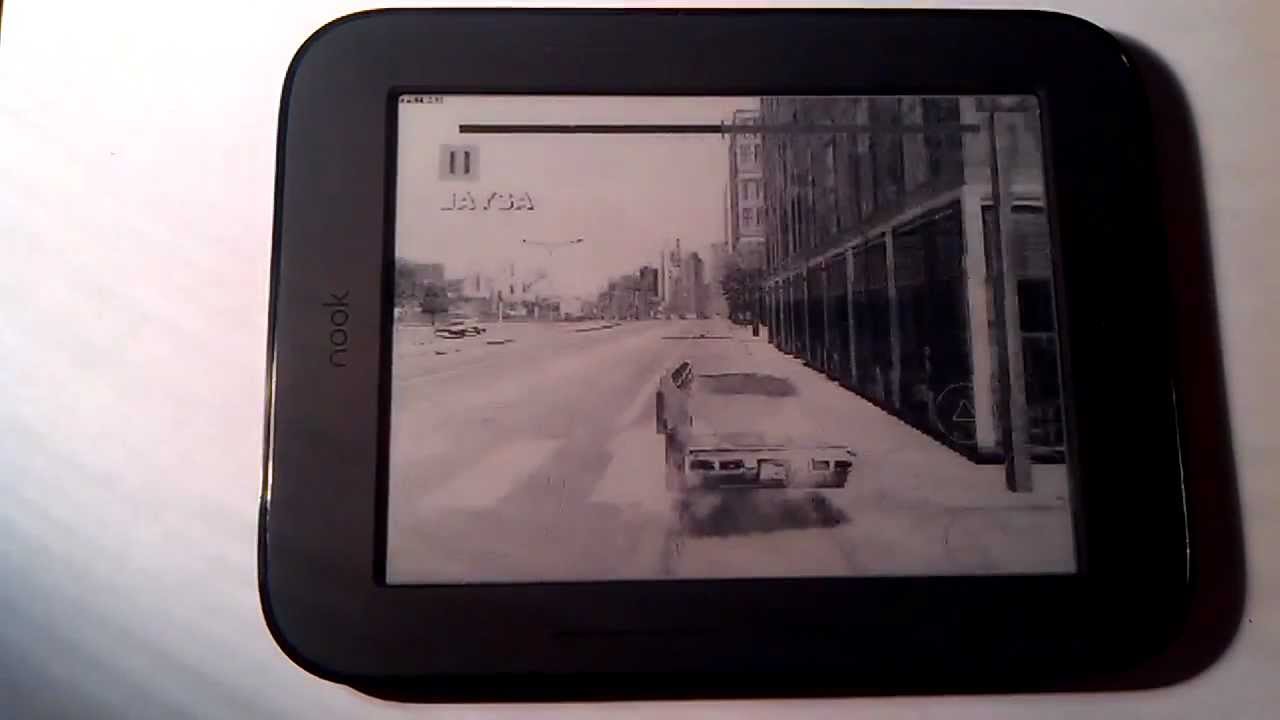
A custom fast-refresh modification enables real-time PlayStation 1 emulation on the Nook Simple Touch by overriding standard e-ink display latency limits.
AI-assisted summary of Nook simple touch e-ink games — original source. Check the original for full context.
Source published:
Key ideas
- A rooted Nook Simple Touch e-reader is shown running a PlayStation 1 (PS1) emulator despite the hardware being engineered solely for static digital reading. (0:00)
- The setup utilizes a custom 'fast refresh' software mod to override standard e-ink display limitations, drastically cutting latency and ghosting to make gaming playable. (0:00)
- The accompanying audio for the demonstration consists of a repeated vocal loop expressing gratitude ('Thank you'). (0:00)
Detailed notes
## Background Published on YouTube by user vasilievi4 on November 19, 2012, this video highlights gaming on the Nook Simple Touch. According to the description, the demonstration showcases running a PlayStation 1 emulator on the e-ink device using a fast refresh tweak.
## TL;DR The video demonstrates a rooted Nook Simple Touch running video games through a PlayStation 1 (PS1) emulator. To overcome the high latency and ghosting typical of e-ink displays, the device employs a fast refresh modification that forces the screen to update rapidly enough for playable real-time rendering. The visual showcase of the hardware mod is accompanied entirely by a repetitive audio loop stating 'Thank you.'
## Atmosphere & style The presentation carries a raw, hypnotic, and distinctly DIY aesthetic typical of early Android hardware modding demonstrations. The stark monochrome flickering of high-speed e-ink rendering retro console graphics contrasts with the repetitive, droning audio loop chanting 'Thank you.' Devoid of spoken explanation or traditional commentary, the experience feels like an eerie, experimental proof-of-concept focused purely on technical novelty.
## Bulletin - [00:00](https://www.youtube.com/watch?v=9fbD753xE-U&t=0s) A rooted Nook Simple Touch e-reader is shown running a PlayStation 1 (PS1) emulator despite the hardware being engineered solely for static digital reading. - [00:00](https://www.youtube.com/watch?v=9fbD753xE-U&t=0s) The setup utilizes a custom 'fast refresh' software mod to override standard e-ink display limitations, drastically cutting latency and ghosting to make gaming playable. - [00:00](https://www.youtube.com/watch?v=9fbD753xE-U&t=0s) The accompanying audio for the demonstration consists of a repeated vocal loop expressing gratitude ('Thank you').
## Key takeaways - [00:00](https://www.youtube.com/watch?v=9fbD753xE-U&t=0s) The video demonstrates gaming capabilities on a rooted Nook Simple Touch e-reader. - [00:00](https://www.youtube.com/watch?v=9fbD753xE-U&t=0s) The device runs on a modified, rooted version of the Android operating system to support third-party apps. - [00:00](https://www.youtube.com/watch?v=9fbD753xE-U&t=0s) A PlayStation 1 (PS1) emulator is installed and executed directly on the e-ink hardware. - [00:00](https://www.youtube.com/watch?v=9fbD753xE-U&t=0s) Standard e-ink screens typically suffer from slow response times and heavy ghosting unsuitable for real-time video games. - [00:00](https://www.youtube.com/watch?v=9fbD753xE-U&t=0s) A 'fast refresh' modification forces the e-ink display to update at a significantly higher frequency. - [00:00](https://www.youtube.com/watch?v=9fbD753xE-U&t=0s) The display tweak allows the PS1 emulator's graphics to render with enough fluidity for playable gameplay. - [00:00](https://www.youtube.com/watch?v=9fbD753xE-U&t=0s) The visual pipeline routes the rooted Android OS through the emulator app and fast refresh utility to output low-latency video on the e-ink panel. - [00:00](https://www.youtube.com/watch?v=9fbD753xE-U&t=0s) The audio track across the demonstration consists of a minimalist repeated loop saying 'Thank you.'
## Detailed walkthrough ### [00:00](https://www.youtube.com/watch?v=9fbD753xE-U&t=0s) Demonstration of E-Ink Gaming on the Nook Simple Touch
This video demonstrates the technical capabilities of a rooted Nook Simple Touch e-reader running video games. Despite being an e-ink device primarily designed for reading digital books, the demonstration showcases the device running a PlayStation 1 (PS1) emulator. To make real-time gaming viable on an e-ink screen—which typically suffers from slow response times and heavy ghosting—the setup utilizes a "fast refresh" modification. This software tweak forces the e-ink display to update at a much higher frequency, allowing the emulator's fast-paced graphics to render with enough fluidity to be playable.
The audio track accompanying this demonstration is minimal, consisting of a repeated loop of gratitude. The speaker or background audio simply states, “Thank you. Thank you Thank you Thank you. Thank you. Thank you.” This repetitive audio plays in the background as the visual demonstration highlights the rapid screen clearing and frame rendering of the emulator on the e-ink hardware.
```mermaid flowchart TD accTitle: Nook Simple Touch E-Ink Gaming Pipeline accDescr: A flowchart illustrating the pipeline of running a PS1 emulator on a rooted Nook Simple Touch using a fast refresh modification.
subgraph Device ["Nook Simple Touch Hardware"] A["Rooted Android OS"] end
subgraph Software ["Emulation & Display Layer"] B["PS1 Emulator App"] C["Fast Refresh Mod / NoRefresh Utility"] end
subgraph Output ["Visual Output"] D["E-Ink Screen (Low Latency Mode)"] end
A --> B B --> C C --> D ```
- **Hardware Platform:** Nook Simple Touch, an e-ink e-reader running a modified, rooted version of the Android operating system. - **Emulation Software:** PlayStation 1 (PS1) emulator configured to run classic console games. - **Display Optimization:** A custom "fast refresh" rendering mode is employed to bypass standard e-ink refresh limitations, reducing latency and ghosting during active gameplay. - **Audio Track:** The audio consists entirely of a repeated vocal track saying, "Thank you."
## Mentioned Android, Nook Simple Touch, NoRefresh, PlayStation 1, vasilievi4
## Video description Nook simple touch e-ink games ps1 emulator fast fefresh
[Source](https://www.youtube.com/watch?v=9fbD753xE-U)