Microsoft Unveils $10,000 Milan Table to Launch Surface Computing
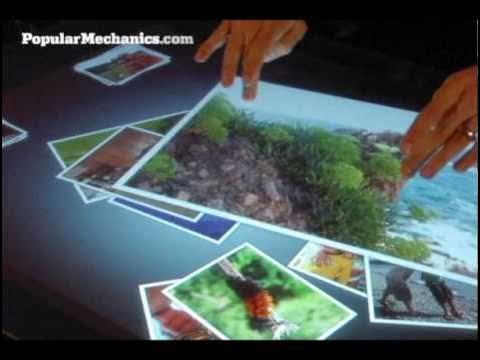
Microsoft Surface multimedia coffee table — Donald G

Donald G

Commercial multi-touch tables that track objects and sync devices wirelessly serve as the stepping stone to embedding interactive computing into everyday furniture and architecture.

AI-assisted summary of Microsoft Surface multimedia coffee table — original source. Check the original for full context.

Source published:

Key ideas

  • Microsoft revealed Project Milan, a multi-touch coffee-table computing platform designed to establish a new paradigm called surface computing. (0:00)
  • Internal infrared cameras allow the Surface table to recognize physical devices like cameras and phones and execute automatic wireless file transfers without cables or manual pairing. (1:42)
  • Microsoft slated commercial rollout for late 2007 at price points between $5,000 and $10,000, targeting venues such as T-Mobile stores, Harrah's Casinos, and Starwood Hotels. (3:06)
  • Computer scientists like Jeff Han view surface computing as a bridge toward ubiquitous computing, where walls, desks, and everyday furniture become interactive interfaces. (3:06)

Detailed notes

## Background Published on YouTube by Donald G on April 14, 2011, this video showcases the Microsoft Surface multimedia coffee table. According to the page description, it features the interactive table and directs viewers to learn how to make homemade multi-touch screens.

## TL;DR The video covers an exclusive preview by Popular Mechanics of Microsoft's top-secret 'Project Milan,' introducing a multi-touch surface computing platform shaped like a coffee table. NYU researcher Jeff Han explains how direct multi-touch manipulation breaks past the limitations of traditional computer mice by allowing natural, multi-finger input. Demonstrations show the table using internal infrared cameras to recognize physical devices like digital cameras and mobile phones, enabling seamless, cable-free file transfers across the glass. Concluding with commercial rollout plans for retail and hospitality environments, the segment frames the platform as an initial step toward ubiquitous interactive surfaces throughout the built environment.

## Atmosphere & style The presentation carries an optimistic, mid-2000s tech-journalism vibe, blending behind-the-scenes access at Microsoft headquarters with cutting-edge academic insight. The tone is inquisitive, sleek, and forward-looking, marked by playful live demonstrations where presenters drag and toss digital photos between physical gadgets. It conveys a tangible sense of wonder and novelty as visionary technologists predict a seamless future where everyday furniture transforms into interactive digital workspaces.

## Bulletin - [00:00](https://www.youtube.com/watch?v=SRU3NemA95k&t=0s) Microsoft revealed Project Milan, a multi-touch coffee-table computing platform designed to establish a new paradigm called surface computing. - [01:42](https://www.youtube.com/watch?v=SRU3NemA95k&t=102s) Internal infrared cameras allow the Surface table to recognize physical devices like cameras and phones and execute automatic wireless file transfers without cables or manual pairing. - [03:06](https://www.youtube.com/watch?v=SRU3NemA95k&t=186s) Microsoft slated commercial rollout for late 2007 at price points between $5,000 and $10,000, targeting venues such as T-Mobile stores, Harrah's Casinos, and Starwood Hotels. - [03:06](https://www.youtube.com/watch?v=SRU3NemA95k&t=186s) Computer scientists like Jeff Han view surface computing as a bridge toward ubiquitous computing, where walls, desks, and everyday furniture become interactive interfaces.

## Key takeaways - [00:00](https://www.youtube.com/watch?v=SRU3NemA95k&t=0s) Microsoft introduced surface computing under the secret internal code name 'Milan' at its Redmond headquarters. - [00:00](https://www.youtube.com/watch?v=SRU3NemA95k&t=0s) The coffee-table form factor allows users to manipulate digital media directly with their fingers, mimicking physical interactions with paper prints. - [00:00](https://www.youtube.com/watch?v=SRU3NemA95k&t=0s) Multi-touch technology enables multi-finger and multi-user interaction, overcoming the single-input limitations of traditional computer mice. - [00:00](https://www.youtube.com/watch?v=SRU3NemA95k&t=0s) Perceptive Pixel founder Jeff Han highlighted direct manipulation as a breakthrough that removes intermediaries between users and graphical data. - [01:42](https://www.youtube.com/watch?v=SRU3NemA95k&t=102s) Internal infrared cameras mounted underneath the table surface track touch contact points and identify physical objects placed on the glass. - [01:42](https://www.youtube.com/watch?v=SRU3NemA95k&t=102s) Placing a digital camera on the display surface triggers automatic wireless recognition and downloads captured photos directly to the table. - [01:42](https://www.youtube.com/watch?v=SRU3NemA95k&t=102s) Users can drag media files over physical mobile devices placed on the screen to initiate instant, over-the-air file synchronization without cords or setup software. - [03:06](https://www.youtube.com/watch?v=SRU3NemA95k&t=186s) Initial market availability targeted commercial spaces, including retail stores, hotels, and casinos, rather than mainstream residential living rooms. - [03:06](https://www.youtube.com/watch?v=SRU3NemA95k&t=186s) Units carried an initial commercial price range of $5,000 to $10,000 scheduled for release by late 2007. - [03:06](https://www.youtube.com/watch?v=SRU3NemA95k&t=186s) Surface computing serves as a foundation for ubiquitous computing, where ambient architecture, countertops, and wallpaper displays act as universal computational interfaces.

## Detailed walkthrough ### [00:00](https://www.youtube.com/watch?v=SRU3NemA95k&t=0s) Project Milan and the Emergence of Surface Computing

A fundamental shift is taking place in personal computing, emerging not as a traditional desktop or laptop, but in the unconventional form factor of a coffee table. Microsoft invited *Popular Mechanics* to its Redmond, Washington headquarters for an exclusive look at a top-secret initiative code-named "Milan." As a representative explained during the unveiling, “It is the first of its kind in that it is a new paradigm in computing; it's called surface computing.” Unlike standard monitors where navigation feels distant and detached, this tabletop platform mimics the physical ease of sorting through paper. Users can naturally manipulate digital items with their fingers, seamlessly organizing image galleries, dragging photos across the surface, resizing them freely, and playing embedded videos side by side as if handling physical photographic prints on a table.

The foundation of this interface is multi-touch technology—a multifinger, multiuser design concept that had been circulating through computer science research labs since the 1980s. Jeff Han, an NYU computer scientist who designs large-scale multi-touch displays for military and enterprise clients through his company Perceptive Pixel, explained the core mechanics and advantages of multi-point systems. Han pointed out that traditional computer mice severely throttle human dexterity down to one or two inputs at a time, whereas direct multi-touch fundamentally transforms how people interact with graphical data. Demonstrating the concept, Han stated: “Multi-touch first of all allows for direct manipulation, means you're actually contacting not to an intermediary, but actually on the graphics itself.”

```mermaid flowchart TD accTitle: Multi-Touch Surface Computing Architecture accDescr: Diagram illustrating how infrared cameras track hands and objects on the tabletop to drive digital manipulation and wireless data transfer.

subgraph TableTop ["Surface Tabletop Interface"] Touch["Multi-Touch Direct Manipulation<br/>(Fingers, gestures, resizing)"] Obj["Physical Objects<br/>(Digital cameras, mobile phones)"] end

subgraph InternalSensors ["Table Hardware & Vision System"] IR["Infrared Vision Cameras<br/>(Tracks touches and identifies objects)"] Wireless["Wireless Radio Linking<br/>(Bluetooth / Wi-Fi auto-pairing)"] end

subgraph Actions ["System Responses & Integration"] Media["Direct Content Manipulation<br/>(Photos, maps, videos, menus)"] DataSync["Cable-Free Data Transfer<br/>(Instant sharing across devices)"] end

Touch --> IR Obj --> IR Obj -.-> Wireless IR --> Media Wireless --> DataSync ```

[01:42](https://www.youtube.com/watch?v=SRU3NemA95k&t=102s) Object Recognition, Wireless Interactivity, and Device Syncing

Beyond recognizing fingertip gestures, the Surface computer incorporates internal infrared cameras mounted beneath the screen that literally watch the tabletop from below. This vision system enables the table to instantly recognize physical objects placed on the glass surface and interact with them programmatically. A Microsoft presenter emphasized the broader scope of this design, observing: “We see this as a whole new category, a complete new ecosystem for computers.”

To showcase this capability, the team demonstrated cross-device data transfers using a wireless digital camera and a mobile phone. The demonstrator took a snapshot of his colleague Erik Sofge and placed the camera directly onto the glass. The table automatically established wireless communication with the camera, pulled the newly captured snapshot onto the display surface, and allowed the presenter to drag and expand the image across the tabletop to tease his colleague. A mobile phone was then laid onto the glass; without plugging in cables, installing software, or executing manual pairing sequences, the user simply dragged the enlarged photo onto the phone icon on the glass. The image transferred instantly over the air, allowing the user to pick up the phone and walk away with the file stored onboard.

- **Infrared Vision Sensing:** Internal infrared cameras track finger contact points and optical markers or shapes of physical hardware resting on top of the display. - **Seamless Wireless Bridging:** Digital media transfers between cameras, cell phones, and the table occur entirely in the background without physical cords or manual sync managers. - **Collaborative Manipulation:** Multiple people can simultaneously share, rotate, scale, and reorganize media items on the same physical workspace without stepping on each other's inputs.

[03:06](https://www.youtube.com/watch?v=SRU3NemA95k&t=186s) Commercial Rollout and the Vision for Ubiquitous Computing

While surface computers may eventually find a place in residential living rooms, Microsoft planned to deploy them first into commercial and hospitality environments. Early enterprise rollout partners included T-Mobile retail stores, Harrah's Casinos, and Starwood Hotels, with units priced between $5,000 and $10,000 scheduled to appear in pilot commercial venues by late 2007.

Researchers and computer scientists view these high-end installations as stepping stones toward an era of ubiquitous computing, where interactive displays become embedded into everyday furniture, kitchen countertops, and ambient architecture. Instead of clunky peripherals, smart surfaces could serve as the ultimate interactive control hub for home entertainment and appliance systems. Reflecting on this technological evolution, Jeff Han expressed deep optimism about the coming transition to ubiquitous interfaces: “I firmly believe that this kind of thing will be in that near future where we have wallpaper displays in every hallway, every desk, every surface starts to become an interface of computer, and in order for that to happen we need interfaces like this.”

## Notable quotes > [00:00](https://www.youtube.com/watch?v=SRU3NemA95k&t=0s) Multi-touch first of all allows for direct manipulation, means you're actually contacting not to an intermediary, but actually on the graphics itself. — Jeff Han

## Mentioned Donald G, Erik Sofge, Harrah's Casinos, Jeff Han, Microsoft, Microsoft Surface, New York University (NYU), Perceptive Pixel, Popular Mechanics, Project Milan, Starwood Hotels, T-Mobile

## Video description Microsoft Surface multimedia coffee table. how to make your home made touch multi-touch screen see more on http://www.newtouchscreen.com

[Source](https://www.youtube.com/watch?v=SRU3NemA95k)

中文简报

微软推出售价1万美元的Milan桌台,发力桌面计算 可追踪物体并无线同步设备的多点触控商用桌台,成为将交互计算融入日常家具与建筑环境的跳板。 本视频涵盖了《大众机械》(Popular Mechanics)对微软高度机密的“Milan项目”(Project Milan)的独家前瞻报道,介绍了这款外形酷似咖啡桌的多点触控桌面计算平台。纽约大学研究员Jeff Han解释了直观的多点触控操作如何通过支持自然的双手多指输入,打破传统电脑鼠标的局限性。演示画面展示了该桌台利用内部红外摄像头识别数码相机和手机等实体设备,并在玻璃表面实现无缝、免线缆的文件传输。视频最后介绍了针对零售和酒店等商用环境的推广计划,并将该平台视作交互式表面普及至整个建筑环境的初始步骤。 微软公布了“Milan项目”,这是一个旨在建立所谓“桌面计算”(surface computing)新范式的多点触控咖啡桌计算平台。 (0:00) 内部红外摄像头使该Surface桌台能够识别相机和手机等实体设备,无需线缆或手动配对即可完成自动无线文件传输。 (1:42) 微软计划于2007年底进行商用推广,售价在5,000至10,000美元之间,目标场所包括T-Mobile门店、哈拉斯赌场(Harrah's Casinos)以及喜达屋酒店(Starwood Hotels)。 (3:06) Jeff Han等计算机科学家将桌面计算视为通向普适计算的桥梁,在普适计算时代,墙面、书桌和日常家具都将成为交互界面。 (3:06)

Reading summary

Microsoft unveiled "Milan," a tabletop computing platform that replaces conventional mice and screens with direct multi-touch manipulation, optical object recognition, and background wireless data syncing. Developed to rethink human-computer interaction, the system allows users to handle digital files collaboratively on a horizontal surface much like physical paper. Direct Manipulation via Multi-Touch Architecture (0:00) Microsoft's secret initiative, code-named "Milan," introduced an interactive coffee table platform that the company defined as a new paradigm called surface computing. The interface draws on multi-touch concepts developed in research labs since the 1980s, enabling multi-finger and multi-user input directly on graphical assets. Users can organize galleries, resize photographs, and play embedded video clips side by side using natural finger motions that mimic sorting physical prints on a desk. According to computer scientist Jeff Han of Perceptive Pixel, conventional computer mice severely throttle natural human dexterity down to one or two inputs at a time. Han noted that direct multi-touch interfaces fundamentally alter graphical interactions by eliminating intermediary input devices and letting users contact digital assets directly. Infrared Vision Sensing and Device Interoperability (1:42) Beneath the glass display, the table utilizes internal infrared cameras to track touch inputs and identify the shape and optical markers of physical objects placed on the surface. Microsoft positioned the technology as an entirely new ecosystem capable of bridging peripheral hardware without physical cables, manual syncing managers, or custom software installations. During a demonstration for Popular Mechanics, a wireless digital camera placed onto the glass automatically connected to the table and transferred a newly captured photo onto the display. When a mobile phone was laid beside it, the user dragged the enlarged photo onto the phone's visual icon, transferring the file over the air so the device could immediately be taken away with the stored file. Commercial Rollout and Ubiquitous Computing Projections (3:06) Microsoft planned its initial rollout for commercial and hospitality venues rather than private living rooms, pricing units between $5,000 and $10,000. Early pilot deployments scheduled for late 2007 targeted partners such as Starwood Hotels, Harrah's Casinos, and T-Mobile retail locations. Researchers and industry specialists viewed these early commercial deployments as a pathway toward ubiquitous computing, anticipating an era where responsive displays are integrated into kitchen counters, desks, and walls. Han expressed optimism for this trajectory, predicting a near future where ambient architectural surfaces throughout homes and corridors serve as primary digital interfaces. Although high launch prices limited initial adoption to enterprise and hospitality pilots, Microsoft and collaborating researchers positioned surface computing as the essential interface model for an anticipated transition toward ambient, ubiquitous digital surfaces.

精炼阅读摘要

微软在华盛顿州雷德蒙德总部向《Popular Mechanics》展示了代号为“Milan”的咖啡桌形态 Surface 计算设备。该系统通过集成红外机器视觉与多点触控技术打破了传统鼠标与键盘的物理限制,被微软定义为一种让用户能够像整理实体纸张一样直接操纵数字内容并联动实体硬件的新型计算范式。 直接操控与多点触控的人机交互范式 (0:00) 项目“Milan”放弃了传统台式机与笔记本电脑的屏幕形态,将人机交互界面转移到一张平整的咖啡桌表面。该系统支持多指与多人同时操作,用户无需借助中介外设,即可直接在屏幕玻璃上滑动整理相册、自由拖拽缩放照片,并让多段嵌入式视频并排播放,重现了在实体桌面上翻阅纸质冲印相片的物理体验。 针对多触点交互机制,来自纽约大学并在 Perceptive Pixel 开发大型触控界面的计算机科学家 Jeff Han 指出,多指多用户交互概念自 20 世纪 80 年代起便在实验室流传。Han 认为,传统鼠标严重束缚了人类的双手灵巧度,将操作扼杀在一次一两个输入点内;而多点触控消除了中间设备,使用户能够直接对图形本身进行物理式的直观操控。 红外视觉感知与跨设备无缝无线互联 (1:42) 除了追踪指尖手势,Surface 在屏幕下方内置了红外摄像头,自下而上监控整个台面。这套光学感知系统不仅能追踪手指接触点,还可识别放置在玻璃上的实体设备外观或光学标记,赋予桌面根据物理对象执行程序化交互的能力。微软演示团队因此将其描述为一个独立于传统 PC 的全新计算类别与软硬件生态系统。 在数据协同演示中,操作人员使用无线数码相机为现场人员 Erik Sofge 拍照,并将相机直接放置在玻璃桌面上;系统随即自动建立无线通信,在无需插入线缆或打开同步软件的情况下抓取照片并投射到屏幕上供人拖拽放大。随后,操作者将一部手机放上桌面,只需将放大后的相片拖拽至手机图标,文件便即时无线传输至手机中,用户拿起手机即可带走照片。 商业落地路径与泛在计算的远景预测 (3:06) 尽管表面计算最终可能进入家庭起居室,但微软初期将其部署重点放在高端商业与酒店服务行业。系统定价在 5,000 美元至 10,000 美元之间,首批试点合作方包括 T-Mobile 零售店、哈拉斯赌场(Harrah's Casinos)以及喜达屋酒店(Starwood Hotels),计划于 2007 年底前在商业场所投入试运行。 计算机科学研究人员将这类高单价商用设施视为通向“泛在计算(Ubiquitous Computing)”时代的跳板。学界预测,未来的交互显示器将深度嵌入至厨房操作台、起居家具与建筑墙体之中,成为家庭娱乐与设备控制的核心枢纽。Jeff Han 对此表示乐观,预测走廊壁纸、办公桌以及日常所有表面在不久的将来都可能演化为计算机交互界面,而 Surface 这类直接操控技术正是通往该未来的关键过渡。 微软将代号为 Milan 的桌面系统视为拓展人机交互边界的关键探索,但高达 5,000 至 10,000 美元的硬件成本在初期将其局限于特定的商业零售与娱乐展示场所;该技术能否从昂贵的小众商用硬件演进为普及于墙面与家具的泛在计算中枢,仍有待更长周期的技术扩散与成本验证。

Detailed notes — zh

## Background 该视频由 Donald G 于 2011 年 4 月 14 日发布在 YouTube 平台上。视频简介指出这是关于微软 Surface 多媒体咖啡桌的展示,并附带了自制多点触控屏教程网站的推广链接。 ## TL;DR 视频记录了《大众机械》(Popular Mechanics)受邀探访微软雷德蒙德总部,揭秘代号为“米兰”(Milan)的初代 Surface 表面计算多媒体咖啡桌。计算机科学家 Jeff Han 解读了多点触控与传统鼠标操作的本质区别,指出直接触碰图形像素所带来的多指、多人并行交互革命。演示现场展示了利用红外摄像头自动识别放置于台面的数码相机与手机,实现免接线、免配对的即时照片拖拽流转。微软计划初期以 5,000 至 10,000 美元的定价向酒店、零售和赌场等商业客户推广,并展望了未来墙面、桌面皆为交互界面的泛在计算愿景。 ## Atmosphere & style 整段视频洋溢着 2000 年代末期前沿科技初露锋芒时的惊艳与乐观主义,节奏明快且极富科技探索感。演示者随性调侃同事照片的轻松氛围,与 Jeff Han 严谨专业的学术解读形成鲜明互补,生动呈现出技术从实验室走向现实生活的跃动感。屏幕上泛着荧光的触控光影与跨设备无缝传输的魔术般体验,让观众能真切感受到人机交互范式迭代时的纯粹震撼。 ## Bulletin - [00:00](https://www.youtube.com/watch?v=SRU3NemA95k&t=0s) 微软首次向媒体公开代号为“米兰”(Milan)的 Surface 咖啡桌形态设备,推出摆脱鼠标媒介、支持直接多指操作的“表面计算”(Surface Computing)交互范式。 - [01:42](https://www.youtube.com/watch?v=SRU3NemA95k&t=102s) Surface 内部配备红外摄像头阵列,可直接视觉识别置于桌面上的数码相机与手机,实现无需插线或手动配对的跨设备照片无线拖拽传输。 - [03:06](https://www.youtube.com/watch?v=SRU3NemA95k&t=186s) 该设备早期主打商用市场,单台售价定在 5,000 至 10,000 美元之间,首批合作客户包括 T-Mobile、哈拉斯娱乐及喜达屋酒店集团,预计于 2007 年底开始铺设。 - [03:06](https://www.youtube.com/watch?v=SRU3NemA95k&t=186s) 计算机科学家杰夫·汉(Jeff Han)指出,多点触控将推动技术向“泛在计算”演进,未来走廊墙面与各类桌面均有望转化为壁纸式交互显示界面。 ## Key takeaways - [00:00](https://www.youtube.com/watch?v=SRU3NemA95k&t=0s) 微软在雷德蒙德总部公开绝密项目“米兰”(Milan),将计算机打造为低矮的咖啡桌形态。 - [00:00](https://www.youtube.com/watch?v=SRU3NemA95k&t=0s) 表面计算(Surface Computing)让人机交互摆脱传统屏幕限制,提供如同操作实体纸张般自然的拖拽与缩放体验。 - [00:00](https://www.youtube.com/watch?v=SRU3NemA95k&t=0s) 多点触控技术最早可追溯至 1980 年代的计算机科学研究,并非近期凭空出现的技术路线。 - [00:00](https://www.youtube.com/watch?v=SRU3NemA95k&t=0s) 多点触控的核心优势在于“直接操作”,去除了鼠标等中间媒介,允许用户直接物理触碰并操控图形像素本身。 - [00:00](https://www.youtube.com/watch?v=SRU3NemA95k&t=0s) 相比传统鼠标的单点控制,多指与多人协同机制支持用户同时并行操作多个屏幕对象。 - [01:42](https://www.youtube.com/watch?v=SRU3NemA95k&t=102s) 台面下方集成的多组红外摄像头赋予了 Surface 识别桌面物理实体与辨识设备身份的能力。 - [01:42](https://www.youtube.com/watch?v=SRU3NemA95k&t=102s) 数码相机置于桌面后照片可被即时读取展开,拖拽至旁边放置的手机即可直接完成无线传输,彻底告别数据线与繁琐同步流程。 - [01:42](https://www.youtube.com/watch?v=SRU3NemA95k&t=102s) 微软将 Surface 定位为打破数据孤岛的硬件交互中枢与全新计算生态类别。 - [03:06](https://www.youtube.com/watch?v=SRU3NemA95k&t=186s) Surface 初期避开消费级家庭,优先面向电信、赌场与高端酒店等垂直领域的企业客户推广。 - [03:06](https://www.youtube.com/watch?v=SRU3NemA95k&t=186s) 初代商用机器单台成本居高不下,定价在 5,000 至 10,000 美元区间,定于 2007 年底陆续入驻商业门店。 - [03:06](https://www.youtube.com/watch?v=SRU3NemA95k&t=186s) 表面计算技术长远来看将逐步下沉普及,成为连接家庭餐桌与客厅中控的泛在计算终端。 - [03:06](https://www.youtube.com/watch?v=SRU3NemA95k&t=186s) 未来人机交互愿景将演进为无处不在的智能表面,走廊墙壁与各类书桌均可能转化为可交互的壁纸级显示屏幕。 ## Detailed walkthrough ### [00:00](https://www.youtube.com/watch?v=SRU3NemA95k&t=0s) 微软“米兰计划”与表面计算新范式 科技界正在发生一场根本性的变革,一种崭新型态的计算机正以意想不到的“咖啡桌”形态登场。微软邀请《大众机械》(Popular Mechanics)杂志团队前往其位于华盛顿州雷德蒙德(Redmond)的总部园区,首次公开代号为“米兰”(Milan)的绝密项目。这一设备开创了一种被称作“表面计算”(Surface Computing)的全新人机交互范式。相较于传统屏幕浏览的局限,这种界面在照片共享、地图浏览和菜单操作等场景下表现尤为亮眼,能让用户体验到如同操作真实纸张般的精细触摸感。现场演示中,用户可以直接用手指整理、拖拽、随意缩放照片与视频,就像在桌面上把玩实体冲印照片一样自然。 纽约大学计算机科学家杰夫·汉(Jeff Han)指出,多点触控(multi-touch)技术实际上是一种支持多指乃至多用户协同的界面,早在1980年代就已在计算机科学领域出现。作为开发军用与企业级大型多点触控显示设备的 Perceptive Pixel 公司创始人,Jeff Han 强调了多点触控的核心价值所在:“Multi-touch first of all allows for direct manipulation means you're actually contacting not to an intermediary but actually on the graphics itself it's a direct manipulation effect.” 他进一步补充道,与传统鼠标一次只能操作一两个对象的局限相比,多点触控让用户可以同时利用两到三根甚至更多的手指直接操作多个对象,极大地提高了交互效率。 ```mermaid flowchart TD accTitle: 表面计算与传统交互模式对比 accDescr: 对比传统计算机中间媒介与表面计算直接触控两种不同的交互链条。 subgraph Traditional["传统计算交互模式"] A["鼠标 / 键盘输入"] --> B["屏幕光标中间媒介"] B --> C["单点图形操作"] end subgraph SurfaceComp["表面计算与多点触控"] D["多指 / 多人手势输入"] --> E["直接触碰图形像素"] E --> F["实时并行多对象操控"] end ``` - **代号与形态**:该项目内部代号为“Milan”,硬件外观呈低矮的咖啡桌形态。 - **技术渊源**:多点触控技术最早可追溯至1980年代的计算机科学研究,并非凭空出现。 - **直接操作属性**:去除了鼠标光标等“中间媒介”,手指与桌面上的图形内容实现一对一物理接触。 --- ### [01:42](https://www.youtube.com/watch?v=SRU3NemA95k&t=102s) 红外识别与多设备无缝无线交互 微软 Surface 真正令人震撼的技术突破,在于其与现实外部物体的互动方式。设备台面内部集成了一系列红外摄像头(infrared cameras),能够实时“看清”放置在桌面上的实体物品。当特定设备放置于桌面时,系统不仅能瞬间辨识其身份,还能与该物体展开直接交互。微软将其定义为一个全新的计算类别和完整的硬件生态系统。 演示人员现场使用一台配备无线功能的数码相机为同事埃里克·索菲(Eric Sofi)拍摄了一张照片,随后直接将相机放置在 Surface 桌面上。相机内的照片立即被读取并呈现在桌面上,演示者调侃着将照片大幅放大以达到“最大程度的难堪”效果。随后,演示人员又将一部手机放在桌面上,所有的无线链路配对均在桌面底层自动隐蔽完成。演示者只需轻轻将放大的照片拖拽至手机图标上,照片便即时无线传输到了手机中。微软团队强调,这彻底告别了传统的数据线插拔或繁琐的电脑同步程序,实现了在两个独立设备之间即放即传的无缝体验。 - **感知机制**:台面下方配置多组红外摄像头,实现对桌面物体的视觉捕获与标识识别。 - **跨设备传输演示**:相机拍摄照片后置于桌面,照片展开后拖至旁边放置的手机,全程无需插线或手动配对。 - **生态定位**:微软将 Surface 视为一个连接各类便携设备、打通数据孤岛的交互中枢。 --- ### [03:06](https://www.youtube.com/watch?v=SRU3NemA95k&t=186s) 商业落地、价格策略与泛在计算愿景 虽然表面计算最终可能会走入千家万户的客厅,但微软初期的商业规划主要瞄准企业级商业客户。其首批合作方包括电信运营商 T-Mobile、哈拉斯娱乐(Harrah's Casinos,现凯撒娱乐)以及喜达屋酒店集团(Starwood Hotels)。这些单台售价在 5,000 美元至 10,000 美元之间的商用机器,预计最快将于2007年底在部分零售门店内亮相。 面向更长远的未来,计算机科学家们描绘了一个“泛在计算”(Ubiquitous Computing)的前景:人们的生活将被无处不在的智能表面所环绕。未来的智能表面既可以是厨房餐桌,也可以是放置在电视机前充当终极控制台的茶几。Jeff Han 对这股技术普及浪潮充满信心,明确表达了他对未来的研判:“Eventually of course this will trickle down and I do I am very positive and uh I firmly believe that this kind of thing will be in that near future where we have wallpaper displays in every hallway every desk every Surface starts to become an interface of computer and in order for that to happen we need faces like this.” 在这一愿景中,走廊墙面化身壁纸显示屏,每一张书桌、每一个平面都将变成可计算的交互界面。 - **早期商业客户**:首批合作伙伴涵盖零售(T-Mobile)、博彩娱乐(Harrah's Casinos)以及高端酒店服务业(Starwood Hotels)。 - **设备成本与时间表**:商用定价为 5,000 至 10,000 美元,定于 2007 年底开始在商业场所铺设。 - **终极形态预测**:从高成本商用逐步下沉至消费级家庭,与智能家居深度融合,最终演化为墙面、桌面全覆盖的“壁纸级”泛在显示界面。 ## Notable quotes > [00:00](https://www.youtube.com/watch?v=SRU3NemA95k&t=0s) Multi-touch first of all allows for direct manipulation means you're actually contacting not to an intermediary but actually on the graphics itself it's a direct manipulation effect. — Jeff Han ## Mentioned Microsoft Surface, Milan, Jeff Han, Perceptive Pixel, Popular Mechanics, Eric Sofi, T-Mobile, Harrah's Casinos, Starwood Hotels ## Video description Microsoft Surface multimedia coffee table. how to make your home made touch multi-touch screen see more on http://www.newtouchscreen.com [Source](https://www.youtube.com/watch?v=SRU3NemA95k)

Source quotes

[0:00] Jeff Han: Multi-touch first of all allows for direct manipulation means you're actually contacting not to an intermediary but actually on the graphics itself it's a direct manipulation effect.

Source quotes

[0:00] Jeff Han: Multi-touch first of all allows for direct manipulation, means you're actually contacting not to an intermediary, but actually on the graphics itself.

Original transcript

[0:00] there's a fundamental change occurring [0:02] in the world of technology a new type of [0:04] computer that's arriving in the unusual [0:07] form of a coffee table this past March [0:10] Microsoft invited Popular Mechanics to [0:12] the company's Redmond Washington campus [0:14] for a first look at a top secret project [0:17] code named Milan it is the first of its [0:20] kind uh in that it is a new paradigm in [0:23] Computing it's called surface Computing [0:26] this type of interface Works especially [0:27] well for photo sharing maps and menus [0:30] browsing on a traditional screen pales [0:32] in comparison to the detailed Hands-On [0:34] manipulation people are used to with [0:36] paper you can do things [0:39] like organize your [0:42] photos drag them around and resize them [0:46] and play with them as if they were real [0:48] photos real printed photos and here we [0:50] even have a little video surface [0:53] Computing utilizes multi-touch [0:55] technology which is a multifinger [0:57] multi-user interface that has been [0:59] bouncing around of computer [1:01] science80 this is a multi-touch input [1:04] device and multi-touch which generally [1:07] means multipoint input devices are about [1:09] allowing more than one input uh to be [1:11] processed at a time NYU computer [1:13] scientist Jeff Han builds huge [1:15] multi-touch displays for corporate and [1:16] Military clients through his company [1:18] perceptive pixel in fact multitouch is [1:20] swiftly becoming the hot interface for [1:22] electronic devices multi-touch first of [1:24] all allows for direct manipulation means [1:26] you're actually contacting not to an [1:28] intermediary but actually on the [1:30] graphics itself it's a direct [1:31] manipulation effect two it means that I [1:33] can do more than one point at time I can [1:35] actually use two or three which means I [1:36] can manipulate more things at a time [1:39] with a mouse you can only manipulate one [1:40] or two things at a time but where [1:42] Microsoft Surface computer truly gets [1:43] mind-blowing is how it interacts with [1:45] other devices the Surface computer uses [1:48] a series of infrared cameras to [1:50] literally see what is on its tabletop [1:52] what we're able to do is also have [1:54] interaction with objects on the surface [1:56] so when we place an object on the [1:58] surface the camera can recognize what [2:00] that object is and allow us to interact [2:03] directly with that object that we've [2:04] just placed on the surface we see this [2:06] as a whole new category a complete new [2:08] ecosystem for computers here we have a [2:11] wireless camera and a lot of Wireless uh [2:13] functionality is built into them the [2:16] surface Computing platform and it's [2:18] evolving into into devices such as this [2:21] camera so here we're going to take a [2:23] picture of uh my colleague Eric Sofi [2:30] and we can then just put the camera [2:33] right on the uh right on the device and [2:36] use that picture which is I think [2:39] enormously flattering of our friend Eric [2:42] great angle and and really really blow [2:44] it up for maximum embarrassment we have [2:47] a cell phone and all the wireless [2:49] linking is going on behind the scenes in [2:51] the table so you can take your photo and [2:54] then just instantly put it on your [2:56] wireless device and then take it with [2:58] you now you basically Bally taken two [3:00] devices and without having to plug them [3:02] into a computer or sync them up you've [3:04] transferred content from one to the [3:06] other although surface Computing may [3:07] eventually find a place in the home [3:09] Microsoft initially plans to sell the [3:11] devices to commercial Partners such as [3:13] T-Mobile Harris casinos and Starwood [3:15] Hotels the $5,000 to $10,000 machines [3:18] will start showing up in local retail [3:19] stores as early as the end of 2007 but [3:22] where is all of this leading computer [3:24] scientists see a near future of [3:26] ubiquitous Computing where people are [3:28] surrounded by intelligent services may [3:30] be the surface of your kitchen table or [3:33] it can be in front of your television [3:35] and it can help you to control your your [3:38] uh your television kind of isn't as the [3:40] ultimate unusable remote control [3:43] eventually of course this will trickle [3:44] down and I do I am very positive and uh [3:47] I firmly believe that this kind of thing [3:49] will be in that near future where we [3:51] have wallpaper displays in every hallway [3:53] every desk every Surface starts to [3:55] become an interface of computer and in [3:57] order for that to happen we need faes [4:00] like this you can learn a lot more about [4:01] Microsoft Surface Computing device as [4:04] well as Jeff hans's multitouch display [4:06] at popular mechanics.com for popular [4:08] mechanics.com I'm glender