Microsoft Skips Consumer Retail for Hotel, Casino Surface Rollout
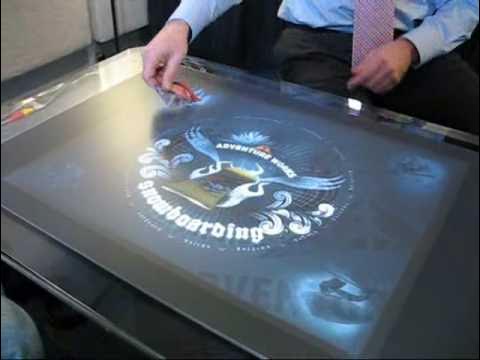
Microsoft Surface Demo @ CES 2008 — BotJunkie

BotJunkie

Microsoft is deploying its Surface tabletop platform exclusively through commercial hospitality and retail partners in spring 2008, betting in-venue experiences will drive adoption while tethering physical spaces to Windows Live cloud services.

AI-assisted summary of Microsoft Surface Demo @ CES 2008 — original source. Check the original for full context.

Source published:

Key ideas

  • Microsoft Surface is scheduled for its first commercial rollouts in spring 2008 across hospitality, retail, and gaming venues rather than direct consumer retail sales. (0:07)
  • The platform introduces physical-to-digital object recognition using optical tags on retail items and restaurant glassware to trigger customized interactive models and point-of-sale data. (1:19)
  • Seamless device handoff enables users to place Windows Mobile smartphones directly on the tabletop glass to transfer saved retail configurations or sync multimedia content. (4:30)
  • Surface integrates with Microsoft cloud services such as Windows Live Spaces and Virtual Earth, allowing users to export dining selections, photos, and geographical winery data to the web. (9:09)

Detailed notes

## Background Published on YouTube by the channel BotJunkie on January 8, 2008, this video showcases a live trade show presentation of Microsoft Surface at CES 2008. The video description provides links for viewers to read further coverage on OhGizmo and the official Microsoft Surface website.

## TL;DR The demonstration highlights Microsoft Surface, a 30-inch interactive tabletop computing platform slated for a spring 2008 commercial rollout across partners like Starwood Hotels, Harrah's, T-Mobile, and IGT. The presenter walks through practical commercial scenarios, starting with an interactive retail snowboard designer that uses optical tag cards and syncs designs directly to a Windows Mobile device. It shifts to a resort hospitality setting where hotel guests manipulate photos, play slope videos, and email digital postcards via Windows Live Spaces. Finally, the showcase demonstrates a smart restaurant dining table that pairs with tagged wine glasses, offering palate filters, culinary pairings, Virtual Earth vineyard exploration, and direct POS integration.

## Atmosphere & style The presentation carries the polished, eager optimism typical of late-2000s trade show tech demonstrations, set against the ambient hum of the CES convention floor. The demonstrator maintains an approachable, conversational rhythm, fielding input from the surrounding crowd while effortlessly dragging, spinning, and flicking digital assets across the glass. Watching it feels like a fascinating time capsule of the early natural user interface era, where physical tags, early smartphone handshakes, and tabletop multitouch gestures felt remarkably cutting-edge.

## Bulletin - [00:07](https://www.youtube.com/watch?v=Zxk_WywMTzc&t=7s) Microsoft Surface is scheduled for its first commercial rollouts in spring 2008 across hospitality, retail, and gaming venues rather than direct consumer retail sales. - [01:19](https://www.youtube.com/watch?v=Zxk_WywMTzc&t=79s) The platform introduces physical-to-digital object recognition using optical tags on retail items and restaurant glassware to trigger customized interactive models and point-of-sale data. - [04:30](https://www.youtube.com/watch?v=Zxk_WywMTzc&t=270s) Seamless device handoff enables users to place Windows Mobile smartphones directly on the tabletop glass to transfer saved retail configurations or sync multimedia content. - [09:09](https://www.youtube.com/watch?v=Zxk_WywMTzc&t=549s) Surface integrates with Microsoft cloud services such as Windows Live Spaces and Virtual Earth, allowing users to export dining selections, photos, and geographical winery data to the web.

## Key takeaways - [00:07](https://www.youtube.com/watch?v=Zxk_WywMTzc&t=7s) Microsoft Surface is engineered around a natural user interface that replaces traditional mice and keyboards with direct touch and object interaction on a 30-inch tabletop display. - [00:07](https://www.youtube.com/watch?v=Zxk_WywMTzc&t=7s) Initial commercial launch partners for spring 2008 include Harrah's Entertainment, Starwood Hotels, T-Mobile, and International Game Technology (IGT). - [00:07](https://www.youtube.com/watch?v=Zxk_WywMTzc&t=7s) The underlying architecture is designed to scale beyond the initial 30-inch tabletop to compact surfaces, larger table installations, and vertical wall mounts. - [01:19](https://www.youtube.com/watch?v=Zxk_WywMTzc&t=79s) Physical merchandise tags placed on the glass prompt the screen's optical sensors to render fully rotatable, interactive 3D product models. - [01:19](https://www.youtube.com/watch?v=Zxk_WywMTzc&t=79s) Shoppers can customize products by dragging graphics, adjusting colors, signing personal signatures on the reverse side, and snapping on physical hardware attachments. - [04:30](https://www.youtube.com/watch?v=Zxk_WywMTzc&t=270s) Placing a Windows Mobile smartphone onto the surface glass creates an instant pairing handshake to store designs locally or upload them to Windows Live Spaces. - [04:30](https://www.youtube.com/watch?v=Zxk_WywMTzc&t=270s) In hospitality settings like hotel lobbies, multiple guests can simultaneously manipulate, scatter, and play back high-resolution photos and video clips directly from their phones. - [04:30](https://www.youtube.com/watch?v=Zxk_WywMTzc&t=270s) Guests can turn digital photos into handwritten postcards on the tabletop and send them through authenticated Windows Live contact lists. - [06:25](https://www.youtube.com/watch?v=Zxk_WywMTzc&t=385s) Interactive restaurant menus demystify complex wine lists by allowing patrons to filter options based on sensory profiles such as acidity, body, and depth. - [06:25](https://www.youtube.com/watch?v=Zxk_WywMTzc&t=385s) Bottom-mounted optical tags on glassware connect directly to restaurant POS systems to generate interactive digital coasters beneath individual drinks. - [06:25](https://www.youtube.com/watch?v=Zxk_WywMTzc&t=385s) Digital coasters allow diners to adjust an illuminated glow to visually record personal preference ratings, inspect food pairings, and watch winemaker videos. - [09:09](https://www.youtube.com/watch?v=Zxk_WywMTzc&t=549s) Integrated Virtual Earth mapping lets users explore vineyard locations and regional topography directly on the table to make informed ordering decisions. - [09:09](https://www.youtube.com/watch?v=Zxk_WywMTzc&t=549s) Direct on-screen sharing controls enable patrons to email complex wine cards to themselves or post tasting notes directly to Windows Live blogs.

## Detailed walkthrough ### [00:07](https://www.youtube.com/watch?v=Zxk_WywMTzc&t=7s) Introduction to Microsoft Surface and Commercial Launch Strategy

The demonstration opens with an introduction to Microsoft Surface, a computing platform engineered to transform ordinary flat tabletops into active digital environments. By interacting directly with visual content using natural hand gestures rather than a mouse or keyboard, the platform marks a leap forward in natural user interface design. While the hardware shown is a 30-inch diagonal tabletop display, the underlying architecture is intended to support multiple future form factors, including larger installations, compact tabletop units, and vertical wall-mounted surfaces.

```mermaid flowchart TD accTitle: Microsoft Surface Ecosystem and Launch Partners accDescr: Commercial partners deploying Microsoft Surface across leisure, entertainment, and retail.

subgraph CorePlatform["Microsoft Surface Platform"] MS["Natural User Interface (30-inch Display)"] end

subgraph Partners["Commercial Launch Partners (Spring 2008)"] H["Harrah's Entertainment"] S["Starwood Hotels (Westin & Sheraton)"] TM["T-Mobile"] IGT["International Game Technology (IGT)"] end

MS --> H MS --> S MS --> TM MS --> IGT ```

Originally announced in May 2007, Microsoft Surface is not positioned for direct consumer retail sales at launch. Instead, Microsoft is targeting commercial venues across leisure, entertainment, and hospitality. Commercial partners purchase the units directly to install within customer-facing spaces, slated for operational rollout in the spring of 2008. The demonstrator highlights that end users will encounter the technology across four key launch partners:

- **Harrah's Entertainment**: Casino and resort hospitality installations. - **Starwood Hotels & Resorts**: Hospitality deployments across brands such as Westin and Sheraton. - **T-Mobile**: Interactive retail and mobile telecommunications environments. - **International Game Technology (IGT)**: Casino gaming machines and interactive entertainment setups.

---

[01:19](https://www.youtube.com/watch?v=Zxk_WywMTzc&t=79s) Interactive Snowboard Customization and Retail Experience

The presenter introduces the first new application revealed at CES 2008, dubbed the "Snowboard" demo. The scenario tackles a common retail problem: walking into a sporting goods shop confronted by hundreds of boards mounted on a wall without an intuitive way to tailor or visualize options. The demonstrator emphasizes that “personalization and customization is really big I mean if if you you're taking a look around here at CES it's one of the major themes so surface can actually enhance that situation.”

```mermaid flowchart LR accTitle: Retail Snowboard Personalization Flow accDescr: Step-by-step workflow of customizing a snowboard on Microsoft Surface and syncing to mobile.

subgraph StoreFloor["In-Store Retail"] A["Physical Tag with Optical Code"] --> B["Place Tag on Surface Display"] B --> C["Render 3D Snowboard Model"] end

subgraph Customization["Surface Interaction"] C --> D["Manipulate Decals, Colors & Position"] D --> E["Flip Board to Sign Name"] E --> F["Attach Hardware Bindings"] end

subgraph Handoff["Cross-Device Handoff"] F --> G["Place Windows Mobile Phone on Screen"] G --> H["Save to Windows Live Spaces or Local Phone Storage"] end ```

To bridge the physical inventory with the digital surface, each physical snowboard rack includes a card equipped with an optical tag on the reverse side. When placed onto the Surface display, optical sensors detect the pattern, instantly projecting a full 3D model of the board onto the glass. The user manipulates the virtual board directly:

- **Surface Manipulation**: The 3D model can be freely rotated, spun, and flipped over with direct finger contact. - **Graphic Customization**: Users select graphical designs and decals from a palette, drag them onto the board, resize them, adjust their position, and alter specific logo colors. - **Graphic Bleed Effects**: Decals can be scaled and offset to deliberately bleed over the board edges. - **Personal Signature**: Turning the board to the underside allows users to apply handwritten signatures along the perimeter or edge so it is visible while hitting moguls. - **Hardware Finalization**: Bindings are dragged and snapped into place to complete the custom setup.

---

[04:30](https://www.youtube.com/watch?v=Zxk_WywMTzc&t=270s) Mobile Device Handshake and Hospitality Cloud Sync

After assembling the customized board, the demonstrator addresses a classic pain point in specialty retail: shoppers rarely make high-ticket purchases on their initial consultation, often needing to leave and bring back a friend. To preserve the session without forcing a sales clerk to rebuild the design from scratch, the user rests a Windows Mobile smartphone directly onto the Surface glass.

The system pairs with the device, presenting options to store the design directly into the phone's internal memory or upload it to a Windows Live Spaces account. The customer can then return the following day, place the handset on the tabletop, and instantly retrieve the working session to finalize tweaks and complete the purchase.

The demonstration shifts to a hospitality context set weeks later in a ski resort:

```mermaid flowchart TD accTitle: Hospitality Media Sharing Architecture accDescr: Media offloading and social interaction workflow in a hotel lobby via Microsoft Surface.

subgraph Handset["Windows Mobile Device"] M["Phone Placed on Surface Glass"] end

subgraph SurfaceLobby["Sheraton Lobby Surface Table"] M --> V["Stream Recorded Video Clips"] M --> P["Scatter High-Res Ski Photos"] P --> Multi["Simultaneous Multi-User Manipulation"] P --> Postcard["Create Digital Postcard"] end

subgraph CloudServices["Connected Cloud Services"] Postcard --> WLS["Windows Live Contacts"] WLS --> OutMail["Email Out to Friends"] WLS --> LiveSpaces["Publish to Windows Live Spaces"] end ```

In the lobby of a Sheraton hotel by the fireplace, guests gather around a Surface table. Resting the Windows Mobile smartphone on the tabletop triggers an automatic synchronization of the day's slope footage and action photography. Users can: - Scatter, flick, and resize photos simultaneously across multiple touch points, treating digital media like printed physical photographs. - Play video clips directly on the tabletop surface showing runs down the slopes or wipeouts. - Tap the Windows Live Spaces icon to access previously uploaded photo archives from earlier in the ski trip. - Flip an individual photo over to generate a digital postcard, complete with an on-screen handwritten note. - Access authenticated Windows Live contacts to dispatch the postcard via email or publish it to an online profile.

As the presenter explains, “again what we've done is we've taken surface computing technology into an environment where where technology didn't exist and we've addressed some real pain points we've turned that situation where you had a large number of snowboards and really not an ability to customize we changed that and then we've made that uh experience even better because it becomes mobile and portable via your Windows mobile phone and then we've got access to what we call the cloud the internet Hardware software Services through Windows Live so it becomes a very a very compelling experience.”

---

[06:25](https://www.youtube.com/watch?v=Zxk_WywMTzc&t=385s) Interactive Wine Menu and Restaurant Tabletop Dining

Transitioning to another commercial scenario, the demonstrator addresses the hospitality dining space. Turning to the audience, the presenter asks if anyone is a wine drinker, prompting an attendee to mention they work within the wine industry. The presenter points out that for many restaurant patrons, the traditional wine selection process remains thoroughly intimidating, marked by thick leatherbound wine books filled with foreign names and complex vintages.

```mermaid flowchart TD accTitle: Surface Restaurant Wine and POS Flow accDescr: End-to-end dining experience from filtering wines to ordering and tracking glassware via POS integration.

subgraph Selection["Tabletop Menu Browsing"] Touch["Touch Tabletop to Open Wine Menu"] --> Filters["Filter by Red, White, Acidity, Body & Depth"] Filters --> SelectWine["Select & Order Wine"] end

subgraph Identification["Glass & Coaster Recognition"] SelectWine --> Glass["Wine Glass Placed on Table"] Glass --> Tag["Optical Tag on Base of Glass"] Tag --> POS["Integration with Restaurant POS"] POS --> Coaster["Virtual Glowing Coaster Appears"] end

subgraph RichContent["Contextual Dining Details"] Coaster --> Glow["Adjust Glow to Reflect Personal Rating"] Coaster --> Pairing["View Food Pairings (e.g., Calamari)"] Coaster --> Vineyard["Stream On-Screen Winery Video"] end ```

On a Surface-enabled dining table, guests touch the tabletop to surface the restaurant's entire catalog: - **Intuitive Browsing**: Diners filter listings across categories such as red wines, white wines, and champagnes. - **Palate Filtering**: Interactive sliders allow patrons to narrow recommendations based on specific sensory criteria, including acidity, body, and depth. - **Glass-Level Tracking via POS**: When a selection is ordered, the waiter brings out a glass fitted with a bottom-mounted optical tag. When the glass is set on the table, the restaurant's Point of Sale (POS) system identifies the specific pour. - **Virtual Interactive Coaster**: An illuminated digital ring appears directly beneath the stem of the glass, displaying wine details and estate information. - **Dynamic Rating Ring**: The diner alters the outer glow of the coaster by finger touch to visually log their preference rating, scaling from subtle to bright. - **Pairings and Media**: Guests pull up culinary pairings directly from the wine's profile—such as calamari—and launch on-table video interviews featuring the winemaker detailing the vineyard's harvest and regional history.

[09:09](https://www.youtube.com/watch?v=Zxk_WywMTzc&t=549s) Exploring Wine Regions and Sharing Selections via Virtual Earth and Windows Live

Demonstrating the retail and dining capabilities of Microsoft Surface, the presenter explains how users can delve deep into available wine varietals and their origins directly on the interactive tabletop. After setting a selection back down onto the Surface screen, the user can examine the specific winemaking region where the bottle originated. The display brings up an interactive Virtual Earth map that can be freely rotated and manipulated with touch. The presenter navigates the geography, pointing out the featured winery alongside neighboring vineyards, noting how someone might plan an excursion or simply zoom in closer to discover deeper background on the surrounding bottles. As the presenter summarizes the utility of the interface, “All of this helps me make a more informed decision about the wine.”

Beyond immediate discovery, the interface addresses the everyday frustration of trying to memorize complicated wine labels and vintages after leaving a venue. The presenter points out a built-in email button directly on the tabletop display, allowing a patron to tap the screen and send their chosen wine profile straight to their personal inbox. Looking ahead at connected ecosystem possibilities, the presenter highlights how Microsoft Surface can bridge local venue interactions with social web services: “With the power of Surface, have a Windows Live logo on there that would take this information, post up to Windows Live, and I may be able to share it with my friends and be able to blog about it as well.”

- **Virtual Earth Mapping:** Users can rotate, manipulate, and zoom into interactive maps to explore specific vineyards and adjacent winemaking regions. - **Direct Email Delivery:** A single tap on an on-screen email button transmits the complex wine names and detailed product cards directly to the user's home account. - **Windows Live Integration:** Surface demo features touchpoints for cloud and social sharing, allowing guests to export tasting details, blog about their selections, or distribute recommendations to friends.

## Mentioned Microsoft Surface, CES 2008, Harrah's Entertainment, Starwood Hotels & Resorts, Westin, Sheraton, T-Mobile, International Game Technology (IGT), Windows Mobile, Windows Live Spaces, Windows Live, Virtual Earth, BotJunkie, OhGizmo!

## Video description Read more at http://www.ohgizmo.com/ and http://www.microsoft.com/surface/

[Source](https://www.youtube.com/watch?v=Zxk_WywMTzc)

中文简报

微软跳过消费零售市场,率先在酒店与赌场推出Surface 微软将于2008年春季专门通过商业酒店和零售合作伙伴部署其Surface桌面平台,押注现场体验将推动普及,同时将实体空间与Windows Live云服务紧密联结。 该演示重点介绍了微软Surface,这是一款30英寸交互式桌面计算平台,计划于2008年春季通过喜达屋酒店、哈拉斯娱乐、T-Mobile和IGT等合作伙伴进行商业推广。演示人员展示了多个实际商业场景,首先是利用光学标签卡并将设计直接同步到Windows Mobile设备的互动式零售滑雪板设计工具。接着转向度假酒店场景,住客可以在其中处理照片、播放滑雪坡道视频,并通过Windows Live Spaces以电子邮件发送数字明信片。最后,演示展示了一张智能餐厅餐桌,可与带有标签的酒杯配对,提供口味筛选、美食搭配建议、Virtual Earth葡萄园探索以及直接的POS系统集成。 微软Surface计划于2008年春季在酒店、零售和博彩场所进行首次商业推广,而非面向消费者直接进行零售。 (0:07) 该平台引入了实体到数字的物体识别功能,利用零售商品和餐厅玻璃器皿上的光学标签来触发定制的交互模型和销售点数据。 (1:19) 无缝的设备流转功能使用户可以直接将Windows Mobile智能手机放在桌面玻璃上,以传输保存的零售配置或同步多媒体内容。 (4:30) Surface集成了Windows Live Spaces和Virtual Earth等微软云服务,允许用户将餐饮选择、照片和葡萄园地理数据导出到网络上。 (9:09)

Reading summary

At CES 2008, Microsoft demonstrated its Surface computing platform as a commercial-first tabletop natural user interface, targeting leisure, retail, and hospitality deployments rather than consumer retail sales. Commercial Partner Rollout Over Direct Consumer Retail (0:07) First announced in May 2007, Microsoft Surface was designed around a 30-inch diagonal tabletop display using natural hand gestures instead of mice or keyboards. Rather than releasing the hardware directly to consumers, Microsoft structured its spring 2008 launch around business-to-business enterprise adoption, installing units across customer-facing environments. The demonstrator identified four primary commercial launch partners: Harrah's Entertainment for casino resorts, Starwood Hotels & Resorts for brands like Westin and Sheraton, T-Mobile for interactive telecommunications retail, and International Game Technology (IGT) for casino gaming machines. Although showcased in a horizontal tabletop format, Microsoft designed the underlying architecture to support future form factors, including compact units and vertical wall installations. Bridging Physical Inventory With Optical Tag Recognition (1:19) To address retail scenarios where browsing large physical inventories is overwhelming, Microsoft showcased an interactive snowboard customization demo. Physical retail cards mounted on display racks feature reverse-side optical tags; placing a tag onto the Surface glass prompts optical sensors to instantly render an interactive 3D model of the snowboard. Shoppers manipulate the digital board with touch, spinning and flipping the model to test graphic decals, adjust logo colors, and allow designs to bleed over edges. Users can also write personal signatures directly onto the board's base and snap hardware bindings into place, translating physical merchandise into a customizable digital asset. Device Pairing and Windows Live Cloud Continuity (4:30) Because high-ticket retail purchases rarely close on an initial visit, the platform supports session persistence via physical device pairing. Placing a Windows Mobile smartphone directly on the tabletop establishes a connection, enabling shoppers to save their custom configurations locally to the handset or upload them to Windows Live Spaces so they can resume their session later. This cross-device workflow extends into leisure environments, such as a hotel lobby. Guests can rest a Windows Mobile device on the table to automatically offload action photos and slope footage, manipulate images collaboratively across multiple touchpoints, craft digital postcards with handwritten notes, and dispatch them to Windows Live contacts via email or online profiles. Contextual Hospitality Menus and Geospatial Mapping (6:25) In restaurant settings, Surface replaces traditional wine lists with touch-driven filtering based on varietals, acidity, body, and depth. When a beverage is served, an optical tag on the base of the glass links with the venue's Point of Sale (POS) system, projecting an illuminated digital coaster beneath the glass that displays estate history, culinary pairings like calamari, and winemaker interview videos. Patrons can adjust the coaster's glowing ring to log personal taste ratings and open interactive Virtual Earth maps to explore the geography of neighboring vineyards. To preserve information after leaving the venue, the interface incorporates on-screen sharing tools to email wine profiles home or post recommendations directly to Windows Live. Microsoft framed Surface as an integration of touch hardware, mobile handsets, and cloud services designed to modernize physical venues, while operational reach at launch remained restricted to enterprise commercial partners.

精炼阅读摘要

在CES 2008上,微软展示了Microsoft Surface表面计算技术,演示者将其定位为依托自然用户界面(NUI)的企业级交互平台,旨在通过物体光学识别、移动设备互联与云端服务重塑零售与酒店娱乐等线下商业体验。 商业落地规划与多形态硬件架构 (0:07) Microsoft Surface最初于2007年5月公布,在CES 2008的演示中,微软明确该设备在初期并不面向普通个人消费市场,而是采取面向商业客户的B2B推广策略。商业伙伴采购设备后将其部署在面向公众的营业场所,首批业务计划于2008年春季正式投入运营。首发四大核心合作伙伴涵盖哈拉斯娱乐(Harrah's Entertainment)、喜达屋酒店及度假村(Starwood Hotels & Resorts,涉及威斯汀与喜来登品牌)、T-Mobile以及国际游戏技术公司(IGT),分别对应博彩度假村、高端酒店、电信零售及互动娱乐场景。 在硬件形态上,现场展示的是一台30英寸对角线的水平桌面型显示设备。演示者强调,尽管展示形态为桌面,但底层系统架构在规划中可适配多种未来硬件规格,包括更小型的桌面单元、超大型交互装置以及垂直安装的壁挂式表面。 光学标签识别与实体零售定制 (1:19) 针对体育用品零售场景中商品陈列密集、顾客难以直观预览与定制的痛点,微软在展会上演示了滑雪板定制应用。系统通过硬件与实物标签结合的方式打通线上线下:货架上的实体卡片背面附有光学识别码,当卡片放置在Surface表面时,内置光学传感器会即时感应并渲染出完全对应的3D滑雪板模型。 用户可以直接使用手指进行多点触控操作,包括任意旋转、翻转模型,从调色板拖拽贴花图案,缩放图案尺寸,调整特定标志的颜色,甚至允许图案产生边缘溢出效果。此外,用户翻转板底即可使用手指进行手写签名,并将选定的固定器拖拽卡入预定卡槽,完成高客单价商品的完全个性化定制。 跨设备物理触控配对与云端流转 (4:30) 为了解决零售场景中消费者由于高昂售价无法当场完成决策的问题,Surface设计了移动端接力机制。用户仅需将Windows Mobile智能手机平放在屏幕玻璃上,系统便会建立握手连接,将当前的设计草案直接写入手机内置存储或同步上传至Windows Live Spaces账号。顾客离开后可在次日携手机返回,放回桌面即刻还原工作区以继续选购。 这一跨设备交互进一步延伸至酒店大堂场景。演示模拟了顾客在喜来登酒店壁炉旁的使用流程:将手机置于桌面后,系统自动同步白天拍摄的滑雪高清照片与运动视频。多名用户可在桌面上同时轻推、缩放与排列数字照片,播放滑雪动态录像,翻转照片撰写手绘电子明信片,并通过调用Windows Live联系人列表直接发送邮件或上传至个人线上空间。 餐饮交互、POS系统联动与地理探索 (6:25) 在餐饮应用演示中,Surface被设计为替代厚重传统酒单的数字化交互餐桌。顾客可以通过触控屏幕按红葡萄酒、白葡萄酒和香槟进行分类检索,并通过酸度、酒体与深度等口感滑块筛选符合个人偏好的酒品。当服务员送上底部贴有光学识别码的酒杯并置于桌面时,系统通过集成餐厅POS系统识别出具体杯装酒品,并在杯底生成一圈发光的虚拟互动杯垫。顾客可通过触控调节杯垫光晕亮度来记录个人评分,并调取墨鱼等推荐配菜指南或观看酒庄采访视频。 在产地溯源方面,桌面集成了Virtual Earth三维地图系统,支持触控缩放与旋转,便于顾客探索葡萄园及周边酒庄的地理环境。最后,用户可通过桌面内置的邮件按钮将酒品详细卡片直接发送至个人邮箱,或借助Windows Live平台将品酒记录发布到社交网络与个人博客。 该演示展示了微软早期将大屏触控计算、物理光学标记、Windows Mobile终端与Windows Live云服务深度捆绑的垂直生态构想,其商业化路径严格依托大型B端客户部署,并未向个人消费级市场开放。

Detailed notes — zh

## Background 该视频由 YouTube 频道 BotJunkie 于 2008 年 1 月 8 日发布,记录了在 CES 2008 展会现场进行的 Microsoft Surface 交互演示。视频简介引导观众访问 OhGizmo 科技博客与微软 Surface 官方网站以了解更多技术详情。 ## TL;DR 在 CES 2008 展会上,微软展示了其革命性的初代 Microsoft Surface 桌面计算设备,强调自然用户界面(NUI)如何重塑实体商业与数字体验。演示者首先介绍了针对哈拉斯娱乐、喜达屋酒店、T-Mobile 及 IGT 等首批商业伙伴的合作规划,随后重点演示了多个落地概念:通过光学标记码定制滑雪板并无缝同步至 Windows Mobile 手机、在酒店大堂壁炉旁实现多用户照片浏览与云端明信片寄送,以及在高级餐厅中借助数字酒单、光学感应酒杯、Virtual Earth 地图进行餐酒搭配与风味探索。整场展示凸显了实体物件识别、多点触控与微软云端生态协同的沉浸式交互能力。 ## Atmosphere & style 现场氛围生动且极具科技探索感,展台四周环绕着好奇的围观者,演示者与观众之间充满即兴互动与轻松幽默的交谈(例如调侃博彩机器赚走自己的钱,或是交流对选红酒的畏惧感)。整体叙事带着 2000 年代后期对未来交互界面憧憬的饱满热情,当实体卡片、手机与酒杯放置在桌面上瞬间激发出数字化光晕与 3D 模型时,现场流露出一种见证科幻走进现实的惊艳与探索趣味。 ## Bulletin - [00:07](https://www.youtube.com/watch?v=Zxk_WywMTzc&t=7s) 微软在 CES 2008 上展示了 30 英寸的初代 Microsoft Surface,设备主打自然用户界面(NUI),短期内不面向个人消费者,而是率先切入休闲娱乐与高端零售行业。 - [00:07](https://www.youtube.com/watch?v=Zxk_WywMTzc&t=7s) 微软已签约首批四家商业合作伙伴,包括哈拉斯娱乐、喜达屋酒店集团、T-Mobile 以及 IGT,首批终端预计于当年春季正式进驻线下门店与酒店大堂。 - [01:19](https://www.youtube.com/watch?v=Zxk_WywMTzc&t=79s) Surface 深度整合了光学标记识别技术,可直接识别贴有光学码的实体卡片或酒杯底部,打通线下物理实体与桌面 3D 数字交互。 - [01:19](https://www.youtube.com/watch?v=Zxk_WywMTzc&t=79s) 设备通过与 Windows Mobile 智能手机以及 Windows Live 云端服务结合,实现无缝身份认证、设计方案留存与跨端多媒体社交分享。 ## Key takeaways - [00:07](https://www.youtube.com/watch?v=Zxk_WywMTzc&t=7s) Microsoft Surface 重新定义了人机交互形态,将传统物理桌面转变为支持多点触控与物体识别的自然用户界面(NUI)。 - [00:07](https://www.youtube.com/watch?v=Zxk_WywMTzc&t=7s) 虽然当前展示形态为 30 英寸桌面,但 Surface 硬件在未来具备做成垂直挂墙或放大缩小的极高形态弹性。 - [00:07](https://www.youtube.com/watch?v=Zxk_WywMTzc&t=7s) 微软商业落地策略先行,避开个人消费市场,优先与赌场、酒店、电信运营商和博彩游戏企业合作落地。 - [01:19](https://www.youtube.com/watch?v=Zxk_WywMTzc&t=79s) 滑雪板定制演示展现了 Surface 赋能传统零售的能力,将原本缺乏数字科技的专卖店升级为高度个性化的互动体验空间。 - [01:19](https://www.youtube.com/watch?v=Zxk_WywMTzc&t=79s) 通过桌面底部的红外摄像头识别附在实体卡片上的光学标记码(Optical Tag),Surface 能瞬间投射出可自由旋转缩放的 3D 模型。 - [01:19](https://www.youtube.com/watch?v=Zxk_WywMTzc&t=79s) 用户可直接在板面上进行涂鸦、放大 Logo、设计板边裁切手写签名并装配固定器,完成全套个性化外观定制流程。 - [01:19](https://www.youtube.com/watch?v=Zxk_WywMTzc&t=79s) 将 Windows Mobile 智能手机平放在桌面上即可完成身份识别,轻松把设计方案保存至本地或云端,解决顾客二次到店时方案难还原的零售痛点。 - [04:30](https://www.youtube.com/watch?v=Zxk_WywMTzc&t=270s) 在酒店大堂场景中,Surface 充当社交茶几,多位好友可围坐在一起以洗印实体照片般的自然手势同时拖拽、放大和旋转手机中的高清照片与视频。 - [04:30](https://www.youtube.com/watch?v=Zxk_WywMTzc&t=270s) 用户可直接将桌面照片转换为虚拟明信片,并在背面手写留言后,经由微软云服务(The Cloud)及 Windows Live 通讯录直接电邮或发布到博客。 - [06:27](https://www.youtube.com/watch?v=Zxk_WywMTzc&t=387s) 在高端餐饮场景下,Surface 替代了厚重晦涩的实体酒单,允许顾客根据酸度、酒体与浓郁度等维度直观筛选葡萄酒。 - [06:27](https://www.youtube.com/watch?v=Zxk_WywMTzc&t=387s) 当贴有光学码的酒杯接触桌面时,Surface 结合餐厅 POS 系统可立刻调出该酒款的档案,并通过杯底交互光晕支持打分评级与配菜推荐加点。 - [06:27](https://www.youtube.com/watch?v=Zxk_WywMTzc&t=387s) 桌面内置多媒体播放能力,让顾客能直接观看庄主讲述葡萄收成的短片,将枯燥的点餐过程转变为生动的文化体验。 - [09:09](https://www.youtube.com/watch?v=Zxk_WywMTzc&t=549s) 集成 Virtual Earth 交互式地图功能,支持多点触控缩放查看酒庄地理环境及周边酒厂,为深入探索产区或旅行规划提供决策参考。 - [09:09](https://www.youtube.com/watch?v=Zxk_WywMTzc&t=549s) 针对红酒复杂名称难记的困扰,系统提供一键发送邮件到私人邮箱或同步到 Windows Live 的功能,打通线下消费与线上记录分享。 ## Detailed walkthrough ### [00:07](https://www.youtube.com/watch?v=Zxk_WywMTzc&t=7s) Microsoft Surface 与商业合作规划 在 CES 2008 的现场,演示者向观众正式展示了 Microsoft Surface。这项技术的革命性之处在于它打破了传统桌面与计算设备的界限,将一张普通的桌面转变成完全互动的数字界面。演示者一边伸手直接触控桌面上的数字内容,一边强调这是自然用户界面(Natural User Interface,NUI)领域的重大突破。目前的展示设备配备了一块 30 英寸对角线的显示屏,但演示者指出,未来的产品形态将极具弹性,既可以做成垂直挂墙的形式,也可以在尺寸上根据需要进一步放大或缩小。 该产品最初于 2007 年 5 月正式对外公布。演示者特别向现场观众说明,Microsoft Surface 目前并不直接面向个人消费市场销售,而是率先切入休闲娱乐与高端零售行业。微软已经锁定了首批四家商业合作伙伴,消费者很快就能在这些合作伙伴的线下场所亲自体验到该设备: - **哈拉斯娱乐(Harrah's Casinos and Resorts)**:应用于旗下的赌场与度假酒店。 - **喜达屋酒店集团(Starwood Hotels)**:覆盖威斯汀(Westin)与喜来登(Sheraton)等高端酒店品牌。 - **T-Mobile**:用于零售门店的数字化消费体验与产品展示。 - **国际游戏科技(International Game Technology, IGT)**:博彩游戏开发巨头(引得现场旁观者打趣道:“他们把我的钱全赚走了”)。 这些合作伙伴采购的 Surface 终端预计将于当年春季正式进驻其各自的商业场所。 --- ### [01:19](https://www.youtube.com/watch?v=Zxk_WywMTzc&t=79s) 零售场景革新:滑雪板的个性化定制体验 演示者在展会上展示了专为 CES 准备的全新概念演示——“滑雪板定制应用”(Snowboard)。该演示意在说明 Surface 如何将计算体验带入以往完全没有数码科技介入的实体零售场景。在传统的滑雪板专卖店中,墙上往往挂着上百块滑雪板,消费者不仅难以挑选,更无法对板身图案进行实时定制。而“个性化与定制化”恰恰是本届 CES 的核心潮流之一。 在 Surface 的互动流程中,消费者在货架看中某款滑雪板后,只需取下板身下方附带的小卡片。卡片背面贴有一枚光学标记码(Optical Tag)。当消费者将卡片放置在 Surface 桌面上时,设备底部的红外摄像头立刻识别出该标签,并在桌面上虚拟生成一块对应的 3D 滑雪板模型。用户可以直接用双手旋转、翻转这块滑雪板,进行深度定制: ```mermaid flowchart TD accTitle: 实体零售到 Surface 的交互流程 accDescr: 展示从货架选择标签卡片到在桌面交互定制并同步至手机的完整流程 subgraph Store["线下实体店选购"] A["货架浏览滑雪板"] --> B["取下带光学标记的卡片"] end subgraph Surface["Surface 桌面交互"] B --> C["放置卡片至桌面识别"] C --> D["生成 3D 滑雪板模型"] D --> E["自由涂鸦、缩放图案与签名"] end subgraph Sync["数据保存与外带"] E --> F["放置 Windows Mobile 手机"] F --> G["同步至手机或云端空间"] end ``` 用户可以从素材库中将各类涂鸦与 Logo 拖拽到空白板面上,随意放大、缩小或调整位置;演示者甚至将一个凶猛风格的 Logo 放大并摆放在板面前端,让它“在滑雪冲下山坡时显得霸气十足”。翻转到板面背面后,用户还能直接用手指手写签名,并将签名拖放到板边做边缘裁切设计,以便“飞越雪包时别人能看清署名”。最后再挑选并装配上固定器(Bindings),整套定制方案便告完成。 针对零售业中“顾客难以当场决定、下次到店需重新找导购复原方案”的痛点,演示者拿出一台 Windows Mobile 智能手机平放在桌面上。Surface 会立刻识别手机并弹出选项:用户既可以将设计同步保存至 Windows Live Spaces 空间供好友评审,也可以直接存入手机本地存储。第二天若与朋友重返店内,只要再次把手机往桌面上一放,原先保存的专属滑雪板便会毫秒级还原到桌面上继续修改与下单。正如演示者所总结的那样:“我们把 Surface 计算技术带入了一个原本不存在科技的环境,并解决了切实的痛点。” --- ### [04:30](https://www.youtube.com/watch?v=Zxk_WywMTzc&t=270s) 旅途互联:酒店大堂的照片与云端社交 随后,演示者描绘了滑雪板购买数周后的延伸使用场景:当用户远赴科罗拉多雪场度假数日后,朋友们赶来汇合,大家聚在喜来登酒店(Sheraton)大堂的壁炉旁。壁炉边恰好放置了一台 Surface 交互茶几。用户只需再次拿出 Windows Mobile 手机放在桌面上,手机中刚拍的高清滑雪照片和录像便瞬间散落铺开在桌面上,甚至包括一段在雪道上摔跟头的滑稽录像(引得同伴笑着确认:“那看起来确实是你”)。 多位好友可以同时伸出双手在桌面上拖拽、放大、旋转这些照片,就如同围着一堆洗印好的实体照片一样自然。此外,由于手机在放置时已经完成了用户身份认证(Authentication),屏幕角落还会同步出现 Windows Live Spaces 的云端图标,允许用户调出前几天已经上传至云端的内容。 用户选中一张极具表现力的滑雪抓拍后,只需在界面上一按即可将其转变成一张虚拟明信片。翻转明信片背面,便能手写留言;借助屏幕顶端调出的 Windows Live 通讯录,这张定制明信片可以通过电子邮件即时发送给远方亲友,或者一键发布到个人博客空间中,展现了本地设备、Surface 硬件与微软云端服务(The Cloud)的无缝整合。 --- ### [06:27](https://www.youtube.com/watch?v=Zxk_WywMTzc&t=387s) 智能餐厅体验:数字酒单与光学感应酒杯 演示者紧接着切换到了第二个行业演示——餐饮与红酒体验。在开场时,演示者询问旁观者是否平时喝葡萄酒,其中一位旁观者恰好就在葡萄酒行业工作。演示者指出,大多数普通人在高级餐厅点酒时都会感到不知所措,而另一位旁观者随即赞同地表示:“是的,我就是其中之一。” 针对厚重的皮革装订酒单上那些充斥着晦涩外语、令人望而生畏的名字,Surface 提供了直观的交互解决方案。餐桌本身即是数字酒单,顾客伸出手指即可在不同红酒、白葡萄酒或香槟之间滑动浏览。演示者展示了如何根据酸度(Acidity)、酒体(Body)以及浓郁度(Depth)等具体维度快速筛选符合个人口味的酒款。 选定酒款下单后,桌面上会浮现出一个虚拟杯垫。当侍酒师端上倒好酒的玻璃杯时,酒杯底部同样贴有类似滑雪板卡片的光学识别码。当酒杯接触桌面时,Surface 会通过餐厅的 POS 销售系统识别这只杯子并关联所倒酒款的全部档案: - **桌面虚拟光晕**:杯底四周会亮起交互光晕,顾客通过手指滑动光晕范围,就能为这款红酒的当前口感打分评级。 - **餐酒搭配推荐**:点击红酒详情可以查询适合搭配的菜品,例如系统推荐了鱿鱼(Calamari),顾客可直接在桌面上完成加点。 - **酒庄背景与故事**:顾客还能在桌面上直接播放酒庄的视频短片,由庄主亲自讲述当季与往年的收成故事,将原本枯燥冷冰的点餐过程转化为生动的多媒体文化体验。 ### [09:09](https://www.youtube.com/watch?v=Zxk_WywMTzc&t=549s) 葡萄酒产区地图探索与信息分享功能 在展示了酒类品种与详细风味之后,演示人员将酒杯或酒瓶等实体交互物重新放回 Microsoft Surface 桌面,进一步探索葡萄酒背后的产地故事。如果消费者对这款酒的原产地感兴趣,界面会直接调出一张 Virtual Earth 交互式地图。用户可以在桌面上随意旋转地图方向,缩放查看酒庄的具体地理位置以及周围的其他酒庄。这不仅方便用户深入了解产区环境、对比周边产出的具体酒品,甚至还能直接为实地旅行规划提供参考,帮助消费者在点餐或购买时做出更充分、更明智的选择。 针对红酒名称冗长复杂、日常极难记忆的痛点,演示者展示了 Surface 在数据跨平台同步与社交分享上的延伸能力。界面上提供了一个直接发送邮件的快捷按钮,轻轻一点就能将当前红酒的所有档案发送到用户的私人邮箱;同时系统也可以集成 Windows Live 服务,一键将酒品数据上传同步,方便用户日后调取、撰写博客或直接分享给朋友。演示人员总结道:“All of this helps me make a more informed decision about the wine and and uh if I like this I can also solve another problem that I have is I sometimes it's difficult to remember these complex names for wines but what I can do is I can press this email button and it'll send me a message back home or we could with the power of Surface have a Windows Live logo on there that would take this information post up to Windows Live and I may be able to share it with my friends and be able to blog about it as well.” ```mermaid flowchart TD accTitle: Microsoft Surface 葡萄酒互动体验流程 accDescr: 演示用户如何在 Surface 桌面上查看红酒地图并进行跨平台信息分享 subgraph MapExplore ["虚拟地图探索"] A["实体酒具放置于 Surface 桌面"] --> B["调用 Virtual Earth 地图"] B --> C["旋转与缩放地图"] C --> D["查看酒庄位置及周边酒品"] end subgraph DataShare ["信息留存与分享"] D --> E{"解决名称难记问题"} E -->|"点击 Email 按钮"| F["发送葡萄酒详细信息至私人邮箱"] E -->|"关联 Windows Live"| G["同步数据至线上用于发博客或好友分享"] end ``` - **Virtual Earth 地图集成**:支持多点触控旋转、缩放与产区定位,可同屏查看选定酒庄及周边的其他酿酒厂。 - **一键邮件推送**:针对复杂的葡萄酒命名规则,提供直发邮箱功能,解决离店后遗忘酒名的烦恼。 - **社交与云端连接**:借助 Surface 底层系统整合 Windows Live 生态,实现博客发布与社交圈分享。 ## Notable quotes > [01:19](https://www.youtube.com/watch?v=Zxk_WywMTzc&t=79s) 我们把 Surface 计算技术带入了一个原本不存在科技的环境,并解决了切实的痛点。 — 演示者 ## Mentioned Microsoft Surface, CES 2008, 哈拉斯娱乐 (Harrah's Casinos and Resorts), 喜达屋酒店集团 (Starwood Hotels), 威斯汀 (Westin), 喜来登 (Sheraton), T-Mobile, 国际游戏科技 (International Game Technology, IGT), Windows Mobile, Windows Live Spaces, Windows Live, Virtual Earth ## Video description Read more at http://www.ohgizmo.com/ and http://www.microsoft.com/surface/ [Source](https://www.youtube.com/watch?v=Zxk_WywMTzc)

Source quotes

[1:19] 演示者: 我们把 Surface 计算技术带入了一个原本不存在科技的环境,并解决了切实的痛点。

Original transcript

[0:07] okay so all right so this is Microsoft [0:09] Surface and what it allows us to do is [0:11] to bring an ordinary tabletop to life uh [0:14] as you can see I can reach out and just [0:15] physically touch digital content with my [0:18] hands which is something that uh is is [0:23] completely revolutionary in that it's an [0:26] a great advancement in natural user [0:28] interface um today it's a 30-in diagonal [0:31] display but in the future it could take [0:33] many different form factors it could go [0:35] vertical it could go bigger it could go [0:37] smaller uh what we've done is we [0:40] announced it in May and we've we've uh [0:43] got four commercial Partners we'll be [0:44] first targeting the Leisure [0:45] entertainment retail space so it's not [0:47] available for sale to Consumers right [0:49] now but they'll be able to experience [0:51] surface in our commercial Partners such [0:53] as Harris C casinos and resorts uh [0:56] Starwood Hotels which has Weston Sheron [1:00] Um T-Mobile and international game [1:02] technology they they produce uh microser [1:06] games yeah they take all my money that's [1:08] right uh so those four commercial [1:11] Partners will be purchasing surface from [1:13] us and it'll be available through uh [1:16] through their u in their venues in the [1:17] spring of this [1:19] year all right um let me show you two [1:22] new [1:23] applications that uh are uh just being [1:27] introduced at CES so your uh readers and [1:31] viewers are among the first to actually [1:33] see these demos this is called [1:35] snowboard and it's a demo that actually [1:39] um illustrates how we can bring surface [1:42] Computing technology into an environment [1:44] where technology doesn't exist today [1:45] imagine going into a snowboard shop and [1:48] there are hundreds of snowboards on the [1:50] wall from which to choose and and it's a [1:52] difficult decision and you really can't [1:54] understand how you can personalize and [1:55] customize those snowboards you know [1:57] personalization and customization is [1:59] really big I mean if if you you're [2:01] taking a look around here at CES it's [2:03] one of the major themes so surface can [2:05] actually enhance that situation so if [2:06] I'm in a in a in a market for a [2:08] snowboard and I'm in a large Sporting [2:10] Goods store what I can do is I can get [2:11] up I can go to the wall and on the wall [2:13] I would see a variety of snowboards and [2:15] I would I would find what I wanted and I [2:17] would pull a card off of a tag from [2:20] below those snowboards and I would be [2:21] able to bring it over to surface and it [2:23] has an optical tag on the back and this [2:25] Optical tag is recognized by surface and [2:29] when I place it down that snowboard is [2:32] brought to life on Surface so now I have [2:33] a 3D snowboard that I can actually touch [2:36] and flip over with my with my hands if I [2:39] want to design it to make it my own [2:40] again to personalize and customize it I [2:42] can take a look at a variety of boards [2:44] that are available in designs and I can [2:46] drag those to uh to uh the blank [2:49] snowboard and what I want to do is [2:50] customize it so that it's it's further [2:53] uh illustrating sort of my personality [2:55] and and uh what I want and so I can [2:58] actually change the color of a specific [3:01] logo so I can bring this over and I can [3:03] enlarge it I can change this location [3:05] and what I'll do is I'll place it right [3:07] on the front of the board so it looks [3:08] really menacing as I'm coming down the [3:10] slopes and then I might want to choose [3:12] another design here in the back and [3:13] again I can change the colors and what [3:15] I'll do is I'll bring this over and I'll [3:17] have it bleed off the side a little bit [3:19] like that and when I'm ready what I can [3:22] do is I can flip the board over and I [3:24] can even further customize it by uh [3:27] signing my name on on the back and then [3:31] when I'm ready I just bring this over to [3:33] the board and I can have it uh go along [3:35] the edge like this or I can have it sort [3:37] of bleed off again which I think I'll do [3:39] so you can see this as I'm uh coming [3:41] over the Mogul over the top of your head [3:44] now I can flip it over and I'm ready to [3:46] go and what I'll do is I'll finish it by [3:47] adding some bindings but you know I may [3:50] not be ready to purchase this today and [3:52] one of the common problems in retail is [3:54] that you may come in for an initial [3:56] consultation then you'll leave and [3:57] you've got to come back and you've got [3:58] to find the same salesp person and [3:59] recreate the whole experience but with [4:01] surface what you can do is reach into [4:03] your pocket and pull out a Windows [4:04] Mobile smartphone place it down on [4:06] Surface and you're presented with a [4:07] couple of options one is I can save this [4:10] creation to my Windows Live spaces [4:11] account where I can share it with [4:12] friends and talk about whether or not [4:14] this is a great design or I can save it [4:15] directly to the phone so that when I [4:17] leave and then come back the next day [4:19] with my friend to make my final decision [4:21] I can place it down on Surface and [4:22] there's my creation and what we might do [4:23] is you know my friend might say well you [4:25] know let's move this up here that's [4:26] where it really should belong and then I [4:28] can purchase my snowboard and off I go [4:30] then a few weeks later if I'm uh on the [4:33] slopes say in Colorado uh Midway through [4:37] my trip I've been there for a few days [4:39] and some of my friends join me and I say [4:41] and we walk into the Sheron hotel lobby [4:43] and we're by a fireplace and there's a [4:45] surface unit I can say you know today I [4:46] was taking some great photos and some [4:48] great video with my Windows mobile phone [4:51] I'm going to place it down here on [4:52] Surface and there they are these are the [4:53] shots here I am coming down the slopes [4:56] in video you can see me and then here's [4:58] here's some other shots here I took a [5:00] digger right here um that looks like you [5:03] too yeah it is look like that that's me [5:06] um so we can have fun with with these [5:08] and I can actually share photos with [5:09] people it's as if I printed these photos [5:11] and they're available right on the [5:13] surface from be able to interact and [5:14] multiple people can do this at once you [5:16] can see that you can have multiple [5:18] interactions going over here in this [5:19] corner what I have is a Windows Live [5:21] spaces logo so I've been here a few days [5:23] and you guys just joined me what I want [5:24] to do is share some photos I took [5:25] earlier in the week that I've posted up [5:27] to Windows Live and here they are again [5:29] so got video again and maybe what I've [5:31] got is a photo that I think is really [5:33] compelling and I want to share this with [5:34] some friends back home I can turn this [5:37] into a postcard and because I've [5:38] authenticated with my Windows mobile [5:40] phone what I can do is take this [5:42] postcard turn it over and I could write [5:44] a message to my friends and then up here [5:47] I've got my Windows Live contacts and I [5:49] can instantly go and I can send off this [5:51] uh creation via email or I might even [5:54] want to post it to my live spaces [5:55] account so again what we've done is [5:57] we've taken surface computing techn [5:59] technology into an environment where [6:01] where technology didn't exist and we've [6:03] addressed some real pain points we've [6:05] turned that situation where you had a [6:07] large number of snowboards and really [6:09] not an ability to customize we changed [6:11] that and then we've made that uh [6:13] experience even better because it [6:14] becomes mobile and portable via your [6:15] Windows mobile phone and then we've got [6:17] access to what we call the cloud the [6:19] internet Hardware software Services [6:21] through Windows Live so it becomes a [6:23] very a very compelling experience [6:25] another demo that we have let me just uh [6:27] transition here [6:31] again along the theme of going into [6:32] commercial environments and talking [6:34] about uh how we can actually address [6:36] clear problems and pain points for [6:38] people are either of you guys wine [6:40] drinkers I am as well I work in the wine [6:42] industry actually you do work in the [6:43] wine industry okay wonderful so um you [6:47] know then that there's a large [6:48] percentage of people that are [6:50] intimidated sometimes by the wine [6:52] selection process yeah I'm one of them [6:54] you're one of them okay great so you [6:56] know what happens is I'm not all drink [6:57] anything well the win stir come up to [6:59] you and he'll he or she will have a [7:01] large leatherbound book with a [7:04] tremendous amount of uh uh confusing and [7:07] difficult to remember names many of them [7:09] in foreign languages and uh it it tends [7:13] to be an intimidating process well what [7:14] if was surface If This Were the our [7:15] restaurant table we could simply Reach [7:17] Out And Touch surface with our fingers [7:21] our hands and the wine menu now becomes [7:24] available for us to browse through as [7:26] easy as this you can see that the [7:27] descriptions of the wines changed I [7:29] could look at white wines or Champagnes [7:30] but in this case I look at red wines and [7:32] you know what I tend to have different [7:34] preferences as it relates to acidity and [7:36] body and depth and what I can do is I [7:39] can Wile down this list of wines to [7:42] exactly what I'm looking for and when I [7:45] find uh the bottle through uh this [7:48] focused approach that I want I can [7:50] actually order it and then what happens [7:52] is a virtual coaster appears on Surface [7:55] which is fantastic because what we can [7:58] do is we can have the waiter identify my [8:02] glass because I've got an optical tag on [8:04] the back of it similar to the one I [8:05] showed you on the snowboard and he or [8:07] she knows which wine they poured into [8:10] this glass and they could tie that to [8:11] the POS system which Associates with [8:14] surface and when it's placed down there [8:16] all the information about my specific [8:17] wine appears on service I can take a [8:20] drink of it and say you know this uh [8:22] this tastes pretty good I think what [8:24] I'll do is I'll start off giving this a [8:25] rating say may a mid-range rating but I [8:27] want to find out some more information [8:29] about it [8:29] see I can change the glow of this to say [8:32] well I don't like it a I just like a [8:33] little and maybe I like it a lot so I'll [8:35] start off right here but what I'll do is [8:37] I'll use surface to find out more [8:38] information about this wine I can dig in [8:41] and I can say well let me see what uh [8:43] Foods might work well with this wine [8:45] well I can see the seari is a good [8:47] choice so what I can do is I can just [8:49] order the seari I might want to be able [8:51] to take a look at the winery find out a [8:53] little bit of more information about the [8:55] Winer R I can start a video playing and [8:57] you being in the wine industry know that [8:59] there there's a lot of Stories on a wine [9:00] ring it would be great to be able to see [9:02] the uh wine maker talking to you about [9:05] uh this season and and the sort of the [9:08] the past seasons in the past talking [9:09] about the varietals that are available [9:11] and what I can do is I can place this [9:13] back into surface and uh also if I'm [9:16] interested I might want to take a look [9:17] at the wine making region so where does [9:18] this wine uh originate from and I can [9:21] got a virtual Earth Map I can turn it [9:23] around I can say well you know look [9:24] here's the winery I'm interested in [9:26] there are several others well I want to [9:28] go out there and take a trip or maybe [9:29] I'll do is right here is I'll dive down [9:30] in and I'll find out some more about [9:32] about these specific wines all of this [9:34] helps me make a more informed decision [9:35] about the wine and and uh if I like this [9:38] I can also solve another problem that I [9:40] have is I sometimes it's difficult to [9:41] remember these complex names for wines [9:43] but what I can do is I can press this [9:44] email button and it'll send me a message [9:46] back home or we could with the power of [9:49] service have a Windows Live logo on [9:51] there that would take this information [9:53] post up the Windows Live and I may be [9:54] able to share it with my friends and be [9:55] able to blog about it as well