The 1981 Xerox 8010 Star introduced defining modern computing elements—such as the commercial graphical user interface, desktop metaphor, icons, Ethernet networking, and laser printing—engineered with custom AMD 2901 bit-slice hardware to deliver PDP-11 minicomputer performance at one-third the cost. (34:34)
Star's core user interface methodology relied on Seymour Papert's 'powerful ideas' and universal verbs like Move, Copy, and Show Properties, allowing non-technical office professionals to manipulate structured graphics and documents using fewer than twelve basic commands. (61:34)
Key software architects identified Star's closed proprietary ecosystem as its single greatest strategic mistake, preventing third-party developer adoption like that achieved by Apple's Macintosh Toolbox. (57:18)
Xerox PARC and Star pioneered fundamental networking and data standards, including Ethernet, multi-byte character encoding that directly evolved into Unicode, and the Clearinghouse directory architecture that anticipated modern LDAP and Active Directory. (92:45)
Detailed notes
## Background
Published by the Computer History Museum on YouTube on October 23, 2013, this recorded session from June 17, 1998, documents the final live demonstration of the 1981 Xerox 8010 'Star' Information System. According to the description, the presentation reunites the leaders and inventors of the Star project to demonstrate its pioneering graphical user interface, event-driven architecture, and hardware design before the aging physical machines permanently fail.
## TL;DR
Key architects and engineers—including David Liddle, Bob Belleville, Robert Garner, and David Canfield Smith—revisit the corporate, hardware, and user-interface innovations that defined the Xerox Star 8010. They detail how custom bit-sliced Dandelion processors, local area networking, and principled UI layered modeling were developed to turn computers into intuitive office appliances rather than programming terminals. Smith conducts an extensive live demonstration of the system's desktop metaphor, object-property sheets, integrated equation and graphics editors, and networked resources, while the panel reflects on Star's commercial missteps, technical debts, and enduring legacy across modern computing.
## Atmosphere & style
The presentation blends affectionate tech-archaeology nostalgia with deep engineering rigor, carrying a distinct undercurrent of tension due to the genuine fear that the fragile, decades-old machines might fail live on stage. The dynamic between the speakers is warm, collegial, and wryly self-deprecating as they trade war stories about corporate politics, hardware hacks, and unfulfilled features like the physical Undo key. Watching it feels like attending an intimate, historically monumental reunion where computing legends celebrate ideas that transformed the modern world while candidly critiquing the industry's subsequent stagnation.
## Bulletin
- [34:34](https://www.youtube.com/watch?v=_OwG_rQ_Hqw&t=2074s) The 1981 Xerox 8010 Star introduced defining modern computing elements—such as the commercial graphical user interface, desktop metaphor, icons, Ethernet networking, and laser printing—engineered with custom AMD 2901 bit-slice hardware to deliver PDP-11 minicomputer performance at one-third the cost.
- [01:01:34](https://www.youtube.com/watch?v=_OwG_rQ_Hqw&t=3694s) Star's core user interface methodology relied on Seymour Papert's 'powerful ideas' and universal verbs like Move, Copy, and Show Properties, allowing non-technical office professionals to manipulate structured graphics and documents using fewer than twelve basic commands.
- [57:18](https://www.youtube.com/watch?v=_OwG_rQ_Hqw&t=3438s) Key software architects identified Star's closed proprietary ecosystem as its single greatest strategic mistake, preventing third-party developer adoption like that achieved by Apple's Macintosh Toolbox.
- [01:32:45](https://www.youtube.com/watch?v=_OwG_rQ_Hqw&t=5565s) Xerox PARC and Star pioneered fundamental networking and data standards, including Ethernet, multi-byte character encoding that directly evolved into Unicode, and the Clearinghouse directory architecture that anticipated modern LDAP and Active Directory.
## Key takeaways
- [03:46](https://www.youtube.com/watch?v=_OwG_rQ_Hqw&t=226s) Xerox CEO C. Peter McColough's mandate to make the company 'architects of information' provided organizational justification for PARC's foundational research into laser printing, Ethernet, Smalltalk, and the Alto.
- [20:30](https://www.youtube.com/watch?v=_OwG_rQ_Hqw&t=1230s) The System Development Division was formed to commercialize PARC's breakthroughs, defining an architecture that separated hardware implementation from network-centric client-server protocols and Mesa bytecode execution.
- [30:27](https://www.youtube.com/watch?v=_OwG_rQ_Hqw&t=1827s) Star hardware was driven by the custom 10 MHz Dandelion processor using four AMD 2901 4-bit bit-slice ALUs alongside an Intel 8085 coprocessor to offload low-speed I/O.
- [43:28](https://www.youtube.com/watch?v=_OwG_rQ_Hqw&t=2608s) The physical constraints of integrating CRC logic on the Dandelion Ethernet board forced engineers to drop the network speed standard from 20 Mbps down to 10 Mbps.
- [48:31](https://www.youtube.com/watch?v=_OwG_rQ_Hqw&t=2911s) Engineering teams relied entirely on asynchronous networked email across shifts, establishing an internal development culture decades ahead of mainstream industry practices.
- [56:10](https://www.youtube.com/watch?v=_OwG_rQ_Hqw&t=3370s) Star was designed from the ground up to adapt computing tools to non-programming office professionals rather than forcing business workers to master computer jargon.
- [01:01:34](https://www.youtube.com/watch?v=_OwG_rQ_Hqw&t=3694s) The Star user interface eliminated blank-slate cognitive fatigue through pervasive copying, allowing users to clone existing document templates from a virtual form pad.
- [59:28](https://www.youtube.com/watch?v=_OwG_rQ_Hqw&t=3568s) Star combined a two-button mouse with a left-hand generic command cluster (Delete, Move, Copy, Show Properties) to enforce a consistent noun-verb interaction model.
- [01:15:54](https://www.youtube.com/watch?v=_OwG_rQ_Hqw&t=4554s) Interface windows treated graphical objects, charts, and mathematical equations as object-oriented entities that updated dynamically via property sheets and dedicated function keys.
- [01:24:43](https://www.youtube.com/watch?v=_OwG_rQ_Hqw&t=5083s) Hardware performance limitations in 1981 made real-time interactive pagination impossible, necessitating an explicit manual pagination step to guarantee accurate WYSIWYG output.
- [01:32:45](https://www.youtube.com/watch?v=_OwG_rQ_Hqw&t=5565s) The Star system featured universal character encoding covering European and Asian scripts, leading directly to the development of the international Unicode standard.
- [01:32:45](https://www.youtube.com/watch?v=_OwG_rQ_Hqw&t=5565s) Star established enterprise distributed services including Clearinghouse directory lookup, Courier remote procedure calls, and automated network boot protocols over Ethernet.
- [01:44:31](https://www.youtube.com/watch?v=_OwG_rQ_Hqw&t=6271s) A rigorous three-layer interface design methodology—separating user conceptual models, information display, and function invocation—was defined before software implementation began.
- [02:00:00](https://www.youtube.com/watch?v=_OwG_rQ_Hqw&t=7200s) Despite having a physical Undo key on the keyboard, software engineering constraints prevented the Star development team from completing Undo for the version 1.0 release.
- [02:08:43](https://www.youtube.com/watch?v=_OwG_rQ_Hqw&t=7723s) Key Star inventors expressed frustration that personal computing interfaces remained stagnated around the 1981 desktop metaphor rather than embracing search-driven models or dynamic 3D interactions.
## Detailed walkthrough
### [00:02](https://www.youtube.com/watch?v=_OwG_rQ_Hqw&t=2s) Origins of the History Series and Predecessors to the Star
Peter Nurkse opens the evening by welcoming the audience, noting that seating has finally sorted itself out. Along with Jeanie Treichel, both from Sun Microsystems, Nurkse has organized a computer history talk series for the past five years. Their inaugural session took place five years earlier in April 1993 in that very auditorium, focusing on early computing at Lawrence Livermore National Laboratory. Only twenty people attended that first event, audience and speakers combined. Despite the modest crowd, the front row featured computer luminaries Gordon Bell and Donald Knuth sitting side by side, which Nurkse fondly characterizes as “hardware and software together.” Over the subsequent years, the series partnered with the Computer Museum History Center at Moffett Field, home to the world's largest computing archive with over one hundred tons of vintage hardware.
Nurkse recalls other landmark sessions in the series that built toward this retrospective. In May 1993, they marked the twentieth anniversary of the Ethernet—suggested by John Shoch, who also proposed the evening’s Xerox Star retrospective. Just the previous autumn, on October 28, Larry Tesler and Chris Espinosa presented on early user interface design at Apple, showcasing direct lineage to Xerox PARC research. A November session on Douglas Engelbart’s work on augmenting human intellect featured Bill English demonstrating early pointing devices. English pulled a succession of prototype mice from his briefcase—fabricated from wood, plastic, and metal. Nurkse reminds the room of how drastically perceptions have shifted since the Star's era: “It was a digital pointing device. They didn't have any better words for it.”
- **April 1993 Series Debut**: Held in the same auditorium on Livermore computing; total attendance was 20 people, including Gordon Bell and Donald Knuth in the front row.
- **May 1993 Event**: Celebrated the 20th anniversary of Ethernet, organized with John Shoch.
- **Fall 1997 Programs**: Featured Apple UI history with Larry Tesler and Chris Espinosa, followed by Bill English demonstrating Douglas Engelbart’s early mouse prototypes.
---
[02:35](https://www.youtube.com/watch?v=_OwG_rQ_Hqw&t=155s) Resurrecting the Xerox 8010 Hardware and Software
Turning to the evening’s main event, Nurkse reveals the extraordinary technical effort required to make the Star live demonstration possible. Two machines are set up and powered on stage side by side to ensure redundancy in case one encounters a hardware failure during the presentation. While an earlier announcement described Dave Curbow of Sun Microsystems salvaging functional parts out of roughly a dozen units, those machines were actually a later revision of the Star hardware. For this demonstration, the organizers successfully revived an original Xerox 8010 workstation.
Securing the machine itself was only half the struggle. Operating the 8010 required authentic original software, and the activation keys necessary to run the operating system were discovered by Bob Garner only two weeks prior to the talk. With the machine fully operative, Nurkse hands the floor over to David Liddle, who directed the Star development program at Xerox.
---
[03:46](https://www.youtube.com/watch?v=_OwG_rQ_Hqw&t=226s) David Liddle on PARC Culture and the Vision of Information Architecture
Taking the podium, David Liddle begins with self-deprecating banter about room acoustics and adjusting monitors before reflecting on the emotional weight of seeing former colleagues gathered together after so many years, remarking that everyone looks unchanged aside from “a little pigment here and there.” To avoid hurt feelings or accidental slights across such a large team, Liddle sets a ground rule: he will not attempt a comprehensive roll call of names, reserving credit for the team members who will speak next. He explains that recent email threads leading up to the event had devolved into a vigorous “cacophony” of debates over who invented what first, but his objective is to outline the broad historical context from 1970 to 1975 that made Xerox invest in office automation.
Liddle anchors the early vision to a watershed speech by C. Peter McColough, then chairman and CEO of Xerox, who boldly proclaimed that Xerox intended to become the “architects of information.” Liddle notes the strategic utility of such sweeping rhetoric: “This was a great phrase because nobody knew exactly what it meant. And there were quite a few interesting things that you could do and simply cite that as the justification.” Beyond placating Wall Street analysts who worried Xerox was too dependent on reprographics and photocopiers, McColough’s slogan legitimized ambitious computer science experiments across the company.
```mermaid
flowchart TD
accTitle: Evolution of Xerox PARC Technologies Leading to Star
accDescr: Diagram illustrating the research efforts at Xerox PARC from 1970 to 1975 that led to the Star workstation.
subgraph PARC_Research["PARC Foundations (1970–1975)"]
CPM["C. Peter McColough's Mandate<br/>'Architects of Information'"]
SLOT["Gary Starkweather's SLOT<br/>(Laser Printer Prototype)"]
POLOS["POLOS Project<br/>(High-Res Screen, Mouse, Fonts)"]
LRG["Learning Research Group<br/>(Smalltalk & Screen Real Estate)"]
ALTO["Chuck Thacker's Alto (1973)<br/>& Ethernet"]
end
subgraph Commercialization["Commercial Development (1975)"]
HH["Harold Hall<br/>(January 1975 Initiative)"]
SDD["System Development Division<br/>(Xerox 8010 Star)"]
end
CPM --> POLOS
SLOT --> SDD
POLOS --> HH
LRG --> HH
ALTO --> HH
HH --> SDD
```
- **Gary Starkweather and SLOT**: The Scanned Laser Output Terminal pioneered the modern laser printer, proving that arbitrary digital graphics and type could be rendered onto paper.
- **POLOS (PARC On-Line Office System)**: An early environment designed around professional rather than clerical office workers, combining high-resolution displays, careful font rendering, and mouse interaction.
- **Quality of Output**: Liddle jokes that before high-resolution WYSIWYG displays and laser printers, researchers had to get papers formally published just to see their words rendered cleanly, whereas now even total nonsense could look immaculate.
- **Smalltalk & Learning Research Group**: Advanced new object-oriented programming paradigms and fresh approaches to apportioning screen space.
- **Chuck Thacker and the Alto (1973)**: Developed alongside Ethernet as a prototype for an interactive computer; Thacker joked it would take only a couple of years to shrink from a 30-inch cube into a handheld pad.
---
[09:53](https://www.youtube.com/watch?v=_OwG_rQ_Hqw&t=593s) Bridging Research into Product: Harold Hall and the Minicomputer Landscape
By January 1975, Xerox needed to translate its rich research portfolio into an operational product line. Liddle singles out his mentor, Harold Hall, as the sole person he will name from this transitional era. Hall took the institutional risk of confronting executive indecision and committing to build a long-term architecture for office automation directly out of Palo Alto. Hall recognized that PARC’s scattered innovations in networking, protocols, operating system protection, and user interfaces could be assembled into a unified office system.
Liddle stresses that modern observers cannot understand the late 1970s by extrapolating backward from modern personal computing: “There's been a very big discontinuity in many dimensions that's occurred since that time.” Between 1975 and 1980, the minicomputer was the unquestioned pinnacle of computing, and conventional wisdom held that if an application could not run on a minicomputer, it was not worth doing. Interactive terminals were almost universally primitive:
- Most corporate interaction relied on paper-based terminals and teletypes; having a cathode-ray tube screen was considered an extraordinary luxury.
- Emerging "intelligent terminals" were just beginning to incorporate minimal local logic, while the rest of the computing landscape remained tethered to centralized timesharing mainframes.
- Xerox’s ambitious gamble was to replace this terminal-and-minicomputer hierarchy with dedicated, high-performance bitmapped workstations tied together by local networks.
[12:03](https://www.youtube.com/watch?v=_OwG_rQ_Hqw&t=723s) The Office Landscape in 1975: "Clickety-Bang" Word Processors and Mainframes
In the mid-1970s, the computing landscape was completely different from what followed. The dominant market force was electromechanical word processing—humorously remembered by the speaker as "clickety-bang word processing." IBM dominated this massive, lucrative market, facing limited competition. The speaker shares an aside about the origin of the term: “By the way, if you don't know this, the term word processing was made up by the IBM Deutschland engineering group in Germany to be sort of a parallel with data processing. I'd love to know what that German word for word processing was. I'm sure it's a real tour de force of sort of linguistic construction.”
At that time, word processing simply meant a typewriter equipped with rudimentary storage and logic, allowing a user to painstakingly edit a document and store it on magnetic cards or tape. Xerox's Dallas division offered the primary competition to IBM's dominance by leveraging a daisy wheel printer acquired from Diablo Systems across the San Francisco Bay, producing a well-received, high-performance standalone electromechanical machine.
Beyond these dedicated machines, an independent software industry simply did not exist. Mainframe vendors or large enterprise customers (such as Bank of America) wrote their own software in-house. When third parties outside mainframe manufacturers eventually emerged to sell software, the idea was so unprecedented that the industry invented a label for them: Independent Software Vendors (ISVs). Industry pundits envisioned the future of office automation entirely around closed, turnkey vendor solutions from companies like Wang and Burroughs. The personal computer market barely registered, consisting only of hobbyist kits and early pre-assembled machines like the Apple II toward the tail end of the era.
[14:40](https://www.youtube.com/watch?v=_OwG_rQ_Hqw&t=880s) Xerox’s Internal Turmoil, Product Portfolio, and Legal Battles
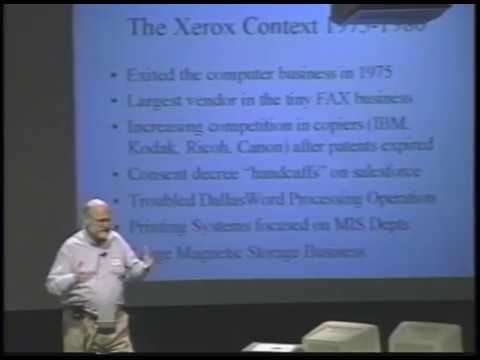
Between 1975 and 1980, Xerox faced severe internal headwinds and changing business realities. Xerox had entered the mainframe computer business by acquiring Scientific Data Systems (SDS), an established rival to Digital Equipment Corporation (DEC) that built high-quality, real-time shared minicomputers (such as the SDS 930 and 940). However, after the acquisition, Xerox redirected SDS's Sigma series to compete directly with IBM in business data processing—a grueling market struggle that led Xerox to abruptly exit the computer business in 1975 by selling off the assets to Honeywell. While painful, this collapse left behind a crucial resource: an advanced electronics manufacturing facility in El Segundo, California, along with deep systems software talent that would eventually build Star.
Simultaneously, Xerox’s core copier and duplicator monopoly came under fierce assault from Kodak, IBM, Ricoh, and Canon as its foundational patents expired. Worse, Xerox was forced into a restrictive antitrust consent decree with the Department of Justice, restricting its pricing strategies and severely curtailing its sales force's competitive rhetoric. The speaker reflects on how hard this culture shift was: “So suddenly we had to go to this very sort of Marquess of Queensberry, you know, dignified, uncompetitive behavior in the sales force, which was not an easy adjustment for the company to make at that time.”
Xerox's other divisions were similarly constrained or specialized:
- **Facsimile:** Xerox led the facsimile market, but it generated only a few hundred million dollars within a $5–6 billion corporation, relying on non-digital technology that would soon be disrupted by digital logic.
- **Word Processing (Dallas):** The standalone word processing group struggled to define a clear focus and achieve profitability, consuming corporate attention.
- **Printing Systems Division:** Building on character generation technology pioneered at PARC, this division sold ultra-high-speed laser printers outputting two pages per second, but targeted them solely at centralized mainframe Management Information Systems (MIS) departments rather than office desks.
- **Magnetic Storage:** Xerox held major stakes across the storage industry through its ownership of Shugart Associates (which dominated floppy disks and early Winchester hard drives) and Century Data Systems (a maker of packaged disk drives).
[18:57](https://www.youtube.com/watch?v=_OwG_rQ_Hqw&t=1137s) The Corporate Odyssey of the System Development Division
The team tasked with building the future of Xerox office systems was continually shuffled across corporate reorganizations between 1975 and 1980:
```mermaid
flowchart TD
accTitle: Evolution of Xerox System Development Division
accDescr: Organizational moves of the Star development team between 1975 and 1980.
subgraph Timeline ["Organizational Trajectory (1975–1980)"]
A["1975: Information Technology Group<br/>(OIS Project)"]
B["1976: System Development Division<br/>(SDD)"]
C["1978: Reorganized with loose products<br/>(Attempt to retain executive)"]
D["1980: Snatched by Don Massaro<br/>(Merged with Dallas Office Products)"]
end
A --> B
B --> C
C --> D
```
Beginning in 1975 as the Office Information Systems (OIS) project inside the Information Technology Group under Harold Hall, the team—initially including the speaker and Gale Tafoya—grew into the newly designated "System Development Division" (SDD) by 1976. In 1978, the group was folded into a miscellany of information products in an unsuccessful attempt to appease a corporate executive, who promptly departed to run Amdahl Corporation anyway.
By 1980, the initiative was rescued by Don Massaro, who believed in the project and lashed SDD together with the Dallas-based Office Products Division, clearing the path to release a commercial product. The speaker observes: “It was a case where the product and the ideas were so strong that even though we never could quite have a good home for them, it's also true that no one wanted to stop them in their tracks because they had an obvious merit and an obvious value even though they were an imperfect match with most of the business objectives of the corporation.”
[20:30](https://www.youtube.com/watch?v=_OwG_rQ_Hqw&t=1230s) The 1975 OIS Architecture: Designing for a Ten-Year Horizon
The team was commissioned to create an architecture that would endure for a decade. The roadmap aimed first to power electronic copying and network printing, then provide tools for knowledge professionals handling document creation, storage, and communication, and ultimately replace the traditional paper-based office before environmental concerns halted commercial logging.
In 1975, at Harold Hall's urging, the speaker authored the formal "OIS Architecture" specification outlining seven fundamental principles that drove the eventual implementation of Star:
- **Local Area Network:** A packet-oriented LAN, initially inspired by the 3-Mbps experimental Alto network and dubbed the "Xerox wire," which evolved into the 10-Mbps Ethernet.
- **Client-Server Architecture:** Adapting ARPANET concepts—where terminal-heavy "using hosts" communicated with shared "serving hosts"—into dedicated, single-user desktop client workstations paired with specialized network servers.
- **Scalable CPU Architecture:** Defined in the classic engineering sense rather than modern software design jargon. “In those days, architecture meant not how the box is put together. That's what it did not mean. It meant everything but that. Namely, the instruction set and the things that happened when you executed them.” The architecture was designed to be strictly implementation-independent, transcending physical chassis design, register widths, and component technologies.
[23:01](https://www.youtube.com/watch?v=_OwG_rQ_Hqw&t=1381s) The Philosophy and Business Logic Behind Star
David Liddle details the software and systems architecture that accompanied the Star project, beginning with the system principles laid out in the "Principles of Operation." Liddle notes with some amusement that academic operating system research at the time had begun swinging "from the Baroque to the Rococo," but the Xerox team deliberately steered clear of the worst theoretical excesses to produce a modern, pragmatic, and sophisticated operating system. Virtual memory was central to this design—a telling marker of an era when physical RAM remained extraordinarily scarce and expensive. Even though Xerox management viewed the team as “the most reckless and profligate people in the world for having 512K bytes when we went out the door,” the engineering reality was an unrelenting fight over capacity. They had initially struggled to fit the system into 192K 16-bit words, and Liddle kept the pressure on until the absolute last minute to prevent memory bloat.
Beyond the workstation itself, Xerox System Development Division (SDD) designed an entire ecosystem between 1975 and its 1981 shipment: an advanced development environment, print servers, file servers, mail servers, and early internetworking communication units that performed the duties of modern routers, bridges, and gateways. Liddle explains that the 8010 workstation was built to be the first system professional users would genuinely love, breaking the cultural taboo that desktop computers were merely clerical tools for typing memos:
> “We were really trying to make the first product that professional users would actually like because it added more to their life than just giving them a way to get memos typed and so on.”
This ambitious user experience had a direct business rationale designed to feed Xerox's bottom line. The goal was to entice professionals to create elaborate, typography-rich documents just like researchers did inside PARC. By providing beautiful equation typesetting and sophisticated graphic formatting, customers would generate documents that could only be reproduced on Xerox’s high-end laser printers, driving corporate print volumes and storage management revenues while elevating the Xerox name beyond copier rooms and into Fortune 500 executive suites.
- The operating system included virtual memory (VM) despite intense scrutiny over memory cost.
- The machine finally shipped with 512 KB of RAM, after failing to squeeze into an earlier 192K-word (16-bit) target.
- Network services developed by 1981 included print, file, mail, and communication servers handling routing and internetworking.
- Strategic objective: elevate Xerox from copier supply closets into the executive suites of the Fortune 500.
---
[26:51](https://www.youtube.com/watch?v=_OwG_rQ_Hqw&t=1611s) The Alto Benchmark and the Technical Hurdle of Star
Bob Belleville takes over the presentation to explain the hardware engineering behind the Star, setting the scene in 1978 when interactive personal computing was entirely unheard of outside elite research labs. While Apple’s Macintosh would not approach Star's capabilities until roughly a decade later and Microsoft Windows took nearly 15 years, researchers at SDD and PARC were already accustomed to what Belleville calls “this level of creature comfort.” Inside their culture, almost everyone had an Alto—first built in 1973, with around a thousand units in daily use by 1979. They enjoyed worldwide email and FTP across the ARPANET, sophisticated office tools, and automated computer-aided design systems that transformed schematics into wire-wrapped prototypes automatically.
```mermaid
flowchart TD
accTitle: Evolution from Alto to Star Hardware Requirements
accDescr: Diagram contrasting the hardware specifications of the 1973 Xerox Alto with the increased performance requirements of the 1981 Xerox Star.
subgraph ALTO["Xerox Alto (1973)"]
A1["Display: 600 x 800 Portrait<br>(Single Page, ~8.2 MHz dot clock)"]
A2["Network: 3 Mbps Ethernet"]
A3["Disk: 1.5 Mbps Drive<br>(16-bit buffer read every 10 µs)"]
A4["Memory Bandwidth: 32 Mbps<br>(32-bit bus @ 1 µs cycles)"]
end
subgraph STAR["Xerox Star / Dandelion (1981)"]
S1["Display: 1024 x 800 Landscape<br>(Two Full Pages, 51 Mbps bandwidth)"]
S2["Network: 10 Mbps Ethernet"]
S3["Disk: 10 Mbps Drive"]
S4["Demands: Mesa Bytecode + Pilot VM OS<br>Multitasking on a single CPU"]
end
ALTO -.->|"Required Order-of-Magnitude<br>Performance Leap"| STAR
```
However, SDD's mission was to rebuild everything from scratch for a commercial product, and the beloved Alto hardware was nowhere near fast enough to handle Star’s technical specification:
- **Display capacity:** Alto drove a 600×800 monochrome portrait display; Star required a two-page 1024×800 display, consuming an enormous 51 megabits per second of memory bandwidth alone.
- **I/O throughput:** Ethernet jumped from 3 Mbps to 10 Mbps, and disk drive data transfer rates leapt from 1.5 Mbps to 10 Mbps.
- **Software overhead:** Star’s complex user interface, multiple proportional fonts, overlapping windows, and the Pilot virtual-memory multitasking operating system were all written in Mesa and had to be emulated on the processor simultaneously.
Belleville recalls commiserating over these daunting constraints one afternoon in 1978 with his manager, Ethernet co-inventor Bob Metcalfe. Metcalfe listened patiently until he grasped the core issue, then abruptly cut through the complaints:
> “Bob's mind was wandering in the way it did when he'd already gotten the point. But he looked at me suddenly and said, 'So what are you going to do about it? Just sit here and whine?'”
---
[30:27](https://www.youtube.com/watch?v=_OwG_rQ_Hqw&t=1827s) Butler Lampson's "Wildflower" and the Dandelion Architecture
Spurred by Metcalfe's challenge, Belleville sought a way forward despite SDD having no formal mandate to build processor hardware and Belleville himself sitting at the very bottom of the division's organizational chart. Colleague Robert Garner brought word that computer systems pioneer Butler Lampson had drafted a novel processor concept on seven sheets of yellow paper. Where the Alto CPU had relied on the standard 74181 ALU chip, Lampson’s design—initially dubbed "Wildflower" because such cheap machines were expected to sprout up everywhere—was built around four AMD 2901 4-bit bipolar bit-slice processors. National Semiconductor data sheets indicated the design could reach a 100-nanosecond cycle time and a 300-nanosecond memory cycle, delivering a 10 MHz microcoded machine capable of guaranteeing strict memory latency for peripheral controllers without expensive hardware buffers.
```mermaid
flowchart LR
accTitle: Dandelion Click Scheduling Round
accDescr: Microcode time-slice scheduling showing clicks allocated to controllers and the Mesa interpreter within a single round.
subgraph ROUND["One Scheduling Round (5 Clicks = 15 Microinstructions = 1.5 µs)"]
direction LR
C1["Click 1:<br>Disk Controller<br>(3 µ-inst + 1 Mem Access)"]
C2["Click 2:<br>Ethernet / Display"]
C3["Click 3:<br>Display / IO"]
C4["Click 4:<br>Mesa Bytecode Interpreter"]
C5["Click 5:<br>Mesa Bytecode Interpreter"]
end
C1 --> C2 --> C3 --> C4 --> C5
```
The breakthrough of Lampson’s scheme lay in strictly synchronizing the execution of microinstructions with memory access cycles and peripheral I/O scheduling:
- Tasks were partitioned into three-instruction blocks called **clicks**. Each click executed exactly three microinstructions and performed exactly one memory access.
- Clicks were grouped into repeating **rounds**. In the production Dandelion processor, each round consisted of five clicks (15 microinstructions total).
- Hardware controllers were assigned dedicated clicks within a round. The hard disk controller was guaranteed one click per round, meaning the hardware designer could rely on exactly one guaranteed memory cycle every 15 clock ticks.
- Any clicks not consumed by high-speed peripheral controllers were automatically yielded to execute the Mesa bytecode interpreter.
- In essence, the central processor acted as both the CPU and the high-speed system bus.
To avoid burdening the bit-slice engine with mundane, low-speed tasks, the team quietly integrated an off-the-shelf Intel 8085 microprocessor alongside the main processor:
> “One addition we made to Butler's design was the addition of an Intel 8085 which we kind of snuck in the side and it was to manage all the low-speed IO such as keyboard, mouse, serial communication, floppy disc and real-time clock.”
The 8085 also bootstrapped and initialized the bit-slice engine upon startup, drastically reducing complex initialization logic and producing an innovative dual-processor workstation.
---
[33:34](https://www.youtube.com/watch?v=_OwG_rQ_Hqw&t=2014s) The Dandelion Legacy and the Dawn of 68000 Workstations
With backing from Bob Metcalfe and Dave Liddle, the team assembled the documentation and slide decks needed to justify custom hardware. Commercial off-the-shelf microprocessors in 1978 were entirely inadequate for driving an interactive, bitmapped, multitasking environment; a custom processor was the only viable path to make Star a reality. The project was christened **Dandelion**. Belleville jokes about the origin of the moniker: PARC had established a pattern of naming experimental processors after aggressive beasts (such as the Dorado), so the team decided to hide an aggressive beast at the tail end of a gentle flower—a Dande-*lion*.
The inception of Dandelion in 1978 caught the very tail end of the bipolar bit-slice computing era:
- In 1979, Motorola introduced the 16/32-bit MC68000, sounding the death knell for discrete bipolar workstation CPUs as CMOS density and speed accelerated.
- Dandelion finally reached the market in 1981, the exact same year IBM launched the 8088-based IBM Personal Computer.
- That same year, Apple commenced development on the Macintosh—which would eventually ship in 1984 built around Motorola's 68000.
Belleville reflects on the scale of the achievement:
> “Clearly our only choice to achieve Star was a custom processor. Dandelion was an order of magnitude beyond anything currently available or envisioned for the near future.”
[035:18] The Dandelion Team and the Evolution to an Office Appliance
Prior to bringing hardware designer Robert Garner to the podium, the presentation highlights the core team responsible for the earliest design of the Dandelion hardware architecture. Faced with an aggressive timeline, their initial milestone had been to get an image displayed on the screen by Christmas of 1979, a feat they achieved by piping the output of an image scanner straight into memory. Between 1978 and 1981, as the workstation transitioned into full manufacturing, the underlying design was further expanded and upgraded to support network-wide file servers and print servers.
Taking the stage to applause, Garner notes that the gathering feels very much like a reunion, remarking that revisiting these machines has reawakened long-dormant parts of his memory. To set the scene, he presents scanned slides from the era to contrast Star’s hardware with contemporary computing. Garner cites an insight from computer architect Gordon Bell, stating that:
> “Gordon Bell who noticed, who remarked many years ago that the design of a machine is based not only on its architecture but also on the financial and the cultural aspects of the organization that builds it.”
While modern users take pocket-sized high-performance computers for granted, mid-1970s machines were imposing steel enclosures. The gold standard that university graduates then aspired to build was the DEC PDP-10, a 36-bit mainframe delivering just under 2 MIPS of performance with roughly a megaword of core memory. Although the Star software engineers would have loved having PDP-10-caliber power at their disposal, the physical footprint and underlying economics made that impossible for an individual office desk.
- **Initial hardware milestone:** Image on screen by Christmas 1979 via scanner input directly into memory.
- **Production transition:** 1978 to 1981, adapting the workstation hardware to power both file servers and print servers.
- **DEC PDP-10 specifications:** 36-bit architecture, ~2 MIPS processing power, and ~1 megaword of memory.
---
[038:11] Scaling Down: The PDP-11/60 vs. Star’s Appliance Philosophy
A closer reference point for the Star engineering team was Digital Equipment Corporation's PDP-11/60, a 16-bit minicomputer delivering slightly over 0.5 MIPS with 256 kilobytes (a quarter-megabyte) of main memory. These exact compute and memory capabilities matched the functional requirements envisioned by the Star designers. However, the machine’s chassis was far too large to sit under an office desk, accompanied by cumbersome peripheral enclosures such as a separate character terminal and an individual printer cabinet.
The breakthrough realized at Xerox PARC through the earlier Alto project was to treat the machine not as a general-purpose hacker platform, but as a dedicated office appliance. Previous minicomputers like the PDP-10 and PDP-11 relied on broad, universal, general-purpose I/O backplane buses (such as DEC's Unibus) to allow arbitrary peripheral expansion. Xerox engineers recognized that an office appliance required no universal internal I/O bus whatsoever; any functional expansion or peripheral sharing could simply take place over the local Ethernet network.
By eliminating complex general-purpose bus arbitration and offloading the vast majority of I/O control into software and microcode, the Dandelion team achieved minicomputer performance at roughly a third of the physical size, power consumption, weight, and financial cost.
To run high-bandwidth I/O without specialized external controller cabinets, Butler Lampson and his PARC colleagues restructured the computer’s memory bus around a deterministic round-robin time-slice mechanism. Memory access was partitioned into five dedicated recurring time slots. Every time a subsystem was granted its slot, it could transfer exactly one 16-bit word to or from memory and execute three microcode instructions.
This round-robin allocation divided the five slots between the hard disk, two phases for Ethernet, the bitmapped raster display, and general slow I/O. As a consequence, any hardware device needing memory was guaranteed service within two microseconds, along with a locked throughput of 1 megabyte per second. Minicomputers of the day commonly dropped data packets or missed disk transfers whenever aggregate bus traffic peaked. By contrast, Lampson's architecture was fundamentally immune to overruns:
> “So this was actually a correct-by-construction hardware design with respect to the I/O. As long as that box ran at the clock rate it had to run at, the I/O was going to work and not have one of the terrible side effects of many of those minicomputers had at the time, which was when too much I/O happened, they tended to drop data on the floor.”
---
[041:20] Physical Hardware Inspection: The CPU and DRAM Boards
Garner moves to an in-person physical teardown of the Dandelion circuit boards, cautioning the audience that he had already cut his fingers on the sharp wire pins protruding from the backplane. Holding up the Star CPU board, he points out four AMD Am2901 4-bit bipolar microprocessor slices combined at the top to build a 16-bit processing engine. The bottom half of the board holds the writable control store, composed of 4,000 words of 48-bit microcode memory, clocked at a cycle time of 137 nanoseconds (approximately 7.3 MHz). He remarks on the rapid progression of Moore's law, pointing out that what once filled this massive, dense card now comfortably occupies a tiny fraction of a single modern silicon chip.
He then presents the 256-kilobyte dynamic RAM (DRAM) board, populated with 16-kilobit dynamic memory chips. Garner demonstrates how an equivalent memory footprint in 1998 fits onto one single 16-megabit DRAM package—a thousand-fold jump in chip density over two decades.
Garner playfully thanks Dave Liddle for having eventually approved hardware configurations with expanded memory, remembering how the original 256 KB systems were crippled by excessive paging. When 64-kilobit chips later arrived, memory capacity reached 1.5 megabytes. Crucially, the memory subsystem provided 8 megabytes of virtual address space and integrated hardware error-correcting code (ECC), which detected and corrected single-bit memory errors in real time—an enterprise-grade reliability feature entirely absent in commercial personal computers that shipped later that year.
- **CPU architecture:** 16-bit ALU constructed from 4× AMD 2901 bit-slices.
- **Control store:** 4,096 entries × 48-bit wide microinstructions.
- **Clock rate:** 137 ns cycle time (~7.3 MHz).
- **Initial RAM capacity:** 256 KB using 16 Kb DRAM chips (later 1.5 MB using 64 Kb DRAM chips).
- **Virtual memory & reliability:** 8 MB virtual address space with hardware ECC.
---
[043:28] The 10 Mbps Ethernet Board and the Shugart SA1000 Hard Drive
Holding up the Star's network controller, Garner recalls the migration from PARC’s original experimental 3-megabit Ethernet to the production 10-megabit standard. Although physically large by modern standards, the controller occupied only the upper half of the board, using just 88 small-scale integration (SSI) logic chips housing rudimentary flip-flops and NAND gates. Equivalent minicomputer interfaces, such as the Ethernet controller for the DEC VAX-11/780, were massive multi-board enclosures resembling the size of a home washing machine. When DEC and Intel engineers visited Xerox to inspect the Dandelion's design, they were stunned by how compact the implementation was.
Garner shares an untold engineering anecdote about how the 10-megabit transmission rate was decided. Xerox's internal engineering specification—then referred to as the "Xerox Wire"—had originally set a target speed of 20 megabits per second. While laying out the prototype Ethernet board for the D0 (Dolphin) workstation, Garner discovered that the logic required to calculate CRCs at 20 MHz exceeded the physical area of the card:
> “So I went, you know, a tail between my leg to Bob and I said, 'Bob, if we run at 10 MHz, this all fits.' So that's why the Ethernet runs at 10 megabits a second.”
Flipping through a parts catalog, Garner had spotted a single off-the-shelf Fairchild checksum/CRC generator chip that topped out at 10 MHz. That physical chip constraint forced the team to cut the transmission target in half, permanently locking 10 Mbps into the global Ethernet standard.
Finally, Garner presents the machine's primary local mass storage: the Shugart Associates SA1000 8-inch Winchester hard disk drive. Weighing several pounds yet marketed as the computer industry's first low-cost 8-inch drive at a price of $1,000, it provided the reliable persistent storage required to make Star’s virtual memory and office document archiving practical.
[45:44](https://www.youtube.com/watch?v=_OwG_rQ_Hqw&t=2744s) The Rigid Disk, Synchronous Timing, and Display Borders
The speaker recounts a conversation with an engineer who shared deep technical details about the Star's hard disk. Many original observers had doubted the hardware's longevity, assuming the heads would have physically welded to the platters after twenty years, leading skeptical customers to refuse to buy them. The speaker quips that the engineer can now report back that they are still operating decades later.
Because the disk in the Dandelion architecture ran completely synchronously with the CPU, clock data had to be supplied directly from the Dandelion’s internal system clock. This rigid hardware synchronization led to an unexpected international deployment glitch: when units were shipped to Japan, which operates on a 50 Hz electrical grid rather than the 60 Hz standard in the United States, the disk subsystems failed to function properly. The fix required physical modifications—replacing the drive's belt and pulley—prompting Xerox to maintain two distinct hardware SKU versions for 50 Hz and 60 Hz markets. Looking back from 1998, the speaker contrasts the original 8 MB hard disk with the contemporary 8 GB disk he is holding up, noting a 1,000-fold increase in storage capacity: “So that software better be a thousand times better.” For network servers requiring large storage to hold printed bitmap images, the internal Shugart drives were insufficient, requiring separate external housings capable of holding Trident or larger Quantum disks.
```mermaid
flowchart LR
accTitle: Dandelion System Synchronous Clocking
accDescr: Diagram showing how the CPU master clock directly drives memory, disk timing, and display scanning.
subgraph ClockMaster["Central Hardware Clock"]
CPU["Dandelion CPU Cycle<br/>(7 Pixel Times)"]
end
subgraph SynchronousSubsystems["Synchronous Subsystems"]
MEM["Main Memory<br/>(21 Pixel Times)"]
DISK["Rigid Disk<br/>(6 Pixel Times)"]
DISP["Display Scan<br/>(808 x 1024 @ 38 Hz)"]
end
CPU --> MEM
CPU --> DISK
CPU --> DISP
```
The display itself was locked to this same synchronous master timing. Running at a fixed resolution of 808 lines by 1,024 columns at 38 frames per second, the refresh rate could not be adjusted by software, which causes noticeable screen flicker during the presentation demo. In pixel timings:
- 1 CPU cycle equaled 7 pixel times.
- 1 memory access equaled 21 pixel times.
- 1 disk access equaled 6 pixel times.
An unusual visual feature of the CRT was the inclusion of 32 extra lines on the top, bottom, and sides, known as the "border pattern." The display controller allowed this border to match the rest of the desktop background. The speaker shares the reasoning: in certain international cultures, framing a portrait in a solid black border signifies that the person depicted is deceased. To avoid presenting users with a morbid "dead picture" appearance on the CRT, Xerox engineered the hardware to support customizable border colors.
[48:31](https://www.youtube.com/watch?v=_OwG_rQ_Hqw&t=2911s) The I/O Processor, Floppy Drives, and Network Development Culture
Turning to the I/O Processor (IOP) board, the speaker displays an AMD-second-sourced 8085 microprocessor. He characterizes this commodity microprocessor as an "uninvited guest" that was acceptable for driving low-speed peripheral operations, though over time it effectively became an architectural Trojan horse inside the custom Xerox hardware ecosystem. The IOP board managed an 8-inch floppy disk drive holding around 800 KB (double density), which was an industry-wide requirement for standalone and networked computers alike. The board also hosted:
- The keyboard controller interface.
- An underlying LED maintenance diagnostic panel indicating internal machine states.
- Serial communication ports (TTY and COM ports) capable of directly driving external laser printers.
The speaker highlights that standard Star workstations already contained the latent hardware capability to act as print servers, though Xerox did not actively advertise to customers that desktop units could drive laser printers directly.
The speaker then holds up an original thick Ethernet transceiver—an evolution of the earlier PARC 3-megabit design—joking that there are likely original units still wired into the ceiling rafters of the facility and active Dandelions elsewhere on campus that the demo machines might home in on.
Reflecting on his transition from Stanford University, where computing still revolved around punch cards, into Xerox's networked workstation ecosystem, he describes it as stepping into a science fiction novel: “I mean, I stepped out of school and walked into this environment. I thought I had walked into a science fiction novel.” Operating much like an intense modern startup—minus the stock options—the engineering team worked around the clock across alternating shifts, relying entirely on networked email to hand off progress between engineers. When the speaker's father skeptically asked how collaboration was possible when colleagues were never in the building at the same time, the concept of asynchronous email communication was still so novel it had to be explained from scratch. This development velocity allowed Xerox to progress from a blank slate to functional hardware in a single year, followed by one year to bring the product to market. The underlying hardware was introduced first in November 1980 as a network file, print, and communications server before its formal April 27, 1981 debut as the Xerox 8010 Star Information System.
[51:42](https://www.youtube.com/watch?v=_OwG_rQ_Hqw&t=3102s) Hardware Debugging and Moore's Law Trajectories
Displaying a scanned slide from the late 1970s, the speaker details the custom hardware debugging station nicknamed the "windmill." In this rig, six individual system logic boards were mounted together radially so that engineers could probe and access all test points simultaneously. The boards utilized stitch-weld wiring technology, allowing hardware redesigns and fixes to be mechanically altered and turned around in a couple of hours without the benefit of modern software simulation tools. Engineers interfaced with the hardware under test using an Alto workstation running a specialized microcode debugging program called "Burdo," which gave them the ability to set breakpoints and single-step the Dandelion processor.
Addressing the economics of the platform, the speaker acknowledges that while the Star carried a hefty list price, ran hot enough to saturate a standard office wall circuit, and had substantial physical weight, it achieved performance roughly comparable to a contemporary minicomputer (like a PDP-11) at one-third the cost, one-third the weight, and one-third the electrical consumption.
Analyzing performance trends under Moore's Law since 1959, he observes a sharp divergence in computer architecture:
- Microprocessors grew roughly 1,000 times faster.
- Memory chips achieved roughly 1,000 times greater density.
- Disk and network I/O speeds advanced by only a factor of 10.
He cautions that because I/O bandwidth has significantly lagged behind CPU and memory development, software that relies heavily on page faulting and excessive network traffic cannot deliver proportional real-world speedups. He concludes his hardware presentation with a tribute: “So finally, I wanted to say, if a picture is a thousand words, I wanted to say a thousand thanks to Xerox.” He praises the company for investing the resources and giving engineers the creative runway to invent the world's first bitmapped, networked personal computer workstation.
[54:29](https://www.youtube.com/watch?v=_OwG_rQ_Hqw&t=3269s) Dave Smith Begins the Live User Interface Demonstration
David Canfield Smith, one of Star's principal human-interface designers, takes over the microphone to conduct a comprehensive 30-minute demonstration of the system from the end-user's perspective.
Looking over the stage, Smith points out the lineup of historical hardware assembled for the session:
- Two original Xerox 8010 "Star" workstations from 1981, occupying considerable desk space. Smith explains the presence of the backup machine: “There's two because there's a definite non-zero probability one of them will break in the next 30 minutes and we'll switch over to the other.”
- A Xerox 6085 workstation (introduced roughly five years later, around 1985), which reduced the physical chassis footprint to less than half the volume of the original 8010.
- A "version 17" compact unit, representing later miniaturized iterations of the architecture.
- An open, unskinned 8010 chassis displaying the internal board cages and hardware assemblies described during the previous presentation.
Smith outlines the roadmap for the demo: he will adopt the role of a brand-new office user sitting down before the interface for the very first time, walking the audience through initializing an empty workspace, setting up a working desktop environment, and authoring an integrated multimedia document. He notes the personal finality of the occasion, stating that while he has demonstrated the machine dozens of times since its inception, this performance will be his last formal public demonstration of the Xerox Star.
[56:10](https://www.youtube.com/watch?v=_OwG_rQ_Hqw&t=3370s) The Goal of Star: Welcoming the Non-Computer Professional
The presenter begins by acknowledging a common reaction when modern audiences see Star demonstrated: people often ask, "What's the big deal? Everybody does that." To understand the magnitude of the achievement, one must recall the mid-1970s landscape, where virtually every terminal was text-oriented and driven strictly by command-line interfaces. The foundational design challenge for the Star team was not to force office workers to turn into computer users, but rather to adapt the machine to the professional's natural environment. As the speaker explains:
> “So our challenge as a designer was to try to bring the computer into the office professional world instead of trying to get the professional to become a computer user.”
These target users were largely computer-phobic, and most had never sat in front of a computer terminal in their lives.
```mermaid
flowchart LR
accTitle: Mid-1970s Computing vs Star Paradigm
accDescr: Diagram contrasting text-based terminals requiring user adaptation with Star adapting to the office worker.
subgraph Old["Mid-1970s Status Quo"]
direction TB
CLI["Command Line Interfaces"] --> Phobia["Intimidates Non-Engineers"]
Phobia --> Force["Forces User to Become Programmer"]
end
subgraph Star["Star Paradigm"]
direction TB
Desk["Office Metaphor & GUI"] --> Intuitive["Point-and-Click Direct Interaction"]
Intuitive --> Target["Brings Computer to Office Worker"]
end
```
- In the mid-1970s, computing was dominated by command-line interfaces on character-based terminals.
- Star was conceived specifically for office professionals who lacked programming backgrounds and were frequently intimidated by technology.
- During the stage transition, a bouncing square screensaver appears on the monitor before the live environment is shown.
---
[57:18](https://www.youtube.com/watch?v=_OwG_rQ_Hqw&t=3438s) Strengths, Weaknesses, and the Closed System Mistake
Evaluating the machine with historical perspective, the speaker outlines Star's monumental breakthroughs alongside its painful shortcomings. On the positive side, Star established the visual point-and-click interface, the first object-oriented desktop metaphor, the widespread use of icons, the first commercial deployment of Ethernet, and the first commercial laser print servers—pioneering principles that today underpin systems used by over 100 million people worldwide. Yet its ambition was also its undoing: it attempted to invent every layer of technology simultaneously, and missing the mark on any single piece threatened the entire system.
The most damaging architectural miscalculation, however, was keeping Star completely closed off from third-party developers. While this decision made sense at the time—because an independent software vendor (ISV) market did not yet exist, as Dave Liddle pointed out—it crippled the machine's long-term commercial adaptability compared to later platforms. The speaker reflects candidly on this design choice:
> “From my point of view, I'd like to point out another weakness that I think was the biggest mistake we made, and that was to make it a closed system.”
Hardware limitations compounded the problem. Despite extensive custom engineering, the physical system was drastically underpowered—possessing roughly the compute capability of an early Macintosh Plus—forcing sophisticated software that was a decade ahead of its time to run on inadequate silicon.
- Star introduced the first commercial point-and-click interface, icons, Ethernet local networking, and laser print servers.
- The platform tried to innovate across too many domains simultaneously instead of relying on established standards.
- Star's software was approximately 10 years ahead of its hardware substrate, meaning it would run effortlessly on modern hardware but chugged on its native bit-sliced architecture.
- The Macintosh Toolbox is highlighted as a superior, open alternative to Star's proprietary, closed software architecture.
---
[59:28](https://www.youtube.com/watch?v=_OwG_rQ_Hqw&t=3568s) Hardware Controls: The Two-Button Mouse and the Four Generic Keys
Turning to physical human-computer interface design, the speaker explains why Star settled on a two-button mouse rather than Engelbart's three buttons or Apple's single button: rigorous user testing revealed that one button was too limiting, while three buttons added unnecessary cognitive friction. (The speaker jokes that the Mac actually had two buttons all along—with the second one placed on the keyboard—while PCs added three, four, or five).
Star's physical keyboard was equally critical to its ergonomics. Surrounding the standard typing array were three distinct banks of dedicated, hard-labeled function keys. Anchoring the left side were the four fundamental universal operations: **Delete**, **Copy**, **Move**, and **Show Properties**. These commands were derived directly from the fundamental primitives of computer science—manipulating data structures—and surfaced straight to the user. Additional dedicated keys across the top managed styling attributes like Bold, Italics, and Underline. This layout enabled a fluid two-handed operating model where the left hand rested over the command bank while the right hand operated the mouse. While inspired by Douglas Engelbart's chord keystrip at SRI, Star traded Engelbart's steep learning curve for immediate accessibility:
> “It was sort of modeled after what Engelbart was doing at SRI at the time, only he was using this little strange little keypad that user testing showed that mere mortals couldn't learn, but they could do this.”
- **Two-Button Mouse**: Empirically chosen because "one was too few and three were unnecessary."
- **Four Core Generic Keys**: Left-hand keys for `Delete`, `Copy`, `Move`, and `Show Properties` mapped core data-structure operations directly to hardware.
- **Two-Handed Workflow**: Users steered with the right hand on the mouse and triggered commands with the left hand on the functional cluster (apologizing to left-handers in attendance).
- **Text Attribute Keys**: Dedicated hardware keys on the top row handled instant text styling (`Bold`, `Italics`, `Underline`).
---
[01:01:34](https://www.youtube.com/watch?v=_OwG_rQ_Hqw&t=3694s) The "Powerful Idea" of Pervasive Copying
A primary metric of user interface elegance is achieving maximum operational power through a minimal vocabulary of commands. The presenter asserts that Star remains unsurpassed in this regard, noting that the entire presentation—including building a complex, compound multimedia document—will require fewer than twelve distinct commands.
This parsimony was inspired by Seymour Papert’s educational computing concept of "powerful ideas": general principles that, when applied across an entire operating environment, simultaneously boost utility while drastically lowering cognitive load. For Star, the foundational paradigm was **copying**. Generating objects from scratch is cognitively exhausting—much like an open-ended fill-in-the-blank exam or staring into the void of a command-line prompt—whereas copying and modifying an existing template mimics the ease of a multiple-choice test:
> “Copying is easier for people to do than creating by scratch.”
Applying this principle everywhere meant users never invoked specialized creation utilities or abstract shell commands; they simply found an example of what they needed on the desktop or in a library directory, hit the Copy key, and placed the duplicate right into their workspace.
- **Minimal Command Set**: The demo proves that complex desktop authoring can be performed using fewer than a dozen universal commands.
- **Seymour Papert Influence**: Star designers leveraged Papert’s notion of "powerful ideas" to ensure mechanisms were both universally applicable and easy to master.
- **Recognition over Recall**: Copying existing documents or components prevents the "blank slate" anxiety that made command-line interfaces so repellent to novices.
---
[01:03:24](https://www.youtube.com/watch?v=_OwG_rQ_Hqw&t=3804s) Live Demo: Network Single Sign-On and the Desktop Directory
Transitioning to the live machine, the presenter logs into Star, emphasizing that network integration was baked in from day one. Single sign-on was fully realized: once a user authenticated at their local workstation, the system negotiated authentication across all network file servers and hosts automatically without prompting for credentials again.
Addressing the audience about the visible video flicker on the projection, the presenter clarifies that the actual CRT monitor is rock-solid; the wobble is strictly an artifact of the video camera trying to synchronize with the interlaced scan rate of the Star's high-resolution display.
Looking at the top of the interface, the presenter corrects a common modern misconception:
> “See that white thing up there? That is not a menu bar.”
Instead of an application menu bar, this top region is dedicated to global system messages, prompts, and status readouts. A solitary pull-down menu sitting on the top edge was simply a repository for obscure, rarely used operations that the team had not yet found time to redesign out of existence.
To begin building a working environment on what is deliberately named the **Desktop**, the presenter accesses a "directory icon" located in the lower-right corner. Opening this directory produces a window displaying categories of system resources. Choosing "Basic Documents," the presenter selects an item, hits the dedicated **Copy** key, and drops an instance onto the desktop canvas. The desktop metaphor and icon designs were deliberately modeled on physical office fixtures—folders, file cabinets, bookshelves, and wastebaskets—expressly to lower barriers for non-technical workers. Within this directory structure, the presenter copies out several functional objects onto the desktop:
1. A standard document container.
2. A desktop folder.
3. A **Records File** (the Star equivalent of a relational database table).
4. A spreadsheet template.
Navigating outward to inspect network filing options, the window displays a cluster of remote file servers, humorously named after major universities, demonstrating seamless networked file browsing right out of the box.
[01:07:48](https://www.youtube.com/watch?v=_OwG_rQ_Hqw&t=4068s) Network Browsing and Desktop Work Environment Setup
The presenter continues assembling working tools on the Xerox Star desktop by browsing the corporate network via directory icons. Selecting the mail out-basket and in-basket icons, he duplicates them onto the desktop using the dedicated universal `Copy` key rather than any drag-and-drop mechanism. When an audience member observes that he is not dragging the item, the presenter confirms: “No, it's a noun verb destination.” As the mail baskets land on the desktop, an alert appears indicating unread messages, prompting an amused aside about unread mail from the 1980s that might have expired.
He then retrieves network printing tools, emphasizing how radical this directory-based paradigm was for distributed computing at the time: “Basically, this use of the directory icon allowed us to bring Star's interface ideas to the world of the network.” He points out that network resources were not interacted with through an intuitive graphical browsing interface again until Marc Andreessen introduced NCSA Mosaic, the predecessor to Netscape. After closing the directory window, the presenter displays a fully configured desktop containing documents, folders, a database, a spreadsheet, electronic mail baskets, and network printers, all ready for active office work.
```mermaid
flowchart TD
accTitle: Star Document Creation Pattern
accDescr: Creating a new document in Xerox Star by copying a master form pad and editing properties.
subgraph S1["Form Pad Paradigm"]
A["Blank Document Template (Form Pad)"] -->|"Press universal 'Copy' key"| B["New Document Clone"]
end
subgraph S2["Object Modification"]
B -->|"Press 'Show Properties'"| C["Property Sheet: Name, State, Metadata"]
C -->|"Rename & save"| D["Working Document ('History Demo')"]
end
subgraph S3["Document Environment"]
D -->|"Open window"| E["Integrated Workspace: Text, Tables, Graphics"]
end
```
[01:09:43](https://www.youtube.com/watch?v=_OwG_rQ_Hqw&t=4183s) The Form Pad Paradigm and Object Properties
The workflow shifts to document authoring, demonstrating Star's architectural philosophy of universal copying. Rather than executing a specialized "New File" application command, users treat any existing document—such as a blank document template—as a reusable pad of forms: “The way you work is you make a copy of an existing document and then you edit the copy. Uh so therefore every document becomes like a form pad a source for new documents.” To inspect and modify the newly copied file, he invokes the dedicated `Show Properties` key on the keyboard.
He explains that under the hood, Star's interface is rigorously object-oriented: “These little pictures are not just pictures. They are objects that have semantics. They have both state and behavior like any object and object-oriented programming.” Activating the property sheet exposes the object's internal state, including metadata fields and title attributes. He changes the document name to "History Demo," applies the changes, and opens the window. The top border of the window contains a small set of streamlined controls: a question mark for context-sensitive help, a close button, a pagination/page-layout button, and pull-down menus tucked off to the right for table formatting and infrequently used commands. Text characters inside the document are treated as first-class objects with distinct paragraph attributes (alignment, margins) and character attributes (typefaces, point sizes, weights). Setting the heading to classic serif, 24-point bold text, he jokes with the audience: “Actually there's the penultimate last talk and last in April we gave the ultimate last talk. So, this must be the post-ultimate last talk.”
- The primary authoring model treats every document as an instantiable template or form pad.
- Object-oriented UI architecture gives every desktop and content entity encapsulated state, editable via `Show Properties`.
- Top-of-window controls are intentionally sparse, avoiding dense menu bars in favor of context-sensitive help, close, page layout, and isolated pull-downs.
[01:13:21](https://www.youtube.com/watch?v=_OwG_rQ_Hqw&t=4401s) Function Key Accelerators and the Virtual Keyboard
Addressing body text styling, the presenter explains that opening full property sheets for small edits can be tedious. Star solves this through eight function keys across the top of the physical keyboard, which act as context-sensitive accelerators for centering, sizing, and text attributes without bringing up modal sheets. These function keys are remapped dynamically by the system depending on what the user is currently doing.
To show international characters, math symbols, and structural objects, he presses the `Keyboard` key to reveal the virtual keyboard system. Hitting the virtual "Show" key displays an on-screen visual keyboard at the bottom of the display. Users can switch between alternate character sets—including office symbols, mathematical and logic notation, Greek letters, Italian, Spanish, Russian, and even the alternative Dvorak layout—either by striking the physical keys or by clicking the on-screen keys directly with the mouse. Moving beyond character sets, he switches the virtual keyboard to its "Special" set containing smart objects and selects the graphics frame generator key to embed a dedicated drawing canvas directly into the running text stream.
- Star features eight top-row function keys that dynamically re-label and remap to accelerate common attribute changes.
- The virtual keyboard provides software-switchable layouts for multilingual typography, symbolic notations, and Dvorak typing.
- Structural elements, such as inline graphics frames, are treated as smart characters and inserted directly through the virtual keyboard subsystem.
[01:15:54](https://www.youtube.com/watch?v=_OwG_rQ_Hqw&t=4554s) Electronic Transfer Sheets and Data-Driven Graphics
Once the graphics frame is embedded and centered, the top function keys immediately reconfigure into graphic-manipulation tools such as `Stretch` and `Magnify`. The presenter opens an auxiliary document titled the "basic graphics transfer sheet." He describes how this design was translated directly from physical graphic design practices of the late 1970s: “This is modeled after the ruboff sheets that existed in the day. These were little sheets, transparent sheets with graphical symbols on them, and you would put them on top of a typewritten page, and scrub on the back of it with an eraser, and it would transfer the symbol onto the page. Well, we did the same thing only electronically.”
The transfer sheet contains pre-built graphical primitives—lines, rectangles, and ovals—which are copied into the document frame with the standard `Copy` key and resized with `Stretch`. He then copies a far more complex component: a full bar-chart object. Even though the chart contains sophisticated underlying logic, the interaction model remains identical: “This is a complex object, but I deal with it in exactly the same way. I select it, I say copy, and I click where I want the copy to go, and I can stretch it using the stretch command.” By invoking `Show Properties` on the bar chart, he opens a structured demographic data sheet. Fighting a mechanically aging, sticky physical mouse, he enters comparative heights and weights for himself and Dave Curbow (entering 75 inches and 215 pounds for Dave; 50 inches and 150 pounds for himself). When flipping between the property sheet tabs, the bar chart immediately consumes the data table and renders the comparative bars side by side inside the document frame.
[01:20:01](https://www.youtube.com/watch?v=_OwG_rQ_Hqw&t=4801s) Direct Manipulation of Charts and Inserting Equation Frames
Continuing the live demo on the Xerox Star, the presenter fine-tunes the chart layout, pointing out that a certain weight color is “beating on the screen” and changing it to solid black via the property sheet before hitting “Done” to instantly apply the update. He recenters the object, muttering playfully, “I wish my mouse wasn't quite so sticky.” Reflecting on the ease of building visual assets from reusable components, he notes that using a transfer sheet makes generating complex figures painless, even for an office worker facing a tight deadline.
```mermaid
flowchart TD
accTitle: Equation Construction in Xerox Star
accDescr: Flow diagram showing how Star constructs a formatted equation using context-sensitive virtual keyboards and the NEXT key.
subgraph Setup ["Frame Insertion"]
A["Special Keyboard (Press 'C')"] --> B["Equation Frame Inserted"]
B --> C["Caret Placed Inside Frame"]
end
subgraph Formatting ["Smart Formatting"]
C --> D["Context-Sensitive Keyboard Loaded"]
D --> E["Insert Fraction & Summation"]
E --> F["Auto-Italicize Variables / Roman Numerals"]
end
subgraph Navigation ["Structured Editing"]
F --> G["Press NEXT Key"]
G --> H["Jump Limits: Lower to Upper"]
H --> I["Vertically Stacked Sub/Superscripts"]
end
```
He then demonstrates one of Star’s most sophisticated document capabilities: inserting and formatting mathematical expressions. Pressing the `C` key while invoking the special virtual keyboard instantly inserts an equation frame into the multimedia document and places the insertion caret directly inside. After typing basic ASCII text like $f(x) =$, he explains that within an equation frame, the virtual keyboard dynamically shifts into a context-sensitive layout filled with mathematical symbols rather than generic alphanumeric characters:
- **Context-Sensitive Keys**: Switching to the special keyboard inside an equation frame automatically supplies fractions, summations, integrals, radicals, and Greek characters.
- **Automated Typography**: Letters default to italic and numbers to Roman typeface without requiring any manual font changes.
- **Aligned Scripts**: Subscripts and superscripts align directly over one another vertically, adhering to proper mathematical typesetting rules rather than appearing horizontally offset as in conventional word processors.
[01:22:12](https://www.youtube.com/watch?v=_OwG_rQ_Hqw&t=4932s) Navigating Equations with the NEXT Key and Typesetting Complex Math
To construct composite mathematical expressions without fighting cursor placement, Star relies heavily on the `NEXT` key. The demonstrator explains that just as he previously used the `NEXT` key to jump sequentially through cells, rows, and columns in a data table, the exact same universal key moves the insertion point through the structural slots of an equation.
Inserting a summation automatically drops the caret into the lower limit, where he inputs $i = 1$. Tapping `NEXT` instantly advances the caret to the upper limit to enter $100$. Hitting `NEXT` again jumps to the right of the sigma, where he enters an expression with both superscripts and subscripts ($x_i^2$). Continuing with the demonstration, he inserts a product operator over index $j$ for $y_j$, hits `NEXT` to drop down into an integral from $a$ to $b$, and pulls up Greek characters to write $\rho(\theta) \, d\theta$.
He emphasizes that this entire, beautifully typeset equation was constructed without copying and pasting formulas or navigating complex nested menus: “All I used was the special keyboard feature and this smart equation objects.”
[01:24:43](https://www.youtube.com/watch?v=_OwG_rQ_Hqw&t=5083s) Frame Borders, Pagination Limits, and the Icon Taxonomy
Preparing the document for its final layout, the presenter removes the visible boundary around the graphics frame. Just like the shapes and text blocks inside them, graphics frames have their own property sheets governing borders, margins, and horizontal centering. At this stage, he candidly points out a significant architectural limitation of the 1981 hardware:
> “Now here’s where a weakness comes in of Star. I actually to get this to look the way it will look when it's printed, I actually have to explicitly paginate it. The hardware simply wasn’t able to keep up with interactive pagination.”
Once explicitly paginated, the document achieves pure WYSIWYG fidelity: what appears on screen matches the laser printer output down to the pixel.
He then illustrates Star’s clean icon architecture, explaining that Star strictly divides icons into two categories:
1. **Data Icons**: Objects representing content containers, including documents, folders, record files, and spreadsheets.
2. **Function Icons**: System agents and services that act on data, such as mailboxes, laser printers, and file cabinets.
To invoke an action, the user never searches for a specialized program command. Instead, they leverage the universal `MOVE` command: selecting a data icon, pressing `MOVE`, and clicking on a function icon. Moving a document onto a mailbox icon automatically initiates email delivery. The user simply types an address into the resulting pop-up form, clicks “Done,” and the document—complete with embedded vector graphics, tables, and mathematical formulas—is dispatched across the network.
[01:27:21](https://www.youtube.com/watch?v=_OwG_rQ_Hqw&t=5241s) Architectural Lessons of the Star Interface
Reflecting on the system’s legacy seventeen years after its 1981 debut, the presenter makes a passionate case for the enduring superiority of Star's minimalist conceptual model over late-1990s desktop operating systems. He reflects on how well the software has aged:
> “17 years after Star came out, 1,000 times later in machine speed, memory density, and disk density, Star’s interface still is simpler and more consistent and more usable than the systems we see today.”
He remarks that if he could still use Star as his daily driver, he gladly would—though he notes with amusement that today no compatible laser printers exist to connect to it, nor does anyone have an email client capable of rendering Star’s rich, non-ASCII multi-object mail packets (prompting an audience member to chime in, “write an emulator!”). He summarizes the core design principles that allowed Star to accomplish more tasks with far fewer commands:
- **Generic Function Keys**: Universal keyboard keys (`MOVE`, `COPY`, `OPEN`, `PROPERTIES`, `DELETE`, `NEXT`) that behave predictably across all objects.
- **Universal Property Sheets**: Detailed inspector panels tailored to any selected entity, separating object state from operational commands.
- **Virtual Context-Sensitive Keyboards**: On-screen soft keyboards that adapt their symbol sets to the current editing environment (e.g., equations vs. prose).
- **Smart Objects**: Embedded objects (tables, equation frames) that encapsulate layout logic, font rules, and caret movement internally.
- **Strict Icon Taxonomy**: Clean division between data icons and function icons manipulated via universal verbs (`MOVE` to print or send).
- **The Copy Paradigm**: Providing users with transfer sheets of pre-made graphics and components, allowing non-artists to assemble sophisticated graphics simply by copying and adapting templates.
[01:30:43](https://www.youtube.com/watch?v=_OwG_rQ_Hqw&t=5443s) Dave Curbow on Star's Extended Technologies and Internationalization
Following the live desktop walkthrough, Dave Curbow takes the podium to discuss Star innovations that extended far beyond the graphical user interface. Curbow recalls arriving at Xerox in 1983 to work on the version demonstrated today, transitioning from a background in mainframe operating systems. Stunned by the sophisticated architecture, he helped rescue and restore original hardware from Alan Freier’s garage to get it running for a demonstration at the ACM SIGCHI conference. Curbow was so taken by the system’s design philosophy that he transitioned into human interface design himself, eventually moving to Apple.
Transitioning to slides, Curbow highlights the advanced text and character architecture that made the equation formatting and worldwide document exchange possible. Long before standard ASCII was expanded by the broader industry into Unicode, Star was built from the start with a massive, multi-byte international character encoding scheme:
- **Multilingual Support at Launch**: The very first commercial release of Star supported Russian, French, and Swedish, among several other languages, seamlessly integrated into its text engine.
- **Japanese Language Capabilities**: By late 1982, Xerox released the “J-Star” workstation, fully supporting Japanese kanji and kana text entry, rendering, and printing alongside standard Western typography.
[01:32:45](https://www.youtube.com/watch?v=_OwG_rQ_Hqw&t=5565s) System Innovations: From Unicode and Clearinghouse to CUSP and Remote Access
The presenter outlines an array of foundational software innovations introduced or productized by the Xerox Star project that later became industry standards. Xerox established an international character code standard capable of handling every major written language on screen and in print, directly paving the way for modern Unicode: “Zor's character code standard which which became um Unicode really unicode came from this supported every major language.” The architecture also introduced enterprise directory services under the name Clearinghouse, derived from the Grapevine system developed earlier for the Alto at Xerox PARC. While directory services had become the industry rage nearly two decades later with LDAP and Microsoft Active Directory—along with Novell’s directory services, which closely mirrored Clearinghouse—Star had productized and shipped them in the early 1980s. Similarly, Courier remote procedure calls (RPC) and network print protocols originated on the Alto and Star platforms, anticipating modern distributed computing and Internet printing protocols.
```mermaid
flowchart TD
accTitle: Evolution of Xerox Star Innovations into Modern Technologies
accDescr: Diagram tracing Star technologies such as Character Codes, Clearinghouse, CUSP, and Boot Servers to their modern equivalents.
subgraph Xerox["Xerox Star Innovations (Late 70s - Early 80s)"]
A["Xerox Character Code Standard"]
B["Clearinghouse Directory Services"]
C["Courier Remote Procedure Calls"]
D["CUSP (Customer Programming)"]
E["Boot Servers"]
F["Remote Modem Access"]
end
subgraph Modern["Modern Industry Standards & Products"]
A --> M1["Unicode Standard"]
B --> M2["Novell NDS / LDAP / Active Directory"]
C --> M3["Modern Network RPC Protocols"]
D --> M4["Metaphor Capsules / AppleScript"]
E --> M5["Application Servers / Java Applets (WebLogic)"]
F --> M6["Dial-in VPN / Nomadic Computing"]
end
```
The presentation details how Star addressed end-user programming through CUSP (Customer Programming). Although conceived to empower everyday users to automate workflows using an English-language tool, CUSP ultimately functioned as a powerful instrument for consultants. Enterprise clients adopted it aggressively; Lufthansa Airlines, for instance, ran operations ranging from menu planning to core logistics entirely on CUSP scripts. The presenter reflects on how this work evolved into Metaphor capsules and later AppleScript, a project he worked on at Apple with the same fundamental goal: “the intent was again to allow users well really consultants um to be able to automate um stuff on on the system.” Other critical distributed services included:
- **Boot servers:** Star productized network boot servers that allowed workstations to load installers, diagnostic utilities, and applications over Ethernet—anticipating modern application servers like WebLogic and Netscape downloading Java applets.
- **Remote access:** Engineers enabled remote workers in the field or at home to dial in via modem over slow connections and link transparently to the corporate local network, a feat that “cause Allen Frier no end of grief trying to make it all work” but laid the groundwork for modern mobile, nomadic computing.
---
[01:36:01](https://www.youtube.com/watch?v=_OwG_rQ_Hqw&t=5761s) Hardware Rescues, Garage Archives, and Acknowledgments
The speaker extends heartfelt credit to the individuals who salvaged historical hardware and software to make this final live demonstration possible. Special thanks go to Kathy Ching and Stella Timmons of XSoft for hunting down surviving floppy disks and spare hardware, and to Alan Freier for coaxing the finicky vintage machines back into working order. A singular debt of gratitude is offered to Tony Stafford, who maintained a personal garage packed with vintage Metaphor machines. Among his haul were original 10-megabyte Xerox 8010 workstations and a forgotten box of software disks dating back to 1983 and 1984, rescued when Metaphor purged its Star inventory.
The team pulled off a minor miracle the evening before the demonstration: floppy disks written in 1984 were inserted into the 8010 drives and loaded cleanly without data loss. The recovery effort hit an immediate barrier when product factoring security demanded software license keys to unlock the system. Fortunately, someone unearthed a stray scrap of paper bearing a valid password, allowing the team to complete the product factoring installation and bring the entire software stack to life. The speaker concludes by asking veterans in the room to sign the commemorative poster outside, points attendees to copies of the *Xerox Star Retrospective* paper provided by co-author Jeff Johnson, and thanks the hundreds of engineers and designers who built the platform.
---
[01:38:03](https://www.youtube.com/watch?v=_OwG_rQ_Hqw&t=5883s) Q&A: The Fate of Star’s Source Code and Public Domain Access
As the floor opens for questions, the session moderator addresses concerns that historical Q&A sessions can drag on, stating firmly that these unscripted discussions provide indispensable historical records that will be preserved on tape without arbitrary time limits, while attendees are free to slip out if needed. Audience member Peter steps up to offer a philosophical plea regarding computing history: “those who do not learn from history are compelled to repeat it.” He argues that while Star's core design ideas have been thoroughly documented in academic literature, critical implementation nuances only survive within the code itself. Peter asks two direct questions:
1. Is there any substantial argument against Xerox placing the entire Star source code into the public domain?
2. If Xerox were amenable, could anyone actually locate the original source archives or a complete facsimile?
The session leaders rephrase the question for the recording and acknowledge that they see no fundamental intellectual property reason to withhold classical source code from the public domain, though the formal decision rests with Xerox corporate management. Addressing the question of whether the codebase still exists, a presenter reveals that Xerox maintained active internal product support for the Star architecture until just two or three months prior. Software engineers had even built a virtual machine implementation capable of executing the Star environment on top of modern PC Windows hardware at impressive speeds. A small maintenance crew reported having gigabytes of historical software archives, though the exact versioning across the repositories remained somewhat untangled. The presenter advises Peter to pursue the matter directly with Xerox management, pointing out that PARC researcher Mark Weiser is present in the room.
---
[01:41:25](https://www.youtube.com/watch?v=_OwG_rQ_Hqw&t=6085s) The Year 2000 Bug, Network Time Limits, and Design Methodology
The audience turns to the impending Year 2000 (Y2K) rollover bug, asking whether Star’s operating system and desktop software will crash when the calendar turns. The presenters provide a nuanced, humorous breakdown of how time is handled across different layers of the Star system:
- **Configuration utilities:** Alan Freier’s system setup software encounters immediate problems when users attempt to enter a two-digit year of `"00"`, flatly rejecting the input.
- **Underlying network protocol (XNS):** Ron steps in from the floor to clarify the underlying engineering reality of Xerox Network Systems: “the XNS time protocol is the 32-bit number, which is the number of seconds since January 1, 1901. And that 32-bit counter rolls over around 20[38].”
- **Practical verdict:** The presenter jokes that while Star is technically Year 2000 compliant in its runtime structures, it is certainly not "Year 2020 compliant."
An audience member asks about a specialized integrated circuit design tool named "ChipWich" allegedly still used in Japan, but the panelists have no recollection of it, noting they relied internally on the SIL (Simple Illustrator) schematic layout tool and were not permitted to do IC design directly.
The conversation pivots to architectural philosophy when Charles Irby prompts the panel to discuss Star’s formal design methodology. The speaker highlights that Dave Smith and the core team designed the platform based on rigorous, abstract definitions of user functionality rather than ad hoc technical features. The session lead notes that before engineering work commenced, he specifically commissioned a foundational task force chaired by Charles Irby to invent a principled methodology for user interface design, ensuring that every command, visual affordance, and desktop metaphor derived from a coherent conceptual model.
The team decided early on to establish an explicit methodology for user interface design to properly manage both the design process and the abstractions they were manipulating. The work was carried out in stages to tackle distinct tasks through a remarkably consistent approach. Crucially, the information display was designed independently from function invocation, and both were developed independently from the user's conceptual model. This marked the first time that either a formal UI methodology or a principled interface design had ever been created, which explains why the Star achieved a level of usability far superior to many systems that followed. Rather than randomly copying existing work or debugging an interface into existence, the team designed strictly from deliberate principles.
```mermaid
flowchart TD
accTitle: Xerox Star Three-Layer Interface Design Methodology
accDescr: Diagram showing the separation of conceptual model, information display, and function invocation.
subgraph Methodology["Design Abstraction Layers"]
CM["User's Conceptual Model<br/>(Task objects & actions)"]
ID["Information Display<br/>(Visual representation & layout)"]
FI["Function Invocation<br/>(Commands & interactions)"]
end
CM --> ID
CM --> FI
```
A sizable and highly focused task force drove this effort. Key contributors included Charles Irby, Dave Smith, Eric Harslem, Ralph Kimball, and Linda Bergsteinsson, along with researchers from Xerox PARC proper who joined the group, such as Larry Tesler, Charles Simonyi, and Bill Verplank. While some critics initially felt an excessive amount of time was spent designing how to design, the resulting framework served the project and the broader computing industry tremendously well.
- “That's one of the reasons why Star from a usability point of view is such a great improvement over most of its successors is because we actually did it by designing it using a set of principles rather than just sort of randomly copying what someone else had done or kind of debugging it into existence,” David Liddle emphasized.
[01:46:21](https://www.youtube.com/watch?v=_OwG_rQ_Hqw&t=6381s) The Turnkey Model vs. Open Programmable Systems
An audience member raised a major critique often leveled against the Star: its closed, turnkey product model versus anticipating the emerging independent software market. While there had been speculative discussions at PARC about third-party software, the questioner wondered whether Xerox had simply overreached or in hindsight regretted not adopting an open software approach.
David Liddle explained that opening the system had actually always been part of the long-term plan, even though it was not prioritized ahead of initial office product goals. Xerox developed the Xerox Development Environment (XDE), packaged it, and began shipping it to customers roughly 18 months after Star's debut. However, XDE was built for serious, hardcore programming, and Xerox had little experience exporting and supporting that kind of environment. Liddle acknowledged that if open development had arrived earlier, Xerox might have helped foster a cleaner, more robust independent PC software sector instead of the rocky tools that dominated the market's early years. Another speaker added that by 1983, a project called Phoenix had adapted the Tahoe toolkit into Viewpoint—an open, toolkit-based architecture released around 1984–1985 designed specifically for third parties writing Mesa applications.
- “I generally feel that if it had happened earlier, we might have been more a part of jumpstarting a better earlier independent software industry,” David Liddle reflected regarding the missed timing on opening the platform.
[01:49:29](https://www.youtube.com/watch?v=_OwG_rQ_Hqw&t=6569s) Task Decomposition and the Roots of SIGCHI
Revisiting the design methodology, a panelist highlighted that while Star's core principles might seem commonplace to modern attendees of ACM SIGCHI conferences, they were groundbreaking at the time. The team went out to various customer sites to analyze real user workflows in excruciating detail, cataloging the specific physical and conceptual objects office workers used and the exact actions they executed upon them. The design goal was to re-implement those identical functions on screen in a cleaner, vastly simplified manner. Demonstrating just how early this work was relative to the formalization of the human-computer interaction field, the SIGCHI organization was not established until after the Star was released, hosting its inaugural conference in 1982.
- “Dave Liddle is correct that before we did the design we did the design for the design,” a panelist affirmed, pointing out that their rigorous task analysis predated the formalization of modern human factors practices.
[01:50:55](https://www.youtube.com/watch?v=_OwG_rQ_Hqw&t=6655s) GlobalView, J-Star, and Internationalization
An audience member from PARC shared that the Japanese branch, Fuji Xerox, was still actively using the GlobalView/Star platform, noting that Sony Corporation had selected it that very year for an internal system; he even demonstrated sending a document from PARC directly to a colleague's printer at Fuji Xerox in Japan with flawless results. Recalling the launch of the Japanese Star (J-Star), David Liddle recounted traveling to Japan alongside Bill English and Joe Becker, who had spent several years on the ground getting the Japanese software functioning. The launch booth was overwhelmed with crowds and competitors. The following day, a Fuji Xerox marketing representative translated a newspaper review in real time, finding the perfect poetic phrase to describe the machine's leap forward.
Special recognition was given to Joe Becker for his years of brilliant work solving difficult internationalization challenges. Becker mastered the intricate bidirectionality requirements of non-Latin scripts, solving edge cases where text moved right-to-left in Arabic, reversed to left-to-right when embedding English words, reverted back to Arabic, and even nested quotations in Hebrew within an Arabic sentence without breaking user selections.
- “The Fuji Xerox Star is as different from conventional computer interaction as clouds from mud,” David Liddle quoted from the translated Japanese review.
[01:54:10](https://www.youtube.com/watch?v=_OwG_rQ_Hqw&t=6850s) Star Development Tools and Dynamic Debugging
An audience member asked about the underlying programming and debugging environments used to build these systems, wondering whether tools had progressed beyond traditional teletype compilers and static assemblers toward real-time, interactive native code development without requiring programs to stop for changes.
A speaker responded by detailing the sophisticated development tools available within their Mesa environment during the mid-1980s (around 1987). The debugger allowed developers to dynamically intervene while stepping through executing code: upon encountering an error, a programmer could back up stack frames down the call stack, force calls with modified variables, skip instructions, and divert code execution on the fly without having to completely rebuild and restart the execution environment.
- “You could at some point you realize you'd screwed up, you could back up and say, 'No, no, do it like this'—back up down the call stack, force a call differently, passing different variables and go in and say, 'No, no, skip over this and do that,'” the speaker explained when illustrating the power of the Mesa development tools.
[01:55:53](https://www.youtube.com/watch?v=_OwG_rQ_Hqw&t=6953s) Target Audience and Fortune 500 Adoption
The discussion opens with an engineer joking about his technical limitations: while programmers note that modern Microsoft products are only just catching up to these concepts, he claims to be “the most nerdy person in this group” who can no longer answer deep engineering questions because he transitioned into human interface work. He directs deep debugging questions to Charles Haynes, who built the system's debugger and other core components.
An audience member asks about the commercial life cycle of the Star: how long sales were significant, and whether the machine ever reached high-level Fortune 500 executives. A speaker who remained at Xerox through late 1982 before launching Metaphor Computer Systems explains that while units were sold in modest quantities, the machines were adopted by the largest corporate clients imaginable. However, a major internal friction existed with Xerox's direct salesforce:
> “As a matter of fact it was hard to get the salesforce to quit trying to sell it to word processing people.”
Word processors took pride in mastering convoluted, difficult command sets and “their ability to withstand pain,” whereas the Star was engineered for professional knowledge workers who needed straightforward office automation.
- Total Star units produced across its lifespan were estimated at roughly 30,000.
- Primary commercial deployments went directly to corporate executives and analytical professionals rather than dedicated typing pools.
---
[01:57:43](https://www.youtube.com/watch?v=_OwG_rQ_Hqw&t=7063s) The Genesis and Reality of the Undo Key
An attendee praises the machine's design and asks who invented the universal `Undo` command. The panel credits Warren Teitelman with introducing Undo within BBN LISP / Interlisp. Because Interlisp was deeply embedded in Xerox PARC culture, the inclusion of an undo capability was considered an absolute requirement. Furthermore, Jay Strother Moore's invention of the "piece table" data structure made document-level undo practical by enabling non-destructive editing without irrevocably committing changes to the underlying text buffers.
```mermaid
flowchart LR
accTitle: Evolution and Reality of the Star Undo Command
accDescr: Diagram showing how Warren Teitelman's Lisp Undo concept and Jay Moore's piece table led to a dedicated keyboard key that was never actually implemented in software.
subgraph Heritage["Conceptual Origins"]
A["Warren Teitelman<br/>(BBN LISP / Interlisp)"]
B["Jay Strother Moore<br/>(Piece Table Data Structure)"]
end
subgraph Spec["Design Specification"]
C["Hardware Key:<br/>Dedicated 'Undo' Button"]
D["Spec Sentence:<br/>'Every command can be undone by pushing the undo key'"]
end
subgraph Outcome["Implementation Reality"]
E["Star v1.0 Software:<br/>Never Implemented"]
end
A --> D
B --> D
D --> C
C -.->|"Left Unbuilt"| E
```
The panel then directs the room's camera to zoom in on the physical keyboard. Right on the keyboard console sits a dedicated key labeled `Undo`. However, the panel reveals an embarrassing historical confession:
> “Unfortunately in our naivety we were wrong and it was never implemented and Star did not actually have Undo.”
The software engineers simply never got around to implementing it for release. The team joked about it internally by hosting a contest to find the single line in the functional specification that generated the most implementation work. The winning entry was: “Every command can be undone by pushing the undo key.”
---
[02:00:00](https://www.youtube.com/watch?v=_OwG_rQ_Hqw&t=7200s) Product Naming and the Metaphor Lineage
When asked how the project received the name "Star" after originally bearing code names like Daybreak, a speaker recounts a pitch meeting with senior management. Bob Spinrad, then head of the System Development Division (SDD), was attempting to sell the machine's concept to David Culbertson, a skeptical senior executive and avid sailing enthusiast:
> “Spinrad said let's name it after a sailboat class, okay, a one-design sailing class, maybe that will cause him to be interested in it.”
After discarding other one-design class names like Sunfish and Lightning, they settled on Star, finding it dignified enough for an office appliance.
An audience member follows up by asking about the direct conceptual descendants of the Star GUI. The panel lists several licensed offshoots and peers:
- **Sun OpenWindows / OPEN LOOK:** A GUI toolkit and desktop environment developed under direct Xerox license.
- **Metaphor Computer Systems:** Built by Star alumni under an official Xerox technology license.
- **Apple Lisa:** Highly aligned with Star’s desktop paradigm, exhibiting closer architectural similarities to Star than the subsequent Apple Macintosh.
- **NeXTSTEP, OSF/Motif, and the PERQ workstation:** Recognized as adjacent or second-layer descendants.
- A comprehensive dependency graph tracing Star’s lineage to subsequent user interfaces, documented in an article by Jeff Johnson, was exhibited on stage for attendees to examine.
---
[02:03:54](https://www.youtube.com/watch?v=_OwG_rQ_Hqw&t=7434s) Steve Jobs' Visit, Research Culture, and Ada vs. Mesa
Addressing the well-known narrative of Steve Jobs visiting PARC and competitors capitalizing on Xerox innovations, an audience member asks about the sentiment inside PARC as rival companies profited off these ideas. A speaker delivers a deadpan, sarcastic retort:
> “We just thought it was great. We just simply wanted our ideas to go out there in the world and we weren't at all concerned with commercial success.”
Kim Pihl, a 20-year PARC veteran, pushes back against the myth that PARC never generated commercial returns for Xerox. He emphasizes that just two PARC-invented laser printing systems—the DocuTech and DocuPrint product families—generated over $2 billion in annual gross revenues for Xerox Corporation. Another panelist recalls that during the Star’s international unveiling at the 1981 National Computer Conference (NCC), a Japanese trade press review was translated literally to the team as: “The Xerox Star disemboweled the competition.”
Finally, an attendee asks whether Xerox rejected a Department of Defense request to use the Mesa programming language as the foundation for Ada. A panelist clarifies that Xerox did brief the DoD Ada committee on advanced Mesa features that were not yet widely published. However, when asked to accept a DARPA defense contract to harden Mesa into the standard military language, Xerox declined:
> “We said no because we didn't want to do contracting. We were actually trying to construct these commercial products.”
[02:07:34](https://www.youtube.com/watch?v=_OwG_rQ_Hqw&t=7654s) Mesa's Legacy: Ada and Niklaus Wirth's Modula-2
An audience member asks about the historical relationship between Mesa and other major programming languages, specifically the Department of Defense Ada effort and Niklaus Wirth’s Modula-2. The panel confirms that while there was clear interest in Mesa during the Ada evaluations, internal Xerox politics prevented Mesa from being formally submitted as an Ada candidate. Butler Lampson is cited as the person who would know the exact details of that episode.
Regarding Niklaus Wirth, the panel notes that his time spent visiting Xerox PARC and his exposure to Mesa directly shaped his subsequent design of Modula-2. Wirth himself has openly credited Mesa as one of the primary sources of ideas for Modula-2's module system and separate compilation design.
[02:08:43](https://www.youtube.com/watch?v=_OwG_rQ_Hqw&t=7723s) The Stagnation of the GUI and Looking Beyond the Desktop Metaphor
The discussion turns to the future of graphical user interfaces. An audience member points out that Star rendered command lines and character terminals obsolete, yet seventeen years later, computing remains largely anchored to the exact same GUI concepts. When asked what future paradigm will render the GUI obsolete—what will compare to the Star as “clouds to mud”—a panelist dryly quips: “I think the answer is pretty clear. It's Windows 98.”
```mermaid
flowchart TD
accTitle: Paradigm Stagnation vs Future Interaction Concepts
accDescr: Diagram illustrating the transition from command-line interfaces to the Xerox Star desktop, followed by current stagnation and proposed future directions.
subgraph Present["A Decade of Inertia"]
Desktop --> Flat["Minimal Evolution\n(Minor UI tweaks, inline spell-check)"]
end
subgraph Future["Exploration Frontiers"]
Flat -.-> Search["Local Information Retrieval\n(Search engine models)"]
Flat -.-> Spatial["Video Game Navigation\n(Fast-paced spatial UI)"]
Flat -.-> Realtime3D["Hardware 3D Acceleration\n(Utilizing modern silicon)"]
end
```
Moving past the joke, David Canfield Smith shares his genuine disappointment with the industry's lack of ambition over the preceding decade. Having helped design the original Star interface, he laments that computing remains stuck on the desktop metaphor:
> “As I was one of the designers of the Star interface, I am a little disappointed that in the last decade, we haven't really pushed much beyond this desktop metaphor with its documents and folders.”
Smith recalls that even during his later years at Apple, he could not convince the company to move beyond the desktop metaphor because their massive, long-term commercial success had bred organizational inertia. He argues that computing should be pushed hard toward advanced information retrieval, noting that the search engines emerging on the Internet ought to be integrated natively into local file systems.
Hardware designers on the panel voice equal frustration at how software has squandered massive hardware gains:
- Hardware processing power exploded from roughly 0.5 MIPS on original systems up to 500 MIPS on modern workstations, yet user interaction models have barely evolved.
- On the Xerox Star, spell-checking was an intensive operation requiring long waits or dedicated network spelling servers; the speaker notes with irony that the only visible user-level change in seventeen years is that Microsoft PowerPoint now checks spelling inline as you type.
- An audience member jokes that Microsoft Word still features pagination delays under the guise of "fast save."
[02:11:51](https://www.youtube.com/watch?v=_OwG_rQ_Hqw&t=7911s) Video Games and 3D Interaction as the Next UI Frontier
A panelist with background working on Nintendo gaming technology suggests looking at youth video game culture for the next user interface leap. Millions of children have developed extraordinary reflexes and mental models navigating complex, interactive spatial worlds at high speeds. While business software should not become a video game, the methodology of spatial navigation and responsive 3D environments holds the seeds of a new interaction model.
Hardware engineers chime in that contemporary microprocessors now deliver hardware-accelerated 3D graphics virtually "for free" in silicon, yet mainstream operating systems fail to take advantage of these transistors for everyday interaction:
> “I'll give you the hardware if you give me the software prototype.”
The hardware team expresses frustration at the lack of university and industrial research exploring non-desktop spatial environments. In response, another speaker points out that multiplayer 3D network gaming has deep roots at PARC, citing the early networked game *Maze War*. Beyond being a pioneering 3D game, *Maze War* served an essential engineering purpose:
> “The thing that I appreciated about Maze War was that otherwise I never would have gotten people to be willing to test all that complicated internetworking code.”
Engineers willingly spent hours torturing every single line of early network code purely for the joy of playing the game, inadvertently conducting rigorous stress testing that would have otherwise been nearly impossible to mandate.
[02:13:30](https://www.youtube.com/watch?v=_OwG_rQ_Hqw&t=8010s) The Origins and Engineering Rationale Behind Mesa
An audience member asks about the origins of the Mesa programming language and why it was selected to implement the Pilot operating system, the CoPilot debugger, and the entire Star application suite. The panel outlines the programming landscape at Xerox PARC in the mid-1970s, which was split between two extremes:
1. **High-level prototyping environments (Smalltalk and Interlisp):** Exceptionally powerful for rapid iteration and building large systems, but suffering from severe performance overhead that made them impractical for commercial personal workstation products (even though David Canfield Smith stubbornly prototyped Star concepts in them for as long as possible).
2. **Machine-oriented system languages (BCPL):** Lacked strict type safety, data encapsulation, and high-level abstractions required to build massive, commercial-grade software meant to be deployed on tens of thousands of customer machines without a systems engineer on site. C was dismissed with an acerbic quip: “C even didn't exist at that time. That splendid language embodying the grade given to its designer.”
Mesa filled this void by providing a strongly typed, module-oriented system language with structured exception handling and interface definitions. It enabled large programming teams to modify complex software subsystems without causing subtle memory corruptions.
A high-powered working group at PARC had evaluated organizational programming requirements and pushed for rich, compile-time type safety—a philosophy that was deeply unpopular among hardcore systems programmers in the 1970s, who preferred weakly protected, machine-level pointer arithmetic. Mesa proved to be the exact tool required to ship an industrial operating system and office application suite on bit-sliced workstation hardware.
[02:18:11](https://www.youtube.com/watch?v=_OwG_rQ_Hqw&t=8291s) Documenting Tahoe and Publishing References Online
A speaker points out that while a certain paper does not go all the way back into the deep history that Peter had discussed, it contains a comprehensive bibliography that traces those origins and provides a clear description of the state of Tahoe circa 1985. The organizers discuss finding a way to distribute the paper's URL to the audience, noting that they will publish it.
Another speaker jumps in to offer a personal host for the document, explaining that he will upload it that evening to `www.sweetshoppe.com` (spelled s-w-e-e-t-s-h-o-p-p-e). He humorously remarks that this website domain was handed over to him by his wife after she changed her own domain name, promising: “I'll put a copy of the paper there.”
[02:19:11](https://www.youtube.com/watch?v=_OwG_rQ_Hqw&t=8351s) Maze War Trivia, Star Easter Eggs, and Conclusion
An audience member chimes in not with a question, but with a piece of Xerox PARC trivia concerning the legendary networked multiplayer game *Maze War*. The contributor explains that programmers were playing it constantly and, being hackers, routinely hacked the source code to invent their own cheats. Frustrated by the rampant cheating, the authors took unprecedented countermeasures. As the contributor recounts, the authors encrypted the source code in the repository: out of all the groundbreaking software innovations being developed across Xerox PARC at the time, the *Maze War* source code was famously the only software kept stored in an encrypted format.
A final question is raised from the audience asking whether the Xerox Star ever shipped with any hidden Easter eggs. The session lead repeats the question and responds with self-aware amusement regarding what engineers might have snuck in without management's knowledge: “Let me assure you, not any that I knew of, but I wouldn't bet that there weren't.” With no further questions raised, the session concludes with a warm “Okay, thank you very much,” bringing the historic final demonstration of the Xerox Star to a close.
- The *Maze War* code was stored in encrypted form on the source tree specifically to prevent internal PARC hackers from modifying the game to create cheats.
- The Star leadership was unaware of any deliberately shipped Easter eggs, though they conceded software engineers may well have hidden some unnoticed.
## Notable quotes
> [01:17:21](https://www.youtube.com/watch?v=_OwG_rQ_Hqw&t=4641s) 17 years after Star came out, 1,000 times later in machine speed, memory density, and disk density, Star’s interface still is simpler and more consistent and more usable than the systems we see today.
> [02:08:43](https://www.youtube.com/watch?v=_OwG_rQ_Hqw&t=7723s) As I was one of the designers of the Star interface, I am a little disappointed that in the last decade, we haven't really pushed much beyond this desktop metaphor with its documents and folders. — David Canfield Smith
> [56:10](https://www.youtube.com/watch?v=_OwG_rQ_Hqw&t=3370s) our challenge as a designer was to try to bring the computer into the office professional world instead of trying to get the professional to become a computer user.
## Mentioned
ACM SIGCHI, Ada, Alan Freier, Alto, AMD 2901, Amdahl Corporation, Apple, Apple Lisa, Apple Macintosh, AppleScript, BCPL, Bill English, Bill Verplank, Bob Belleville, Bob Garner, Bob Metcalfe, Bob Spinrad, Butler Lampson, C. Peter McColough, Canon, Century Data Systems, Charles Haynes, Charles Irby, Charles Simonyi, Chuck Thacker, Clearinghouse, Computer Museum History Center, CoPilot, Courier RPC, CUSP, Dandelion, DARPA, Dave Curbow, Dave Smith, David Canfield Smith, David Culbertson, David Liddle, DEC PDP-10, DEC PDP-11/60, DEC VAX-11/780, Diablo Systems, DocuPrint, DocuTech, Dolphin (D0), Donald Knuth, Don Massaro, Douglas Engelbart, Eric Harslem, Fairchild, Fuji Xerox, Gale Tafoya, Gary Starkweather, GlobalView, Gordon Bell, Grapevine, Harold Hall, Honeywell, IBM, Intel 8085, Interlisp, Jay Strother Moore, Jeanie Treichel, Jeff Johnson, Joe Becker, John Shoch, J-Star, Kathy Ching, Kim Pihl, Kodak, Larry Tesler, Lawrence Livermore National Laboratory, Learning Research Group, Linda Bergsteinsson, Lufthansa Airlines, Marc Andreessen, Mark Weiser, Maze War, Mesa, Metaphor Computer Systems, Microsoft, Microsoft PowerPoint, Microsoft Word, Modula-2, Motorola MC68000, National Computer Conference, NCSA Mosaic, Netscape, NeXTSTEP, Niklaus Wirth, Nintendo, Novell, OSF/Motif, PERQ, Peter Nurkse, Pilot, POLOS, Ralph Kimball, Ricoh, Robert Garner, Scientific Data Systems (SDS), Seymour Papert, Shugart Associates, Shugart Associates SA1000, SIL (Simple Illustrator), SLOT, Smalltalk, Sony Corporation, Stanford University, Stella Timmons, Steve Jobs, Sun Microsystems, Sun OpenWindows, System Development Division, Tahoe, Tony Stafford, Unibus, Viewpoint, Warren Teitelman, Windows 98, Xerox, Xerox 6085, Xerox 8010 Star Information System, Xerox Development Environment (XDE), Xerox Network Systems (XNS), Xerox PARC, XSoft
## Video description
[Recorded: June 17,1998]
Unquestionably, one of the major design innovations of this century has been the graphical user interface (GUI) for computers. With its desktop, icons, pop-up and pull-down menus and ubiquitous windows, the GUI has made computers much easier to use.
Though over 100 million people around the world are now using GUI's, few outside of the Human-Computer Interaction field are aware of the history of its design.
The first GUI ever developed was the work of Dr. Douglas Engelbart, a researcher at SRI in the 1960s. His visionary and pioneering design and prototypes succeeded in producing the world's first screen-based windows, cursor-selectable pop-up menus, as well as a mouse with which to interact with them.
Though these innovations were truly revolutionary, it was not until a decade later that researchers at the Xerox Palo Alto Research Center (PARC) began systematically applying these ideas in personal computers.
During the 1970s, PARC produced the first personal computer to have a bitmapped display and to use overlapping windows (the "Alto"), the first laser printers, the first Ethernet local area network, and object-oriented programming languages such as Smalltalk.
Seventeen years ago, in 1981, these ideas came together in the Xerox 8010 "Star" Information System. This was a commercial personal computer designed for office workers and built by Xerox's System Development Division. It incorporated features that today define personal computers: a bitmapped display, mouse, windows, local hard disk, network connectivity, and laser printing. In addition, Star invented and introduced the first commercial graphical user interface, with the first icons, desktop metaphor, dialog boxes, universal commands, and a "point and click" style of interaction now known as "direct manipulation."
As revolutionary as these software ideas were, the hardware was equally innovative. When the Star project was begun in 1975, only rudimentary microprocessors existed such as Intel's 8008 and MOS Technology's 6502.
To obtain the speed needed for the graphical user interface and to enable a very cost-effective machine for the time (1/10 the cost of a nearly-equivalent performance PDP-11), Star used four 2901 bit-sliced processors to implement the Mesa language and to control I/O and its 10-Mbps Ethernet interface. Without the advantage of hardware interrupts, its designers supported an event-driven interface by creating a non-preemptive multitasking architecture. They designed the first commercial Ethernet protocols and developed a suite of network services including a worldwide naming architecture that anticipated today's URL's.
Star had a profound effect on the personal computer industry. Today all personal computers and many workstations incorporate its ideas. Yet few people have actually seen a Star computer. We will remedy that in this presentation. The head of the Star project and several of its inventors will give one final demonstration of Star and use it to illustrate its design principles. This may be the last time it gets demoed, as the hardware has begun failing due to its age. Don't miss this opportunity to witness an important step in the history of computing and user interface design.
During a retrospective presentation hosted by the Computer History Museum, the creators of the 1981 Xerox Star (8010) demonstrated how its principled conceptual architecture pioneered the modern graphical computing environment while reflecting on the technical trade-offs and proprietary choices that constrained its market adoption.
Designing an Office Appliance Under Severe Hardware Constraints (9:53)
In 1975, Xerox commissioned an Office Information Systems (OIS) architecture designed to survive a ten-year horizon amidst aggressive copier competition and the collapse of its mainframe computer business. David Liddle explained that conventional computing at the time relied on mainframes, minicomputers, and electromechanical word processors, requiring Xerox to invent nearly every layer of its office ecosystem from scratch. Off-the-shelf microprocessors in 1978 could not support an interactive, multitasking bitmapped display, forcing the team to build a custom discrete processor codenamed 'Dandelion.'
Deterministic Hardware Architecture and Microcoded Resource Scheduling (30:27)
Hardware designer Robert Garner detailed how Butler Lampson's 'Wildflower' architecture used four AMD Am2901 4-bit bipolar bit-slice processors to achieve a 100-nanosecond cycle time with a microcoded control store. To handle high-bandwidth I/O without costly peripheral controller cabinets, Lampson structured memory access into a strict five-slot round-robin schedule guaranteeing one megabyte per second of throughput and service within two microseconds across the hard disk, Ethernet phases, raster display, and slower I/O. Standard desktop units shipped with 512 kilobytes of memory, an 8085-driven I/O subsystem, and a 10-Mbps Ethernet controller that was scaled down from an initial 20-Mbps goal because contemporary CRC generation logic could not fit on the circuit board.
Principled Interface Design and Minimal Command Sets (54:29)
Principal human-interface designer David Canfield Smith argued that Star's durability stemmed from establishing an explicit design methodology that separated user conceptual models, information displays, and command invocations prior to coding. Rather than forcing users to learn hundreds of specialized commands, the system centered on an object-oriented desktop metaphor driven by fewer than a dozen universal actions. Hardware ergonomics integrated a two-button mouse with a keyboard array featuring four generic commands: Delete, Copy, Move, and Show Properties.
Universal Copying and Advanced Document Typography (61:34)
Star substituted application-level document creation routines with Seymour Papert's pedagogical concept of 'powerful ideas,' turning every document into a reusable template pad that could be duplicated and edited via universal copying. Document creation accommodated embedded data tables, graphics transfer sheets, and dynamic equation frames that updated without nested menus. Navigating complex multi-tier mathematical formulas was accomplished by pressing a single generic 'NEXT' key to step sequentially through upper, lower, and index limits.
Architectural Precedents and the Closed System Barrier (57:18)
Star introduced and productized distributed computing standards long before their broad industry adoption, including multilingual multi-byte text encoding that anticipated Unicode, Courier remote procedure calls, and the Clearinghouse directory service that presaged LDAP. However, the presenters candidly acknowledged that Xerox's most critical strategic failure was engineering Star as a closed system. Because an independent software vendor market did not exist in the late 1970s, outside developers could not expand the platform, leaving it vulnerable as off-the-shelf microprocessors like Motorola's 68000 caught up.
While the Xerox Star established the conceptual foundations for commercial client-server networking, graphic user interfaces, and internationalized typography, its high price tag, proprietary design, and hardware limitations hindered commercial success. Decades later, its designers observed that mainstream consumer operating systems had largely stagnated around Star's 1981 desktop paradigm, calling for software architectures to look toward fast, real-time spatial models pioneered by 3D gaming.
[77:21] 17 years after Star came out, 1,000 times later in machine speed, memory density, and disk density, Star’s interface still is simpler and more consistent and more usable than the systems we see today.
[128:43] David Canfield Smith: As I was one of the designers of the Star interface, I am a little disappointed that in the last decade, we haven't really pushed much beyond this desktop metaphor with its documents and folders.
[56:10] our challenge as a designer was to try to bring the computer into the office professional world instead of trying to get the professional to become a computer user.
Original transcript
[0:02] Okay, I think we're about ready to
[0:04] begin. This seating has sorted itself
[0:07] out. I'd like to welcome you. I'm Peter
[0:11] Nerkxy and I'm from Sun Micros
[0:14] Systemystems and with Jeannie Tricol
[0:15] also of Sun. We've had a computer
[0:18] history talk series for the last five
[0:20] years. Our very first program 5 years
[0:23] ago back in April 1993 was right here in
[0:27] this auditorium on early computing at
[0:29] Liverour and the total number of people
[0:32] present including the speakers and the
[0:34] entire audience was 20.
[0:37] But this was a very distinguished
[0:38] audience because right there in the
[0:40] front row in two seats in the center we
[0:42] had Gordon Bell and Donald Kof sitting
[0:44] side by side sort of like hardware and
[0:47] software together.
[0:49] So we've had five years of program since
[0:52] then. In the last couple of years, we've
[0:53] joined forces with the computer museum
[0:56] history center at Mobit Field, which has
[0:59] world's largest collection of computer
[1:01] hardware, over 100 tons of computer
[1:04] hardware.
[1:09] I might say that our our second program
[1:12] after that distinguished first program
[1:14] was on the 20th birthday of the Ethernet
[1:16] back in May of 1993. Again, a park
[1:19] occasion, although we held it at sun,
[1:21] that program. And John Shock was one of
[1:24] the speakers who also suggested this
[1:26] program here tonight. And since then,
[1:29] looking back over our programs, I find a
[1:32] couple more particularly relevant to
[1:33] this evening just last fall, like uh
[1:37] October 28, we had a program on the
[1:39] early user interface design at Apple
[1:42] with Larry Tesla and Chris Espinosa,
[1:44] which directly drew on a lot of the work
[1:47] done at Park and that you'll see in the
[1:50] Star user interface this evening. And
[1:52] our November program last year that was
[1:55] on Doug Engelbart and his writing on
[1:59] augmenting human intellect. And there we
[2:02] had Bill English who worked with Doug on
[2:05] early input devices. And he had a whole
[2:08] series of early mice that he pulled out
[2:10] of his briefcase one after the other.
[2:12] You know, some were plastic, some were
[2:14] wood, some were metal. There a whole
[2:17] profusion of early mice which you also
[2:20] see in the star user interface. And
[2:22] remember the star comes from 1982. But
[2:24] just that recently, 1982, people weren't
[2:27] sure how to describe a mouse. It was a
[2:30] digital pointing device. They didn't
[2:32] have any better words for it.
[2:35] Now, about the program tonight,
[2:37] obviously, the main center of interest
[2:38] is the star itself, although there's two
[2:40] stars running just in case one falters.
[2:44] I'd like to make a point about the
[2:46] hardware. In my announcement, I wrote
[2:48] how Dave Kerbo from Sun had like 12
[2:50] stars from which he was making one or
[2:54] two run, but those were a later model of
[2:56] the star. We're lucky enough for this
[2:59] program tonight to have the original
[3:00] star, the Xerox 8010 running. And we're
[3:04] even luckier that we have the original
[3:07] software running on it. And the code to
[3:11] activate the software was only found by
[3:13] Bob Garner two weeks ago.
[3:16] Yes.
[3:18] So there I think I've said enough about
[3:20] the series and well there's the main
[3:23] topic of the program the star. So I'll
[3:25] ask Dave Liddell to speak now and Dave
[3:27] directed the star development effort at
[3:30] Xerox.
[3:34] Thank you.
[3:46] It's inferior.
[3:56] We probably need to change um
[3:59] monitor. Yeah, that's right. Everything
[4:01] about the same.
[4:04] Okay. Thank you.
[4:13] How's that?
[4:15] Not that I couldn't make the place
[4:17] resonate entirely unamplified, of
[4:20] course. Um,
[4:23] there's something very painful about
[4:25] this experience to me, which is that I'm
[4:27] seeing all these people that I haven't
[4:29] seen for many years, and you are
[4:31] unchanged except for a little pigment
[4:34] here and there. And recognizing that
[4:37] that was going to be true, I promised
[4:38] myself that I was not going to name
[4:41] names in my discussion precisely because
[4:44] I'd have to leave people out and I can't
[4:47] bring myself to do that. So I will uh
[4:51] name really only one prominent name in
[4:54] the in the course of what I'm going to
[4:55] tell you about. But I want you to know
[4:58] that I'm just going to try to set the
[5:00] context and it is a considerable and
[5:02] complicated one for the development of
[5:06] STAR before my talented colleagues who
[5:09] really did the hard work tell you what
[5:12] we did and how we got there. But I'm
[5:13] going to just try and help you to
[5:15] understand really what that world was
[5:18] like. the one in which Xerox decided to
[5:22] participate in these new industries and
[5:25] in which and for which we developed the
[5:27] star and uh the related uh network
[5:31] services and so on. There's been a
[5:33] wonderful um what do you call it when
[5:36] there's more than one more than two
[5:38] people in a dialogue? Is it a poly log
[5:40] or a multilog or something? Anyway,
[5:41] there's been a actually more like a
[5:44] cacaphony um of email discussion about
[5:47] all the firsts and inventions and new
[5:49] ideas and whether they were or weren't
[5:52] new or for the first time, but it's
[5:53] really been invigorating and so a lot of
[5:55] us had an opportunity to participate in
[5:57] that. I'm not going to try and identify
[6:00] those things, but some of you may pick
[6:02] them out as we go along a little bit
[6:04] later. But first of all, I want to talk
[6:07] about park. Not this park that we're in
[6:10] now at all. The same location for part
[6:13] of the time, but this is nothing to do
[6:15] with Xerox PaloAlto Research Center as
[6:17] it operates today, but just a very small
[6:20] window of its long and glorious history
[6:23] from 1970 to 1975 roughly. Of course,
[6:27] I'm only going to talk very briefly
[6:29] about issues directly tied to certain
[6:33] kinds of information processing and
[6:35] computing problems. But having said
[6:37] that, I want to mention some very strong
[6:41] major high points that affected a great
[6:43] deal of what we did. First of all, there
[6:45] was a famous talk given by C. Peter
[6:50] McCulla who was then a much respected
[6:54] chairman and CEO of Xerox. And in his in
[6:59] this famous and much publicized talk, he
[7:01] said that he wanted for the future for
[7:05] Xerox to be the architects of
[7:07] information. This was a great phrase
[7:11] because nobody knew exactly what it
[7:12] meant. And there were quite a few
[7:14] interesting things that you could do and
[7:17] simply cite that as the justification.
[7:20] Um, but it also made Wall Street feel a
[7:22] good deal better about Xerox's future
[7:25] prospects to realize that they weren't
[7:26] just focusing on um a sort of
[7:29] reprographic copying and duplicating and
[7:31] so on. There was already the early work
[7:35] um that had been done by Gary
[7:36] Starkweather and others leading to this
[7:38] thing that we then called slot, the
[7:39] scanned laser output terminal, which
[7:42] grew up to be laser printing of the the
[7:45] kind we we know today. And this was very
[7:48] cool because we really could print very
[7:50] very interesting documents with it. But
[7:53] it was really hell to produce those
[7:56] documents at that time. There's a
[7:58] splendid project called Polos, the park
[8:00] online office system. I came there first
[8:03] to work on mostly on that project and to
[8:06] help out with uh the learning research
[8:08] group a little bit. And the really nice
[8:10] thing about this was for the first time
[8:12] we saw how very very attractive
[8:17] office equipment designed for
[8:18] professional users rather than for
[8:20] clerical users could be. high resolution
[8:24] displays with um beautiful carefully
[8:26] rendered fonts, pointing with a mouse
[8:29] and having a a really quality keyboard
[8:32] and so on and the ability to print the
[8:34] kinds of documents that otherwise we had
[8:36] to get a paper accepted by a publication
[8:40] ever to see our words rendered so
[8:42] beautifully. And now even if it was
[8:44] entire rubbish, we could see it rendered
[8:46] beautifully in this these wonderful
[8:48] fonts and so on. Um
[8:51] there was a great deal of work at that
[8:53] time sort of very turgid interesting
[8:55] work going on in the learning research
[8:56] group which among other things led to
[8:59] small talk in a somewhat different way
[9:00] of thinking about using screen real
[9:02] estate as well as programming. And in
[9:05] 1973
[9:07] the alto and the Ethernet independently
[9:10] were invented but they began to work
[9:12] together relatively soon thereafter. Um
[9:17] uh the Alto back then was a prototype
[9:20] for a um pad-sized
[9:23] um computer and um Chuck Thacker
[9:26] promised us that would only take a few
[9:27] years before it went from being a
[9:29] featureless cube 30 in on the side to
[9:31] being this pad type computer. The
[9:33] functionality of it though was very much
[9:35] what was wanted. Um there was a lot of
[9:38] other creative ferment going on. And I
[9:40] won't bore you with the details, but we
[9:41] had people interested in networking and
[9:43] protocols and various programming
[9:45] techniques and very advanced notions in
[9:48] uh operating system security and memory
[9:50] protection and other things. In the
[9:53] midst of all this,
[9:55] uh, in January of 1975,
[9:58] my friend and principal mentor, Harold
[10:00] Hall, stepped up and agreed to start an
[10:04] activity to try to harvest these ideas
[10:09] into a long-term architecture for
[10:12] Xerox's entry into the new world of the
[10:15] automated office. So he was the one
[10:18] willing to face up to the corporation's
[10:20] uh sort of mixed and tentative interest
[10:22] in doing this and saying no we can do
[10:24] it. PaloAlto is a place where we can get
[10:26] started and put together that story in
[10:29] an understandable way and harness some
[10:31] of these good ideas that have already
[10:33] been developed here uh in park. Now
[10:38] between 1975 and 1980 the the time
[10:42] period of interest when all of the
[10:44] development was being done things were
[10:47] very different than they are today. You
[10:50] can't extrapolate backwards from where
[10:51] we are now and get there. Okay. Um
[10:57] there's been a very big discontinuity in
[10:59] many dimensions that's occurred since
[11:01] that time. But minicomputers were all
[11:05] the rage. If you couldn't do it with a
[11:06] minicomp computer, it probably wasn't
[11:08] worth doing was what most of industry
[11:10] thought and even IBM had begun to
[11:13] package things into minicomputer sized
[11:15] chunks for various sorts of reasons. But
[11:18] um uh the mo very interesting and
[11:21] cutting edge companies were the minicomp
[11:23] computer companies at that time. And the
[11:26] idea of the interaction devices that
[11:28] were going to be in front of the users
[11:30] was that they were going to go from
[11:32] being dumb terminals
[11:34] which at that time still predominantly
[11:37] were teletypes and paperbased terminals.
[11:40] It was a great luxury in that world to
[11:42] have an actual screen um on your
[11:45] terminal. And there were a few
[11:48] intelligent terminals. Intelligence of
[11:51] course being a relative term, but it did
[11:53] mean that some of them had a little bit
[11:54] of memory and could be made to do mildly
[11:56] interesting uh sort of quasic
[11:59] computational
[12:01] things.
[12:03] But the hot ticket in those days was
[12:04] electromechanical
[12:06] word processing or clicketity bang word
[12:08] processing as we used to call it back
[12:10] then. Uh IBM was the big lion in this
[12:14] marketplace and it was one hell of a big
[12:16] business and they were also challenged
[12:17] by various other people. By the way, if
[12:20] you don't know this, the term word
[12:21] processing was made up by the IBM
[12:24] Deutseland um engineering group in
[12:27] Germany to be sort of a parallel with
[12:29] data processing. I'd love to know what
[12:32] that German word for word processing
[12:34] was. I'm sure it's um a real tour to
[12:36] force of sort of uh um you know
[12:39] linguistic construction. But in any
[12:41] case, this was then a big business, but
[12:43] it meant in general a typewriter imbued
[12:48] with a modest amount of storage and
[12:50] logic and you could somewhat painfully
[12:53] edit a document, save it onto um a
[12:56] magnetic tape or a little card.
[12:59] This was a very big business. The big
[13:02] threat at that time to IBM's dominance
[13:04] in this business was Xerox
[13:06] with a division in Dallas which because
[13:09] they possessed a daisy wheel printer
[13:10] from Diablo across the bay, a company
[13:12] Xerox had bought um had actually
[13:15] introduced quite a nice high-performance
[13:18] electromechanical standalone word
[13:20] processor.
[13:23] There was no independent software
[13:25] industry. software was written by the
[13:27] customers, say Bank of America or
[13:29] someone like that, or by the vendor of a
[13:31] mainframe,
[13:33] but not by anyone else. If you ever
[13:34] wonder where the I in ISV comes from,
[13:37] when the first companies finally started
[13:40] writing software, companies that weren't
[13:42] part of a mainframe company, this was so
[13:44] shocking that a new category was made up
[13:46] and they were called ISVS.
[13:49] But there was no such thing during this
[13:51] period of time. The future of office
[13:54] systems was imagined by the pundits of
[13:58] that time to be entire turnkey closed
[14:02] vendor office systems. Burroughs had
[14:05] one, Wang had one.
[14:09] Everybody was uh sort of um hovering
[14:13] around this idea of the marketplace and
[14:16] in particular there was no personal
[14:19] computer industry whatsoever. Near the
[14:21] end of this era, a few personal
[14:23] computers appeared as you know kits and
[14:26] then the Apple uh completed packages and
[14:29] then a few others but there was no
[14:31] really strong industry. It was
[14:32] essentially a hobbyist um business at
[14:35] that time
[14:37] inside Xerox.
[14:40] This is very important to understand
[14:43] that is this was the climate in which we
[14:47] operated in this period from 1975 to
[14:50] 1980.
[14:52] Xerox had entered and then exited the
[14:56] computer business that is they had
[14:58] bought the leading mini computer company
[15:00] of the time scientific data systems
[15:03] which was a competitor with digital. And
[15:06] at the time they bought it, it produced
[15:07] primarily real-time uh shared um very
[15:12] high quality um minicomp computer
[15:14] systems. Uh during the era that it was a
[15:17] part of the Xerox Corporation, it made a
[15:19] turn in the direction of providing
[15:21] business data processing systems. So the
[15:23] Sigma series began to be sold
[15:25] competitively against IBM rather than
[15:28] for instance competitively against
[15:29] digital as had the 930 and 940 and other
[15:31] famous systems been sold. This turned
[15:33] out to be a very tough business to
[15:35] participate in and in 1975
[15:38] Xerox somewhat painfully left this
[15:40] business selling its remaining interests
[15:44] to Honeywell.
[15:46] uh but leaving behind luckily for us a
[15:49] large number of really talented people
[15:52] in Elsagundo a very strong capability in
[15:54] electronics and certain kinds of system
[15:56] software and a factory and gave us
[15:59] suddenly sort of a base a place in which
[16:01] this kind of work uh could be done.
[16:05] Xerox at that time was by far the
[16:07] largest vendor in the faximile business.
[16:09] But Xerox was a by by the middle of this
[16:12] era a five or six billion dollar company
[16:14] and the fax business was a very small
[16:17] few hundred million dollar um business
[16:20] and not very digital in its uh in its
[16:24] nature. The fax business we know today
[16:26] was almost completely restarted from
[16:28] scratch by the revolution in digital
[16:30] logic. Xerox was had gone from really
[16:33] dominating the copier and duplicator
[16:35] world to suddenly being under a great
[16:37] deal of very stiff competition from very
[16:39] very tough competitors including Kodak
[16:41] and IBM and Rico and Canon and some of
[16:44] Xerox's longtime patent protection had
[16:47] expired. Somewhat worse than that was
[16:50] Xerox had had to agree to an IBM-like
[16:54] consent decree with the Justice
[16:56] Department limiting a number of things
[16:57] that it could do both as to pricing but
[17:00] also as to competitive statements it was
[17:03] able to make in in the marketplace and
[17:05] so on. So suddenly we had to go to this
[17:07] very um very sort of Marcus of
[17:11] Queensbury you know dignified uh
[17:14] uncompetitive behavior in the salesforce
[17:16] which was not an easy adjustment for the
[17:18] company to make at that time. We had a
[17:21] word processing operation largely in
[17:24] Dallas as I had mentioned um it was
[17:26] troubled. They had a hard time bringing
[17:29] it to profitability. um they had a hard
[17:32] time focusing it down as a business and
[17:35] there was much energy going into what
[17:37] will we do to fix that operation. Um the
[17:41] printing systems division which by the
[17:43] end of this era had begun to build laser
[17:44] printers based on much of the work done
[17:47] here in park particularly work that used
[17:49] very clever character generation
[17:51] technology and other things. It was very
[17:54] focused on selling computer printers to
[17:56] MIS departments that is big really
[17:59] beautiful printers that were hooked up
[18:01] to great big mainframes and per produced
[18:03] two pages per second of very high
[18:05] quality output. That was the business
[18:06] that we were in. Not anything to do with
[18:09] casual office laser printing and so on.
[18:12] And at this time Xerox was the perhaps
[18:15] number two or three largest participant
[18:18] in magnetic storage. which they owned
[18:20] Schugart which pretty much owned the um
[18:24] floppy disc business and had a very
[18:26] strong position in the sort of uh
[18:28] Winchester disc business and they owned
[18:30] Century Data Systems one of the big
[18:32] players in package disc drives. So there
[18:34] were a lot of things that were true of
[18:35] Xerox at that time and many problems to
[18:38] be worked on or itches to be scratched
[18:40] then they simply don't exist now. These
[18:42] this list of stuff that I'm showing you
[18:44] here is that was the big deal. Those
[18:46] were the things that we were actually
[18:47] focusing on and that were affecting our
[18:50] choices about what businesses we were
[18:52] going to be in. Ever heard of any of
[18:55] them before? I doubt it.
[18:57] Now, when we started this organization,
[19:00] we moved around Xerox a lot. Um in 1975
[19:07] we um Harold Hall and I and then Gail
[19:10] Tafani and then a small growing group of
[19:12] other people were part of the
[19:13] information technology groups OIS
[19:17] project. By 1976
[19:20] a quote division had been started
[19:22] although it wasn't really the size of a
[19:24] typical division called the system
[19:25] development division.
[19:27] By 1978, it had been shuffled to be put
[19:31] together with some other loosely
[19:33] information related products in order
[19:35] vainly to try to hold on to one
[19:37] particularly self-centered um executive
[19:40] who after they reorganized the
[19:41] corporation to keep him wound up leaving
[19:43] to run AMDall anyway. And then in 1980,
[19:48] um, we were kind of snatched from the
[19:50] jaws of death by Don Masaro, who still
[19:54] thought it was a good idea even though
[19:55] other people didn't and that it deserved
[19:57] to go to in some way to see the light of
[20:00] day. And so we were lashed together with
[20:04] the Dallas office products division and
[20:06] were able finally to get our products
[20:08] built and into the marketplace. It was a
[20:10] uh it was a case where the product and
[20:13] the ideas were so strong that even
[20:15] though we never could quite have a good
[20:17] home for them, it's also true that no
[20:18] one wanted to stop them in their tracks
[20:20] because they had an obvious merit and an
[20:23] obvious value even though they were an
[20:25] imperfect match with most of the
[20:26] business objectives of the corporation.
[20:30] What were we supposed to be trying to
[20:32] do? We were trying to do an overall
[20:35] system architecture that would last 10
[20:38] years
[20:41] with its first implementation being to
[20:44] support electronic copying and printing
[20:47] and then for professionals who were
[20:49] doing document creation and transmission
[20:52] and storage and so on. And then finally,
[20:54] as a long-term overall successor
[20:57] business, when people would no longer be
[20:59] allowed to cut down trees and there
[21:01] wouldn't be a paperbased office
[21:03] automation industry anymore.
[21:07] In 1975,
[21:12] at Harold Hall's urging, I wrote a
[21:15] document called the OIS architecture.
[21:18] this
[21:21] um described these essentially
[21:25] seven points. There was more detail of
[21:26] course but I won't put you through all
[21:27] that. The main point though is in the
[21:30] parentheses you see what the ultimate
[21:32] implementation was that we finally did
[21:35] of these particular points that were in
[21:37] this architectural document that with
[21:39] some pain we got um a people to agree
[21:43] was a good long-term approach for us to
[21:45] take. So the idea was we'd have a packet
[21:48] oriented local area network. We had
[21:49] already had the three megbit Ethernet as
[21:52] its inspiration. This was to be named
[21:54] the Xerox wire and eventually we renamed
[21:56] it the Ethernet because that was a
[21:57] better name. Um
[22:00] no one used the term client server back
[22:02] then but on the Arpanet there was the
[22:05] concept of user and server. Everything
[22:07] was hosts of course but you had a using
[22:09] host with a bunch of terminals and a
[22:11] serving host. And we worked out the way
[22:14] to have that host be a workstation
[22:16] belonging to one person, a i.e. a client
[22:18] as it's now called. And of course, a
[22:20] structure of a number of servers and
[22:22] server protocols.
[22:25] Um, a scalable CPU architecture in the
[22:28] old sense of the word architecture. Now
[22:31] that there are so many people who do
[22:32] architecture that don't know very much
[22:34] about it, we talk about architecture as
[22:37] if it were design, like the way it is in
[22:39] a building. But in those days,
[22:41] architecture meant not how the box is
[22:43] put together. That's what it did not
[22:45] mean. It meant everything but that.
[22:47] Namely, the instruction set and the
[22:48] things that happened when you executed
[22:50] them. No matter how you put the box
[22:52] together, no matter what the underlying
[22:54] technology was or how big or small any
[22:56] register was or anything like that, it
[22:58] was the implementation independent
[23:01] design um which we did in a document
[23:05] called the principles of operation. Um
[23:09] the uh we also
[23:11] um operating system research had just
[23:14] begun to go from the Baroque to the
[23:17] racoo at this time and we managed to
[23:20] avoid the worst excesses of operating
[23:23] system uh design but we did design a
[23:25] very very modern uh operating system and
[23:28] quite sophisticated for its day. Now,
[23:31] the fact that the VM in there stands for
[23:33] virtual memory shows you what the world
[23:35] was like back then and that memory was
[23:37] still relatively scarce even though we
[23:39] were thought to be the most reckless and
[23:41] proflegate people in the world for
[23:43] having 512k bytes when we went out the
[23:46] dooroo and when you hear people talking
[23:48] about 192k machines those were 16 bit
[23:51] words and we couldn't quite get it in
[23:53] 192k but I didn't let the pressure off
[23:55] until the last minute fearing that it
[23:57] would get even bigger Um
[24:01] the development environment at that time
[24:04] was also a modern and sophisticated one
[24:06] that we were very proud of and was
[24:08] clearly far ahead of what had been done
[24:10] up until that time. Bear in mind that
[24:12] I'm not naming any of the things that
[24:14] happened after this time. I'm just
[24:15] talking about the stuff that we
[24:16] described in 1975 and shipped by 1981.
[24:21] The servers that were out there were
[24:22] print and file and mail and what today
[24:26] we would sort of call some combination
[24:28] of routers and bridges and gateways, our
[24:31] communication server stuff, including
[24:33] internet networking. And then finally,
[24:36] this idea of the star, the 8010
[24:39] professional workstation.
[24:43] Why the star itself? Why particularly
[24:47] that last piece?
[24:50] Here's what we were trying to do. I tell
[24:52] you this to put in context what you are
[24:54] going to see demonstrated
[24:57] at this time. We were really trying to
[24:59] make the first product that professional
[25:02] users would actually like because it
[25:05] added more to their life than just
[25:07] giving them a way to get memos typed and
[25:10] so on. And in particular, we wanted to
[25:12] overcome the idea that this was somehow
[25:14] a unacceptable thing for professionals
[25:17] to do by making an really usable and
[25:20] really powerful workstation. Um,
[25:24] naturally, what we hoped they would then
[25:25] do was to create these elaborate kind of
[25:28] self-serving documents like we did in
[25:30] park. Um, we had some beautiful type
[25:33] setting for equations, for example,
[25:35] because if you got people to type set
[25:37] their equations, then you knew for sure
[25:38] they couldn't print this on anything but
[25:39] one of our laser printers. And that was
[25:42] the whole idea. We wanted to induce
[25:44] people to produce subtle and elaborate
[25:47] documents that would then favor our
[25:49] ability to make money by storing and
[25:51] managing and printing them. And finally,
[25:54] we wanted the brand name Xerox not to
[25:58] just be in the copier rooms and seen by
[26:01] purchasing agents and people who were
[26:02] responsible for duplication. We wanted
[26:04] to get it onto the desks of management
[26:06] in the Fortune 500. So these are the
[26:09] things that we were trying to do at at
[26:12] this time. This is what the STAR was
[26:15] about. And um now Bob Belleville and Bob
[26:20] Garner are going to tell you in more
[26:22] detail about the hardware design aspects
[26:24] uh of the star.
[26:34] I switched to B. Is that okay?
[26:51] personal interactive software like Star
[26:53] was unknown outside the research
[26:56] facilities in 1978
[26:58] the year uh Dandelion was started
[27:02] Apple Macintosh began to catch up
[27:05] perhaps to stars capability about a
[27:07] decade later Microsoft Windows took
[27:10] almost 15 years inside Xerox Park.
[27:13] However, we were quite used to this
[27:15] level of creature comfort. At SDDD, a
[27:19] Xerox product group spiritually attached
[27:21] to Park. Almost everybody had an Alto.
[27:25] First built here at Park in 1973. Altos
[27:28] furnished most of the computational
[27:30] horsepower for our culture. We had email
[27:34] and FTP all over the world via the
[27:37] ARPANET,
[27:38] computer AED uh impressive office
[27:41] automation and software development
[27:42] tools and computer AED design facilities
[27:45] that took us from schematic to prototype
[27:49] nearly automatically. Our mission at
[27:52] SDDD was to take some or all of this to
[27:54] the world except we were going to redo
[27:57] it all from scratch.
[28:00] Alto was mature and there were about a
[28:01] thousand machines in use in 1979.
[28:04] Basically a 16-bit machine, Alto had a
[28:07] 600 by 800 pixel monochrome display
[28:11] arranged vertically like a sheet of
[28:12] paper, a 3 megabit Ethernet, a removable
[28:15] hard disk, and up to 512 K bytes of RAM.
[28:20] Alto was implemented in small and
[28:23] mediumcale TTL logic. The CPU was
[28:26] microcoded and all micro instructions
[28:29] were completed in 170 nancond clock
[28:32] cycle. That's about 6 megahertz. Main
[28:35] memory cycles were about one microscond
[28:38] and by running 32 bits wide that gives a
[28:41] total memory bandwidth of 32 million
[28:43] bits per second.
[28:45] In addition to emulating various
[28:47] instruction sets, microode in the Alto
[28:50] was also used to implement much of each
[28:52] peripheral controller. The hard disk
[28:54] controller had for example only 16 bit a
[28:58] 16- bit word buffer.
[29:01] Since in those days dis data rates were
[29:04] 1.5 million bits per second. Microode
[29:07] could leisurely read this buffer once
[29:09] every 10 microsconds
[29:11] and small buffers meant low cost.
[29:15] Star was to be much more powerful
[29:17] workstation.
[29:19] Star's display was to be 1,024 by 800
[29:23] pixels, some two pages compared to the
[29:26] Alto, and consume 51 megabits of memory
[29:30] bandwidth. Included too was a 10 megbit
[29:33] Ethernet up from three and 10 megbit
[29:36] disc drive. In addition, STAR's
[29:38] application software with overlapping
[29:41] windows and multiple fonts and the pilot
[29:44] multitasking virtual memory operating
[29:46] system were both written in Mesa and
[29:49] they were to be emulated by this same
[29:51] processor at the same time. Alto, in
[29:54] short, wasn't nearly fast enough.
[29:59] I had studied uh our situation for my
[30:02] boss uh Bob Metaf one afternoon and was
[30:06] talking with him one afternoon in 1978.
[30:08] I was lamenting the problems we faced
[30:10] for Star to build such a piece of
[30:13] hardware that would support such a
[30:14] thing. Bob's mind was wandering in the
[30:17] way it did when he'd already gotten the
[30:19] point.
[30:20] But he looked at me suddenly and said,
[30:22] "So what are you going to do about it?
[30:24] Just sit here and whine?"
[30:27] STD had no charter to do processor
[30:29] hardware. The last machine I personally
[30:32] designed was my homebrew 8080 in 1976
[30:35] and I was at the very bottom of the STD
[30:38] orc chart. My co-workers Roy Ogus, Ron
[30:41] Crane, and Robert Garner were working on
[30:44] the new 10 megabit Ethernet. Robert had
[30:47] heard tell that Butler Lamson had
[30:49] sketched out the design of a new kind of
[30:51] CPU on seven sheets of yellow paper.
[30:54] Butler's idea would make it possible to
[30:56] build a high-speed machine with
[30:58] relatively small IOTA controllers.
[31:02] Alto had been based on the 74181
[31:04] accumulator chip. Butler's design, which
[31:07] was later called Wildflower because they
[31:10] were expected to come up everywhere,
[31:12] used four 2901 4-bit CPU slices. He had
[31:17] a preliminary data sheet from National
[31:19] Semiconductor which convinced him that
[31:21] the machine could be built with 100
[31:23] nancond
[31:24] cycle time and a 300 a nancond memory
[31:28] cycle. That would be a 10 megabit
[31:29] machine. Best of all, Wildflower's
[31:32] design could guarantee memory latency
[31:34] for IO controllers and get us the speed
[31:38] we wanted with Alto's simplicity and low
[31:41] cost.
[31:42] The genius really of Butler's design was
[31:45] the concept in the concept was to
[31:47] synchronize the scheduling of micro
[31:49] instructions not only with the main
[31:51] memory but also with peripheral
[31:53] controller microode. Microprocessor
[31:55] tasks were scheduled in three
[31:57] instruction groups called clicks and
[31:59] each click microode had exactly three
[32:02] micro instructions and one memory
[32:04] access. Clicks were arranged into a
[32:07] round with each click which each
[32:09] controller able to demand only a fixed
[32:12] number of clicks. In Dandelion's case,
[32:15] there were three clicks per round, five
[32:17] clicks per round. The disc controller
[32:20] had one click per round assigned. So,
[32:22] the hardware for the controller could be
[32:24] designed knowing that one memory access
[32:26] was available every 15 clocks.
[32:30] Clicks not required by the controllers
[32:32] were given to the Mace interpreter.
[32:34] The scheme gave lowcost controllers,
[32:37] DMA, microodebased virtual memory and
[32:41] complete flexibility for the design of
[32:44] the Mesa's bitecoded instruction set.
[32:48] Another way of looking at Wildflower's
[32:50] architecture is that the CPU acts like
[32:53] the system bus in modern machines.
[32:56] One addition we made to Butler's design
[32:58] was the addition of an Intel 8085 which
[33:02] we kind of snuck in the side
[33:05] and it was to manage all the low-speed
[33:07] IO such as keyboard, mouse, serial
[33:10] communication, floppy disc and real-time
[33:13] clock. The 8085 also took care of the
[33:16] job of initializing the main CPU to put
[33:20] it into operation so that we didn't have
[33:22] it have a huge amount of of logic to
[33:25] support that function.
[33:27] So as a result we ended up with an early
[33:30] dual processor system.
[33:34] Both Bob Metaf
[33:36] and
[33:38] Dave Liddell were ready to be behind us
[33:41] on this adventure, but they needed a
[33:43] document and lots of slides to support
[33:45] our claim that we were doing the right
[33:47] thing. And to reinforce what Dave's just
[33:50] been talking about, this is the
[33:51] environment, the same period of
[33:53] environment he's talking about and the
[33:55] kind of um as Dave was saying, no
[33:59] possible way of projecting this of
[34:01] interpreting this back from the current
[34:03] environment. Uh in those days things
[34:06] were very simple. uh microprocessor
[34:09] technology was not in the state that it
[34:11] is now by any stretch of the imagination
[34:13] and the personal computer as I say up
[34:16] there was hardly such a
[34:19] clearly our only choice to achieve star
[34:22] was a custom processor
[34:25] dandelion was an order of magnitude
[34:27] beyond anything currently available or
[34:29] envision for the near future
[34:32] by the way we picked the name dandelion
[34:34] because Park had been picking project
[34:36] names after very aggressive beasts.
[34:40] Notice the aggressive beast hidden at
[34:42] the end of a common wildflower.
[34:47] Dandelion's inception came at the end of
[34:49] the bipolar era. Motorola's 68000 was
[34:52] introduced the next year in 1979 and
[34:55] signaled the end of bipolar machines.
[34:59] CMOS speeds and densities grew very
[35:01] quickly from then on. Dandelion shipped
[35:04] in 1981,
[35:05] the same year as the introduction of the
[35:07] IBM PC. The Apple Macintosh, the one
[35:11] that shipped in 1984, was also started
[35:13] that same year using the 68,000 as a
[35:16] CPU.
[35:18] The team on Dandelion, and I'm going to
[35:21] I'm going to uh actually put up a slide
[35:24] while Robert Garner is coming up to show
[35:26] the people that were involved in the
[35:27] very earliest part of that design. They
[35:30] were a very remarkable group. Our
[35:32] challenge was to have a picture on the
[35:34] screen by Christmas of 1979.
[35:37] This was accomplished by feeding the
[35:40] output of a scanner into memory.
[35:45] Between 1978 and 1981, while the
[35:48] workstation was moved into production,
[35:50] the design was enhanced to support file
[35:52] servers and print servers.
[35:54] So, here's a look at the people, and
[35:56] we'll get Bob Garner to come up and show
[36:00] some of these wonderful pieces of
[36:01] hardware here.
[36:13] Now, I I think actually many of the
[36:15] people on this list are here. Uh this
[36:17] feels a bit like a a reunion. Uh for me
[36:20] it's been uh going back and reawakening
[36:22] parts of my brain that I thought were
[36:24] gone a long time ago. Um it's it's been
[36:27] quite an experience. So thanks Bob for
[36:29] that introduction. Uh I'm going to do a
[36:30] little hardware show and tell and I'm
[36:32] going to try to set some context as
[36:34] well. You heard from Dave Liddell how
[36:36] this was an era of machines that are
[36:38] totally different from what we know
[36:39] today. And so I I found some old slides
[36:41] in an old box and had them scanned in
[36:43] and I'll show you up here to give you a
[36:45] little bit of a feeling for what the
[36:46] context was like. Um, you know, one of
[36:50] the I think it was uh Gordon Bell who uh
[36:54] who noticed who remarked many years ago
[36:57] that the the design of a machine is
[36:59] based not only on its architecture but
[37:01] also on the financial and the cultural
[37:03] aspects of the organization that builds
[37:04] it. And this was nowhere else than than
[37:07] here at Xerox. And at the time, well,
[37:11] actually today, uh, a very powerful
[37:14] computer, uh, fits in our pocket. Uh,
[37:17] you know, my 10-year-old understands
[37:19] that. But in the mid1 1970s, a computer
[37:22] of comparable performance, uh, you know,
[37:24] if you inadvertently bumped into this
[37:26] thing, you would smash your nose. So,
[37:28] you know, what today fits in your pocket
[37:30] looked like this in the mid1 1970s. And
[37:32] these were the real computers. These
[37:33] were the ones that we were all supposed
[37:35] to aspire to and build, you know, coming
[37:37] out of school. uh not these little
[37:39] little things you can put in your pocket
[37:41] today. So this was a muchloved machine,
[37:43] the PDP10, 36-bit machine, a little
[37:47] under two MIPS in performance. What I
[37:49] like about all this is everyone now
[37:50] knows these terms uh and about uh about
[37:54] a megawatt of memory. Not a megawatt of
[37:56] power, but about a mega megawatt of
[37:59] memory. Uh a very much loved machine.
[38:02] The designers of the star software would
[38:04] have loved to have had hardware of this
[38:06] power, but the technology wasn't quite
[38:09] there.
[38:11] Now, a machine that was a little closer
[38:13] was the PDP11. This is the model 60. It
[38:16] was a 16bit machine with a little more
[38:20] than half a me of performance and a
[38:23] quarter megabyte of main memory. And it
[38:25] turns out these these features were
[38:28] almost precisely what the star designers
[38:30] were looking for in performance. Now the
[38:33] only side effect is that it's not going
[38:35] to fit under your desk obviously. So
[38:37] something had to be done. I noticed Dave
[38:39] referred to the the two very uh sexy IO
[38:43] devices on the side there. The the
[38:45] terminal character terminal and your own
[38:47] personal printer. So this is kind of
[38:49] what we wanted but still was a little
[38:50] too big. So what made the star hardware
[38:53] unique? Bob talked a lot about this. Uh
[38:55] really it was based on the Alto that the
[38:57] designers here at at Park on the Alto
[39:00] realized that really what they were
[39:02] designing was in essence an appliance. I
[39:04] called it an office appliance here. You
[39:05] know these days we hear about computers
[39:07] as appliances but I think this is
[39:09] actually the first example because it
[39:11] did a very fixed function, a very simple
[39:13] fixed function. Uh not a real computer
[39:16] opened up to the user. So, one of the
[39:18] first observations the researchers at
[39:19] Park made was it didn't need a general
[39:22] purpose universal IO bus. Not necessary.
[39:25] And those universal IO buses were in the
[39:28] PDP10 in the PDP11, but you didn't need
[39:31] that in this system. In fact, if you
[39:32] wanted to expand functionality, you did
[39:34] it via the Ethernet. So, this was kind
[39:36] of the breakthrough idea that that uh
[39:38] led us down this path. And so, again,
[39:41] like Bob talked about, it it allowed us
[39:42] to have very tiny IO hardware. In fact,
[39:44] most of the IO operations were done in
[39:47] software and microode
[39:49] and uh basically it gave us
[39:51] state-of-the-art performance just as
[39:52] good as that previous those previous
[39:54] mini computers but at a third of the
[39:55] power weight and cost. So the star was
[39:58] actually a tremendous achievement for
[39:59] the time that that all of us are very
[40:01] proud of.
[40:03] And Bob talked about this and I'd like
[40:05] to show a picture of what it was all
[40:06] about. Butler Lamson basically and some
[40:08] of his cohorts here at Park came up with
[40:10] this idea of reworking the memory system
[40:14] so that the IO devices uh so that
[40:17] basically it was divided into five slots
[40:19] or rounds kind of like a round robin
[40:20] round Robin Hood's barn and each time a
[40:24] device got hold of a slot it could it
[40:27] could move one memory word and it could
[40:29] execute three instructions. So this
[40:31] shows the five slots uh one for the
[40:33] disk, two for the Ethernet, one for the
[40:35] display, and one for the slow IO. And so
[40:37] this guaranteed that if a device needed
[40:40] to access memory, always knew it could
[40:41] get there within two microsconds. And
[40:43] once it got there, it would always get
[40:45] guaranteed bandwidth, 1 megabyte per
[40:46] second worth of bandwidth. So this was
[40:48] actually a correct by construction
[40:50] hardware design with respect to the IO.
[40:52] As long as that box ran at the clock
[40:54] rate it had to run at, uh, the IO was
[40:57] going to work and not have one of the
[40:58] terrible side effects of many of those
[41:00] minicomputers had at the time, which was
[41:02] when too much IO happened, they tended
[41:04] to drop data on the floor. So, this was
[41:06] a very innovative design, correct by
[41:08] construction, which is a phrase I hate,
[41:10] but was actually true in the case of
[41:12] this machine. We knew it would work as
[41:13] long as it met the cycle time.
[41:20] So, I'm going to do a little show and
[41:21] tell. This is where we get a little
[41:23] physical here. Uh, you I've already got
[41:26] my fingers poked several times in the
[41:27] back of these boards. Um, so this this
[41:31] was the CPU card for Star. On the top,
[41:34] it's 16 bit wide, so there are four
[41:36] fourbit u bit slices from AMD, the 2901s
[41:40] that Bob referred to. And then on the
[41:42] bottom was 4,000 entries of 48 bit wide
[41:45] micro instructions. And all of this ran
[41:47] at 137 nancond cycle time or 7 MHz.
[41:53] Um,
[41:55] all that of course and more fits on a
[41:56] single chip today. So it's kind of a
[41:59] kind of disheartening to see more.
[42:04] So but it's good stuff. Okay, this is a
[42:07] a quarter megabyte of dynamic memory. A
[42:10] quarter megabyte. All right. A quarter.
[42:14] Eight. Eight. Expensive. Eight times as
[42:17] much memory fits on one of these chips.
[42:19] If I cover up the other ones. So eight
[42:22] of these fits on one of these today. Uh
[42:24] these are 16 kilobit DRAMs and today
[42:27] they're 16 megabit DRAM. So there's a
[42:30] factor of 1,000 in the number of bits
[42:33] per chip stored there per chip stored
[42:35] here. So uh that's that's the industry
[42:38] for you. Again, it's very humbling.
[42:42] Um I moved on to the memory. So I Oh,
[42:45] the other Yeah, what I almost forgot
[42:46] about the memory is that Dave Liddell
[42:48] mentioned it supported virtual memory.
[42:49] So even though the memory itself was
[42:51] only a quarter megabyte, by the way, it
[42:53] was nice to hear Dave, you finally let
[42:55] the gate open so that the poor software
[42:57] people could run with more memory
[42:58] because I remember it was swapping too
[43:00] much. But later with the 64 kilob D
[43:02] RAMs, it could get up to a megabyte and
[43:04] a half of memory. Um, but it did support
[43:08] 8 megabytes of virtual memory, which
[43:10] seemed like a lot at the time. And one
[43:12] of the amazing things about this board
[43:13] is it supported error correction codes.
[43:16] So if there was a single bit failure, it
[43:18] would be corrected. And that actually
[43:19] was a feature that didn't show up on on
[43:21] the PC you bought later that year. Um
[43:28] now the Ethernet.
[43:31] So I
[43:33] of course the first Ethernet was done
[43:34] here at Park, the 3 megabit Ethernet. Uh
[43:37] we worked on the follow-on version, the
[43:38] 10 megabit. This board, even though it
[43:41] looks big, is amazing. Uh, the top half
[43:44] of the board is the Ethernet controller
[43:45] itself, and demonstrates how small the
[43:47] hardware was in the case of the
[43:49] Dandeline. You have to realize that each
[43:50] of these little black chips um maybe has
[43:53] eight flip-flops in it, you know, and
[43:55] and four nanates and and uh so really
[43:59] small scale integration. Uh so the
[44:01] Ethernet controller was only 88 chips,
[44:03] whereas in the mini computers that I had
[44:05] showed you, it was more like hundreds of
[44:06] chips. In fact, I'll never forget the
[44:07] fax 11 780 Ethernet board. It was as big
[44:10] as your washing machine just for the
[44:12] Ethernet. And when Deck and and Intel
[44:14] came and looked at our and saw our
[44:16] Ethernet implementation, they just about
[44:18] collapsed uh because they maybe they
[44:21] thought we had an advantage. But uh uh
[44:26] so anyways, one of the stories here on
[44:29] the Ethernet was I was designing the it
[44:32] was called the Zerox wire at the time
[44:33] and the target was 20 megabits a second
[44:36] and I designed a board for a predecessor
[44:38] machine called the D0 or the Dolphin and
[44:41] I had laid out the board and it didn't
[44:43] fit. So I went to Bob Metaf and I said,
[44:45] you know, Bob, I can't get all the chips
[44:47] to fit at at at 20 megahertz. And I
[44:50] opened up a, you know, everyone's got,
[44:51] you remember the old pictures of
[44:52] cataloges of parts. I opened up a carts
[44:54] catalog and there was a Fairchild 10
[44:57] megahertz CRC or checks some chip. So I
[45:00] went, you know, a tail between my leg to
[45:02] Bob and I said, "Bob, if we run at 10
[45:04] mehz, this all fits." So that's why the
[45:06] Ethernet runs at 10 megabits a second.
[45:11] Okay.
[45:16] All right. Now we get into some fun
[45:18] stuff.
[45:20] uh disc. This was the Schugart SA 1000
[45:26] uh
[45:27] which is the industry's first lowcost 8
[45:30] in disc. Uh I'm not sure how much it
[45:34] weighs, but it's low cost. It was
[45:35] $1,000.
[45:37] Um
[45:39] they're actually pretty reliable. The
[45:40] designer of this disc might be in the
[45:41] audience. I don't know if Joel Harrison
[45:42] is here. I met him recently at Quantum
[45:44] and he told me lots of secrets about the
[45:46] disc. And he said they still work. He
[45:47] thought that
[45:49] apparently
[45:51] they thought that the heads would have
[45:52] welded to the surfaces by now. And some
[45:54] customer said they had said they'd never
[45:56] buy them because it wouldn't last 20
[45:57] years. Well, he's going to go tell that
[45:59] customer they're still working. Um, so
[46:02] we we had one fun experience uh with it.
[46:07] uh which was the uh the disc ran
[46:09] synchronously with the CPU totally
[46:11] synchronously and you had to supply the
[46:14] clock data to the disc and so that was
[46:16] tied to the dandelion's clock. So when
[46:18] this system was sent to Japan where they
[46:20] have 50 Hz AC motors uh it didn't work
[46:24] and uh they learned they had to replace
[46:25] the pulley and the belt in Japan and so
[46:29] there were two stock versions of those
[46:30] for 50 Hz and 60 Hz. Now of course today
[46:35] uh this is 8 megabytes uh this is 8
[46:37] gigabytes
[46:41] uh so um yeah, 1000x
[46:45] so that software better be a thousand
[46:47] times better.
[46:54] Okay.
[46:59] Uh so now you know and to be honest with
[47:02] ourselves this obviously wasn't enough
[47:03] for a network system to store all those
[47:05] images that Dave was saying needed to be
[47:06] printed. So the dandel could also
[47:08] support uh bigger discs trident and
[47:11] larger quantum discs which had to be in
[47:12] a housing all by themselves.
[47:15] Okay. All right. The display
[47:18] uh was um 88 by,024 columns 38 frames a
[47:23] second and you can't change that. So
[47:25] actually when Dave gives the demo
[47:27] there's going to be a little bit of
[47:28] flickering. you're going to see because
[47:29] we can't adjust the frame rate on these
[47:31] guys. Remember, they're tied to the CPU
[47:33] clock. Everything's running
[47:34] synchronously. Um, the innovative thing
[47:37] about the display is there are 32 extra
[47:40] lines on the top and bottom and sides
[47:41] which are called the border pattern. And
[47:43] we could make that equal to the border
[47:44] pattern of the rest of the display. And
[47:46] I had an interesting explanation to
[47:48] this. Maybe Dave can elaborate this.
[47:52] Apparently, in some cultures, if you
[47:54] have a picture of someone with a black
[47:57] border, it implies they're dead.
[48:01] So, so they didn't want to have the
[48:04] display with a black border. So, one of
[48:05] the nice features about the display is
[48:07] that you can make the border be any
[48:08] color you'd like.
[48:11] No, no dead, no dead pictures. Um, and
[48:15] again, I've said the dandelion was
[48:16] synchronous with the display. The CPU
[48:18] CPU cycle equals seven pixel times on
[48:21] the display. uh the memory equal 21
[48:23] pixel times and the disk equal six pixel
[48:26] times. So it's a pretty unique machine.
[48:30] Had to do something about scaling it.
[48:31] Okay. Finally, the the IOP that Bob told
[48:34] you about. So this is where we uh use
[48:37] this Intel chip. Um actually this is an
[48:41] AMD chip.
[48:44] Uh kind of like an uninvited guest in
[48:46] some sense. I mean it's definitely okay
[48:48] for running low-eed IO. Uh but over time
[48:51] it I guess it became something of a
[48:53] Trojan horse. Um it could handle this
[48:56] this board. Uh so as part of the this
[48:59] this board the um 8085
[49:03] uh ran the 8 in floppy
[49:07] drive which we all recognize
[49:10] um
[49:11] which has also gotten dramatically
[49:13] smaller these days. Uh the 8 in uh I
[49:17] guess all computers had to have a floppy
[49:19] even though they wereworked.
[49:21] Uh the the other things we had on here
[49:24] were the keyboard controller and the LED
[49:26] maintenance panel which is underneath
[49:28] there which tells you what state your
[49:29] machine is in and uh connections to the
[49:32] laser printer comp ports and TTY ports.
[49:35] Uh so actually it was a fully pretty
[49:37] capable machine. We just didn't tell all
[49:38] the customers they could take their star
[49:39] hardware and hook it up to a laser
[49:40] printer and all that kind of stuff but
[49:42] the same hardware could do that.
[49:46] Oh man. Uh 800 kilobytes as I would
[49:49] guess. The I think the the double
[49:50] density were 800 kilobytes.
[49:54] All righty. So I like Bob. That's it for
[49:57] my hardware show until my arms can't
[49:59] take anymore. Although I guess I could
[50:00] show this was the original Ethernet uh
[50:04] transceiver. This was an evolution of
[50:05] the 3 megabit design. There probably
[50:06] some up in the ceiling. I'm sure still
[50:08] here. In fact, I'm sure there are some
[50:11] dandelions probably running here at
[50:12] Xerox. And these machines are probably
[50:14] homing in on them right now.
[50:19] So, okay. Now, this this machine
[50:21] wouldn't have been possible if it
[50:22] weren't for the revolutionary network
[50:23] design environment that created. I mean,
[50:25] I stepped out of school and walked into
[50:26] this environment. I thought I had walked
[50:28] into a science fiction novel. Uh, you
[50:30] know, I at Stanford I was using punched
[50:33] cards and and you know, all of a sudden,
[50:36] you know, here's here are the Altos with
[50:37] their bitmap screens and networking and
[50:40] you know, I thought I was on drugs. um
[50:44] but I wasn't and what this environment
[50:46] allowed us to do was uh to take
[50:48] advantage of these tools and we actually
[50:49] ran like a small startup. I the one
[50:52] thing I don't remember with the stock
[50:53] options
[50:55] uh
[50:57] uh
[50:59] but it allowed us to work around the
[51:00] clock. You know, with email, you could
[51:02] say what you had done and then when the
[51:04] person came in when you weren't there
[51:05] could read and take over from where you
[51:06] left off. And we actually did. We worked
[51:08] around the clock. And so we actually ran
[51:10] this project. My father asked, "How can
[51:12] you work around the clock when you can't
[51:13] communicate with people?" And I just
[51:14] send him an email message. What uh you
[51:17] know what's that? So it allowed this
[51:19] kind of product. And so actually we from
[51:21] the start of the design to having
[51:23] hardware running just took us a year
[51:24] which is kind of standard for a complete
[51:26] system and then another year to announce
[51:28] and ship. And the hardware like Dave
[51:29] mentioned was actually announced first
[51:31] as a file print communication server in
[51:32] November of 1980 and then in April 27th
[51:35] 81 as the Xerox Star 8010 professional
[51:39] workstation.
[51:42] And uh I found an old slide and took it
[51:45] down and got it scanned. This was our
[51:47] debug environment. Uh it shows this is
[51:50] our favorite the windmill situation
[51:52] where we had the six boards uh in a
[51:55] single station where we could access all
[51:56] the boards simultaneously. This was
[51:58] stitch well technology so we could turn
[51:59] the board around really quickly like in
[52:01] a couple hours. Remember no software
[52:03] simulation environment. They alto ran
[52:05] this great user uh debug program called
[52:07] Berdo which allowed us to singlestep the
[52:09] machine and and read breakpoints and
[52:11] whatnot. And and u I think that person
[52:14] is Dan Davies. He couldn't make it here
[52:16] tonight. Um, but we were really proud of
[52:19] that that debug environment.
[52:22] There's actually a person I've learned
[52:23] at Apple's trying to recreate this
[52:25] environment. So, I'll let you know when
[52:26] he gets it running. Uh, all right. So,
[52:29] Moors law has been operating since uh
[52:32] 1959. You know, the star was I know they
[52:35] sold it for much less than the list
[52:36] price. I just wrote the list price up
[52:38] there. I'm sure Dave could sell you some
[52:39] at a great deal. Uh, they you know, they
[52:42] were a little expensive. They weighed a
[52:43] little bit and they took all the power
[52:44] out of your one core out of your one
[52:46] outlet in your office. Um but you know
[52:49] they again they were a third the cost,
[52:50] third the weight and a third the power
[52:52] of a machine which would have had the
[52:54] comparable performance at the time. So
[52:55] they were actually very revolutionary
[52:57] for their time. Uh but you know now
[53:00] memory chips are thousand times denser
[53:01] and CPUs are a thousand times faster.
[53:04] And so I have wondered whether software
[53:05] is a thousand times better. But one
[53:07] thing I've noticed looking at these
[53:09] statistics over the years having worked
[53:10] on risk machines since here was the IO
[53:13] has only gone up 10x.
[53:15] So even though the processor and memory
[53:17] has gone up a thousandx the IO the disc
[53:19] drives and the Ethernet are lagging. So
[53:22] you know if you keep making the software
[53:24] which faults page faults and uses the
[53:26] networks you know it's not going to run
[53:28] that much faster really. And so actually
[53:30] when you see the demo that Dave will be
[53:32] giving next, you'll see it's actually
[53:33] pretty pretty quick,
[53:35] pretty capable. So finally, I wanted to
[53:38] say uh if a picture is a thousand words,
[53:40] I wanted to say a thousand thanks to
[53:41] Xerox. Uh Xerox, you know, they put the
[53:45] investment, they put the time time in,
[53:47] they allowed the team to be created. You
[53:49] know, walking into this kind of design
[53:50] environment was just a magical
[53:52] experience for everyone involved. And uh
[53:55] you know, Xerox really deserves a lot of
[53:57] recognition for doing that.
[53:59] uh for allowing us to put into the
[54:01] marketplace a product you know to
[54:02] explore to pioneer a product which was
[54:04] totally new uh the new concept for a PC
[54:06] and a new concept for a workstation you
[54:08] know basically the world's first uh
[54:10] bitmappedworked
[54:13] PC and a thousand thanks go to Xerox uh
[54:16] for allowing us to do that so that's my
[54:18] presentation
[54:29] So, so next uh Dave Smith's going to
[54:31] give us a demo and Dave was one of the
[54:33] uh human factors uh designers on Star.
[54:38] Thanks, Bob.
[54:40] This is on.
[54:42] Um Okay, so what do we what do we have
[54:44] up here? Let me just I'm about to
[54:45] operate this stuff. I'm going to give
[54:46] you about a 30-minute demo of of Star
[54:50] from a user perspective. Here we have a
[54:52] couple of the first version Stars, the
[54:54] 8010.
[54:57] They were so big that they're see this
[54:59] is so typical. Everybody just leaves
[55:01] junk all over everything here. You know,
[55:05] tell you
[55:09] there's two because uh there's a
[55:12] definite non-zero probability one of
[55:14] them will break in the next 30 minutes
[55:15] and we'll switch over to the other.
[55:18] Down here is the version two of the
[55:22] hardware, the so-called um 6085.
[55:25] It's about half the volume, even less of
[55:27] um the first version that came out about
[55:30] five years later. And down here we have
[55:33] the um version 17 of the star uh system
[55:39] which is a little smaller even. So here
[55:41] we have the star with the skins off. So
[55:43] uh after Bob's tour of it, you can
[55:45] probably identify a lot of the pieces
[55:47] inside there.
[55:50] So I'm going to give you a demo. I'm
[55:51] going to pretend I'm a new user and I'm
[55:53] going to set up a working environment
[55:55] and I'm going to do a multimedia
[55:56] document. And I've done this a lot of
[55:59] times and like the talk says this is my
[56:02] last time.
[56:04] I've got to get out of this business.
[56:07] Um and in fact it's hard to give a talk
[56:10] on star because more and more when I do
[56:13] people say what's the big deal?
[56:15] Everybody does that.
[56:17] So,
[56:23] what?
[56:27] No, the screen's not supposed to be up
[56:28] there yet.
[56:31] Okay,
[56:34] that's a little um bouncing uh square
[56:37] screen saver.
[56:40] Um
[56:42] let's see. So one thing I want to want
[56:45] to re reiterate from a user perspective
[56:47] is thinking back to those days of the
[56:49] mid70s all the screens all the terminals
[56:52] that people used in those days were
[56:54] textoriented and they all use command
[56:57] line interfaces. So our challenge as a
[57:00] um designer was to try to bring the
[57:04] computer into the office professional
[57:06] world instead of trying to get the
[57:09] professional to become a computer user.
[57:12] These guys were all pretty computer
[57:13] phobic and most had never used a
[57:15] computer before.
[57:18] So, I'm going to talk about uh I hope
[57:19] pretty forthrightly um star strengths
[57:22] and weaknesses. Uh some of its strengths
[57:24] still aren't in products 20 years later
[57:28] and some of its weaknesses are pretty
[57:30] legendary.
[57:32] So, a strength is this was a
[57:34] breakthrough product which made a huge
[57:36] improvement in computer usability by
[57:38] non-computer professionals.
[57:41] Today it's in use the the basic
[57:44] interface ideas are in use by over 100
[57:46] million people worldwide.
[57:49] Uh it was the first had the first visual
[57:51] pointandclick interface. It was the
[57:54] first objectoriented interface. It was
[57:57] the first use of icons. It was the first
[57:59] interface to identify and follow what
[58:02] has since become standard human computer
[58:04] interface principles.
[58:06] It was uh it used the first commercial
[58:08] Ethernet. It used the first commercial
[58:10] laser print server.
[58:13] But uh another way to put a spin on that
[58:15] is a weakness was it tried to do too
[58:17] much
[58:19] all by itself. It tried to do too many
[58:21] new things and it did some well and some
[58:23] poorly and really all of them had to be
[58:25] done well for the thing to be a success.
[58:30] Um,
[58:32] from my point of view, I'd like to point
[58:34] out another weakness that I think was
[58:36] the biggest mistake we made, and that
[58:37] was to make it a closed system. As Dave
[58:40] the Dell pointed out, there was no
[58:42] independent software industry at the
[58:43] time. So, it made more sense
[58:47] in context, but in retrospect, that was
[58:50] the biggest mistake we made. For
[58:51] example, the Macintosh toolbox was um a
[58:54] huge improvement over Star.
[58:58] Uh, another weakness of it was even with
[59:00] all of the impressive performance that
[59:04] was built into this little machine, it
[59:07] was still drastically underpowered and
[59:10] Starwood run quite well on today's
[59:12] machines. Thank you very much. But um,
[59:15] it was the software was about 10 years
[59:16] ahead of its time uh, for this hardware.
[59:20] Basically, the machine was about the
[59:21] power of a Mac Plus, I believe. That's
[59:28] uh a couple things I want to point out.
[59:30] We used a two button mouse here. Okay.
[59:33] Why two buttons? Because user testing
[59:35] showed that
[59:37] one was too few and three were
[59:38] unnecessary.
[59:42] The Mac has two buttons too for that
[59:44] matter. Uh it's only the the second one
[59:46] is on the keyboard. And the PC has
[59:52] the PC has three or four or five or as
[59:55] many as you want. Uh and that you know I
[59:58] don't want to say anything about that.
[60:00] Now the keyboard was pretty innovative.
[60:03] And if I was to point out the biggest
[60:06] reason for Star's user interface
[60:08] success, it's this keyboard. In
[60:11] particular, in addition to the standard
[60:13] typing array, we had three banks of
[60:15] function keys. that were hardlabeled
[60:18] with their meanings. The most important
[60:20] were these on the left side. Uh in fact,
[60:23] the bigger ones were the most important
[60:25] of those. Delete, copy, move, and show
[60:30] properties.
[60:32] Those four generic functions
[60:35] were were based on observations of what
[60:38] fundamental principles were in um in
[60:41] computers. You know, in a programming
[60:43] language, those are operations you do.
[60:45] You copy data structures, you delete
[60:46] data structures, and you move data
[60:48] structures. So, we elevated those to the
[60:51] level of the user interface. Across the
[60:53] top, we had some that dealt with text
[60:55] like bold, italics, underline, and down
[60:58] here, we had some others. So, the effect
[61:00] was you could actually operate star for
[61:03] quite a while by putting your left hand
[61:05] on these keys and your right hand on the
[61:07] mouse. And if you were left-handed, we
[61:10] apologize.
[61:12] um and operate star that way. It was
[61:17] two-handed operation. Uh it was sort of
[61:19] modeled after what Inglebart was doing
[61:21] in at SRRI at the time, only he was
[61:24] using this little strange little keypad
[61:25] that user testing showed that mere
[61:28] mortals couldn't couldn't learn,
[61:31] but they could do this. Okay. So now I'm
[61:34] going to one of the points I'd like to
[61:36] make here
[61:39] from a user interface perspective is
[61:42] that this interface has still not been
[61:45] surpassed in in many ways today. And one
[61:48] of the ways it has not been surpassed is
[61:50] in the very few commands that you need
[61:53] to do complicated things in star. I'm
[61:56] going to create a multimedia document
[61:57] using fewer than a dozen commands. In
[62:00] fact, the entire demo is going to use
[62:01] fewer than a dozen commands.
[62:06] All right. What else?
[62:09] Oh, there's another um principle. Uh we
[62:12] really like this idea of Seymour Paper
[62:14] about powerful ideas. Powerful idea is
[62:18] something of great generality that if
[62:20] you apply pervasively
[62:23] can make a system both more powerful and
[62:26] simpler at the same time. And as a human
[62:29] interface developer um that's a very
[62:32] important pair of criteria.
[62:36] So one of the one of the powerful ideas
[62:39] that we adopted was the notion of
[62:40] copying.
[62:42] Copying is a paradigm for operating the
[62:44] system and you'll see that in the demo.
[62:46] We make copying pervasive in star.
[62:49] Copying is easier for people to do than
[62:52] creating by scratch. You know, that's
[62:54] why people like my son here um who take
[62:58] tests love the multiple choice tests
[63:00] because all you have to do is, you know,
[63:01] figure out the most likely answer rather
[63:03] than the fill-in-thelank tests which
[63:06] require you to generate something from
[63:07] scratch.
[63:09] By the way, that's exactly why the
[63:11] reason people don't like command line
[63:13] interfaces is because you're faced with
[63:15] a blank screen and you have to generate
[63:17] a command line with all the switches and
[63:18] everything from your own memory.
[63:22] Okay?
[63:24] So let's do a demo.
[63:31] Okay, the first thing we're going to do
[63:32] is log in to the system. Star wasworked
[63:35] from day one.
[63:37] Uh
[63:46] what is not on the screen? Oh, the
[63:48] wiggle. Yes. Um yeah, we apologize for
[63:51] all the shaking. Uh if you were to come
[63:53] look at the star screen afterwards, and
[63:55] you're all invited to, it's really rock
[63:57] solid. It has to do with the mismatch of
[63:59] the scan rates. This is an interlace
[64:02] screen, and the camera just can't
[64:05] get a sync rate that will stabilize it.
[64:09] So, the screen I'm looking at is not
[64:11] wiggling like the one you are. We
[64:12] apologize for that, but So, come up
[64:15] afterwards.
[64:19] Okay. Okay. So, I have to log in to to
[64:20] even um do anything with star, but I
[64:23] only have to log in once. I've now
[64:25] identified myself to the system. And
[64:27] every server I go to or any other host
[64:30] anywhere on the network, I know no
[64:32] longer have to log in. It will negotiate
[64:35] for me.
[64:37] Now, look at the top of the screen here.
[64:43] See that white thing up there? That is
[64:46] not
[64:47] a menu bar.
[64:49] Let me repeat that. That is not a menu
[64:51] bar. This is an area for messages and
[64:54] prompts and things. Way over here on the
[64:56] edge is a pull down menu. Sure enough,
[65:00] but those are infrequently used commands
[65:02] that we didn't have time to get rid of.
[65:11] Down here in the lower right corner,
[65:13] I got it.
[65:14] Good man. I I have a monitor here, too.
[65:17] This is not part of the star hardware by
[65:18] the way. This little Sony monitor here.
[65:22] This is our um handle onto the whole
[65:25] world of the network. It's uh what we
[65:27] call a directory icon. And I'll open it.
[65:31] And it opens up into a window. And here
[65:33] are all the categories of things that
[65:35] are available to me as a new user.
[65:37] Remember this was my first use of stars.
[65:40] And um so I'm going to say, well, let's
[65:42] see now. I want to get a working
[65:44] environment together that will let me do
[65:45] some real work. Okay, basic documents.
[65:49] All right, that sounds promising. So,
[65:50] I'll open that up and see what's in
[65:51] there. I'm doing that by um double
[65:54] clicking on it or there is an open key
[65:56] on the keyboard that will let me single
[65:58] click and then push open.
[66:01] Okay, now here's where I'm actually
[66:03] going to use this um these these generic
[66:07] commands. I'm going to select this thing
[66:09] and say copy. And then I'm going to move
[66:12] my cursor over here to the right
[66:15] and deposit it.
[66:18] So that was the use of the copy key.
[66:20] That got me one of these things out onto
[66:23] my desktop. Uh now we're going to go
[66:25] back over here and copy some others in.
[66:30] Pardon? You didn't call it a desktop.
[66:32] We did call it desktop.
[66:33] Yes.
[66:36] And in fact, it was very deliberately
[66:38] called a desktop. And the icons chosen
[66:41] were very deliberately chosen to be
[66:44] familiar to the office professionals.
[66:46] So, the way we chose them is we looked
[66:48] around the office and well, let's see.
[66:50] There's some folders and some documents
[66:52] and file cabinets and uh well maybe not
[66:56] printers but uh uh there's a bookshelf
[66:59] and a waste basket and so forth and so
[67:01] on. And so those are the icons that we
[67:03] built into star trying to get the
[67:06] computer into the user's world. Okay. So
[67:09] I'll copy out a folder.
[67:12] What else am I going to copy out? Here's
[67:13] something records file. This was our um
[67:17] equivalent of a database.
[67:19] And so I might might want to use that.
[67:22] Uh here's a spreadsheet. So I'll copy
[67:25] that out. What the heck?
[67:27] All right, that's all of these things.
[67:30] Let's go back and look at our categories
[67:31] again. H okay. Filing. Well, let's see
[67:35] what's in there.
[67:39] A bunch of file servers. And you can see
[67:41] we've named them like universities.
[67:44] Okay. I I don't want to do that. I'm
[67:46] just going to go on. Okay, mailing. That
[67:48] sounds promising. I'm going to want to
[67:49] do some mail. All right, let's see what
[67:52] we got here. Okay, an out basket. That's
[67:54] That sounds promising.
[67:56] So, I'll copy. Hello. There we go. I'll
[67:59] copy the um
[68:02] out basket and in basket. I'm I'm
[68:06] selecting these things and in every case
[68:08] just saying copy. Right.
[68:11] So far, I've used
[68:12] dragon.
[68:13] Pardon?
[68:14] You're not dragging. It's not a click
[68:15] and drag.
[68:16] No,
[68:18] it's a noun verb destination.
[68:21] You have mail.
[68:23] You have mail.
[68:24] Oh, got mail.
[68:26] Gee,
[68:28] from 198 uh
[68:34] I hope I hope the issue hasn't expired
[68:37] here. I better read that. I'll read a
[68:40] little bit later here.
[68:41] Okay. Well, let's see. We're going to
[68:42] want to do some printing. So, I'll get a
[68:44] couple more things out. I think by now
[68:46] you're getting the idea. Uh, this is a
[68:50] browsing interface to the network.
[68:53] Basically, this use of the directory
[68:55] icon allowed us to bring stars interface
[68:58] ideas to the world of the network.
[69:01] Uh, it wasn't until
[69:04] um
[69:07] Anderson did uh
[69:10] what was it? Mosaic.
[69:13] What was the predecessor of Netscape?
[69:15] Mosaic. Yeah. Until he did that that we
[69:18] had a similar interface to the network.
[69:21] Okay. Uh, okay. This is probably enough
[69:24] of that stuff for now. So, I'm just
[69:26] going to close my little directory. So
[69:28] now let's take a look at this this whole
[69:30] screen here.
[69:32] So this is what I've I've set up. I set
[69:33] up some documents, some folders, uh
[69:37] database, spreadsheet, mail, printing,
[69:41] ready to do some work.
[69:43] So let's go to the blank document. And
[69:46] now here's where copying becomes
[69:48] pervasive. The way you work is you make
[69:50] a copy of an existing document
[69:54] and then you edit the copy. Uh so
[69:57] therefore every document becomes like a
[70:00] form pad a source for new documents.
[70:02] There's no no special concepts needed.
[70:06] So I'll open this. Oh let's see before I
[70:08] do that now I'm going to show you um
[70:10] another key I haven't used yet. The show
[70:12] properties key.
[70:14] I said that star was an object-oriented
[70:17] interface.
[70:18] These little pictures are not just
[70:20] pictures. They are objects that have
[70:22] semantics. They have both state and
[70:24] behavior like any object and
[70:26] object-oriented programming.
[70:30] Uh and when you say show properties, it
[70:31] will show you the state. So um this one
[70:35] has things like a name and a couple of
[70:38] uh information only properties. So I'll
[70:41] call this the history
[70:43] demo.
[70:46] All right.
[70:48] So now my little blank document becomes
[70:50] a history demo. So now I'll double click
[70:52] on it and open it up.
[70:55] And sure enough, it's blank just like
[70:57] the source that you Now let's go up and
[71:00] look at the top of the window again.
[71:01] Okay, there's three commands here. This
[71:05] question mark is for contextsensitive
[71:06] help. This closes the window and this
[71:10] causes a pageionate or layout page
[71:12] layout to happen. Way over here on the
[71:14] right is uh a pull down menu of commands
[71:19] that deal with tables.
[71:22] And even further is another little pull
[71:23] down menu of infrequently used commands
[71:27] that we didn't really want you to pay
[71:29] any attention to.
[71:31] Let's go up and look at this top thing.
[71:33] This is still not a menu bar.
[71:36] This is it. These are the commands
[71:40] necessary to to construct a star
[71:42] document.
[71:45] Okay. So, let's start doing some stuff
[71:47] here.
[71:52] Okay. This is very tiny. So, let's uh
[71:54] the first thing we should do is make it
[71:55] larger.
[71:57] Now, I'm going to um select it and hit
[72:00] the show properties key because like
[72:02] anything, text characters are objects.
[72:04] So, they have attributes.
[72:06] uh they have both paragraph and and uh
[72:09] font attributes. So these are the
[72:11] paragraph ones. I can make it centered
[72:14] saying double width
[72:16] um
[72:18] double height. Let's go look at the
[72:20] character properties.
[72:23] Uh okay let's make it the classic font
[72:25] which is serif 24 point size and bold.
[72:30] Okay. So when I say done now
[72:36] that thing I selected turns into the
[72:38] competition.
[72:44] Very nice audience here. You're all
[72:47] invited to the to the next uh last talk.
[72:52] Actually there's the pinultimate last
[72:53] talk and last in April we gave the
[72:56] ultimate last talk. So, this must be the
[72:58] post-limate last talk.
[73:01] Okay. So, now I'll type some more stuff.
[73:03] Um,
[73:21] um, okay. Well, let me see. This is a
[73:23] little too big. So, I'm just going to
[73:24] select this whole paragraph. Now, I
[73:26] could bring up the property sheet, but
[73:27] that's what the top row of function keys
[73:29] let me do is they're accelerators for
[73:31] having to go to the property sheet and
[73:33] click those properties.
[73:34] Uh, oh, okay. Here, this top row of
[73:37] function keys, they've never mind.
[73:41] So, I can do things like I can make it
[73:43] centered or not centered, and I can make
[73:44] it larger or smaller just by pushing
[73:46] some of those keys. And so, common
[73:48] operations could be done using those top
[73:50] row function keys. And I'll show you in
[73:52] fact that those are virtual keys that
[73:55] are remapped from as the context
[73:57] changes.
[74:07] Okay. So now I'm going to show you a new
[74:08] thing here, a new key, a new function
[74:11] called the keyboard, the virtual
[74:13] keyboard. So I'm going to push the
[74:15] keyboard key.
[74:17] And when I do, you'll see that at the
[74:20] top of the window here, that top row of
[74:22] function keys, of which there are eight,
[74:23] get remapped to these meanings.
[74:26] So, I'm going to show you the key by
[74:28] pushing this show key. And down at the
[74:31] bottom of the screen, the virtual
[74:33] keyboard shows up.
[74:35] And so, I can say, okay, let's just see
[74:37] some office symbols or math or logic
[74:41] symbols,
[74:43] Greek letters.
[74:45] What else?
[74:47] Italian,
[74:49] uh, Spanish, Russian,
[74:53] or maybe the D'vorak key keyboard layout
[74:56] if you'd like to set it to that and type
[74:58] with that one. But what I want to do now
[75:01] is I want to go to the special keyboard
[75:05] set. And these are smart characters or
[75:08] smart objects.
[75:11] Uh, and one of the ones I'd like to do
[75:13] now is insert a graphics frame. So, I'm
[75:16] going to uh hit the A key, which says a
[75:20] graphics frame,
[75:22] and back up here in our document,
[75:26] a little frame will appear.
[75:31] Yes, you could click on it. If I just
[75:34] move the mouse to it.
[75:35] Question is, could you click on those
[75:36] virtual keys with a with a mouse? And
[75:38] the answer is yes. Let's see. Before I
[75:41] do this, I'm going to move this uh
[75:42] keyboard window off to the right side of
[75:44] the screen.
[75:46] So, it has properties as well.
[75:48] Yeah. So, it it also has some
[75:49] properties. And I'm going to u center
[75:52] this thing again.
[75:54] Okay. Now, when I select the frame, this
[75:57] graphics frame, you'll see that um the
[76:01] top row of keys automatically got
[76:04] remapped to graphics type things like
[76:06] stretch and magnify. So, I'm going to
[76:08] push the stretch key. And now I can uh
[76:10] adjust the size of this thing. Okay,
[76:12] great.
[76:14] What I want here is a bar chart. So I'm
[76:17] going to go to this second document that
[76:18] I copied out earlier. This basic
[76:20] graphics transfer sheet.
[76:23] This is modeled after the ruboff sheets
[76:26] that existed in the day. These were
[76:28] little sheets, transparent sheets with
[76:30] graphical symbols on them, and you would
[76:32] put them on top of a typewritten page,
[76:35] and scrub on the back of it with an
[76:36] eraser, and it would transfer the symbol
[76:38] onto the page. Well, we did the same
[76:41] thing only electronically.
[76:43] We have little um electronic transfers
[76:46] here.
[76:48] So, we have some simple ones like lines
[76:50] and rectangles and ovals. So, I'm going
[76:52] to select this one and say copy.
[76:56] And using that same command that I've
[76:59] been using all along, the copy command,
[77:02] I can get a copy of it and I can stretch
[77:04] it since it's a graphical thing. And so
[77:07] I'll stretch it out a little bit here.
[77:10] All right,
[77:12] let's see. Let me uh move this thing so
[77:14] that I get it where I want it.
[77:18] I got a kind of a sticky mouse, so it's
[77:20] hard for me to do this. All right,
[77:22] that's that's basically good enough.
[77:25] So, that's a very simple little graphic
[77:26] transfer. Here's one that maybe is more
[77:28] interesting. Down here is a bar chart.
[77:32] This is a complex object, but I deal
[77:35] with it in exactly the same way. I
[77:37] select it, I say copy, and I click where
[77:39] I want the copy to go,
[77:42] and I can stretch it using the stretch
[77:44] command. So, even though it's got a
[77:47] whole lot of semantics to it, the
[77:49] interface is the same.
[77:52] See if I can actually get the Hello.
[77:56] Can't Why can't I get that? There we go.
[78:04] Boy, my mouse is definitely sticky.
[78:06] Okay, so I'm going to stretch it out
[78:08] sort of to fill this little oval.
[78:10] Now, it's an object like any other
[78:12] object, so it has attributes. And so, I
[78:14] can use the show properties key to see
[78:16] what they are. And here, you'll see it
[78:18] has some pretty fancy stuff. Uh it's got
[78:21] some spatial properties
[78:25] and it even has a table of data. So what
[78:28] I'm going to do is I'm going to uh fill
[78:31] in the data table.
[78:34] I'll type some demographic data for
[78:36] Kerbo and me.
[78:40] Let's see what we want to do is fill in
[78:42] by column. So now when I hit the next.
[78:48] Okay. So the first thing maybe we'll um
[78:50] we'll enter for you guys is uh
[78:54] our heights.
[79:02] Hello.
[79:04] Um Dave's about I don't know 75 inches
[79:07] tall and I'm about uh oh shall we say 50
[79:11] inches tall
[79:17] and we'll get even more fanciful here
[79:19] because we'll do weight
[79:24] and uh Dave is about um
[79:27] 215
[79:29] going for the gold hyund Okay. And I'm
[79:31] about 150.
[79:35] There's my little data table. Now, I'd
[79:36] like to plot this data into the bar
[79:39] chart. That's what bar charts do, right?
[79:41] So, let's go back to the spatial
[79:42] properties here and get this chart
[79:44] looking the way we want.
[79:47] So, when I switched these little um tabs
[79:50] or pages, uh it plotted what it knew so
[79:53] far. And there it is. I don't like that.
[79:55] I want just this kind of um thing. I
[79:59] want the bars to be side by side in a
[80:01] little spacing here. And oh, by the way,
[80:04] that one is kind of that one color is
[80:07] kind of beating on the screen. So, I'd
[80:09] like to change the weight color say to
[80:12] be black.
[80:14] And now when I say done, it will apply
[80:16] those changes to the chart. And there
[80:19] you are.
[80:28] Let me just center this guy again.
[80:31] I wish my mouse wasn't quite so sticky.
[80:35] Okay. Okay. Well, we're done with this
[80:37] little transfer sheet. That was pretty
[80:38] painless, you know, as a person who had
[80:40] to create a chart, maybe against a
[80:42] deadline or something.
[80:45] Let's uh
[80:49] I'm going to uh just insert one other
[80:51] kind of thing here.
[81:05] We're going to in using our special
[81:07] keyboard, we're going to insert a
[81:09] equation frame which we do with a C key.
[81:15] And now when we inserted this equation
[81:16] frame, it automatically positions the
[81:18] carrot the type-in point inside the
[81:20] frame. And I can type some standard ASKI
[81:23] like f ofx
[81:25] equals
[81:26] I apologize for not being able to make
[81:28] this um larger. This is uh
[81:32] the u largest font I can do with this
[81:36] version of star.
[81:38] Um and now I'd like to say maybe do a
[81:41] quotient here. So if I go to the
[81:43] equation frame now, I if I go to the
[81:46] special keyboard now, the fact that the
[81:49] context is an equation frame gives me a
[81:51] different set of special characters,
[81:53] equation type characters.
[81:56] So uh it's context sensitive. So I can
[81:58] say I want a fraction and in the the
[82:00] numerator I want a summation.
[82:03] And you'll see that it positions the
[82:05] carrot automatically in the lower limit
[82:07] of the summation. And I can type I
[82:10] equals 1
[82:12] and then hit the next key. Now the next
[82:14] key, actually I was using the next key.
[82:17] I forgot to tell you about it when I was
[82:18] stepping through the rows and columns of
[82:20] the table. I was doing that with the
[82:22] next key. And now I'm going to use the
[82:24] next key to step through the parts of an
[82:26] equation. So when I hit the next key, it
[82:28] jumps to the upper limit. And I can type
[82:30] 100
[82:33] and hit next. It'll drop uh jump to the
[82:36] right side. I don't know if you can see
[82:37] it or not. Maybe you can see it in just
[82:39] a second.
[82:43] But but
[82:47] I'm going to say x subi squared. There's
[82:50] a couple things I'd like to point out.
[82:51] First of all, can you see that the
[82:52] letters are in italic and the numbers
[82:55] are in Roman font, which is proper
[82:57] equation formatting, and I did not have
[83:00] to switch the font to get that. Also,
[83:02] the superscript is directly above the
[83:04] subscript, not offset to the right as in
[83:08] word processors, which again is correct
[83:10] equation formatting.
[83:13] And it's it does that for you uh
[83:15] automatically.
[83:17] So, I'll just type some more stuff, some
[83:18] some random uh see a product say over j
[83:23] and uh
[83:26] and we'll say it's a um y subj.
[83:33] And now if I keep nexting, I'll
[83:35] eventually get to where I want to be,
[83:36] which is in the lower limit. for this
[83:38] maybe I'll insert a uh
[83:41] integral
[83:43] from a to b
[83:46] and let's use some Greek stuff here. So
[83:48] I'll choose the Greek special character
[83:50] say row of theta
[84:00] uh and then d row I guess would be the
[84:03] way to d theta.
[84:07] So I just created a mathematically types
[84:11] set correct um equation.
[84:19] This is very rewarding. Dave,
[84:23] are you sure this is the last
[84:25] the last clause of that statement was
[84:27] going to be only using the special
[84:31] keyboard. I didn't even use the copy uh
[84:34] those commands this time. All I used was
[84:36] the special keyboard feature and this
[84:39] smart equation objects.
[84:43] All right. In the interest of time, I
[84:45] was I was going to introduce um insert
[84:47] some things like fields and some other
[84:49] objects which I could do into this
[84:52] multimedia document. Um
[84:56] one thing I do want to do is get rid of
[84:57] the um the uh fra frame border around
[85:01] this equation uh this graphics frame. So
[85:04] the graphics frame itself has attributes
[85:08] just like the objects inside it. Its
[85:10] attributes have to do with its border
[85:12] and whether I want it centered or so
[85:15] forth on the page.
[85:17] And now I'm going to now here's where a
[85:20] weakness comes in of star. I actually to
[85:22] get this to look the way it will look
[85:25] when it's printed. I actually have to
[85:26] explicitly pageionate it.
[85:30] the hardware simply wasn't able to keep
[85:32] up with uh interactive pageionation.
[85:35] Sorry,
[85:40] but let's step back and think of what
[85:43] I've said here.
[85:52] Okay.
[85:54] So, I've created the multimedia document
[85:58] properly uh type set and laid out in a
[86:00] wizzywig fashion. Uh if I were to print
[86:03] that, this is exactly the way it'll show
[86:04] up. And I did it with fewer than a dozen
[86:08] commands as I claimed I would do. If I
[86:11] wanted to print this thing, I mean to um
[86:14] say well print it or to mail it, what I
[86:17] would do is drag it to one of these uh
[86:21] icons. So in fact here is where
[86:25] I guess I forgot to point out when I was
[86:27] talking about icons. We divided the
[86:29] icons into two classes. Data icons and
[86:32] function icons.
[86:34] The function icons operated on the data
[86:37] icons. The data icons were documents,
[86:40] folders, record files, spreadsheets.
[86:44] The function icons were mailboxes,
[86:46] printers, file cabinets, and so forth.
[86:49] The way you got a function to operate
[86:52] was by using the move key. You selected
[86:54] a data icon, said move, and then clicked
[86:58] on a function icon. So, I've just
[87:00] invoked the mail command by using the
[87:03] more generic in general move command.
[87:06] So, all I have to do here is type a um
[87:07] address,
[87:12] say done,
[87:15] and it will go off and mail this thing
[87:17] for me.
[87:21] So, I want to sum up here.
[87:25] There's a couple of lessons that I think
[87:28] bear thinking about
[87:32] 17 years after Star came out
[87:37] 1,000 times later in machine speed,
[87:41] memory density, and disk density.
[87:46] Star's interface still is simpler and um
[87:51] more consistent and more usable than the
[87:54] systems we see today.
[88:06] In fact, the most pleasant experience
[88:08] for me and this whole thing um actually
[88:11] Dave Kerbo has had to do all the hard
[88:13] work of making this hardware one. All
[88:15] I've had to do is get familiar with Star
[88:17] again. And the most pleasant part of all
[88:19] that is
[88:21] um
[88:23] finding out all over again how well Star
[88:26] um uh has has survived, how the how well
[88:31] the ideas have held up in the
[88:33] intervening 17 years. It doesn't seem
[88:35] like an antiquated system. In fact, if
[88:37] there were any way I could use this
[88:39] thing,
[88:42] I would. But there's nowhere I can print
[88:45] it. Uh nothing I can print on. Nowhere
[88:46] nobody who can read this email.
[88:49] This email by the way that I just sent
[88:51] uh you know I had it had equations in
[88:53] and it had all sorts of nonasky stuff in
[88:55] it but doesn't matter. It just all went
[88:59] to write an emulator.
[89:00] Yeah.
[89:03] The way
[89:05] um so star had many fewer commands than
[89:08] today's systems and it didn't do it by
[89:10] having fewer functions. it just had
[89:12] fewer commands. And the way we got we
[89:15] accomplished that I hope I illustrated
[89:18] was through the use of generic function
[89:20] keys
[89:22] through objects that had property sheets
[89:26] through virtual keyboards
[89:28] and through smart objects that would do
[89:31] a lot of the hard work for you.
[89:34] We also had a taxonomy of icons, data
[89:36] and function icons that led to simple
[89:39] ways of doing things. named you move to
[89:42] a function icon and that uh handled a
[89:45] whole bunch of commands there.
[89:48] And lastly, this notion of a copy
[89:50] paradigm
[89:52] meant that I could do quite fancy
[89:55] graphics
[89:56] if somebody had created a little
[89:58] graphics transfer sheet for me to use.
[90:01] All I had to do is then copy those
[90:03] things into my document.
[90:06] Okay, that was pretty much the demo. Um
[90:09] now Dave Kerbo
[90:12] is going to talk about some of the um
[90:15] technologies other than the this
[90:18] interface. Obviously the interface has
[90:19] been picked up by by all personal
[90:22] computer manufacturers and most
[90:24] workstation manufacturers but there are
[90:27] a lot of other technologies in Star that
[90:29] have also been picked up by other
[90:30] companies and Dave's going to cover some
[90:32] of those.
[90:43] So the version of star you saw is the
[90:45] version that they were working on when I
[90:47] arrived in ' 83.
[90:49] And if Robert was blown away when he
[90:51] came here at the hardware design, um I
[90:54] was really blown away because I came
[90:56] from a heart from a um mainframe
[90:58] operating system background just before
[91:00] this and um I'm very proud to have been
[91:04] able to work on this project for so many
[91:06] years.
[91:07] Um, my job in this whole thing has kind
[91:10] of been I had I had some hardware in my
[91:12] garage that I got from Alan Frier and
[91:14] some more people and in the course of my
[91:17] work I managed to figure out how to make
[91:19] it work again and so we were able to do
[91:22] a demo for the Kai conference human
[91:24] interface. In fact, I became a human
[91:26] interface designer at the end of my um
[91:28] Xerox stay because I was so impressed
[91:31] with the user interface and I wanted to
[91:32] do a better job for everybody else. So I
[91:35] went to Apple and and worked there as a
[91:38] human interface designer. Um well long
[91:42] story. Um but um
[91:45] so we went to the Kai conference and
[91:47] everybody was really impressed and John
[91:49] Shock suggested that we do this again
[91:52] and so since everybody's covered all the
[91:54] interesting things I thought I'd tell
[91:55] you about the well not the interesting
[91:57] but some of the things that people don't
[91:58] really notice.
[92:00] Can I have the slides please? Thank you.
[92:06] Great. I hope so. Um, all of those
[92:12] all those wonderful things Dave showed
[92:14] with equations and all that that was
[92:15] there was that worked because we had,
[92:18] you know, not just ASI.
[92:21] Um, and also we we supported Oh, gee,
[92:24] let's see. Um in the very first release
[92:26] we had Russian, French, Swedish,
[92:31] um lots of other things and then like 6
[92:33] months later we supported Japanese. So
[92:37] in the end of of 82 I I believe is is
[92:40] when Jar came out. And it may be tough
[92:41] to see but this is actually um Japanese
[92:45] typed on the screen and printed. And
[92:50] in the course of of the next few years
[92:53] um Zor's character code standard which
[92:55] which became
[92:57] um Unicode really unicode came from this
[93:01] supported every major language.
[93:04] Um some some little known facts
[93:07] some of the other innovations you may
[93:09] not be aware of directory services we
[93:12] call them clearing houses um they derive
[93:14] from um originally grapevine here at
[93:17] park on on the uh
[93:20] on the altos um now 18 years later
[93:23] they're all the rage um with with LDAP
[93:26] and Microsoft direct active directory of
[93:28] course novel did support um directories
[93:32] for a number of years and they were I'm
[93:33] hold extremely similar to clearing house
[93:37] um courier remote procedure calls you
[93:41] know
[93:42] originated here of course it originated
[93:45] with um with the altos first and we
[93:47] productized them and shipped them um
[93:50] print protocols um internet printing
[93:52] protocols that you guys if if you're
[93:55] really into printing you you may care
[93:57] about um derive from here um cusp kusp
[94:02] was customer programming. It basically
[94:06] it was end user programming. It it was
[94:08] intended to allow users to program.
[94:10] Well, it actually turned out that more
[94:13] like consultants program, but anyway, um
[94:16] it was an English language
[94:19] programming tool that was that was
[94:20] extremely popular with some of our major
[94:23] customers. Um I'm told that Lufans
[94:25] airlines did everything from from menu
[94:28] planning and everything else using CUSP.
[94:30] um that's kind of metamorphized into
[94:34] metaphor capsules um slightly different
[94:37] and Apple script a project I worked on
[94:39] at Apple for a while the intent was
[94:41] again to allow users well really
[94:44] consultants um to be able to automate um
[94:50] stuff on on the system um boot servers
[94:52] well boot servers um if you if you use
[94:54] an alto you knew you you downloaded
[94:56] things like Maze War um and and other
[94:58] games um and and applications Um in
[95:03] in our product days, we shipped
[95:05] something called boot servers. So you
[95:06] could boot installer and utilities and
[95:09] things like that from the network. Um
[95:10] that's metamorphized into application
[95:12] servers that now download things like
[95:14] Java applets. Um Web Logic and
[95:17] KeaNetcape
[95:19] um do this now. Very popular. Um, only
[95:24] so many years later, remote access, the
[95:27] ability to from someplace remote like
[95:31] your home or someplace out out in the
[95:34] field, dial in through a modem and be
[95:36] connected transparently to the network
[95:38] at the other end. Um, cause Allen Frier
[95:41] no end of grief trying to make it all
[95:43] work. Um, but it you on a very slow
[95:48] Ethernet connection. Um, and of course
[95:51] that's extremely popular now in in the
[95:53] nomadic world that we live where
[95:55] everybody carries a notebook computer
[95:56] and they want to plug in but they have
[95:57] to dial in to work to get stuff. So
[95:59] that's just a few of the things that we
[96:01] did. Um, I want to say thank you for all
[96:04] the people who helped make this happen
[96:05] like Kathy Ching and Stella Timmons and
[96:10] um of Xoft who who provided me with some
[96:13] floppies that they managed to find um as
[96:15] well as some hardware. um Alan Frier who
[96:18] helped make all this hardware work in
[96:19] the first place. And of course Tony
[96:21] Stafford who has a garage I'm told full
[96:23] of metaphor machines. Um these in fact
[96:25] are 10 megabit sorry 10 megabyte very
[96:29] first
[96:30] um 8010s.
[96:33] So they're very old. We're we're very
[96:36] happy that they're still working. We uh
[96:38] he also managed to find in his garage a
[96:40] box of software that when he left
[96:42] Metaphor metaphor got rid of the stars,
[96:44] whatever it was, the stuff went to his
[96:47] house for some reason and it has he had
[96:50] a box of software.
[96:53] Oh, I'm sorry. Excuse me, Dave. Um so
[96:56] anyway there's um in this box we found
[96:59] um software from 1983
[97:02] 1984 which we actually we actually last
[97:05] night loaded floppies from 1984 in
[97:08] floppies that still loaded and still
[97:10] worked. Um we did have a bit of a
[97:13] problem with product factoring trying to
[97:15] find trying to find keys to to unlock it
[97:17] but a scrap of paper was found with a
[97:20] password that worked and so we were able
[97:22] to last night product factor things and
[97:24] make it all work. So, we're very very
[97:26] thankful to Tony for for stashing this
[97:28] stuff. Um, and of course to the hundreds
[97:30] of people here um who worked on Star um
[97:33] of which I was just one of those people.
[97:36] Thank you for coming.
[97:38] And now we'll do Q. Oh, I'm sorry. There
[97:40] is two more things I should tell you.
[97:42] Um let's see. If you didn't sign the
[97:45] poster out there, the people who worked
[97:47] on the star, please do so. There there's
[97:49] a poster somewhere. um and the Zuroxar
[97:53] retrospective which Jeff Johnson and
[97:54] people worked on. Jeff has kindly
[97:57] provided a few copies if you're
[97:59] interested in that. And now we'll do
[98:01] Q&A.
[98:03] So
[98:16] that's very good. I'd
[98:18] like to say something about the Q&A
[98:19] session. I've heard some of our history
[98:21] programs that question and answers go on
[98:23] too long. And I'd like to point out
[98:27] first of all, it's valuable information
[98:28] for historical record. We take these
[98:30] programs for that. So I'm not inclined
[98:32] to stop the question and answer at any
[98:34] point. And anyone who wants to leave at
[98:36] any time is perfectly free to. You don't
[98:38] have to now or during the question and
[98:40] answers.
[98:43] Peter,
[98:45] uh those who do not learn from history
[98:47] are compelled to repeat it. And I'd like
[98:50] to suggest that that even though many of
[98:52] the good ideas in STAR have been
[98:53] published and published well that there
[98:56] are also important aspects of it that
[98:59] don't really uh transmit their value to
[99:01] subsequent generations except in the
[99:03] form of code. So I'd like to ask the
[99:05] following two questions. Number one, uh
[99:09] can anyone make a substantial case why
[99:11] Xerox should not put the entire source
[99:13] code of STAR into the public domain? And
[99:16] number two, were Xerox to do such a
[99:18] thing? Would it be a would it be
[99:20] possible to find it?
[99:25] We should we should repeat the question.
[99:27] Why
[99:28] the U
[99:30] Peter's question is,
[99:34] is there any substantial argument as to
[99:36] why the star source code ought not now
[99:41] to be put in the public domain? And
[99:43] secondly, if there were an agreement
[99:45] that that were an acceptable thing to
[99:47] do, could anyone lay hands on the
[99:48] original star source code or a faximile
[99:51] thereof in order to do that? Um, I can't
[99:54] possibly answer either of those
[99:56] questions except say I can't I cannot
[99:58] myself automatically see um a reason why
[100:02] it couldn't be as some other classical
[100:04] source code is um uh in the public
[100:07] domain. But that would be an issue for
[100:08] Xerox to to uh sort out. The the other
[100:13] question though about the availability
[100:16] of it.
[100:18] Um who knows? I I imagine it must
[100:24] um well in fact up until two three
[100:27] months ago um Xerox was still supporting
[100:31] the products. Um, there had there had
[100:34] been a new virtual machine
[100:36] implementation built that ran on top of
[100:38] Windows. It runs very fast actually. Um,
[100:42] and
[100:44] um, they tell me that they have
[100:46] gigabytes of stuff, but they're not
[100:48] quite sure what versions and stuff
[100:50] because it's just a small crew that was
[100:53] finishing the maintenance. Um, they
[100:55] stopped supporting it just recently. I
[100:57] suggest you talk to someone at Xerox.
[101:00] Who? Mark Wiser is nearby.
[101:09] Thank you.
[101:12] You said there was a virtual machine.
[101:14] There is virtual machine implementation.
[101:16] It is a Xerox product never sold until
[101:19] about two months ago.
[101:21] It runs on PCs, Windows.
[101:25] We have a question over way over here.
[101:28] Is the star program uh is the star
[101:30] program the year 2000 compliant?
[101:35] Is it year 2000 complant? They have no
[101:37] way.
[101:37] Oh, there's a but there's a wonderful
[101:39] answer to this actually. Um although
[101:42] it's not year 2000 compliant.
[101:45] It does have some fairly nice features
[101:47] about um uh dealing with dates and other
[101:52] things like that. When is it it hasn't
[101:54] blown up yet though. Is it year 2000
[101:56] when it hits the wall or is there
[101:57] something earlier?
[101:57] I think the time stamp actually blows up
[101:59] around 2020 or something like that.
[102:02] Yeah, I think that there is a problem
[102:04] with the configuration software which uh
[102:06] if Allan can rewrite it. It doesn't let
[102:08] you uh configure a new star. I tried
[102:10] entering 00 and it said no way. But
[102:13] that's just that's your code. Okay. But
[102:15] that was
[102:19] that's just the code to uh to set the
[102:22] time on the machine. It had a few
[102:24] idiosyncrasies where it really couldn't
[102:26] keep time forever. Um, we we tried.
[102:28] So, it is year 2000 compliant. It's not
[102:31] year 2020 compliant.
[102:33] Ron,
[102:35] a side note, the the XNS time protocol
[102:38] is the 32-bit number, which is the
[102:40] number of seconds since January 1, 1901.
[102:44] And that 32-bit counter rolls over
[102:46] around 20.
[102:50] Yes. I I have a question uh regarding
[102:53] chip w who's the person who designed it.
[102:56] Uh Cox is still using it. Uh it's a
[103:01] wonderful program that uh uh I see
[103:04] designers would would love to have in
[103:06] Japan. Do you know anything about it?
[103:10] What's name? Chip witch chip
[103:14] a little programming
[103:16] we use for IC design
[103:20] that
[103:21] sorry
[103:23] we just use sill
[103:27] you weren't allowed to design ICO
[103:40] one of of the things I thought would be
[103:41] useful for for Dave to comment on is is
[103:44] the design methodology that we use and
[103:46] the fact that he designed this based on
[103:48] abstract notions of what the
[103:50] functionality were rather than the
[103:52] specific thing.
[103:56] Yeah. Yeah. That's an interesting point.
[103:58] I'm the first day you're the second one
[104:00] question that
[104:03] Charles asked about some comments about
[104:06] the work that was done um on the design
[104:10] methodology. Dave Smith referred earlier
[104:12] to the fact that it was done in a
[104:14] principled way. Um in fact um I
[104:19] commissioned a uh you might say a task
[104:21] force uh which uh Charles Herby uh
[104:25] chaired as it were to develop a
[104:28] methodology first. So before we did the
[104:31] design we decided on a methodology for
[104:34] user interface design um so that we'd be
[104:38] able properly to manage both the process
[104:41] and the abstractions that we were going
[104:43] to be working on. And then as the user
[104:46] interface design was done um in stages
[104:49] and to attack different tasks there was
[104:52] a very sort of con consistent approach.
[104:55] The information display was designed
[104:58] independently from the function
[105:00] invocation for example which turned out
[105:02] to matter a great deal and both of those
[105:05] were designed independently from the
[105:06] user's conceptual model and this was the
[105:09] first time that anything like this had
[105:11] been done either the development of a
[105:13] methodology per se or then a principled
[105:16] user interface design. Um, that's one of
[105:19] the reasons why STAR from a usability
[105:21] point of view is such a great
[105:22] improvement over most of its successors
[105:24] is because we actually did it by
[105:27] designing it using a set of principles
[105:29] rather than just sort of randomly
[105:31] copying what someone else had done or
[105:33] kind of debugging it into existence. So
[105:35] that turned out to be very important. um
[105:39] um Charles himself and and uh Dave
[105:41] Smith, Eric Harslam and Ralph Kimell
[105:45] along with Linda Bergstensson um and a
[105:48] number of people from Park who were
[105:50] still in park proper but were happily
[105:53] helped us by joining our task force and
[105:56] uh I include Larry Tesler um Charles
[105:59] Simony um at least Bill Verplank a
[106:02] number of other people as well. So it
[106:05] was a big and very um focused effort. Um
[106:09] some people thought gee it's a long
[106:10] period of time just to decide what
[106:11] you're going to decide or to design how
[106:14] you're going to do the design. But I
[106:15] feel that it really served the process
[106:17] and the subsequent industry very well.
[106:21] Yes. Well, it seems pretty clear that
[106:23] one of the major shortcomings of STAR
[106:25] was the thing that you cite about
[106:27] turnkey closed model as opposed to
[106:30] somehow seeing in the crystal ball that
[106:32] the independent software market was
[106:35] coming into existence.
[106:37] There was some speculation at heart at
[106:39] the time that such a software market
[106:41] would come into existence, but of course
[106:42] it was all just speculation. I I'd be
[106:45] curious about what you think and and
[106:48] what Dave Smith was also about whether
[106:51] that was uh something that at at the
[106:54] time was just impossible to have seen
[106:57] start just was overreaching itself or
[106:59] whether looking back on it you feel like
[107:01] g you know I wish you'd gone the other
[107:03] way.
[107:05] Well, I'll say what I thought and I can
[107:08] approach it too. The question was
[107:11] um uh in retrospect
[107:14] um doesn't it seem as if you could have
[107:17] thought that you should provide more of
[107:19] a programmable open system even though
[107:21] there wasn't an independent software
[107:23] industry at the time and we actually did
[107:25] make the XDE the Xerox development
[107:27] environment in such a way that it could
[107:29] be packaged up and shipped and we did
[107:32] begin shipping it to customers about if
[107:34] I remember about 18 months after we
[107:36] launched the product. It was however
[107:39] designed for fairly serious pro hardcore
[107:42] programming use and we did not
[107:46] understand a lot about what it meant to
[107:48] export and support that kind of an
[107:51] environment. But I um it actually always
[107:54] was a part of the plan to do that. We
[107:56] just did not put it in front of the
[107:58] other objectives. Later on, of course,
[108:00] some of the objectives for the program
[108:02] changed, but um I generally feel that if
[108:05] it ha it had happened earlier, we might
[108:07] have been more a part of jumpstarting a
[108:11] better earlier um soft independent
[108:15] software uh industry. The first few
[108:17] years of the PC software industry were
[108:19] pretty rocky and largely because of the
[108:21] tools and so on that were available. So
[108:23] I I think see it as an opportunity
[108:25] partially missed. Actually there was a
[108:28] um dumpier in ' 83. There was a project
[108:31] called Phoenix what was which was taking
[108:33] essentially the topo toolkit Dave Dave
[108:36] mentioned that I think he mentioned
[108:38] today maybe mentioned last time that one
[108:39] of the problems was we didn't have a
[108:41] tool kit installed that that that
[108:43] drawing on the screen required everybody
[108:45] to draw on on the screen. Well, in
[108:47] Tahoe, there was a toolkit for doing
[108:49] that. And in the Phoenix project, um, a
[108:53] toolkit was built and originally and and
[108:55] it became Viewpoint. Viewpoint was an
[108:57] open toolkit based architecture that
[109:00] intended for, um, third parties to
[109:03] develop software for. Um, you had to
[109:05] develop in Mesa and required a little
[109:07] more learning than what most people had.
[109:09] And but it about 84
[109:14] 85 we started shipping viewpoint um to
[109:17] allow people to do just what you
[109:19] suggested.
[109:24] You turn up the volume some of your
[109:25] questions.
[109:26] Oh, can we have the volume up a little
[109:28] higher?
[109:29] I I would like to make uh one more
[109:32] comment about the previous question,
[109:34] Charles Irvy's question about the design
[109:36] methodology.
[109:38] Um
[109:40] Dave Ludal is correct that we before we
[109:42] did the design we did the design for the
[109:44] design
[109:46] and it's interesting that uh the
[109:50] principles that we came up with are no
[109:52] big surprises to people today. Anyone in
[109:54] the human factors business anyone who
[109:56] goes to a SIGKAI conference or reads the
[109:58] journals it's all pretty standard stuff.
[110:01] It's it was doing user testing.
[110:04] It's analyzing the tasks that users are
[110:07] doing in their context, trying to figure
[110:09] out what objects they're using and what
[110:11] actions they're performing on the
[110:12] objects.
[110:14] And in fact, um
[110:18] we we went out many times in the early
[110:20] days to various sites um and decomposed
[110:24] in excruciating detail the tasks that
[110:27] people were performing. went back and
[110:29] did a design that would uh
[110:33] would enable you to accomplish those
[110:35] very same functions but hopefully in a
[110:36] much simpler and more improved way. I
[110:39] think it's very revealing from an
[110:40] historical standpoint that the SIGKAI
[110:44] organization formed after star came out.
[110:48] It uh the first SIGKAI conference was in
[110:50] 1982.
[110:55] Yes,
[110:57] I have information uh that might be
[110:59] interesting to the speakers. Uh I work
[111:03] at park and just uh last week I had a
[111:06] visit from a colleague in Fuji Xerox
[111:09] the Japan branch of Xerox. He told me
[111:14] that uh they the S2 America global view
[111:18] star product in Japan is still active
[111:22] and had been and that Sony Corporation
[111:25] this year had selected it for for
[111:28] assistant fe that they have and then for
[111:31] good measure we uh opened up a global
[111:34] view system here and the and the network
[111:37] icons and I dropped a document on this
[111:40] guy's printer at Fuji Xerons in Japan
[111:42] and and it work. So
[111:50] speaking of of J Star and Fuji Xerox and
[111:53] and so on, I I very well remember when
[111:57] Bill English and and I and Joe Becker
[111:59] and others were there for the launch of
[112:03] the Fuji Xerox J Star. Bill and Joe of
[112:06] course had been there in Japan several
[112:09] years getting that program working and I
[112:13] was not very used to uh the way that
[112:16] literal translations from Japanese turn
[112:18] into English um phrasiology
[112:22] and uh so uh after the after the launch
[112:27] that is on the day of the launch the
[112:28] booth was absolutely packed with uh
[112:31] people of all kinds particularly
[112:32] competitors people from other companies
[112:33] and so on looking at the
[112:35] And I remember one of the Fuji Xerox U
[112:39] marketing folks translating for me the
[112:41] review that was written the next day in
[112:43] the paper and um he said it was it was
[112:48] clear in real time he was thinking how
[112:49] to phrase this back to me and he said
[112:52] the Fuj Fuji Xerox star is as different
[112:56] from conventional computer interaction
[112:59] as clouds from mud.
[113:05] And I thought, boy, you can't do any
[113:06] better than that, you know.
[113:13] Hang on just a second here. I think that
[113:14] apart from talking about the
[113:16] international features of Star and how
[113:19] they were a big uh element in in the
[113:22] sales that we did have, we should
[113:24] recognize the years of hard and very
[113:27] creative and dedicated work of the man
[113:30] who did who was largely responsible for
[113:32] the internationalization of Star and
[113:34] that is Joe Becker.
[113:45] without whom a lot of these um tough
[113:47] issues especially like um making a
[113:50] selection in Arabic which starts like
[113:53] this and then if there's an English word
[113:55] it it'll go the other way and then when
[113:57] you go back to Arabic the selection will
[113:58] go the other and he made it all work
[114:00] oh and then he said and what if the
[114:02] writer is writing in Arabic and they're
[114:04] quoting something in Hebrew
[114:07] he figured it out All right.
[114:10] Yes.
[114:11] I'm tell I'm playing Mike and I'm you
[114:14] I've been very curious about what what
[114:17] kind of tools are used to create these
[114:19] uh programs with other than the old what
[114:22] you call traditional teletype tools you
[114:24] know the old you know word processor
[114:26] assembly and compilers and whatever is
[114:29] there any uh new environments we're
[114:31] coming up which are more real time
[114:32] interactive for lowle machine language
[114:36] uh native machine language code all The
[114:39] only things I've seen required you to
[114:41] stop the programs before you make
[114:43] changes. I wonder if there any um where
[114:45] I could get any information about full
[114:47] bandwidth object level program and debug
[114:52] environments which are not fun. So
[114:55] really hardware based second. I wonder
[114:59] how you actually work with this new
[115:01] program. How anybody works programs
[115:03] today.
[115:09] I look at SD98 systems conference
[115:20] was extremely fast at the time. It had
[115:22] things such as the the debugger.
[115:27] You could at at some point you realize
[115:29] you realize you'd screwed up, you could
[115:31] back up and say, "No, no, do it like
[115:33] this. Back up down down down the call
[115:36] stack. force a call differently, you
[115:39] know, passing different variables and go
[115:40] in and and say, "No, no, skip over this
[115:42] and do that." And this was in 80
[115:46] 87, something like that. You know, it
[115:49] was just amazing tools available that
[115:51] according to my friends who are still,
[115:53] you know, writing code tell me they're
[115:55] just now starting to see this stuff in
[115:57] some of the new Microsoft products. Um,
[115:59] I'm probably the most nerdy person in
[116:02] this group and I can't answer the
[116:03] questions anymore because I've done done
[116:05] human interface. But if you find like,
[116:07] oh, this man right here,
[116:11] um, Charles Haynes, who was the debugger
[116:14] person who put in well and and and other
[116:18] things. Um, talk to him afterwards.
[116:20] Okay.
[116:25] For how long were sales significant and
[116:27] did the machine actually end up on the
[116:29] desks of uh high level Fortune 500
[116:32] executives?
[116:33] The question is uh for how long were
[116:37] sales significant and did the machines
[116:40] wind up on the desk of Fortune 500
[116:42] professionals? I can I can answer the
[116:44] second part. I was only here through
[116:49] most of 1982 and then went off and tried
[116:52] to put it similar but different machines
[116:54] on the desk of Fortune 500 professionals
[116:57] not to print documents but do other
[116:59] funny dataike things. Um it is certainly
[117:02] the case that the primary customers were
[117:04] the biggest customers you can imagine
[117:05] that is it did indeed go prime virtually
[117:08] always to professionals. As a matter of
[117:10] fact it was hard to get the salesforce
[117:11] to quit trying to sell it to word
[117:14] processing people. word processing
[117:16] people were proud of their ability to
[117:17] withstand pain, you know, and to know
[117:19] all these complicated commands and they
[117:21] were not the the target and it
[117:23] definitely went in modest numbers, I
[117:26] admit to that very target um audience.
[117:30] Uh who can say what was the period over
[117:33] which star was sold on the various
[117:35] different platforms including the song?
[117:39] I don't know if any of us have the right
[117:41] answer for that.
[117:43] Yes. That's right at the back.
[117:45] I fell in love with your design and I
[117:47] wanted to say thank you, but I also
[117:49] wondered who invented the undo command.
[117:54] The question is the question following a
[117:57] complimentary statement about
[118:00] who invented the undo command. Now, as
[118:02] far as I know, Warren Titleman invented
[118:04] the undo command in interlisp uh or its
[118:09] BBN list, its prior name. I believe
[118:11] that's true and it was culturally very
[118:13] strong here in park and so was not
[118:15] optional not to have it in in the
[118:19] system. I think it's fair to say that
[118:21] the idea that the ability to make text
[118:25] editing documents undoable
[118:28] uh flows from Jay Str's uh peace table
[118:31] invention which was the thing made it
[118:33] possible to have a text document in
[118:35] which you could still undo it by not
[118:37] irrevocably committing the data
[118:40] structure. Um that at least would be my
[118:42] assessment.
[118:44] What else? Yeah. Um, as far as undo
[118:46] goes, we might as well uh come clean
[118:49] here.
[118:51] Dave's trying to get a picture of the
[118:53] keyboard. Uh, if we could switch to the
[118:55] camera for a second.
[118:56] All right.
[118:57] There is a key labeled on the keyboard.
[119:01] Undo.
[119:02] Oh, he's got it now. Dave.
[119:04] Oh,
[119:05] he's got the camera now.
[119:06] No.
[119:09] At any rate, it's one of the function
[119:10] keys on there. And uh we thought that as
[119:14] designers that was enough to ensure that
[119:16] it would actually be implemented.
[119:19] Unfortunately in our naivity we were
[119:21] wrong and it was never implemented and
[119:24] star did not actually have undue.
[119:28] However,
[119:32] we did have one uh one thing that we did
[119:35] uh win when it comes to undo. We used to
[119:39] have a contest. Can you find the
[119:41] sentence in the star functional spec
[119:44] that causes the most implementation
[119:46] work?
[119:47] That was the sentence. Every command can
[119:49] be undone by pushing the undo key.
[119:52] Yeah.
[119:54] When they you talked about names for the
[119:56] product that one of the original ones
[119:58] was was to be daybreak
[120:00] for the star. How did how did the term
[120:03] star how did the name star? Now the name
[120:06] star was made up by Bob Spinrad who was
[120:11] at that time vice president of system
[120:14] development. was the head of SDDD at
[120:16] that time and he and I were once again
[120:20] trying to sell it to yet another
[120:21] skeptical senior executive and we had
[120:24] just been put into the clutches of um
[120:26] Dave Colbertson who um happened to be a
[120:30] sailing enthusiast and so Spinrad said
[120:34] let's name it after a um a one you know
[120:38] a sailboat class okay a one design
[120:40] sailing class uh maybe that will cause
[120:43] him to be interested in in it and
[120:46] star. Well, you know, it wasn't very
[120:48] easy to get Dave interested in things
[120:50] and um the Star was
[120:54] um both a decent interesting one design
[120:58] sailboat and also a tolerable name for
[121:03] um an office appliance. I mean, we
[121:05] looked at a number of other ones, but
[121:06] you know, somehow lightning didn't quite
[121:09] do it and, you know, Sunfish and
[121:12] everything else, but Star seemed okay.
[121:14] That's where it came from.
[121:15] Yeah.
[121:18] Day was the name of the launch.
[121:21] Yeah.
[121:24] I'm sorry.
[121:25] Is there any idea how many were actually
[121:27] produced?
[121:30] Something like 30,000.
[121:34] Yes,
[121:35] about the object-oriented gooey, which
[121:38] I'm a strong supporter of, but recently
[121:40] you may have noticed there's something
[121:42] of a backlash against object-oriented
[121:44] gooies or maybe it's more of a muddling
[121:46] would be a better word for it. Uh, with
[121:48] the longest perspective perhaps of most
[121:51] folks on object-oriented guies, has your
[121:54] faith in object-oriented guies been
[121:57] shaken at all?
[121:59] Not badly enough to call them gooies,
[122:00] but we know
[122:17] Keith Hansen, out of curiosity, if you
[122:19] were to look at the descent lines from
[122:21] this the star, there's a lot of what
[122:24] would be the first and maybe some of the
[122:26] second layer ones that you would
[122:27] consider to be obviously distended
[122:30] descended from the start at least in
[122:33] idea mimemetic concepts if you will
[122:37] I'm thinking particularly of that the
[122:38] Lisa might have been the closest
[122:40] well there are a few that were lences
[122:42] okay that is
[122:44] there was a product done at sun called
[122:50] I forget but it was
[122:51] the port of the sun the port of the sun
[122:53] there was a tool kit done at sun under
[122:56] license from
[122:56] open
[122:58] zur
[122:58] open look
[122:59] openl look thank you right which a
[123:01] direct descendant. Similarly,
[123:03] the product that we did at Metaphor, we
[123:05] actually had a license for as well and
[123:07] it was a clear direct descendant.
[123:10] Lisa had some similarities and some
[123:13] differences. It was more similar than
[123:15] the Macintosh was. Obviously, there was
[123:19] uh you should pardon the expression next
[123:21] step and um and uh motif. Um
[123:27] what was the yeah the the perk had some
[123:30] similarities and some differences as
[123:31] well. What else other guys can think
[123:33] about?
[123:33] Well actually um this article by Jeff
[123:35] Johnson that they referred to which are
[123:38] up here has a very nice chart in it that
[123:42] has quite a dependency graph of uh star
[123:45] and everything. So you're invited to
[123:46] come up here and take a look at that.
[123:54] Uh it's a lot of hay has been made over
[123:56] uh a certain uh visit by Steve Jobs and
[124:00] he showed up here and looked at
[124:01] everything. Whether that exists or not
[124:04] uh maybe there's a story there, maybe
[124:05] not. But I'm more curious uh you would
[124:09] read a lot especially maybe in the last
[124:11] 10 years about how Xerox invented it and
[124:13] everybody else got rich off of it. And
[124:15] I'm just curious from what was the,
[124:18] you know, what can you say about the
[124:19] attitudes or the feelings inside Xerox
[124:22] uh inside park, you know, watching these
[124:24] other machines, you know, garbage, not
[124:27] so much garbage, whatever, making a lot
[124:29] of money. Was it the proud child of our
[124:32] ideas? Was it the goddamn ideas?
[124:38] We just thought it was great. We just
[124:40] simply wanted our ideas to go out there
[124:42] in the world and we weren't at all
[124:44] concerned with commercial success.
[124:55] My name is Kim Pier. I'm uh I started
[124:58] off before the star
[125:01] day hired band. I've been at park for
[125:03] about 20 years. I just want to say this
[125:06] in public. Two of the inventions at
[125:08] park. Okay. Make Xerox over2 billion
[125:11] dollars a year in gross revenues. Just
[125:13] two of them. All right. So, we're very
[125:16] proud of the money that we have made for
[125:18] this corporation.
[125:19] And they are the Doc Tech and the
[125:21] DocuPrint printers. The other
[125:26] Dave, I thought you were going to tell
[125:28] one of my favorite stories and I just
[125:29] have to substitute a couple of words.
[125:32] Uh, remind me the Star I think was
[125:35] unveiled at the 1981 NCC
[125:38] for the rest of the world and the booth
[125:40] was packed and the Japanese press was
[125:42] there and they went back and wrote all
[125:44] about it. And when it was translated to
[125:46] me in just the same way,
[125:49] um, the translator looked at it and
[125:53] said, "This says that the Xerox Star
[125:58] disembowled the competition.
[126:06] Yeah, I decided to leave that part out.
[126:08] But
[126:09] that's that's true
[126:11] research.
[126:14] Dave, I heard a rumor a long time ago
[126:15] that when the Department of Defense was
[126:17] designing ADA, they came to Xerox and
[126:19] asked if they could use Mesa instead and
[126:21] we said no. Is that true?
[126:24] Um Bob's question was that he had heard
[126:27] that long ago when uh the DoD had that
[126:31] high order language thing on the street,
[126:34] what what eventually became ADA and that
[126:36] they came to Xerox and asked if they
[126:40] could quote have MESAs and that Xerox
[126:42] said no. Um I don't think that's quite
[126:46] correct. I do remember someone asking
[126:48] permission for us to give a briefing to
[126:51] the ADA committee about a number of the
[126:54] features that were in Mesa because we
[126:57] hadn't at that time yet really written
[126:58] widely about at least some of the
[127:00] features that were in that were in Mesa
[127:02] and we did give we did sign off on that
[127:06] briefing happening. I think what you may
[127:08] have heard is that we were asked if we
[127:12] would like to take essentially an ARPA
[127:15] contract
[127:16] to uh as it were um harden
[127:22] Mesa to to be that ADA and we said no
[127:25] because we didn't want to do
[127:26] contracting. We were actually trying to
[127:28] construct these um commercial products.
[127:31] But that's my recollection about it.
[127:32] Peter, do you remember anything about
[127:34] that? um that what what was just said
[127:37] does ring a faint bell that that um that
[127:40] there was there was interest in Mesa as
[127:43] part of the ADA effort. Uh I don't
[127:45] remember um whether and and I'm pretty
[127:49] sure that there was there was some Xerox
[127:51] political reason why Mesa was not
[127:54] submitted as one of the candidates in
[127:56] the in the ADA competition. Uh the
[127:58] person who probably would know the most
[127:59] about that is Butler Lamson. Yeah, maybe
[128:01] sat quite I remember coming to me and
[128:04] asking how much can we
[128:05] do anything about that?
[128:06] Um, no, no more than what you said.
[128:09] Okay.
[128:09] What about
[128:10] Go ahead, Jan. What about
[128:14] when he was at park? He pattered a lot
[128:15] of module after
[128:22] the question is didn't uh did did uh
[128:25] Nicholas Verit's um uh visit to park and
[128:30] his exposure to Mesa have impact to how
[128:33] he designed Modula 2. I think he he
[128:35] certainly has said that. I think he's um
[128:38] quoted that as one of the sources of of
[128:40] his um ideas.
[128:43] Yeah.
[128:43] Yeah. Um the Xerox I mean the interface
[128:47] star clearly made text interfaces
[128:49] obsolete command lines obsolete and it
[128:52] hasn't really been better 17 years but
[128:55] someday it's obviously going to be
[128:57] obsolete too and I was wondering if you
[128:58] had any ideas or thoughts or any
[129:00] research I've been done in Xerox about
[129:02] stuff that's way beyond that type of
[129:05] interface.
[129:07] As far as user interaction,
[129:11] uh the question was that given that the
[129:16] that the Xerox star and the interface
[129:19] approach that it sort of exemplifies or
[129:21] embodies still seems to be a leading um
[129:25] uh form and the strong successor to the
[129:27] old textbased interfaces.
[129:30] uh he was really asking about opinions
[129:33] about uh things which will uh compare to
[129:37] the Xerox star as clouds to mud. That is
[129:41] what is it that will what is it that
[129:43] will obsolete the graphic user
[129:45] interface?
[129:46] I think the answer is pretty clear. It's
[129:47] Windows 98.
[129:52] No doubt about it.
[129:54] No doubt about it.
[129:56] Well,
[130:07] I will say one thing in seriousness
[130:08] though. Um,
[130:11] as I was one of the designers of the
[130:13] star interface, I am a little
[130:15] disappointed that in the last decade, we
[130:17] haven't really pushed much beyond this
[130:19] desktop metaphor with its documents and
[130:22] folders. I mean uh even at Apple I was
[130:25] unable to get them to willingly go
[130:28] beyond this metaphor. They were just too
[130:31] successful for too long and developed
[130:33] too much inertia. Uh you know I I would
[130:35] like to see it pushed in directions of
[130:37] information retrieval.
[130:39] One of the neatest things about the
[130:41] internet are all the uh the search
[130:43] engines that are out there. Those are
[130:44] just great and there's no reason you
[130:46] can't do that on your local machine as
[130:48] well. And there's a lot of areas that we
[130:50] could make progress in. And hasn't been
[130:53] um sufficient anyway innovation in the
[130:57] last decade. You know, I' that's pretty
[130:58] clear.
[130:59] Yeah, I'll I'll second this. As a
[131:00] hardware designer, you know, having the
[131:02] uh having our MYIP rate go from a half
[131:05] to 500 and and seeing the user interface
[131:08] barely uh change has been an incredible
[131:10] disappointment. I remember uh on the
[131:13] star software if you wanted to run the
[131:15] spelling checker that was a big deal.
[131:17] You know, you waited a while. In fact,
[131:18] we had spelling checker servers, you
[131:20] know, now and
[131:23] So this is the biggest change that's
[131:24] happened in 10 years is now PowerPoint
[131:26] does spelling checking while you're, you
[131:28] know, entering the characters. And I I
[131:30] predicted that would happen someday. I
[131:31] remember. So that's the only change I've
[131:33] seen now in 17 years is spelling
[131:35] correction is as you type.
[131:38] Also,
[131:42] don't do that. Don't don't do that.
[131:44] Yeah.
[131:44] Actually, Word still has pageionation.
[131:46] It's called fast save.
[131:51] I just wanted to
[131:55] spent some time
[131:57] I spent some time at graphics working
[132:00] with the Nintendo game machine and
[132:02] technology and so forth and even though
[132:03] I'm not a video game person if you look
[132:06] at the number of children that are
[132:07] growing up with amazing skill at playing
[132:09] these very very fast video games and you
[132:12] think about some of the navigational
[132:14] technology there and some of the
[132:16] methodology for moving around in a space
[132:18] and doing things in that face,
[132:20] especially if it's interacting with you
[132:21] in kind of an entertaining way. It seems
[132:23] to me that there's the germ of a new UI
[132:26] paradigm in there somewhere. I don't
[132:28] know quite what it is yet, and it's
[132:29] certainly not a video game per se, but
[132:31] but I think it can build on some of the
[132:33] same.
[132:34] Well, certainly today we can uh we can
[132:36] build our microprocessors with things
[132:38] like the 3D acceleration for free
[132:40] essentially. So, I I am I really I know
[132:43] that there was the insight group here
[132:45] which I visited a little while ago. I
[132:46] would I would really like to see, you
[132:49] know, something and utilize the
[132:50] transistors better on the chip for the
[132:52] user interface and if it's 3D, we can do
[132:54] it for free essentially. So, we're at
[132:55] that point on technology that that's
[132:57] possible.
[132:59] I think I think Charles actually um
[133:01] identified if anybody's interested in
[133:03] pursuing it. I'm not in that business
[133:05] myself, but uh a direction to go in
[133:08] trying to push the interface forward,
[133:10] look at games, look at video games.
[133:12] So, so I want to see a prototype because
[133:14] we're doing silicon that that we need.
[133:16] Uh I I'm just shocked there's no
[133:18] university research or no, you know,
[133:20] research at all in this area and I I
[133:22] really would like to see a prototype and
[133:24] I'll give you the hardware if you give
[133:25] me the software prototype.
[133:26] So, what about all the VR stuff that's
[133:29] been
[133:30] It's a good start. Go ahead.
[133:33] Can you talk a little bit about the
[133:34] invention of the Mesa programming
[133:36] language and why you decided to choose
[133:39] Mesa as the language for pilot and
[133:41] co-pilot and start?
[133:43] Sure. U question is how was Mesa
[133:46] invented and why did we decide to use
[133:48] it? Um uh the other language
[133:52] alternatives that we had at that time
[133:55] fell into two classes. They were they
[133:58] were either very much uh very superior
[134:01] for quickly building prototypes or even
[134:03] building large elaborate systems but had
[134:06] the the well-known performance
[134:08] difficulties that you would expect with
[134:10] these two very powerful systems we had
[134:12] here namely interpol. Okay, it was not
[134:15] practical obviously to do an
[134:16] implementation in those although Smith
[134:19] stubbornly um continued to prototype um
[134:22] in in them for as long as he possibly
[134:24] could. um the other set of alternatives
[134:27] that was available at that time weren't
[134:30] sufficiently type- safe or had didn't
[134:33] have the right set of abstractions and
[134:35] so on for building industrial strength
[134:37] software of which you hope to sell
[134:39] hundreds of thousands of copies. So that
[134:42] was primarily BCPL. C even um didn't
[134:46] exist at that time. That splendid
[134:49] language embodying the grade given to
[134:51] its designer. Um it it wasn't even here
[134:55] in that in that moment. So it was BCPL
[134:59] or other very um weakly protected
[135:02] machineoriented languages. So Mesa was
[135:06] actually quite a nice design. and it had
[135:09] a few excesses in it that took us a
[135:11] little while to get out, but it gave us
[135:13] tremendous reliability uh in
[135:16] constructing this elaborate piece of
[135:17] software and by God you made a change to
[135:19] things and it started running again the
[135:20] way it was supposed to and so on. So
[135:23] this was a curious window in the history
[135:25] of programming languages and the idea of
[135:29] building a big software system that was
[135:31] nevertheless going to be replicated and
[135:33] sold very cheaply so you couldn't ship a
[135:35] systems engineer with every copy was
[135:37] really quite new and and uh that was the
[135:40] reason for the Mesa choice. Peter,
[135:43] I'd like to just add a little footnote
[135:44] to that. There was there was a a working
[135:47] group at Park that that met a number of
[135:50] times. was a very high-powered group uh
[135:52] looking at the requirements for
[135:55] programming language for the work to be
[135:57] done at park itself. And while that
[136:00] group was not directly coupled to the to
[136:02] the evolution of of Mesa and Mesa's
[136:05] follow follows on, in fact, in fact,
[136:07] Mesa had already been developed um to a
[136:10] to a fair point by that time. Uh there
[136:13] were there were um ideas coming directly
[136:16] from Park as to what a modern system
[136:20] programming language needed. Uh that
[136:22] that I think influenced uh Mesa, the
[136:26] choice of Mesa very heavily. for
[136:28] example, the fact that that Mesa has a
[136:30] very rich type safe type system and is
[136:32] generally very type- safe. Uh this was
[136:34] not a a popular uh point of view for uh
[136:39] you know hardcore system programming in
[136:41] the late 1970s and the early 1980s. Uh
[136:44] and uh and I think that that it's fair
[136:47] to say that the that the that the that
[136:50] the Mesa artifact, the ideas in it uh
[136:53] originated pretty much at park.
[136:56] That's correct. and and that and that it
[136:58] was it was the apt the apt tool to hand
[137:01] when when uh the star was being
[137:03] programmed.
[137:03] Yes. Over here.
[137:04] Um I want to respond to the thing that
[137:06] Charles mentioned about uh 3D interfaces
[137:09] being a direction to explore. It's uh uh
[137:12] amusing to me that the rage in video
[137:14] games right now are 3D multiplayer
[137:17] network games. I recall many years ago
[137:20] Mazewar being a very early 3D
[137:30] maze war the thing that I appreciated
[137:32] about maze war was that otherwise I
[137:34] never would have gotten people to be
[137:35] willing to test all that complicated
[137:37] inner networking code and no I'm
[137:41] perfectly serious it was a wretched
[137:42] testing problem but people playing maze
[137:44] maze war absolutely tortured every every
[137:48] line of that code and I was tremendously
[137:51] grateful for that idea. Dick,
[137:53] in response to the question about why
[137:57] Mesa, u Ker was kind enough to take a a
[138:01] paper that I had written back in '85 and
[138:03] and scanned in with C forback capture
[138:07] and put on his website uh which doesn't
[138:11] really go all the way back in history to
[138:12] the stuff Peter was talking about, but
[138:15] it it has some it has a bibliography
[138:17] that does and it it's a fairly clear
[138:20] description of uh Tahoe the state of
[138:23] Tahoe circa 1985. So um
[138:29] I don't know if we can make the URL for
[138:30] that available but
[138:36] we'll publish that.
[138:38] I can give another URL.
[138:39] Go ahead.
[138:40] If you just go well I will have to put
[138:42] it on tonight but if you go to sweet
[138:46] you go to www.sweetshop.com
[138:48] sweetshop.com spelled s we e t s h o p p
[138:52] e
[138:55] that happens to to be my a website that
[138:58] my wife uh gave me when she changed her
[139:00] domain name
[139:02] I'll put it I'll put a copy of the paper
[139:03] there
[139:11] not a question just part trivia I
[139:13] believe it was true that the maze war
[139:15] all the programmers were playing it all
[139:17] the time and of Of course they we were
[139:18] all hackers and we're hacking the
[139:20] sources and a result of that the authors
[139:22] got upset with everyone making cheats
[139:24] and therefore they stored the sources in
[139:26] an encrypted form on the source tree and
[139:28] I believe out of all the software
[139:29] innovation that was happening in the
[139:30] park the mainboard sources were the only
[139:32] software stored in form
[139:41] any hidden Easter eggs you know of
[139:45] um the question is did star ship up with
[139:48] any hidden Easter eggs that I know of.
[139:51] Let me assure you, not any that I knew
[139:53] of,
[139:55] but I wouldn't bet that there weren't.
[139:58] What else?
[140:01] Okay, thank you very much.