Quake Runs on Hitachi Oscilloscope via Laptop Audio Output
pekkavaa
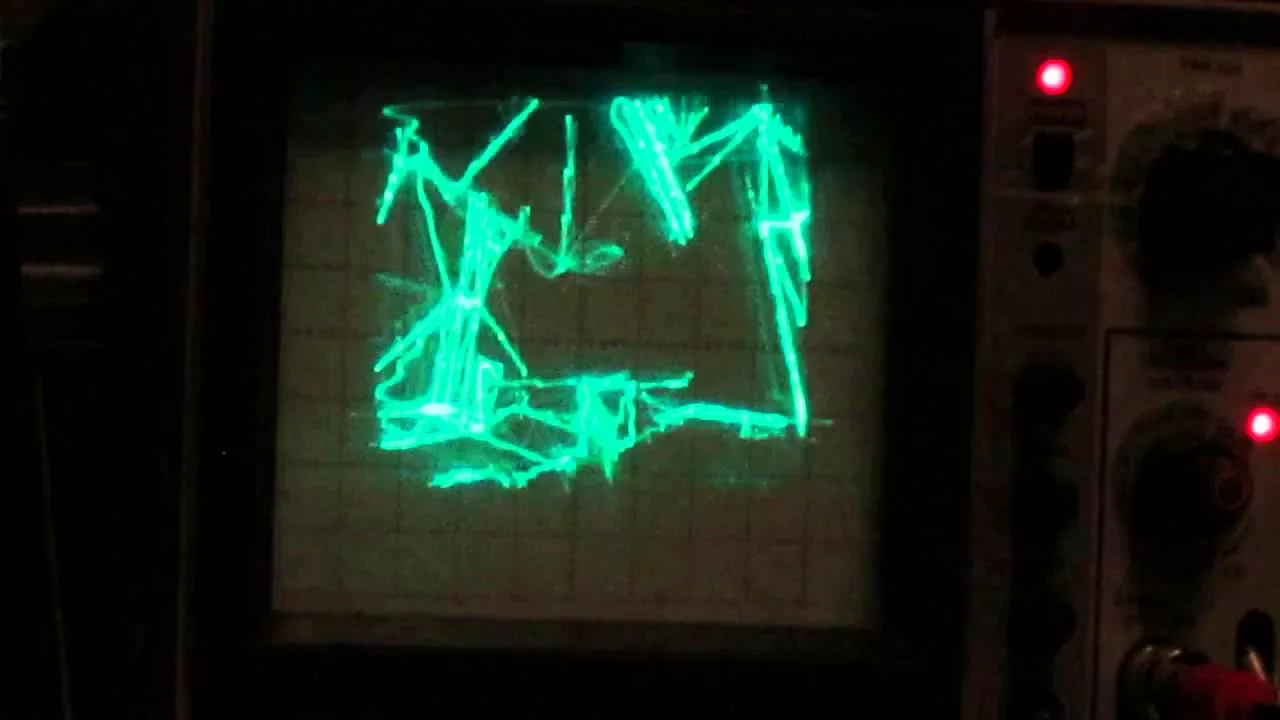
A laptop translates real-time Quake geometry into analog audio waves, allowing a Hitachi oscilloscope to draw playable vector graphics on its screen.
AI-assisted summary of Quake on an oscilloscope — original source. Check the original for full context.
Source published:
Key ideas
- Quake's iconic E1M1 map is successfully rendered and played in real time on a Hitachi V-422 oscilloscope screen. (0:00)
- The rendering pipeline runs on a laptop, translating the game's visual geometry into an analog audio signal driving the scope's X/Y inputs as 2D vector graphics. (0:00)
- Real-time navigation and combat, including responsive shotgun firing, are demonstrated directly on the glowing green CRT vector display. (0:00)
Detailed notes
## Background Published on YouTube by pekkavaa on December 28, 2014, the video features a demonstration of playing level E1M1 of Quake on a Hitachi V-422 oscilloscope. The video description explains that the game is rendered on a laptop and converted into an audio signal, which the oscilloscope then draws as real-time two-dimensional vector graphics.
## TL;DR The demonstration shows classic Quake gameplay rendered entirely as glowing green vector wireframes on a dual-trace Hitachi oscilloscope screen. After an initial reaction of disbelief at the working display, the player fires off several shotgun blasts while navigating the level's corridors. Determined to see how responsive the unconventional setup is, the player decides to push forward and run through the map.
## Atmosphere & style The presentation has the hypnotic, ambient feel of a late-night workbench experiment, juxtaposing crisp, retro shotgun sound effects with the eerie glow of an analog CRT. The mood starts with stunned, quiet awe before pivoting into amused determination as the player actually starts navigating the wireframe corridors. Watching it feels like peeking into a hacker's workshop where vintage test equipment is repurposed into a surreal gaming terminal.
## Bulletin - [00:00](https://www.youtube.com/watch?v=aMli33ornEU&t=0s) Quake's iconic E1M1 map is successfully rendered and played in real time on a Hitachi V-422 oscilloscope screen. - [00:00](https://www.youtube.com/watch?v=aMli33ornEU&t=0s) The rendering pipeline runs on a laptop, translating the game's visual geometry into an analog audio signal driving the scope's X/Y inputs as 2D vector graphics. - [00:00](https://www.youtube.com/watch?v=aMli33ornEU&t=0s) Real-time navigation and combat, including responsive shotgun firing, are demonstrated directly on the glowing green CRT vector display.
## Key takeaways - [00:00](https://www.youtube.com/watch?v=aMli33ornEU&t=0s) A laptop executes the Quake game engine running the first level, E1M1. - [00:00](https://www.youtube.com/watch?v=aMli33ornEU&t=0s) The laptop converts 3D gameplay geometry into a two-dimensional vector audio signal rather than a standard video output. - [00:00](https://www.youtube.com/watch?v=aMli33ornEU&t=0s) A Hitachi V-422 dual-trace oscilloscope serves as the primary visual display for the game. - [00:00](https://www.youtube.com/watch?v=aMli33ornEU&t=0s) The oscilloscope interprets the audio signal to draw real-time glowing green vector line graphics on its CRT screen. - [00:00](https://www.youtube.com/watch?v=aMli33ornEU&t=0s) The setup provides low-latency responsiveness sufficient for real-time first-person shooter navigation. - [00:00](https://www.youtube.com/watch?v=aMli33ornEU&t=0s) Combat mechanics, including weapon firing and shotgun blasts, function seamlessly within the vector audio rendering workflow. - [00:00](https://www.youtube.com/watch?v=aMli33ornEU&t=0s) The player audibly verifies the surprising fidelity and playability of rendering a complex 3D engine through an oscilloscope. - [00:00](https://www.youtube.com/watch?v=aMli33ornEU&t=0s) The demonstration proves that audio channels can effectively drive analog vector graphics for complex interactive software.
## Detailed walkthrough ### [00:00](https://www.youtube.com/watch?v=aMli33ornEU&t=0s) Demonstrating Quake on a Hitachi Oscilloscope
The demonstration opens with background music and the distinctive sounds of gameplay as id Software's classic first-person shooter *Quake* (specifically map E1M1) is rendered onto a Hitachi V-422 oscilloscope screen. The visual output is achieved by running the game rendering on a laptop, which converts the scene into an audio signal translated directly into two-dimensional vector graphics on the scope's CRT display. As the player takes in the surreal, glowing green vector wireframe environment, an initial reaction of surprise breaks through with an astonished “Huh?” followed immediately by “Oh, my God.”
Gunfire echoes in rapid succession with three distinct shotgun blasts ringing out across the audio track as the player navigates the vector-drawn corridors and engages enemies. Ready to push forward into the level and test the responsiveness of the setup, the player commits to running the map, announcing, “I'm going to go,” and resolving, “I'm going to try it.”
```mermaid flowchart LR accTitle: Quake Oscilloscope Rendering Pipeline accDescr: Diagram illustrating how Quake gameplay on a laptop is output via audio signals into an oscilloscope screen. subgraph Computer["Laptop Processing"] A["Quake Engine (E1M1)"] --> B["Vector Audio Signal Generation"] end subgraph Display["Analog Display"] B --> C["Hitachi V-422 Oscilloscope"] C --> D["2D Vector Graphics Display"] end ```
- Hardware setup: A laptop performs the core game rendering and converts the visual geometry into an analog stereo audio stream. - Display device: A Hitachi V-422 dual-trace oscilloscope displays the X/Y audio signal as glowing green vector line art in real time.
## Mentioned E1M1, Hitachi V-422, id Software, pekkavaa, Quake
## Video description Playing E1M1 of Quake on a Hitachi V-422 oscilloscope. The rendering is done a laptop and the scope shows the generated audio signal as two dimensional vector graphics.
Detailed explanation: http://www.lofibucket.com/articles/oscilloscope_quake.html
[Source](https://www.youtube.com/watch?v=aMli33ornEU)