WiebeTech HotPlug Keeps Seized PCs Powered to Save Volatile Data
HotPlug Basic Demonstration — WiebeTech

WiebeTech

Investigators can transport live computers directly to forensic laboratories without losing unencrypted files or volatile memory by bridging outlet circuits to battery power before disconnecting wall plugs.

AI-assisted summary of HotPlug Basic Demonstration — original source. Check the original for full context.

Source published:

Key ideas

  • WiebeTech's HotPlug system allows digital forensic investigators to transfer a running computer from building mains to battery power without shutdown or crashing, preserving volatile RAM and active filesystems. (0:05)
  • To prevent screensavers, sleep timers, or session lockouts during seizure, the USB-based Mouse Jiggler spoofs standard HID mouse activity through subtle cursor micro-movements without triggering OS driver prompts. (0:05)
  • For computers connected via a power strip, HotPlug back-feeds the strip using a portable UPS, allowing the energized main wall plug to be detached and plugged directly into the UPS so HotPlug can be reused immediately. (1:23)
  • For direct wall outlet connections, the Plug Capture Device slips spring brass contacts over plug prongs exposed by 1/8 inch, bridging power continuously as the plug is transferred from the wall into a battery backup. (3:39)

Detailed notes

## Background Published on YouTube by WiebeTech on October 22, 2007, this demonstration introduces the company's HotPlug field tool. According to the video description, HotPlug allows users to transfer a running computer to battery power to relocate it without powering down, showcasing two accessible methods suitable for most US electrical setups.

## TL;DR WiebeTech CEO James Wiebe demonstrates how digital forensics investigators can seize running computers from a scene without triggering lockouts or losing volatile memory. The process begins with the Mouse Jiggler, an automated HID device that generates micro-movements to suppress screensavers, sleep timers, and encryption timeouts. Wiebe then walks through transferring electrical load to a field UPS using the HotPlug unit, showing how to safely back-feed a workstation connected to a power strip as well as how to bridge a direct wall outlet using spring brass contacts on the Plug Capture Device.

## Atmosphere & style The presentation is pragmatic, calm, and methodically paced, evoking the functional atmosphere of a mid-2000s technical law enforcement briefing. James Wiebe speaks in an instructional, matter-of-fact tone, treating delicate forensic challenges and live-wire cutovers with steady, routine confidence. The focus remains tightly locked on physical hardware interactions, indicator lights, and exact cable manipulation, making the viewer feel like a field investigator learning an essential, hands-on tradecraft procedure.

## Bulletin - [00:05](https://www.youtube.com/watch?v=erq4TO_a3z8&t=5s) WiebeTech's HotPlug system allows digital forensic investigators to transfer a running computer from building mains to battery power without shutdown or crashing, preserving volatile RAM and active filesystems. - [00:05](https://www.youtube.com/watch?v=erq4TO_a3z8&t=5s) To prevent screensavers, sleep timers, or session lockouts during seizure, the USB-based Mouse Jiggler spoofs standard HID mouse activity through subtle cursor micro-movements without triggering OS driver prompts. - [01:23](https://www.youtube.com/watch?v=erq4TO_a3z8&t=83s) For computers connected via a power strip, HotPlug back-feeds the strip using a portable UPS, allowing the energized main wall plug to be detached and plugged directly into the UPS so HotPlug can be reused immediately. - [03:39](https://www.youtube.com/watch?v=erq4TO_a3z8&t=219s) For direct wall outlet connections, the Plug Capture Device slips spring brass contacts over plug prongs exposed by 1/8 inch, bridging power continuously as the plug is transferred from the wall into a battery backup.

## Key takeaways - [00:05](https://www.youtube.com/watch?v=erq4TO_a3z8&t=5s) Live forensic seizure preserves critical volatile system state, including RAM contents, active processes, unencrypted filesystems, and open network connections. - [00:05](https://www.youtube.com/watch?v=erq4TO_a3z8&t=5s) Investigators entering an office face a dual challenge: preventing operating system sleep or lockouts and severing building power without dropping electrical current. - [00:05](https://www.youtube.com/watch?v=erq4TO_a3z8&t=5s) The Mouse Jiggler prevents sleep modes and screensavers by registering as a standard HID device and generating microscopic cursor movements without OS dialogue prompts. - [00:05](https://www.youtube.com/watch?v=erq4TO_a3z8&t=5s) HotPlug serves as an auxiliary power bridge, transferring running hardware to an external portable UPS for transport to a forensic laboratory. - [01:23](https://www.youtube.com/watch?v=erq4TO_a3z8&t=83s) The brand and model of the UPS are secondary to ensuring its battery backup capacity is sufficient to keep the seized PC powered during transit. - [01:23](https://www.youtube.com/watch?v=erq4TO_a3z8&t=83s) HotPlug features diagnostic indicators that sense and confirm active incoming UPS power and continuity across the target connection before switching is engaged. - [01:23](https://www.youtube.com/watch?v=erq4TO_a3z8&t=83s) A dedicated power switch illuminates a green ready light to confirm that the bridge circuit is actively armed to maintain power. - [01:23](https://www.youtube.com/watch?v=erq4TO_a3z8&t=83s) Back-feeding a power strip keeps the computer running when unplugged, leaving the detached wall prongs electrically energized until plugged into the UPS. - [01:23](https://www.youtube.com/watch?v=erq4TO_a3z8&t=83s) Transferring the power strip directly into the UPS allows HotPlug to be disconnected and immediately redeployed to seize other machines in the facility. - [03:39](https://www.youtube.com/watch?v=erq4TO_a3z8&t=219s) The Plug Capture Device provides a specialized solution for situations where a computer is plugged directly into a wall socket instead of a power strip. - [03:39](https://www.youtube.com/watch?v=erq4TO_a3z8&t=219s) Investigators expose the plug's prongs by backing it out approximately 1/8 inch, keeping the tips grounded inside the receptacle while exposing contact area. - [03:39](https://www.youtube.com/watch?v=erq4TO_a3z8&t=219s) Spring brass contacts on the Plug Capture Device slide over the exposed plug blades to supply external power before the plug is extracted from the wall. - [03:39](https://www.youtube.com/watch?v=erq4TO_a3z8&t=219s) Once the captured plug is inserted into the portable UPS, the Plug Capture Device slides off the prongs, completing the transfer to battery power.

## Detailed walkthrough ### [00:05](https://www.youtube.com/watch?v=erq4TO_a3z8&t=5s) The Challenges of Live Forensics and the Mouse Jiggler

James Wiebe, CEO of WiebeTech, introduces the company as a developer and marketer of storage and digital forensics equipment whose tools have gained widespread adoption in law enforcement agencies. He presents HotPlug, a field tool designed to let an investigator seize a live, running computer from an office or crime scene and transport it directly to a forensic laboratory for analysis without shutting it down or allowing it to crash. When entering an office target environment, forensic investigators face an immediate dual challenge: keeping the machine awake to avoid lock screens or data encryption timeouts, and transferring it away from main building power without interrupting electrical flow.

```mermaid flowchart TD accTitle: Live Computer Seizure Workflow accDescr: Workflow diagram illustrating how Mouse Jiggler and HotPlug are used to maintain machine state during seizure. subgraph SleepPrevention ["1. Prevent Sleep Mode"] A["Insert Mouse Jiggler into target PC USB port"] --> B["Continuous micro-movements spoof HID activity"] end subgraph PowerTransition ["2. HotPlug Power Transfer"] B --> C["Connect HotPlug Input to field UPS"] C --> D["Connect HotPlug Output to power strip or Plug Capture Device"] D --> E["Arm HotPlug and illuminate green Ready light"] E --> F["Safely withdraw wall connection while circuit remains energized"] F --> G["Insert computer power into UPS and disconnect HotPlug"] end ```

To resolve the first dilemma, Wiebe demonstrates the WiebeTech Mouse Jiggler. Plugging straight into any available USB port on the target workstation, the hardware acts as a standard Human Interface Device (HID). It generates subtle, microscopic cursor movements across the screen, mimicking organic user activity. Because it registers strictly as a standard HID mouse, the host operating system installs no visible drivers and triggers no interactive prompts. As James Wiebe explains: “Mouse Jiggler is an HID device and all it does is spoof what a regular mouse would do by making very fine motions uh so it's very easy to use there's uh no implication no dialogue box pops up when you use it.”

- The Mouse Jiggler prevents sleep timers, screensavers, and session locks without altering open files or alerting an interactive operating system prompt. - HotPlug serves to preserve volatile system state, including RAM contents, running processes, open network connections, and unencrypted filesystems.

---

[01:23](https://www.youtube.com/watch?v=erq4TO_a3z8&t=83s) Seizing a Running PC Connected to a Power Strip

Once sleep prevention is assured, the investigator must address the second hurdle: safely severing the workstation from the building's AC power without powering down. Wiebe walks through the standard procedure for a workstation connected via a power strip. HotPlug comes bundled with specialized power cabling. To begin the cutover, the investigator connects HotPlug's input lead to a portable uninterruptible power supply (UPS). Wiebe emphasizes that the specific make is secondary to capacity, stating: “I don't care what brand and I don't really care what size of UPS you use as long as you use a UPS that's got enough power backup time to handle the computer uh that you're seizing on this particular day.”

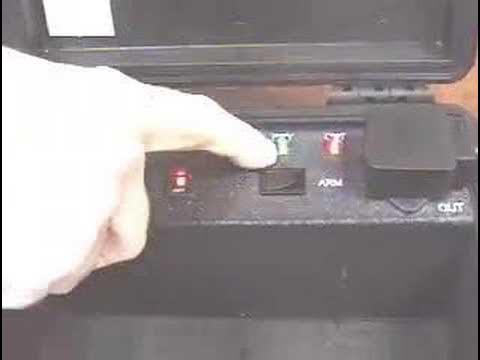
With the input side engaged, HotPlug senses incoming power from the UPS. The investigator then links the unit's output cord into an open receptacle on the target computer's power strip. At this point, HotPlug's diagnostic indicators confirm both active input power from the battery backup and output power across the strip. The investigator toggles the HotPlug power switch, which activates a bright green "ready" light. With the bridge armed, Wiebe pulls the power strip's primary wall plug completely free from the wall socket.

Because HotPlug back-feeds the strip, the computer continues operating uninterrupted, leaving the prongs of the detached wall plug electrically live ("hot"). Wiebe quickly routes that energized main power strip plug directly into the nearby UPS. Once the computer's power strip is drawing current straight from the UPS battery, HotPlug is safely toggled off and unplugged from the circuit. The investigator can carry the UPS and the active PC directly to a seizure vehicle outfitted with an internal power inverter, keeping the target rig awake throughout transit while freeing up HotPlug to seize additional machines in the facility.

- Input and output status LEDs confirm electrical continuity on both sides before switching is activated. - The green "ready" indicator confirms that the unit is armed to supply uninterrupted auxiliary power. - Transferring the power strip plug to the UPS allows HotPlug to be detached and reused immediately elsewhere on-site.

---

[03:39](https://www.youtube.com/watch?v=erq4TO_a3z8&t=219s) Direct Wall Outlet Seizure Using the Plug Capture Device

To handle scenarios where a target computer is plugged directly into a wall receptacle rather than an auxiliary power strip, Wiebe introduces WiebeTech's Plug Capture Device. As Wiebe highlights, “You'll use this device in the most common situation which is when the computer is plugged directly into a wall outlet.” The specialized accessory features a trailing lead on one end that plugs straight into the output interface of the HotPlug unit, balanced on the other end by a molded assembly fitted with spring brass contacts engineered to slip over the exposed prongs of a wall plug.

```mermaid flowchart LR accTitle: Plug Capture Device Operation accDescr: Sequence showing physical attachment of the Plug Capture Device to an outlet plug. A["Back computer plug out roughly 1/8 inch"] --> B["Slip Plug Capture spring contacts over exposed prongs"] B --> C["Arm HotPlug via toggle switch"] C --> D["Pull combined assembly out of wall socket"] D --> E["Insert plug directly into UPS outlet"] E --> F["Slide off Plug Capture Device"] ```

To execute the direct capture, the investigator connects the output of HotPlug into the Plug Capture Device. Next, the investigator cautiously pulls the computer's AC plug outward from the wall outlet by approximately one-eighth of an inch—just enough to expose the prongs while keeping the terminal ends deep enough inside the receptacle to maintain continuous electrical contact. The investigator slides the spring brass prongs of the Plug Capture Device directly over the exposed blade prongs of the existing plug.

With physical contact established, the investigator arms the HotPlug unit until the green indicator light confirms active bridge power. The investigator then pulls the computer plug fully out of the wall. Although the exposed contacts are now live with current supplied through the bridge, the plug can immediately be guided into the portable UPS. As soon as solid mechanical and electrical engagement is achieved inside the UPS outlet, the Plug Capture Device slides off the prongs, completing the transfer and leaving the live workstation ready for immediate removal.

- The target plug is withdrawn only 1/8 inch from the wall socket to sustain wall voltage while seating the spring brass prongs. - The Plug Capture Device energizes the plug blades externally via HotPlug during extraction, bridging the physical gap between wall outlet and UPS. - Once seated in the UPS receptacle, the device is slipped off, fully freeing the machine for laboratory transit.

## Notable quotes > [01:23](https://www.youtube.com/watch?v=erq4TO_a3z8&t=83s) I don't care what brand and I don't really care what size of UPS you use as long as you use a UPS that's got enough power backup time to handle the computer uh that you're seizing on this particular day. — James Wiebe

## Mentioned James Wiebe, WiebeTech, HotPlug, Mouse Jiggler, Plug Capture Device

## Video description A demonstration of HotPlug by WiebeTech. HotPlug allows you to transfer a running computer to battery power, so you can move it somewhere else without turning it off. The two methods demonstrated here are easy, and work on most situations in the US. See also the advanced demo.

http://www.wiebetech.com/products/HotPlug.php

[Source](https://www.youtube.com/watch?v=erq4TO_a3z8)

中文简报

WiebeTech HotPlug使查获电脑保持通电以保留易失性数据 调查人员可在断开墙壁插头前将插座电路桥接至电池供电,从而将运行中的电脑直接运送至取证实验室,而不会丢失未加密文件或易失性内存。 WiebeTech首席执行官James Wiebe演示了数字取证调查人员如何在不触发锁定或丢失易失性内存的情况下,从现场查扣运行中的电脑。该流程始于Mouse Jiggler,这是一种自动化HID设备,通过产生微小移动来阻止屏幕保护程序、睡眠定时器以及加密超时。随后,Wiebe演示了如何使用HotPlug装置将电力负载转移到现场UPS,展示了如何安全地为连接在接线板上的工作站反向供电,以及如何利用Plug Capture Device上的弹簧黄铜触点桥接直接连接墙壁插座的电源。 WiebeTech的HotPlug系统允许数字取证调查人员在不关机或崩溃的情况下,将运行中的电脑从建筑物市电切换到电池供电,从而保留易失性RAM和活动文件系统。 (0:05) 为了防止在查扣过程中出现屏幕保护程序、睡眠定时器或会话锁定,基于USB的Mouse Jiggler通过细微的光标微移来模拟标准HID鼠标活动,且不会触发操作系统驱动程序提示。 (0:05) 对于通过接线板连接的电脑,HotPlug使用便携式UPS向接线板反向供电,从而可以将带电的墙壁主插头拔下并直接插入UPS,使HotPlug能够立即重复使用。 (1:23) 对于直接连接墙壁插座的情况,Plug Capture Device可将弹簧黄铜触点套在露出1/8英寸的插头插脚上,在插头从墙壁转移到备用电池的过程中持续桥接供电。 (3:39)

Reading summary

WiebeTech CEO James Wiebe demonstrates field hardware designed for digital forensic investigators to seize running computers without triggering sleep states, encryption lockouts, or electrical cutoffs. The workflow combines a USB Mouse Jiggler to spoof user activity with the HotPlug power bridge and Plug Capture Device to transfer active electrical loads to portable battery backups. Maintaining Active System State via Mouse Jiggler (0:05) When entering an investigation scene, forensic investigators must prevent target computers from timing out into screensavers, sleep modes, or session locks that could restrict access to volatile RAM contents, unencrypted filesystems, and active network connections. To prevent these timeouts without alerting users or altering system state, Wiebe introduces the WiebeTech Mouse Jiggler, a hardware device that inserts directly into an open USB port. Power Strip Transfers via HotPlug Bridging (1:23) After securing the workstation against sleep timeouts, investigators must sever the machine from building AC power without interrupting current flow. For setups where the computer is plugged into a power strip, the HotPlug unit is positioned between a portable uninterruptible power supply (UPS) and an open outlet on the strip. Wiebe notes that the brand and physical dimensions of the UPS are secondary to ensuring it has adequate battery capacity to carry the workstation's draw. HotPlug uses diagnostic LEDs to confirm electrical input from the UPS and output to the power strip before the investigator activates the unit's toggle switch. Once a green ready light confirms the bridge is armed, the investigator disconnects the power strip from the wall outlet. Because HotPlug back-feeds the strip, the computer remains operational while the detached wall prongs become energized. The investigator inserts this live plug directly into the UPS, turns off HotPlug, and disconnects it, leaving the computer running on battery power while freeing HotPlug for additional seizures. Direct Wall Outlet Extraction via Plug Capture (3:39) In cases where a computer connects directly to a wall socket rather than a power strip, Wiebe explains that investigators employ the Plug Capture Device. The accessory attaches to HotPlug's output lead on one end and features spring brass contacts on the other designed to slip over standard plug blades. The investigator backs the computer plug approximately one-eighth of an inch out of the wall outlet—exposing the blades while keeping the terminal ends deep enough to sustain continuous line voltage. The spring brass contacts of the Plug Capture Device are slid onto the exposed blades, and HotPlug is switched on until the green ready light indicates active auxiliary power. The investigator withdraws the fully bridged plug from the wall, guides it into the portable UPS, and slides the Plug Capture Device off the prongs once engagement inside the UPS outlet is secure. By pairing automated user-activity simulation with uninterruptible electrical bridging, this toolset enables investigators to transport active machines to inverters in seizure vehicles and on to forensics labs without restarting. However, safe cutover relies on adequate UPS run-time capacity and physical precision when partially backing live plugs out of wall receptacles.

精炼阅读摘要

WiebeTech 首席执行官 James Wiebe 演示了便携式取证工具 HotPlug 与 Mouse Jiggler 的协同工作流程,旨在协助执法人员在不切断电源或触发休眠锁定的情况下,完整查扣处于运行状态的目标计算机。 防范休眠锁定与易失性数据留存 (0:05) 在数字取证现场,调查人员面临的首要难题是防止目标设备进入休眠、锁屏或触发加密超时,从而丢失易失性内存数据。WiebeTech 提出的方案是在计算机的可用 USB 接口中插入 Mouse Jiggler。该硬件作为标准人机接口设备(HID)运作,在后台模拟微小的光标位移,伪装出用户持续操作的状态。由于其被操作系统严格识别为通用鼠标,因此不会加载可视驱动,也不会弹出任何可能干扰现场证据的对话框。 通过阻止屏幕保护程序与会话锁定生效,调查人员能够在保留内存数据、活跃网络连接、未加密文件系统及运行进程的前提下开展后续操作,为直接将活跃系统转移至取证实验室提供了前置保障。 排插场景下的不间断电源切换 (1:23) 当目标设备接入排插时,调查人员可通过 HotPlug 将其供电平稳过渡至便携式不间断电源(UPS)。操作时,调查人员先将 HotPlug 的输入端接入便携式 UPS。James Wiebe 指出,UPS 的具体品牌与规格并不关键,核心在于其备用电量必须足以支撑目标计算机当前的运行能耗。随后,HotPlug 的输出端线缆接入排插的空闲插孔。 此时,HotPlug 上的诊断指示灯会确认来自电池与排插两端的电路连通性。操作人员扳动开关启动 HotPlug,面板上的绿色 Ready 指示灯随即亮起,表明旁路供电已激活。调查人员此时可将排插的墙插完全拔出;由于 HotPlug 正在对排插进行反向反向供电,拔出的插头引脚仍带有电流。操作人员需迅速将该带电插头插入 UPS 插座中。待排插直接从 UPS 获取电能后,即可关闭并撤下 HotPlug,以便在现场扣押其他设备,而目标设备与 UPS 则可整体移送至配备车载逆变器的车辆中。 利用捕获装置处理直插墙面插座 (3:39) 针对计算机直接插入墙面插座的常见场景,WiebeTech 提供了专用的插头捕获装置(Plug Capture Device)。该配件一端连接 HotPlug 的输出接口,另一端配备了带有黄铜弹片的模具结构,可精准套接在插头的外露引脚上。 在执行抓取时,调查人员先将目标计算机的电源插头从墙壁插座中小心向外拔出约八分之一英寸(1/8 inch)。这一微小距离既能露出部分金属引脚,又能确保插头末端仍留在插座内部以维持原供电回路。随后,调查人员将捕获装置的黄铜弹片滑套在暴露的插头引脚上,并启动 HotPlug 开关点亮绿色就绪灯。在辅助桥接电源生效后,插头被彻底拔出墙面,此时引脚由 HotPlug 维持带电状态并直接送入 UPS 插座。一旦在 UPS 接口内形成稳固的电气连接,插头捕获装置便可滑脱卸下,完成活体取证的离线电源交接。 该套流程依赖便携式 UPS 的持续电量以及现场物理插拔的精确度(如微拔 1/8 英寸以维持通路),若在操作期间接触不良或 UPS 续航耗尽,仍存在设备断电导致内存数据丢失的潜在风险。

Detailed notes — zh

## Background 该视频由 WiebeTech 于 2007 年 10 月 22 日在 YouTube 平台发布。视频主要演示了 WiebeTech 研发的 HotPlug 设备,介绍如何在不关机的前提下将运行中的电脑切换至电池供电,以便调查人员将其完整转移至其他地点。 ## TL;DR 在电子取证现场扣押电脑时,调查人员面临防止系统休眠以及在不断电情况下拔除电源两大技术挑战。WiebeTech 首席执行官 James Wiebe 演示了使用 Mouse Jiggler 硬件模拟鼠标微动以阻止电脑休眠或锁屏。随后,他展示了 HotPlug 配合便携式 UPS 的两种不断电电源接管方案:针对接线板场景,通过反向供电直接拔掉排插并转接 UPS;针对墙面直插场景,则利用配备弹簧黄铜触点的 Plug Capture Device 扣住微露的插头引脚完成无缝带电切换,确保主机全程开机转移至取证车辆。 ## Atmosphere & style 整个演示呈现出务实、严谨且偏重技术实操的专业工程风格。主讲人 James Wiebe 讲解语气沉稳自信,动作干脆利落,像是在进行一场精密而日常的现场取证教学。拔出带电插头与无缝切换供电的瞬间自带一种扣人心弦的悬念感,直观展现了硬件工具在争分夺秒的执法取证环境中所带来的确定性与高效率。 ## Bulletin - [00:05](https://www.youtube.com/watch?v=erq4TO_a3z8&t=5s) WiebeTech 推出 HotPlug 电子取证解决方案,旨在协助执法人员在不关机、不休眠的状态下将开机电脑从案发现场转移至实验室。 - [00:05](https://www.youtube.com/watch?v=erq4TO_a3z8&t=5s) 针对锁屏与休眠问题,Mouse Jiggler 作为免驱动的 USB HID 硬件,通过持续模拟微小鼠标位移阻止系统待机。 - [01:23](https://www.youtube.com/watch?v=erq4TO_a3z8&t=83s) HotPlug 支持利用常规 UPS 进行反向供电过渡,不仅兼容接线板供电环境,还可通过专用配件应对墙面直插插头。 - [01:23](https://www.youtube.com/watch?v=erq4TO_a3z8&t=83s) 完成电源过渡至便携式 UPS 后,HotPlug 设备即可脱离线路用于现场下一台电脑,目标主机则转接至取证车逆变器实现长途带电转移。 ## Key takeaways - [00:05](https://www.youtube.com/watch?v=erq4TO_a3z8&t=5s) 现场电子取证扣押开机电脑时面临两大核心痛点:防止系统休眠锁屏,以及在不断电的情况下切断原有供电并迁移。 - [00:05](https://www.youtube.com/watch?v=erq4TO_a3z8&t=5s) Mouse Jiggler 采用即插即用的 USB HID 标准协议,插入后无需安装驱动亦不会弹窗,有效避免破坏现场取证环境。 - [01:23](https://www.youtube.com/watch?v=erq4TO_a3z8&t=83s) HotPlug 转移方案对便携式 UPS 的品牌与型号没有限制,唯一硬性要求是电池后备时间足以支撑扣押交接全程。 - [01:23](https://www.youtube.com/watch?v=erq4TO_a3z8&t=83s) HotPlug 配备双向电源检测逻辑,面板的 Input 与 Output 指示灯以及绿色 Ready 状态灯用于确保带电接管就绪。 - [01:23](https://www.youtube.com/watch?v=erq4TO_a3z8&t=83s) 在接线板(Power Strip)供电场景中,HotPlug 通过向插排反向反哺电力,允许调查人员拔掉原插头而维持电脑持续开机。 - [01:23](https://www.youtube.com/watch?v=erq4TO_a3z8&t=83s) 原插头拔下后会处于带电状态,将其直接接入 UPS 后即可移除 HotPlug,实现设备复用以扣押下一台机器。 - [01:23](https://www.youtube.com/watch?v=erq4TO_a3z8&t=83s) 扣押电脑连同 UPS 搬入取证车后,可通过车内配备的逆变器(Inverter)持续供电并运离现场。 - [03:39](https://www.youtube.com/watch?v=erq4TO_a3z8&t=219s) 面对直接插在墙面插座的电脑,专用配件 Plug Capture Device 能够利用弹簧黄铜触点外夹插头引脚进行保电。 - [03:39](https://www.youtube.com/watch?v=erq4TO_a3z8&t=219s) 墙插拔取操作需先将插头向外微拔约 1/8 英寸(约 3 毫米),在维持原有供电接通的同时留出触点咬合缝隙。 - [03:39](https://www.youtube.com/watch?v=erq4TO_a3z8&t=219s) 在 HotPlug 启动布防(Arm)且绿灯亮起后拔出墙插,取证人员需迅速将插头插入 UPS 并卸下抓取器以完成安全交接。 ## Detailed walkthrough ### [00:05](https://www.youtube.com/watch?v=erq4TO_a3z8&t=5s) 电子取证扣押电脑的两大难题与 Mouse Jiggler 防休眠方案 WiebeTech 首席执行官 James Wiebe 介绍了公司背景:WiebeTech 专注于存储设备与电子取证产品的研发与销售,其产品在执法部门中有着极其广泛的应用。这次他要演示的是一款名为 HotPlug 的新设备,其核心目标是协助调查人员在不关机的情况下,将一台处于开机运行状态的目标电脑从案发现场完整移送至实验室作后续深入取证。正如 James Wiebe 所指出的:“The very first thing that happens when you walk into an office is you have a computer that you want to seize, you've got to solve two problems: the first problem is how do you prevent the computer from going to sleep, and the second problem is how do you get the computer disconnected from its power source without turning it off.” 为了解决电脑自动进入休眠或锁屏这第一个难题,WiebeTech 提供了 Mouse Jiggler 硬件工具。现场演示中,只需将 Mouse Jiggler 插入电脑的任意空闲 USB 接口即可生效。屏幕上的鼠标光标随即开始自动做极其细微的移动。James Wiebe 说明,Mouse Jiggler 在操作系统层面被识别为标准的 HID(人机接口设备),其工作原理仅仅是模拟常规鼠标的细微动作;它即插即用、操作极其简便,插入后电脑系统不会弹出任何驱动安装或异常对话框,完全不会惊动系统或破坏现场取证环境。 ```mermaid flowchart TD accTitle: 现场取证电脑快速稳妥扣押流程 accDescr: 描述调查人员到达现场后通过Mouse Jiggler防休眠并使用HotPlug完成带电移机的整体逻辑 subgraph Step1["步骤一:防止电脑锁屏休眠"] A["进入现场发现开机电脑"] --> B["插入 Mouse Jiggler (USB HID)"] B --> C["微幅模拟光标移动保持唤醒"] end subgraph Step2["步骤二:无间断电源切换 (HotPlug)"] C --> D{"目标电脑供电方式"} D -->|"接在接线板上"| E["HotPlug 反向直连插排供电"] D -->|"直接插在墙面插座"| F["使用 Plug Capture Device 扣住插头引脚"] E --> G["无缝切换至便携式 UPS"] F --> G end subgraph Step3["步骤三:移送与上车"] G --> H["HotPlug 脱离并可复用"] H --> I["目标电脑连同 UPS 搬入取证车 (接车内逆变器)"] end ``` ### [01:23](https://www.youtube.com/watch?v=erq4TO_a3z8&t=83s) HotPlug 接线板不断电热插拔迁移演示 针对第二个难点——如何在不关机的前提下切断并替换原有供电,James Wiebe 演示了 HotPlug 设备本体及其特制的连接线缆。现场首先将 HotPlug 的输入端接入便携式供电电源。在演示中他使用的是一台常规 UPS(不间断电源);James Wiebe 强调,UPS 的品牌和具体型号并不重要,“as long as you use a UPS that's got enough power backup time to handle the computer uh that you're seizing on this particular day”。接通后,HotPlug 面板会亮起指示灯,显示输入端已成功检测到电源输入。 接下来,James Wiebe 将 HotPlug 的输出端线缆插在电脑当前接入的电源排插(Power Strip)上。此时 HotPlug 同时检测到输入与输出两端电力,扳动其电源开关后,面板上的绿色“Ready”就绪指示灯亮起,代表 HotPlug 已经准备就绪。随后他上演了“见证奇迹”的一幕:直接将排插本身的供电插头从墙上拔出。此时由于 HotPlug 正在从 UPS 向排插反向反哺供电,整台电脑丝毫没有断电,依然平稳运行;甚至拔下来的那个排插插头本身也是带电(hot)的。紧接着,他把拔下来的排插插头直接插到旁边的同一台 UPS 上。完成这一步后,即可将 HotPlug 从整个电路中断开拿走。电脑继续依靠 UPS 独立供电,调查人员可将其连同 UPS 一起搬运至取证车辆上,再接入车内已备好的逆变器(Inverter)后直接驱车离开,彻底达成“电脑未关机、未休眠”的扣押目标;而脱离电路的 HotPlug 设备则可以立刻拿去扣押现场的下一台电脑。 - **UPS 选型原则**:对品牌与具体尺寸无限制,唯一要求是后备电池容量必须足够支撑本次扣押移送所需的时间。 - **状态指示机制**:输入端(Input)与输出端(Output)均有状态检测,开启开关后由绿色 Ready 指示灯确认接管准备就绪。 - **车端转接**:现场将主机与 UPS 搬入取证车辆(Seizure Van)后,直接接驳车载逆变器(Inverter)持续供电。 ### [03:39](https://www.youtube.com/watch?v=erq4TO_a3z8&t=219s) 墙面插座直插场景:Plug Capture Device 抓取技术 针对现实中最普遍、也更棘手的场景——即目标电脑的电源线是直接插在墙壁插座上,而非外接排插时,James Wiebe 介绍了专用配件“Plug Capture Device(插头抓取器)”。该配件的一端是一个标准插座,用于连入 HotPlug 的输出端;另一端则配有特制的弹簧黄铜触点(Spring Brass Contacts),用于从外部精准扣住插头暴露在外的引脚。 在实操环节中,James Wiebe 首先将 Plug Capture Device 连接至 HotPlug 的输出端,然后小心翼翼地将目标电脑插在墙上的电源插头向外拔出约 1/8 英寸(约 3 毫米)。这个距离既能露出一截插头引脚,又能保证电脑内部仍与墙内电源保持正常的电气导通状态。随后,他将带有弹簧黄铜触点的抓取器顺着缝隙套在原有插头上,使其牢固咬合插头金属片。接着前往 HotPlug 启动布防(Arm),设备绿灯亮起进入就绪状态。此时调查人员即可果断将插头和抓取器整体彻底拔出墙面。虽然此时外露触点带有电流,但调查人员需要立即、迅速地将电脑插头完全插进身旁的 UPS 供电插孔中。在确认接触良好、UPS 成功接管供电后,便可顺势取下 Plug Capture Device。至此,墙插电脑的不断电电源切换大功告成,取证人员即可随时将保持开机的主机安全带出房间。 ## Mentioned HotPlug, James Wiebe, Mouse Jiggler, Plug Capture Device, UPS, WiebeTech ## Video description A demonstration of HotPlug by WiebeTech. HotPlug allows you to transfer a running computer to battery power, so you can move it somewhere else without turning it off. The two methods demonstrated here are easy, and work on most situations in the US. See also the advanced demo. http://www.wiebetech.com/products/HotPlug.php [Source](https://www.youtube.com/watch?v=erq4TO_a3z8)

Source quotes

[1:23] James Wiebe: I don't care what brand and I don't really care what size of UPS you use as long as you use a UPS that's got enough power backup time to handle the computer uh that you're seizing on this particular day.

Original transcript

[0:05] hi my name is James weeby I'm the CEO of [0:08] weech weech is a company that develops [0:10] and markets storage products and [0:12] forensic products our forensic products [0:14] have found wide application in law [0:16] enforcement today we're going to show [0:18] you a new product called hot plug that [0:20] enables an investigator to remove a live [0:23] running computer from a location [0:25] relocate it to a laboratory for further [0:28] analysis and I think you're going to be [0:30] impressed with what you see the very [0:32] first thing that happens when you walk [0:34] into an office is you have a computer [0:36] that you want to seiz you've got to [0:37] solve two problems the first problem is [0:40] how do you prevent the computer from [0:42] going to sleep and the second problem is [0:43] how do you get the computer disconnected [0:46] from its power source without turning it [0:47] off we'll solve both of the problems the [0:50] first problem of how to prevent the [0:52] computer from going to sleep is solved [0:54] through the use of a product called [0:55] Mouse Jiggler Mouse Jiggler plugs into [0:58] any USB port [1:01] and if you take a look at the cursor [1:03] you'll see that the cursor is making [1:04] very fine motions Mouse is an HID device [1:08] Mouse Jiggler is an HID device and all [1:10] it does is spoof what a regular Mouse [1:12] would do by making very fine motions uh [1:15] so it's very easy to use there's uh no [1:18] implication no dialogue box pops up when [1:20] you use it okay that problem solved the [1:23] second problem is how to get that power [1:25] disconnected without turning the [1:27] computer off that's where we need it hot [1:30] plug hot plug comes with a couple of [1:33] different uh unusual power cords we're [1:36] going to plug it in and show you how to [1:37] use [1:40] it the very first thing that we'll do [1:43] once we've got the power cords plugged [1:44] in is we're going to plug hot plug into [1:47] a source of portable power in our [1:50] demonstration here we're using a UPS uh [1:52] I don't care what brand and I don't [1:54] really care what size of UPS you use as [1:57] long as you use a UPS that's got enough [2:00] power backup time to handle the computer [2:03] uh that you're seizing on this [2:05] particular day so we've plugged into hot [2:08] plug and you see that it detects that [2:09] there's power coming into the input side [2:12] of hot plug now let's take the output [2:14] side of hot [2:16] plug and we're going to plug it into our [2:18] power [2:20] strip okay we've done that as well you [2:24] can see that we have input power we have [2:25] output power We Now flip the switch and [2:28] the green ready comes on it shows you [2:31] that hot plug is ready to do its thing [2:33] let's go over here our power strip is [2:35] plugged into the wall we're going to do [2:37] some [2:38] magic we pull the power strip out of the [2:40] wall you can see that the computer is [2:42] still turned [2:44] on in fact the plug that I'm holding in [2:47] my hand is still hot we're going to move [2:49] that plug over to the same ups that [2:51] we're using and at that point then we're [2:54] going to disconnect hot plug from the [2:56] circuit [3:00] okay hot plug is [3:02] disconnected you can now use it to seize [3:04] another [3:06] computer and you can take this computer [3:09] which is connected to the UPS out to [3:11] your uh to your uh seizure van plug the [3:15] UPS into an inverter that you already [3:17] have in the van Drive the whole thing [3:19] away you've just fulfilled your mission [3:20] you removed a computer it never went to [3:23] sleep and the power was never turned off [3:26] uh you may be wondering what would you [3:28] do if Hot plug excuse me if if uh the [3:30] computer system was plugged into the [3:32] wall outlet well in a few moments we'll [3:34] show you how to handle that situation as [3:39] well hi folks we're back we're going to [3:41] show you webex's plug capture device [3:44] you'll use this device in the most [3:46] common situation which is when the [3:47] computer is plugged directly into a wall [3:49] outlet the very first thing that you'll [3:52] want to notice is that we've got an [3:53] outlet on the end of the plug capture [3:55] device which simply plugs into hot plug [3:58] the other end has spring br gr contacts [4:00] that'll go over the existing wall plug [4:03] let's actually do it we're going to plug [4:04] it in and use it I take the output of [4:07] hot plug I plug that in here we're going [4:10] to go down to the plug and back it out [4:13] of the wall but only about an eighth of [4:15] an inch so we're still making electrical [4:17] contact for the computer we then take [4:19] plug capture device it fits on easily [4:22] and it goes right over the existing [4:23] Outlet I'm going to go over to hot plug [4:26] arm it there we've got a green light [4:30] now I come back to the plug capture [4:31] device and pull it out of the wall at [4:35] this point we have hot electrical [4:36] contacts but we're ready to plug it [4:38] immediately into the [4:42] UPS okay I've plugged it into the UPS I [4:45] have a good contact I can remove the [4:47] plug capture device and we've completed [4:50] our objective we're ready to remove the [4:52] computer from the room