QuestVisual Unveils Word Lens to Translate Signs via Live Camera Feed
QuestVisual
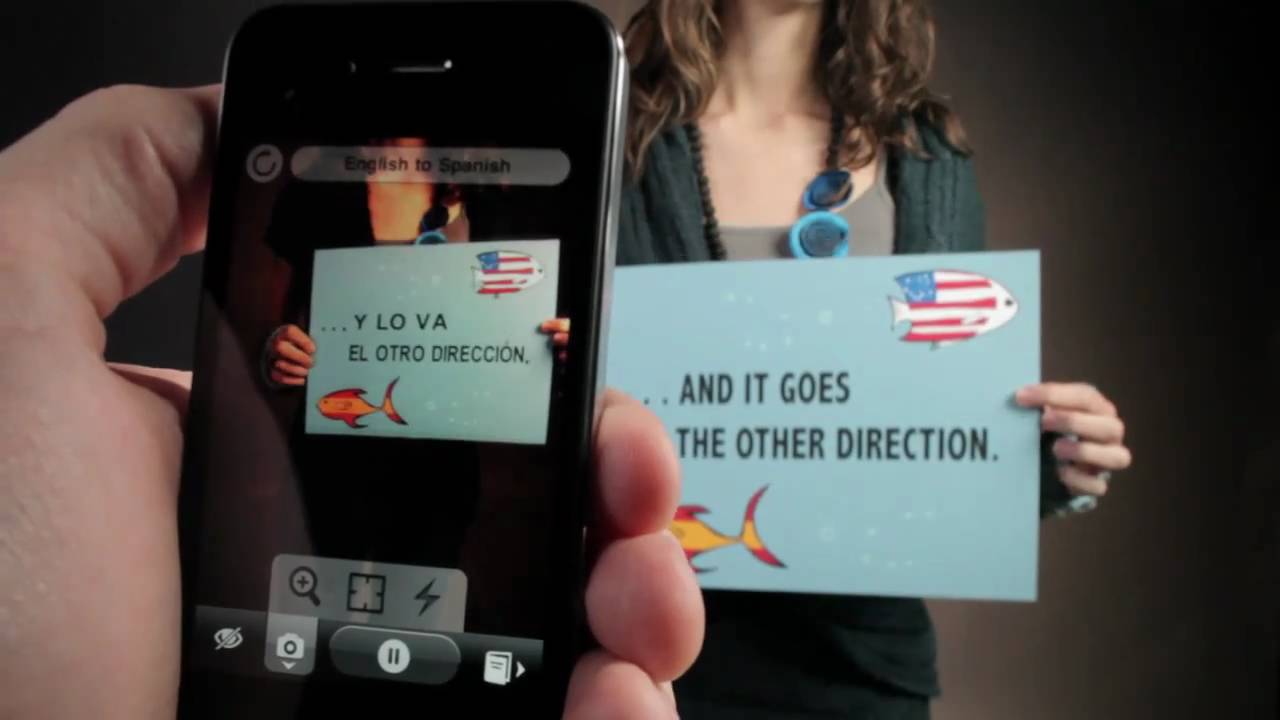
The application uses live optical character recognition to instantly replace printed English and Spanish text in a smartphone viewfinder while preserving font, perspective, and background color.
AI-assisted summary of Introducing Word Lens — original source. Check the original for full context.
Source published:
Key ideas
- QuestVisual introduced Word Lens, an augmented reality application capable of real-time text translation directly through a smartphone's live camera viewfinder. (0:02)
- The app eliminates manual capture, cropping, and typing by using instantaneous optical character recognition (OCR) and font-matching graphic replacement. (0:02)
- Live demonstrations illustrate bidirectional translation between English and Spanish across real-world physical signage while preserving perspective and background styling. (0:02)
- Word Lens technology has been acquired and integrated into Google Translate across iOS and Android, replacing the standalone application.
Detailed notes
## Background Published on YouTube by QuestVisual on December 16, 2010, this video demonstrates the augmented reality mobile application Word Lens. According to the video description, Word Lens has since been discontinued as a standalone product and integrated directly into the Google Translate app on Android and iOS.
## TL;DR The video demonstrates Word Lens's real-time visual translation capabilities operating through a smartphone camera preview. Eliminating the need to snap photos or manually input foreign phrases, the app uses live optical character recognition to detect printed signs and replace text instantly on-screen. Demonstrations showcase bidirectional English and Spanish translations that seamlessly blend with real-world physical signage, matching original fonts, perspective, and background colors directly in the viewfinder.
## Atmosphere & style The presentation is entirely wordless, driven by an upbeat, cheerful acoustic instrumental track rather than spoken dialogue or technical narration. Watching the video feels brisk and quietly mesmerizing as printed signs instantaneously shift languages right before the viewer's eyes. By letting the visual mechanics of augmented reality speak for themselves, the showcase delivers a lighthearted, effortless sense of technological wonder.
## Bulletin - [00:02](https://www.youtube.com/watch?v=h2OfQdYrHRs&t=2s) QuestVisual introduced Word Lens, an augmented reality application capable of real-time text translation directly through a smartphone's live camera viewfinder. - [00:02](https://www.youtube.com/watch?v=h2OfQdYrHRs&t=2s) The app eliminates manual capture, cropping, and typing by using instantaneous optical character recognition (OCR) and font-matching graphic replacement. - [00:02](https://www.youtube.com/watch?v=h2OfQdYrHRs&t=2s) Live demonstrations illustrate bidirectional translation between English and Spanish across real-world physical signage while preserving perspective and background styling. - Word Lens technology has been acquired and integrated into Google Translate across iOS and Android, replacing the standalone application.
## Key takeaways - [00:02](https://www.youtube.com/watch?v=h2OfQdYrHRs&t=2s) Word Lens pioneered live augmented reality translation operating directly inside a smartphone camera preview. - [00:02](https://www.youtube.com/watch?v=h2OfQdYrHRs&t=2s) The tool functions without requiring users to snap a photograph, crop an image, or manually type out foreign text. - [00:02](https://www.youtube.com/watch?v=h2OfQdYrHRs&t=2s) Instant on-screen optical character recognition (OCR) detects printed words directly from the incoming video feed. - [00:02](https://www.youtube.com/watch?v=h2OfQdYrHRs&t=2s) Translated wording is dynamically rendered into the live video stream in place of the original physical text. - [00:02](https://www.youtube.com/watch?v=h2OfQdYrHRs&t=2s) The software mimics the source text's font style, orientation perspective, and background color for natural integration. - [00:02](https://www.youtube.com/watch?v=h2OfQdYrHRs&t=2s) The presentation demonstrates seamless bidirectional translation capabilities between English and Spanish. - [00:02](https://www.youtube.com/watch?v=h2OfQdYrHRs&t=2s) Real-world test scenarios focus on translating informational signage and cautionary notices on physical surfaces. - [00:02](https://www.youtube.com/watch?v=h2OfQdYrHRs&t=2s) The video presents the technology entirely through visual demonstrations set to acoustic music without spoken narration. - QuestVisual's translation technology was subsequently integrated into Google Translate on Android and iOS. - The standalone Word Lens mobile client has been retired following its incorporation into Google's ecosystem.
## Detailed walkthrough ### [00:02](https://www.youtube.com/watch?v=h2OfQdYrHRs&t=2s) Real-Time Visual Translation with Word Lens
The presentation serves as QuestVisual's demonstration of its breakthrough augmented reality application, Word Lens. Set entirely to an upbeat acoustic musical backdrop rather than spoken dialogue, the video visually highlights the application's ability to translate printed signs in real time via a smartphone's camera preview. Rather than requiring users to manually capture a photo, crop it, or type out foreign phrases, the demonstration exhibits instant on-screen optical character recognition (OCR) and live replacement of the source text with translated wording rendered directly into the camera feed, matching the original font style, perspective, and background color.
The video displays seamless bidirectional translation between English and Spanish across real-world physical signage, including cautionary notices and informational text. The audio track consists exclusively of instrumental music, with an automated transcript artifact capturing a solitary vocal remnant at the conclusion of the video:
```mermaid flowchart LR accTitle: Word Lens Real-Time Translation Pipeline accDescr: Flow diagram illustrating the live translation pipeline executed on-device by the Word Lens app. subgraph Capture["Visual Input"] A["Video Feed"] --> B["Text Recognition (OCR)"] end subgraph Process["Translation"] B --> C["Offline Language Model"] end subgraph Display["Augmented Reality"] C --> D["Font & Background Blending"] D --> E["Live Video Viewfinder"] end ```
- **App Integration:** Word Lens was subsequently acquired and integrated directly into the Google Translate application for Android and iOS, replacing the original standalone mobile client. - **Audio Profile:** The demonstration features no spoken dialogue or narration, relying completely on dynamic visual demonstrations of augmented reality replacement accompanied by an instrumental music track.
## Mentioned Android, Google Translate, iOS, QuestVisual, Word Lens
## Video description NEW: Word lens has now been integrated to the Google Translate app and is not available anymore as a standalone app.
Download the Google Translate app: - Android: https://play.google.com/store/apps/details?id=com.google.android.apps.translate - iOS: https://itunes.apple.com/us/app/google-translate/id414706506?mt=8
[Source](https://www.youtube.com/watch?v=h2OfQdYrHRs)