Apple Separates MacBook Air Fan From Heatsink, Threatening CPU Life
Louis Rossmann
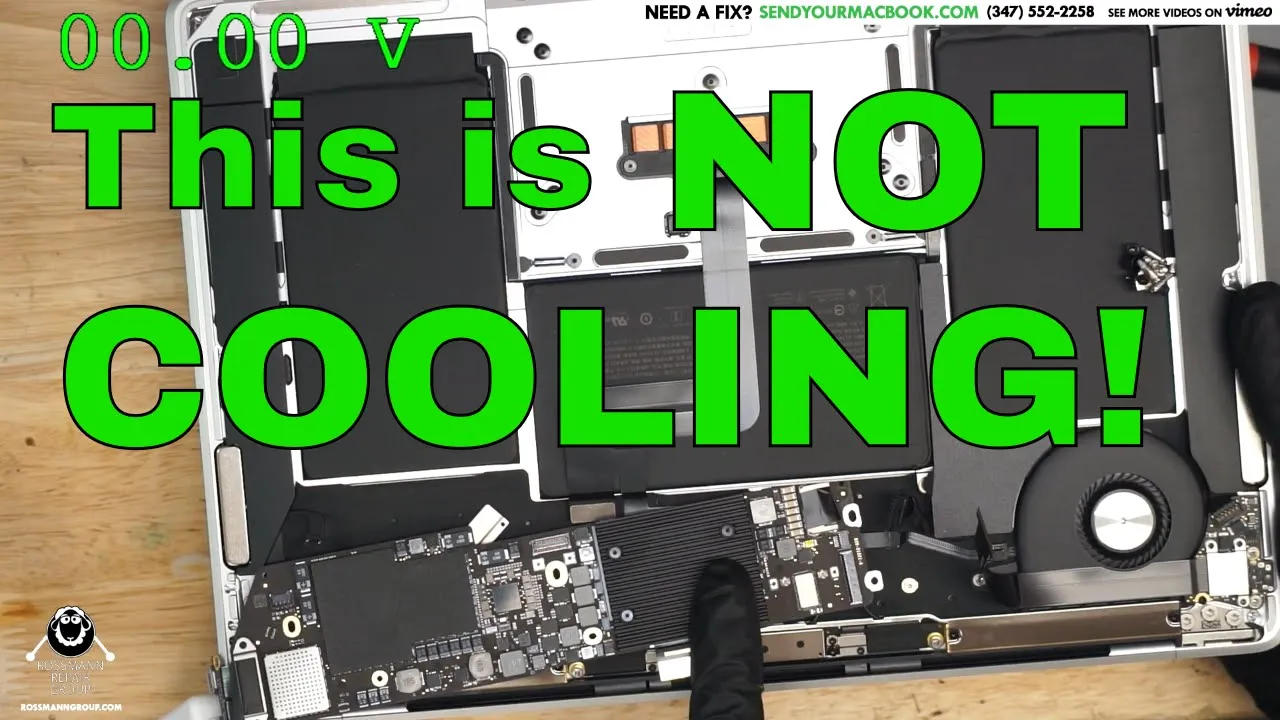
Apple's decision to omit a heat pipe between the MacBook Air processor and its cooling fan leaves the chip effectively uncooled, guaranteeing premature processor failure across the product line.
AI-assisted summary of Louis opens new Macbook Air, immediately loses mind. — original source. Check the original for full context.
Source published:
Key ideas
- Louis Rossmann inspects a non-posting Apple MacBook Air A1932 and discovers that the cooling fan and CPU heatsink are completely separated with no connecting heat pipe or fin stack. (0:03)
- Despite a completely clean logic board with no liquid damage or blown components, the processor appears internally fried due to the absence of a direct thermal dissipation pathway. (1:10)
- The failure mode parallels the fanless 12-inch Retina MacBook A1534, where dying processors typically exhibit video artifacts and random crashes before becoming fully non-responsive despite normal ~600 mA current draw and active S0 rails. (1:10)
- Rossmann predicts a wave of BGA CPU rework for the A1932 model, requiring repair shops to rely on dedicated rework stations like the ZhuoMao to desolder and replace fried processors. (3:42)
Detailed notes
## Background Published on YouTube by repair technician and advocate Louis Rossmann on October 3, 2019, this video documents an inspection of a non-functional MacBook Air. The accompanying video description shares links supporting Right to Repair legislation alongside extensive lists of recommended soldering tools, diagnostic gear, and repair services offered by Rossmann Repair Group.
## TL;DR Louis Rossmann examines an unbootable A1932 MacBook Air that exhibits a full-speed fan but shows zero board activity or display output. Opening the machine reveals that Apple completely disconnected the cooling fan from the processor's heatsink, leaving an open air gap with no heat pipe or fin stack between them. Rossmann contrasts this layout with conventional laptop thermal design and compares it to the fatally degrading CPUs found in the 12-inch A1534 MacBook. He predicts this thermal failure will inevitably cause a massive wave of baked processors requiring high-volume BGA chip rework.
## Atmosphere & style The video carries an exasperated, sardonic, and incredulous tone, playing out like an unfiltered workbench revelation. Rossmann moves quickly from routine diagnostic testing to pure disbelief as he inspects the chassis, openly mocking Apple's engineering choices with biting humor. The viewing experience feels raw, educational, and resigned to the inevitable repair headaches awaiting technicians.
## Bulletin - [00:03](https://www.youtube.com/watch?v=iiCBYAP_Sgg&t=3s) Louis Rossmann inspects a non-posting Apple MacBook Air A1932 and discovers that the cooling fan and CPU heatsink are completely separated with no connecting heat pipe or fin stack. - [01:10](https://www.youtube.com/watch?v=iiCBYAP_Sgg&t=70s) Despite a completely clean logic board with no liquid damage or blown components, the processor appears internally fried due to the absence of a direct thermal dissipation pathway. - [01:10](https://www.youtube.com/watch?v=iiCBYAP_Sgg&t=70s) The failure mode parallels the fanless 12-inch Retina MacBook A1534, where dying processors typically exhibit video artifacts and random crashes before becoming fully non-responsive despite normal ~600 mA current draw and active S0 rails. - [03:42](https://www.youtube.com/watch?v=iiCBYAP_Sgg&t=222s) Rossmann predicts a wave of BGA CPU rework for the A1932 model, requiring repair shops to rely on dedicated rework stations like the ZhuoMao to desolder and replace fried processors.
## Key takeaways - [00:03](https://www.youtube.com/watch?v=iiCBYAP_Sgg&t=3s) The MacBook Air A1932 fails to post or display video, while the cooling fan spins up to full speed immediately upon connection. - [00:03](https://www.youtube.com/watch?v=iiCBYAP_Sgg&t=3s) Checking the caps lock key LED indicates the logic board is completely unresponsive and brain-dead. - [00:03](https://www.youtube.com/watch?v=iiCBYAP_Sgg&t=3s) Internal examination reveals a standalone cooling fan mounted across an open chassis gap from an isolated CPU heatsink, without any heat pipe connecting them. - [00:03](https://www.youtube.com/watch?v=iiCBYAP_Sgg&t=3s) Rossmann characterizes the assembly as a 'placebo fan' that generates acoustic noise without performing direct thermal dissipation. - [01:10](https://www.youtube.com/watch?v=iiCBYAP_Sgg&t=70s) Standard laptop engineering routes heat from the CPU through a conductive heat pipe directly to a fin stack placed in the fan's exhaust path. - [01:10](https://www.youtube.com/watch?v=iiCBYAP_Sgg&t=70s) The inspected board shows no signs of liquid corrosion, physical abuse, or burned MOSFETs, pointing directly to CPU degradation from heat. - [01:10](https://www.youtube.com/watch?v=iiCBYAP_Sgg&t=70s) Apple's thermal design progression has devolved from using undersized or quiet fans to completely omitting functional thermal connections. - [01:10](https://www.youtube.com/watch?v=iiCBYAP_Sgg&t=70s) Thermally degraded CPUs in models like the A1534 typically present with display distortion, OS instability, and eventual complete failure while drawing roughly 600 mA on intact S0 rails. - [01:10](https://www.youtube.com/watch?v=iiCBYAP_Sgg&t=70s) Rossmann predicts that isolated thermal layouts will lead to premature processor failure across hundreds of thousands of A1932 units. - [03:42](https://www.youtube.com/watch?v=iiCBYAP_Sgg&t=222s) Independent repair shops will likely need dedicated BGA rework stations and dedicated floor space to handle incoming volumes of processor replacements. - [03:42](https://www.youtube.com/watch?v=iiCBYAP_Sgg&t=222s) Rossmann highlights the machine's architecture as an instructional case study for hardware engineers on how not to design thermal systems.
## Detailed walkthrough ### [00:03](https://www.youtube.com/watch?v=iiCBYAP_Sgg&t=3s) Unboxing the A1932 MacBook Air and Discovering the Thermal Layout
Louis Rossmann introduces a MacBook Air that fails to power on—a category of repair he sarcastically refers to as "Paul's favorite." To check whether the board is posting, he looks for a response from the caps lock key LED, which should light up green if the machine has active system logic. Tapping the key and pressing the power button yields nothing on the screen; instead, the fan immediately ramps up to full speed while the device remains completely unresponsive and brain-dead.
When Louis looks inside the chassis to find the CPU VCORE circuitry, he stops abruptly in disbelief at the internal layout. The laptop features a discrete cooling fan mounted on one side of the chassis and a standalone heatsink sitting over the processor on the other, with no heat pipe or cooling fin connecting them. Stunned, he inspects the physical gap between the two components and wonders what the fan is supposed to be doing if it is separated from the heatsink. He mockingly asks whether the assembly is merely a "placebo fan" designed to generate noise rather than dissipate thermal energy.
```mermaid flowchart LR accTitle: MacBook Air A1932 Disconnected Thermal Architecture accDescr: Diagram contrasting standard laptop cooling against the disconnected heatsink and fan layout found inside the MacBook Air A1932.
subgraph Standard["Standard Laptop Design"] CPU1["CPU Core"] --> HS1["Heatsink & Heat Pipe"] HS1 --> Fin["Cooling Fins"] Fan1["Fan Airflow"] --> Fin end
subgraph A1932["Apple MacBook Air A1932 Design"] CPU2["CPU Core"] --> HS2["Isolated Heatsink"] Gap["Open Internal Chassis Gap"] Fan2["Isolated Fan"] HS2 -.- Gap -.- Fan2 end ```
[01:10](https://www.youtube.com/watch?v=iiCBYAP_Sgg&t=70s) Thermal Design Failure and CPU Degradation
Looking closely at the logic board of this A1932 model, Louis observes no signs of external damage, liquid corrosion, or blown components. Despite the clean board, the computer refuses to boot, display an image, or accept keyboard inputs. Comparing the board to another machine in the shop, Louis explains that the processor is likely fried, pointing out the CPU and the MOSFETs that step down the primary 12-volt rail to the roughly 1-volt line required by the core. He blames the failure squarely on the disconnected cooling system.
Louis contrasts this architecture with conventional laptop engineering, where a heatsink carries thermal energy directly through a heat pipe into a fin stack positioned directly in the fan's exhaust path. In this MacBook Air, the fan sits isolated in its own corner, blowing over empty board space while the CPU heatsink sits across a gap with no thermal pathway between them. He compares the situation to the recurring failures seen on the 12-inch Retina MacBook (A1534), where uncooled CPUs routinely suffered fatal internal degradation after exhibiting symptoms like screen distortion, graphical artifacts, and random system crashes. On those dead units, the logic board would pull roughly 600 milliamps with all primary and S0 power rails fully present, yet the CPU remained completely dead and unable to post.
Louis expresses frustration with Apple's thermal engineering trajectory, arguing that the company has transitioned from merely poor cooling choices to omitting functional thermal pathways altogether:
> “One of the problems that Apple seems to have nowadays is that they've gone from using inadequate cooling or fans that are too small or fans that are too quiet or heat sinks that are too thin to not even having a fin between the heatsink and the fan and this doesn't make sense to me because if you're going to have a fan in your computer I would imagine that this fan should be actually blowing on something that would cool the rest of the computer this heatsink over here I don't understand perhaps somebody in the comments can explain to me to think different genius that occurred any design of this product and perhaps you can explain this to the hundreds of thousands of users with dead A1534s with dying CPUs and eventually all of the people that have an A1932 that have a dead CPU as a result of it being brain dead Apple.”
- Symptoms of thermally degraded MacBook CPUs include initial video distortion, random OS crashes, and eventual inability to post despite active S0 rails and steady ~600 mA current draw. - Unlike traditional laptops that route heat pipes directly to a radiator fin stack, the A1932 chassis isolates the fan from the passive heatsink.
[03:42](https://www.youtube.com/watch?v=iiCBYAP_Sgg&t=222s) The Inevitable Wave of BGA CPU Replacements
Reflecting on the consequences of this thermal setup, Louis predicts a massive surge of board repair business in the coming months. Because these processors inevitably bake themselves to death without direct airflow or heat conduction, the repair shop will need to rely heavily on their ZhuoMao (ZM) BGA rework station to desolder failed processors and solder down replacements.
Louis jokes that their upcoming new repair shop will need an entire dedicated room reserved exclusively for the ZhuoMao rework station and continuous CPU replacements. In the background, he notes Paul's lack of enthusiasm for the tedious prospect of performing high-volume BGA chip swaps. Louis closes by cautioning hardware designers watching the video to study Apple's design as a clear lesson in how thermal systems should not be built.
## Notable quotes > [01:10](https://www.youtube.com/watch?v=iiCBYAP_Sgg&t=70s) One of the problems that Apple seems to have nowadays is that they've gone from using inadequate cooling or fans that are too small or fans that are too quiet or heat sinks that are too thin to not even having a fin between the heatsink and the fan — Louis Rossmann
## Mentioned Louis Rossmann, Paul, Apple, MacBook Air A1932, MacBook A1534, ZhuoMao
## Video description https://matrix.to/#/#rossmannrepair:matrix.org Let's get Right to Repair passed! https://gofund.me/1cba2545 👉 Donate & post a message: http://bit.ly/postamessage
👉 Below we list tools & recording gear we use, repair guides to help you learn, online chip sources, & donation links:
👉 BlackBerry, Oreo, & Clinton the cat's wish list: https://www.amazon.com/hz/wishlist/ls/2YC1L66N7T5BC?&sort=default
👉 CHIPS & COMPONENTS: › http://bit.ly/2jaAOXM
👉 Discord: https://matrix.to/#/#rossmannrepair:matrix.org
👉 TOOLS USED:
✓ Soldering Irons: › Louis' Hakko station(no tweezers): http://amzn.to/2cKkMyO › Paul's Hakko station(works with tweezers): http://amzn.to/2yMvWNy › Micro Soldering Pencil: http://amzn.to/2d5MWUP › Hot tweezers: http://amzn.to/2yMvZsZ › Atten ST-862D hot air station: http://bit.ly/atten862
✓ CHEAP HAKKO ALTERNATIVES: › TS100 soldering iron: https://amzn.to/2Gy1Fqz › Recommended tips: TS-C4: https://amzn.to/2GSDoz3 TS-KU https://amzn.to/2Elofke
✓ Preferred Soldering Tips › Fine: http://amzn.to/2d5MgPn › Flat: https://amzn.to/2JnsDBT › GPU wicking: http://amzn.to/2w8chtB › Micro soldering tip: http://amzn.to/2qUSFDh
✓ Microscopes: › Microscope: http://amzn.to/2iLrE16 › Barlow lens: http://amzn.to/2yMKdKf › LED light: http://amzn.to/2nzfPT2 › CHEAP alternative microscope: http://amzn.to/2rTlHbj
✓ Soldering/Repair Supplies: › Solder: http://amzn.to/2cKkxUp › Desoldering braid: http://bit.ly/2otflOX › Flux: http://bit.ly/amtechflux › Solder paste: http://bit.ly/amtechsolderpaste › THICK insulated jumper wire: https://amzn.to/2rvtD0A › THIN insulated jumper wire: https://amzn.to/2I47DQY › Kapton tape: http://amzn.to/2yN0xuq › Tweezers: http://amzn.to/2d5NBpi › Blades: http://amzn.to/2ByWnvF › Freeze Spray: http://amzn.to/2BySozw › Conformal coating: http://bit.ly/greencoate › Conformal coating curing pen: http://bit.ly/uvpen
✓ Diagnostic tools: › USB amp meter: http://bit.ly/2B2Lu5W › USB-C amp meter: http://bit.ly/usbcamp › On-Screen multimeter: http://amzn.to/2jtgY9K › Multimeter Probes: http://bit.ly/fineprobes › CHEAP multimeter: http://amzn.to/2zjkg8U › Bench PSU: CSI3005P http://bit.ly/benchsupply › Phoneboard: https://phoneboard.co
✓ Ultrasonic Cleaning: › ALL MACBOOKS & CELLPHONES: Crest P1200H-45: http://bit.ly/P1200H45 › PRE-TOUCHBAR MACBOOKS & CELLPHONES: Crest P500H-45: http://bit.ly/P500H45 › CELLPHONES ONLY: Crest P230H-45: http://bit.ly/P230H45 › Branson EC cleaning fluid: http://amzn.to/2cKlBrp
✓ Desk supplies: › Desk: http://amzn.to/2yMShdZ › Chair: https://amzn.to/2LB8bUB › Fume Extractor: http://amzn.to/2d5MGoD › Work mat: http://amzn.to/2yMtlTR › Outlets: http://amzn.to/2yNsZwo › Gloves: http://amzn.to/2iUfumS › Durable lightning cable: http://amzn.to/2yNHzUt › Fine tipped snippers: http://amzn.to/2HGt4XB
✓ Screwdrivers: › iPhone bottom screws: http://amzn.to/2yNwX8p › Macbook bottom screws: http://amzn.to/2AKMdVb › Torx T3: http://amzn.to/2zjtxxH › Torx T5 http://amzn.to/2BLNDn4 › Torx T6 http://amzn.to/2B0XIfA › Torx T8 http://amzn.to/2CpWp68 › Phillips #0: http://amzn.to/2AJaHhM › Phillips #000: http://amzn.to/2yNqsCl
✓ Boardview software used: https://pldaniels.com/flexbv/
✓ RECORDING EQUIPMENT: › Work cam: https://amzn.to/2QjHnt0 › Overhead cam: http://amzn.to/2eAH0oT › Work mic: https://amzn.to/2WGIhzw › Home mic: https://amzn.to/2xfampC › Microscope camera: http://amzn.to/2icVQoG - mine is DISCONTINUED, closest one I can find. › HDMI capture: http://amzn.to/2iyGcle
👉 REPAIR SERVICES: › We fix Macbooks & offer free estimates. http://bit.ly/RossmannLocalBoardRepair › Send your Macbook if you live far away! http://www.sendyourmacbook.com › We offer iPhone data recovery: http://bit.ly/2BDBX4G
👉 LEARN HOW TO DO THIS: › In-person classes: https://bit.ly/classrg › Beginner's guide: http://bit.ly/2k6uz84 › Support forum: $29/mo http://bit.ly/boardrepairforum
👉 SHILLING: › Buying on eBay? Support us while you shop! https://www.rossmanngroup.com/ebay › Rossmann Repair Group Inc is a participant in the Amazon Services LLC Associates Program, an affiliate advertising program designed to provide a means for sites to earn advertising fees by advertising and linking to amazon.com
👉 Leave a tip for us via cryptocurrency if we've helped you out: › Credit card: http://bit.ly/postamessage › Bitcoin: 1EaEv8DBeFfg6fE6BimEmvEFbYLkhpcvhj › Bitcoin Cash: qzwtptwa8h0wjjawr5fsm0ku8kf40amgqgm6lx4jxh › Dash: XwQpZuvMvU44JT7C7Uh6xHvkSadzJw9fMN › Dogecoin: DKetsoCvwa2hF29ssgUA4Wz4hxT4kj3KLU › Ethereum: 0x6f6870feb48f08388ee345cf0261e2f03d2fa310 › Ethereum classic: 0x671bfd61ba87edf6365c97cea33d66ba73645510 › Litecoin: LWnbTTAjojZQt68ihFJFgQq3cYHUsTcyd7 › Verge: DFumZ5sMhi3JktLQpsTVtV9xUt3zKDrcZV › Zcash: t1Ko3FkphQYoQroQc8k2DVk4WKMAbmNR8PH › Zcoin: a8QdvArHmdRYe1MjiqtP6jDNe6Z4JgnRKZ
[Source](https://www.youtube.com/watch?v=iiCBYAP_Sgg)