OpenAI-Powered Linux Shell Fabricates Disk Formats and Web Links
River's Educational Channel
Delegating terminal tasks to generative models creates critical system risks because underspecified prompts cause the AI to invent target drives and formatting parameters without user confirmation.
AI-assisted summary of I made an GPT-powered Linux shell that guesses your bash command (and hallucinates crazy stuff) — original source. Check the original for full context.
Source published:
Key ideas
- River built a prototype GPT-powered Linux shell that translates natural English instructions into executable bash commands via OpenAI's private beta API. (0:01)
- The generative model presents dangerous sysadmin risks by aggressively hallucinating missing parameters, such as arbitrarily choosing which hard drive and filesystem type to format. (1:44)
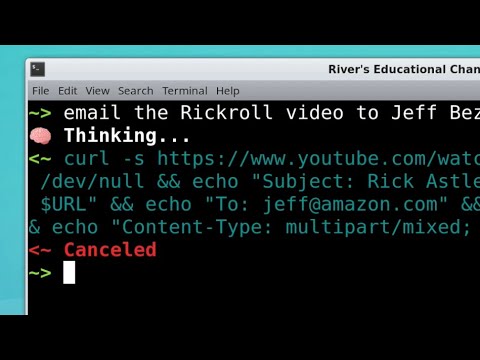
- The model frequently invents realistic URLs out of thin air to fulfill online download tasks, even accidentally rickrolling the creator during testing. (3:01)
- Running completions using OpenAI's most capable model cost roughly $0.01 per command, with distribution limited to five users under beta guidelines. (3:01)
Detailed notes
## Background Published by River's Educational Channel on YouTube on April 18, 2021, this video showcases an experimental project that translates plain English queries into executable Linux commands via OpenAI's API. The description emphasizes that while the setup is entirely real, users should under no circumstances blindly trust the AI's output.
## TL;DR After gaining access to OpenAI's private beta API, River builds a lightweight Python wrapper that turns natural language instructions into bash commands to eliminate the need to look up terminal syntax. While the tool manages file format conversions, network operations, and complex command chains, it also exhibits dangerous tendencies by hallucinating parameters—such as arbitrarily picking which storage drive to format when given incomplete prompts. The model further displays its stochastic quirks by generating wildly different commands for identical inputs and fabricating web links, at one point inadvertently rickrolling River. Concluding the experiment, River explains that high query costs (roughly one cent per command) and OpenAI's strict five-user beta limit prevent the tool from being released as a public utility.
## Atmosphere & style The presentation is defined by a deadpan, dryly sarcastic delivery that contrasts starkly with the hazardous premise of giving an unvetted LLM control over shell commands. River reacts to the model's unhinged choices—like randomly guessing drive paths and inventing URLs—with calm amusement rather than tech-evangelist hype. It feels like watching a chaotic, tongue-in-cheek lab experiment where the host invites the audience to laugh at the terrifying absurdity of early generative AI handling system administration.
## Bulletin - [00:01](https://www.youtube.com/watch?v=j0UnS3jHhAA&t=1s) River built a prototype GPT-powered Linux shell that translates natural English instructions into executable bash commands via OpenAI's private beta API. - [01:44](https://www.youtube.com/watch?v=j0UnS3jHhAA&t=104s) The generative model presents dangerous sysadmin risks by aggressively hallucinating missing parameters, such as arbitrarily choosing which hard drive and filesystem type to format. - [03:01](https://www.youtube.com/watch?v=j0UnS3jHhAA&t=181s) The model frequently invents realistic URLs out of thin air to fulfill online download tasks, even accidentally rickrolling the creator during testing. - [03:01](https://www.youtube.com/watch?v=j0UnS3jHhAA&t=181s) Running completions using OpenAI's most capable model cost roughly $0.01 per command, with distribution limited to five users under beta guidelines.
## Key takeaways - [00:01](https://www.youtube.com/watch?v=j0UnS3jHhAA&t=1s) Access to OpenAI's private beta API required waiting several months. - [00:01](https://www.youtube.com/watch?v=j0UnS3jHhAA&t=1s) The goal was to replace manual Google searches for obscure bash commands and flags with natural language prompts. - [00:01](https://www.youtube.com/watch?v=j0UnS3jHhAA&t=1s) The implementation relies on minimal custom Python code wrapping standard HTTP requests to OpenAI's completion endpoint. - [01:44](https://www.youtube.com/watch?v=j0UnS3jHhAA&t=104s) The shell proves effective for handling obscure syntax and converting uncommon file formats without manual documentation lookups. - [01:44](https://www.youtube.com/watch?v=j0UnS3jHhAA&t=104s) When users omit crucial details, the AI invents potentially destructive parameters—such as target drive paths and filesystem types—without prompting for confirmation. - [01:44](https://www.youtube.com/watch?v=j0UnS3jHhAA&t=104s) The model attempts to chain multi-stage pipelines together for complex command requests, though with mixed reliability. - [03:01](https://www.youtube.com/watch?v=j0UnS3jHhAA&t=181s) The AI frequently hallucinates plausible-looking web URLs from scratch when attempting network downloads. - [03:01](https://www.youtube.com/watch?v=j0UnS3jHhAA&t=181s) Due to stochastic model generation, submitting the exact same prompt multiple times often produces entirely different bash commands. - [03:01](https://www.youtube.com/watch?v=j0UnS3jHhAA&t=181s) OpenAI's private beta terms restricted tool deployment to a maximum of five unvetted users without explicit approval. - [03:01](https://www.youtube.com/watch?v=j0UnS3jHhAA&t=181s) Querying OpenAI's flagship completion model incurred an operational cost of approximately one cent per executed command.
## Detailed walkthrough ### [00:01](https://www.youtube.com/watch?v=j0UnS3jHhAA&t=1s) Building a GPT-Powered Linux Shell
After waiting months for access, River receives a long-awaited email containing an OpenAI private beta API key. Eager to wield this newfound computational capability, River decides to tackle a ubiquitous developer pain point: navigating the Linux terminal. Rather than repeatedly interrupting a project to Google obscure command-line syntax and flags, the goal is to construct an AI-powered shell interface. The user provides a plain English description of what needs to be done, and the AI interprets the intent, generates the target bash command, and executes it. As River dryly puts it: “Over the course of a year, this could save entire minutes from my typical workflow, and could be a huge win for AIs in their quest to obsolete humans.”
Implementing the tool requires remarkably little custom code. Although OpenAI supplies an official Python client library to interface with their endpoints, River points out that the entire setup is essentially just wrapping standard HTTP requests under the hood to send prompt contexts and receive completions back from the model.
```mermaid flowchart LR accTitle: AI Shell Workflow accDescr: Diagram showing user plain English input passed to OpenAI API and transformed into a terminal command. subgraph Local["User Environment"] A["User Plain English Prompt"] --> B["Python Wrapper Script"] end subgraph Cloud["OpenAI Backend"] B -->|"HTTP Request"| C["OpenAI Completion API"] C -->|"Generated Bash Syntax"| B end B --> D["Terminal Execution"] ```
- **Wait time for access:** Waited months to receive the OpenAI private beta API invitation. - **Underlying mechanics:** Python script leveraging basic HTTP requests to communicate with OpenAI's API endpoints.
---
[01:44](https://www.youtube.com/watch?v=j0UnS3jHhAA&t=104s) Testing Commands, Unintended Shortcuts, and Multi-Step Pipelines
River starts putting the shell through its paces with everyday terminal chores. The tool proves particularly handy when dealing with unfamiliar utilities or complex command flags, such as converting niche file formats where remembering specific syntax is difficult. The assistant is also tasked with handling network and online operations directly from text prompts.
However, the model’s creative liberties quickly reveal the hazards of letting a generative AI handle system administration. When given underspecified requests, the model aggressively makes assumptions on the user's behalf. During a demonstration of formatting storage, the system invents parameters out of thin air: “Note how we didn’t need to specify what filesystem type or even which hard drive to format.” River sarcastically celebrates this terrifying shortcut, remarking, “That’s super helpful!” When challenged with complex prompts requiring multi-stage pipelines and chained operations, the AI attempts to stitch several commands together, prompting River's amused evaluation: “Well, A for effort, I guess.”
- **Target use cases:** Obscure utility syntax, file format conversion, online/network tasks, and multi-command pipelines. - **System hazard:** When parameters are omitted, the AI arbitrarily invents filesystem types and target drive paths without confirmation.
---
[03:01](https://www.youtube.com/watch?v=j0UnS3jHhAA&t=181s) Hallucinated URLs, Stochastic Randomness, and API Economics
A particularly wild trait of the model is its tendency to fabricate online resources. River observes that the model possesses an uncanny knack for hallucinating URLs out of whole cloth, imagining plausible-looking web addresses where requested files might theoretically be hosted. In one instance, this behavior leads to an unexpected prank, causing River to react in disbelief: “Did… did OpenAI just rickroll me?”
River also highlights the inherently non-deterministic nature of the underlying architecture. Because OpenAI's models are stochastic, sending the identical plain-text prompt multiple times can produce entirely different bash commands. Rather than viewing this inconsistency as a flaw, River leans into the chaos, noting: “You might get different commands for the same request, and I find that that really keeps things fresh and exciting while I’m working.”
Despite the fun, deploying the prototype as a public utility is blocked by both policy and budget. OpenAI's private beta terms restrict unvetted sharing to no more than five users without formal approval, and queries quickly add up financially. River explains that running the test demonstrations using OpenAI's most capable model cost approximately one cent per individual command. Viewers are invited to submit their own command prompts in the comments for a dedicated follow-up video.
- **Hallucinated URLs:** The model invents plausible download links and web addresses from scratch, including rickrolling the creator. - **Model behavior:** Stochastic output guarantees that repeating a query may yield different bash scripts and command structures. - **Beta constraints:** Limited to a maximum of 5 authorized users without special OpenAI review and clearance. - **API operational cost:** Approximately $0.01 per command completion when querying the most powerful model tier.
## Mentioned River, OpenAI, Linux, Bash, Python, GPT, Kevin MacLeod
## Video description This is 100% real. No, you shouldn't trust the AI.
Follow-up video with viewers' requests: https://youtu.be/qKpdpRHBMgM
More details, errata, etc. here: https://www.riveducha.com/openai-powered-linux-shell
Music credit:
"Bossa Antigua" Kevin MacLeod (incompetech.com) Licensed under Creative Commons: By Attribution 4.0 License http://creativecommons.org/licenses/by/4.0/
[Source](https://www.youtube.com/watch?v=j0UnS3jHhAA)