Google Adds Real-Time Sign Language Translation to Pixel Devices
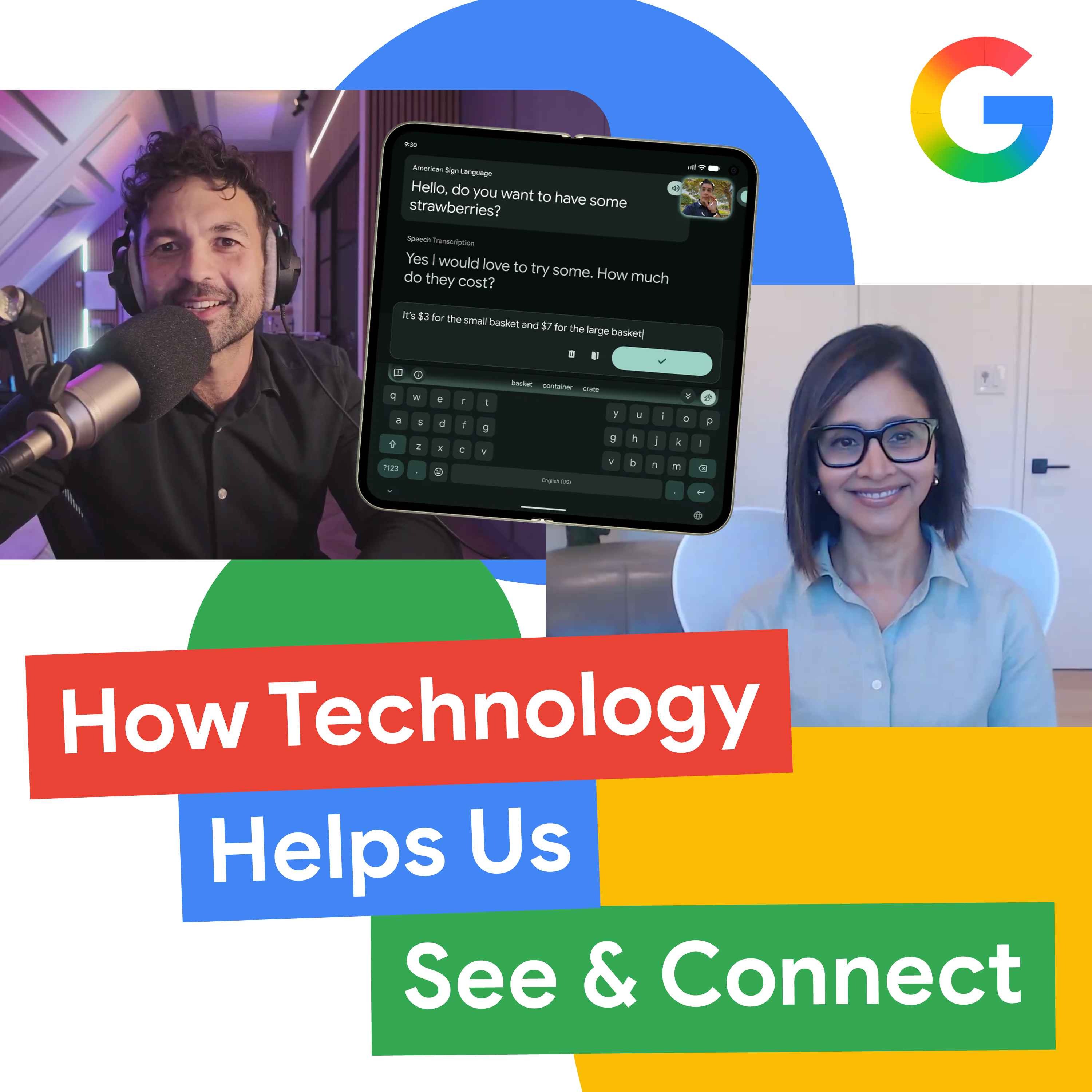
How Technology Helps Us See & Connect — Made by Google Podcast

Made by Google Podcast

Google restricted the tool to casual conversations after deaf advisers warned that artificial intelligence cannot ethically replace professional interpreters in medical and legal settings.

AI-assisted summary of How Technology Helps Us See & Connect — original source. Check the original for full context.

Source published:

Key ideas

  • Google launched Guided Vision within the Gemini app and Sign to Text on Pixel 11, applying frontier AI to human perception challenges for blind, low-vision, and deaf users. (0:00)
  • Sign to Text launched on Pixel 11 via Gboard and Live Transcribe for American Sign Language, focusing deliberately on casual, unassisted daily interactions rather than replacing professional human interpreters. (5:00)
  • Guided Vision pairs live camera feeds with Gemini Live spatial reasoning to deliver progressive physical instructions instead of static object identification, partnering with Aira for authentic real-world training data. (5:00)
  • Overcoming computer vision fragility required deep collaboration with Google DeepMind to resolve hallucinations and edge cases such as left-handed signers and asymmetric single-handed phone holds. (8:32)

Detailed notes

## Background Published on October 26, 2026, on the Made by Google Podcast, host Rachid Finge sits down with Google's Director of Product Management, Angana Ghosh. The episode explores the behind-the-scenes engineering and human stories behind two landmark Pixel accessibility features: Guided Vision and Sign to Text, detailing how collaboration with blind and deaf communities helped solve complex research hurdles.

## TL;DR Angana Ghosh details the development of Guided Vision and Sign to Text, explaining how grounding AI research in first-principles human perception enables real-time physical navigation and language translation. By collaborating closely with community advisory panels and organizations like Aira, the engineering team defined critical boundaries, deciding that Sign to Text should assist casual everyday interactions rather than attempt to displace professional interpreters in high-stakes settings. The discussion outlines how DeepMind and Google engineers conquered technical roadblocks such as spatial ambiguity, left-handed signing, latency, and hallucinations to launch features across Live Transcribe, Gboard, and Gemini Live. Ghosh reinforces Google's core philosophy that designing for extreme edge cases ultimately elevates product utility for all users, driving toward a future where assistive interfaces seamlessly fade into the background.

## Atmosphere & style The conversation carries a warm, deeply reflective, and earnest tone, blending philosophical engineering depth with personal, human-centered storytelling. Angana Ghosh speaks with the calm authority of an 18-year Google veteran, yet her excitement remains palpable when recounting breakthrough moments—such as an internal deaf tester getting chills when the model captured his thoughts without conversational lag. Rachid Finge acts as an appreciative and attentive sounding board, allowing the narrative arc to progress naturally from tough mathematical and computer vision hurdles to touching real-world retail reactions and shared family hugs.

## Bulletin - `00:00` Google launched Guided Vision within the Gemini app and Sign to Text on Pixel 11, applying frontier AI to human perception challenges for blind, low-vision, and deaf users. - `05:00` Sign to Text launched on Pixel 11 via Gboard and Live Transcribe for American Sign Language, focusing deliberately on casual, unassisted daily interactions rather than replacing professional human interpreters. - `05:00` Guided Vision pairs live camera feeds with Gemini Live spatial reasoning to deliver progressive physical instructions instead of static object identification, partnering with Aira for authentic real-world training data. - `08:32` Overcoming computer vision fragility required deep collaboration with Google DeepMind to resolve hallucinations and edge cases such as left-handed signers and asymmetric single-handed phone holds.

## Key takeaways - `00:00` Google's accessibility strategy relies on a first-principles approach, anchoring AI development in the boundary conditions of human perception such as vision, hearing, touch, and speech. - `00:00` Visual impairment spans a broad spectrum, making tools like Guided Vision broadly practical for tasks ranging from reading fine print to navigating low-lit spaces. - `00:00` Because blind users cannot afford AI errors in real-world navigation, Google partnered with organizations like Aira to feed high-quality, practical data and establish strict safety guardrails. - `05:00` Unlike conventional screen readers or flat object detection tools, Guided Vision provides interactive, progressive physical directions relative to the user's body and posture. - `05:00` Input from the AI Sign Advisory Community led Google to explicitly avoid attempting to replace human interpreters in high-stakes environments, focusing instead on casual daily moments. - `08:32` Traditional computer vision models proved fragile when confronted with real-world sign language variation, asymmetric postures, left-handed signing, and off-axis camera angles. - `10:14` Sign languages like ASL are independent native languages with distinct syntax; Sign to Text removes the cognitive friction of mentally translating sign concepts into written English before typing. - `10:14` Sign to Text integrates directly into standard workflow surfaces—Live Transcribe for spoken dialogues and Gboard for text messaging—to preserve conversational speed. - `15:00` Low latency and strictly controlled hallucination thresholds were identified as the two make-or-break engineering metrics defined in partnership with the deaf community. - `17:15` Designing for extreme accessibility edge cases elevates products for mainstream audiences, mirroring historical innovations like closed captioning. - `19:50` The long-term objective of ambient accessibility AI is not merely to build smarter machines, but to make technology adapt so fluidly that the interface itself fades away. - `21:40` Sign to Text debuted on Pixel 11 with future hardware and sign language expansions planned, while Guided Vision is accessible more broadly via Gemini app settings and Gemini Live.

## Detailed walkthrough ### `00:00` First-Principles AI and the Genesis of Guided Vision

Host Rachid Finge introduces Google Director of Product Management Angana Ghosh, highlighting her status as a company veteran who joined in 2008 before the launch of Android 1.0. When asked what it was like to tackle two empowering Pixel accessibility features—Guided Vision and Sign to Text—Angana reflects on the philosophical foundation behind the engineering effort. She explains that both projects represented incredibly difficult research challenges, but the core promise of artificial intelligence lies in grounding technical innovation in human perception:

> “So what we were trying to do was, you know, anchoring our research and product development and engineering in these boundary conditions of human perception around vision, hearing, touch, speech. So we were taking this first principles-based approach to restore humans' connection with their environment, with their families, their phones.”

Guided Vision specifically aims to help blind and low-vision individuals navigate daily tasks that require sight, whether reading fine print on nutritional labels, browsing menus in dimly lit restaurants, or locating everyday objects around a home. Angana notes that visual impairments exist across a broad spectrum—she points out that simply removing her own glasses makes her a low-vision user—meaning the tool provides independence across many real-world scenarios. Mechanically, the user shares their smartphone camera feed with Gemini Live inside the Gemini app, receiving immediate spoken spatial guidance.

Rachid notes that camera-based accessibility tools have been around for some time and asks what distinguishes Gemini Live in this implementation. Angana identifies three interdependent research hurdles that shaped their approach: determining what truly helps the blind and low-vision community, building an AI model capable of grasping untidy everyday tasks, and implementing strict safety guardrails. As she points out, “AI can make mistakes and blind users can't,” making it essential to partner with organizations like Aira to feed high-quality, practical data into the system.

- **Launch timeframe**: Ghosh joined Google in 2008, predating the public release of Android 1.0. - **Underlying technology**: Live video streaming through the device camera processed by Gemini Live inside the Gemini app. - **Primary use cases**: Reading nutritional labels, deciphering restaurant menus in low lighting, and locating household objects. - **Key data partner**: Collaborated with Aira to gather authentic training data reflecting the complexities of everyday visual navigation.

---

`05:00` Interactive Guidance and Defining Product Boundaries with the Community

Explaining how Guided Vision operates beyond conventional screen-reading software, Angana illustrates a common scenario involving an everyday object like a water bottle sitting on a desk. While a sighted person spots it instantly, a blind or low-vision user may know an item is nearby without knowing its precise physical coordinates. When they point the camera and ask for assistance finding the bottle, Guided Vision does not simply announce that a bottle exists; it provides progressive, relative physical instructions, such as telling the user that the item is located to the left of their keyboard if they extend their arm, continuing to direct their hand forward until contact is made.

Turning to the development of Sign to Text, Angana highlights a pivotal moment that occurred through early co-design sessions with their AI Sign Advisory Community, a global panel comprising members of the Deaf and hard-of-hearing communities alongside academic and institutional representatives. The advisory group delivered clear feedback regarding the inherent limits and ethics of artificial intelligence in high-stakes environments such as healthcare, courtroom proceedings, and classroom education, leading to an essential strategic decision:

> “And this profound insight helped us to understand how to rethink our product. And it was very clear to us that we should never attempt our product to replace human interpreters because it can never do that. But we should instead try to help out in those daily moments where a user would not have access to a human interpreter.”

By narrowing the tool's mandate to casual, unassisted settings—such as ordering coffee at a counter or chatting spontaneously with hearing friends and family—the engineering team could concentrate on practical utility rather than attempting to displace professional interpreters whose accountability and nuanced ethical judgment cannot be replicated by software.

```mermaid flowchart TD accTitle: Guided Vision vs Traditional OCR / Object Detection accDescr: Diagram contrasting passive camera identification with the interactive conversational guidance loop of Guided Vision.

subgraph Traditional["Traditional Computer Vision"] A["Camera Image Captured"] --> B["Object Detection / OCR"] B --> C["Flat Announcement: 'Water bottle on table'"] end

subgraph Guided["Guided Vision with Gemini Live"] D["Continuous Camera Stream"] --> E["Gemini Live Spatial Reasoning"] E --> F["Directional Prompt: 'Extend your arm to the left of keyboard'"] F --> G["Live Feedback Loop: 'Move hand slightly forward'"] end ```

---

`08:32` Solving Spatial Ambiguity, Hallucinations, and Dialects in Sign Language

Building a functional sign language interpretation model exposed severe flaws in standard computer vision pipelines. Angana explains that sign language varies significantly across individuals; despite shared grammatical standards, every signer has idiosyncratic hand movements, pacing, and signing styles. Early prototypes suffered from intense spatial and contextual ambiguity, frequently triggering bizarre hallucinations:

> “The problem was that traditional computer vision architectures are notoriously fragile when confronted with this real world messiness. They expect everything to be perfectly proportional and balanced.”

The engineering team encountered edge cases that regularly broke the model, such as left-handed signers or users holding their phones with one hand while signing with the other. While the unexpected mistranslations were occasionally comical for internal testing groups, overcoming these errors required constructing a rigorous evaluation framework tested continuously against unscripted, real-world footage. Google DeepMind and product engineers augmented their datasets specifically to capture varied hand orientations, asymmetric postures, and non-standard camera angles.

- **Primary failure modes**: Model hallucinations, confusion caused by left-handed signers, and off-axis camera angles when users hold phones single-handed. - **Architectural mismatch**: Standard vision models require uniform, proportional inputs, whereas real-life signing involves fluid, varied physical articulation. - **Remediation approach**: Building a specialized evaluation suite and deliberately collecting diverse real-world edge-case datasets with Google DeepMind.

---

`10:14` Launching Sign to Text on Pixel: Removing the Translation Bottleneck

Angana details the conceptual breakthrough that underpinned the Sign to Text demonstration at the Made by Google event in New York. Sighted and hearing individuals often fail to recognize that sign languages, including American Sign Language (ASL), are fully independent native languages with distinct grammatical structures rather than direct manual representations of spoken tongues. For a deaf signer replying to a written message, formulating a response normally requires translating their native sign-based thought into English syntax before typing—a high-friction cognitive tax.

To make conversation natural and fluid, the system had to deliver ultra-low latency directly where people communicate. Google integrated the initial launch of ASL recognition into two primary Pixel surfaces: Live Transcribe for in-person, face-to-face dialogue, and Gboard to enable direct text entry across standard messaging applications. Angana emphasizes that this rollout represents just the beginning of support for additional sign languages and platform integrations across upcoming quarters.

She recalls the emotional breakthrough during model optimization alongside Google DeepMind, when an internal deaf tester experienced the tool performing seamlessly without conversational lag:

> “And then suddenly in one of the testings, it worked really well. And one of our testers said—and he was signing to us using the model—he said, ‘For the first time, I felt I don't need to stop to translate my thought, and the machine just got me.’ And that got us the chills.”

- **Integrated product surfaces**: Integrated into Live Transcribe for live spoken-to-visual conversation and Gboard for everyday typing and messaging. - **Initial language coverage**: Launched with American Sign Language (ASL), with roadmaps planned for additional regional sign languages. - **Core user benefit**: Eliminates the cognitive burden of manually translating spatial sign language concepts into written English sentence structure.

`15:00` Community Reaction and Making Sign to Text Work

Immediately following launch, retail feedback and social media buzz confirmed how eagerly the community embraced Sign to Text. Google Store managers reached out to Angana Ghosh and her team within just a few weeks, labeling it one of their "hero demo features." Customers were walking into the physical stores specifically to experience the tool firsthand. Online, social media feeds filled with videos of people testing the feature, capturing stories, and sharing them with their circles with excited captions urging others to check it out. Ghosh fondly recalls seeing one user introduce it to their family, pointing out that another relative was also a signer, and hugging them as they tested the technology together. Seeing these reactions has given the development team immense encouragement to continue expanding and refining the experience.

When asked by Rachid Finge when she truly knew the feature was going to work—given that early on, teams often wonder if such ambitious concepts can ever realistically ship—Ghosh reflected on the uncertainty of tackling hard research problems. She expressed deep gratitude for her team being in a position to take on such challenges, noting that initially, they had no guarantee it would ever launch. What kept them going was the firm conviction that solving it was vital. To move from a moonshot idea to a shippable reality, they identified the two absolute make-or-break technical factors: latency and hallucination.

To bridge the gap between engineering goals and real human needs, the team partnered closely with the deaf and signing communities: - **Low Latency:** As someone signs, the transcription must appear almost instantaneously so that the natural rhythm of conversation is preserved. - **Controlled Hallucination:** The translation has to be accurate within acceptable, rigorously tested bounds. The team worked with community members to establish these exact thresholds and translated them into concrete numerical targets for the research and engineering teams to hit before launch was approved.

```mermaid flowchart TD accTitle: Sign to Text Viability Pipeline accDescr: Process showing community input leading to technical benchmarks and the final shippable product. subgraph Requirements["Community-Driven Priorities"] L["Low Latency<br/>(Real-time signing output)"] H["Hallucination Bounds<br/>(High accuracy thresholds)"] end subgraph Targets["Engineering Benchmarks"] T["Concrete Numerical Targets<br/>(Research & ML Metrics)"] end subgraph Outcome["Launch Readiness"] S["Shippable Feature<br/>(Pixel Retail Hero Demo)"] end L --> T H --> T T --> S ```

`17:15` Designing for Everyone and the True Power of AI

Addressing the broader question of why Google commits resources to accessibility innovations like Guided Vision and Sign to Text, Ghosh emphasized Google's core philosophy: designing for edge cases and underserved communities inherently elevates products for everyone. She observed that Guided Vision is turning out to be useful well beyond its intended core demographic. Ghosh keeps the feature permanently enabled on her own phone because it provides consistently better and more descriptive answers. Furthermore, many people who do not identify as blind or low-vision have reached out to say that their mothers or grandmothers could benefit greatly from it.

Ghosh pointed to closed captioning as the ultimate historical precedent for this dynamic: initially developed specifically for deaf and hard-of-hearing individuals, captioning is now used by virtually everyone in daily life. Beyond broad utility, Ghosh explained that tackling these deeply complex human scenarios reveals the true potential of frontier artificial intelligence models. “In Google, we always believed that by designing for everyone, we build products that are really helpful,” Angana Ghosh affirmed, underscoring that applying cutting-edge models to accessibility challenges proves what AI is truly capable of accomplishing.

`19:50` The Interface Fades Away

Reflecting on her 18 years working on Android and creating foundational software capabilities, Ghosh described this current era as an unprecedented, deeply meaningful milestone. In earlier stages of her career, the technological infrastructure simply did not exist to deliver this caliber of real-time assistance. Looking ahead, she stressed that the purpose of innovation is not merely to construct more intelligent machines, but to make technology blend so seamlessly into everyday life that users forget the technology is even there.

Ghosh remains candid about the road ahead, noting that both Guided Vision and Sign to Text are still at the very beginning of their journey and require continuous iteration. Crucially, she views these efforts not as top-down feature development, but as an ongoing partnership with the people who rely on them. “From my perspective, the goal is not to build a smarter machine, but to build a world where tech adapts so fluidly that the interface itself fades away,” Angana Ghosh stated, adding, “I feel we are allowing the community to teach us what it is, what it takes to build this incredibly helpful experiences for everyone.”

`21:40` Availability and How to Enable Guided Vision and Sign to Text

For listeners looking to use these tools or share them with friends and family, Ghosh broke down where each feature is currently accessible as of October 2026:

- **Sign to Text:** Currently available on the Pixel 11, with plans to expand to more hardware devices and additional sign languages over time. Users can access the feature directly within **Gboard** and **Live Transcribe**, where a dedicated icon allows them to toggle Sign to Text on. - **Guided Vision:** Available across a broader ecosystem of devices via the **Gemini app**. To turn it on, users navigate to the Gemini app settings and enable Guided Vision. Once activated, they can launch **Gemini Live**, share their device camera, and receive spoken, context-aware visual guidance and answers tailored to their environment and specific questions.

Rachid Finge closed the conversation by thanking Ghosh and her team for developing tools that transcend ordinary software features, inviting her to return to the *Made by Google Podcast* in a future season as the technology continues to evolve.

## Notable quotes > `00:00` AI can make mistakes and blind users can't — Angana Ghosh

> `19:50` From my perspective, the goal is not to build a smarter machine, but to build a world where tech adapts so fluidly that the interface itself fades away — Angana Ghosh

## Mentioned Rachid Finge, Angana Ghosh, Google, Pixel, Guided Vision, Sign to Text, Android, Gemini Live, Gemini app, Aira, AI Sign Advisory Community, Google DeepMind, Live Transcribe, Gboard, American Sign Language (ASL), Pixel 11, Google Store, Made by Google Podcast

## Video description <p>Technology is changing how we interact with the world, but what if that interaction could restore a fundamental human connection? </p><br><p>In this episode, Rachid Finge sits down with Google's Director of Product Management, Angana Ghosh, to go behind the scenes of two of Pixel's most groundbreaking accessibility features: Guided Vision and Sign to Text. Angana shares the incredible journey of working with the blind and deaf communities to solve "impossibly hard" research problems, revealing the profound human moments and surprising insights that shaped these tools. </p><br><p>This isn't just about building smarter software; it's about creating a world where technology adapts so fluidly that the interface itself fades away, empowering everyone with more independence.</p><hr><p style='color:grey; font-size:0.75em;'> Hosted on Acast. See <a style='color:grey;' target='_blank' rel='noopener noreferrer' href='https://acast.com/privacy'>acast.com/privacy</a> for more information.</p>

[Source](https://sphinx.acast.com/p/open/s/63e39eb02e631f0011a284ac/e/6adb45c7b4643bca1503af52/media.mp3)

中文简报

谷歌为 Pixel 设备增添实时手语翻译功能 在听障顾问警告人工智能无法在医疗和法律场景中合乎伦理地取代专业口译员后,谷歌将该工具的使用限制在日常闲聊对话中。 Angana Ghosh 详细介绍了 Guided Vision 与“手语转文本”(Sign to Text)的开发过程,阐释了立足于人类感知第一性原理的 AI 研究如何实现实时物理导航与语言翻译。工程团队通过与社群顾问小组及 Aira 等机构紧密合作,确立了关键的使用边界,决定让“手语转文本”辅助日常闲聊互动,而非试图在高风险场景中取代专业口译员。讨论概述了 DeepMind 和谷歌工程师如何克服空间歧义、左手手语、延迟和幻觉等技术障碍,在 Live Transcribe、Gboard 及 Gemini Live 中上线相关功能。Ghosh 重申了谷歌的核心理念:针对极端边缘场景进行设计,最终将提升产品对全体用户的实用性,迈向辅助界面无感融入日常生活的未来。 谷歌在 Gemini 应用中上线了 Guided Vision,并在 Pixel 11 上推出了“手语转文本”,将前沿 AI 应用于解决盲人、低视力及听障用户面临的人类感知挑战。 (0:00) “手语转文本”针对美式手语通过 Pixel 11 上的 Gboard 和 Live Transcribe 推出,明确聚焦于日常无辅助的随性交流,而非取代专业人工口译员。 (5:00) Guided Vision 将实时摄像头画面与 Gemini Live 的空间推理相结合,提供渐进式的物理指引而非静态物体识别,并与 Aira 合作获取真实的现实世界训练数据。 (5:00) 克服计算机视觉的脆弱性需要与 Google DeepMind 深度合作,以解决幻觉问题以及左手打手语、单手不对称握持手机等边缘场景。 (8:32)

Reading summary

Google's accessibility initiatives—notably Guided Vision and Sign to Text—ground artificial intelligence in human perception and community co-design to address everyday navigation and communication barriers. According to Google Director of Product Management Angana Ghosh, designing for complex accessibility edge cases establishes strict reliability standards while creating practical utility without attempting to displace human professionals. Transforming Visual Assistance Through Interactive Guidance (0:00) Guided Vision utilizes Gemini Live to process real-time smartphone video feeds, moving beyond static optical character recognition to deliver progressive spatial instructions. Instead of merely announcing that an object exists, the model provides relative physical prompts, directing a user's hand toward an item, such as a water bottle located next to a keyboard, until contact is made. Ghosh emphasized that because visual impairments span a wide spectrum and AI errors carry high consequences for blind users, Google partnered with organizations like Aira to train models on authentic, imperfect everyday scenarios like deciphering dim restaurant menus and fine-print nutritional labels. Ethical Product Boundaries and Community Co-Design (5:00) Early co-design sessions with the AI Sign Advisory Community—comprising Deaf and hard-of-hearing individuals alongside institutional experts—established critical operational boundaries for Sign to Text. The advisory panel cautioned against deploying AI in high-stakes environments like healthcare, courtrooms, or classrooms where nuanced ethical judgment and human accountability are paramount. Consequently, Google scoped the feature strictly to unassisted, casual settings such as ordering coffee or conversing with friends, deliberately avoiding any attempt to replace professional human interpreters. Overcoming Spatial Ambiguity and Translation Latency (8:32) Training computer vision models on sign language revealed that standard architectures struggle with asymmetric postures, left-handed signing, off-axis camera angles, and idiosyncratic signing styles, frequently causing hallucinations. To resolve this, Google DeepMind and engineering teams constructed dedicated evaluation suites and collected diverse, unscripted footage to account for real-world variation. Ghosh noted that sign languages like American Sign Language (ASL) are distinct languages rather than direct transliterations of spoken tongues, meaning manual typing normally requires a deaf signer to cognitively translate spatial thoughts into written English syntax. To preserve natural conversational rhythm, Google prioritized near-instantaneous output and strict hallucination thresholds, embedding the model into Gboard and Live Transcribe on Pixel devices. Universal Benefit from Edge-Case Engineering (17:15) Ghosh reiterated Google’s engineering philosophy that designing for underserved edge cases improves software for all users, citing closed captioning as an established historical precedent. Guided Vision has similarly seen uptake outside blind and low-vision demographics, with non-disabled users keeping it active for more descriptive visual answers or recommending it to aging family members. As of October 2026, Sign to Text launched on the Pixel 11 via Gboard and Live Transcribe with planned expansions to other sign languages, while Guided Vision is distributed broadly through the Gemini app. While Ghosh views these deployments as proof of frontier AI capabilities operating with fading interface friction, she acknowledged that Guided Vision and Sign to Text remain early-stage technologies requiring continuous community-guided iteration. The enduring challenge lies in maintaining strict error bounds across messy real-world environments without overextending software beyond safe, daily conversational use.

精炼阅读摘要

Google 产品管理总监 Angana Ghosh 指出,团队基于人类感知边界的第一性原理,利用 Gemini Live 与 Google DeepMind 前沿模型构建了 Guided Vision 和 Sign to Text 两项无障碍功能;她强调为边缘群体的极端需求进行工程攻坚不仅能打破特定沟通壁垒,还能驱动底层模型在实时交互与抗干扰上的突破,最终反哺并提升全人群的产品体验。 第一性原理与空间引导式视觉突破 (0:00) Guided Vision 旨在帮助盲人及低视力群体解决阅读营养标签微缩字体、昏暗餐厅菜单以及定位居家日常物品等实际障碍。Ghosh 阐述称,该工具超越了传统计算机视觉和 OCR 技术的被动式单向识别,而是借助手机摄像头与 Gemini 应用程序中的 Gemini Live 实时视频流协同,为用户构建连续且具备空间推理能力的交互引导。例如在搜寻桌面水瓶时,传统工具仅能机械播报物体存在,而 Guided Vision 则能结合环境坐标给出渐进式的相对物理指示,引导使用者伸直手臂至键盘左侧并逐步前移摸索,直至完成触碰。 明确伦理边界与日常即兴对话定位 (5:00) 在 Sign to Text 的研发早期,团队通过 AI 手语咨询社群(涵盖聋人、听障群体及学术机构代表)明确了系统的伦理边界。社群反馈指出,在医疗诊疗、法庭审判及课堂教学等高风险场景下,AI 系统缺乏问责机制与细微的伦理判断力,因此绝不能也不应尝试取代专业的人工手语翻译员。基于此,Google 将产品定位严格聚焦于传统人工翻译难以覆盖的日常即兴场合,例如在咖啡店柜台点餐或与健听亲友随性闲聊。 Ghosh 进一步解释,美国手语(ASL)是具备独立语法体系的完整母语而非口语的直接翻版,听障用户在既往回复文字消息时需经历将空间手语思维折算为英语语序的沉重认知负担。Sign to Text 首发集成于 Pixel 系统的 Live Transcribe(面对面语音转录)与 Gboard(键盘打字)之中,让模型直接在通信底层接管实时手语翻译,消除了中途停顿转译的阻滞感。 攻克视觉多义性与实时转化生死线 (8:32) 构建手语视觉识别模型的过程暴露了传统计算机视觉架构的固有脆弱性。Ghosh 分析称,标准视觉模型高度依赖匀称、标准的输入,但现实中的手语表达充斥着极高的个体差异性,包括不同的打手语节奏、左撇子习惯、单手持机单手签语以及偏轴拍摄视角等边缘情况。这些现实噪音在早期原型测试中极易触发严重的空间多义性与荒诞的模型幻觉。 为克服这一瓶颈,Google 与 Google DeepMind 合作建立了严苛的专项评估框架,特意补充采集非对称姿态与偏轴视角的真实无脚本数据集。团队与社群共同确立了功能发布前必须达标的两大硬性工程指标:一是超低延迟以保障自然对话的流体节奏,二是将模型幻觉抑制在严格测算的置信阈值之内,最终实现了流畅无卡顿的实时转录输出。 边缘需求反哺大众与界面隐形化愿景 (17:15) 针对在无障碍技术上倾注核心工程资源的战略意义,Ghosh 重申了 Google 的核心信条:为边缘案例和未被充分服务的群体进行设计,最终将系统性抬升所有人的体验。她以隐藏式字幕(Closed Captioning)的历史演进作为参照,指出该项最初为听障群体设计的技术现已普及为全民日常工具;类似地,Guided Vision 因其连续细致的环境描述能力,亦被非视障用户常态化启用或推荐给老年家庭成员使用。 截至 2026 年 10 月,Sign to Text 率先搭载于 Pixel 11 的 Gboard 与 Live Transcribe 中并首发支持 ASL,后续规划扩展至更多设备与区域手语;Guided Vision 则通过 Gemini 应用的设置选项向更广泛的生态设备开放。Ghosh 认为,这一系列探索的核心目的不是为了炫耀技术来造出更聪明的机器,而是让算法自然顺应人类感知,使技术本身透明并最终让界面隐形。 Ghosh 指出 Guided Vision 与 Sign to Text 仍处于发展早期阶段,产品尚需持续依赖社群的实际反馈进行迭代。两项功能当前在适配的手语语种数量、硬件生态覆盖面以及跨场景安全容错率方面仍存在拓展边界,如何长期在无人工干预的复杂现实中维持绝对的物理与语义准确性仍是有待检验的核心课题。

Detailed notes — zh

## Background 本期播客由 Made by Google Podcast 于 2026 年 10 月 26 日在 RSS 及各大网络平台发布。根据页面介绍,主持人 Rachid Finge 邀请了 Google 产品管理总监 Angana Ghosh,共同探讨 Pixel 设备上两项突破性的无障碍功能——Guided Vision 与 Sign to Text 背后的研发故事,展现了技术如何通过深度理解社群需求来重塑人与人之间的根本连接。 ## TL;DR 节目围绕面向盲人与低视力群体的 Guided Vision 以及面向听障群体的 Sign to Text 展开深入探讨。Angana Ghosh 分享了团队如何从第一性原理出发,与残障社群和 Google DeepMind 紧密合作,攻坚多模态场景理解、超低延迟和严控幻觉等高难度研究指标。团队确立了“不取代专业手语翻译、专注日常即时沟通”的伦理边界,并将手语输入无缝融入 Live Transcribe 与 Gboard 中。对话阐释了“为所有人设计”的产品哲学,指出边缘需求的突破往往能为全体大众带来普惠价值,而技术的终极目标是让复杂的交互界面逐渐退场隐形。 ## Atmosphere & style 整期对话洋溢着温暖、克制而又充满敬畏的工程人文主义色彩。主持人的提问敏锐而富有同理心,与老牌产品人娓娓道来的深厚沉淀形成了自然流畅的互动。谈及测试者无需中途翻译思维即可被机器理解的瞬间,叙述中充满了令人动容的情感张力;整场交流既有严谨硬核的研究指标拆解,又始终洋溢着技术服务于人类尊严的脉脉温情。 ## Bulletin - `00:00` Google 推出两项重磅无障碍 AI 功能:面向视障群体的 Guided Vision(集成于 Gemini Live)和面向聋人及重听群体的 Sign to Text(首发搭载于 Pixel 11 上的 Gboard 与 Live Transcribe)。 - `05:00` 在 AI 手语咨询委员会的建议下,Google 明确了伦理红线:Sign to Text 绝不替代法律、医疗等高风险场景中的专业人类手语翻译,而是专注解决发信息、点咖啡等缺乏翻译服务的日常即时交流。 - `17:15` Google 确立了“为所有人设计”的产品理念,强调前沿 AI 模型的真正潜力在于解决极具挑战的人性化体验,就像当年专为听障人士设计的字幕如今已成为大众通用工具一样。 - `19:35` 产品管理总监 Angana Ghosh 指出技术的终极目标不是制造更聪明的机器,而是构建让界面隐形、让交互如流水般自然融入生活并赋能人类独立性的世界。 ## Key takeaways - `00:00` Guided Vision 和 Sign to Text 从第一性原理出发,将研发锚定于人类视觉、听觉等感知边界,致力于修复人与周围环境及亲友间的连接纽带。 - `05:00` Guided Vision 并非简单的环境物体朗读,而是通过多模态理解提供具有动态空间指引的交互反馈(例如指导手臂伸出的方向与距离以找到水瓶)。 - `00:00` 研发 Guided Vision 必须同时攻克三大难题:摸清视障社群的真实诉求、训练能够理解混乱日常场景的模型,以及设立零容错的安全护栏以防物理危险。 - `05:00` 通过与外部伙伴 Aira 和真实社群紧密共创,团队克服了空间语境歧义、打手语习惯个体差异(如单手或左手操作)以及模型早期幻觉等严峻挑战。 - `10:00` 手语是一门独立的母语,以往聋人打字必须先在脑海中将其强行翻译为英语语法结构,Sign to Text 让手语使用者首次实现了无需心理转译的直接表达。 - `10:00` Google DeepMind 与产品工程团队并肩作战,通过艰苦的指标攻坚将 Sign to Text 落地于 Gboard 输入法与 Live Transcribe 实时转写两大核心日常路径。 - `15:00` 团队将宏大愿景拆解为超低延迟与严控幻觉两大核心硬性指标,达标后才正式推向市场,发布后成为 Google Store 门店内极具情感感染力的明星演示功能。 - `17:15` “为所有人设计”的理念让无障碍功能反哺大众,不仅视障人士受惠,普通用户及其年长家人也能从 Guided Vision 贴心的实时交互指导中获益。 - `19:35` 技术的终极愿景在于让机器界面悄然退场,且团队强调不是在单向创造未来,而是在以社群为师探索如何构建真正有用的体验。 - `21:20` Sign to Text 首发支持 Pixel 11 并计划未来覆盖更多设备和手语语种;Guided Vision 则可在支持 Gemini 应用的设备中通过 Gemini Live 开启摄像头画面共享体验。 ## Detailed walkthrough ### `00:00` 借助第一性原理让技术回归人性 节目开场引用了一位测试者的动人反馈,这位测试者通过手语转文字工具与团队交流时直言:“我第一次觉得,我不需要停下来去翻译我的想法,而机器就直接理解了我。”(“For the first time, I felt I don't need to stop to translate my thought. And the machine just got me.”)随后主持人 Rachid Finge 欢迎嘉宾——Google 产品管理总监 Angana Ghosh。作为一名在 2008 年(甚至在 Android 1.0 发布之前)就加入公司的元老级员工,Angana Ghosh 回顾了早期疯狂而充满活力的岁月,并感慨打造随着时间推移能够不断自我完善的产品的力量是何等神奇。 本次对话的核心是 Pixel 设备上两项极具赋能意义的无障碍功能:**Guided Vision**(引导视觉)与 **Sign to Text**(手语转文字)。Angana Ghosh 表示,这两项功能在背后都对应着难度极高的前沿研究难题。在她与团队看来,人工智能的核心承诺在于创造能够唤起深刻人性体验的工具。因此,团队从第一性原理出发,将研发与工程牢牢锚定在人类关于视觉、听觉、触觉和语音等感知边界条件之上,以此修复人类与周围环境、家庭乃至手机设备之间的连接纽带。 关于面向盲人及低视力人群的 Guided Vision,Angana Ghosh 解释了它的核心目标:帮助用户独立完成日常事务,无论是阅读食品营养成分标签、在光线昏暗的餐厅里看菜单点餐,还是在杂乱的家中辨识日常物件。她幽默地补充道,这项技术并不局限于特定群体,如果自己摘掉眼镜,同样属于弱视群体。该功能整合于 Gemini 应用内部的 Gemini Live:用户将手机摄像头分享给 Gemini Live,模型便会实时提供眼前画面的音频语音描述。 为了真正将这一体验落地,团队必须同步攻克三大相互依存的硬核研究挑战: ```mermaid flowchart TD accTitle: Guided Vision 研发三大核心挑战 accDescr: 展示团队解决 Guided Vision 所必须攻克的三个互相关联的研究问题 subgraph CoreProblems["Guided Vision 研发三大核心挑战"] P1["1. 理解社区真正需求<br/>(明确何为真正有帮助)"] P2["2. 构建场景理解模型<br/>(理解混乱日常任务)"] P3["3. 设立严苛安全护栏<br/>(AI容错低,盲人零容错)"] end P1 <--> P2 P2 <--> P3 P1 <--> P3 ``` - **理解何为真正有用**:深入盲人及低视力社群,摸清什么样的视觉描述能够切实帮到他们。 - **日常任务模型开发**:训练一个能够理解真实生活场景中复杂混乱任务的多模态模型。 - **设立严苛的安全护栏**:Angana Ghosh 强调,AI 偶尔可以犯错,但盲人用户在面对现实物理危险时没有试错空间,因此安全保障必须做到万无一失。 --- ### `05:00` 真实场景的动态引导与不取代人类翻译的伦理洞察 为了解决模型对现实琐碎任务的理解,Google 与外部伙伴(如 Aira)展开合作,获取更高质量、更有现实意义的数据输入。针对主持人的疑问——这是否只是简单读出镜头前看到的东西——Angana Ghosh 拿身前的矿泉水瓶做了具体示范。对于普通健视者,水瓶就在眼前一目了然;但盲人或低视力用户虽然推测水瓶在前方,却无法定位具体坐标。此时用户开启 Guided Vision 提问:“帮我找找水瓶在哪?”系统不会生硬报出环境物体,而是会给出具有空间交互性的指令:“如果你伸出手臂,它就在你键盘的左侧。”随着用户伸出手,系统还会动态跟进指导:“继续向前,再把手臂伸长一点。”这种实时空间指引与普通的环境阅读软件截然不同。 在与社群紧密共创的过程中,团队也收获了打破原有技术预设的深刻洞见。在开发 Sign to Text(手语转文字)早期,Google 设立了由全球聋人、重听社区成员及相关机构组成的“AI 手语咨询委员会”(AI Sign Advisory Committee)。顾问们向团队明确指出:在法律诉讼、医疗健康、高等教育等高风险严苛场景中,存在着极多极其微妙的人类情绪、语境以及严格的伦理要求和问责制,这些都是 AI 永远无法企及的。 这一反馈彻底重构了产品的设计理念。Angana Ghosh 指出,团队当即确立原则:绝对不能试图用 AI 去取代专业的人类手语翻译员,产品应当专注填补那些由于客观条件无法获得人工翻译服务的日常时刻。例如早晨醒来与家人朋友发消息交流,或是在咖啡店里点一杯咖啡——在这些微小却核心的日常场景中提供即时沟通能力,才是技术的价值所在。 在产品的迭代打磨过程中,团队面临着严峻的现实挑战: - **空间与语境歧义(Spatial & Contextual Ambiguity)**:传统计算机视觉架构在面对现实世界的不规则性时极其脆弱,算法通常假定画面处于完美比例和均衡状态。 - **打手语习惯的个体差异**:尽管手语有标准语法规则,但每个人的动作幅度与打法各有不同,有人习惯用左手打手语,有人则单手握持手机操作。 - **模型幻觉问题**:由于早期识别不到位,模型经常产生幻觉,翻译出滑稽古怪的内容,虽然在测试时引发了大家一阵欢笑,但必须严肃解决。 - **稳健评估与数据增强**:团队为此建立了高强度的现实评测体系,并针对性地引入更多训练数据(如左手打手语的数据集),以增强模型在复杂环境下的抗干扰能力。 --- ### `10:00` 手语转文字的技术突破与动人时刻 主持人谈到 Sign to Text 在纽约举办的 8 月 Made by Google 发布会上大放异彩,堪称全场焦点。Angana Ghosh 剖析了该功能背后的关键认知:对于不懂手语的人来说,必须认识到手语本身就是一门完全独立的语言,并且是手语使用者的母语。以美国手语(ASL)为例,以往聋人使用者在回复文字信息时,必须先在脑海中理解信息,把自己的手语思维结构强行“翻译”成英语语法结构,再逐字打出。这种转换给原本应该流畅的沟通带来了巨大的认知能耗与心理负担。 基于这一认知,研发团队设定了三大基准:**极低延迟(Low Latency)**、将手语视为一门原生语言全面支持,并将其无缝嵌入到用户最常用的各个系统界面中。在 Made by Google 上,该技术正式在两处核心场景落地: 1. **Live Transcribe(实时转写)**:服务于面对面的实时双向对话; 2. **Gboard 输入法**:直接作为键盘手语输入方式,方便用户即时向他人发送文字。 这两大入口覆盖了日常交流中最关键的用户核心路径(Critical User Journeys, CUJs)。Angana Ghosh 透露,未来几个季度内还将进一步扩展支持更多手语语种以及更多应用界面。 在开发攻坚阶段,Google 顶级的研究团队 Google DeepMind 亲自下场,与产品工程团队并肩作战,经历了一轮又一轮极其磨人的测试、调优、召回率提升与模型指标攻坚(Hill-climbing recall)。终于在某次测试中,模型表现实现了质的飞跃。当时参与测试的一位聋人用户直接通过这套系统向团队打手语表达内心的震动:“我第一次觉得,我不需要停下来去翻译我的想法,而机器就直接理解了我。”(“For the first time, I felt I don't need to stop to translate my thought. And the machine just got me.”)这段话瞬间让在场的所有工程师和研究人员起了一身鸡皮疙瘩。技术不再是一道冰冷的中间界面,而是让表达和思想重新获得了不受阻碍的自由。 ### `15:00` 产品发布反响与攻克“不可能”的技术指标 产品发布几周后,Google 实体门店的店长们便向团队反馈,这两项无障碍功能成了店内的“明星演示功能(hero demo features)”。许多顾客特意走进店内亲身体验,随后录制视频和快拍分享到社交平台,惊叹于其技术表现并推荐给身边的亲朋好友。甚至有用户带着家人来到店里体验,现场用手语交流并激动相拥。Angana Ghosh 感慨,正是这些真实的故事给予了团队持续迭代和打磨产品的巨大动力。 当被问及何时确信这一愿景真的能够落地成形时,Angana 坦言,在立项之初团队完全无法确定它是否能够成功发布。但团队抱定解决这一难题的信念,将庞大的愿景拆解为两个最核心的发布标准: 1. **超低延迟(Latency)**:用户打手语的同时,文字必须几乎无延迟地实时呈现。 2. **严控幻觉(Hallucination)**:转译出来的内容必须在严格限定的误差范围内保持绝对准确。 团队深入社群了解他们对误差容忍度的实际边界,并将其转化为工程和研究团队可以对齐攻坚的具象化量化指标。正是当这些硬性指标被逐一达成时,团队才清楚地意识到,他们真正做好了发布的准备。 ```mermaid flowchart LR accTitle: 无障碍功能落地与验证流程 accDescription: 从社群共研确定指标,到工程攻关达标,再到门店演示与社群传播的流程图。 subgraph Standards["标准确立"] A["深入社群沟通"] --> B["超低延迟指标"] A --> C["低幻觉准确率指标"] end subgraph Engineering["工程攻关"] B --> D["硬性数值指标达标"] C --> D end subgraph Impact["落地反响"] D --> E["产品正式发布"] E --> F["Google Store 明星演示"] F --> G["社群口碑与情感共鸣"] end ``` - “And once we hit it, we knew we were almost ready to launch.” —— Angana Ghosh ### `17:15` “为所有人设计”的产品哲学与前沿 AI 的真正价值 面对部分外界人士对“Google 为何要倾注心血打造此类功能”的疑问,Angana 阐述了 Google 根深蒂固的产品哲学:“In Google, we always believed that by designing for everyone, we build products that are really helpful.” 她指出,像 Guided Vision 和 Sign to Text 这样的项目,其意义远远超越了特定群体的范畴。以 Guided Vision 为例,团队在研发中发现它对所有人都极其有用。Angana 自己就始终在手机上保持该功能开启,发现它给出的交互反馈比普通模式更加实用贴心;许多非视障用户也纷纷表示,这一功能非常适合家中的父母或祖父母使用。 这种由边缘需求催生普惠价值的现象,最典型的历史先例就是“字幕(Captioning)”。字幕最初完全是为聋哑及听障人士设计的,而如今几乎所有普通大众都在各类屏幕上高频使用字幕。此外,Angana 强调,当攻坚这类极具挑战性的人性化体验时,前沿 AI 大模型的真正潜力才得以最大化释放。 - “We build captioning for deaf, hard of hearing users, but look at captioning users now. All of us, all of us, we use it.” —— Angana Ghosh - “The true potential for this frontier models show up when we are solving these kind of experiences.” —— Angana Ghosh ### `19:35` 技术的终极形态:让界面悄然退场 回顾自己在 Android 领域深耕 18 年、从底层基建一路搭建到上层特性的历程,Angana 认为当前是一个前所未有的历史节点,人类以往从未掌握过如此强大的技术工具来提供这般深度的帮助。她对技术使命给出了极为深刻的定义:“From my perspective, the goal is not to build a smarter machine, but to build a world where tech adapts so fluidly that the interface itself fades away.” 在她看来,Guided Vision 与 Sign to Text 目前仅仅是一个开端,体验仍有极大的完善空间。开发这些工具的过程并不是团队在单向地“创造未来”,而是虚心让社群作为导师:“I feel we are not creating features. I feel we are allowing the community to teach us what it is, what it takes to build this incredibly helpful experiences for everyone.” ### `21:20` 功能获取方式与设备支持指南 节目尾声,主持人与 Angana 梳理了具体的使用指南,方便有需要的用户及其亲友快速开启这两项功能: | 功能名称 | 支持设备与载体 | 开启路径与操作方式 | |:--- |:--- |:--- | | **Sign to Text** | Pixel 11 | 在 **Gboard** 或 **Live Transcribe** 应用中打开相应界面,点击屏幕上的专属图标即可开启手语转文字功能(未来计划覆盖更多机型与语种)。 | | **Guided Vision** | 广泛支持搭载 **Gemini App** 的各类设备 | 进入 Gemini 应用设置中开启 Guided Vision;开启后通过 **Gemini Live** 共享摄像头画面,AI 即可根据用户当前诉求提供实时语音环境引导。 | - “Sign to Text is available on Pixel 11. Our goal is to roll out to more devices, more languages, but right now it's on Pixel 11.” —— Angana Ghosh - “They can go to the Gemini app settings and turn on Guided Vision and it should work for them. So once they turn it on, they can use Gemini Live, share the camera and then they will get more helpful guidance.” —— Angana Ghosh ## Notable quotes > `19:35` From my perspective, the goal is not to build a smarter machine, but to build a world where tech adapts so fluidly that the interface itself fades away. — Angana Ghosh > `17:15` We build captioning for deaf, hard of hearing users, but look at captioning users now. All of us, all of us, we use it. — Angana Ghosh ## Mentioned Rachid Finge, Angana Ghosh, Google, Android, Pixel, Pixel 11, Guided Vision, Sign to Text, Gemini, Gemini Live, Aira, AI Sign Advisory Committee, Google DeepMind, Live Transcribe, Gboard, ASL ## Video description <p>Technology is changing how we interact with the world, but what if that interaction could restore a fundamental human connection? </p><br><p>In this episode, Rachid Finge sits down with Google's Director of Product Management, Angana Ghosh, to go behind the scenes of two of Pixel's most groundbreaking accessibility features: Guided Vision and Sign to Text. Angana shares the incredible journey of working with the blind and deaf communities to solve "impossibly hard" research problems, revealing the profound human moments and surprising insights that shaped these tools. </p><br><p>This isn't just about building smarter software; it's about creating a world where technology adapts so fluidly that the interface itself fades away, empowering everyone with more independence.</p><hr><p style='color:grey; font-size:0.75em;'> Hosted on Acast. See <a style='color:grey;' target='_blank' rel='noopener noreferrer' href='https://acast.com/privacy'>acast.com/privacy</a> for more information.</p> [Source](https://sphinx.acast.com/p/open/s/63e39eb02e631f0011a284ac/e/6adb45c7b4643bca1503af52/media.mp3)

Source quotes

[19:35] Angana Ghosh: From my perspective, the goal is not to build a smarter machine, but to build a world where tech adapts so fluidly that the interface itself fades away. [17:15] Angana Ghosh: We build captioning for deaf, hard of hearing users, but look at captioning users now. All of us, all of us, we use it.

Source quotes

[0:00] Angana Ghosh: AI can make mistakes and blind users can't [19:50] Angana Ghosh: From my perspective, the goal is not to build a smarter machine, but to build a world where tech adapts so fluidly that the interface itself fades away

Original transcript

[0:00] One of our testers said, For the first time, I felt I don't need to stop. to Translate. My thought. And the machine... This got me. Angana, welcome to the Made by Google podcast. It is great to have you. You're a true Google veteran, joined in 2008. I think it means you joined maybe even before Android 1.0 came out. Do you remember what those days were like? Thank you so much for having me, Rashid. It's great to be here. It was a crazy time. I cannot believe it's been that long. I think the power of building something that gets better over time has been truly amazing. So here I am. Today we're talking about two features that you were intimately involved in. It's guided vision and sign to text on Pixel. These are two very empowering features. What was it like to work on those? Both of them were incredibly hard research problems. But when I think about it, for me and for my team, the promise of AI is And is about... building something that's capable of bringing to meaningful human experiences So what we were trying to do was... you know, anchoring our research and product development and engineering And these boundary conditions of human perception around nature, Vision. Hearing. touch, speech. So we were taking this first principles-based approach. to restore humans connection with their environment, with their families, their phones so if we start with guided vision there are probably Tons of people listening who are not quite sure what that is or what it looks like or maybe even who it's for. How would you explain guided vision to them? The goal of guided vision is to help blind and low vision users to understand their surroundings, in a day-to-day manner for everyday tasks. So what do I mean by that? Let's say reading a food nutrition label or ordering a menu from a dinnely lit restaurant or trying to identify household objects. So it's really about empowering people with more independence and. And it's really for everyone. If I remove my glasses, I'm an unrollable vision user. So it's truly helpful to many, many users. And the way it works is that you share your phone's camera with Gemini Live, which is inside the Gemini app. And it provides this real time... audio descriptions of what's in front of you. I guess features like these have existed for quite some time. How would you say Gemini Live makes the difference here in Guided Vision? Taking a step back, we had three very hard interdependent research problems to solve to bring this experience to the user. The first is to understand what's helpful. to blend on the coalition community. The second is how do we develop a model that understands everyday tasks. And third is how do we set up the safety guardrails? In a way that because AI can make mistakes and blind users can't. Can I have a recital? That is how also it is different. So for one and three, we worked with the community to understand how do we make it healthful and what are the controls it needs to place for it to me. [5:00] with our partners, Aya, to get more meaningful data into the model. So it understands this messy everyday tasks and how to help and guide the users based on that. Exactly. So someone would open Gemini Live, share the camera with Gemini Live, And, What would be something that Gemini could say to you? Because it's not sort of like literally reading out what it sees, is it? That's great. Let's say, let's say, that's actually a habit here. It's like, how about a water bottle in front of me? As a sighted immune cellar, I can see what the audience went to me. But let's say somebody with low vision or blind user you know, they might ask. a bedded vision for like, "Help me find the water bottle." They know perhaps it's in front of them, but they don't know exactly where it is. So they can open the camera with a bedded vision. They can ask Hey, help you find a water bottle. Guided vision will tell you, oh, if you extend your arm out, it is... in towards the left of your keyboard, which is here. And you know, if they extend their arm, they would continue to give them how it like go forward, extend your arm more. So that is how it is very different from you know, regular or just reading out to the environment for you. So you mentioned working with the community, which is so important because I think maybe as a product manager or an engineer, you would never know for sure, like how to make it helpful. Is there any specific feedback that you got from them that surprised you that you never thought of? Absolutely. I'll give you an example from San Detox. Profound moment of shift came during our early days of co-designing with our community. And at that time, we understood from this experience AI sign advisory community that we set up with worldwide, members from deaf, hard of hearing communities, different institutions, that they helped us understand that in high stake environments, like legal proceedings, like healthcare, like education, There are a lot of human nuances There are a lot of ethical requirements and accountability that AI can never have. Meet up or never labor. And this profound eyesight... helped us to understand how to rethink our product. And it was very clear to us that we should never attempt our product to replace our human interpreters because it can never do that. But we should instead... Try to help out in those daily moments where a user would not have access to a human interpretive. So on those daily moments where you're connecting to a friend or a family, trying to order a coffee from a restaurant, that is where we are trying to help the user. That seems like such an important insight to try not do it all, but If I may say so, get the basics right, as you say, in a time where there's no human interpreter, maybe, you know, when you wake up in the morning or when you're with friends, for example. How did you see the product sort of? evolve while you're building it? Because I presume, you know, you have a prototype version that you show to the community. Maybe you have another version a few months later. How did you see that progress over time? I think both were really hard. Problem space. It was a journey. And we went through multiple rounds of discontinuously working and iterating, both for night invasion and center class. I remember for Sinti-Tig's, the model suffered from spatial and contextual ambiguity. It failed to dissolve how individual signers sign. So even though sign language is a somewhat standard language, Everyone does it slightly differently. Also, there were people who would sign the left amount, who would hold their phones, answer [10:00] and we were not getting them right. There was a lot of hallucination and we would translate to something very different. funny sometimes and we would have fun and including our intestines would have fun. So the problem was, that traditional computer vision architectures are notoriously fragile when confronted with this real world SMS. They expect everything to be perfectly proportional and balanced. So we solved this by designing very robust evaluation work. that we continuously tested with these real-world scenarios. And also we augmented or data cells as needed. So for example, with this, left-handed signing thing that I mentioned. We had to bring in more data sets to open the outside door. model could perform. So now that we're on the topic of signing, so sign to text on Pixel, I think it was first shown at the Made by Google event back in August in New York. I think it was like the showstopping moment, right, when people saw what it could do. Indeed. Let me step back a little, explaining the insight that led us to where we are today. The fundamental insight was for us who don't sign, was to understand that two things. One is sign language, is a distinct language. And it is the first language for signers, which means that, let's say ASL, American Sign Language that we just launched, if an ASL signer has to respond to a text, they would have to figure out what that means for Then to structure what they are thinking in sign into an English structure, And then respond. So that automatically brings a lot of cognitive energy and bottleneck into what is supposed to be a fluid process. communication. So that was the insight for us. And That's led everything for us. And when we designed this, we immediately figured out that it has to be low latency. It has to be there across most surfaces that people use, which it treats as a language. So at Made by Vogel, we launched two experiences. One is in live transcribe that deaf, hard of hearing users use for face-to-face conversation. And the other is in gboard that people use for input. So with these two, we are covering most of the top CUJs, critical user journeys that we have. in communication, but more to come. We are going to support more languages, more sign languages, and more services over the next. field quarters. Amazing. So practically speaking, someone could sign into the camera of a Pixel 11 device and either that appears as like English language text on the screen for someone to read who doesn't know sign language. Is that right? That's right. We've seen people cry when they saw that feature. What kinds of responses have you seen to this? Our first aha moment came when we were testing. You know, we were doing a ton of those cycles where we were trying to improve the model and our best in class, the Google Dipmine team were at the And we were going through this hillside being recalled, right, to make this model better. And then suddenly in one of the testing, it worked really well. And one of our testers said, that you know, for the first time, And he was signing to us using the wallet. He said... For the first time, I felt I don't need to stop To... Translate my thought. and the machine Just got me. And that got got us the chills. The second one was, as you said, like we announced this, that it by Google, we launched it. [15:00] Immediately after launch, just a few weeks after launch, or Google store managers, which talked to us and mentioned that this was one of the features they called it the hero demo features that people were coming into the stores to check it out for themselves And we were seeing in social how they were recording a video and a story and then posting it for their friends and family. to and they were saying like wow check this out for yourself We saw one of the users take it to their family. There's also a sign there. and hug the intestine out. So yeah, we have seen tons and tons of stories. And that gives us Our team, so much encouragement to keep rebuilding this out. When did you realize that this could actually work? Because I imagine when, you know, when you have the idea that, you know, this would be so wonderful to one day ship in a product, you're probably not sure if this could ever launch and work. I and my team are incredibly thankful for this. Being in a place where we get to solve and work on these hard problems and you're right, we were not sure we could. I wish we could ever launch, but we kept at it because we thought that It was important. It was important for us. to solve this. We identified what was important for this experience to launch. The one is the latency. Right, when somebody signs, they need to see the test. in a very low latency manner. The second is hallucination. What they're signing has to be correct. give or check within certain bounds. And we worked with the community to understand the bounds. Once and that we translated into concrete targets, numerical targets that engineering team, the research team could hit. And once we hit it, we knew we were Almost ready. to launch. You know, Angana, some people might wonder, Why does Google care about all these kinds of features? In Google, we always believed But... By designing for everyone. We build products. that are really helpful. And these two examples for both guided vision and sign to text Yeah. I... in that direction for two reasons. The first is that if you take guided vision, for example, by building this, we are now realizing how helpful, It is to actually everyone. I keep guided vision on. on my phone and I found the answers to be actually much more helpful than without. We are hearing from many, many users who are who don't self identify as blind users or low vision users. And they were like, oh, you know, my mom could use that or my grandma can use this. So I think in general, when we push ourselves to build excellent work, I'm so full. experiences for everyone. It generally means that it is going to be very powerful and are my all time. XP example is captioning. Rebuild captioning for death. hard of hearing users, but look at captioning users now. All of us, all of us, we use it. The next one is how we think about the power of AI, the true potential for this frontier models show up when we are solving these kind of experiences. So, yeah. For you, 18 years of Android. building many features, building even sort of the prerequisites to build the features at your starting time at Google. Where does this sit, this feature like guided vision and signed to text and all the things you've done for Android? How important is it to you? Personally, you know, this is such a powerful moment, and I feel that... We never had the tech at our time. [20:00] disposal. to bring this kind of helpfulness ever. If I reflect that From my perspective, the goal is not to build a smarter machine, but to build a world where tech Adapt so fluidly. that the interface itself fades away. So I feel this is the moment we have. We have so much in front of us, both for guided vision and scientific talks. It's just the start, you know, the experience is not perfect. We have to improve it so much more. But when we build, with guided vision and scientific talks, I feel we are not creating futures. I feel we are allowing the community to teach us What it is, what it takes... to build this incredibly helpful experiences for everyone. And that's where I feel we are standing right now with these two experiences. You know, people might be stumbling upon this podcast. They might know someone who could benefit from these features, but they don't quite know where to get it or what to do. Let's help them out, shall we? Yeah. So right now, it's being recorded in October 2026, right? So it means... Sign2Text is available on Pixel 11. Our goal is to roll out to more devices, more languages, but right now it's on Pixel 11. They can get them. on Gborit. and live transcribed. They can open this to experiences and they will see a icon to turn on Sunday text. So that's sentitex for guided vision. They can get it on any other devices that has the Gemini app. So it's across more devices. They can go to the Gemini app settings and turn on guided vision and it should work for them. So once they turn it on, they can use Shamanite Live. share the camera and then they will get more helpful guidance. based on you know, their needs and what their questions are. Amazing. I know there are a lot of people who definitely can't wait to try it out. And as you said, it's not a feature. It's something much bigger than that. So thank you so much, Angana, for building it with your team. And thanks for joining me by Google Podcasts. And please come back in a future season when you have more to share with us. Thank you so much.