Reverse emulating the NES to give it SUPER POWERS!
Reverse emulating the NES to give it SUPER POWERS! — suckerpinch

suckerpinch

AI-assisted summary of Reverse emulating the NES to give it SUPER POWERS! — original source. Check the original for full context.

Source published:

Key ideas

  • Tom (suckerpinch) introduces "reverse emulation"—retaining unmodified vintage console hardware while replacing passive cartridge ROM chips with high-speed computers like the Raspberry Pi Zero W and Pi 3 to inject dynamic data on the fly. (3:43)
  • By dynamically altering palette attribute bytes on every 8x1 pixel scanline fetch, the setup bypasses the NES PPU's native 16x16 attribute grid and VBlank limits, enabling full-motion video playback on standard hardware. (7:46)
  • Because the Raspberry Pi is only ~3× faster than the PPU bus clock, conventional read-then-write code arrives too late; the system relies on a predictive heuristic that writes guessed bytes onto the bus before sampling address lines. (10:41)
  • Using an upgraded quad-core Raspberry Pi 3 cartridge board, the project successfully runs 16-bit Super Mario World in real time on an unmodded 8-bit NES, using an authentic NES gamepad for input. (15:52)

Detailed notes

## Background Published on YouTube by suckerpinch (Tom Murphy VII) on May 29, 2018, this video documents an experimental technical project to give the original NES "super powers." The video description teases that the presentation begins strangely and grows stranger before its ultimate purpose becomes clear, directing viewers to a companion video for deeper technical details.

## TL;DR Tom Murphy VII introduces the concept of "improper hierarchy" in comedy and computing before demonstrating "reverse emulation"—running stock, unmodified retro hardware while replacing passive cartridge ROMs with a high-speed Raspberry Pi. After revealing that the presentation slides and full-motion video are being rendered live through an authentic NES via real-time bus manipulation, he details the strict nanosecond timing, predictive bus writes, and CPU "knocking" protocols needed to bypass hardware limits. Upgrading the setup to a quad-core Raspberry Pi 3, he plays 16-bit Super Mario World directly on the 8-bit console using an original controller. He concludes with a playful philosophical thought experiment applying reverse emulation to the human brain to augment biological memory with high-speed coprocessors.

## Atmosphere & style The presentation blends deadpan intellectual wit, playful absurdity, and formidable low-level engineering skill. Tom delivers complex computing concepts with calm, wry self-deprecation, letting visual gags land naturally alongside oscilloscope traces and hardware schematics. The live reveal that his entire slideshow and video feed are running directly through a vintage front-loader NES creates an authentic sense of delightful technological subversion.

## Bulletin - [03:43](https://www.youtube.com/watch?v=ar9WRwCiSr0&t=223s) Tom (suckerpinch) introduces "reverse emulation"—retaining unmodified vintage console hardware while replacing passive cartridge ROM chips with high-speed computers like the Raspberry Pi Zero W and Pi 3 to inject dynamic data on the fly. - [07:46](https://www.youtube.com/watch?v=ar9WRwCiSr0&t=466s) By dynamically altering palette attribute bytes on every 8x1 pixel scanline fetch, the setup bypasses the NES PPU's native 16x16 attribute grid and VBlank limits, enabling full-motion video playback on standard hardware. - [10:41](https://www.youtube.com/watch?v=ar9WRwCiSr0&t=641s) Because the Raspberry Pi is only ~3× faster than the PPU bus clock, conventional read-then-write code arrives too late; the system relies on a predictive heuristic that writes guessed bytes onto the bus before sampling address lines. - [15:52](https://www.youtube.com/watch?v=ar9WRwCiSr0&t=952s) Using an upgraded quad-core Raspberry Pi 3 cartridge board, the project successfully runs 16-bit Super Mario World in real time on an unmodded 8-bit NES, using an authentic NES gamepad for input.

## Key takeaways - [00:00](https://www.youtube.com/watch?v=ar9WRwCiSr0&t=0s) Humor often operates by violating expectations through improper hierarchies, such as anachronisms or computational strange loops like Quines. - [03:43](https://www.youtube.com/watch?v=ar9WRwCiSr0&t=223s) Reverse emulation inverts traditional emulation by preserving stock retro console silicon and replacing passive cartridge ROMs with active, high-powered processors. - [06:06](https://www.youtube.com/watch?v=ar9WRwCiSr0&t=366s) The entire video presentation was covertly rendered in real time through an unmodified NES and controlled using an authentic NES gamepad as a slide clicker. - [07:46](https://www.youtube.com/watch?v=ar9WRwCiSr0&t=466s) The NES PPU draws background graphics in 8x1 pixel scanline strips, rereading attribute memory on every strip rather than once per 16x16 block. - [07:46](https://www.youtube.com/watch?v=ar9WRwCiSr0&t=466s) Manipulating bus responses during these 8x1 fetches bypasses normal attribute blockiness and unlocks substantially higher effective on-screen color resolution. - [09:22](https://www.youtube.com/watch?v=ar9WRwCiSr0&t=562s) Overcoming native PPU VBlank bandwidth bottlenecks allows an unmodded NES to render arbitrary per-frame tile data and display full-motion video. - [10:41](https://www.youtube.com/watch?v=ar9WRwCiSr0&t=641s) Strict nanosecond-scale bus timings force the cartridge Pi to preemptively write predicted data before reading the requested PPU address lines. - [13:05](https://www.youtube.com/watch?v=ar9WRwCiSr0&t=785s) Custom cartridges require an authentic harvested 10NES CIC lockout chip to boot successfully on unmodified front-loader consoles. - [13:05](https://www.youtube.com/watch?v=ar9WRwCiSr0&t=785s) The system implements a 'knocking' protocol using descending VRAM reads during VBlank to coordinate CPU-to-cartridge communication without corrupting graphics. - [13:05](https://www.youtube.com/watch?v=ar9WRwCiSr0&t=785s) Controller button states are transmitted upstream to the cartridge by embedding 8-bit button states directly into the address lines of dummy VRAM reads. - [15:52](https://www.youtube.com/watch?v=ar9WRwCiSr0&t=952s) Upgrading to a quad-core Raspberry Pi 3 dedicates one core exclusively to timing-critical PPU bus operations while other cores run game emulators. - [15:52](https://www.youtube.com/watch?v=ar9WRwCiSr0&t=952s) Super Mario World runs playable on the 8-bit NES, aided by matching controller bit layouts between NES and SNES hardware. - [15:52](https://www.youtube.com/watch?v=ar9WRwCiSr0&t=952s) Alternating the NES horizontal scroll offset by four pixels every other frame applies a temporal anti-blockiness effect, doubling perceived horizontal resolution. - [19:35](https://www.youtube.com/watch?v=ar9WRwCiSr0&t=1175s) Reverse emulation serves as an alternate metaphor for human cognitive enhancement, proposing biological hardware augmentation over full digital mind uploading.

## Detailed walkthrough ### [00:00](https://www.youtube.com/watch?v=ar9WRwCiSr0&t=0s) The Anatomy of a Joke and Improper Hierarchy

Tom (suckerpinch) introduces the video as a technical humor project centered on the Nintendo Entertainment System (NES). Before diving into the hardware, he chooses to tell the joke "inside out" by dissecting what humor actually is. He notes that pretentious thinkers have desiccated comedy into dry prune dust for centuries, citing an old-timey comedic premise: a movie of a sweating, disgusted man eating a boot is not funny, but a distinguished-looking man eating a boot with a neutral expression supposedly is. While Tom finds neither example funny today—acknowledging that boot-eating as the apex of slapstick might only be meta-funny—the underlying mechanic is valid: humor lives where expectations are violated.

Moving toward technical humor, Tom tests different comedic structures. Mario eating a boot is uninspired retro nostalgia, but Samus Aran eating Tide Pods in the year 1986 becomes funny through anachronism, as Tide Pods did not exist then. He then analyzes self-reference and recursion. Merely stating a fact like "my name is Tom 7" is not funny, but Douglas Hofstadter's concept of "strange loops" is. As an example, he presents a Quine—a computer program that produces its own exact source code as output when compiled and executed.

Tom argues that the comedic magic in a Quine lies specifically in the final step. Code is conventionally understood as the precursor to a program, so watching an executed binary spit out its own source code violates expectations regarding the sequential order of tools and artifacts. He generalizes this concept into what he calls "improper hierarchy": when an established sequence, dependency, or hierarchy is inverted or mangled. Anachronism is simply improper hierarchy applied to time (dragging the present back into the past). In a tongue-in-cheek self-promotion tip, he shows a Venn diagram placing improper hierarchy over strange loops and self-reference, noting: “draw that specious parallel and then you know no one no one can stop you.”

- The boot-eating trope illustrates the principle of comedic subversion through violated expectations. - Anachronisms (e.g., Samus eating Tide Pods in 1986) serve as chronological violations of hierarchy. - A Quine demonstrates an improper hierarchy by reversing the traditional relationship where source code strictly precedes and produces the executable program.

[03:43](https://www.youtube.com/watch?v=ar9WRwCiSr0&t=223s) Inside the NES and the Concept of Reverse Emulation

To apply improper hierarchy to computing, Tom examines the motherboard and architecture of the original NES. On the left sits the 8-bit Ricoh 2A03 CPU running at roughly 1.79 MHz; on the right is the Picture Processing Unit (PPU), a faster, non-programmable graphics processor. Next to them is the 10NES lockout chip (CIC), whose sole purpose is to monitor for authorization and reset the console if it senses something amiss. Tom debunks the widespread childhood myth of blowing into game cartridges, pointing out that moisture from breath is actively bad for the hardware, and that the flashing reset light is purely the result of this lockout chip.

```mermaid flowchart TD accTitle: NES Cartridge Architecture accDescr: Diagram contrasting standard NES cartridge ROMs with the reverse emulation approach using a modern computer.

subgraph StandardCart["Standard Game Pak"] PRG["PRG ROM (CPU Code)"] CHR["CHR ROM (PPU Graphics)"] CIC_C["Lockout Chip (CIC)"] end

subgraph Console["NES Console Motherboard"] CPU["CPU (8-bit @ ~1.79 MHz)"] PPU["PPU (Graphics Processor)"] CIC_M["Lockout Chip (Reset Monitor)"] CPU <--> PRG PPU <--> CHR CIC_M <--> CIC_C end

subgraph ReverseEmu["Reverse Emulation Concept"] RPI["Raspberry Pi Zero W (1 GHz, Modern RAM)"] RPI -.->|"Intercept Bus & Feed Dynamic Data"| CPU RPI -.->|"Intercept Bus & Feed Dynamic Data"| PPU end ```

The console interacts with the game cartridge (officially a "Game Pak," sold for $60 in 1980s money). Opening an American cartridge reveals a comically small circuit board housed inside a massive plastic shell. The Japanese Famicom cartridges were appropriately sized for the tiny board, but when brought to the United States, Nintendo built what Tom calls "the SUV of cartridges." Inside are two main memory chips—PRG ROM for the CPU program and CHR ROM for PPU graphics—along with the mating lockout chip.

Traditional emulation discards the physical hardware, replacing the console chips with software running on a PC to execute a game file. Tom proposes "reverse emulation," completely flipping this relationship: keep the physical, unmodified vintage console hardware, but gut the cartridge. Instead of passive, read-only memory chips that do nothing more than serve static lookups, he plans to replace the ROMs with an active, high-powered computing device.

- Traditional emulation: replaces retro console hardware with modern software while loading static game ROM files. - Reverse emulation: retains original, stock console hardware while replacing passive ROM silicon with an active, high-speed computer. - The vast empty air inside the oversized North American NES cartridge shell offers ample physical clearance to hide modern electronics.

[06:06](https://www.youtube.com/watch?v=ar9WRwCiSr0&t=366s) The Fantasy Schematic, FCC Rules, and the Live Demo Reveal

Tom selects a Raspberry Pi Zero W to sit inside the cartridge. At only $10, it packs a 1 GHz single-core CPU, substantial RAM, and onboard Wi-Fi. His "fantasy schematic" assumes that because the Pi is vastly more powerful than an NES—and his personal software emulator can run NES code at 28,000 frames per second—hooking the Pi directly up to the console should be trivial. The theoretical plan is to listen to the address bus as the NES requests data, perform on-the-fly modern computations, and feed custom values back into the bus, perhaps with a lone resistor tossed in somewhere.

Inspecting the underside of the NES, Tom jokes about finding FCC certification stickers requiring that the device "must accept any interference that may be received, including interference that may cause undesired operation." Tom quips: “basically this behavior is required by law so it has to work.”

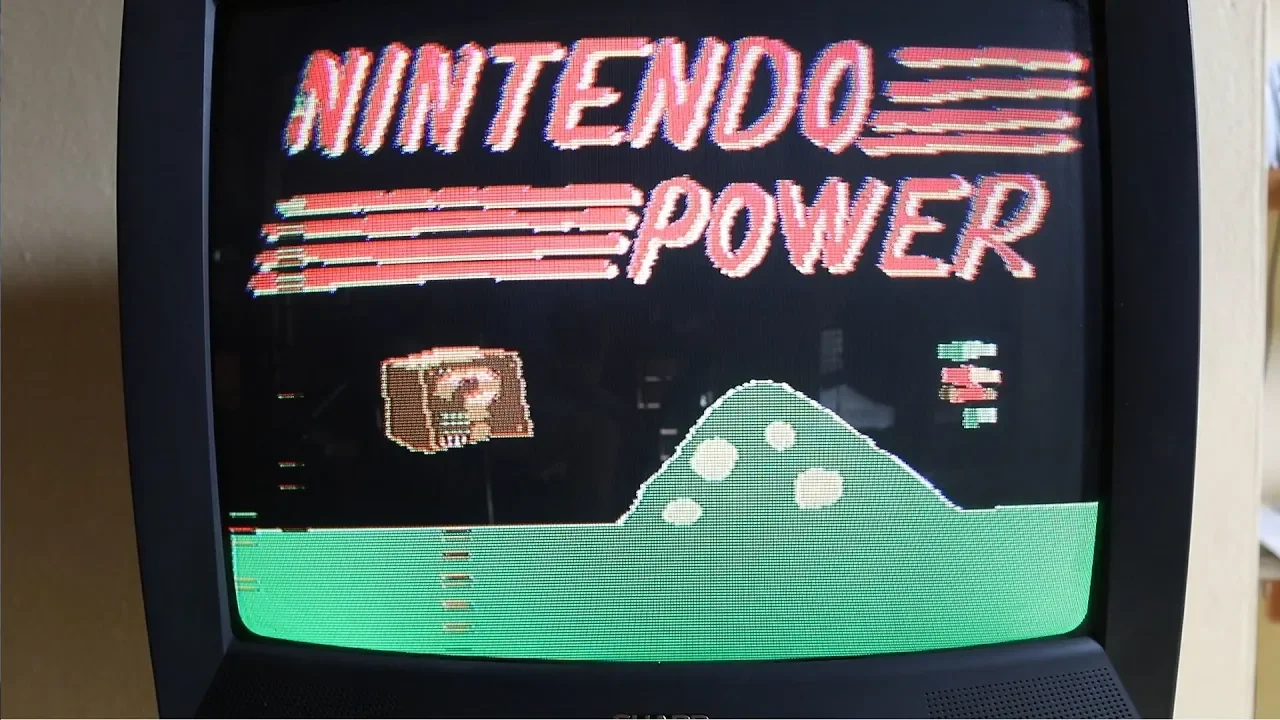
At this moment, Tom reveals the central secret of the presentation: the entire video presentation thus far has been running live on an actual, completely unmodified NES. He pans a physical camera over to prove it, showing the console connected to the display while he uses an authentic original NES gamepad as a handheld slide clicker to advance his slides in real time—effectively running "Nintendo PowerPoint."

- The Raspberry Pi Zero W features a 1 GHz processor, wireless connectivity, and an ultra-low $10 retail price. - Tom's desktop-based software emulator executes NES instructions at roughly 28,000 FPS, highlighting the staggering performance gap between vintage silicon and modern machines. - The entire video lecture is rendered live through a stock NES console and controlled using a standard Nintendo controller.

[07:46](https://www.youtube.com/watch?v=ar9WRwCiSr0&t=466s) Subverting the NES PPU and Tile Rendering

Tom breaks down the inner workings of NES graphics to explain how the slides are being rendered on the fly. The NES PPU structures backgrounds around two tables: pattern tables containing fixed 8x8-pixel graphical tiles, and a separate memory region called the attribute table that assigns color palettes to screen regions. While the hardware can display up to 13 distinct colors simultaneously across four palettes chosen from the system's global palette, the attribute table normally restricts color assignments to large 16x16-pixel blocks (the size of a standard *Super Mario Bros.* question mark block). Tom points out that this severe restriction is why the famous Mario cloud and bush sprites share the exact same tile art, differing only by the palette assigned to them.

```mermaid flowchart LR accTitle: PPU Scanline Rendering Pipeline accDescr: Breakdown of standard 16x16 attribute blocks versus cycle-timed dynamic palette updates during 8x1 rendering strips.

subgraph StandardPPU["Standard Hardware Limitation"] A["16x16 Pixel Region"] --> B["Locked to 1 of 4 Palettes"] end

subgraph DynamicPPU["Reverse Emulation Injection"] C["PPU Scanline Fetch"] --> D["8x1 Pixel Strip"] D --> E["Address Requested from Bus"] E --> F["Pi Feeds Modified Palette on Each Read"] F --> G["Higher Effective Color Resolution"] end ```

Under normal circumstances, developers were chained to this coarse 16x16-pixel color grid. However, Tom explains that the PPU does not draw an entire 16x16 block in one operation; it renders backgrounds in discrete strips measuring 8 pixels wide by 1 pixel high. Crucially, the PPU rereads the color palette attributes from the bus every single time it prepares to draw one of these 8x1 pixel scanline slivers.

Because the reverse emulator controls the memory bus in real time, it does not have to return static values. Every time the PPU requests the same attribute address for an ongoing scanline, the Raspberry Pi can swap the returned byte on the fly. By continuously altering the color data between individual 8x1 pixel fetches, Tom can bypass the static 16x16 attribute grid and unlock far greater color fidelity across the screen than the original hardware was ever intended to produce.

- The NES renders background graphics using 8x8 pixel tiles, referencing an overall master palette through four active 3-color (+1 shared background) palettes, capping simultaneous on-screen colors at 13. - Normal NES attribute memory enforces a low color resolution, locking colors into coarse 16x16 pixel blocks. - The PPU processes display graphics line by line in 8x1 pixel slices, requesting attribute memory repeatedly for each slice. - By intercepting these reads and feeding different palette bytes on every fetch, reverse emulation changes colors per 8x1 strip, significantly overcoming native NES attribute limitations.

[09:22](https://www.youtube.com/watch?v=ar9WRwCiSr0&t=562s) Overcoming NES Update Limits and Full Motion Video

On a stock, unmodified Nintendo Entertainment System, screen rendering is constrained by strict hardware timing. The Picture Processing Unit (PPU) spends most of its time drawing 240 active scanlines, during which the CPU cannot safely touch graphics memory without triggering catastrophic visual glitches. Game code is forced to cram all visual updates into the vertical blanking interval (VBlank), an idle window lasting only about one-thirteenth of an entire frame. Coupled with the sluggish data bus between the CPU and PPU, games like *Super Mario Bros.* can alter only a tiny sliver of the display per frame, establishing a hard physics ceiling on how fast Mario can run before outstripping the console's ability to draw incoming terrain. By reverse-emulating the graphics directly inside the cartridge hardware, suckerpinch bypasses these constraints completely, freely rewriting any and every tile on the fly.

This capability makes it possible to play full-motion video directly on standard hardware. Suckerpinch demonstrates this by playing Rick Astley's "Never Gonna Give You Up," remarking that it might represent the best graphics ever displayed on the console. While noting that an entirely separate companion video covers the complete technical architecture, suckerpinch emphasizes the philosophical irony of pushing the console beyond its perceived specs: “functionality that it doesn't apparently have but it does in fact have because this is an unmodified Nintendo it just needed to believe in itself.”

- The NES draws 240 scanlines before entering VBlank, leaving only ~1/13th of a frame's duration to write updates to PPU memory. - Traditional games are restricted to small, incremental tile updates per frame, which limits maximum scrolling and character speeds. - Cartridge-side reverse emulation enables unrestricted per-frame tile replacement, making full-motion video playback feasible on an unmodded front-loader NES.

---

[10:41](https://www.youtube.com/watch?v=ar9WRwCiSr0&t=641s) The Timing Problem and Predictive Bus Writing

Implementing this in hardware requires operating within razor-thin timing margins. Suckerpinch captured an oscilloscope trace of the cartridge connector pins on the very Nintendo being used, stored that trace inside the cartridge, and piped it right back onto the TV screen over those exact same physical wires—a self-referential loop suckerpinch calls an example of improper hierarchy or a "strange loop." The PPU communicates with the cartridge ROM using timing pulses measured in nanoseconds, passing 16 address lines to request memory and expecting 8 data bits returned on the bus. While suckerpinch is accustomed to desktop emulation speeds hitting 28,000 frames per second, the Raspberry Pi driving the cartridge is only roughly three times faster than the native PPU ROM clock.

```mermaid flowchart TD accTitle: Predictive Cartridge Memory Bus Loop accDescr: Diagram illustrating how the Raspberry Pi preemptively writes data before reading the requested PPU address.

subgraph HardwareCycle ["PPU Bus Cycle"] WaitStart["Wait cycle begins"] WriteData["Pi preemptively pushes predicted byte"] ReadAddr["Pi reads incoming 16-bit address lines"] UpdateGuess["Update state machine prediction for next byte"] end

WaitStart --> WriteData WriteData --> ReadAddr ReadAddr --> UpdateGuess UpdateGuess -.->|"Ready for next cycle"| WaitStart ```

When taking real-world pin latency into account, standard hand-optimized assembly that simply waits for an address and outputs the corresponding byte arrives far too late for the NES to sample it. Suckerpinch solves this timing paradox with a clever shortcut: “you know if you can't submit your paper on time to the conference just submit on time for next year's deadline.” Rather than waiting for the read address, the software immediately fires data onto the bus the moment the cycle starts, allowing the electrical signal just enough time to stabilize before the NES reads it. The Pi only reads the address lines *after* the write has already been executed. Because the write occurs before the read, the system cannot know which address was requested; instead, it runs a predictive heuristic estimating what the PPU will demand next based on standard rendering patterns, refining its guess based on the trailing address reads. While effective enough to function, imperfect predictions cause the visual noise, analog waveform distortion, and jitter seen on the output.

- The PPU interface uses 16 address input lines, 8 data output lines, and control signals operating on a nanosecond scale. - A standard Raspberry Pi runs only about 3× faster than the PPU ROM interface speed, leaving almost no margin for bus turnaround latency. - Naive read-then-write assembly fails timing requirements, forcing the Pi to output predicted data immediately upon cycle start before sampling the requested address lines. - Real-world electrical signals behave as distorted analog waveforms rather than clean square waves, worsening latency and causing visual artifacts.

---

[13:05](https://www.youtube.com/watch?v=ar9WRwCiSr0&t=785s) Hardware Build, the CIC Chip, and CPU "Knocking" Communication

The physical cartridge PCB required a complex layout to interface the Raspberry Pi to the console's edge connectors. Building the cartridge necessitated harvesting an authentic 10NES lock-out chip (CIC) directly from an original retail cartridge, as the console flatly refuses to boot without one. Suckerpinch notes with regret that sacrificial NES cartridges must be desoldered, pointing out the market oddity that 30-year-old bargain NES donor carts have become more expensive than budget Super Nintendo games. Alongside the Raspberry Pi sits a dedicated CPU ROM containing custom machine code that handles controller input and updates the NES palette registers, choosing 13 colors out of the system's 64-color master palette before each frame begins.

```mermaid flowchart LR accTitle: Bidirectional CPU-to-Cartridge Knocking Protocol accDescr: Flowchart detailing the knocking sequence and controller multiplexing over graphics memory reads during VBlank.

subgraph VBlankPeriod ["VBlank Window (~1.5 ms total)"] A["CPU wakes via NMI interrupt"] --> B["Knocking: CPU reads VRAM in descending order"] B --> C["Cartridge recognizes CPU bus master"] C --> D["Cartridge streams 13-color palette data"] D --> E["CPU encodes 8-bit controller state into read addresses"] E --> F["Cartridge latches input; ~0.5 ms CPU budget remains"] end ```

Because the CPU and the custom cartridge board share no dedicated high-speed link, communication is multiplexed over the graphics bus during VBlank. While the PPU sits idle, the CPU reads graphics memory. To prevent the board from confusing CPU access with regular rendering, the CPU executes reads in strictly descending address order—a behavior dubbed "knocking"—which the PPU hardware never performs during its left-to-right scanline sweep. Once synchronized, the exact address values become irrelevant, letting the board safely feed palette data back to the CPU without corrupting screen graphics.

To send player controller data back in the opposite direction, suckerpinch exploits the address bus: since reading a byte requires putting an address on the bus, the CPU simply embeds the 8 controller button bits inside the address lines of its dummy reads. The cartridge snoops these addresses, decoding the controller state while returning junk data. However, this entire handshake consumes two-thirds of the VBlank window, leaving merely half a millisecond of CPU processing time—barely enough to swap presentation slides or run crude animations.

- Authentic CIC lock-out chips must be desoldered from vintage donor cartridges to bypass console lockout mechanisms. - The custom CPU ROM programs 13 active colors out of 64 into the NES palette prior to each frame. - "Knocking" uses descending-order VRAM reads to signal to the cartridge that the CPU, rather than the PPU, is requesting bus access. - Controller button states are transmitted upstream to the cartridge by embedding controller bitmasks into the VRAM read addresses. - The synchronization and data transfer handshake consumes roughly 1 millisecond (two-thirds of VBlank), leaving ~0.5 ms for CPU execution.

---

[15:52](https://www.youtube.com/watch?v=ar9WRwCiSr0&t=952s) Upgrading to Raspberry Pi 3 and Playing Super Mario World

To escape the strict computational bottleneck of the single-core board, suckerpinch constructed a second cartridge revision equipped with a quad-core Raspberry Pi 3. A multi-core processor allows one dedicated core to continuously service the relentless PPU bus timing while the remaining cores run complex application code, emulation, and rendering pipelines in parallel. Suckerpinch swaps the cartridge live on camera to maintain visual continuity, explaining, “I'm going through some trouble for continuity here so so no one can accuse me of cheating faking it.” While Linux kernel background interrupts introduce unavoidable visual flicker and blinking, the system successfully boots up.

The payoff is suckerpinch's punchline: running *Super Mario World*, the flagship 16-bit Super Nintendo launch title, fully playable on an unmodified 8-bit NES. The standard NES controller passes inputs straight into the game, aided by a fortunate mapping design:

> “coincidentally the controller I only have eight buttons on this thing right I don't have all of the buttons on a Super Nintendo but somehow like up on the Nintendo is the same bit as up on the Super Nintendo which is like a cosmic coincidence or perhaps they just you know got lazy”

Because the NES controller lacks the full SNES button layout, Mario is locked into running and spin jumps without standard jumps, though suckerpinch navigates the stage comfortably.

To overcome the visual limitations of the NES's 8×1 pixel color zones, suckerpinch applies an optical anti-blockiness technique: modulating the console's horizontal scroll offset and un-scrolling the rendered buffer by four pixels every other frame. This temporal grid alternation effectively doubles perceived horizontal color detail. Suckerpinch follows this demo by showing standard *Super Mario Bros.* running inside an NES emulator hosted on the Raspberry Pi inside the cartridge, whose video output is then piped back out through the real NES hardware, complete with authentic hardware noise and visual distortion.

- The cartridge upgrade integrates a quad-core Raspberry Pi 3, dedicating one core to real-time PPU bus management and background cores to SNES/NES emulation. - Kernel-level scheduling interrupts in Linux cause visible periodic screen flickering and dropouts. - *Super Mario World* runs in real time; NES controller inputs map directly to SNES controls via shared bit positions, though missing buttons restrict Mario to spin jumps. - Modulating the NES hardware scroll offset by 4 pixels on alternating frames shifts the 8×1 attribute grid to reduce tile blockiness and increase perceived color resolution. - The pipeline can also nest an NES emulator within the cartridge Pi and pipe the rendered frames back through the host NES PPU.

[19:15](https://www.youtube.com/watch?v=ar9WRwCiSr0&t=1155s) Comparing the Gags and Returning to Nintendo PowerPoint

Reflecting on the various visual stunts and recursive setups, Tom Murphy VII (suckerpinch) weighs which conceptual joke landed better. While he finds an elegant appeal in closing the loop, he admits his personal favorite remains the sheer absurdity of running the Super Nintendo through an original 8-bit NES. To him, violating computational status was the punchline all along: “I think this is a nice stroke it's elegant how it forms a loop but honestly I think that the Super Nintendo on Nintendo is a better joke and that's where I was going with all that stuff about improper hierarchy so I guess let me know which one you liked better but let's get back to Nintendo PowerPoint for a wrap up.” Returning to his presentation displayed directly on the hardware, he transitions into a broader philosophical takeaway before wrapping up the video.

[19:35](https://www.youtube.com/watch?v=ar9WRwCiSr0&t=1175s) Reverse Emulation, Artificial Intelligence, and the Human Brain

Looking beyond gaming consoles, Murphy muses on the broader utility of this approach. While reverse emulation is well suited to augmenting nostalgic hardware like the NES, Super Nintendo, Nintendo 64, or GameCube, he extends the thought experiment to another piece of legacy hardware: the human brain itself. He observes that humanity will eventually achieve true artificial intelligence, bringing with it an existential dread that goes beyond apocalypse scenarios. For Murphy, the deeper sting is obsolescence: “I worry a little bit about that not just because we might destroy ourselves and destroy society but because of the feeling of being left behind.” He points out that modern chess engines have already crossed this threshold—they are so overwhelmingly superior that playing against them has ceased to be fun. In that context, reverse emulation offers an alternative framework for the future of human intelligence.

```mermaid flowchart TD accTitle: Brain Emulation versus Reverse Brain Emulation accDescr: A comparison showing standard mind uploading on the left versus hardware augmentation on the right.

subgraph StandardUpload["Standard Emulation"] A["Human Mind"] -->|"Upload whole brain"| B["The Cloud / Virtual Server"] B -->|"Replaces biological self"| C["Virtual Entity"] end

subgraph ReverseEmu["Reverse Brain Emulation"] D["Biological Brain"] <-->|"Hardware interface"| E["Advanced Coprocessor"] E -->|"Intercepts queries"| F["Instant Computation"] F -->|"Feeds back into memory"| D end ```

Rather than standard brain emulation—uploading human consciousness into a cloud server—reverse emulation would leave the core biological person in place while swapping out internal components with hardware that far exceeds natural capabilities. Murphy imagines augmenting human memory so that difficult computational queries could be answered instantaneously:

* **Prime Factorization by Recall:** If asked to calculate the prime factors of an enormous number, the brain would not attempt mental math. Instead, it would simply trigger a recall loop, initiating a rote memory sequence like reciting "A-B-C-D," which the coprocessor intercepts and replaces with the computed factor digits (e.g., 472866029...). * **Perceptual Patching:** Because raw numbers lack the cadence of a nursery rhyme, Murphy jokes that the coprocessor would also need to trick the brain into perceiving that the multi-digit answer rhymes so the mind remains satisfied. * **Sacrificing Useless Pop Culture:** Realizing that reciting the alphabet is actually useful, Murphy proposes overwriting trivia nobody needs: “I realized I have all of these memories that I don't care about so what if instead it was something like Oh remember that time when in Charles in Charge Charles needed to factorize that number and the answer was blah blah blah blah that I think would be actually a pretty acceptable technology sign me up.”

Concluding the presentation, he thanks the audience for watching and humorously invites viewers to subscribe or “do what one does.”

## Mentioned Nintendo Entertainment System (NES), Famicom, Super Nintendo Entertainment System (SNES), Nintendo 64, GameCube, Ricoh 2A03, Picture Processing Unit (PPU), 10NES (CIC), Raspberry Pi Zero W, Raspberry Pi 3, Tom Murphy VII (suckerpinch), Mario, Samus Aran, Douglas Hofstadter, Rick Astley, Super Mario Bros., Super Mario World, Never Gonna Give You Up, Charles in Charge, Federal Communications Commission (FCC), Linux

## Video description The video begins in a strange way and gets stranger, but then, ideally, you understand why.

See the "making of" video for more technical information: https://youtu.be/hTlNVUmBA28

[Source](https://www.youtube.com/watch?v=ar9WRwCiSr0)

中文简报

逆向模拟NES以赋予其“超级能力”! Tom Murphy VII在展示“逆向模拟”之前,首先介绍了喜剧和计算领域的“不当层次”概念——即保留原装未改装的复古硬件,同时用高速树莓派取代无源卡带ROM。在透露演示幻灯片和全动态视频其实是通过实时总线操作在一台真正的NES上实时渲染之后,他详细讲解了突破硬件极限所需的严格纳秒级时序、预测性总线写入以及CPU“敲门”协议。随后,他将配置升级为四核树莓派3,并使用原装手柄直接在这台8位主机上玩起了16位游戏《超级马力欧世界》。最后,他提出了一个有趣的哲学思想实验,将逆向模拟应用于人脑,尝试利用高速协处理器来扩充生物记忆。 Tom(suckerpinch)介绍了“逆向模拟”——保留未经改装的老式主机硬件,同时用树莓派Zero W和Pi 3等高速计算机替代无源卡带ROM芯片,以实时动态注入数据。 (3:43) 通过在每次8x1像素扫描线提取时动态修改调色板属性字节,该方案绕过了NES PPU原生的16x16属性网格和VBlank限制,在标准硬件上实现了全动态视频播放。 (7:46) 由于树莓派的主频仅比PPU总线时钟快约3倍,常规的“先读后写”代码耗时过长;该系统依靠一种预测性启发算法,在对地址线进行采样之前就将猜想的字节写入总线。 (10:41) 利用升级后的四核树莓派3卡带板,该项目成功在一台未经改装的8位NES上实时运行了16位的《超级马力欧世界》,并使用原装NES手柄进行输入控制。 (15:52)

Reading summary

Tom Murphy VII (suckerpinch) demonstrates "reverse emulation" by embedding a modern Raspberry Pi coprocessor inside an NES cartridge, turning the unmodified 8-bit console into a peripheral capable of running full-motion video and 16-bit Super Nintendo games. Murphy frames this technical subversion as an example of "improper hierarchy," using hardware inversion to examine architectural constraints and speculate on augmenting human cognition. Improper Hierarchy and Reverse Emulation (3:43) Traditional emulation relies on modern software running on a PC to replicate vintage console chips and execute static ROM files. Murphy flips this relationship through "reverse emulation," retaining the physical, unmodified 1.79 MHz Ricoh 2A03 CPU and Picture Processing Unit (PPU) of the original NES while replacing the cartridge's passive PRG and CHR ROMs with an active, high-powered computer. He conceptualizes this as an "improper hierarchy"—a comedic violation of expectations akin to self-referential Quines, where an execution environment is controlled by the artifact it normally directs. Murphy exploits the oversized North American NES cartridge shell to fit a modern single-board computer directly onto the bus. In a live reveal, he demonstrates that his entire slide lecture is being rendered on an unmodded front-loader NES and controlled with a standard gamepad. This setup challenges the perceived hard limits of the legacy hardware by feeding dynamic computational results into the console in place of static ROM data. Overcoming NES Video Limitations (7:46) Stock NES graphics normally force developers into strict bottlenecks. Background palettes are locked to coarse 16x16-pixel attribute blocks, and memory updates can only be executed during the brief vertical blanking interval (VBlank)—about one-thirteenth of a frame (~1.5 milliseconds)—to avoid visual corruption. Murphy bypasses these constraints by taking advantage of how the PPU renders backgrounds: it fetches data line by line in 8x1-pixel strips, re-reading attribute addresses from the bus on each pass. By intercepting these reads from within the cartridge, the coprocessor swaps palette bytes on the fly for every 8x1 slice, dramatically increasing effective color fidelity. Because the cartridge can rewrite graphics continuously without routing through the CPU, the system achieves frame-by-frame full-motion video, demonstrated via playback of Rick Astley's "Never Gonna Give You Up." Furthermore, by shifting the console's horizontal scroll offset by four pixels on alternating frames, the system visually dithers the 8x1 grid, effectively doubling perceived horizontal detail. Predictive Bus Timing and Knocking Protocols (10:41) Operating a modern processor on the NES memory bus introduces severe nanosecond-level timing constraints. Even a 1 GHz Raspberry Pi Zero W running roughly three times faster than the PPU ROM interface cannot tolerate pin turnaround latency. A standard program that waits to read an address before writing a reply arrives too late for the NES to sample. Murphy circumvents this with predictive bus writing: the software pushes an estimated byte onto the bus immediately at cycle start and only reads the incoming 16-bit address lines afterward to calibrate its next prediction. While effective, imperfect predictions manifest as visible jitter and analog waveform noise. Bidirectional communication presents another hurdle, as the cartridge board and CPU share no dedicated high-speed link. Murphy devises a "knocking" protocol during VBlank, where the CPU reads graphics memory in descending address order—a pattern the PPU hardware never generates during standard left-to-right scans. Once synchronized, the cartridge streams 13 active palette choices back to the console. To send controller inputs back to the cartridge, the CPU encodes its 8-bit controller state directly into the address lines of dummy reads, though this entire handshake consumes two-thirds of the VBlank window. Multi-Core Emulation and Future Cognitive Augmentation (15:52) To overcome single-core processing limits, Murphy introduces a revised cartridge powered by a quad-core Raspberry Pi 3. One dedicated core services the real-time PPU bus timing while the remaining cores run application logic and emulation. This enables the unmodded 8-bit console to run *Super Mario World*, the 16-bit flagship title of the Super Nintendo. Standard NES controller buttons map directly to SNES inputs due to shared bit positions, though missing buttons limit Mario to running and spin jumps. Murphy also demonstrates running an NES emulator inside the Pi and routing its output back through the real console PPU. Extending the concept beyond retro gaming, Murphy speculates that reverse emulation could serve as a model for the future of human intelligence confronting superior artificial intelligence. Rather than whole-brain emulation via digital mind-uploading, biological hardware could be preserved while integrating high-speed coprocessors. Such an interface could intercept routine memory recall pathways—like reciting trivial pop-culture memories—and replace the output with instantaneous complex computations, such as prime factorizations. While reverse emulation successfully delivers 16-bit emulation and video playback on stock 8-bit hardware, the implementation remains vulnerable to Linux kernel scheduling interrupts, predictive bus misses, and analog signal degradation that cause visible flickering. Murphy concludes that repurposing legacy computational pathways offers a viable paradigm for augmenting obsolete systems, whether vintage silicon or human memory.

精炼阅读摘要

计算机研究者 Tom Murphy VII(网名 suckerpinch)提出“逆向模拟”理念,在保留原版未改装红白机(NES)硬件的前提下,利用卡带内嵌的高性能微型计算机动态劫持系统总线,突破原本的图画处理单元限制以渲染全动态视频乃至运行 16 位 SNES 游戏。 逆向模拟与不当层级的技术讽刺 (3:43) Murphy 将幽默理论中的“不当层级”与计算机技术结合。传统游戏模拟通常由现代 PC 软件模拟老旧主机芯片,并被动读取静态 ROM 文件;而逆向模拟完全颠倒了这种上下级依赖——原装未经改装的 8 位 NES 主机硬件得以完整保留,内部原本只用于静态数据查找的被动 ROM 芯片则被完全掏空,替换为拥有 1 GHz 处理器并内置现代内存与无线网络的 Raspberry Pi。北美版 NES 卡带外壳内部巨大的闲置空间为塞入现代电路提供了充足物理间隙。Murphy 在演讲中揭晓,其展示的演示幻灯片实际上完全运行在一台未改装的真实 NES 主机上,并通过原装手柄作为翻页笔实时控制,从而在物理与逻辑层级上践行了这种技术上的自我引用与结构倒置。 总线拦截突破 NES 图形与刷新极限 (7:46) NES 图形架构依赖 PPU(图画处理单元)读取图案表与属性表,通常屏幕同时最多显示 13 种颜色,且属性表将调色板强制绑定在粗糙的 16x16 像素方块内。此外,NES 仅能在约占一帧十三分之一时长的消隐期(VBlank)内安全更新显存,导致传统游戏每帧只能修改极小部分屏幕区域。然而,PPU 实际上是以 8 像素宽、1 像素高的扫描线切片逐行请求属性数据的,逆向模拟卡带利用现代处理器拦截每一次总线读取,并在每次 8x1 切片请求时动态替换调色板字节,从而跨越了硬件原本的调色板边界限制。凭借卡带侧无视显存传输限制的动态图块重写能力,Murphy 在这台未改装的前插式主机上成功流畅播放了 Rick Astley 的《Never Gonna Give You Up》全动态视频。 纳秒级时序困境与预测性总线写入 (10:41) 在硬件实现层面,将 Raspberry Pi 连接到 NES 遇到极严苛的时序壁垒。虽然桌面模拟器可达 28,000 FPS 的高帧率,但 Pi 实际处理速度仅约为 PPU ROM 接口时钟的 3 倍,在考虑真实引脚延迟与模拟波形畸变后,先等待地址输入再输出数据的常规读写汇编程序完全无法赶上硬件采样。Murphy 采用“预测性写入”机制化解此冲突:Pi 在每个总线周期刚开始时,便基于启发式渲染模式预测 PPU 接下来需要的数据并立即抢先推送到总线上,随后才去读取地址线以修正状态机对下一个周期的预测。尽管这种预测误差会在屏幕上产生不可避免的噪点与波形抖动,但它为微弱的电气信号留出了足够的建立与稳定时间。 敲门协议与多核驱动跨世代游戏 (13:05) 为解决双向数据通信,Murphy 在自制 PCB 上焊接了从原版卡带拆解的 10NES(CIC)锁区芯片,并通过 CPU 固件设计了“敲门”通信协议。由于 CPU 与卡带缺乏专用高速连线,CPU 在 VBlank 期间以严格递减的地址顺序读取显存——这种与 PPU 从左至右扫描截然相反的行为让卡带识别出 CPU 主控,从而在不破坏画面的前提下传递 13 色调色板;同时,CPU 将手柄的 8 位按键状态伪装进假读取操作的地址线中传回卡带,但该握手协议消耗了近三分之二的 VBlank 时间。为突破单核性能瓶颈,Murphy 随后升级至配备四核 Raspberry Pi 3 的二代卡带,让一个核心专门应对 PPU 总线时序,其余核心并行负责模拟计算,成功让 16 位的《超级马里奥世界》完全可玩地运行在 8 位 NES 硬件上,并通过隔帧交替硬件横向滚动 4 像素的光学抗块效应进一步提升了有效水平色彩分辨率。 脑机接口思考与认知逆向模拟假说 (19:35) 在对比了嵌套运行 NES 模拟器与运行 SNES 游戏的讽刺喜剧效果后,Murphy 将逆向模拟的逻辑外推至人类大脑与强人工智能的发展前景。面对国际象棋引擎碾压人类所带来的落后焦虑,他认为未来的应对方案不应是传统意识上传(将心智完全数字化并取代肉体),而是采用逆向脑模拟:保留原有的生物大脑架构,仅将其内部低效或遗忘的认知环节替换为超算协处理器。在此构想下,人类在面临超大质数分解等复杂运算时无需进行心智心算,只需触发一段背诵字母表或无用流行文化记忆的反射回路,协处理器即可在后台拦截该神经信号,并即时替换输出正确的庞大计算结果。 Murphy 借由给红白机赋予超能力的恶搞硬件实验,证实了在保持宿主底层架构不变的情况下,通过动态劫持外部总线输入能够彻底改写古老系统的实际运算边界;但该方案仍受限于预测失误引发的信号噪点、Linux 内核调度导致的画面闪烁,以及真实世界物理引脚的时序余量限制。

Detailed notes — zh

## Background 该视频由 suckerpinch(Tom 7)于 2018 年 5 月 29 日发布在 YouTube 平台上。视频简介以悬念式的口吻指出,整段内容开头看似怪异且愈发离奇,但随着逻辑铺开观众最终会领会其背后的意图,并附上了技术细节更详尽的幕后制作视频链接。 ## TL;DR 作者从幽默本质与哲学概念“不当层级”(improper hierarchy)切入,提出了一种颠覆性的“逆向模拟”(reverse emulation)构想:在完全不改装任天堂红白机(NES)原生硬件的前提下,用搭载现代计算能力的树莓派(Raspberry Pi)替换卡带内部的静态只读内存(ROM)。面对纳秒级的时序严苛限制,作者利用总线预测投机写入、扫描线动态变脸与巧妙的降序“敲门”通信协议,成功在 NES 上突破了调色板和图块刷新极限,不仅顺畅播放全动态视频,甚至还能借助四核树莓派 3 运行 16 位的 SNES 大作《超级马力欧世界》。视频最后揭晓整场演示从开头起就是由这台 NES 实机渲染输出,并将这种用高级硬件外挂接管古老架构的思想实验,进一步延伸至未来利用神经接口替换人类琐碎记忆以获取超强算力的哲学思考。 ## Atmosphere & style 整部作品散发着浓郁的“黑客艺术家”气质,将冷峻严苛的底层硬件工程与无厘头的冷幽默完美融为一体。镜头前作者以平淡而严肃的学术语调娓娓道来,却不断抛出让人忍俊不禁的逻辑包袱,直至突然拉远镜头揭晓“原来你看到的幻灯片一直是在未改动红白机上实时运行”时,瞬间给观众带来智识与极客美学上的双重震撼。观感兼具复古硬核技术拆解的烧脑与哲学思辨的旷达,让人在会心一笑的同时由衷惊叹于人类创造力的纯粹乐趣。 ## Bulletin - [03:41](https://www.youtube.com/watch?v=ar9WRwCiSr0&t=221s) suckerpinch 提出并实现了“逆向模拟”(Reverse Emulation)概念:在完全不改装 NES 物理主板的前提下,用树莓派替换卡带中的静态 ROM,通过动态接管总线向 PPU 注入数据,让 8 位红白机实现了逐行变色、全动态视频播放乃至运行 16 位的《超级马力欧世界》。 - [10:38](https://www.youtube.com/watch?v=ar9WRwCiSr0&t=638s) 受限于树莓派仅比 PPU ROM 快约 3 倍的纳秒级时序瓶颈,作者采用“时间倒流”式的投机预测算法,在周期伊始提前将数据强行打在总线上,再反向读取地址以校正坐标,突破了常规串行响应的物理延迟限制。 - [14:03](https://www.youtube.com/watch?v=ar9WRwCiSr0&t=843s) 作者设计了“敲门”协议与地址线反向传输技术:利用 CPU 在 V-blank 期间发起非正常的降序读取来建立通信握手,并将 8 位手柄按键状态直接编码进 CPU 索要的“读取目标地址”中,实现了双向数据交互。 - [07:22](https://www.youtube.com/watch?v=ar9WRwCiSr0&t=442s) 整段视频自始至终皆由一台原装未经改装的 NES 实时渲染并在屏幕上放映,翻页直接通过 NES 原装手柄控制,构成了作者自创的“不当层级”与自指幽默结构。 ## Key takeaways - [00:00](https://www.youtube.com/watch?v=ar9WRwCiSr0&t=0s) 幽默的核心机制在于打破预期;作者将 Hofstadter 的怪圈概念泛化为“不当层级”(improper hierarchy),将时代错置与自指结构统一为对固有因果和时序的颠覆。 - [03:41](https://www.youtube.com/watch?v=ar9WRwCiSr0&t=221s) 传统模拟器是用软件虚拟硬件来读取 ROM,而逆向模拟反其道而行之:彻底保留未修改的原始硬件,拔掉被动的只读内存,由智能计算设备动态拦截并注水算力。 - [07:22](https://www.youtube.com/watch?v=ar9WRwCiSr0&t=442s) NES 硬件本身受限于静态 13 色调色板及 16×16 像素属性块的色彩绑定限制,但 PPU 实际以 8×1 水平条带读取数据;树莓派通过在每次读取时返回不同调色板字节,将色彩垂直分辨率提升到逐行扫描级别。 - [09:22](https://www.youtube.com/watch?v=ar9WRwCiSr0&t=562s) 传统 NES 仅能在占一帧 1/13 时间的 V-blank 极短窗口内低速更新显存,逆向模拟通过在 PPU 渲染期间实时供给图块数据,突破了这一架构瓶颈,实现了全动态视频(FMV)顺滑播放。 - [10:38](https://www.youtube.com/watch?v=ar9WRwCiSr0&t=638s) 由于纳秒级总线时序的苛刻限制,常规的“读地址 -> 计算 -> 返回数据”必定超时;程序采用投机预测逻辑,先在时钟周期起始盲发数据,再读取地址修正状态,这也是画面产生抖动杂音的原因。 - [13:00](https://www.youtube.com/watch?v=ar9WRwCiSr0&t=780s) 为了绕过主机 10NES(CIC)防盗版锁片芯片导致的强制复位循环,作者只能从现存的正版红白机卡带上拆焊芯片移植到定制 PCB 上。 - [14:03](https://www.youtube.com/watch?v=ar9WRwCiSr0&t=843s) 针对 PPU 绘图严格升序访问的特性,系统利用 CPU 发起的反常降序读取构建“敲门”握手协议,以便在极短时间内区分 CPU 与 PPU 访问并同步调色板数据。 - [14:03](https://www.youtube.com/watch?v=ar9WRwCiSr0&t=843s) 手柄通信巧妙借助了读取指令的寻址阶段:CPU 将手柄的 8 位按键状态打包为“读取请求的内存地址”,树莓派通过总线捕获该地址电平完成状态接收。 - [15:40](https://www.youtube.com/watch?v=ar9WRwCiSr0&t=940s) 升级到四核树莓派 3 后,空闲核心得以并行处理模拟计算,使原装 NES 成功运行了 16 位 SNES 游戏《超级马力欧世界》。 - [15:40](https://www.youtube.com/watch?v=ar9WRwCiSr0&t=940s) 为了在 8 位机的严苛图块限制下还原 16 位画面,作者设计了奇偶帧交替滚动 4 像素的抗锯齿微调方案,利用视觉暂留显著提高了画面的等效色彩与边缘分辨率。 - [15:40](https://www.youtube.com/watch?v=ar9WRwCiSr0&t=940s) 作者将实验进一步嵌套:在树莓派中模拟 NES,再将模拟生成的画面反向传输回真机 NES 渲染输出,形成闭环递归。 - [20:20](https://www.youtube.com/watch?v=ar9WRwCiSr0&t=1220s) 作者将逆向模拟从复古游戏机延伸至人脑哲学思考,认为比起整脑意识上传,更可行的路径是用现代高级硬件局部替换人类底层神经(如记忆检索),将质因数分解等复杂算力无缝重写为主观情景记忆。 ## Detailed walkthrough ### [00:00](https://www.youtube.com/watch?v=ar9WRwCiSr0&t=0s) 什么是幽默:从吃靴子、时代错置到“不当层级” 作者 suckerpinch 计划在视频里讲一个硬核的技术笑料。在抛出这个笑话前,他决定先从哲学与幽默的本质谈起。许多自命不凡的学者研究了幽默数百年,将其剥离得像葡萄干灰尘一样干枯无味。有古板的老派学者提出:如果给观众放一段录像,画面里的人满头大汗、一脸嫌恶地吃着一只靴子,这绝不好笑;但如果换成一个面容威严、表情平淡中立的绅士在啃靴子,那这就是幽默。作者调侃道,或许这两者本身都不好笑,好笑的只是曾经有人把“吃靴子”当作滑稽闹剧的巅峰,但这里揭示了一个核心机制——“打破预期”往往就是幽默的来源。 如果将这种打破预期的概念推演到不同层面:马力欧在吃靴子只是怀旧玩梗,毫无幽默感可言;但要是让萨姆斯(Samus)在 1986 年吞食 Tide Pods(汰渍洗衣球),这就产生了幽默,因为洗衣球在 1986 年根本不存在,这种逻辑错乱被称为“时代错置”(anachronism)。进一步上升到技术语境,“自指”(self-reference)与递归也是幽默的重要源泉。简单的自我指涉(例如“我的名字叫 Tom 7”)并不好笑,但 Douglas Hofstadter 提出的“怪圈”(strange loops)却极具吸引力。最经典的例子莫过于“奎恩”(Quine)自产生程序——将源代码输入编译器生成可执行文件,一旦运行,该程序就会在终端里原封不动地打印出它自己的源码。 ```mermaid flowchart LR accTitle: Quine 程序的自产生逻辑与循环打破预期 accDescr: 展示源代码编译为程序后反向打印出完全相同的源码,颠覆了单向因果链条 subgraph QuineLoop ["奎恩 (Quine) 的怪圈结构"] direction LR Src["源代码<br/>Source Code"] -->|"编译"| Bin["程序<br/>Executable"] Bin -->|"运行输出"| Src end ``` 作者指出,这个怪圈最妙的地方并不在于它形成了一个闭环,而在于程序的最后一步:通常人们认为源代码是程序的因,程序是果,但程序反过来打印自身源代码的过程彻底颠覆了这种单向生成预期。为此,作者自创并引入了一个更通用的上位概念——“不当层级”(improper hierarchy)。只要系统颠覆了某种固有的层级结构或时序顺序,便构成了不当层级。时代错置是不当层级的一种(将现在硬塞入过去),而怪圈则是包含在不当层级之下的特例。作者打趣道:“如果你想自我推销,诀窍就是设法在一张幻灯片上把自己和笛卡尔、道格拉斯·霍夫施塔特排在一起,而且还要讲得通,一旦建立起这种似是而非的平行关系,就没人能拦得住你了。” - “Improper hierarchy is a generalization of strange loops that don't necessarily have to be loops.”(不当层级是对怪圈的泛化,但它不一定非得形成循环。)——suckerpinch 总结幽默的底层逻辑。 --- ### [03:41](https://www.youtube.com/watch?v=ar9WRwCiSr0&t=221s) 红白机主板、卡带内部构造与“逆向模拟”构想 为了讲好这个技术笑料,作者拆解并回顾了 NES(Nintendo Entertainment System)的主板架构。主板左侧是 8 位的 CPU,运行频率约为 1.7 MHz;右侧是 PPU(Picture Processing Unit),即图像处理芯片,运行频率虽然稍快但并不具备通用编程能力。主板上还有一个臭名昭著的 CIC 锁片/版权认证芯片(10NES),其唯一职责就是在检测到卡带异常时不断强制复位主机。作者在此无情戳破了流传几十年的童年迷信:对着卡带吹气根本无法解决接触不良,甚至吹出的唾沫湿气还会加速金手指氧化损坏卡带,真正导致屏幕闪烁、红灯狂跳的罪魁祸首正是这颗被任天堂故意放上去的防盗版芯片。 NES 的卡带(官方正式名称为 Game Pak)则是主机的对偶面。打开当年售价高达 60 美元的卡带外壳,里面只有一块小得滑稽的印刷电路板,主要包含两颗存储芯片:负责给 CPU 提供代码指令的 PRG ROM,以及给 PPU 提供画面图案素材的 CHR ROM,外加一颗与主机 CIC 芯片对话的配对芯片。日本原版的 Famicom 卡带尺寸正好贴合这块电路板,但引进美国后,美版卡带被做成了像“卡带界的 SUV”一样巨大,内部留有极其充裕的空余空间。 ```mermaid flowchart TD accTitle: 传统模拟与逆向模拟的硬件及软件关系对比 accDescr: 展现传统模拟软件替换硬件,与逆向模拟保留原机硬件、用微型电脑替代只读内存的反向操作 subgraph Traditional ["传统模拟 (Emulation)"] direction TB EmuSoft["软件模拟核心<br/>(PC 上模拟 CPU/PPU)"] GameROM["游戏 ROM 文件<br/>(只读数据镜像)"] EmuSoft -->|"读取并解析"| GameROM end subgraph Reverse ["逆向模拟 (Reverse Emulation)"] direction TB NESCore["实机未经修改的 NES<br/>(物理 CPU / PPU 硬件)"] SmartCart["智能卡带替代设备<br/>(Raspberry Pi Zero W)"] NESCore <-->|"实时地址请求 / 动态数据注入"| SmartCart end ``` 这种空旷的外壳催生了“逆向模拟”(reverse emulation)的设想。传统的模拟器是将物理硬件丢进垃圾堆,用纯软件重写 NES 的所有芯片逻辑,再载入 ROM 文件在电脑上运行;而作者想要反其道而行之: 1. 完整保留一台原汁原味、不做任何硬件改装的 NES 裸机; 2. 拔掉卡带上原本毫无智能、只能被动查表返回静态字节的“笨蛋”ROM 芯片; 3. 将 ROM 替换为极度强大的现代智能计算设备。 作者选中了售价仅 10 美元的树莓派 Raspberry Pi Zero W。这款小电脑尺寸小巧,却搭载了 1 GHz 的 CPU、大容量内存并自带 Wi-Fi。在作者脑海中的“幻想原理图”(fantasy schematic)中,NES 模拟器在 PC 上能以每秒 28,000 帧的速度飞速狂奔,足见现代处理器比 NES 快了数个数量级。他原本天真地设想,只要把树莓派与极其缓慢的 NES 总线接在一起,中间随便加几个电阻,“NES 每向 ROM 请求一个地址,树莓派就能实时拦截并计算,随后塞回经过复杂处理的动态数据”。作者甚至还开玩笑地展示了 NES 底壳上的 FCC 合规标签,上面写着“该设备必须接受接收到的任何干扰,包括可能导致意外操作的干扰”,以此断言“根据法律规定,我这种魔改玩法必须成功”。 - “If I replace that with something really fancy, I think I can make the Nintendo do things that it would otherwise be incapable of doing.”(如果我用极其强大的东西替换掉 ROM,我认为我就能让任天堂主机做到它原本绝不可能做到的事情。)——suckerpinch 描绘逆向模拟的蓝图。 --- ### [07:22](https://www.youtube.com/watch?v=ar9WRwCiSr0&t=442s) 现场演示揭晓与打破 PPU 的颜色限制 作者将摄像机镜头拉远并调整角度,向观众揭晓了一个惊人的事实:整段视频并非后期制作的电脑录屏,它从第 1 秒起就是在一台纯物理、未加改装的 NES 上实时渲染输出的,幻灯片的翻页则是他在拿着原装 NES 手柄直接控制,相当于一套“任天堂版 PowerPoint”。 紧接着,作者深入拆解了 NES PPU 的图形渲染管线及其技术瓶颈。NES 的画面背景建立在 8×8 像素的图块(Tile)网格之上,而整屏颜色的控制权由被称为“属性表”(Attribute Table)的独立显存区域掌管。虽然 PPU 硬件总共能显示 50 多种预设色阶,但在任意静态时刻,屏幕只能从 4 组调色板中挑选出总共 13 种可用颜色。更致命的物理限制在于颜色的分辨率:着色属性的最小控制单元不是 8×8 的单个图块,而是一个 16×16 像素的大方块(相当于《超级马力欧兄弟》中一个问号砖块的大小)。正因如此,红白机游戏的大部分素材尺寸都严格对齐 16×16,而为了节省昂贵的显存,游戏里的云朵和草丛往往完全共用同一副像素图样,仅仅依靠挂载不同的调色板来区分红花绿草与蓝天白云。 ```mermaid flowchart LR accTitle: NES PPU 扫描线图块条带渲染与逆向模拟动态注色 accDescr: 解释 PPU 以 8x1 像素条带为单位进行渲染的机制,以及利用高速 ROM 响应突破 16x16 调色板限制的方法 subgraph Standard ["标准卡带机制"] direction TB AttrGrid["16x16 像素属性块<br/>强制绑定单一调色板"] StaticROM["静态 ROM<br/>固定输出同一组颜色索引"] AttrGrid --- StaticROM end subgraph DynamicInjection ["逆向模拟动态注色"] direction TB Strip["8x1 像素水平条带扫描"] PiEngine["Raspberry Pi 监听总线<br/>每次读取注入不同调色板字节"] Strip -->|"每次条带请求"| PiEngine PiEngine -->|"垂直精度提升 16 倍"| HighRes["突破静态 13 色局限<br/>实现逐行扫描变色"] end ``` 然而,16×16 的颜色区块并不是不可逾越的铁律。NES 的 PPU 在光栅扫描过程中,实际上是以“8×1 像素的横向水平条带”为基本单位逐步向卡带读取数据的,且每次读取该条带时都会重新访问调色板数据。 - 传统 ROM 是静态硬件,同一地址永远返回完全固定的字节; - 逆向模拟的微型计算机则具备上下文感知能力,即便 PPU 反复访问同一个内存地址,树莓派也能在微秒级时间内感知当前的光栅扫描进度,并在每一次条带读取瞬间向总线喂入截然不同的新数值。 通过这种“在 PPU 每次索要地址时动态变脸”的欺骗手法,作者成功打破了 16×16 属性块的色彩绑定,将背景调色板的垂直分辨率直接提升到了单条扫描线级别,使这台 8 位古董机展现出了远超其硬件规格的丰富发色数。 - “If I'm reverse emulating the ROM and I'm able to supply a different value every time it reads the same address, I can change the color as often as I want for each one of those strips.”(如果我对 ROM 进行逆向模拟,并且能在它每次读取相同地址时提供不同的值,我就能针对每一个扫描条带随心所欲地变换颜色。)——suckerpinch 阐明绕过色彩限制的机制。 ### [09:22](https://www.youtube.com/watch?v=ar9WRwCiSr0&t=562s) 突破刷新速度瓶颈:在红白机上播放全动态视频 红白机(NES)受制于原本极度严苛的架构设计,但在逆向仿真(Reverse Emulation)的加持下,它展现出了此前从未具备的强悍潜能。suckerpinch 强调,这台主机完全未经任何硬件改装,“它只是一台未改装的任天堂,它只是需要相信自己”。在正常情况下,NES 渲染 240 根扫描线,随后进入垂直消隐期(V-blank)。由于在扫描线渲染期间直接访问图像处理器(PPU)会引发严重的画面撕裂与花屏,游戏只能在占整帧约十三分之一的 V-blank 极短窗口内,通过一条速度相对缓慢的连接通道从 CPU 向 PPU 写入数据。 ```mermaid flowchart TD accTitle: NES 传统渲染与逆向仿真渲染对比 accDescr: 对比传统红白机受限的 V-blank 刷新机制与卡带端逆向仿真直接接管 PPU 读取的机制 subgraph Normal["传统 NES 渲染流程"] A["扫描线渲染 (240 根)"] -->|"PPU 独占总线,禁止写入"| B["V-blank 垂直消隐期"] B -->|"仅占整帧 1/13 时间,更新极少图块"| C["画面局部刷新 (如马力欧移动)"] end subgraph ReverseEmu["卡带逆向仿真流程"] D["Raspberry Pi 监控总线"] -->|"PPU 周期性读取 ROM 图块数据"| E["动态实时生成并返回字节"] E -->|"突破 V-blank 限制,每帧全屏图块皆可换"| F["全动态视频播放 (Full Motion Video)"] end ``` 这种架构制约直接决定了画面的动态极限。以《超级马力欧兄弟》为例,每一帧能够刷新的屏幕区域其实只有极小的一部分,甚至在物理层面上限制了马力欧移动速度的理论上限——因为如果他跑得太快,系统根本来不及绘制前方关卡的画面。然而,卡带端通过逆向仿真直接接管了图形数据的供应,可以在 PPU 需要的任意时刻以任意频率刷新每一个图块。借助这一突破,suckerpinch 在 NES 上实现了全动态视频(Full Motion Video)播放,演示了一段顺滑播放的经典片段(Rickroll),呈现出这台古老主机上前所未见的精美画质。 - 正常 NES 每帧渲染 240 根扫描线,PPU 数据更新仅能在约占整帧 $1/13$ 的 V-blank 期间进行。 - CPU 与 PPU 之间的传输通道十分缓慢,导致单帧画面更新面积严重受限。 - 逆向仿真完全绕过了传统刷新限制,理论上可以做到每一帧都重写全屏幕图块。 --- ### [10:38](https://www.youtube.com/watch?v=ar9WRwCiSr0&t=638s) 纳秒级的时序博弈与“时间倒流”预测机制 为了说明实现这种效果背后的工程难度,suckerpinch 展示了一张示波器抓取 NES 内部排线电气信号的波形图。幽默的是,他将这张波形图做成图像存入卡带,再由卡带转换成信号传输到相同的线路上将其渲染出来,他将这种奇妙的递归戏称为“不正当的层级关系,甚至是怪异的自指回路(strange loop)”。示波器顶部是 PPU 通知 ROM 准备读取的时钟时序信号,其测量单位为纳秒(ns)。总线包含 16 条传入的地址线以及 8 条传出的数据位。令人始料未及的是,树莓派(Raspberry Pi)的响应速度仅比 PPU ROM 快大约 3 倍。与作者台式机上每秒可运行 28,000 帧 NES 模拟的性能相比,这个速度裕量微乎其微。 如果将响应延迟考虑在内,最直观的编程策略会彻底崩溃:即便采用纯手写汇编优化,遵循“读取请求地址 $\rightarrow$ 返回对应字节”这一标准 ROM 流程,计算出的脉冲输出也会因无法赶在时限前到达而被 NES 判定为超时。面对这种物理极限,suckerpinch 想出了一个极为刁钻的解决办法,他调侃道:“如果你赶不上今年学术会议的投稿截稿期,那就准时投到明年的截稿期去。”程序在等待周期刚刚启动的瞬间,完全不等地址信号到位,便立即把数据预先打在总线上;这样扣除延迟后,数据恰好能赶上 NES 读取的截止点。 这一设计带来了一个逻辑悖论:系统先写出数据,后读取地址,导致写入的内容根本无法依赖本次读取的地址。软件的真实运行方式变成了**纯粹的投机预测**——算法预判 PPU 下一个时钟周期索要的字节,并在周期伊始抢先送出,随后再读取真正的地址总线,修正对当前屏幕渲染位置的追踪。幸好 PPU 的扫描循序性极强,这种推测大部分时间都成立,但预测偏差与时序误差也正是屏幕上出现杂音和画面抖动的根源。 - NES PPU 总线包含 16 位地址输入与 8 位数据输出,读取周期在纳秒级别。 - 初代树莓派的处理带宽仅约为 PPU ROM 需求的 3 倍,普通逻辑无法在时延内返回数据。 - 预测算法在周期起始点抢先下发字节,随后通过读取地址更新屏幕坐标,是导致画面噪点与抖动(jank)的主要诱因。 --- ### [13:00](https://www.youtube.com/watch?v=ar9WRwCiSr0&t=780s) 硬件实现、模拟信号现实与拆解卡带之痛 在数字逻辑之外,现实世界是由模拟电路构成的。示波器上的信号并非整齐划一的方波,而是充满了波动与衰减的真实模拟信号,迫使作者必须构建复杂的专用硬件板卡来配合软件。最终制造出来的电路板与原理图极为庞大复杂,远远超出了最初设想的原型结构。在这块实际装入卡带外壳、并焊有树莓派的定制电路板上,不可或缺地安装着一颗 10NES(CIC)安全锁定芯片。 由于市面上无法单独购买 CIC 芯片,且缺少它 NES 就会拒绝引导卡带并不停重启,suckerpinch 只能从现存的正版 NES 卡带上拆焊回收。这件事让他感到十分难过,甚至有些心痛:“这稍微伤了我的心,而且红白机游戏卡带现在变得相当贵了。这些都是 30 年前的老卡带,现在买来只为了拆芯片的最便宜红白机游戏,价格居然比最便宜的超级任天堂(Super Nintendo)游戏还要贵,这对我来说简直是一种倒挂。”除了图形生成电路外,板上还包含了一颗为 CPU 侧专门烧录的 ROM 芯片,用于运行配合树莓派运行的主控代码。 ```mermaid flowchart LR accTitle: 卡带硬件架构布局 accDescr: 定制 PCB 上的核心部件及其与树莓派和 NES 主机的连接架构 subgraph PCB["定制 NES 卡带 PCB"] CIC["CIC 锁定芯片 (拆自正版卡带)"] CPU_ROM["CPU 侧专属 ROM (运行引导/交互程序)"] RPi["Raspberry Pi (负责图形合成与仿真)"] end NES_Main["NES 主机"] <-->|"安全握手"| CIC NES_Main -->|"执行指令"| CPU_ROM NES_Main <-->|"PPU 图形总线 / 投机传输"| RPi ``` - 系统必须集成原装 CIC 芯片以通过 NES 的开机安全认证,迫使作者牺牲现存正版卡带。 - 市场上由于复古收藏升温,廉价 NES 卡带的购入成本已超越部分超任(SNES)卡带。 - 卡带内部划分为负责 CPU 控制程序的 ROM 芯片,以及由树莓派直接接管的图形合成总线部分。 --- ### [14:03](https://www.youtube.com/watch?v=ar9WRwCiSr0&t=843s) 逆向通信:“敲门”协议与地址线数据回传 虽然卡带的大部分逻辑都服务于图形输出,但依然需要与 CPU 建立通信以完成两项关键任务:每帧开始前设定调色板(从 64 种系统颜色中挑选 13 种),以及读取控制器按键状态以便在屏幕上切换幻灯片。常规状态下,PPU 在扫描线期间持续从板卡读取数据,此时 CPU 处于休眠状态;一旦进入 V-blank,CPU 收到中断唤醒,由于 CPU 同样可以寻址图形显存,作者便仅利用“读操作”来构建一套双向通信通道。 这套被称为“敲门(knocking)”的协议利用了 PPU 的渲染特性:PPU 绘制屏幕永远严格遵循自左向右的递增顺序,绝对不会倒序访问。CPU 因而向图形内存发起一系列严格降序的连续读操作,板卡只要捕获到这组反常的降序地址,便能确认当前与自己通信的是 CPU 而非屏幕。一旦完成这套同步握手,随后的地址序列便不再重要,树莓派即可放心下发调色板数据供 CPU 装载,而完全不会破坏显示信号。 ```mermaid flowchart TD accTitle: 逆向敲门协议与控制器数据通信流程 accDescr: CPU 在 V-blank 期间通过降序地址读取与卡带握手并传输手柄数据的交互流程 A["V-blank 中断触发"] --> B["CPU 发送连续降序读取序列 ('敲门')"] B --> C{"板卡检测地址特征"} C -->|"识别为 CPU,非 PPU 顺序扫描"| D["建立握手同步"] D --> E["板卡下发调色板数据 (13 色) 给 CPU 载入"] E --> F["CPU 读取手柄 8 位按键输入"] F --> G["CPU 将手柄按键位打包编码进下次'读取请求的地址'"] G --> H["板卡从地址线解析出按键状态,执行切页/操作"] ``` 控制器数据的回传更是运用了令人叫绝的逆向思维。NES 手柄包含 8 个按键,对应 8 位数据。通常人们认为“读取”是单向从设备获取内容,但 CPU 要想读取 ROM,必须先在总线上广播它想访问的“地址”。既然握手完成后地址本身的内容已无所谓,CPU 程序便巧妙地把手柄的 8 位按键状态直接编码进它所发起的“读取请求地址”之中。树莓派板卡反向捕获这些地址线上的电平状态,便立刻获知了玩家的操作,进而可以实现翻页。然而这套握手与读写流程耗时极长,吃掉了 V-blank 窗口整整三分之二的时间,仅给系统留下了区区 0.5 毫秒(半毫秒)去处理动画与业务逻辑。 - PPU 渲染遵循自左向右严格升序,“敲门”协议利用罕见的降序地址读取触发握手。 - CPU 将手柄 8 位状态直接塞入“读操作的目标地址”中,利用总线地址线完成了反向数据传输。 - 整个双向握手与调色板更新耗费了 V-blank 的 $2/3$,仅留 0.5 毫秒供其它任务运行。 --- ### [15:40](https://www.youtube.com/watch?v=ar9WRwCiSr0&t=940s) 升级四核树莓派 3:在红白机上运行《超级马力欧世界》 单核性能与时间的捉襟见肘让 suckerpinch 决定升级硬件。他打造了第二代卡带,将主控换成了搭载四核处理器的树莓派 3(Raspberry Pi 3)。四核心架构赋予了系统在渲染主循环之外利用其他核心并行计算的能力,不再局限于被动等待 V-blank。虽然底层 Linux 系统的后台调度中断仍会导致画面偶发性闪烁,但整体性能已产生质的飞跃。为了证明自己没有在录像中作弊剪辑,作者特意保留了连贯的开机调试启动画面。 伴随着屏幕闪烁,演示迎来了高潮:NES 上竟然画面清晰地跑起了《超级马力欧世界》(Super Mario World)——这是 16 位主机超级任天堂(SNES)当年的发售护航大作。suckerpinch 自豪地宣告:“正如你所知,你本不可能在一台完全未作硬件修改的任天堂主机上,玩到画面如此先进的《超级马力欧世界》。”由于手柄数据通路已跑通,他甚至能直接拿 NES 手柄进行游玩。巧合的是,NES 的方向上键与 SNES 的方向上键在寄存器里恰好处于同一个数据位,suckerpinch 调侃这若不是宇宙级的巧合,就只能归结为任天堂工程师当年设计时的偷懒。 因为 NES 只有两个动作按键,他只能将其映射为奔跑和旋空跳(spin jump),无法做出普通跳跃,但这并不妨碍他熟练地通过关卡。为了在 NES 极为有限的发色数和图块分辨率下重现 16 位游戏的画面,作者加入了一项绝妙的图像抗锯齿算法:卡带动态调整红白机自身的滚动位移(scroll offset),在奇偶帧之间将整个屏幕向反方向微调 4 个像素,使得原本 $8 \times 1$ 的图块采样条在交替帧上落在不同的像素网格点上。这种高频微移有效消解了画面的大面积色块感,大幅提高了视觉感知上的色彩与线条分辨率。在展示的最后,作者甚至把一套 NES 模拟器套在树莓派中、装在卡带里,把模拟出来的画面再逆向回传给这台真实的 NES 硬件进行输出,层层嵌套,将这台经典主机的硬件潜力压榨到了超现实的境地。 - 树莓派 3 的 4 核心设计允许在 PPU 渲染扫描线的同时,利用空闲核心并行处理模拟与逻辑运算。 - Linux 系统的内核定时中断(Interrupts)无法完全屏蔽,在屏幕上表现为周期性的瞬间黑屏闪烁。 - 巧妙运用奇偶帧交替滚动 4 像素(Sub-pixel scrolling)的技术,在交错网格上刷新 $8 \times 1$ 图块,显著提升了画面的等效色彩分辨率。 - 演示实现了“在树莓派中模拟 NES,再将画面喂回真机 NES 显示”的双重仿真奇观。 ### [19:15](https://www.youtube.com/watch?v=ar9WRwCiSr0&t=1155s) 层次倒错与逆向仿真的哲学发散 在回顾之前的演示时,作者探讨了这种实验背后的幽默感与美学闭环。虽然在系统上实现闭环循环结构非常精妙优雅,但他由衷觉得让 NES 运行 SNES 游戏是一个更绝妙的笑话,这也正是他前面论及“不当层级关系”(improper hierarchy)的落脚点。接着,他将演示切回到运行在任天堂硬件上的 PowerPoint 幻灯片,进入最后的总结与发散思考。他提到,这项逆向仿真技术不仅能用来增强诸如 NES、SNES、Nintendo 64、GameCube 等充满情怀的复古游戏硬件,甚至还可以套用到另一件让人充满怀旧感的事物上——人类大脑。 ```mermaid flowchart LR accTitle: 逆向仿真概念从主机延伸至大脑 accDescr: 展现逆向仿真从复古游戏机硬件延伸到人脑记忆硬件替换的逻辑关联。 subgraph GamingHardware["硬件逆向仿真"] NES["NES / 经典主机"] CoProc["现代协处理器 (卡带端)"] NES <-->|"越级增强"| CoProc end subgraph BrainMetaphor["脑力逆向仿真"] HumanBrain["人类大脑"] NeuralTech["未来外挂增强硬件"] HumanBrain <-->|"替换/改写记忆"| NeuralTech end GamingHardware -.->|"思想实验延伸"| BrainMetaphor ``` 作者坦言,当自己思考人工智能的发展时,人类最终实现真正的人工智能似乎是显而易见的必然结果,但他对此抱有一丝隐忧。这种担忧不仅仅是因为 AI 可能毁灭人类或摧毁社会秩序,更是出于一种“被时代彻底抛下”的失落感。现如今在国际象棋领域就已经出现了这样的现象:由于国际象棋程序比人类顶尖棋手厉害太多,与其对弈甚至已经毫无乐趣可言。因此,尽管本次 NES 项目本质上纯粹是一场闹着玩的消遣,但它却让人隐约体会到一种奇特的感觉:如果我们对人类大脑实施“逆向仿真”(reverse emulate),那究竟会是一种怎样的体验。 - 作者认为在 NES 上运行 SNES 是一个绝妙的“层次倒错”(improper hierarchy)幽默梗。 - 逆向仿真概念不仅适用于怀旧硬件(NES、SNES、N64、GameCube),还能拓展到关于人脑与 AI 的哲学思考。 - “It seems evident to me that we will eventually succeed at this and I worry a little bit about that, not just because we might destroy ourselves and destroy society, but because of the feeling of being left behind.” —— suckerpinch 指出,除了生存与社会危机,人类面临更切近的心态挑战是面对算力碾压时的无力与落差。 ### [20:20](https://www.youtube.com/watch?v=ar9WRwCiSr0&t=1220s) 脑硬件替换与情景记忆的篡改猜想 作者在此澄清,他所设想的“逆向仿真大脑”并不是将人类意识上传到云端那类常规的脑仿真(mind uploading),而是指保留原本的大脑主体,但将大脑的部分底层“硬件”直接替换成功能远超原生肉身的未来科技。假如未来能够找到承载记忆的神经物理区域,并且成功开发出计算机与脑组织的交互接口,人们就能将这一硬件进行改造升级,从而让人类获得远超常人的超强算力和智慧。 ```mermaid flowchart TD accTitle: 大脑逆向仿真质数分解流程 accDescr: 描述人类大脑调用无用情景记忆触发未来增强硬件,并即时算出质因数的全过程。 Query["大脑提出计算需求\n(如:该大数的质因数是什么?)"] Trigger["触发无用情景记忆槽位\n(例:情景喜剧《Charles in Charge》桥段)"] Hardware["外挂硬件实时计算并拦截回填"] Recall["大脑产生逼真回忆\n(感知为自然想起的既定事实)"] Query --> Trigger Trigger --> Hardware Hardware --> Recall ``` 为了具象化这种体验,作者以质因数分解为例:质因数分解对普通人来说枯燥且极难心算,却是计算机最擅长的事。若大脑接入了逆向仿真机制,当某人需要分解一个庞大数字时,他可能只需像背诵乘法口诀或字母表“ABCD……”那样随口念出一段死记硬背的既定内容,而背后的未来硬件就会瞬间完成计算,并拦截原本的记忆输出,将类似“472866029……”的正确答案直接送入大脑认知中。为了保证体验的自然度,甚至还需要欺骗大脑,让潜意识觉得这些吐出来的数字具有韵律节奏,从而避免产生生硬唐突的违和感。 相比于牺牲实用的字母表记忆作为触发占位符,作者笑称自己脑海中塞满了各种毫无价值的垃圾记忆,完全可以将其作为替换载体。例如,可以直接替换成某部古早情景喜剧里的桥段:“还记得在《Charles in Charge》那一集里,Charles 刚好需要分解那个数字,答案正好是……”只要大脑能感知到那是自己自然回忆起来的,这种增强技术就完全可以接受。面对这种既能保留自我意识又能拥有超强算力的未来,作者最后幽默地表示:“算我一个(sign me up)!”并在轻松的气氛中向观众道别致谢,呼吁大家点赞关注。 - 大脑逆向仿真并非整脑上传,而是用外挂高级硬件替换局部神经硬件(如记忆存储)。 - 算力辅助的机制类似于卡带芯片接管 NES 运算:人脑发起简单记忆检索动作,外挂模块负责高难度运算并将答案重写回主观回忆中。 - 可以利用闲置无用的影视剧琐碎记忆(如美剧《Charles in Charge》的无聊剧情)作为数据挂载的触发接口。 - “Remember that time when in Charles in Charge Charles needed to factorize that number and the answer was blah blah blah blah, that I think would be actually a pretty acceptable technology — sign me up.” —— suckerpinch 调侃道,如果能用毫无意义的琐碎记忆置换出惊人的数学计算能力,他会毫不犹豫地选择植入这项技术。 ## Notable quotes > [00:00](https://www.youtube.com/watch?v=ar9WRwCiSr0&t=0s) Improper hierarchy is a generalization of strange loops that don't necessarily have to be loops. — suckerpinch ## Mentioned suckerpinch, Tom 7, Douglas Hofstadter, NES, Famicom, 10NES, Raspberry Pi Zero W, Raspberry Pi 3, Super Nintendo, Nintendo 64, GameCube, Super Mario World, Super Mario Bros., Charles in Charge, René Descartes, FCC ## Video description The video begins in a strange way and gets stranger, but then, ideally, you understand why. See the "making of" video for more technical information: https://youtu.be/hTlNVUmBA28 [Source](https://www.youtube.com/watch?v=ar9WRwCiSr0)

Source quotes

[0:00] suckerpinch: Improper hierarchy is a generalization of strange loops that don't necessarily have to be loops.

Original transcript

[0:00] reverse emulation if you've been [0:03] following my channel you know that I [0:05] like to do projects about the Nintendo I [0:07] also like to do projects that are kind [0:08] of humorous and sort of technically [0:11] humorous so we're gonna do one of those [0:13] we're gonna tell a joke I'm gonna tell a [0:16] joke to you and before we do that though [0:18] I want to I think this joke works better [0:20] if we start and we do it inside out so [0:24] first I want to start by talking about [0:25] what is funny and of course lots of [0:27] pretentious people people even more [0:30] pretentious than me have studied this [0:32] problem and thereby desiccated it into a [0:34] kind of dry prune dust for hundreds of [0:36] years but bear with me for a second so [0:39] some old timey guy says that if you [0:42] shows me a picture a movie of a man [0:44] eating a boot and this person is [0:46] sweating and has a look of disgust on [0:48] their face that's not funny but on the [0:51] other hand if you show me a movie of [0:52] someone with a distinguished look on [0:54] their face and a neutral facial [0:56] expression eating a boot that is funny [0:57] now I don't think either of these things [0:59] are funny maybe it's meta funny that [1:01] once upon a time eating boots was [1:03] considered the apex of slapstick humor [1:06] but there is something to this and it's [1:08] the idea that if I violate your [1:11] expectations humor can be found there [1:13] let's do a couple more of these and I [1:14] want to I want to get to a technical [1:15] joke [1:16] so Mario eating a boot that's not funny [1:19] hear the joke is oh I saw a super Mario [1:21] it's like retro I don't think that is in [1:24] and of itself funny on the other hand [1:26] samus eating Tide Pods at least in the [1:29] year 1986 is potentially funny because [1:32] Tide Pods didn't exist in 1986 and so [1:36] that's anachronism and one more self [1:40] reference now now we're really talking [1:41] about technical jokes [1:43] I think self reference a recursion is a [1:45] really good way to find humor but [1:47] actually not all self reference is [1:48] humorous for example if I tell you my [1:50] name is Tom seven that's not inherently [1:52] funny on the other hand I do think [1:55] inherently funny is this notion of [1:57] strange loops and this is due to Douglas [1:58] Hofstadter here's a great example of a [2:02] strange loop it's a Quine I didn't [2:04] invent this this predates even my birth [2:06] the the top there is source code that I [2:09] have split onto multiple lines but if it [2:11] were all one line then if [2:12] pass that into a compiler it produces a [2:14] program and if I run that program it [2:16] spits out the same exact source code [2:18] that was its own source code and that's [2:20] amazing this is one of the best [2:21] technical jokes that I know however I [2:24] contend that the fact that this is a [2:26] loop is not as important as the as that [2:28] last step that last step is where the [2:31] magic is really happening because here [2:33] we normally think of source code as a [2:35] precursor to a program because after all [2:37] the source code is what forms the [2:39] program but here you have a program [2:40] printing out source code and so that [2:42] last step violates my expectation of [2:45] sort of the order in which source code [2:47] in programs come so enter improper [2:50] hierarchy and this is the kind of joke [2:51] that I'm going to tell you today [2:53] basically if you have some kind of [2:55] expectation of a hierarchy or a sequence [2:57] and you do that in the wrong way then [2:59] that's improper hierarchy I just made [3:01] that up as an example past present [3:04] future well the past is sort of part of [3:06] the present as our memories but if I [3:08] take something from the present and put [3:10] it into the past that's anachronism [3:12] that's an example of improper hierarchy [3:13] and just to really beat this one to [3:17] death self reference contains strange [3:20] loops as a Venn diagram but improper [3:22] hierarchy is a generalization of strange [3:24] loops that don't necessarily have to be [3:26] loops and here's a protip for you if [3:28] you're trying to self-promote manage to [3:30] get yourself on a slide with Descartes [3:32] and Douglas Hofstadter and have it make [3:34] sense draw that specious parallel and [3:37] then you know no one no one can stop you [3:39] so we're gonna do a joke about improper [3:41] hierarchy but in order to do that first [3:43] we need to take a look at the Nintendo [3:44] motherboard here's a drawing of it on [3:47] the left you have the CPU that's an old [3:50] 8-bit microprocessor that runs about 1.7 [3:52] megahertz and on the right you have the [3:54] PPU that's like the graphics chip of the [3:57] Nintendo that runs a bit faster but it's [3:58] not programmable then there's this [4:01] this copyright chip it's only [4:04] job is to reset your Nintendo if it [4:06] senses that something is amiss and so [4:08] actually you're probably familiar with [4:10] the meme of blowing in a Nintendo [4:11] cartridge this does nothing in is [4:13] actually probably bad for your [4:14] cartridges the only thing that will [4:16] cause your Nintendo to reset itself and [4:18] blink that light is this stupid chip so [4:21] thanks a lot Nintendo they put there [4:22] that there on purpose now the CPU npp [4:25] you talk to [4:26] a cartridge the cartridge is the dual of [4:28] the Nintendo this one is called [4:30] footballs actually formerly known as a [4:32] game pack and if you open up a game pack [4:33] which you paid $60 for in the 1980s [4:37] money you'll find this hilariously small [4:39] circuit board and it has two chips on it [4:42] one of them is for the CPU that's the [4:44] ROM read-only memory which contains the [4:47] program for the CPU and one of them is [4:49] the PPU [4:50] ROM which contains graphics for the well [4:53] for graphics there's also a counterpart [4:56] of the CSE that prevents it from [4:57] resetting you'll also notice a huge [5:00] amount of space in here of course the [5:01] Japanese version of this the Famicom [5:03] those cartridges are like the right size [5:05] for this little circuit board but when [5:07] we imported this in the United States we [5:09] were like you know USA number one and [5:11] made the SUV of cartridges but that's [5:13] gonna come in handy this gives me an [5:15] idea [5:15] so here's the normal setup you have the [5:18] Nintendo hardware and you have a game [5:19] and emulation which are familiar with I [5:22] think is where I take the hardware and I [5:25] toss that in the trash and it replaced [5:27] that with software so I implement sort [5:29] of the the chips that are on the [5:30] Nintendo in software and then I can load [5:33] a game into that as a file and play it [5:35] on my computer which is great so here's [5:37] the idea [5:37] reverse emulation I'm gonna flip this on [5:40] its head so what if instead I keep the [5:42] hardware around and I don't modify it [5:44] but I take the cartridge and those roms [5:47] what if I replace those roms with [5:49] something a lot more fancy than wrong [5:51] normally a ROM is just this read-only [5:53] thing that contains some data and it's [5:54] very sort of dumb device I mean all you [5:57] can do is look up data within it but if [5:59] I replace that with something really [6:00] fancy I think I can make the Nintendo do [6:02] things that it would otherwise be [6:04] incapable of doing so this is the [6:07] Raspberry Pi 0w it's a tiny computer [6:09] that costs $10 it has Wireless and it [6:13] has a one gigahertz CPU and a lot of [6:15] memory it's a pretty amazing thing to [6:17] cost $10 and it's pretty small so my [6:20] fantasy is a fantasy schematic is that I [6:22] should be able to just hook up that [6:23] thing it's a modern device so I imagine [6:25] it's like so much faster than the [6:27] Nintendo I'm used to that being the case [6:29] for example the emulator that I'm [6:30] working on can run Nintendo about 28,000 [6:33] frames per second and so you know that's [6:36] orders of magnitude faster than a real [6:38] Nintendo [6:38] I'll just hook that thing up to the very [6:40] slow Nintendo and I'll read addresses as [6:43] they're requested from the ROM and then [6:45] I'll supply data but in between I'll be [6:46] Ella do a bunch of computation and [6:48] produce interesting phenomenon of course [6:52] I'll need some resistor or something I'm [6:54] not totally naive about this well we'll [6:57] see now one thing that gave me hope is I [7:00] flipped over the Nintendo to inspect its [7:02] vulnerable underbelly and I saw these [7:03] stickers and one of them says blah blah [7:06] blah blah FCC compliant this device may [7:08] not cause harmful interference and this [7:11] device must accept any interference that [7:13] may be received including interference [7:15] that may cause undesired operation so [7:17] basically this behavior is required by [7:19] law so it has to work in a case that [7:22] hasn't become clear to you yet this [7:24] entire video and the reason why it is so [7:27] strange is because I'm doing this video [7:29] on an actual unmodified Nintendo so let [7:32] me let me adjust the camera there so you [7:33] can see that and I'm changing the slides [7:38] with a Nintendo controller of course so [7:41] that's kind of like Nintendo Power Point [7:43] alright let's talk about how this works [7:46] the Nintendo's graphics are present [7:48] through two tables it's not that [7:50] important but basically there are these [7:51] tiles that are used over and over again [7:53] on the screen and they're 8 by 8 pixels [7:55] each and so a screen of Super Mario is [7:58] basically made up of these tiles on this [8:01] grid as seen here separate from the [8:03] tiles there is a region of memory called [8:05] the attributes which let you set colors [8:07] to regions of the screen and there's [8:09] basically 13 colors that you have access [8:11] to in 4 different palettes these are all [8:14] of the colors that the Nintendo can [8:16] display total but I can't put them all [8:18] on screen at once because we are [8:19] actually using a Nintendo and it has [8:21] this limitation where you can only have [8:23] 13 active at once now the region of a [8:26] screen that can be given a color is [8:27] larger than an individual tile it's the [8:29] size of that question mark block and [8:30] this is why Nintendo graphics usually [8:32] come in that scale also we've talked [8:34] about this before but I just love that [8:35] the cloud and the bush have the same [8:38] actual graphics just with different [8:39] colors so we just talked about one [8:41] serious limitation that the Nintendo [8:43] apparently has which is this color [8:44] resolution it can only render a 16 by 16 [8:48] square region we [8:50] one of four colors because it's selected [8:53] one of the four palettes but if you look [8:55] at how the Nintendo actually renders it [8:56] doesn't work this way doesn't render [8:57] that whole thing at all at once it [8:59] renders it in eight by one strips eight [9:02] pixels by one pixel and in fact it reads [9:04] the color every time it renders one of [9:06] those strips so if I'm reversed [9:08] emulating the ROM and I'm able to supply [9:10] a different value every time it reads [9:11] the same address I can change the color [9:14] as often as I want for each one of those [9:16] strips so this doesn't totally get [9:18] around the color limitations of course [9:20] but it does allow the Nintendo to access [9:22] functionality that it doesn't apparently [9:25] have but it does in fact have because [9:27] this is an unmodified Nintendo it just [9:29] needed to believe in itself another such [9:32] limitation is update speed so normally [9:35] it's rendering scanlines 240 of those [9:37] and then it enters this period of V [9:39] blank and during scanline rendering you [9:41] can't access the PPU the graphics [9:43] processor because it would cause [9:44] terrible glitches so you can only be [9:46] updating the screen for about one 13th [9:49] of the entire frame and you have to do [9:51] so over a fairly slow connection between [9:53] the CPU and the PPU and so the upshot of [9:55] this is that if I look at Mario for [9:57] example only about this much of the [9:59] screen can be updated per frame and so [10:01] there's sort of an absolute limit to how [10:03] fast Mario could even move because I [10:04] wouldn't be able to draw the level fast [10:07] enough to catch up with him if he was [10:08] moving faster but because I'm reverse [10:11] emulating in the graphics I can update [10:13] every tile as often as I want which [10:16] means that I can do for example full [10:17] motion video here showing you a classic [10:20] don't worry this isn't the joke but it [10:25] is I don't know it looks pretty good I [10:26] think maybe the best graphics as yet [10:28] seen on the Nintendo so I made a whole [10:32] separate video describing the technical [10:35] details for this and please watch that [10:36] if you're interested in it but I want to [10:38] give you a little bit of a sense of how [10:39] much work goes into pulling a trick like [10:41] this so here is an oscilloscope image of [10:44] the Nintendo some of the wires on the [10:46] Nintendo actually this Nintendo and I [10:49] took in fact this image and I put it [10:51] inside the cartridge which it's then [10:53] being converted into the signals to send [10:55] over those very same wires in order to [10:57] produce graphics which i think is kind [10:59] of amazing an example of improper [11:01] hierarchy if not [11:03] a strange loop anyway that thing at the [11:05] top is a timing signal that the PPU uses [11:08] to tell the ROM that I'd like to read [11:10] from it and you'll note that these are [11:11] measured in nanoseconds that's pretty [11:13] fast [11:14] then there's 16 addresses that come in [11:16] that's like which address would you like [11:18] to read and there's 8 data bits that go [11:20] out from the ROM so I wondered how fast [11:23] can the Raspberry Pi keep up with this [11:25] and the answer is this it's only about 3 [11:28] times faster than the PPU rom and that's [11:31] kind of bad actually like I'm used to [11:34] this being tens of thousands of times [11:36] faster for example the emulator I'm [11:38] working on right now can do 28,000 [11:40] Nintendo frames per second on my desktop [11:42] so this was cutting it close and [11:44] actually you know that's the bandwidth [11:47] if I take latency into account it turns [11:49] out it just doesn't work if I do the [11:52] most basic thing hand optimized assembly [11:54] and I just read an address and then [11:56] return the byte so that's like what a [11:57] ROM normally does the pulse comes out [12:00] late and doesn't work it doesn't arrive [12:02] in time for the Nintendo to read it so I [12:04] use a trick and this is a good one you [12:07] know if you can't submit your paper on [12:08] time to the conference just submit on [12:11] time for next year's deadline so as soon [12:14] as the read cycle actually soon as the [12:16] wait cycle begins I immediately write [12:18] the data and then that means that taking [12:21] into account of latency it arrives [12:22] barely on time and that works then I'm [12:25] free to read the addresses now this is [12:27] cool and it works except that now of [12:29] course my read happens after my write so [12:32] that means that my write can't depend on [12:34] the address that was read which is a [12:35] problem so what my software is actually [12:38] doing is predicting what will be the [12:40] next byte that the PPU wants and sending [12:43] that as soon as the cycle begins and [12:45] then updating its guess about where it [12:46] is on the screen based on the addresses [12:48] that are red and the PPU is pretty [12:49] predictable so this works okay but this [12:52] is the main reason why you see noise and [12:54] jank on the screen that's a hard problem [12:56] to tame and I didn't do it completely of [12:58] course the signals are not actually in [13:00] nice square waves digital is not real [13:03] they actually look like this in the [13:04] analog domain [13:05] and so there's a lot of work in making [13:07] hardware in addition to that software to [13:09] support this so here's the board the [13:12] schematic that I created in the layout [13:14] you can see that's much more complicated [13:16] than my fantasy schematic and here it is [13:19] actually installed in a cartridge with [13:21] the Raspberry Pi soldered onto it you'll [13:24] see upstairs the CIC chip which I have [13:27] to harvest from a Nintendo game because [13:29] they don't sell those and I need it [13:31] otherwise that a Nintendo will reject my [13:33] cartridge so that kind of stinks because [13:36] I have to desolder those from real [13:37] Nintendo games which breaks my heart a [13:39] little bit and also Nintendo games are [13:41] getting kinda expensive these are 30 [13:42] year old cartridges and now like the [13:44] cheapest Nintendo games if you want to [13:46] buy them just for their chips are [13:47] getting to be more expensive than the [13:49] cheapest Super Nintendo games which [13:51] seems like an inversion to me this big [13:53] chip here is actually a ROM that I [13:55] created for the CPU side this was the [13:57] program that runs the rest is concerned [14:00] with the graphics but I do need to do [14:01] some stuff with the CPU so one thing is [14:04] I want to be able to set the palet [14:05] before each frame starts pick the 13 of [14:08] the 64 colors that I'm going to use for [14:10] that frame I'm also going to be able to [14:11] read the input so that I can control the [14:13] slides so here's how that works normally [14:16] the PPU is communicating with this board [14:18] during scan lines is reading and it's in [14:21] the board of supplying data and the CPU [14:24] is idle but then 1v blank begins it gets [14:27] an interrupt and wakes up and now the [14:29] CPU is in and communicate with the board [14:30] because it can also read from graphics [14:34] memory and it's only going to use reads [14:35] in order to do this here's what it looks [14:37] like so I do a sequence of reads but I [14:39] do these reads in descending order [14:41] because the PPU never actually renders [14:43] from right to left always goes from left [14:45] right and so as I'm doing these reads [14:47] the board is able to recognize that it's [14:49] talking to the CPU and not the PPU [14:50] because of the strange sequence of reads [14:52] and I call this knocking once it's [14:54] synchronized now the addresses don't [14:56] matter and I can send it the CPU data [14:59] because I know I'm not talking to the [15:01] screen and so I won't be messing up the [15:03] graphics that's how I send the pallet [15:05] and then the CPU can install it so [15:07] that's mission accomplished for [15:08] installing the pallet how do I get the [15:10] controllers well this is really the same [15:12] trick the CPU reads the controllers [15:14] there's 8 bits on a controller because [15:16] there's 8 buttons [15:17] and we normally think of a read as being [15:19] a one-way thing but actually in order to [15:22] do a read I need to tell the [15:23] quote-unquote ROM the address that that [15:26] it would like to read and I get back [15:27] data so because the addresses don't [15:29] matter once I'm synched up I can [15:30] actually put the joystick bits inside [15:32] the addresses that I read and then the [15:34] board can read those out of the [15:35] addresses and it can know what the [15:37] player is doing on the controllers which [15:39] is great so I can switch slides [15:40] unfortunately this whole process uses up [15:43] 2/3 of V blank as I mentioned it's a [15:46] fairly slow thing and this the only [15:48] leaves me there with half a millisecond [15:50] in order to do anything interesting [15:52] which is really not enough I can run [15:54] some animations and I can you know [15:56] switch slides so I upgraded to a fancier [16:00] Raspberry Pi which has 4 cores and this [16:03] is going to let me do something on the [16:04] other cores while while I'm rendering on [16:07] on the main one and so let's switch to [16:10] that cartridge right now [16:11] ok let's do this here I have another [16:14] cartridge and this is using a Raspberry [16:17] Pi 3 I'll show you the debugging of you [16:32] as it boots I'm going through some [16:35] trouble for continuity here so so no one [16:39] can accuse me of cheating faking it [16:41] what's different about this machine so [16:44] this has a four core processor and [16:46] that's gonna allow me to do some [16:48] computation not just in V blank but [16:50] while the other core is running there's [16:52] a problem here which is that Linux is [16:55] going to continue to interrupt me and [16:57] that's going to cause it to blink like [16:58] this but other than that I'm pretty [17:00] happy with how this came out [17:05] so here we are with my joke in case [17:09] you're not brushed up on your Nintendo [17:11] this is Super Mario World [17:13] the launch title for the Super Nintendo [17:15] a 16-bit console that came out years [17:17] after the Nintendo and you know you [17:20] shouldn't be able to play Super Mario [17:23] World with its advanced graphics on an [17:27] unmodified Nintendo [17:28] putting aside the the janky noise and [17:31] the blinking it works and I can play it [17:34] because I've also arranged for my [17:35] controller to pass through and actually [17:38] coincidentally the controller I only [17:41] have eight buttons on this thing right I [17:44] don't have all of the buttons on a Super [17:46] Nintendo but somehow like up on the [17:49] Nintendo is the same bit as up on the [17:51] Super Nintendo which is like a cosmic [17:54] coincidence or perhaps they just you [17:57] know got lazy so let's play this game [17:59] for a second okay so I can only do a [18:02] spin jump because I have run and I have [18:05] spin jump but none of the other like I [18:07] can't do a normal jump which makes it a [18:09] little harder but you know I know how to [18:12] spin jump play this level a lot of times [18:14] so what else is going on here well one [18:17] thing I'm doing is I'm modulating the [18:19] scroll offset on the Nintendo but also [18:22] sort of own scrolling the screen by four [18:24] pixels every other frame what that lets [18:27] me do out what okay just got me by the [18:29] teeth there what that lets me do is [18:31] avoid some of the blockiness [18:33] so know how I have to do is sort of [18:35] eight by one yes eight by one strips I [18:39] can put those eight by one strips on a [18:41] different grid every other frame which [18:43] eliminates some of the blockiness I [18:44] think that helps with the color the [18:46] color resolution a bit okay so you don't [18:48] need to watch me play that another thing [18:51] I can do is play regular Mario so here [18:56] of course I have a Nintendo emulator [18:57] inside the Raspberry Pi inside that [19:00] cartridge and I can take the graphics [19:02] that come out of that and pipe them hip [19:05] pipe them through to the real Nintendo [19:08] which then can display them with all of [19:10] the graphical problems that that entails [19:12] oh yeah people hate it when I missed [19:15] that one up but who loved rolling them [19:17] so I think this is a nice stroke it's [19:20] elegant how it forms a loop but honestly [19:22] I think that the Super Nintendo on [19:24] Nintendo is a better joke and that's [19:26] where I was going with all that stuff [19:27] about improper hierarchy so I guess let [19:29] me know which one you liked better but [19:31] let's get back to Nintendo Power Point [19:32] for a wrap up so one more thought before [19:35] I leave you this technology is good for [19:39] enhancing nostalgic hardware like the [19:42] Nintendo the super nintendo nintendo 64 [19:45] gamecube and maybe i don't know the [19:50] human brain that's something i feel [19:51] nostalgia for and i think about [19:53] artificial intelligence it seems evident [19:55] to me that we will eventually succeed at [19:57] this and i worry a little bit about that [19:59] not just because we might destroy [20:01] ourselves and destroy society but [20:03] because of the feeling of being left [20:05] behind we already have for example chess [20:08] computers that it's not even fun to play [20:09] against because there's so much better [20:11] than us so one of the things I like [20:13] about this project even though it's [20:14] really just a lark is that it tells me a [20:17] little bit about what it might feel like [20:18] if we were to reverse emulate the human [20:20] brain now I'm not talking about [20:21] emulation that's like uploading your [20:23] brain into the cloud or something I'm [20:25] talking about replacing parts of your [20:27] hardware parts of your brain with [20:30] technology that surpasses your brain in [20:32] functionality so for example we could [20:34] imagine replacing our memories or you [20:37] know the hardware that powers our [20:38] memories if that is a place and if it's [20:40] possible to interface with you know [20:41] computers which maybe we could imagine [20:44] replacing that and that might allow us [20:46] to feel much more powerful and smart [20:50] than we than we would normally be so [20:54] let's say for example I wanted to know [20:55] what are the prime factors this number [20:57] that's a pretty boring example but you [21:00] know it's a good example of a thing a [21:01] computer is good at and people are very [21:02] bad at so I might ask myself this [21:05] question and then I might recall knowing [21:07] the answer perhaps by repeating some [21:09] kind of rote fact for example I might go [21:12] ABCD but then my memory which is powered [21:15] by some kind of advanced future thing [21:18] could then recompete that with the [21:20] answer to the problem for seven to eight [21:22] six six oh two nine bla bla bla we might [21:25] want to also trick trick the brain into [21:27] thinking that it rhymes because not very [21:29] satisfying and it's not [21:30] at length so that's kind of a cool idea [21:32] and you know it might end up one day we [21:35] might end up making it work that way [21:36] although I think that the alphabet is [21:38] kind of kind of useful so I'd prefer to [21:40] remember it but I you know I realized I [21:42] have all of these memories that I don't [21:45] care about so what if instead it was [21:46] something like Oh remember that time [21:48] when in Charles in Charge [21:50] Charles needed to factorize that number [21:53] and the answer was blah blah blah blah [21:55] that I think would be actually a pretty [21:58] acceptable technology sign me up [22:01] so that's all I've got for you thanks [22:04] for paying attention and if you liked it [22:05] subscribe or or do you know do what one [22:09] does thanks [22:19] you