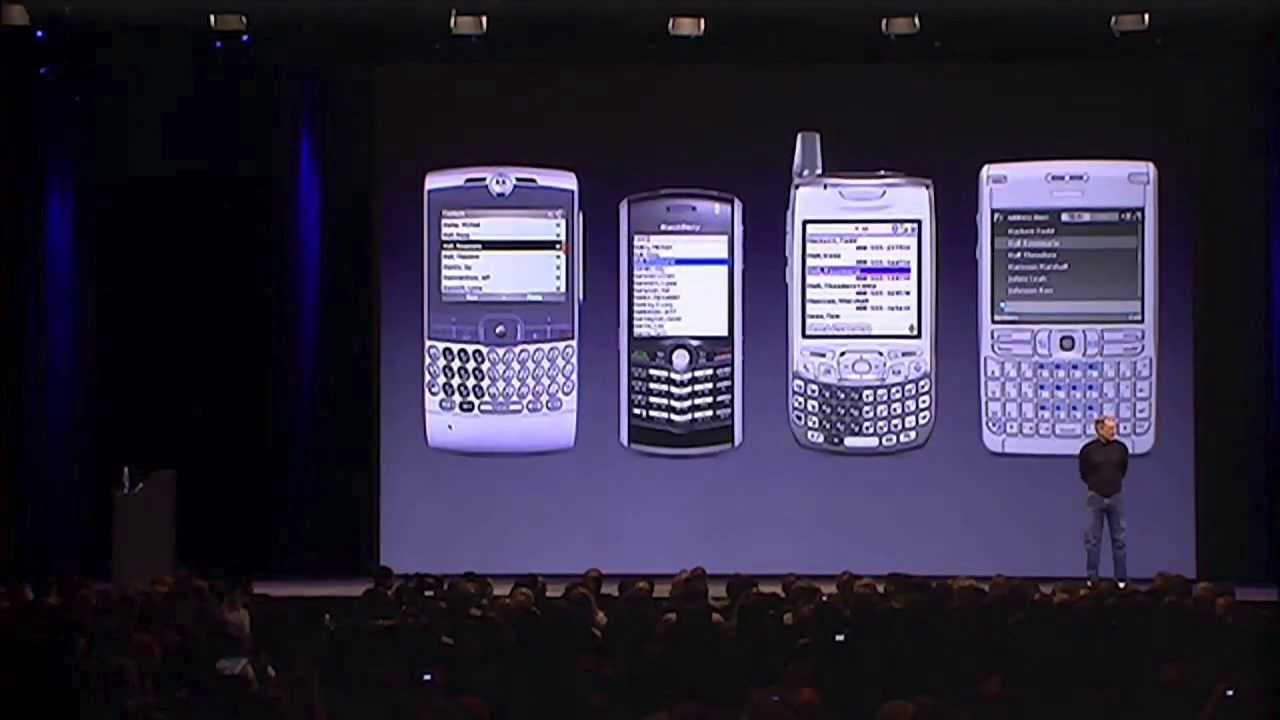
Steve Jobs introduced the original iPhone, unifying a widescreen touch iPod, a revolutionary mobile phone, and a breakthrough internet communicator into a single device running desktop-class OS X. (0:00)
The iPhone features a 3.5-inch 160 ppi display, patented Multi-Touch gesture navigation eliminating physical keyboards and styluses, and integrated proximity, ambient light, and accelerometer sensors. (5:00)
Pricing was set at $499 for the 4 GB model and $599 for the 8 GB model under a multi-year exclusive US partnership with Cingular Wireless, with a launch scheduled for June 2007. (65:00)
Apple established a commercial target of capturing 1% of the global mobile handset market in 2008 (10 million units) and officially dropped 'Computer' from its corporate name to become Apple Inc. (73:55)
Detailed notes
## Background
This video was published on YouTube by Protectstar Inc. on May 16, 2013. According to the description, it features the full 80-minute MacWorld 2007 keynote where Steve Jobs introduced the original iPhone, looking back at the historic milestone following the news of Jobs's resignation as Apple CEO.
## TL;DR
At the MacWorld 2007 keynote, Steve Jobs unveils the original iPhone by presenting three revolutionary devices—a widescreen touch iPod, a mobile phone, and an internet communicator—unified into a single multi-touch product running OS X. Across extensive live stage demonstrations, Jobs showcases fluid kinetic scrolling, Cover Flow, visual voicemail, desktop-class Safari web browsing, Google Maps, and multi-app multitasking. Industry leaders Eric Schmidt of Google, Jerry Yang of Yahoo!, and Stan Sigman of Cingular join the stage to detail the collaborative software and cellular partnership supporting the hardware. Jobs wraps up by revealing the $499 and $599 price points, outlining a target to capture 1% of the global mobile market, and officially renaming Apple Computer, Inc. to Apple Inc.
## Atmosphere & style
The presentation crackles with electric anticipation, theatrical pacing, and palpable awe as the audience repeatedly erupts into cheers and spontaneous applause at breakthroughs like slide-to-unlock and pinch-to-zoom. Jobs commands the stage with charismatic precision, effortless humor—such as placing an impromptu prank call to Starbucks for 4,000 lattes—and infectious showmanship. Even when a slide clicker temporarily fails backstage, he breezily pivots into a nostalgic teenage prank story with Steve Wozniak, maintaining total command over the room. The emotional arc builds from a dramatic multi-product tease to a triumphant, historic inflection point, evoking the rare feeling of watching modern computing history shift in real time.
## Bulletin
- [00:00](https://www.youtube.com/watch?v=VQKMoT-6XSg&t=0s) Steve Jobs introduced the original iPhone, unifying a widescreen touch iPod, a revolutionary mobile phone, and a breakthrough internet communicator into a single device running desktop-class OS X.
- [05:00](https://www.youtube.com/watch?v=VQKMoT-6XSg&t=300s) The iPhone features a 3.5-inch 160 ppi display, patented Multi-Touch gesture navigation eliminating physical keyboards and styluses, and integrated proximity, ambient light, and accelerometer sensors.
- [01:05:00](https://www.youtube.com/watch?v=VQKMoT-6XSg&t=3900s) Pricing was set at $499 for the 4 GB model and $599 for the 8 GB model under a multi-year exclusive US partnership with Cingular Wireless, with a launch scheduled for June 2007.
- [01:13:55](https://www.youtube.com/watch?v=VQKMoT-6XSg&t=4435s) Apple established a commercial target of capturing 1% of the global mobile handset market in 2008 (10 million units) and officially dropped 'Computer' from its corporate name to become Apple Inc.
## Key takeaways
- [00:00](https://www.youtube.com/watch?v=VQKMoT-6XSg&t=0s) Jobs frames the iPhone alongside the 1984 Macintosh and 2001 iPod as a category-defining leapfrog product that reinvents the phone.
- [05:00](https://www.youtube.com/watch?v=VQKMoT-6XSg&t=300s) Contemporary smartphones are flawed by permanent plastic keyboards and fixed buttons taking up 40% of the hardware surface that cannot adapt to future software needs.
- [05:00](https://www.youtube.com/watch?v=VQKMoT-6XSg&t=300s) Multi-Touch interface technology replaces styluses with human fingers, supporting multi-finger gestures, fluid kinetic scrolling, and palm rejection.
- [05:00](https://www.youtube.com/watch?v=VQKMoT-6XSg&t=300s) The iPhone runs a mobile version of OS X, bringing desktop-grade preemptive multitasking, advanced power management, Core Animation, and native graphics to a handset.
- [10:00](https://www.youtube.com/watch?v=VQKMoT-6XSg&t=600s) Hardware integration includes an 11.6 mm thin chassis, a 2.0-megapixel camera, and three hidden sensors: an accelerometer, a proximity sensor, and an ambient light sensor.
- [17:30](https://www.youtube.com/watch?v=VQKMoT-6XSg&t=1050s) The media experience features interactive Cover Flow browsing in landscape mode and double-tap aspect ratio toggling for widescreen video.
- [21:00](https://www.youtube.com/watch?v=VQKMoT-6XSg&t=1260s) Visual Voicemail transforms traditional sequential telephone voice prompts into a random-access inbox where users can listen to messages in any order.
- [35:00](https://www.youtube.com/watch?v=VQKMoT-6XSg&t=2100s) Apple implemented desktop-grade web browsing via Safari and rich HTML email, discarding stripped-down WAP protocols and partner-locking with Yahoo for free push IMAP mail.
- [50:35](https://www.youtube.com/watch?v=VQKMoT-6XSg&t=3035s) Google CEO Eric Schmidt joined the presentation to showcase integrated Google Maps and discuss the modern architecture connecting powerful client devices with cloud data.
- [56:45](https://www.youtube.com/watch?v=VQKMoT-6XSg&t=3405s) iPhone supports seamless background multitasking, allowing active voice calls to continue while sending photos or browsing movie schedules on the web.
- [01:02:15](https://www.youtube.com/watch?v=VQKMoT-6XSg&t=3735s) Battery specifications deliver 5 hours of talk time, video playback, or web browsing, alongside 16 hours of continuous audio playback.
- [01:05:00](https://www.youtube.com/watch?v=VQKMoT-6XSg&t=3900s) The device was priced at $499 (4 GB) and $599 (8 GB) on two-year contracts, backed by over 200 patent filings to defend Apple's proprietary innovations.
- [01:07:20](https://www.youtube.com/watch?v=VQKMoT-6XSg&t=4040s) Cingular CEO Stan Sigman announced a multi-year carrier partnership built on co-engineered network features like Visual Voicemail rather than an MVNO model.
- [01:13:55](https://www.youtube.com/watch?v=VQKMoT-6XSg&t=4435s) With worldwide handset sales reaching nearly 1 billion units in 2006, Apple set an initial strategic goal of securing 1% market share (10 million units) in 2008.
- [01:17:10](https://www.youtube.com/watch?v=VQKMoT-6XSg&t=4630s) To reflect its expanded portfolio across the Mac, iPod, Apple TV, and iPhone, Apple Computer, Inc. formally changed its corporate name to Apple Inc.
## Detailed walkthrough
### [00:00](https://www.youtube.com/watch?v=VQKMoT-6XSg&t=0s) Introducing Three Revolutionary Products in One Device
Steve Jobs opens the presentation by declaring that this is a day he has been looking forward to for two and a half years. Reflecting on company history, he observes that while an individual is fortunate to work on just one revolutionary product that changes everything in their career, Apple has been fortunate enough to introduce a few. In 1984, Apple introduced the Macintosh, which didn't merely change Apple but transformed the entire computer industry. Later, in 2001, Apple introduced the first iPod, changing not just personal music listening habits, but reshaping the entire music industry. Jobs then reveals that Apple is introducing three revolutionary products of this caliber all at once: a widescreen iPod with touch controls, a revolutionary mobile phone, and a breakthrough internet communications device.
Repeating the trio—an iPod, a phone, and an internet communicator—Jobs asks the energized crowd, “Are you getting it?” He delivers the central reveal: these are not three separate devices, but rather one single device named iPhone, declaring boldly, “Today, Apple is going to reinvent the phone.” Addressing the existing mobile landscape, Jobs critiques the category known as smartphones, typically defined as devices combining phone capabilities with email and a rudimentary, “baby internet.” Plotting these devices on a business-school matrix comparing "smart" against "easy to use," he points out that standard cell phones are neither smart nor easy to use, while smartphones are somewhat smarter but actually far harder to use and overly complicated for basic tasks. Apple’s objective is to build a leapfrog device that is substantially smarter than any mobile product ever created while remaining super easy to use.
```mermaid
flowchart TD
accTitle: The iPhone Product Convergence
accDescr: Diagram illustrating three distinct device concepts merging into a single unified product called the iPhone.
subgraph ThreeProducts["Three Breakthrough Products"]
A["Widescreen iPod with Touch Controls"]
B["Revolutionary Mobile Phone"]
C["Breakthrough Internet Communications Device"]
end
ThreeProducts --> D["iPhone: A Single Leapfrog Device"]
```
[05:00](https://www.youtube.com/watch?v=VQKMoT-6XSg&t=300s) The Multi-Touch User Interface and OS X Architecture
Analyzing the fundamental design flaws of existing smartphones—specifically calling out the Motorola Q, the BlackBerry, the Palm Treo, and the Nokia E62—Jobs identifies the core problem in the bottom 40% of the hardware. Every one of these devices features fixed plastic keyboards and hardwired control buttons that remain whether an application needs them or not. Because these physical buttons cannot dynamically adapt to different applications or accommodate new software updates devised six months later, the physical interfaces are inherently constrained. Jobs explains that Apple solved this identical design problem two decades earlier on desktop computers using a bitmap display that could render any interface, paired with a pointing device: the mouse.
To translate this concept to mobile without encumbering users with a physical mouse or a stylus, Apple discarded mechanical controls entirely in favor of a full-face screen. Jobs openly mocks the concept of a stylus, stating, “Who wants a stylus? You have to get them and put them away and you lose them. Yuck. Nobody wants a stylus.” Instead, the iPhone relies on the human hand, using a patented technology called Multi-Touch that works reliably without styluses, rejects unintended touches, and supports multi-finger gestures. Just as the mouse empowered the Mac and the click wheel defined the iPod, Multi-Touch forms the interface pillar for the iPhone. On the software side, Jobs rejects the "baby software" common on other handsets, announcing that the iPhone runs OS X. By leveraging a real desktop-class operating system, the iPhone inherits preemptive multitasking, advanced networking, built-in power management, robust security, Cocoa, Core Animation, and native audio/video handling.
Jobs underscores Apple's hardware-software philosophy by citing computing pioneer Alan Kay: “People who are really serious about software should make their own hardware.”
- **Flaws of traditional smartphones**: Fixed hardware buttons; interfaces cannot update or adapt dynamically to new software features.
- **Multi-Touch breakthrough**: Replaces styluses with finger input; supports complex multi-finger gestures and sophisticated palm/accidental touch rejection.
- **Desktop-class foundation**: OS X provides native graphics, Core Animation, advanced power management, and desktop-grade application capability.
[10:00](https://www.youtube.com/watch?v=VQKMoT-6XSg&t=600s) iTunes Synchronization, Industrial Hardware Design, and Advanced Sensors
Building upon the success of the iPod ecosystem, Jobs highlights that Apple is set to ship its 100 millionth iPod during the year, meaning tens of millions of users are already accustomed to syncing content through iTunes. The iPhone operates on this exact same workflow: docking the device seamlessly syncs media (music, audiobooks, podcasts, movies, TV shows, and music videos) alongside personal data, including contacts, calendars, photos, notes, browser bookmarks, and full email account configurations directly from a PC or Mac.
Jobs moves to a physical breakdown of the iPhone's industrial design, describing it as an elegant device built specifically for the hand. The front surface is dominated by a 3.5-inch display boasting a density of 160 pixels per inch—the highest resolution screen Apple had shipped to date—accompanied by only a single physical button on the front: the Home button, designed to return the user home from anywhere within the operating system. Measuring just 11.6 millimeters thick, the iPhone is thinner than any contemporary competitor, including the Q and the BlackJack. Jobs details the exterior layout and unveils three hidden hardware sensors embedded into the chassis:
| Component / Side | Features & Technical Specifications |
|:--- |:--- |
| **Front** | 3.5-inch high-resolution display (160 ppi), single physical "Home" button. |
| **Side & Profile** | 11.6 mm thickness, ring/silent toggle switch, volume up/down controls. |
| **Rear** | Integrated 2.0-megapixel camera. |
| **Top** | 3.5 mm standard headset jack, SIM card tray, sleep/wake power button. |
| **Bottom** | Built-in speaker, microphone, Apple 30-pin iPod connector interface. |
| **Proximity Sensor** | Detects ear proximity to turn off screen and touch digitizer, saving power and preventing accidental face inputs. |
| **Ambient Light Sensor** | Reads surrounding lighting to dynamically adjust backlight intensity, reducing battery drain. |
| **Accelerometer** | Senses orientation shifts to seamlessly alternate between portrait and landscape viewports. |
Returning to the three pillar capabilities, Jobs selects the iPod experience to demonstrate first. He emphasizes how users can literally "touch their music," view widescreen video, browse high-resolution album artwork, utilize the integrated speaker, and navigate an album collection using Cover Flow for the first time ever on an iPod before transitioning to the live demo.
[15:00](https://www.youtube.com/watch?v=VQKMoT-6XSg&t=900s) The Slide to Unlock and the iPod Experience
Steve Jobs begins the live demonstration by explaining the stage setup. Because standard mobile devices cannot output video directly, Apple modified these specific demonstration units with internal boards and video-out cables connected directly to the venue’s overhead projectors. To give the audience an unobstructed view of how multi-touch works, Jobs pairs the direct feed with an overhead picture-in-picture camera tracking his finger. He presses the sleep/wake button on top of the phone, wakes the display, and slides his finger across the glass to unlock it. He repeats the action for emphasis, explaining the deliberate engineering choice behind the gesture: “We wanted something you couldn't do by accident in your pocket and just slide it across. Boom.”
Jobs then dives into the iPod experience on iPhone by tapping the icon in the lower right-hand corner. The bottom interface houses five primary navigation buttons: Playlists, Artists, Songs, Videos, and More. Demonstrating how navigation works without a mechanical scroll wheel or buttons, Jobs flicks his finger across the screen to glide through an alphabetical list of artists, pointing out the subtle physics at play: “I just take my finger, and I scroll. That's it. Isn't that cool? A little rubber banding up when I run off the edge.”
Tapping into The Beatles, he pulls up *Sgt. Pepper's Lonely Hearts Club Band* and starts playing "With a Little Help from My Friends." As the album art fills the screen, Jobs points out the on-screen volume slider and taps a small icon in the upper right-hand corner. The album cover smoothly flips around to display the full track listing and star ratings on the reverse side. With a single tap, he switches playback to "Lovely Rita," toggles the rating arrows to make it a five-star album, and flips the artwork back around.
```mermaid
flowchart TD
accTitle: iPod Navigation and Interaction Flow on iPhone
accDescr: Flow diagram showing navigation paths in the iPod application on iPhone from the home screen to playback and Cover Flow.
subgraph Home ["Home & Navigation"]
A["Home Screen"] -->|"Tap iPod Icon"| B["iPod View"]
B -->|"Bottom Tab Bar"| C["Playlists / Artists / Songs / Videos / More"]
end
subgraph Browsing ["Browsing & Selection"]
C -->|"Touch & Flick"| D["Smooth Kinetic Scrolling with Edge Rubber-Banding"]
D -->|"Tap Artist / Album"| E["Track Listing View"]
end
subgraph Playback ["Media Playback & Views"]
E -->|"Tap Track"| F["Now Playing Screen with Album Art"]
F -->|"Tap Corner Flip Button"| G["Reverse Tracklist & Star Ratings"]
F -->|"Rotate to Landscape"| H["Cover Flow Browsing"]
end
```
[17:30](https://www.youtube.com/watch?v=VQKMoT-6XSg&t=1050s) Cover Flow and Video Playback
Holding the phone in portrait orientation, Jobs physically rotates the unit into landscape mode. The interface instantly transitions into Cover Flow, drawing gasps and applause from the audience. Jobs thumbs through virtual three-dimensional album jackets, stopping at Bob Dylan to launch "Like a Rolling Stone," and then flips effortlessly to Green Day's *American Idiot*, queuing up "Boulevard of Broken Dreams." He demonstrates that album covers can be flipped with a tap to inspect tracks directly within Cover Flow before being flipped back into the browsing stack.
Jobs returns to the standard iPod view to show the rest of the media categories, including audiobooks and compilations, before shifting focus to video playback. He taps the Videos tab to reveal loaded content: a video podcast, a music video, a television episode, and a feature film. To showcase widescreen television playback, Jobs plays an episode of NBC’s *The Office*, featuring Jim Halpert's prank sending fax messages from "future Dwight."
Transitioning from television to cinema, Jobs opens *Pirates of the Caribbean: Dead Man's Chest*. He double-taps the screen to alternate seamlessly between the movie's native widescreen aspect ratio (with letterboxing) and a cropped full-screen view that fills the entire display, highlighting how the on-screen playback controls disappear when not in use.
- **Display density:** 160 pixels per inch (ppi) resolution designed specifically for clear text and portable video playback.
- **Orientation awareness:** Automatic switching between vertical lists and horizontal Cover Flow enabled by internal accelerometers.
- **Aspect ratio toggling:** Double-tap gesture enables instant zooming between native letterbox and full-screen aspect ratios.
[21:00](https://www.youtube.com/watch?v=VQKMoT-6XSg&t=1260s) Reinventing the Phone and Visual Voicemail
Reflecting on the iPod functionality he just showed, Jobs shares an anecdote from inside Apple: “You know, I was showing this to somebody... who'd never seen this before inside Apple. And I finished the demo, I said, 'What do you think?' He told me this. He said, 'You had me at scrolling.'” With music and video established, Jobs turns to the second pillar of the product: building a revolutionary mobile phone.
Jobs argues that traditional mobile phones fail at their most basic task. Users typically have to dial numbers manually or rely on their recent calls list as a makeshift address book because existing mobile address books are clunky and limited. The iPhone solves this by synchronizing contacts directly from a Mac or PC via iTunes, carrying full contact profiles—including multiple phone numbers, physical addresses, and email accounts—wherever the user goes.
Jobs also tackles the frustration of traditional sequential voicemail, contrasting it with the iPhone’s new random-access paradigm. Visual Voicemail treats voice recordings like an email inbox, allowing users to view caller information and jump straight to the exact message they want to hear.
- **Cellular capabilities:** Quad-band GSM phone with EDGE cellular data, standardizing on the most popular international mobile carrier standard.
- **Wireless connectivity:** Integrated Wi-Fi and Bluetooth 2.0 + EDR (Enhanced Data Rate).
- **Core feature lineup:** Jobs outlines a live walkthrough of four core phone applications: Phone, Photos, Calendar, and SMS messaging.
[25:00](https://www.youtube.com/watch?v=VQKMoT-6XSg&t=1500s) The Phone App and the First Public Call
Jobs opens the Phone application via its icon in the bottom left-hand corner of the Home screen, highlighting the five bottom tabs: Favorites, Recents, Contacts, Keypad, and Voicemail. In Contacts, he scrolls down to Apple’s head of design, Jony Ive, and taps Ive's mobile number to initiate the first public phone call ever placed on an iPhone.
Once the call connects, Jobs turns on the speakerphone. Ive’s voice comes through clearly: “Hey Johnny, how you doing?” Jobs asks. Ive replies, “I'm good. How are you doing?” Jobs reminisces about the project's secretive timeline: “Well, it's been two and a half years and I can't tell you how thrilled I am to make the first public phone call with iPhone.”
As they talk, a second incoming call from Apple Senior Vice President of Worldwide Product Marketing Phil Schiller appears on the screen. Jobs places Ive on hold with a single tap to take Schiller’s call. He then brings Ive back onto the line and merges both callers into a three-way conference call. After greeting both men, Jobs demonstrates the interface's flexibility by taking Ive private again, leaving Schiller on hold. Wrapping up the call, Jobs asks Ive for his impressions, to which Ive responds: “It's not too shabby, is it?” Jobs ends the call with Ive, un-holds Schiller to say goodbye, and hangs up.
[27:30](https://www.youtube.com/watch?v=VQKMoT-6XSg&t=1650s) Favorites, Keypad, and Visual Voicemail in Action
Moving on to phone management, Jobs walks through the Favorites menu, designed for one-touch dialing of frequently called numbers. He taps the plus button in the upper right corner, scrolls to Phil Schiller, and selects his work number to instantly add him to the list. Tapping the Edit button, Jobs demonstrates how entries can be dragged and rearranged vertically, or deleted outright, removing an outdated contact listing for Tony Fadell.
Jobs examines the Recents tab, pointing out that incoming and placed calls appear in a unified list while missed calls stand out in red text, filterable via a dedicated button at the top. Moving to the Keypad tab, he demonstrates how the touch interface handles manual dialing. As he enters digits for Apple's main campus switchboard, the application automatically formats standard domestic telephone numbers; when extra digits are added for international numbers, the on-screen font dynamically shrinks to keep the entire number visible on a single line.
Finally, Jobs demonstrates Visual Voicemail. Instead of calling an interactive voice response system and wading through numeric menus, the screen presents a visual queue of voicemails with caller names, dates, and durations. Jobs selects a message left by former U.S. Vice President and Apple board member Al Gore. Gore’s voice plays through the speaker: “Hi Steve, it's Al. Wish I could be there today. I'm here in Nashville training people to give my slideshow. But I wanted to say congratulations on the iPhone.”
[30:00](https://www.youtube.com/watch?v=VQKMoT-6XSg&t=1800s) Visual Voicemail, SMS Conversations, and the Keyboard
Steve Jobs wraps up his demonstration of Visual Voicemail, highlighting how it frees users from traditional sequential audio prompts. After hearing a message from Al Gore, he decides to play a voicemail from Tim Cook instead: *"Hi, Steve. It's Tim. I've got the results from last quarter. Revenue was—you know, I'll just wait and tell you when I see you in person. Good luck on the keynote. See you there."* Jobs emphasizes the complete autonomy the interface provides: “And so I've got voicemail, how I want to listen to it, when I want to listen to it, in any order I want to listen to it, with visual voicemail.” If he wants to return a call immediately, he can simply hit the call back button right on the screen.
```mermaid
flowchart LR
accTitle: Phone Application Capabilities
accDescr: Highlights core capabilities of the iPhone phone package demonstrated by Steve Jobs.
subgraph PhonePkg["Phone Package"]
VM["Visual Voicemail<br/>(Random access audio)"]
SMS["SMS Messaging<br/>(Threaded chat sessions)"]
Photo["Photos App<br/>(Gestures, pinch, wallpaper)"]
end
VM --> PhonePkg
SMS --> PhonePkg
Photo --> PhonePkg
```
Moving into SMS messaging, Jobs taps the SMS icon in the upper-left corner of the screen to demonstrate threaded, multi-session messaging. Instead of managing isolated SMS texts, users can maintain ongoing conversation histories with contacts like Eddy Cue and Phil Schiller. Jobs opens a chat thread from Phil Schiller:
- Phil asks: *"Still on for dinner tonight?"*
- Steve replies: *"Absolutely."*
- Phil writes: *"Your turn to pick. I've picked sushi, Ron. How about 7 o'clock tonight?"*
To respond, Jobs uses the virtual touchscreen keyboard, praising its speed, predictive assistance, and error correction. While acknowledging human mistakes, he argues: “It does error prevention and correction—not that I won't make some, I probably will, but it's actually really fast to type on. It's faster than all these little plastic keyboards and all these smartphones.” He types out *"Sounds great. See you there,"* sends the text, and notes that incoming replies will trigger notifications and badges so conversations can resume right where they left off.
---
[32:41](https://www.youtube.com/watch?v=VQKMoT-6XSg&t=1961s) Photos, Multi-Touch Pinch Zoom, and Wallpaper
Jobs moves on to the third core part of the phone package: the Photos application, paired with the built-in 2-megapixel camera. Calling it the coolest photo management app ever on a mobile device, he opens the photo library and flicks through images with a finger. He opens an album titled "Italy" and demonstrates navigating horizontally between photos with simple finger swipes. When coming across a landscape photo, rotating the physical device reorients the picture into widescreen mode instantly, where swiping gestures continue to work seamlessly.
Jobs then demonstrates the "pinch" multi-touch gesture to resize photos. By placing two fingers on the glass and spreading them apart or drawing them together, users can dynamically zoom in, zoom out, stretch the frame, or reposition the picture. He takes a photo, centers it using gestures, and taps the button to set it as the device wallpaper. From that point on, whenever the device wakes from sleep or receives a call, that custom wallpaper is displayed. Summarizing the telephony suite—visual voicemail, easy contact scrolling, SMS texting, and photo handling—Jobs declares: “And I think when you have a chance to get your hand on it, you'll agree we have reinvented the phone.”
---
[35:00](https://www.youtube.com/watch?v=VQKMoT-6XSg&t=2100s) The Breakthrough Internet Communicator: Safari and Push Email
Turning to the third pillar of the iPhone—a breakthrough Internet communications device—Jobs contrasts Apple’s vision with the limited web and email experiences typical of contemporary mobile phones. Instead of stripped-down WAP browsers or rudimentary mail, iPhone integrates rich HTML email compatible with standard IMAP and POP3 services, fully functional Google Maps (with satellite views, directions, and live traffic), dashboard widgets (Weather and Stocks), and Safari: “We wanted the best web browser in the world on our phone, not a baby web browser or a WAP browser, a real web browser—and we picked the best one in the world: Safari.” The device automatically switches between cellular Edge and Wi-Fi networks in the background without requiring user intervention.
```mermaid
flowchart TD
accTitle: Internet Communications Architecture
accDescr: Shows the network connectivity and service integrations of iPhone's internet package.
subgraph Connectivity["Automatic Network Handling"]
WiFi["Wi-Fi (Seamless Auto-Switch)"]
EDGE["Cellular EDGE"]
end
subgraph CoreServices["Internet Package Apps"]
Safari["Safari Browser (Full HTML)"]
Mail["Rich HTML Push Mail"]
Maps["Google Maps & Widgets"]
end
Connectivity --> CoreServices
```
Jobs details the email ecosystem, noting that IMAP is superior because folders and messages remain synchronized on the central server across devices, supported by services like.Mac, Microsoft Exchange, and Yahoo Mail, while POP3 is supported for services like Google Gmail, AOL, and traditional ISPs. He announces a partnership with Yahoo, the largest email provider worldwide with over 250 million users: “And today we are announcing with Yahoo that they are going to provide free push IMAP email to all iPhone customers—so this isn't just IMAP email, it is push IMAP email.” Incoming messages are instantly pushed directly to the handset just like on a corporate BlackBerry, but at no additional charge.
---
[37:34](https://www.youtube.com/watch?v=VQKMoT-6XSg&t=2254s) Demonstrating Desktop-Class Mail
Jobs opens the Mail application—the second icon from the bottom left—running live off a Yahoo IMAP server in the cloud. He scrolls through actual messages to show inline photography and formatted rich text. First, he displays a baby announcement with photos from James Vincent, followed by a message from Phil Schiller noting his wife loved a gift. Next, he opens an email containing a shopping list and directions to dinner at Sushi Ran. The iPhone operating system automatically detects and underlines phone numbers in blue within email text; Jobs taps the link, demonstrating that a single touch immediately dials the restaurant, before ending the test call.
He also opens an email from Apple marketing team member Ken Bereskin, featuring high-resolution photos of penguins taken during a trip to Antarctica. Jobs shows that users can toggle between a full-screen message reading view and a desktop-style split view, allowing users to scroll through the inbox at the top while previewing individual email contents below. To show message creation, he taps the compose button: the virtual keyboard slides up automatically, address auto-completion fills in Phil Schiller and Scott Forstall as he types the first few letters, and he sends a note regarding dinner. Jobs emphasizes: “So that is Mail. Full desktop-class email running on a mobile device.”
---
[40:48](https://www.youtube.com/watch?v=VQKMoT-6XSg&t=2448s) Full Safari Web Browsing and Dashboard Widgets
Jobs opens the Safari browser to demonstrate real web browsing over Wi-Fi, loading the full desktop edition of *The New York Times* rather than a crippled mobile page. When the broad layout appears, he flips the device into landscape mode, showing the columns dynamically reformatting. Because desktop text can be tiny on a handheld screen, users can pinch-zoom or simply double-tap any column or image to automatically zoom and snap that specific content to fill the screen width. Double-tapping again smoothly returns to the full-page overview.
```mermaid
flowchart LR
accTitle: Safari Multi-Page Workflow
accDescr: Flowchart illustrating browsing, zooming, and managing multiple web tabs in Safari.
A["Load Full Desktop Site"] --> B["Landscape Rotation"]
B --> C["Double-Tap Column Zoom"]
C --> D["Multi-Page Tab Switcher"]
D --> E["Bookmarks / New Sites"]
```
To demonstrate handling multiple active pages, Jobs taps the multi-page manager button in the lower-right corner, shrinks the current view, and opens an Amazon bookmark. He navigates to Amazon's DVD bestsellers:
- He checks the top sellers, quipping that he likes when Disney titles lead.
- He spots Al Gore’s documentary: *"Oh look, Al's An Inconvenient Truth is number one."*
- He browses other titles on the chart, noting *Grey's Anatomy* and *Pirates of the Caribbean*.
He flips between open tabs, zooms into a picture on *The New York Times*, and closes pages with a tap on the standard "x" button. Reflecting on existing mobile alternatives, Jobs remarks: “If you've ever used what's called a web browser on a mobile phone, you'll know how incredible this is. I hope you never really know, because it's—it's bad out there today. And this is a revolution of the first order to really bring the real Internet to your phone.” He then transitions to the built-in Widgets, opening the Stocks widget to pull live market data from the web, playfully noting that Apple's stock is up.
[45:00](https://www.youtube.com/watch?v=VQKMoT-6XSg&t=2700s) Stocks, Weather Widgets, and Google Maps with the Prank Latte Call
Steve Jobs continues demoing the widgets built into iPhone, starting with Stocks. He shows how easy it is to check percentage changes and review historical graphs directly on the screen. From Stocks, he swipes over to the Weather widget to see the local forecast: it is 49 degrees outside in San Francisco, with an expected high of 61 degrees, prompting Jobs to joke, “We'll just stay in here until it warms up.” He flips through several configured cities to showcase multi-location tracking: night has fallen in Paris (where it is surprisingly warmer than San Francisco), Aspen is expecting snow later in the week, and Hawaii is unfortunately seeing rain.
```mermaid
flowchart TD
accTitle: Google Maps Integration Workflow on iPhone
accDescr: Flowchart illustrating user interactions with Google Maps on the original iPhone, from location search to calling a business and switching map layers.
subgraph SearchFlow["Location & Search"]
A["Open Maps App"] --> B["Moscone West Bookmark"]
B --> C["Search for 'Starbucks'"]
C --> D["View Search Results Pin/List"]
end
subgraph ActionFlow["Actions & Views"]
D --> E["Select Specific Starbucks"]
E --> F["One-Tap Phone Call (Prank Order)"]
D --> G["Switch to Satellite View"]
G --> H["Double-Tap/Pinch Zoom Landmarks"]
end
```
Moving on to the grand finale of the mobile Internet segment, Jobs announces what he calls “something truly remarkable, which is Google Maps on iPhone.” He opens the Maps application, which initializes onto North America, and immediately navigates to Moscone West where the keynote is taking place. Wanting a cup of coffee afterwards, he runs a search for "Starbucks," generating pushpins across the city map. He taps on a specific location, pulls up its listing, and taps the phone number to place a live call over speakerphone:
> “Yes, I'd like to order 4,000 lattes to go, please. No, just kidding. Wrong number. Thank you. Bye-bye.”
The audience bursts into laughter and applause at the prank call. Jobs then demonstrates map navigation, zooming in by pinching or double-tapping to fetch progressively higher-resolution map tiles. He jumps through a series of bookmarks to showcase the brand-new Satellite imagery feature:
- **Washington Monument:** He taps the "Satellite" button at the bottom of the screen to swap map tiles for aerial photography, zooming in until individual people strolling around the base of the obelisk are clearly visible on the phone.
- **Eiffel Tower:** He navigates to Paris to view the iconic iron tower from above, pointing out visitors clustered on the grounds.
- **Roman Colosseum:** Pushing past the limits of standard street mapping into high-resolution satellite imagery, Jobs displays Rome's ancient arena in crisp overhead detail, marveling: “Look at that. That's the Colosseum. Unbelievable. Right on our phone.”
---
[48:38](https://www.youtube.com/watch?v=VQKMoT-6XSg&t=2918s) Recapping the Breakthrough Internet Communicator
Jobs summarizes the core strengths of the iPhone's third tentpole identity: the breakthrough Internet communicator. He recaps the landmark elements: rich HTML email on a mobile device, desktop-class web browsing with Safari, the best mobile implementation of Google Maps on the planet, desktop widgets, and flexible networking over both EDGE cellular data and Wi-Fi.
He emphasizes how these components change mobile computing forever, highlighting the free push IMAP email partnership with Yahoo, support for standard IMAP and POP3 services, advanced touch-typing, and the power to read unmodified, full-layout desktop web pages in either portrait or landscape orientation:
> “It's the internet in your pocket for the first time ever.”
---
[50:35](https://www.youtube.com/watch?v=VQKMoT-6XSg&t=3035s) Eric Schmidt on "Apple Goo" and Modern Internet Architecture
Jobs remarks that nobody can think of the Internet without thinking of Google, explaining that Apple worked intimately with them to build Google Search directly into Safari's toolbar and to engineer the iPhone's Google Maps client. He invites Google CEO and Apple board member Dr. Eric Schmidt to the stage to speak about the partnership.
Schmidt congratulates Jobs on the announcement and draws big laughs by joking about board synergy: “I thought, you know, if we just sort of merge the companies, we could call them Apple Goo. But I'm not a marketing guy.” Shifting to technology, Schmidt reflects on the architectural power of the modern web:
> “What I like about this new device and the new architecture of the internet is that you can actually merge without merging.”
Schmidt explains that modern internet architectures allow Apple's exceptional client engineering team to merge seamlessly with the cloud data services and open protocols provided by Google. Rather than burdening users with backend complexity, the iPhone effortlessly marries cloud data (such as maps, imagery, and partner information) with the embedded Safari engine. Schmidt predicts this marks the beginning of an era where powerful cloud computing platforms stream HTML, XML, and sophisticated services to a new generation of mobile client devices. Before leaving the stage, he predicts the iPhone is going to be "hot," to which Jobs responds with a smile: “As a board member, you'll get one of the first ones.”
---
[53:23](https://www.youtube.com/watch?v=VQKMoT-6XSg&t=3203s) Jerry Yang Introduces Yahoo Push Email and Mobile Services
Jobs notes that the other company synonymous with the Internet is Yahoo. Just like Google, Yahoo search is integrated into Safari as an optional engine with its own dedicated button. Furthermore, Apple and Yahoo teamed up to offer free push IMAP email to iPhone owners. Jobs introduces Yahoo co-founder and "Chief Yahoo" Jerry Yang.
Yang opens with self-deprecating banter, remarking: “I'm not a board member of Apple, but I would love to have one of these, too, obviously.” He expresses Yahoo's pride in partnering with Apple to launch free push IMAP email on the iPhone. Yang discusses Yahoo's broader suite of mobile initiatives unveiled that week, expressing eagerness to bring newly announced platforms like Yahoo Go and Yahoo oneSearch to the iPhone hardware.
[05:00](https://www.youtube.com/watch?v=VQKMoT-6XSg&t=300s) Yahoo! Integration and Putting the Internet in Your Pocket
Jerry Yang concludes his presentation by outlining how Yahoo! is tailoring web services for mobile devices. Rather than forcing users through traditional, clunky search result pages, Yahoo! aggregates essential information into a concise view—searching for a city like San Francisco immediately pulls together local news, weather, and maps in one unified place. Turning to email, Yang emphasizes that mail is the critical phone application, noting that Yahoo! Mail on iPhone delivers full web services, calendar integration, address book syncing, and spam protection. Summarizing the breakthrough, Yang remarks: “Just think, it's basically like having a Blackberry without the Exchange server.” Yang hands the stage back to Jobs after expressing his excitement about translating Web 2.0 services, top-tier hardware, and great UI into a seamless mobile experience.
Taking back the stage, Steve Jobs reflects on the strategic significance of partnering with Silicon Valley neighbors Google and Yahoo! to create a device that unifies an internet communicator, an iPod, and a mobile phone. Jobs expresses his gratitude to both teams: “And we've been able to work with these guys really closely, and it's been an incredible pleasure to work on this great technology and bring it to everybody in iPhone. So thank you guys so much. You've really helped us put the internet in your pocket.”
[56:45](https://www.youtube.com/watch?v=VQKMoT-6XSg&t=3405s) The Integrated Real-Life Scenario: Music, Calls, Photos, and the Web
```mermaid
flowchart TD
accTitle: Real-Life Multitasking Scenario Flow
accDescr: Sequence showing iPhone smoothly transitioning from music playback to an incoming phone call, background photo sharing, web browsing, and back to music.
subgraph Media ["1. Audio Playback"]
A["Listening to iPod<br/>(Red Hot Chili Peppers)"]
end
subgraph Telephony ["2. Call Handling"]
B["Incoming Call Fades Music<br/>(Phil Schiller on screen)"]
C["Tap Green Bar to Return<br/>& End Call"]
end
subgraph Multitask ["3. Background Multitasking"]
D["Press Home Button<br/>(Call stays active)"]
E["Photos App:<br/>Email Hawaii photo to Phil"]
F["Safari App:<br/>Check Fandango for movies"]
end
A --> B
B --> D
D --> E
E --> F
F --> C
C --> A
```
To demonstrate how the three core pillars of iPhone function together seamlessly, Jobs launches into a live, unscripted real-world walkthrough. He opens the iPod app and selects a song by the Red Hot Chili Peppers. While the track is playing, an incoming call interrupts: the music smoothly fades out, the screen transitions, and Phil Schiller’s name and contact photo appear. Jobs answers the call: “Howdy.” Schiller explains that he wants a copy of a photo Jobs took in Hawaii to use as his wallpaper.
Jobs hits the Home button while remaining on the call—noted by the flashing phone icon and a persistent green bar across the top of the display. He navigates to the Photos app, selects the scenic Hawaii snapshot, and chooses the email option. The image scales down neatly into an overlaid compose sheet; Jobs addresses it to Phil Schiller and sends it over the cellular data connection mid-call. Schiller then asks if Jobs wants to grab dinner and catch a movie later. Jobs switches directly to Safari, taps his Fandango bookmark, and double-taps to zoom in on local theater listings. Joking with the audience about their plans, Jobs quips, “Just as a plan, there's nothing personal here. We've got to go catch a movie. Don't want to read too much into it.” They agree on *Night at the Museum*. Jobs taps the green bar at the top of the screen to jump instantly back into the phone interface, bids Schiller farewell, and hangs up—whereupon the Red Hot Chili Peppers track fades straight back in right where it left off.
- Multitasking maintains an uninterrupted phone call while simultaneously accessing Photos, Mail, and Safari.
- Returning to an active phone call from any screen requires just a single tap on the persistent green status bar.
- Media audio intelligently fades down for incoming calls and automatically fades back up once a call concludes.
[01:00:30](https://www.youtube.com/watch?v=VQKMoT-6XSg&t=3630s) iPhone vs. Existing Smartphones: A Direct Comparison
Jobs steps back to assess how the iPhone stacks up against the contemporary crop of premier smartphones: the BlackBerry, the Palm Treo, the Moto Q, and the Nokia E62. He displays side-by-side screenshots contrasting their software interfaces with iPhone's implementation. The competitors' home screens are cluttered with tiny icons and status rows, whereas iPhone presents a clean grid of dedicated apps. In Contacts, typical smartphones display plain, cramped text lists, while iPhone surfaces rich cards containing photos, addresses, phone numbers, and notes.
Jobs walks through Mail, Calendars, Safari, and media playback. While rival smartphones render basic text emails or strip out styling, iPhone renders full HTML rich-text messages. For the web, competitor browsers either display broken pages or text-only approximations; Jobs emphasizes: “This is what the web looks like, and we tried to make it look as good as we could on these. It usually looks worse, and this is what you get. And of course, this is what you get on iPhone, and you can zoom in and see anything you want.” Finally, Jobs points out that built-in music players on other smartphones are so painful that nobody uses them, whereas iPhone delivers a complete widescreen iPod. Summarizing the gulf between platforms, Jobs declares: “After today, I don't think anyone's going to look at these phones quite the same way again.”
| Feature | Competitor Smartphones (Treo, BlackBerry, Moto Q, E62) | Apple iPhone |
|:--- |:--- |:--- |
| **Home Screen** | Dense text menus and tiny icon bars | Clean, finger-friendly app grid |
| **Contacts** | Monochromatic text fields | Rich contact cards with integrated photos |
| **Email** | Plain text or stripped formatting | Full rich HTML email rendering |
| **Web Browser** | Stripped-down mobile WAP / degraded text layouts | Full desktop-grade Safari with double-tap zoom |
| **Music Player** | Clunky, rarely used utility players | Full-featured widescreen iPod interface |
[01:02:15](https://www.youtube.com/watch?v=VQKMoT-6XSg&t=3735s) Accessories, Battery Life, and Engineering Innovations
Jobs reveals two hardware accessories engineered specifically for iPhone. First is a set of wired stereo headphones that include an inline capsule containing an integrated microphone and a clicker switch; users can squeeze the switch to answer or hang up calls effortlessly while speaking through the mic. Second is an ultra-compact Apple Bluetooth headset. Featuring a single top button for call control, the headset has no power switch—it goes to sleep when idle and wakes automatically—and pairs with the iPhone out of the box without complicated passcodes or menus.
Addressing a widespread weakness in existing smartphones, Jobs reveals the iPhone's battery performance metrics: 5 hours of talk time, video playback, or web browsing, alongside 16 hours of continuous audio playback. Jobs attributes these figures to aggressive power management, custom silicon, and extensive miniaturization, noting that Apple managed to fit OS X inside a mobile enclosure packed with three advanced sensors (proximity, ambient light, and an accelerometer). Jobs stresses Apple's commitment to defending its proprietary innovations: “We've been innovating like crazy for the last few years on this, and we filed for over 200 patents for all the inventions in iPhone. And we intend to protect them.” He then sets up the pricing reveal by asking what such a device should cost, pointing out that a 4GB iPod nano alone retails for $199 alongside expensive, compromised smartphones.
- **Wired stereo headset:** Features an inline microphone and click-switch for hands-free answering and call termination.
- **Apple Bluetooth headset:** Ultra-small profile, single top button, automatic sleep/wake states, and zero-configuration automatic pairing with iPhone.
- **Battery specifications:** 5 hours of talk time, web browsing, or video playback; 16 hours of continuous music playback.
- **Intellectual property:** Apple filed over 200 patent applications covering hardware, software, and multi-touch interactions.
[01:05:00](https://www.youtube.com/watch?v=VQKMoT-6XSg&t=3900s) iPhone Pricing and Global Rollout Schedule
Steve Jobs addresses the economics of the existing smartphone landscape to frame the iPhone's pricing. Typical smartphones range from $199 to $299 on contract, with Palm having just introduced a model at $399 the previous day, averaging roughly $299. However, because those devices deliver an inadequate music experience, customers routinely purchase an iPod alongside their phone, pushing their combined expenditure to roughly $499. Jobs reasons that because the iPhone integrates real desktop-class video, a widescreen display, multi-touch navigation, Wi-Fi, a full Safari browser, HTML email, and Cover Flow—capabilities that would individually cost hundreds of dollars—Apple could easily justify charging well above $499. Instead, he reveals that the 4 GB model will retail for $499 with no premium over the standalone phone-and-iPod pairing, while an 8 GB model will sell for $599.
Addressing product availability, Jobs explains that the iPhone will ship in the United States in June 2007. The early January announcement was necessary due to pending regulatory clearance, with Jobs noting: “And we thought it'd be better if we introduced this rather than ask the FCC to introduce it for us.” He lays out an international roadmap projecting availability in Europe by the fourth quarter of 2007, followed by an Asia launch in 2008. In the US, Apple selected Cingular as its exclusive carrier partner, citing their position as the nation's top wireless network with 58 million subscribers. Jobs stresses that the relationship goes beyond distribution: the two companies collaborated deeply at the network and software levels to build Visual Voicemail, an innovation requiring direct coordination between phone hardware and carrier infrastructure.
- Typical smartphone contract price: $199–$399 (average ~$299).
- Combined smartphone plus separate iPod spend: ~$499.
- iPhone 4 GB model price: $499 (with a two-year contract).
- iPhone 8 GB model price: $599 (with a two-year contract).
- US release date: June 2007; Europe target: Q4 2007; Asia target: 2008.
- Exclusive carrier: Cingular Wireless (serving 58 million subscribers).
- Distribution channels: Apple retail stores and Cingular retail locations.
[01:07:20](https://www.youtube.com/watch?v=VQKMoT-6XSg&t=4040s) Exclusive Partnership with Cingular and Stan Sigman's Address
Jobs introduces Stan Sigman, CEO of Cingular, who takes the stage to congratulate Jobs and detail the unprecedented corporate collaboration behind the device. Sigman reveals that he and Jobs first met in New York City roughly two years earlier to discuss Jobs's concept for the device. Remarkably, Cingular committed to an agreement before ever seeing the physical hardware. Sigman remarks: “It actually entered into a contractual agreement without us ever seeing the device or the phone.” Expressing amazement at the finished hardware, Sigman points out that just eleven days prior, Cingular had formally integrated into the newly restructured AT&T family, bringing together wireline, wireless, broadband, and video assets.
Sigman underlines the technical and retail weight supporting the iPhone rollout. Cingular brings the nation's largest digital voice and data network with the lowest rate of dropped calls, while AT&T adds legendary broadband infrastructure. Sigman emphasizes that Visual Voicemail exemplifies the necessity of network-level and device-level co-engineering. On the retail side, Cingular's 2,100 storefronts and top-ranked wireless online portal will pair with Apple's retail and web presence to provide unmatched national reach. Emphasizing the nature of the contract, Sigman explains that the iPhone is exclusive to Cingular and is not a mobile virtual network operator (MVNO) reseller arrangement: “Ours is a unique relationship that lets Apple be Apple and Cingular be Cingular.”
```mermaid
flowchart TD
accTitle: Apple and Cingular Partnership Architecture
accDescr: Diagram illustrating the joint technical, network, and distribution components of the Apple and Cingular collaboration.
- Contract origins: Steve Jobs and Stan Sigman first met two years prior in New York City.
- Corporate structure: Cingular became fully integrated into the new AT&T family eleven days prior to the keynote.
- Network pedigree: Lowest dropped-call rate in the US; AT&T broadband backbone.
- Retail footprint: More than 2,100 Cingular retail stores alongside Apple retail and online stores.
- Carrier agreement structure: Multi-year exclusive carrier partnership, deliberately structured to avoid an MVNO model.
[01:13:55](https://www.youtube.com/watch?v=VQKMoT-6XSg&t=4435s) A Malfunctioning Clicker and the 1% Mobile Market Goal
Following Sigman's departure, Jobs prepares to outline the global market opportunity, but his presentation remote suddenly stops advancing the slides. While technicians scramble backstage to resolve the technical glitch, Jobs keeps the audience entertained with an impromptu anecdote from his high school days with Steve Wozniak. He recalls how Wozniak built a handheld "TV jammer"—a small oscillator designed to disrupt television broadcast frequencies. Jobs tells how the two of them carried the jammer into a UC Berkeley dormitory lounge where students were watching *Star Trek*. Whenever someone stood up to fiddle with the television set, Wozniak would switch off the jammer to restore the picture just as the person lifted a foot off the floor, and disrupt it again when they stepped down, eventually leading a bewildered student to hold an awkward pose for five minutes straight.
```mermaid
flowchart LR
accTitle: 2006 Worldwide Consumer Tech Device Sales
accDescr: Horizontal comparison of 2006 worldwide unit sales for game consoles, digital cameras, MP3 players, PCs, and mobile phones.
Once the slide system is restored, Jobs contextualizes the scale of the handset business by comparing 2006 worldwide consumer technology shipments. Video game consoles accounted for 26 million units, digital cameras reached 94 million, MP3 players totaled 135 million, and personal computers reached approximately 209 million. In contrast, worldwide mobile phone shipments reached nearly one billion units in 2006. Jobs points out that securing even a single percentage point of this enormous volume equals 10 million units. Setting Apple's strategic target, Jobs declares: “And this is exactly what we're going to try to do in 2008, our first full year in the market, is grab 1% market share and go from there.”
- 2006 worldwide device sales:
- Video game consoles: 26 million units
- Digital cameras: 94 million units
- MP3 players: 135 million units
- Personal computers: ~209 million units
- Mobile handsets: ~1 billion units
- Unit benchmark: 1% global mobile market share equals 10 million devices.
- Apple's sales objective: Capture 1% of the worldwide handset market (10 million units) in 2008.
[01:17:10](https://www.youtube.com/watch?v=VQKMoT-6XSg&t=4630s) Becoming Apple Inc. and Skating to Where the Puck Is Going to Be
Jobs shifts to the broader evolution of the company. With a catalog that now encompasses the Mac, the iPod, Apple TV, and the iPhone, the company's product scope has expanded far beyond traditional computing hardware. Because the Mac represents the only pure computer in that lineup, Jobs announces that the corporate identity must formally reflect this broader focus: “So we're announcing today we're dropping the computer from our name, and from this day forward we're going to be known as Apple Incorporated to reflect the product mix that we have today.”
Reflecting on Apple's trajectory, Jobs shares that he could not sleep the night before due to the gravity of the announcement. He draws a direct line between the Macintosh in 1984, which transformed personal computing, the iPod in 2001, which revolutionized the music business, and the iPhone in 2007. Jobs explains Apple's philosophy through a famous quote from hockey legend Wayne Gretzky: “I skate to where the puck is going to be, not where it has been.” He affirms that Apple has operated under that principle since its inception and will continue to do so in the future, before thanking the attendees and concluding the historic presentation.
- Corporate name change: Apple Computer, Inc. is officially renamed Apple Inc.
- Modern product mix highlighted: Mac, iPod, Apple TV, and iPhone.
- Historical milestones: The original Macintosh in 1984, the original iPod in 2001, and the iPhone in 2007.
- Guiding philosophy: Wayne Gretzky's axiom on anticipating where the puck is going to be.
## Notable quotes
> [00:00](https://www.youtube.com/watch?v=VQKMoT-6XSg&t=0s) Today, Apple is going to reinvent the phone. — Steve Jobs
> [35:00](https://www.youtube.com/watch?v=VQKMoT-6XSg&t=2100s) We wanted the best web browser in the world on our phone, not a baby web browser or a WAP browser, a real web browser—and we picked the best one in the world: Safari. — Steve Jobs
> [01:07:20](https://www.youtube.com/watch?v=VQKMoT-6XSg&t=4040s) Ours is a unique relationship that lets Apple be Apple and Cingular be Cingular. — Stan Sigman
## Mentioned
Steve Jobs, Jony Ive, Phil Schiller, Tony Fadell, Al Gore, Tim Cook, Scott Forstall, Dr. Eric Schmidt, Jerry Yang, Stan Sigman, Steve Wozniak, Wayne Gretzky, Alan Kay, Apple Inc., Macintosh, iPod, iPhone, OS X, Safari, iTunes, Apple TV, Google, Google Maps, Yahoo!, Yahoo Mail, Yahoo Go, Yahoo oneSearch, Cingular Wireless, AT&T, Motorola Q, BlackBerry, Palm Treo, Nokia E62, The Beatles, Bob Dylan, Green Day, Red Hot Chili Peppers, The Office, Pirates of the Caribbean: Dead Man's Chest, An Inconvenient Truth, Star Trek, Moscone West, Amazon, The New York Times, Fandango, Starbucks
## Video description
"Every once in a while, a revolutionary product comes along that changes everything ..." Steve Jobs said during a MacWorld keynote in 2007 and this was definitely hyperbole but the introduction of the original iPhone was a major moment in mobile history. With news that Jobs is resigning as Apple CEO, we thought it would be fun to take a look back at Jobs' showing the world the first iPhone.
At MacWorld 2007, Apple CEO Steve Jobs introduced the iPhone, asserting that personal mobile technology could be reinvented by unifying a widescreen iPod, an advanced mobile phone, and a desktop-grade internet communicator into a single multi-touch device. Apple positioned this software-driven architecture as an alternative to existing smartphones constrained by fixed hardware keyboards and rudimentary mobile web browsers.
Eliminating Hardware Keyboards with Multi-Touch and OS X (5:00)
Jobs identified the primary limitation of contemporary smartphones—such as the BlackBerry, Palm Treo, Motorola Q, and Nokia E62—in their lower hardware face, where fixed plastic keyboards occupied roughly 40 percent of the surface. Because physical buttons could not adapt to evolving software or context, Apple eliminated mechanical keys and styluses entirely in favor of a 3.5-inch display (160 ppi) operated by finger gestures via patented Multi-Touch technology. Embedded accelerometer, ambient light, and proximity sensors automatically managed orientation shifts, backlight power, and accidental touch inputs.
On the software foundation, Jobs rejected stripped-down mobile operating systems, announcing that the iPhone ran desktop OS X. This software layer provided native preemptive multitasking, Cocoa, Core Animation, graphic rendering, and advanced power management inside an 11.6-millimeter-thick chassis. Jobs cited computing pioneer Alan Kay's dictum that serious software developers must design their own hardware, noting Apple had filed over 200 patents to protect the device's proprietary technologies.
Converging Media, Telephony, and Desktop Web (35:00)
The device consolidated three distinct product categories into one platform. For media, the iPhone synchronized with iTunes to store music, video, and audiobooks, introducing Cover Flow to browse album artwork on a handheld display. For cellular communication, it operated as a quad-band GSM phone with EDGE connectivity, introducing Visual Voicemail to allow random-access audio playback rather than sequential phone menus, alongside threaded SMS text conversations and a gesture-driven photo manager.
For internet communications, Apple bypassed simplified WAP browsing and plain-text mobile mail. The iPhone embedded desktop Safari capable of rendering standard desktop HTML pages—featuring double-tap column zooming and multi-page switching—alongside rich HTML email compatible with IMAP and POP3. In a live test demonstration, Jobs showcased system-level multitasking by maintaining an ongoing phone call while concurrently reviewing photos and browsing web listings, with media audio fading automatically around the conversation.
Carrier Collaboration and Cloud Service Partnerships (50:35)
Executing the iPhone's connected software required deep infrastructure integration with carrier and internet partners. Apple established an exclusive U.S. multi-year partnership with Cingular Wireless (rebranded under AT&T). Cingular CEO Stan Sigman stated that the carrier contracted with Apple before seeing the finished device, coordinating network-level engineering to enable Visual Voicemail across Cingular's 58-million subscriber network without adopting a reseller MVNO model.
Apple similarly integrated Silicon Valley cloud services into native applications. Google CEO Eric Schmidt appeared to discuss direct integration of Google Search into Safari and Google Maps onto OS X, utilizing satellite photography and local business lookup. Schmidt argued that modern web architectures enabled client hardware and cloud platforms to merge functionally without corporate mergers. Concurrently, Yahoo co-founder Jerry Yang outlined an agreement providing free push IMAP email to all iPhone users, delivering background corporate-style email delivery without enterprise server overhead.
Commercial Strategy, Sales Targets, and Corporate Rebranding (65:00)
Apple priced the iPhone at $499 for a 4 GB model and $599 for an 8 GB model under a two-year contract, scheduling U.S. release for June 2007, Europe for late 2007, and Asia for 2008. Jobs rationalized the price by pointing out that consumers already paid an average of $299 for a standard smartphone and $199 for an iPod, making the combined cost comparable while the iPhone added desktop-grade web and multi-touch capabilities.
Contextualizing the business opportunity, Jobs cited 2006 global electronics shipments showing mobile phones approaching one billion units annually, dwarfing personal computers (209 million), MP3 players (135 million), and digital cameras (94 million). Apple set an explicit commercial goal to capture 1 percent of the global handset market, equating to 10 million units, in its first full calendar year of 2008. To mark this strategic transition beyond traditional computing hardware, Jobs announced that Apple Computer, Inc. was officially changing its corporate name to Apple Inc.
Jobs positioned the iPhone alongside the 1984 Macintosh and 2001 iPod as a historic inflection point for Apple, citing Wayne Gretzky's axiom of skating to where the puck is going to be. However, achieving Apple's projected 1 percent global handset target in 2008 remained contingent on pending FCC regulatory approval, carrier network stability under rich data traffic, and broad market willingness to transition away from physical keyboards across the planned multi-year global rollout.
## Background
该视频由 YouTube 频道 Protectstar Inc. 于 2013 年 5 月 16 日发布,完整记录了史蒂夫·乔布斯(Steve Jobs)在 2007 年 MacWorld 大会上发布初代 iPhone 的 80 分钟经典主题演讲。发布方在简介中表示,因获悉乔布斯辞去苹果 CEO 职务的消息,特以此视频带观众回顾他向世界推出第一代 iPhone 这一改变移动历史的里程碑时刻。
## TL;DR
在本次发布会上,乔布斯正式推出了集“触控宽屏 iPod”、“革命性手机”与“突破性互联网通讯设备”于一体的初代 iPhone。苹果通过革命性的 Multi-Touch 多点触控技术彻底摒弃传统塑料物理键盘,搭载桌面级 OS X 架构,带来了惯性滚动、双指捏合缩放、可视语音信箱(Visual Voicemail)以及完整桌面版 Safari 浏览器等突破性体验。现场除演示给星巴克拨打“订购 4000 杯拿铁”的幽默恶作剧外,Google CEO 埃里克·施密特与雅虎联合创始人杨致远也作为核心生态伙伴登台致辞。乔布斯公布了 499 美元起售价及 2008 年争取全球 1% 手机市场份额的目标,并正式宣布将公司名称精简为“Apple Inc.”。
## Atmosphere & style
整场演讲充满大师级的戏剧张力与笃定自信,乔布斯以极其克制却又极富煽动力的节奏层层揭晓悬念,现场掌声、惊叹与欢呼此起彼伏,气氛狂热。在演示中,从轻扫滚动的顺滑到“恶作剧电话”的即兴幽默,再到翻页遥控器故障时信手拈来高中趣事控场,乔布斯展现了无可挑剔的个人魅力与舞台气场。整场大会不仅有见证跨时代技术降临的纯粹震撼,更有尾声借冰球名将格雷茨基名言寄托造物哲学的深情动容,让观众真切感受到历史在眼前被彻底改写的崇高氛围。
## Bulletin
- [00:00](https://www.youtube.com/watch?v=VQKMoT-6XSg&t=0s) 苹果正式发布初代 iPhone,将触控宽屏 iPod、移动电话与互联网通信设备三合一,并引入革命性的 Multi-Touch 多点触控与桌面级 OS X 系统。
- [01:05:00](https://www.youtube.com/watch?v=VQKMoT-6XSg&t=3900s) iPhone 4GB 版本定价 499 美元,8GB 版本定价 599 美元,计划于 2007 年 6 月在美发售并由运营商 Cingular(新 AT&T)独家承载网络服务。
- [01:13:30](https://www.youtube.com/watch?v=VQKMoT-6XSg&t=4410s) 面对全球年出货近 10 亿部的手机市场,苹果设定在 2008 年首个完整销售年达成 1% 全球市场份额(1000 万部)的目标。
- [01:17:00](https://www.youtube.com/watch?v=VQKMoT-6XSg&t=4620s) 伴随产品线由 Mac 拓展至 iPod、Apple TV 与 iPhone,公司正式将法定名称由“Apple Computer, Inc.”精简变更为“Apple Inc.”。
## Key takeaways
- [00:00](https://www.youtube.com/watch?v=VQKMoT-6XSg&t=0s) 苹果将 iPhone 定位为超越传统功能手机与已有智能手机的跨越式设备,核心在于打破传统手机将 40% 屏幕永久让渡给实体塑料键盘的低效设计。
- [05:00](https://www.youtube.com/watch?v=VQKMoT-6XSg&t=300s) Multi-Touch 多点触控技术彻底抛弃易丢繁琐的触控笔,直接使用手指作为指针,并为该交互架构申请了 200 余项核心专利。
- [05:00](https://www.youtube.com/watch?v=VQKMoT-6XSg&t=300s) iPhone 底层直接运行桌面级 OS X 操作系统,完整继承 Cocoa、Core Animation、网络协议栈与电源管理,软件系统代际领先业界约五年。
- [10:00](https://www.youtube.com/watch?v=VQKMoT-6XSg&t=600s) 工业设计兼顾极致轻薄与智能化,在 11.6 毫米机身中集成 3.5 英寸 160 PPI 屏幕以及距离、环境光、加速度计三大传感器。
- [15:00](https://www.youtube.com/watch?v=VQKMoT-6XSg&t=900s) 软件交互带来颠覆性体验,包括防止口袋误触的“滑动解锁”、手指惯性滚动与边缘橡皮筋回弹,以及横屏自动触发的 3D Cover Flow 唱片墙。
- [22:38](https://www.youtube.com/watch?v=VQKMoT-6XSg&t=1358s) 颠覆传统顺序收听语音留言的痛点,联合运营商定制开发“可视电话语音信箱”(Visual Voicemail),支持直接点播与随机访问。
- [30:00](https://www.youtube.com/watch?v=VQKMoT-6XSg&t=1800s) 内置防误触与自动纠错的虚拟全键盘,彻底取代低效的塑料小键盘,并支持横屏无缝切换与捏合缩放(Pinch-to-zoom)的照片浏览。
- [35:00](https://www.youtube.com/watch?v=VQKMoT-6XSg&t=2100s) 与雅虎深度结盟,由 Yahoo Mail 为所有 iPhone 用户独家提供免费的 Push IMAP 实时邮件推送服务,打破黑莓对推送邮件的垄断。
- [40:00](https://www.youtube.com/watch?v=VQKMoT-6XSg&t=2400s) 移植完整桌面版 Safari 浏览器与 Google 地图,彻底终结移动设备简陋缩水的 WAP 页面体验,首次实现真正的“口袋里的完整互联网”。
- [50:18](https://www.youtube.com/watch?v=VQKMoT-6XSg&t=3018s) Google CEO 埃里克·施密特登台强调“无需合并即可深度融合”的技术哲学,展示了硅谷顶级终端人机交互与云端计算架构的无缝协同。
- [01:02:18](https://www.youtube.com/watch?v=VQKMoT-6XSg&t=3738s) 综合续航实现持续通话、视频或上网 5 小时及纯音频播放 16 小时,并推出支持自动配对的超小型官方蓝牙耳机。
- [01:07:44](https://www.youtube.com/watch?v=VQKMoT-6XSg&t=4064s) 商业合作上与 Cingular(AT&T)建立深度排他合作,在未见实体样机的前提下签约,开创终端厂商主导电信合作与渠道协同的全新模式。
- [01:17:00](https://www.youtube.com/watch?v=VQKMoT-6XSg&t=4620s) 乔布斯引用冰球名宿韦恩·格雷茨基“滑向冰球将要到达的位置”的名言,阐释苹果不盲从现有市场、持续通过跨界创新颠覆行业的造物法则。
## Detailed walkthrough
### [00:00](https://www.youtube.com/watch?v=VQKMoT-6XSg&t=0s) 重新发明手机:三合一革命性设备
史蒂夫·乔布斯(Steve Jobs)在热烈的掌声中登台,向全场坦言这一天是他足足期待了两年半的时刻。他感慨道,每隔一段时间,就会出现一款颠覆一切的革命性产品,一个人在职业生涯中如果能参与开发其中一款,便已称得上极其幸运;而苹果(Apple)非常荣幸,已经在历史上向世界推出了数款这样的产品。1984 年,苹果推出了 Macintosh,不仅改变了苹果,更改变了整个计算机行业;2001 年,苹果推出了第一代 iPod,不仅改变了所有人听音乐的方式,更改变了整个音乐产业。
随后,乔布斯抛出震撼悬念:苹果今天将一次性发布三款同等级别的革命性产品。第一款是“带触摸控制的宽屏 iPod”;第二款是“革命性的移动电话”;第三款则是“突破性的互联网通信设备”。乔布斯反复将这三款产品排比串讲:“一台宽屏 iPod、一部手机、一个互联网通讯器……”台下观众逐渐回过味来爆发尖叫,乔布斯微笑着反问:“你们明白了吗?这不是三台独立的设备,这是一台设备,我们称它为 iPhone。”他在全场雷鸣般的欢呼中宣布:“今天,苹果将重新发明手机(Today, Apple is going to reinvent the phone)。”
为了说清为什么要重做手机,乔布斯画了一张商学院基础的二维四象限坐标轴,横轴为“容易使用(Easy to use)”,纵轴为“智能(Smart)”。市面上最先进的设备通常自称为“智能手机(Smartphones)”,普遍是在通话功能上附带少量电子邮件和简陋的“婴儿版互联网”,并挂着一堆小塑料键盘。乔布斯指出,传统手机既不聪明也很难用,而现有的智能手机虽然稍微聪明一点,但操作极其复杂,“连最基础的功能,人们都搞不清楚怎么用”。乔布斯的断言非常明确:“我们要做的,是一款实现跨越式升级的产品,它要比以往任何移动设备都聪明得多,而且超级容易使用。这就是 iPhone。”
```mermaid
flowchart LR
accTitle: 手机品类象限对比
accDescr: 比较常规手机、传统智能手机与 iPhone 在易用性与智能程度两个维度的差异
subgraph LowSmart["低智能 / 较难用"]
CP["普通功能手机<br/>(Regular Phones)"]
end
subgraph HighSmartHard["高复杂度 / 难用"]
SP["传统智能手机<br/>(Moto Q / BlackBerry / Treo / E62)"]
end
subgraph Leapfrog["跨越式产品"]
IP["iPhone<br/>(超高智能 + 极度易用)"]
end
CP -->|"功能受限"| SP
SP -->|"根本性交互变革"| IP
```
- **历史里程碑**:1984 年 Macintosh 颠覆个人电脑;2001 年 iPod 重构音乐产业;2007 年 iPhone 开启移动互联新时代。
- **产品定义**:触控宽屏 iPod + 革命性手机 + 突破性互联网设备三位一体。
- **市场痛点**:传统智能手机将屏幕 40% 的面积永久让渡给固定塑料按键,界面无法根据应用程序动态适配,功能繁杂反直觉。
---
### [05:00](https://www.youtube.com/watch?v=VQKMoT-6XSg&t=300s) 多点触控与革命性操作系统 OS X
谈及交互界面的变革,乔布斯展示了当时主流的四款智能手机——Motorola Q、BlackBerry、Palm Treo 与 Nokia E62。他指出这些设备最大的弊病全集中在下半部 40% 的区域:这些塑料实体按键无论你是否需要都摆在那里,每款应用程序都只能共用一套死板的物理按键;如果团队在六个月后产生新灵感,根本不可能给已出厂的硬件凭空多加一个物理按钮。乔布斯指出,其实苹果在 20 年前就在电脑上解决了这一难题,那就是通过“点阵位图屏幕”搭配“鼠标指针”。
将这个逻辑迁移到移动设备上,苹果的答案是:彻底砍掉所有物理按键,换上一块巨大的屏幕。乔布斯幽默地调侃起触控笔方案:“我们要用触控笔吗?不!谁想要触控笔?你得拿出来、收起来,还会把它弄丢,真恶心,没人想要触控笔。”苹果选择直接使用人类与生俱来的最佳指针设备——十根手指。为此苹果研发了革命性的 Multi-Touch(多点触控)技术,不仅远比以往任何触控屏精确,还能智能忽略无意触碰,并支持多指手势。乔布斯骄傲地宣称:“天哪,我们为此申请了专利(And boy have we patented it)。”
在软件架构上,乔布斯揭晓 iPhone 运行的是桌面级操作系统——OS X。他解释称市面其他手机的软件如同“婴儿玩具”,而 iPhone 直接继承了 OS X 的多任务处理、顶尖网络协议栈、先进电源管理、强大安全机制以及 Cocoa、Core Animation、音频与视频架构,从而支持真正的桌面级应用。乔布斯援引计算机先驱阿兰·凯(Alan Kay)30 年前的一句名言阐释软硬件垂直整合的造物哲学:“对软件极度认真的人,应该自己做硬件(People who are really serious about software should make their own hardware)。”
- **交互进化史**:鼠标(Mac) ➔ 点击轮盘 Click Wheel(iPod) ➔ 多点触控 Multi-Touch(iPhone)。
- **底层架构**:直接搭载 OS X,跳过手机轻量精简系统的局限,实现真正的桌面级功能。
- **代际差距**:乔布斯断言 iPhone 的软件系统领先市面上任何其他手机至少整整五年。
---
### [10:00](https://www.youtube.com/watch?v=VQKMoT-6XSg&t=600s) 工业设计、传感器与数字生活同步
在数据管理与内容生态上,iPhone 全面继承了 iPod 的成功经验。苹果预计当年将出厂第一亿台 iPod,数以千万计的用户早已习惯通过 iTunes 同步多媒体内容。乔布斯指出,iPhone 同样只需插上底座,就能通过 iTunes 自动同步音乐、有声书、播客、电影、电视节目,还能将电脑上的联系人、日历、照片、备忘录、浏览器书签乃至完整的电子邮件账户配置一键同步导入。
随后乔布斯详细展示了 iPhone 惊艳的工业设计。正面搭载一块 3.5 英寸的大屏幕,像素密度达 160 PPI,是当时苹果出厂分辨率最高的显示屏;机身厚度仅 11.6 毫米,远比市面上的 Moto Q 或 Samsung BlackJack 更薄。机身正下方仅保留一颗实体“Home 键”,一键即可返回主屏幕;侧边配有静音开关与音量增减键;顶部集成了 3.5mm 耳机孔、SIM 卡托和电源唤醒键;底部则布局了扬声器、麦克风和经典的 30-pin iPod 数据接口;背面内置一颗 200 万像素摄像头。
除了显而易见的硬件,机身内部还隐藏了三大精密传感器:
1. **距离传感器(Proximity Sensor)**:在手机贴近耳朵通话时,瞬间关闭屏幕与触摸感应,既防止面部接触引起误触,又能显著节省电量;移开耳朵时屏幕立即重新点亮。
2. **环境光传感器(Ambient Light Sensor)**:实时感知外部光线强弱并自动调节屏幕亮度,兼顾最佳观感与节能。
3. **加速度计(Accelerometer)**:精准侦测设备的旋转方向,在竖屏与横屏之间平滑自动切换。
乔布斯拿起 iPhone 演示它完美契合手掌的尺寸,并宣布首先进入 iPod 功能的展示:用户可以直接在屏幕上用手指“触摸音乐”,体验宽屏视频播放、高速歌曲检索、精美专辑封面,以及首次被引入 iPod 的革命性 3D 视觉翻页交互——Cover Flow。
- **三维与屏幕规格**:厚度仅 11.6 mm;配备 3.5 英寸显示屏,分辨率达 160 PPI。
- **三大隐藏传感器**:距离感应器、环境光感应器、重力加速度感应器。
- **核心交互亮点**:实体 Home 键架构、Cover Flow 唱片墙触控浏览。
### [15:00](https://www.youtube.com/watch?v=VQKMoT-6XSg&t=900s) 滑动解锁与 iPod 触控音乐体验
Steve Jobs 在讲台上展示了特制的 iPhone 演示机。这些工程样机内部加装了专用的视频输出板,通过线缆直连现场投影仪,同时配合一台对准手指操作的摄像机,以画中画(Picture-in-Picture)的形式向全场观众展示最真实的操作细节。Jobs 演示了唤醒设备的过程:轻按机身顶部的睡眠/唤醒键后,屏幕亮起,他用手指在屏幕底部轻轻一划便完成了“滑动解锁”(Slide to unlock)。为了强调这个设计的精妙,他关掉屏幕重新演示了一遍,解释道:“我们想要一种你在口袋里绝不会误触的操作,只需轻轻一滑,搞定(Boom)。”
进入主屏幕后,Jobs 点击右下角的 iPod 图标进入音乐界面。底部整齐排列着播放列表(Playlists)、艺人(Artists)、歌曲(Songs)、视频(Videos)和更多(More)五个标签栏。在艺人列表中,Jobs 展示了革命性的惯性滚动:无需按键或滚轮,仅用手指向上轻轻一拨,列表便顺滑滚动,滑到列表边缘时还会呈现出逼真的橡皮筋回弹效果(Rubber banding)。Jobs 激动地赞叹:“我就用我的手指这么一划,完事了。这难道不酷吗?”
随后 Jobs 点击 The Beatles,调出《Sgt. Pepper's Lonely Hearts Club Band》专辑并播放《With a Little Help from My Friends》。高分辨率的精美专辑封面跃然屏上,界面内嵌有音量滑块;点击右上角的小图标,整张专辑封面随之翻转,背面露出了曲目清单与五星评分系统。紧接着,Jobs 将 iPhone 旋转至横屏模式,界面瞬间无缝切换至 Cover Flow 模式。他在三维专辑封面间随意滑动画动,点开 Bob Dylan 的《Like a Rolling Stone》,又翻出 Green Day 的专辑播放了片段,整个交互行云流水。
- **滑动解锁机制**:通过单向滑动手势彻底杜绝裤兜内的误触问题。
- **列表交互创新**:取消传统物理滚动条,引入电容触控直觉拖拽与边缘橡皮筋回弹动效。
- **专辑翻转与评分**:支持轻触翻转封面查看曲目背书,并可直接在背面通过点击星级进行评分。
- **Cover Flow 体验**:内置重力感应,横屏自动加载全 3D 唱片墙浏览效果。
```mermaid
flowchart TD
accTitle: iPhone 初始交互与 iPod 音乐导航流
accDescr: 展示从锁屏唤醒到进入 iPod 音乐播放及横屏 Cover Flow 切换的操作流程
subgraph UnlockFlow ["解锁与主屏幕"]
A["睡眠/唤醒按键 (Sleep/Wake)"] --> B["滑动解锁 (Slide to Unlock)"]
B --> C["iOS 主屏幕 (Home Screen)"]
end
subgraph iPodNav ["iPod 音乐库操作"]
C --> D["iPod 触控图标"]
D --> E["五大导航标签 (艺人/列表/歌曲等)"]
E --> F["惯性触控滚动与橡皮筋回弹"]
F --> G["竖屏模式:播放界面与封面翻转"]
end
subgraph Landscape ["横屏交互"]
G -->|"旋转机身 90 度"| H["3D Cover Flow 模式"]
H --> I["手指左右拨动唱片封面"]
end
```
---
### [18:48](https://www.youtube.com/watch?v=VQKMoT-6XSg&t=1128s) 宽屏视频播放与 iPod 功能总结
除音乐之外,iPhone 也是一款顶级的掌上便携视频播放设备。Jobs 点击底部“视频”标签,列表里列出了播客、MV、电视节目和电影等多种内容。他首先播放了热播美剧《办公室》(The Office)的一段剧集。所有视频在 iPhone 上均自动以横屏全屏呈现,现场大屏幕播放了 Jim 利用 Dwight 信纸从“未来”给 Dwight 乱发传真预警咖啡有毒的经典搞笑桥段。视频播放过程中,轻触屏幕即可唤出浮动式播放控制控件,再次点击即可隐藏,不遮挡画面。
紧接着,Jobs 演示了电影《加勒比海盗 2:聚魂棺》(Pirates of the Caribbean: Dead Man's Chest)的片段。为了展示屏幕对不同比例画面的适配能力,Jobs 演示了双击缩放手势:在原始宽屏比例与满屏无黑边显示之间自如切换。Jobs 总结指出,这款设备拥有每英寸 160 像素(160 ppi)的高分辨率顶级屏幕,配合 Cover Flow 和直观触控,真正让用户“触摸到自己的音乐”。
Jobs 动情地分享了一个内部轶事:在发布会前不久,他曾向一位从未见过该项目的苹果员工进行私下演示,演示完毕后 Jobs 问对方觉得如何,对方只回答了一句:“你在展示滚动那一刻,就把我彻底征服了(You had me at scroll)。”
- **视频多格式支持**:集成了 Video Podcast、Music Video、TV Show 及长篇院线电影(Feature-length movies)。
- **比例切换机制**:双击屏幕可在等比 Letterbox 宽屏模式与全屏填充模式之间快速切换。
- **屏幕参数与色彩**:具备 160 ppi 屏幕像素密度,提供当时便携设备上前所未有的色彩饱和度与画质表现。
---
### [22:38](https://www.youtube.com/watch?v=VQKMoT-6XSg&t=1358s) 重新发明手机:GSM、硬件规格与可视电话语音信箱
展示完 iPod 功能后,Jobs 正式切入第二大核心支柱——“革命性的手机”(A revolutionary phone)。他直言不讳地指出当前移动电话的巨大痛点:在绝大多数手机上打电话极其痛苦,用户要么每次笨拙地拨打号码,要么因为通讯录难以管理,只能把“最近通话记录”(Recents)当成简易通讯录来用。为此,iPhone 彻底打通与 Mac 及 PC 的数据同步,让用户的联系人资料时刻保持完整更新。
在通讯制式与硬件上,iPhone 采用全球最普及的四频 GSM 加 EDGE 网络标准,Jobs 承诺未来还会推出 3G 手机,并在机身内完整集成了 Wi-Fi 以及带有 EDR 技术的蓝牙 2.0(Bluetooth 2.0 + EDR)。随后,Jobs 隆重推出了打破几十年语音留言痛点的全新功能——“可视电话语音信箱”(Visual Voicemail)。传统语音信箱必须按时间顺序逐条收听,若想听第六条就不得不忍受前五条,而 iPhone 实现了像电子邮件一样的“随机访问语音信箱”(Random access voicemail),用户可以直接在屏幕上点选感兴趣的留言人进行收听。
- **通讯与网络架构**:四频 GSM/GPRS/EDGE 网络支持,内置 Wi-Fi 与 Bluetooth 2.0 + EDR。
- **通话交互痛点破局**:通过电脑双向同步通讯录,废除繁杂的手动翻查。
- **Visual Voicemail**:与运营商深度合作打造,将音频留言列表化、可视化,支持任意点播收听。
---
### [25:00](https://www.youtube.com/watch?v=VQKMoT-6XSg&t=1500s) 现场连线 Jony Ive 与三方通话演示
Jobs 进入电话应用界面,底部呈现五大模块:个人收藏(Favorites)、最近通话(Recents)、通讯录(Contacts)、拨号键盘(Keypad)和语音信箱(Voicemail)。在通讯录中,Jobs 再次展示了手指上下飞速滑动的体验,随后停在首席设计师 Jony Ive(乔纳森·艾维)的名片页。页面汇集了 Jony 的三个电话、邮箱和工作住址等全量信息。Jobs 轻触手机号码,现场直接拨通了第一通公开电话。
电话接通后,Jobs 打开免提扬声器(Speakerphone),现场传来了 Jony Ive 的声音。Jobs 感慨道:“历经两年半的研发,我无法用言语形容用 iPhone 打出第一个公开电话有多么激动。”话音未落,屏幕突然弹出来电等待提示——Phil Schiller(菲尔·席勒)的电话切了进来。Jobs 当机立断将 Jony Ive 置于保持状态(Hold),接通了 Phil。Jobs 打趣道歉说第一通电话已经打给了 Jony,但随后点击屏幕中变为“合并通话”(Merge Calls)的按钮,现场瞬间建立起三方电话会议。
随后,Jobs 点击通话管理箭头,将 Jony 转为私聊模式(Private),同时将 Phil 再次置于保持状态。Jobs 问 Jony:“在这个历史性的第一通电话里,你有什么想对大家说的吗?”Jony 幽默地回应:“这表现还不赖,对吧?(It's not too shabby, is it?)”Jobs 随后挂断 Jony 的线路,切回 Phil 的通话并向其道别,行云流水地展示了此前在普通手机上极其复杂的多路通话调度。
```mermaid
flowchart TD
accTitle: iPhone 现场通话与多路呼叫流转逻辑
accDescr: 展示 Steve Jobs 拨打 Jony Ive 电话、接入 Phil Schiller 来电并合并为三方通话的流转过程
subgraph CallOne ["第一路呼叫:Jony Ive"]
A["通讯录点击 Jony Ive 号码"] --> B["建立通话并开启免提"]
end
subgraph IncomingCall ["第二路呼入:Phil Schiller"]
B --> C["Phil Schiller 来电弹窗"]
C --> D["将 Jony 置于等待 (Hold)"]
D --> E["接听 Phil Schiller 电话"]
end
subgraph ConferenceManage ["会议合并与管理"]
E --> F["点击合并通话 (Merge Calls) 建立三方会议"]
F --> G["点击私密切换 (Private) 单独与 Jony 通话"]
G --> H["挂断 Jony 并切回 Phil 线路"]
H --> I["结束通话,返回主流程"]
end
```
---
### [27:30](https://www.youtube.com/watch?v=VQKMoT-6XSg&t=1650s) 通讯录管理、拨号盘与 Al Gore 的可视语音留言
演示完通话管理后,Jobs 详细展示了“个人收藏”(Favorites)界面的定制与整理。他点击右上角的加号按钮,在通讯录索引中快速滑动定位到“S”,选定 Phil Schiller 并将其工作电话添加入收藏夹;随后点击左上角的“编辑”(Edit)按钮,通过拖拽把 Phil 的条目置顶,并顺手将号码变动的高管 Tony Fadell 移出收藏,整个过程只需点按与拖动即可完成。在最近通话(Recents)标签中,未接来电均用鲜明的红色高亮标出,轻按顶部的切换标签即可一键筛选出所有的未接呼叫。
Jobs 调侃如果有人“还生活在上个世纪”,iPhone 依然保留了经典的数字拨号键盘(Keypad)。在输入号码时,系统会自动应用电话号码排版格式;当输入极长的国际长途号码时,屏幕上的数字字体还会随着长度增加自动智能缩小,保证号码完整可见。
最后,Jobs 重点演示了与运营商紧密合作开发的 Visual Voicemail。屏幕上像收件箱一样整整齐齐列出留有语音信息的联系人列表。Jobs 扫视屏幕指着其中一条说:“哦,这里有一条 Al Gore(阿尔·戈尔)发来的,我想听听这条。”他直接点击 Gore 的条目,扬声器立刻清晰播放出前美国副总统兼苹果董事会成员 Al Gore 预先录制的原声留言。Gore 在留言中解释自己正在纳什维尔(Nashville)培训演讲人员因而无法亲临现场,并向 Jobs 和苹果团队表达了对 iPhone 发布的由衷祝贺。
- **快速收藏与动态编辑**:收藏夹支持单触即拨,支持行内拖拽重新排序与一键划除。
- **智能键盘格式化**:键入号码自动进行括号与横杠断句,超长号码字体自适应等比缩小。
- **Visual Voicemail 点播实测**:打破传统 IVR 电话语音菜单按键,实现毫秒级跳转收听 Al Gore 的真实留言。
### [30:00](https://www.youtube.com/watch?v=VQKMoT-6XSg&t=1800s) 语音信箱收尾、短信会话与革命性的照片应用
乔布斯继续演示 iPhone 的电话功能。在听取了来自阿尔·戈尔(Al Gore)的留言后,他并没有立即回拨,而是决定听听蒂姆·库克(Tim Cook)留下的语音:“嗨,史蒂夫,我是蒂姆。上季度的财报出来了,营收是……算了我还是当面告诉你吧。祝发布会顺利,待会儿见。”乔布斯兴奋地向全场发问:“Isn't this awesome?”(这难道不棒吗?)凭借可视语音信箱(Visual Voicemail),用户能够随心所欲地按照自己想要的顺序和时间收听留言。
紧接着,乔布斯展示了位于屏幕左上角的 SMS 短信功能。iPhone 不仅支持短信,还引入了多会话列表机制,每一条新信息都会弹出提醒。乔布斯展示了与埃迪·库(Eddy Cue)以及菲尔·席勒(Phil Schiller)的实时聊天记录。席勒发来短信询问晚饭是否如期进行,乔布斯当场使用虚拟键盘回复:“Sounds great. See you there.”(听起来很棒,到时见。)乔布斯极力赞扬这款键盘,强调它具备强大的防错与纠错机制,甚至断言:“It's faster than all these little plastic keyboards and all these smartphones.”(它比所有这些智能手机上的塑料小键盘打字都要快。)
在电话套件的最后,乔布斯隆重推出了照片(Photos)应用。手机配备了 200 万像素摄像头,乔布斯自信地宣称他们打造了“有史以来最酷的照片管理应用”。他点进名为“意大利”的相册,通过手指轻扫即可在照片间平滑切换;遇到横向全景照片时,只需将手机一转,画面便自动切换至横屏,而且在横屏状态下同样支持滑动浏览。
```mermaid
flowchart LR
accTitle: iPhone 照片多点触控与壁纸设置流程
accDescr: 展示用户如何在 iPhone 上通过手势交互查看照片、双指缩放并将其设为锁屏壁纸的过程。
subgraph 相册浏览
A["相册列表 / 图库"] -->|"手指轻扫 (Swipe)"| B["全屏照片查看"]
B -->|"旋转机身"| C["自动横屏显示"]
end
subgraph 手势缩放与壁纸
C -->|"双指捏合 / 张开 (Pinch)"| D["无级缩放与拖动物体"]
D -->|"设为壁纸"| E["锁定屏幕 / 来电背景生效"]
end
```
通过著名的“捏合(Pinch)”手势——手指贴近或分开,照片就能平滑放大或缩小,并可自由拖拽位置。乔布斯当场将一张调整好的照片设为壁纸,并解释道,从现在起不管是休眠唤醒还是接打电话,都能看到这张壁纸。
- 语音信箱与短信核心体验:
- 支持多会话短信列表,告别传统手机逐条翻阅的碎片化体验。
- 智能虚拟键盘内置错误预防和自动纠错算法,极大提升虚拟键盘打字效率。
- 短信中包含未读红点提示,点击即无缝衔接上下文。
- 照片应用创新细节:
- 内置 200 万像素摄像头。
- 依靠重力感应器实现横竖屏无缝切换,横屏模式下仍保留完整翻页手势。
- 独创 Multi-Touch 缩放手势(Pinch-to-zoom),打破传统手机照片逐级数字放大的生硬交互。
---
### [35:00](https://www.youtube.com/watch?v=VQKMoT-6XSg&t=2100s) 互联网通信设备定位与雅虎免费 Push IMAP 邮件合作
乔布斯总结了电话功能的革新,并郑重宣告:“And I think when you have a chance to get your hand on it, you'll agree we have reinvented the phone.”(我相信当你们有机会亲手拿到它时,你们会同意我们重新发明了手机。)随后,他切入 iPhone 的第三大核心支柱——一台革命性的“互联网通信设备(Internet Communications Device)”。
iPhone 在移动互联网体验上带来了一系列重大突破:
1. **富文本 HTML 邮件**:首次在移动设备上实现真正的桌面级富文本邮件,支持几乎所有的 IMAP 和 POP3 邮箱服务(如 Yahoo Mail、Microsoft Exchange、.Mac、Google Gmail、AOL 等)。
2. **真正的桌面级网页浏览器**:摒弃传统移动设备简陋缩水的 WAP 浏览器或“婴儿版(baby)”浏览器,直接移植了全球顶尖的完整桌面级 Safari 浏览器。
3. **Google Maps**:集成地图、卫星图像、行车路线和实时路况查询。
4. **桌面 Widgets(微件)**:率先推出实时天气和股市等轻量化应用。
5. **网络无缝切换**:支持 EDGE 与 Wi-Fi 无线网络,iPhone 能自动侦测 Wi-Fi 并完成丝滑切换,免去用户手动配置网络的繁琐步骤。
```mermaid
flowchart TD
accTitle: iPhone 互联网通信与邮件架构
accDescr: 展示 iPhone 如何整合移动网络并与 Yahoo 合作提供实时 Push IMAP 邮件推送。
subgraph 连接通道
NET["网络环境 (EDGE / Wi-Fi)"] -->|"自动侦测无缝切换"| IPHONE["iPhone 互联网终端"]
end
subgraph 核心网络应用
IPHONE --> MAIL["桌面级 HTML 邮件"]
IPHONE --> SAFARI["完整版 Safari 浏览器"]
IPHONE --> MAPS["Google Maps & Widgets"]
end
subgraph 雅虎战略合作
YAHOO["Yahoo Mail 云端服务器<br>(全球 2.5 亿+ 用户)"] -->|"免费 Push IMAP 推送"| MAIL
end
```
谈及邮件协议时,乔布斯强调 IMAP 远优于 POP3,因为所有文件夹和邮件内容都可以完整保留在云端服务器上供多端同步。在演示现场,乔布斯宣布了一项重磅合作:全球拥有超过 2.5 亿用户的最大邮件服务提供商 Yahoo Mail,将为所有 iPhone 用户独家提供免费的 Push IMAP(实时邮件推送)服务。这意味着新邮件到达时能够像黑莓(BlackBerry)手机一样瞬间推送至手机端,且完全免费。
进入 Mail 演示,乔布斯展示了实时从雅虎云端服务器拉取的数据。邮件内容完全保留了格式、内嵌图片与富文本排版。在打开一封关于“Sushi Ran”晚餐聚会的路线邮件时,系统智能识别出其中的电话号码并以蓝色下划线标注,点击即可一键拨出。而在翻看市场营销团队同事肯·布雷斯金(Ken Breskin)从南极拍摄企鹅的照片邮件时,精致的高清内嵌照片引起了现场阵阵赞叹。乔布斯还展示了类似 Mac 电脑的左右分栏视图(Split View),满足商务人士快速查阅长列表的效率需求。
---
### [40:00](https://www.youtube.com/watch?v=VQKMoT-6XSg&t=2400s) 桌面级邮件撰写体验、全功能 Safari 与微件展示
在邮件撰写演示中,乔布斯展示了动态键盘的灵活性——“需要时出现,不需要时消失”。在收件人栏中,只需敲击“P-H”,系统便自动完成联想匹配并填入菲尔·席勒的名字;接着他又顺畅添加了斯科特·福斯特尔(Scott Forstall)。乔布斯感叹道,这正是把完整的桌面级邮件系统装进了便携设备之中。
随后,乔布斯进入了整场发布会的高潮之一——运行在移动设备上的全功能桌面级 Safari 浏览器。乔布斯没有选择轻量级的 Apple 官网,而是直接加载了图片密集、结构复杂的《纽约时报》(The New York Times)官方网站。与当时其他手机只能加载残缺不堪的 WAP 页面不同,iPhone 通过 Wi-Fi 完整呈现了整个桌面版网页。
```mermaid
flowchart TD
accTitle: Safari 网页交互机制
accDescr: 展示在 iPhone 上使用 Safari 浏览完整桌面网页的多点触控交互逻辑。
A["完整加载桌面版网页 (如纽约时报)"] --> B["双指缩放 (Pinch-to-zoom) / 双击优化 (Double Tap)"]
B --> C["局部区块自适应填满屏幕并清晰放大"]
C --> D["旋转机身至横屏宽屏阅读"]
D --> E["多标签页切换 / 书签快速跳转"]
```
乔布斯展示了革命性的网页交互方式:
- **自适应双击缩放(Double Tap)**:用户无需繁琐微调,只需在感兴趣的新闻专栏上双击,页面该区块就会自动调整比例并填满整个屏幕。
- **流畅重力感应横屏**:将设备横置后,网页瞬间拉伸适配为宽屏排版,文字依旧清晰锐利。
- **多页面标签管理**:点击右下角按钮,当前页面平滑缩小,用户可以新建标签页并自由滑动切换。
在标签页中,乔布斯打开亚马逊(Amazon)并切入 DVD 热销榜单。看到前副总统阿尔·戈尔的纪录片《难以忽视的真相》(*An Inconvenient Truth*)高居榜首,现场发出一阵会心的笑声,乔布斯随后还浏览了《实习医生格蕾》(*Grey's Anatomy*)和《加勒比海盗》(*Pirates of the Caribbean*)等影视条目。
面对传统移动端上网的糟糕现状,乔布斯尖锐地评价道:“If you've ever used what's called a web browser on a mobile phone, you'll know how incredible this is. I hope you never really know, because it's — it's bad out there today.”(如果你曾用过手机上所谓“网页浏览器”,你就会明白这有多么不可思议。我希望你从未真正体验过那种糟糕的玩意儿,因为现在的移动上网体验太差了。)他强调将真正的互联网搬上手机是一场“第一秩序的革命(revolution of the first order)”。
在片段末尾,乔布斯简短切入微件(Widgets)功能的演示。他打开了股票(Stocks)微件,应用立刻从互联网抓取最新股票行情,乔布斯看着跳动的数据幽默地打趣道:“Oh, look, Apple's up. That's great.”(噢,看哪,苹果股价涨了,真不错。)全场随即爆发出热烈的掌声与笑声。
### [45:00](https://www.youtube.com/watch?v=VQKMoT-6XSg&t=2700s) 天气与股市小组件展示,以及 Google 地图的震撼登场与“4000杯拿铁”恶作剧电话
在展示完股市小组件的走势图和涨跌百分比后,史蒂夫·乔布斯(Steve Jobs)顺畅地切换到了天气小组件。他当场查看了旧金山当天的气温,显示当前为 49 华氏度,并补充说预报今天最高温会达到 61 华氏度,于是他打趣道大家最好就呆在温暖的展厅里别出去。随后,他又滑出多个预设城市:夜晚的巴黎竟然比白天的旧金山还要暖和;阿斯彭(Aspen)本周晚些时候才会有降雪;而夏威夷则在下雨,引来现场一阵叹息。
紧接着,乔布斯宣布要用一项“真正非凡”的功能来为整个“互联网通讯器”部分收尾——运行在 iPhone 上的 Google 地图(Google Maps)。应用开启后首先显示北美全图,乔布斯通过多点触控与搜索迅速定位到他们所在的莫斯考尼西馆(Moscone West)。定位完成后,乔布斯开玩笑说发布会结束后自己肯定想喝杯咖啡,于是在搜索框输入“Starbucks”(星巴克)。屏幕上瞬间密密麻麻地标出了会场周边的所有星巴克门店。他点开其中一家门店的信息卡,屏幕上立刻展示出详细地址与电话号码。乔布斯当着全场观众的面直接按下了拨号键。
电话接通后传来了星巴克店员清晰的问候:“早上好,先生,请问有什么可以帮您?”全场观众屏息凝神,只见乔布斯微笑着对着 iPhone 说出了那句载入科技史的恶作剧台词:“Yes, I'd like to order 4,000 lattes to go, please.”(是的,我想订 4000 杯拿铁外带,谢谢。)现场顿时爆发出热烈的掌声与笑声。随后乔布斯迅速接道:“开个玩笑,打错了,谢谢,拜拜!”随即挂断了电话,以极其戏剧化且幽默的方式完整演示了从“地图搜索地点”到“一键直拨电话”的无缝整合。
- 天气小组件同时追踪的四个城市:旧金山(49°F,预报最高 61°F)、巴黎(夜晚且比旧金山更暖和)、阿斯彭( Aspen,滑雪胜地,显示周末前无雪)、夏威夷(降雨)。
- Google 地图直接内置于 iPhone,支持实时地点搜索、详情信息调取以及原生一键拨号呼叫商家。
### [47:45](https://www.youtube.com/watch?v=VQKMoT-6XSg&t=2865s) 卫星地图视角与“装在口袋里的互联网”总结
打完恶作剧电话后,乔布斯继续深入演示 Google 地图的操控细节。他展示了既可以通过双指捏合(pinch)进行缩放,也可以直接双击屏幕来逐级放大地图,分辨率会随着放大层层递进。他打开书签中保存的华盛顿纪念碑,通过连续双击不断逼近目标。随后,他按下了底部的“卫星”(Satellite)按钮,矢量地图瞬间切换为高清晰度的真实卫星鸟瞰照片。乔布斯继续双击放大,直到纪念碑脚下清晰可辨一个个走动的人影,现场惊叹声不断。
为了进一步展现卫星地图的视觉震撼,乔布斯接连调出了巴黎埃菲尔铁塔和罗马斗兽场的全景卫星图像。在屏幕上,观众不仅能看清埃菲尔铁塔的金属构架及其周边的游客,还能细致俯瞰古罗马斗兽场的残垣构造。乔布斯情不自禁地感叹,在一部随身携带的手机上能实现如此流畅的卫星图像浏览,这在过去是完全无法想象的。
展示告一段落,乔布斯对 iPhone 的互联网通讯功能进行了系统性总结。他强调这是手机历史上前所未有的突破:第一次在手机上迎来功能完整的富文本 HTML 电子邮件;第一次迎来真正意义上的完整网络浏览器(支持横竖屏无缝切换与双击放大);全球体验最好的移动端 Google 地图;便捷的小组件生态;并全面支持 Wi-Fi 与 EDGE 网络连接。乔布斯用一句掷地有声的话概括了这一飞跃:“It's the internet in your pocket for the first time ever.”(这是有史以来第一次把互联网装进了你的口袋。)
```mermaid
flowchart TD
accTitle: iPhone Internet Communicator Ecosystem
accDescr: Diagram showing the features of the iPhone Internet communicator including networking, core apps, and data services.
subgraph Network["网络连接层"]
WIFI["Wi-Fi"]
EDGE["EDGE 蜂窝网络"]
end
subgraph CoreApps["核心互联网体验"]
direction TB
Browser["Safari 桌面级浏览器<br/>(横竖屏自由旋转 / 智能缩放)"]
Mail["Rich HTML 邮件<br/>(免费 Yahoo IMAP 推送 / POP3)"]
Maps["Google Maps<br/>(本地商户搜索 / 卫星实景 / 一键呼叫)"]
Widgets["桌面小组件<br/>(天气 / 股市)"]
end
Network --> CoreApps
```
- 核心突破总结:真正显示完整网页的 Safari 移动浏览器、支持横向/纵向陀螺仪切换、多点触控缩放。
- 邮件系统:提供免费的 Yahoo! 推送式 IMAP 邮件,并兼容市面上绝大多数通用 IMAP 与 POP3 协议邮箱服务。
### [50:18](https://www.youtube.com/watch?v=VQKMoT-6XSg&t=3018s) Google CEO 埃里克·施密特登台:“合并成 AppleGoo”的幽默与云端架构深度融合
在盘点完网络功能后,乔布斯指出:“谈到互联网,当然不可能不想到 Google。”他谈到苹果与 Google 展开了极其紧密的底层技术合作,不仅将 Google 搜索直接集成在 Safari 浏览器的搜索栏中,还联手打造了移动版 Google Maps。随后,乔布斯隆重邀请 Google 首席执行官埃里克·施密特(Dr. Eric Schmidt)博士登台。
施密特登台后首先向乔布斯表示祝贺。作为当时兼任苹果公司董事会成员的施密特,一开口就抛出了一记引发全场哄堂大笑的幽默段子:他提到两家公司的董事会关系非常密切,以至于他曾琢磨如果直接把苹果和 Google 合并,新公司大概可以叫做“AppleGoo”,但他自嘲说“我可不是做营销的料”。紧接着施密特转入正题,称赞 iPhone 的架构展示了一种全新的互联网协作范式——“无需合并即可深度融合”(merge without merging)。
施密特阐述道,以往用户很难理解把复杂的异构数据缝合在一起有多么艰难,而 iPhone 完美体现了乔布斯一贯的技术哲学。关于这一点,施密特在台上直接引述道:“Steve says that each company should do the absolutely best thing that they can do every time.”(史蒂夫说,每家公司每一次都应该把自己最擅长的事情做到极致。)施密特分析指出,正是现代互联网开放架构,才得以将苹果开发团队顶尖的客户端人机交互与硬件能力,与 Google 等公司庞大的云端计算、开放协议、地图及复杂数据服务(HTML、XML 等)无缝衔接在一起。最后,施密特给出了极高的赞誉:“My congratulations to you, and this product is going to be hot.”(恭喜你,这款产品一定会大火。)乔布斯则笑着回应,作为苹果董事,施密特一定会是最早拿到真机的人之一。
- 合作范围:Safari 内置 Google 搜索引擎;底层定制深度适配的多点触控 Google 地图客户端。
- 架构价值:利用强大的云端服务器提供 HTML、XML 及位置服务,由移动 Safari 引擎及本地系统接管呈现,开启移动端与云端算力协同的新模式。
### [53:30](https://www.youtube.com/watch?v=VQKMoT-6XSg&t=3210s) Yahoo 联合创始人杨致远亮相:雅虎 IMAP 推送邮件与搜索合作
送别埃里克·施密特后,乔布斯指出在互联网版图中同样绕不开另一家巨头——雅虎(Yahoo!)。在 iPhone 上,Safari 同样原生地内置了雅虎搜索,用户可以自由切换默认搜索引擎;更重要的是,雅虎为 iPhone 用户提供了专属的免费雅虎 IMAP 推送邮件(Push Email)服务,打破了此前黑莓等设备对企业推送邮件的垄断。随后,乔布斯邀请雅虎联合创始人兼“酋长”(Chief Yahoo)杨致远(Jerry Yang)登台。
杨致远登台后首先顺着施密特的玩笑打趣道:“I'm not a board member of Apple, but I would love to have one of these, too, obviously.”(我虽然不是苹果的董事会成员,但显而易见,我也非常想拿到一部 iPhone。)面对台上这款前所未见的产品,杨致远惊叹道:“所有这些惊人的功能居然全集中在一部手机里。”
杨致远表示,雅虎对能与苹果深度结盟深感自豪。双方的合作不仅落地在首发的全新雅虎 IMAP 电子邮件服务上,未来还将探索雅虎海量流行服务的进一步接入。杨致远还向现场透露,雅虎正在与苹果接洽,计划将雅虎在当周早些时候最新发布的“Yahoo Go”移动平台以及革新性的移动搜索产品“Yahoo oneSearch”引入到 iPhone 中,以全新的移动信息组织方式丰富 iPhone 用户的互联网体验。
- 雅虎深度集成项目:提供面向消费者的全免费雅虎 IMAP 推送邮件;Safari 双引擎内置的 Yahoo! Search。
- 未来规划服务:探讨引入雅虎当周新发布的移动套件“Yahoo Go”与针对移动场景深度优化的“Yahoo oneSearch”。
### [55:00](https://www.youtube.com/watch?v=VQKMoT-6XSg&t=3300s) 雅虎伙伴演讲收尾与史蒂夫·乔布斯致谢
雅虎联合创始人杨致远(Jerry Yang)在台上继续介绍雅虎与苹果针对 iPhone 展开的深度合作。他强调,在 iPhone 上,用户不再只是得到传统的网页搜索链接,而是能以极度精炼、聚合的方式获得一切所需信息;例如只要输入“旧金山”(San Francisco),便能在一处同时获取当地新闻、天气预报与地图。谈及电子邮件时,他特别指出:“Just think, it's basically like having a Blackberry without the Exchange server.”(“想象一下,这基本上就相当于拥有一部不需要配置 Exchange 服务器的黑莓手机。”)这不仅能带来顶级的垃圾邮件拦截、通讯录深度整合与日历支持,还能让用户享受从 PC 到移动互联网之间无缝切换的体验。
杨致远表示,雅虎完全认同优秀的硬件、软件以及将 Web 2.0 服务带入设备世界的理念,苹果正在通过 iPhone 重塑手机,而雅虎则希望在移动互联网端同步实现这一变革。在台下观众的热烈掌声中,杨致远开玩笑提醒乔布斯记得把自己刚才在地图里找到的地址发给他,随后向乔布斯致谢握手下台。
乔布斯重新掌控舞台,由衷感慨苹果非常幸运能与全网最顶尖的两家公司——谷歌和雅虎合作,而且这两家公司“就在街角不远处”(都在硅谷)。乔布斯由衷向两家合作伙伴致谢,称赞正是他们的紧密协作与卓越技术,帮助苹果真正“把互联网装进了大家的口袋”。
```mermaid
flowchart TD
accTitle: Yahoo and Apple Integration on iPhone
accDescr: Diagram illustrating Yahoo services integrated into iPhone mobile platform.
subgraph YahooServices["雅虎云端服务 (Web 2.0)"]
YSearch["聚合搜索<br>(本地新闻/天气/地图)"]
YMail["无缝推送邮件<br>(无需企业Exchange服务)"]
YPIM["通讯录与日历同步"]
end
subgraph IPhonePlatform["iPhone 移动设备整合"]
Safari["Safari 浏览器 / 搜索入口"]
MailApp["桌面级 Mail 客户端"]
PhoneCore["口袋里的完整互联网体验"]
end
YSearch --> Safari
YMail --> MailApp
YPIM --> PhoneCore
```
---
### [56:56](https://www.youtube.com/watch?v=VQKMoT-6XSg&t=3416s) 三合一现场连贯演示:听歌、接听 Phil 电话与多任务处理
在完成单独的功能展示后,乔布斯宣布将“革命性手机”、“宽屏触摸 iPod”和“突破性互联网通讯器”三大要素融合,现场演示一段贴近真实生活的综合使用场景。乔布斯戴上设备,先打开 iPod 应用,在艺人列表中挑选了自己非常喜爱的“红辣椒乐队”(Red Hot Chili Peppers)并播放音乐。几秒钟后,现场传来呼叫提示音,音乐平滑淡出(fade out),屏幕立即切换为来电显示界面。屏幕上赫然显示着苹果全球市场营销高级副总裁菲尔·席勒(Phil Schiller)的名字和联系人头像。
接通电话后,乔布斯对着电话问好:“Howdy. Hi, Phil.”并打趣说自己手头正忙,问席勒有什么事。席勒在电话中表示,希望乔布斯把之前在夏威夷拍的一张照片发给自己当壁纸。乔布斯立刻按下正面的 Home 键返回主屏幕,此时左下角电话图标闪烁,顶部也出现了明显的绿色状态栏,表明通话仍在后台稳定进行。随后乔布斯点开“照片”应用,迅速找到了那张夏威夷风景照。
乔布斯没有选择将其设为壁纸,而是点击左下角的分享按钮选择通过电子邮件发送。照片轻微缩小,背面随即滑出精美的邮件撰写窗口。乔布斯在收件人栏轻触输入“Phil Schiller”,系统迅速自动补全,邮件瞬间发出。
紧接着,席勒在电话里又提议今晚讲座结束后一起吃晚餐顺便看场电影,并询问乔布斯想看什么。乔布斯幽默地澄清说这只是演示工作安排、绝非私人约会,引发现场大笑。随后他再次按下 Home 键退到主屏,打开 Safari 浏览器的书签页,直接点进预存的 Fandango 电影票务网站。乔布斯用手指双击屏幕迅速放大网页内容,查看正在热映的院线排片表,最后挑中了《博物馆奇妙夜》(Night at the Museum)。席勒高兴地表示自己也没看过,两人敲定行程后,乔布斯轻触屏幕顶端的绿色常驻状态条,瞬间一键切回通话界面并挂断电话;就在通话切断的同一瞬间,原本暂停的红辣椒乐队音乐再次无缝淡入播放,整个流程行云流水。
- **演示流程要点**:
- iPod 音乐播放中遭遇来电,音频自动优雅淡出。
- 通话期间支持通过 Home 键随时切出,后台通话通过屏幕顶部绿色常驻高亮条提示,随时一触返回。
- 在照片应用中直接调用 Mail 编写邮件,自动附带高分辨率图片。
- 通话同时调出 Safari 浏览桌面级排片网站 Fandango,双击即时智能局部缩放。
- 通话结束后音频自动平滑接续播放,无需手动重新点开播放器。
---
### [01:00:40](https://www.youtube.com/watch?v=VQKMoT-6XSg&t=3640s) 降维打击:iPhone 与现有智能手机的逐项全方位对比
演示结束后,乔布斯用一句话定调:“Today, Apple is reinventing the phone.”(“今天,苹果重新发明了手机。”)为了证明这款产品带来的跨时代差距,乔布斯在主屏幕上调出了前述几款主流智能手机(如 Moto Q、BlackBerry、Palm Treo、Nokia E62)与 iPhone 的直接视觉对比。
乔布斯逐一放大了几个核心功能的对比画面:
1. **主屏幕(Home Screen)**:传统智能手机布满了混乱、微小的文字菜单与图标堆叠,而 iPhone 则是整齐美观的拟物化触摸图标。
2. **通讯录(Contacts)**:传统手机界面简陋乏味;iPhone 拥有流畅滚动的全名录以及图文并茂、聚合一切信息的个人名片。
3. **电子邮件(Mail)**:传统手机仅能处理单调干瘪的纯文本邮件;iPhone 展现的则是与桌面 Mac 上完全一致的精美富文本 HTML 邮件。
4. **日历(Calendar)**:传统手机的日程表拥挤难读;iPhone 的日历清晰直观,完美模拟桌面体验。
5. **网页浏览(Web)**:乔布斯讽刺道,苹果在幻灯片里已经尽量让对手的网页看起来好一点了,但实际日常显示往往更糟,通常是残破不堪的小屏缩水版;而 iPhone 呈现的则是真正的全功能桌面级 Web,并支持随心所欲的双指缩放与平移。
6. **音乐播放(Music)**:对手手机上的音乐播放器极其简陋繁琐,几乎无人真正使用;而 iPhone 则是货真价实、业界顶级的宽屏触摸式 iPod。
对比完毕,乔布斯自信地对全场宣告:“After today, I don't think anyone's going to look at these phones quite the same way again.”(“在今天之后,我认为再也不会有人用以前的眼光去看待那些手机了。”)
| 比较维度 | 传统智能手机 (BlackBerry / Palm / Moto 等) | 苹果 iPhone |
|:--- |:--- |:--- |
| **主屏幕交互** | 密集纯文字列表、塑料实体按键导航 | 3.5 英寸全触控、直观的图形化应用网格 |
| **邮件阅读** | 局限在单调的无格式纯文本 | 完整的桌面级 HTML 富文本排版呈现 |
| **网页浏览** | WAP 或排版割裂的重排小屏网页 | 完整桌面版 Safari 渲染,自由双击/双指缩放 |
| **音乐体验** | 附加功能,操控复杂、音质平平,使用率极低 | 具备 Cover Flow 专辑封面的顶级 iPod 体验 |
---
### [01:02:18](https://www.youtube.com/watch?v=VQKMoT-6XSg&t=3738s) iPhone 专属配件与电池续航规格发布
展示完手机本体后,乔布斯揭晓了两款随 iPhone 问世的全新官方配件。第一款是随机附送的立体声有线耳机,苹果在其耳机线上集成了一枚微型麦克风兼线控开关。当用户戴着耳机听音乐遇到来电时,只需轻轻按捏该开关即可接听电话,话毕再次按捏即可挂断,内置麦克风拾音极为清晰。
第二款配件则是一款惊艳全场的苹果官方超小型蓝牙耳机。它拥有极其纤巧优雅的金属柱状外观,乔布斯展示了佩戴在耳部的微缩比例。该蓝牙耳机浑然一体,顶部仅设有一个多功能实体按键用来接听或挂断电话。它彻底告别了传统蓝牙耳机繁琐的电源开关机制,平时会自动休眠,更彻底消除了繁琐晦涩的蓝牙配对流程——它能够与 iPhone 实现全自动无感智能配对,乔布斯盛赞这是他们见过“最酷的一款蓝牙耳机”。
针对智能手机普遍饱受诟病的续航短板,乔布斯公布了 iPhone 的电池数据。iPhone 实现了长达 **5 小时**的持续通话、视频播放或网页浏览续航,而在纯音频播放模式下则可坚持 **16 小时**。乔布斯指出,这在同类智能手机中是极其巨大的飞跃。
- **配件与续航参数**:
- **线控立体声耳机**:附带微型拾音麦克风与单键式接听/挂断按压开关。
- **超小型蓝牙耳机**:超紧凑工业设计,顶部单一按键,无开关设计(自动休眠),与 iPhone 实现全自动无缝无线配对。
- **综合续航能力**:5 小时(通话 / 视频播放 / 网页浏览);16 小时(音频连续播放)。
---
### [01:04:30](https://www.youtube.com/watch?v=VQKMoT-6XSg&t=3870s) 技术底座总结与 200 项专利壁垒
乔布斯系统性盘点了 iPhone 内部蕴含的尖端高科技。苹果在过去几年里推向了工业设计与软硬件工程的极值:
- 行业首创的革新性 Multi-Touch 多点触控屏幕。
- 前所未有的精密微型化硬件堆叠架构。
- 大量专门定制的高集成度芯片(Custom Silicon)与卓越的电源管理架构。
- 首次将完整的桌面级操作系统 **OS X** 塞进超便携移动设备之中。
- 轻量级的高精度金属机身外壳,配合内置的 3 大先进传感器(接近传感器、环境光传感器、重力加速度传感器)。
- 真正的桌面级应用程序集群,加上完整的宽屏视频 iPod。
乔布斯神情严肃且自豪地宣布,苹果在研发 iPhone 的过程中进行了疯狂的技术创新,并为此申请了超过 200 项核心专利。他向整个行业直接亮出底牌并发出坚定宣告:“And we intend to protect them.”(“我们打算全力捍卫这些专利。”)乔布斯总结道,iPhone 就像是将你的整个人生装进口袋,它是当之无愧的终极数字化设备。
最后,乔布斯将话题引向最受关注的悬念——定价。他带领观众回顾当前市场上的数码产品物价:一台最受欢迎的 4GB iPod nano 售价为 199 美元;而市场上那些号称能上网却体验拙劣的智能手机,价格通常也十分高昂。一场关于 iPhone 定价与价值重构的揭晓正式拉开帷幕。
### [01:05:00](https://www.youtube.com/watch?v=VQKMoT-6XSg&t=3900s) iPhone 定价逻辑与发售规划
Steve Jobs 开始拆解市面上智能手机的定价格局。目前普通智能手机的售价通常在 $199 到 $299 之间,Palm 甚至在前一天刚刚发布了一款标价 $399 的新机,但总体而言,绑定两年合约后的平均售价大约是 $299。然而,这些手机虽然号称能播放音乐,却几乎没人真正用它们来听歌,因为体验实在太糟糕;消费者最终不得不额外购买一台 iPod 来搭配手机使用。Jobs 笑着指出,Apple 对此一清二楚,因为 iPod 就是 Apple 卖出去的。这就意味着普通用户为“智能手机 + iPod”这个组合实际支付了整整 $499。
Jobs 随即向观众抛出核心问题:既然 iPhone 不仅集成了两者,还带来了真正的宽屏视频、革命性的 Multi-Touch 多点触控界面、Wi-Fi、完整的桌面级浏览器、富文本 HTML 邮件、Cover Flow 以及可视语音信箱等大量通常需要花费数百美元才能获得的顶级软硬件体验,那它的定价到底应该比 $499 高出多少?Jobs 坦承团队为此深思熟虑了很久,最终给出了震撼全场的方案:
> “Well, for 4 gigabyte model, we're going to price it at that same $499. No premium whatsoever. $499.”
iPhone 的 4GB 版本定价为 $499,没有任何额外溢价;而 8GB 版本的售价则仅为 $599。关于发售节奏,Jobs 宣布 iPhone 将于当年 6 月在全美正式出货。之所以提前在 1 月发布,是因为这类通信产品必须先经过美国联邦通信委员会(FCC)长达数月的审批流程,Jobs 幽默地调侃称:“We thought it'd be better if we introduced this rather than ask the FCC to introduce it for us.”(我们觉得最好由我们自己来向大家介绍这款产品,而不是让 FCC 抢先替我们公开)。
在出货时间线上,Apple 规划了清晰的全球分阶段推进计划:
- **2007 年 6 月**:美国本土正式发货
- **2007 年第四季度**:进军欧洲市场
- **2008 年**:拓展至亚洲市场
```mermaid
flowchart LR
accTitle: iPhone 发售时间线
accDescr: 展示 iPhone 从 2007 年 1 月发布到 2008 年亚洲发售的节奏
subgraph Timeline ["iPhone 推进时间表"]
A["2007年1月<br/>正式发布 (待 FCC 审批)"] --> B["2007年6月<br/>美国本土发售"]
B --> C["2007年Q4<br/>登陆欧洲市场"]
C --> D["2008年<br/>拓展至亚洲市场"]
end
```
Jobs 正式揭晓了美国本土的独家运营合作方——Cingular Wireless。Cingular 拥有 5,800 万名订阅用户,是全美覆盖最广、规模最大的无线网络。Jobs 强调这绝非一次简单的“捆绑销售”渠道合作,而是深度的联合技术创新。例如“可视语音信箱”(Visual Voicemail)这项功能,既依赖手机端界面的交互突破,更需要底层通信网络的系统级支持;正是两家公司紧密协作,才促成了这项功能的诞生。产品发售后,消费者将可以在 Apple 零售店和 Cingular 营业厅同时购买到 iPhone。
---
### [01:07:44](https://www.youtube.com/watch?v=VQKMoT-6XSg&t=4064s) 独家网络运营商合作伙伴:Cingular 与新 AT&T
Jobs 邀请 Cingular 首席执行官 Stan Sigman 登台。Sigman 回忆道,他与 Jobs 的首次接触大约发生在两年前的纽约,当时 Jobs 第一次向他描绘了这款革命性产品的宏大构想。双方的信任深厚到甚至在没有任何实体样机的情况下就正式签署了合作协议。Sigman 由衷感叹:
> “It actually entered into a contractual agreement without us ever seeing the device or the phone. That was because of the confidence that I have in Steve and his leadership team to deliver on the vision that they have. And every time I see this, it's just... Wow.”
Sigman 还带来了一个重磅消息:就在 11 天前,Cingular 已经全面并入全新的 AT&T 家族(该电信巨头正是由 6 年多前 BellSouth 与 SBC 合资组建 Cingular 的脉络演变而来)。全新的 AT&T 正致力于将有线通信、无线通信、宽带和视频融合在同一终端上,而 iPhone 正是实现这一愿景的完美载体。
Sigman 详细阐述了双方强强联合的四大战略支柱:
1. **顶尖网络与创新技术**:Cingular 拥有全美最大的语音与数据网络,通话掉线率全美最低;AT&T 拥有传奇般的宽带网络服务。双方联合在网络架构层与终端层深度定制,打造出诸如可视语音信箱等突破性体验。
2. **空前的零售渠道优势**:整合 Cingular 旗下的 2,100 家零售门市与领先的在线商城,再叠加 Apple 极富号召力的零售店(Apple Store)及线上商店,构建起无与伦比的渠道销售网络。
3. **全新的商业协同模式**:双方并非虚拟运营商(MVNO)式的从属批发,而是建立在高度信任基础上的多年独家合作,让“Apple 做最好的 Apple,Cingular 做最好的 Cingular”。
4. **一致的品牌号召力**:让消费者信赖的顶级硬件与顶级运营商服务合二为一,为用户带来无缝的移动网络体验。
---
### [01:13:30](https://www.youtube.com/watch?v=VQKMoT-6XSg&t=4410s) 遥控器故障的小插曲、巨型手机市场与 1% 市场份额目标
Sigman 致谢退场后,Jobs 重新回到舞台中央。他感叹电信业、计算机业与音乐业原本属于完全不同的领域,但双方在这两年的磨合中合作极为融洽。正当 Jobs 准备切入市场规模分析时,手中的幻灯片遥控器(clicker)突然失灵,屏幕没有响应翻页。
面对后台工程团队紧急排查的空档,Jobs 展现出极强的临场控场能力,微笑着在台上给全场讲起了高中时期的趣事:当年他和 Steve Wozniak(主要是 Wozniak 动手制作)搞出了一个小巧的“电视干扰器”(TV jammer)。那是一个能在特定频率上发射信号扰乱电视画面的小型振荡器。Jobs 回忆道,Woz 会把这个小玩意儿揣在兜里,两人悄悄溜进加州大学伯克利分校的宿舍楼。当时一屋子人正在聚精会神地看《星际迷航》(Star Trek),Woz 就悄悄启动干扰器弄乱画面;每当有倒霉的同学从沙发上爬起来走过去试图调试电视天线、单脚刚离开地面时,Woz 就松开开关让画面恢复正常;对方一把脚放回地面,他就再次按下干扰。Jobs 调侃道,仅仅过了五分钟,Woz 就能把某个人整得全程维持着滑稽的单脚悬空姿势看完大半集《星际迷航》。
全场哄堂大笑之后,后台技术人员迅速恢复了幻灯片控制。Jobs 随即对比了一组 2006 年全球各类科技消费品的出货量数据,揭示手机市场的恐怖体量:
| 设备品类 | 2006年全球出货量 |
|:--- |:--- |
| **游戏主机 (Game consoles)** | 约 2,600 万台 |
| **数码相机 (Digital cameras)** | 约 9,400 万台 |
| **MP3 播放器** | 约 1.35 亿台 |
| **个人电脑 (PCs)** | 约 2.09 亿台 |
| **移动电话 (Mobile phones)** | **接近 10 亿部** |
Jobs 犀利地指出,手机是一个体量高达 10 亿部的超级庞然大物。在这片汪洋大海中,哪怕仅拿到区区 1% 的市场份额,就意味着 1,000 万部的出货量。Jobs 当场立下了雄心勃勃的目标:
> “And this is exactly what we're going to try to do in 2008, our first full year in the market, is grab 1% market share and go from there.”
Apple 计划在进入市场的首个完整运营年度(2008 年)全力冲刺,拿下 1% 的全球市场份额(即 1,000 万部 iPhone),并以此为基石继续向前迈进。
---
### [01:17:00](https://www.youtube.com/watch?v=VQKMoT-6XSg&t=4620s) 正式更名 Apple Inc. 与传奇落幕
随着产品线从 Mac、iPod 延伸到今天发布的 Apple TV 与 iPhone,Jobs 指出,在 Apple 当下的四大核心产品中,严格意义上只有 Mac 是一台传统“电脑”。为了让公司名称更准确地反映出日益多元化的消费电子业务版图,Jobs 郑重宣布了一项具有里程碑意义的重大企业决策:
> “So we're announcing today, we're dropping the 'Computer' from our name, and from this day forward, we're going to be known as Apple Inc. to reflect the product mix that we have today.”
公司正式剔除公司名称中的“Computer”一词,即日起由“Apple Computer, Inc.”正式更名为“Apple Inc.”(苹果公司)。
在演讲的收尾部分,Jobs 的情绪转入深情与动容。他坦承自己前一晚激动得彻夜未眠,因为 Apple 极为幸运地创造过多款彻底颠覆行业的革命性产品:1984 年的 Macintosh 彻底改变了个人电脑,其带来的震撼令亲历者终生难忘;2001 年的 iPod 彻底重构了整个音乐产业;而今天在 2007 年,Apple 将凭借 iPhone 再次改变世界。
最后,Jobs 引用了传奇冰球运动员 Wayne Gretzky 的经典名言来总结 Apple 贯穿始终的创新灵魂:“I skate to where the puck is going to be, not where it has been.”(我滑向冰球将要到达的位置,而不是它曾经在的地方)。Jobs 坚定地表示,这正是 Apple 从最初创立到如今一直身体力行的信条,并且在未来也将永远如此。伴随着全场雷动般的掌声与欢呼,这场载入消费电子史册的发布会圆满落幕。
## Notable quotes
> [05:00](https://www.youtube.com/watch?v=VQKMoT-6XSg&t=300s) People who are really serious about software should make their own hardware — Alan Kay
## Mentioned
Steve Jobs, Jony Ive, Phil Schiller, Al Gore, Tim Cook, Eddy Cue, Ken Breskin, Scott Forstall, Eric Schmidt, Jerry Yang, Stan Sigman, Steve Wozniak, Wayne Gretzky, Alan Kay, Tony Fadell, iPhone, Macintosh, iPod, Apple TV, OS X, Safari, Google Maps, iTunes, Multi-Touch, Apple Inc., Cingular Wireless, AT&T, Google, Yahoo!, Motorola Q, BlackBerry, Palm Treo, Nokia E62, Samsung BlackJack
## Video description
"Every once in a while, a revolutionary product comes along that changes everything ..." Steve Jobs said during a MacWorld keynote in 2007 and this was definitely hyperbole but the introduction of the original iPhone was a major moment in mobile history. With news that Jobs is resigning as Apple CEO, we thought it would be fun to take a look back at Jobs' showing the world the first iPhone.
Resolution 1280 x 720
Duration: 01:19:10
[Source](https://www.youtube.com/watch?v=VQKMoT-6XSg)
Source quotes
[5:00] Alan Kay: People who are really serious about software should make their own hardware
Source quotes
[0:00] Steve Jobs: Today, Apple is going to reinvent the phone.
[35:00] Steve Jobs: We wanted the best web browser in the world on our phone, not a baby web browser or a WAP browser, a real web browser—and we picked the best one in the world: Safari.
[67:20] Stan Sigman: Ours is a unique relationship that lets Apple be Apple and Cingular be Cingular.
Original transcript
[0:00] Thank you. Thank you. Thank you. This is a day... I've been looking forward to for two and a half years. Thank you. Every once in a while, a revolutionary product comes along. that changes everything. Thank you. And... Apple has been... Well, first of all, one's very fortunate if you get to work on just one of these things. in your career. Apple's been very fortunate. It's been able to... introduce a few of these into the world. 1984 We introduced the Macintosh. It didn't just change Apple. It changed the whole computer industry. Thank you. In 2001 we introduced the first iPod. And it didn't just change the way we all listen to music. It changed the entire music industry. Well, Today, we're introducing three revolutionary products of this class. The first one. is a widescreen iPod with touch controls. The second Thank you. is a revolutionary mobile command. And the third is a breakthrough internet communications device. Three things. A widescreen iPod with touch controls, a revolutionary mobile phone and a breakthrough internet communications device. An iPod. a phone, and an internet communicator. An iPod. A phone. Are you getting it? These are not. three separate devices. This is one device. And we are calling it iPhone. Today, Apple is going to reinvent the phone. And here it is. No. Actually, here it is, but we're going to leave it there for now. So... Before we get into it, let me... Let me talk about a category of things the most advanced phones are called smartphones. So they say. And they typically combine a phone plus some email capability plus they say it's the internet, sort of the baby internet. into one device and they all have these plastic little keyboards on them And the problem is that they're not so smart, and they're not so easy to use. if you kind of make a you know, business school 101 graph of the smart axis and the easy to use axis phones, regular cell phones are kind of right there, they're not so smart And they're, you know, not so easy to use. Um... But smartphones are definitely a little smarter, but they actually are harder to use. They're really complicated. Just for the basic stuff, people have a hard time figuring out how to use them. Well, we don't want to do either one of these things. What we want to do is make a leapfrog product that is way smarter than any mobile device has ever been, and super easy to use. this is what iPhone is. Okay? So, we're going to reinvent the phone. Now, we're going to start... Thank you. with a revolutionary user interface. is The result of years...
[5:00] of research and development And of course, it's an interplay of hardware and software. Now, why do we need a revolutionary user interface? Here's four smartphones, right? Motorola Q, the Blackberry, palm trail Nokia E62, the usual suspects. and What's wrong with their user interfaces? The problem with them is really sort of in the bottom 40 there. It's this stuff right here. they all have these keyboards that are there whether you need them or not to be there. and they all have these control buttons that are fixed in plastic and are the same for every application. Well, every application wants a slightly different user interface. a slightly optimized set of buttons just for it. And what happens if you think of a great idea six months from now? You can't run around and add a button to these things, they're already shipped. So what do you do? It doesn't work because the buttons and the controls can't change. They can't change for each application. and they can't change down the road if you think of another great idea you want to add to this product. Well, how do you solve this? Hmm. It turns out we have solved it. We solved it in computers 20 years ago. We solved it with a bitmap screen. that could display anything we want, put any user interface up. and a pointing device. We solved it with the mouse. Right? we solve this problem so how are we going to take this to a mobile device But what we're going to do is get rid of all these buttons and just make a giant screen. A giant screen. Now, how are we going to communicate this? We don't want to carry around a mouse, right? So what are we going to do? Oh, a stylus, right? We're going to use a stylus. No. No. Who wants a stylus? You have to get them and put them away and you lose them. Yuck. Nobody wants a stylus. So let's not use a stylus. We're going to use the best pointing device in the world. We're going to use a pointing device that we're all born with We're born with ten of them. We're going to use our fingers. We're going to touch this with our fingers. And we have invented a new technology called "Multi-Touch." which is phenomenal. It works like magic. You don't need a stylus. It's far more accurate than any touch display that's ever been shipped. It ignores unintended touches. It's super smart. You can do multi-finger gestures on it. and boy have we patented it. So, we've been very lucky to have brought a few revolutionary user interfaces to the market. in our time. First was the mouse. The second? was the click wheel. And now we're going to bring multi-touch to the market. And each of these revolutionary user interfaces has made possible a revolutionary product. The Mac, the iPod, and now the iPhone. So, a revolutionary user interface. We're going to build on top of that with software. Now, software on mobile phones is like It's like baby software. It's not so powerful. And today, We're going to show you a software breakthrough. Software that's at least five years ahead of what's on any other phone. Now, how do we do this? Well, we start... with a strong foundation. iPhone runs OS 10. Why? Why would we want to run Such a sophisticated operating system on a mobile device? Well, because it's got everything we need. It's got multitasking. It's got the best networking. It already knows how to power manage. We've been doing this on mobile computers for years. It's got awesome security. And the right apps. It's got everything from cocoa and the graphics and it's got core animation built in and it's got the audio and video that OS X is famous for. It's got all the stuff we want. and it's built right in to iPhone and that has let us create desktop class applications and networking. Right? Not the crippled stuff. that you find on most phones. This is real desktop class applications. Now you know, One of the pioneers of our industry, Alan Kay, has had a lot of great quotes throughout the years. And I ran across one of them recently that explains how we look at this. explains why we go up
[10:00] ...about doing things the way we do, because we love software. And here's the quote. People who are really serious about software should make their own hardware. You know? Alan said this 30 years ago. And this is how we feel about it. And so we're bringing breakthrough software to a mobile device for the first time, It's five years ahead of anything on any other phone. The second thing we're doing is we're learning from the iPod. Syncing with iTunes, you know, we're going to ship our hundred millionth iPod this year. And that's tens of millions of people that know how to sync these devices with their PCs or Mac, and sync all of their media right onto their iPod. Right? So you just Drop your iPod in. and it automatically syncs You're going to do the same thing with iPhone. It automatically syncs to your PC or Mac, right through iTunes. And iTunes is going to sync all your media onto your iPhone. your music, your audio books, podcasts, movies, TV shows, music videos, but it also syncs a ton of data. your contacts, your calendars, and your photos, which you can get on your iPod today, your notes, your bookmarks from your web browser, Your email accounts, your whole email setup, all that stuff can be moved over to iPhone completely automatically. It's really nice. And we do it through iTunes. Again, you go to iTunes and you set it up. just like you'd set up an iPod or an Apple TV and you set up what you want synced to your iPhone. And it's just like an iPod. Charge and sink. So sync with iTunes. third thing I want to talk about a little is design We've designed something wonderful. for your hand. Just wonderful. And this is what it looks like. It's got a three and a half inch screen on it. It's really big. And it's the highest resolution screen we've ever shipped. It's 160 pixels per inch. Highest we've ever shipped. It's gorgeous. And on the front, there's only one button down there. We call it the home button. It takes you home from wherever you are. And that's it. Let's take a look at the side. It's really thin. It's thinner than any smartphone out there at 11.6 millimeters. Thinner than the Q, thinner than the blackjack, thinner than all of them. It's really nice. And we've got some controls on the side. We've got a little switch for ring and silent. We've got a volume up and down control. Let's look at the back. On the back, the biggest thing of note is we got a 2 megapixel camera built right in. The other side, and we're back on the front. So let's take a look at the top now. We've got... A headset jack? 3.5mm, all your iPod headphones fit right in. We've got a place, a little tray for your SIM card. And we've got one switch for sleep and wake. Just push it to go to sleep. Push it to wake up. Let's take a look at the bottom. We've got a speaker. You got a microphone. and we've got our 30 pin iPod connector. So that's the bottom. Now, we've also got some stuff you can't see. We've got three really advanced sensors built into this phone. The first one is a proximity sensor. It senses when physical objects get close. So when you bring iPhone up to your ear, take a phone call It turns off the display. and it turns off the touch sensor instantly. Why do you want to do that? Well, one, to save battery, but two, so you don't get spurious inputs from your face. into the touch screen. Just automatically turns them off, take it away, boom, it's back on. So it's got a proximity sensor built in. It's got an ambient light sensor as well. We sense the ambient lighting conditions and adjust the brightness of the display to match the ambient lighting conditions. Again, better user experience saves power. And the third thing we've got is an accelerometer, so that we can tell when you switch from portrait to landscape. It's pretty cool. I'll show it to you in a minute. So three advanced sensors built in. So, Let's go ahead and turn it on. This is the size of it. It fits beautifully. in the palm of your hand. So an iPod, A phone. and an internet communicator. Let's start with the iPod. you can touch your music. You can just touch your music. It's so cool. You got a wide screen video. You can find your music even faster. Gorgeous album art. on this display. Built-in speaker. Ann? Why not? Cover flow, first time ever on an iPod. And so rather than talk about this some more, let me show it to you. Thank you. Thank you.
[15:00] Thank you. All righty. Now, I've got some special... Special iPhones up here, they've got a little special board in them, so I can get some digital video out. I got a little cord here which goes up to these projectors. And so I got some great images. and you get to see what it really looks like. So let me, I've got a camera here so you can see what I'm doing with my finger for a few seconds. And let me go ahead and get that picture-within-picture up, I'm going to go ahead and just push the... sleep/wake button There we go, right there. And to unlock the phone, I just take my finger and Slide it across. All right, you wanna see that again? Go to sleep. We wanted something you couldn't do by accident in your pocket and Just slide it across. Boom. And this is the home screen... iPhone right here And so if I want to get in the iPod, I just go down that lower right-hand corner and Push this icon right here. And boom. I'm in the iPod. I want to get home. I push the home button right here. and I'm home. Back in the iPod. I'm back in the iPod. Now here I am, you see five buttons across the bottom: playlists, artists, Songs, videos and more. I'm an artist right now. Well, how do I scroll through my list of artists? I How do I do this? I just take my finger, and I scroll. That's it. Isn't that cool? a little rubber banding up when I run off the edge. And if I want to pick somebody, let's say I want to pick the Beatles, I just... Tap them. And here's the Beatles songs with their albums right here. Want to play Sgt. Pepper's? I just hit Sgt. Pepper's right there. and You know, a little help for my friends. Look at this gorgeous album artwork here. Of course I got a volume control. Now, I've got a little button up in the corner right here. You can see in the upper right-hand corner, I can hit that and... flip the album art around Here's all the other songs back here. I can play lovely Rita if I want to. Flip it back around. Very simple. I can set some stars back here just by... Setting the arrows. That's a five star album. Isn't that cool? Yeah, that's pretty nice. Now, let me show you something else. I just take my unit here and I turn it Landscape mode. Oh, look what happens. I'm in cover flow. Let's go into Dylan here. Let's play like a Rolling Stone. Can I just thumb through? It's come through my albums. This is... - Dude, the films are done. It's real easy. Anytime I find something I like, I can just turn it around. Play something. It's that easy. Thank you. Thank you. Thank you. I walk a lonely road, the only one that I have ever known. Thank you. It's that simple. Isn't that great? Yeah. We'll be right back. . ALL RIGHT. I could play with this for a long time. Now, Again, I've got playlists here. I can go into my playlists. I've got artists. I've got songs. I've got more over here. I've got, you know, albums. I've got a great album view again that shows all my album artwork right here if I want. Uh, And I've also got audio books and compilations and things like that. I've also got videos here. So I push videos. And I've got here, I've got a video podcast loaded on and a music video and I've got a TV show and a movie, and I'd like to just show you the TV show here. This is an episode from The Office. All videos we look at in landscape. And now, an NBC presentation. Hey. Hey. Who are you faxing so early in the morning? Oh, um... Kinda hard to explain. I don't have a ton of contact with the Scranton branch, but before I left, I took a box of Dwight's stationery. So from time to time, I send Dwight faxes. From himself. from the future. Dwight, at 8 a.m. today someone poisons the coffee. Do not
[20:00] Drink the coffee. More instructions will follow. Cordially, future Dwight. No! We have touch controls on here, of course. Isn't that awesome? Isn't that awesome? Let's go... And I want to show you a movie playing. Let's play Pirates of the Caribbean, the second one here. Great movie, by the way. And... Now this is a widescreen movie so I just double tap and I can see the whole thing here or I can fill up the screen, whichever I like. Thank you. Thank you. *Dramatic music* Lord, I... Bye. Did it? and again I've got on-screen controls here isn't this cool So we can be watching feature length movies just like this. All righty. So that, is the iPod. Pretty cool, huh? We've just started. So, again... Touch your music. Scroll through your songs. Scroll through your playlists. It's incredible. Wide screen video like you've never seen on a portable device. 160 pixels per inch. Gorgeous screen quality. Gorgeous album art. and cover flow. It's the best iPod we've ever made. Again. Some of the screenshots. um It's unbelievable. Here's some album art I just put up so you can see what it looks like. Just no matter what you like, it looks pretty doggone gorgeous. Thank you. And of course, cover flow. and video. with on-screen controls. You know, I was showing this to somebody. I was giving a demo to somebody a little while ago. who'd never seen this before inside Apple. And I finished the demo, I said, "What do you think?" He told me this. He said, "You had me at school." Thank you. the iPhone with the most amazing iPod ever. You can now touch your music. So that's the iPod. Now, let's take a look at a revolutionary phone. We want to reinvent the phone. Now, what's the killer app? The killer app is making calls. It's amazing... it's amazing how hard it is to make calls on most phones. Most people actually dial them every time. Most people don't have very many numbers in their address book. They use their recents as their address book. Right? How many of you do that? I bet more than a few. So we want to let you use contacts like never before. You can sync your iPhone with your PC or Mac and bring down all your contacts right into your phone. So you've got everybody's numbers with you at all times. We have something that's going to revolutionize voicemail today. We call it visual voicemail. Wouldn't it be great If you had six voicemails, if you didn't have to listen to five of them first before you wanted to listen to the sixth, Wouldn't that be great if you had random access voicemail? Well, we've got it. Just like email, you can go directly to the voicemails that interest you. Excellent audio quality. iPhone is a quad band GSM plus edge phone. We have decided to go with the most popular international standard which is GSM. We're on that bandwagon. headed on that road map, and plan to make 3G phones and all sorts of other amazing things in the future. Quad bed, GSM plus edge. And, of course, we have Wi-Fi and Bluetooth 2.0 EDR built in as well. And so this is what it looks like. when you get a call, This is what it sounds like. It's one of our ringtones you can pick, of course. Thank you. So I want to show you four things. I want to show you the phone app. Photos. Got a calendar. and SMS. messaging. the kind of things you would find on a typical phone but in a very untypical way now. So let's go ahead. Take a look. Thank you.
[25:00] So let's go to our phone first. You see that icon in the lower left-hand corner of the phone? I just push it right here. And boom. I'm in the phone and I've got five buttons across the bottom Favorites, recent contacts, keypad and voicemail. I'm in contacts right now again. How do I move around my contacts? I just scroll through them. And so let's say I want to make a call to Johnny Ive. I can just push here and I see Johnny Ives Context. with all his information, his three phone numbers, his email, whatever else is address, whatever else I've got, It's all in one place. And if I want to call Johnny... All I do is push his phone number. I'll call his mobile number right now. And now we are calling Johnny here. *phone rings* Thank you. I turn on speakerphone like this if I wanted to? Hey Johnny, how you doing? I'm good. How are you doing? Well, it's been two and a half years and I can't tell you how thrilled I am to make the first public phone call with iPhone. I remember when we first started working on this and it's just, it's just, Unbelievable. Whoa, whoa, what is this? I've got another call coming in. Johnny, can I put you on hold for a minute? Okay. so I put Johnny on hold and hi Phil I'm Steve I want you to be the first call sorry Phil as you can see it's put it's put Johnny on hold and Phil I can just touch Johnny and Bring Johnny back. Hey, Johnny, you there? Yeah, I'm here. Hey listen, Phil called. Do you mind if I conference him in? I'd like it, sir. I You can see the button has changed to merge calls right there in the middle, so I just push that right here. And now I've created a conference call. Johnny, you there? Yeah. Amen. Phil, you there? Officer Higgins on. So here we are. And listen, I've got to get back to my keynote. So if I want to do that, I just touch this arrow right here. And I'm going to go ahead and take Johnny Private here. and put Phil on hold. Johnny? Do you have anything to say on the first phone call? It's not too shabby, is it? It's not too shabby. You take care, Johnny. I'll see you later. And I end this call and it Phil's on hold. I take him off a hold. Phil, thanks very much. I've got to get back to the keynote now. All right, talk to you later. Bye-bye. Alrighty. So, now I've also got a way to make a list of favorites here. from my most often called number so I can just touch it once and dial Dial the number. And I might want to add somebody to favorites. So let's say I want to add Phil Schiller. I just push that plus button in the upper right hand corner. right there. and up popped my favorites and I can just go to S is here and there's Phil. So Phil Schiller right there. And I'll put, let's say I want to put Phil's work number. and it's added fill right there you can see the favorites. I can edit favorites by pushing the edit button in the upper left hand corner. and I can move Phil up if I want to, you know, maybe to the top. And-- Let's see. I'm not going to... Tony's changed his number, I've got to update this anyway, so I'm going to get rid of that. I can just remove Tony, boom. There we go. It's that simple to edit these things. Very, very easy. I've got recents right here, which is all my recent phone calls. If I want to see the ones I've missed which are in red, I can just go up and touch that button at the top and boom, those are all the ones I've missed. and those are all THE CALLS. that I've placed or have gotten. If I want to dial the phone, if I'm real last century, I can push keypad here, and I can dial a call just with... Oops. called force, sorry. Wrong number. Uh, 408. 9 on 6, 10, 10. And it formats the numbers. And if I want to, I can just keep dialing. Let's say it's a European number. And the numbers just keep getting smaller. Real simple. Very simple to dial with a keypad. Now let me show you visual voicemail. This is so cool. This is a collaboration that we've done which I'll talk more about later. And it allows us to have random access voicemail, go directly to the voicemails we want. So as an example, I come to my voicemail and I say, "Oh, there's one by Al Gore." I want to hear that one. I just push it. High D is down. Wish I could be there today. I'm here in Nashville training people to give my slideshow. But I wanted to say congratulations on the iPhone.
[30:00] It is unbelievably cool. Good luck with the presentation. Call me later. Now if I want to call Al back right now, I can just push that call back button. But I want to listen to one from Tim Cook I've got here, so let me listen to Tim. Hi, Steve. It's Tim. I've got the results from last quarter. revenue was You know I'll just wait and tell you when I see you in person. Good luck on the keynote. See you there. Isn't this awesome? And so I've got voicemail, how I want to listen to it, when I want to listen to it, in any order I want to listen to it, with visual voicemail. So that is a quick tour of the phone app. Now what I want to do is show you SMS texting. So I just go to that SMS icon in the upper left hand corner, and push it and I not only have SMS texting but I have multiple sessions So I can be carrying on conversations with people and every time I get a new message from them I'll be alerted to that and I can go check it out. So, as an example here, I've got Eddie Q and I've been carrying on a conversation with Eddie and I just tap this and here's the conversation I've been carrying on right here. Right? And if there's a new message, so there's a new message from Phil. And let's see, the conversation was what? Hey, Steve. Hi. Still on for dinner tonight? Absolutely. Your turn to pick. I've picked sushi, Ron. How about 7 o'clock tonight? And I can just say... You know, sounds great. I've got this little keyboard which is phenomenal. It does Error. prevention and correction not that I won't make some, I probably will, but it's actually really fast to type on. It's faster than all these little plastic keyboards and all these smartphones. So I can just say, "Sounds great." See you there. And I can send that. And there it is. Hmm? It's that simple. And when Phil messages me back, I'll be alerted, I'll see the dot and I can just go pick up that conversation where it left off. If I want to send a message to Eddie or Scott, I just push this and Send a message and go. It's so simple. So that's SMS messaging and, you know, again, you've seen the keyboard. It's pretty awesome. We'll come back to that a little bit later. And the third app I want to show you as part of the phone package is Photos. You know, we have a 2 megapixel camera built in, as I said. We also have the coolest photo management app, ever. Certainly on a mobile device, but I think maybe ever. And so here's our photos. I'm going to go into our photo library. And this is our library. And again, I can just scroll through photos here with my finger. Pretty cool. let me go to photo album I'll pick Italy And I just, let's start at the top. And to go through pictures, I just swipe them. I can just swipe through my photo library. There's one that's... this landscape, I can just turn my device and take a look at it. Pretty cool, huh? So I can even swipe when I'm in landscape here. you know Isn't this awesome? The other thing I can do is I can take any of these pictures and I can make them bigger. And so let me go ahead and get the camera back up. Yeah, there it is right there. I can just take my fingers and I can -- we call it the pinch. I can bring them closer together and move them further apart to make it bigger or smaller. And so I can just move them further apart and stretch the image. And move it around. And now what I can do is I can pick to make this my wallpaper. And of course I could, you know, Jigger it around then and just set the wallpaper. And now... When I, if I'm back at home and I go to sleep, when I wake up from here on out until I reset it. That's my wallpaper. Whenever I'm making a call, that's what I'm going to see. Boom. There we go. So photos, SMS... and the phone app. That is part of our phone package. for iPhone. Thank you. Get a call. Again. Really great call management features. Just scroll through contacts with your finger. All the information at your fingertips here, Favorites. Last century, visual voicemail, Calendar. SMS texting. incredible photo app, the ability to just take any picture and Make it your wallpaper. It's pretty unbelievable.
[35:00] And I think when you have a chance to get your hand on it, you'll agree we have reinvented the phone. Okay. So, now let's take a look at an Internet communications device. It's part of iPhone. So what's this all about? Well, we've got some real breakthroughs here. to start off with we've got rich HTML email on iPhone the first time really rich email on a mobile device and it works with any IMAP or pop email service you got your favorite mail service it'll likely work with it and it's rich text email we wanted the best web browser in the world on our phone not a baby web browser or a WAP browser a real web browser and we pick the best one in the world Safari and we have Safari running on iPhone it is the first fully usable HTML browser on a phone third we have Google Maps Maps satellite images directions and traffic This is unbelievable. Wait until you see it. We have widgets, starting off with weather and stocks. And this communicates with the Internet over Edge and Wi-Fi. An iPhone automatically detects Wi-Fi and switches seamlessly to it. You don't have to manage the network, it just does the right thing. Now, I want to take a second and talk about email. We hook up to almost any IMAP or POP3 mail service. I just want to give you some examples. IMAP, of course, is the best because you can keep your folders and all your email on the server and access it from anywhere. Yahoo Mail is IMAP. Microsoft Exchange has an IMAP option. And obviously .macmail is IMAP as well. POP3, Google Gmail, AOL mail and most ISPs are POP3 email. Now I want to take a minute and highlight one. Yahoo Mail. Yahoo Mail is the biggest mail service in the world. They have over a quarter billion users Biggest email service in the world And today we are announcing with Yahoo that they are going to provide free push IMAP email to all iPhone customers so this isn't just IMAP email it is push IMAP email so when you get a message it'll push it right out to the phone for you same as a Blackberry free IMAP push email from Yahoo so we think this is a pretty big deal so what I'd like to do now is I'd like to show you mail Safari Google Maps and widgets running on iPhone so let's go see so let's go into mail second icon from the left on the bottom there I just touch it with my finger and boom I'm there and so I've got an inbox here and this is by the way running live on Yahoo IMAP email this stuff is coming off a Yahoo server somewhere up in the cloud and so I can say James Vincent here sent me an email and he's a proud father and there we go and I just scroll it here I got inline photos rich text email there we go let look at another one Phil Schiller she loved the gift again inline photos rich text pretty nice shopping list again rich text right here pretty cool directions to sushi Ron for tonight's dinner now iPhone of course parses out phone numbers and as you can see there's a phone number in blue I can just touch it and boom I'm gonna call this place right I don't really want to call them so I'm gonna end the call here but you get the idea and now this last one Ken Breskin is one of our marketing folks he just returned from Antarctica Ken's a great photographer and he took all these great photos of penguins in Antarctica it's really cool look at this it's great right in your email right on your phone And if I want to, by the way, I can look at my email with a split view just like I do on my computer. And so I can select something here and just look at it down here if I want to peruse my messages real fast and just find that one message I was looking for. But I actually like the full screen view. And of course we have a standard inbox and drafts and sent, you know, and all sorts of folders you can put things in as well. So it's real email.
[40:00] just like you're used to, on your computer. right here on your phone. It's extraordinary. And again... free IMAP email from Yahoo. Now, let me go ahead and just create an email message, show you what that's like. So again, when I don't need the keyboard, it's not there. When I do, it's there. I want to send a message to... let's say, Phil, I just type P-H-P-H. And boom, Phil Schiller, it's address completion and maybe I'll send one to Scott Forrestal as well. And there's Scott right there. and let's say the subject is dinner. dinner and you know, Oops. CU. tonight. Boom. And I just send send. sends that email and we're done. So that is male. Full desktop class email running on a mobile device. All right, now I want to show you something incredible. I want to show you Safari running on a mobile device. So let's go to the web. and here we are I'm going to load in rather than Apple.com here a little a more universal site. I'm going to load in the New York Times. It's kind of a slow site because it's got a lot of images, but Here we are loading it. We're loading it over Wi-Fi right now. Thank you. And rather than just give you a WAP version of the New York Times, Rather than give you this wrapped version all around, we're showing you the whole New York Times website. And there it is. And guess what I can do? I can... Just... Put this into landscape mode and there it is right there. and I can scroll here if I want. Scroll up and down here. Boom. Still loading it in. Here we go. or I can just get back like this. This is really great and I can see the whole page but of course I can't read it. It's a little too small. so I can get in with my fingers and pinch it but we have an optimization here I can just double tap on anything and it automatically Fills up the screen with it. And I can just scroll around like this and scroll over here. I can even make this text bigger if I want to And there it is. and just double tap again. to get back to the full page. Isn't this cool? And so I'm just -- Look at this. There is the New York Times. And again, any article I want, Boom. Here we go. Boom. unbelievable. Now, you can look at multiple web pages as well. You can have multiple web pages open. So I just push this button in the lower right-hand corner. shrinks it down, and I could add a new page if I want, And I'll go to Amazon here out of my bookmarks. So let's go to Amazon and I love to go to the DVD section of Amazon and see what DVDs are selling. I like it especially when Disney's are at the top. And so here's Amazon coming in. Even before the whole page is loaded, I'm just going to double tap on this and And... I'm going to say let's go to the DVD section here. and now it's doing that. And here we are. And there's a section over here on the right-hand side, right there. and these are the top sellers updated hourly. Oh look, Al's an inconvenient truth is number one. Alright, and here's all the other movies. Ray's Anatomy, I like that. Pirates of the Caribbean, fantastic. And so I've got... This right here, and I can go back to the New York Times if I want. Let's zoom up to that picture. So we can all see it. And again, here. That's cool. Just over there. Go back to this one. I can get rid of them just by hitting the x. And there we go. Isn't that incredible? Safari. If you've ever used... what's called a web browser on a mobile phone, You'll know how incredible this is. I hope you never really know. because it's It's bad out there today. And this is a revolution of the first order. to really bring the real Internet to your phone. Let me show you some about widgets here. Let's go to stocks right now. and we're going to load stock information off the web. and Just right onto the phone here. Oh, look, Apple's up. That's great.
[45:00] I can look at different graphs here if I want to. And... That's fantastic. Let's look at the percentages here. Oh, good. Good, good. So I've got stocks right here and I can go look at the weather. Let's see what it's like outside. 49 degrees. Thank you. But it's supposed to get to 61 today, so that's good. We'll just stay in here until it warms up. Now, I've got... Paris right here, I can have as many of these as I want, so it's nighttime in Paris. It's actually warmer in Paris at night than it is here today. Wow. Aspen. No snow till later in the week. and Hawaii Oh, it's raining. That's not good. Well, anyway, here's four places. Hawaii, Aspen, Paris. and San Francisco and again. The weather widget. Now, To conclude... with the Internet device section here I want to show you something truly remarkable which is Google Maps, on iPhone. I hit our Maps application here. And it's coming up. And it shows us North America. And I'm going to go to Moscone West. That's where we are right now. And here we are. Boom. That's where we are. Now what I'm going to do is I'm going to go look for something. I'm going to certainly want a cup of coffee afterwards. So I'm just going to look for Starbucks, right? Starbucks. So I'm going to search for Starbucks. and sure enough, there's all the Starbucks. Now, I can get a list of Starbucks here, so I can pick that one if I want And I can even go look at that Starbucks And there it is. And let's give them a call. Thank you. *phone rings* Good morning. Mr. Saba Sir, now, how can I help you? Yes, I'd like to order 4,000 lattes to go, please. No, just kidding. Wrong number. Thank you. Bye-bye. Okay. Now, I can zoom in. by just, again, pinching if I want to, or I can just double click to zoom in. and I get just higher and higher resolution versions of the map. So let's go somewhere else here that I've got bookmarked. And let's go to the Washington Monuments. And so here is Washington DC and I could just double tap and And I'm going in a little further here. Just double tapping in. And there's the Washington Monument there. I'll double tap in again. But now I want to show you something else. satellite images. So I just hit this button called satellite down at the bottom, and it's going to replace the map with satellite images. There we go. And I can just double tap in. And double tap in again. And let's catch it up to me here. There we go. And let's double tap in again. This is the Washington Monument. There we go, look at this. You see people down there. Whoops. There we go. Yep. Isn't that incredible? Right on my phone. It's unbelievable. So let's go -- I've got another one, the Eiffel Tower, which is very cool. I set this one to be... Look at this. There's the Eiffel Tower. There's people at the Eiffel Tower you can see. Look at that. Isn't that incredible? And here, just one last one. I have to show you the Colosseum in Rome. So again, here we are. in Rome. That's as far as we can go with the map, but we can go a little further with the satellite. There's the Colosseum. There's the Roman Colosseum. Satellite imagery right on the phone. Look at that. That's the Colosseum. Unbelievable. Right on our phone. What do you think? Come on, Trevor. So. So. All these amazing things. This is a breakthrough thing. Internet communicator. built right into iPhone. The first rich HTML email on a phone, the first real web browser on a phone, Best version of Google Maps on the planet. Widgets. and all with edge and Wi-Fi networking. We're very, very happy with this. Again? Email. Push email to IMAP, free, Yahoo. and almost any other IMAP and pop mail service you want to hook up to. Incredible. new technology for entering text
[50:00] are better than we've seen on phones before. a real browser on the phone, we can see real web pages, in portrait or landscape, We can zoom in on what we... want to take a look at more closely. Google Maps. and widgets. It's the internet in your pocket. for the first time ever. Now, you can't really think about the Internet of course without thinking about Google, right? And for Google, What we have on our phone, working with them, is of course Google Search. We have that built right into the browser. Just type what you want, hit Google, and you're off. and Google Maps. We've been working very closely with them to make this all happen. We're thrilled with the results. and it's my pleasure now to introduce Dr. Eric Schmidt, Google's CEO. Congratulations, Steve. What an incredible job. Thank you. Thank you. Thank you. So Steve, You know, I've had the privilege of joining the board, and there's a lot of relationships between the boards. And I thought, you know, if we just sort of merge the companies, we could call them Apple Goo. But I'm not a marketing guy. What I like about this new device and the new architecture of the internet. is that you can actually merge without merging. Steve says that each company should do the absolutely best thing that they can do every time. And I think he's shown it once again today. Thank you. And internet architectures, right? Internet architectures allow you now to take the enormous brain trust that is represented by the Apple development team and combine that with the open protocols and data services that companies like Google and the others represented that are coming up in a bit. to actually put them together in a seamless environment for end users. What I particularly like about this is it's the first time it's all to come together in one place. Now from a Google perspective, What we've done is we pushed very, very hard to partner with others, in particular to partner with Apple, The companies, the cultures are similar, innovation, having fun while you're doing it. and also working with many, many different data services. So Steve showed a little bit of some of the components, some of the pieces and so forth that you can do. but understand that this is a set of data that's from maps and partners and so forth. So that you really can get the full integration. The person doesn't understand how hard it was to get it all together. It comes together seamlessly. From my perspective, this is the first of a whole new generation of data services where these powerful base cloud computers Google being, we hope, a leading representative provides HTML, XML and other sophisticated services that the Safari browser that's embedded in the iPhone and many other of its type devices and future devices out of Apple will be able to take advantage. Steve? My congratulations to you. and this product is going to be hot. Thank you very much. As a board member, you'll get one of the first ones. . Yeah. Okay. Now, you also... can't think about the internet without thinking about Yahoo. And again, on the phone, we've got Yahoo search built right in. You can select which one you want to use. Just type in something, hit that Yahoo button, and boom, you're off. And of course we also have Yahoo! IMAP email services. And so it is my great pleasure to introduce Jerry Yang, co-founder and chief Yahoo. Jerry? Thank you. Thank you Steve. I'm not a board member of Apple, but I would love to have one of these, too, obviously. Wow. All this for a phone. Pretty incredible. And what a great device, Steve. We are really proud at Yahoo to be partnering with Apple on not only the Yahoo IMAP email, the first one we're doing, but also the Google Chrome. but also hopefully on a whole variety of other popular services from Yahoo. One of the things that we're going to be doing with Apple is also launching some of our new services that we announced this week, the Yahoo Go, Yahoo One Search, and hopefully we can get Yahoo One Search, which is one of our new products. honor this phone, which is a really innovative way of looking at
[55:00] You're really able to not get the traditional web search results, but rather get all the things you want in a very concise format, aggregated. If you type in things like San Francisco, you'll get all the-- local news, local weather. and local maps all in one place. So we're looking forward to doing that. As Steve said, Mail is a killer app on the phone and Yahoo is really trying to re-- design and re-innovate and re-invent the web experience and the internet experience on the mobile devices. on the email you can look forward not only to great web services like the best spam protection address books, integration, and a calendar if you're on Yahoo. Just think, it's basically like having a Blackberry without the Exchange server. This is really going to be really great, not only having a seamless experience from your PC, taking it to your mobile internet. Yeah, there's some clapping out there. I can hear that. we want to be able to really take what Apple is doing on the phone by reinventing the phone and reinventing the the device. We want to be able to do that on the internet. And what we're doing is really being able to take great form factors, Great user experiences. and great UI, that we're taking from not only the web but also in the backend services and translate them into a seamless web experience. So we're big believers in great hardware and great software, and we're big believers in taking the web services and web 2.0 model, and taken into the device world. So, Steve. My address, you got it all. Please send it to me. Thanks again. Great to be your partner. Thank you. You know... It's been great. having... the two greatest companies on the web. right down the block. Google and Yahoo. And we've been able to work with these guys really closely, and it's been an incredible pleasure. to work on this great technology and bring it to everybody in iPhone. So thank you guys so much. You've really helped us. Put the internet in your pocket. Thank you. internet communicator an iPod and a phone. Let's put them all together. and see what you can do in a real life scenario. So, Let's take a look. Thank you. I'm... Thank you. I want to listen to some music, so I'm going to go into my iPod here. And... Let's see, in artists, I want to listen to... Oh, maybe... Red hot chili peppers. I love those guys. And so I'm listening to a song of theirs. And let's see what happens when I get a phone call. Music fades out. Screen changes. I've got a phone call coming in. So I can ignore it, but I think I'm going to answer it. So I'll answer it. Howdy. Hi, Phil. Now it knows who Phil is because he's in my address book so it puts his little picture up here and everything up there. And how I feel, listen, I'm kind of busy right now. What can I do for you? Oh, I was hoping you were done, because there's a photo that you had of Hawaii. I was kind of hoping you could send it to me. I think you could send it to my wallpaper. Okay, hold on just a sec. So I push the home button here. down at the bottom and I go home right here and I'm still on the call you can see the the phone thing flashing right there on the lower left. And I go into photos And now I'm in photos and again you can see the bar across the top, the green bar, I can just touch that to return to the call. And Phil wants a photo that he wanted to use it for a screen saver, it was one of the ones that It was taken in Hawaii. I think it was this one. Yep, there it is. So you want me to mail this to you, Phil? Oh, that'd be great. Alright, so I again I just go down here and push this button and rather than use it as wallpaper, I'm going to email it. and uh So watch what happens now. It shrinks it a little bit and then a... compose window will come up right behind it. There we go. And I will just tap in the to field and send this to Phil here. Phil Schiller, there we go. and the email's there. Yep, it's there. And I'm just going to send it. Hey, Phil, that should be on its way right now. Okay, thanks. Yep. Anything else? Yeah, I was kind of hoping if you're done soon that we could not only get some dinner, but maybe catch a movie tonight. Is there anything you want to see? Let me go check it out. I've got, I think I've got Fandango. my bookmarks here And yes, I do. Let's go to Fandango. Figure out what movies are playing? - Just as a plan, there's nothing personal here. We've got to go catch a movie. Don't want to read too much into it. Thank you. Okay, here's Fandango. Let's just double tap and... Here's the movies playing. Yep. How about we go see Night at the Museum? I haven't seen that yet.
[60:00] I haven't either. That'd be great. Great. Alrighty. Hey, take care, Phil. Now, what I'm going to do is... To go back to my call, I just touched the top here. And I'm back at my call and I'm just going to go ahead and end the call. And what happens now? Back in my music. So, This is what it's like when you put it all together. iPhone Today, Apple is reinventing the phone. Now, how does this stack up? Let's go back to... to these guys. Let's take a look. Well, these are their home screens. And again, as you recall, this is iPhone's home screen. Um... This is what their contacts look like. This is what iPhone's contacts look like and again you just pick one and you see everything about that person, all the information you have. This is what mail looks like on these smartphones. Again, this is what mail looks like on iPhone. You have rich, HTML rich text email. This is what calendars look like on these guys. That's what calendars look like on iPhone. This is what the web looks like, and we tried to make it look as good as we could on these. It usually looks worse, and this is what you get. And of course, This is what you get on iPhone. and you can zoom in and see anything you want. And this is what you get from music players. Nobody really uses them much. uh... And this is what you get. on iPhone. So, After today, I don't think anyone's going to look at these phones quite the same way. again. Now let me tell you about some accessories we've got for iPhone. Got some great stereo headphones we're going to be shipping. And they've got a little addition. to them, which is This little thing right over here, it's a microphone and a switch. So you can talk, you have them in there, you can get a call, just talk, the beautiful reception on the microphone, and just push it together to answer a call or hang up on a call. And so you can be wearing them. Just dangles right there and Picks up your voice beautifully. And we also have a Bluetooth accessory. headset that we're going to be shipping. there it is right there it's incredibly small And just to let you see what it looks like, it's got one button on the top for answering and hanging up a phone call. You never have to turn it off or on. It just goes to sleep. It automatically pairs with iPhones, so you don't have to worry about pairing. It's really simple. And It's very tiny. This is what it looks like in here. It's just beautiful. It's the coolest one that we've ever seen. So, Bluetooth headset coming as well. Battery life. There's a lot of stuff. A lot of these phones, a lot of these smartphones have pretty Pretty low battery life. We've managed to get five hours of battery and that's for talk time. or video or browsing. five hours of battery life, and 16 hours of audio playback. So that's dramatically better than any of these smart teams. There's a tremendous amount of high technology. in iPhone. We've been pushing the state of the art. in every facet of this design. So... Let me just talk a little bit about it here. who got the multi-touch screen of firsts. Miniaturization. more than we've ever done before. A lot of custom silicon. tremendous power management. OS 10. inside a mobile device. Featherweight precision enclosures three advanced sensors, desktop class applications, And of course, the widescreen video iPod. Thank you. We've been innovating like crazy for the last few years on this. and we filed for over 200 patents for all the inventions in iPhone. And we intend to protect them. So, a lot of high technology. I think we're advancing the state of the art in every aspect of this design. So, iPhone is like having your life in your pocket. It's the ultimate digital device. So what should we price it at? Well, what do these things normally cost? An iPod, the most popular iPod, $199 for 4 gig nano What's a smartphone cost? Well, they say you get the phone and some of the Internet with it, although...
[65:00] Questionable. But... They cost somewhere between around $2.99. You can get them for $1.99. Palm just introduced a new one at $3.99 yesterday. So... generally average about $299 with a two-year contract. Now, these phones sort of do music but nobody uses them for music because they're not very good and so they end up buying an iPod to go with the phone. We know we sell the iPod. And so People spend $499 on this combination. What should we charge for iPhone. Because iPhone's got a lot more than this stuff. Right? It's got video. real video, It's got this beautiful, gorgeous wide screen. It's got multi-touch user interface. It's got Wi-Fi, It's got a real browser? It's got HTML email, it's got cover flow and on and on and on and this stuff would normally cost hundreds of dollars. So how much more than $499 Should we price iPhone? Well, we thought long and hard about it. Because iPhone just does so much stuff. so much better experience on a call and managing your contacts and visual voicemail, random access voicemail for the first time texting and email and real browser and Google Maps and... tremendous iPod and cover flow and video. What should we price this thing at? Well, for four gigabyte model We're going to price it at that same $499. No premium whatsoever. $499. And we're going to have an 8 gigabyte model for just $5.99. So we're going to price it starting at $499. Now, when's it going to be available? We're going to be shipping these in June. Yeah, June. We're announcing it today because... With products like this, we got to go and get FCC approval, which takes a few months. And we thought it'd be better if we introduced this rather than ask the FCC to introduce it for us. So here we are, and we're going to be shipping it in June in the U.S. We're going to Europe hopefully by the fourth calendar quarter of this year and Asia in 2008. So June, in just a few months... will be shipping in the U.S., And when we do, Our partner... is going to be singular. We've chosen Singular. They are the best and most popular network in the country. 58 million subscribers. They are number one. and they're going to be our exclusive partner in the US. Now, it's a unique partnership though. We're not just going to be selling phones and services together. We're going to be doing innovation together. We worked with singular on visual voicemail. Because it's an innovation that requires both innovation on the phone and in the network You can't do it in just one place. You have to do it in both places and collaborate. And so visual voicemail is the first fruit of this collaboration, and you will see more. And when we start shipping in June, we'll be selling iPhone through our own stores. and through singular stores. And it's my pleasure to introduce the CEO of singular Stan Sigmund. Thank you. Congratulations, my friend. Thank you. Welcome, Stan. Thank you. Thank you. You know, Steve and I first met about two years ago in New York City. when he shared with me this vision that he had for this product. And we've been working on it for some time. It actually entered into a contractual agreement without us ever seeing the device or the phone. That was because of the confidence that I have And Steve and his leadership team. to deliver on the vision that they have. And every time I see this, it's just... Wow. It's just wow. It's really, really cool. You've exceeded my expectations. It's a real honor for Singular to be partnering with Apple today. And I've brought with me another company to celebrate in this. And it's a pretty big company. It's the new AT&T. You know, 11 days ago, AT&T became a full part, I mean, Singular became a full part of the new AT&T family. And this new family will help fulfill The vision we have. of wireline, wireless, Broadband. and video coming together. on one device. and the ways
[70:00] that customers haven't imagined. Today, Singular and Apple are truly raising the bar. We're announcing a partnership that takes the mobile phone experience to a real new level by bringing together the best network with the best device. Networks are the foundation of what Singular and AT&T do. Singular offers the largest digital and voice data network in America today. The Singular network has the fewest dropped calls in this country, and AT&T is the largest provider of broadband Internet services in this community. When it comes to networks, AT&T wrote the book, Their Quality is Legendary. Put this network experience that Singular and AT&T have and Apple products together and what do you get? First, you get the best voice and data services with the best user experience available anywhere. Second you get real compelling products and services For example there a visual voicemail that Steve mentioned which lets you look at the voice message you want to hear and when you want to hear it. As Steve mentioned, to create the visual voicemail, it took innovation on Singular's part at the network level and by Apple with the device. And I promise you'll see more of that coming down the road. Third, when you combine Singular's 2,100 retail stores and number one wireless online store with Apple's already legendary retail stores and online stores, you've got unmatched distribution. Yes, we're truly pleased to partner with Apple to deliver one of the most eagerly awaited wireless products ever, the iPhone that he showed you. With the iPhone, you get a breakthrough wireless experience. And we'll be working shoulder to shoulder with Steve and his team to make sure that the integration of the iPhone and our network is seamless This is only the beginning We are just introducing a new product We are changing the way companies work together Apple and Singular have a multi exclusive partnership The new iPhone is only available with Singular wireless services. This is not an MVNO. Ours is a unique relationship that lets Apple be Apple and singular be singular. Apple has built a device combining the best phone, iPod, and mobile Internet experience ever. iPhone owners will be singular and AT&T customers. Our customers will get the best network and services in the business. People will benefit from the best that companies they already know and trust in what they have to offer. Apple, Singular, and AT&T have come a long ways, and now we're picking up the pace. A little over six years ago Bell South and AT came together to form Singular Eleven days Singular joined the new AT Today, Singular and AT&T are working together to provide our customers the most innovative, enjoyable, and reliable service in the industry. I hope you're as excited as we are and what we have to see and enjoy here. This is going to be a terrific ride. Thank you very much, Steve, and congratulations. Thank you, Steve. Thank you. You know, as Stan said, we started working together about two years ago, and we come from pretty different worlds. telecommunications industry the computer industry and of course music with the iPod and and yet we have worked wonderfully together and we love these guys and we think it's we're gonna bring some great stuff to market over the years together so let's take a look at at this market and how big it is my clicker's not working
[75:00] Mm-hmm. Oh, there it is. Maybe it is working. So how big is this market? Let's take a look. No. you All righty. Clicker is not working. All right. They're scrambling backstage right now. You know, when I was in high school, Steve Wozniak. and I, mostly Steve, made this little device called a TV jammer. And it was this little oscillator that put out frequencies that would screw up the TV. And Woz would have it in his pocket. And we'd go into like a dorm at Berkeley where he was going to school. and a bunch of folks will be watching like Star Trek and he'd screw up the TV and somebody'd go up to fix it And just as they had their foot off the ground, he'd turn it back on. And if they put their foot back on the ground, he'd screw up the TV again. And within five minutes, he'd have somebody like this for the rest of the Star Trek episode. Okay, so maybe it's working now. Maybe they're going to have to click them for me. So, Game consoles. 26 million game consoles were sold. in 2006 worldwide, actually a little smaller than you think. It's not such a big market. Digital cameras dwarfed it at 94 million. MP3 players 135 million And PCs... About 209. Mobile phones? Just about a billion last year. worldwide. So what does this tell you? What this tells you is, that 1% market share equals 10 million units. This is a giant market. If you just 1% market share, you're going to sell 10 million phones. And this is exactly what we're going to try to do in 2008, our first full year in the market. is grab 1% market share and go from there. So we're going to enter a very competitive market, a lot of players, We think we're going to have the best product in the world. AND WE'RE GOING TO GO FOR IT. See if we can get 1% market share, 10 million units in 2008, and go from there. So, Today, We've added... to the Mac. Yeah. and the iPod, We've added Apple TV. and now iPhone. And you know... The Mac is the only one that you really think of as a computer. Right? And so we thought about this and we thought, you know... Maybe our name should reflect this a little bit more than it does. So we're announcing today We're dropping the computer from our name and from this day forward we're going to be known as Apple Incorporated. to reflect the product mix that we have today. You know, I didn't sleep a wink last night. And I was so excited about today because We've been so lucky at Apple. we've had some real revolutionary products. The Mac in 1984. is an experience that those of us that were there will never forget. And I don't think the world will forget it either. The iPod in 2001. changed everything about music. And we're going to do it again with the iPhone in 2007. We're very excited about this. You know, there's an old Wayne Gretzky quote that I love. I skate to where the puck is going to be, not where it has been. And we've always tried to do that at Apple. since the very, very beginning. And we always will. So thank you very, very much for doing the practice.