Hejlsberg Upends 30-Year Compiler Model to Meet Real-Time IDE Demands
Kasper
Traditional batch compilation fails in interactive editors because user code is perpetually broken, forcing compilers to adopt immutable persistent trees and lazy pull models to meet 100-millisecond response budgets.
Modern compilers have diverged fundamentally from the 30-year-old 'Dragon Book' batch model, shifting toward interactive compiler services that power IDE features like autocomplete, refactoring, and real-time diagnostics. (0:00)
User studies indicate completion menus must appear within roughly 100 milliseconds, forcing compilers to abandon slow whole-program passes in favor of localized, on-demand query evaluation. (5:00)
Modern compiler architecture inverts traditional assumptions by treating source code as broken by default, deliberately parsing illegal grammar constructs to maintain resilient syntax trees during active typing. (8:25)
Engines like Roslyn and TypeScript rely on functional programming principles—specifically persistent immutable syntax trees and lazy lookaside tables—to simulate starting from scratch on every keystroke without paying the re-parsing cost. (21:08)
Decoupling compilers into background language server daemons communicating over JSON protocols allows editors across the ecosystem to share identical, high-fidelity language intelligence. (29:47)
Detailed notes
## Background
Originally produced for Channel 9 and uploaded to YouTube by Kasper on January 31, 2017, this whiteboard session features language architect Anders Hejlsberg discussing modern compiler construction. The video was inspired by a casual lunchroom conversation about the significant gap between academic compiler design and the responsive architecture required for modern software development tools.
## TL;DR
Anders Hejlsberg contrasts the traditional multi-pass batch compiler model taught in academia with the demands of interactive integrated development environments, which must operate on broken code and return semantic intelligence within 100 milliseconds. He details how modern architectures like Roslyn and TypeScript unified command-line and editor tooling into a single API powered by applied functional programming principles. Rather than maintaining brittle mutable caches, these systems rely on persistent immutable syntax trees, spine rebuilding, and lazy demand-driven type evaluation to create the illusion of recompiling from scratch on every keystroke. The discussion concludes by illustrating how compilers run as out-of-process language servers over simple JSON protocols to deliver uniform language features across diverse editors.
## Atmosphere & style
The session has the energetic, spontaneous vibe of a high-level whiteboard masterclass between two colleagues in a tech hallway. Host Seth Juarez brings infectious curiosity and practical developer empathy, while Anders Hejlsberg speaks with calm, authoritative clarity, fluidly illustrating abstract data structures by hand. Nostalgic nods to classic computing—like the constraints of Turbo Pascal and 1980s Dragon Book coursework—give way to modern architectural insights, making complex compiler theory feel approachable, practical, and intellectually thrilling.
## Bulletin
- [00:00](https://www.youtube.com/watch?v=wSdV1M7n4gQ&t=0s) Modern compilers have diverged fundamentally from the 30-year-old 'Dragon Book' batch model, shifting toward interactive compiler services that power IDE features like autocomplete, refactoring, and real-time diagnostics.
- [05:00](https://www.youtube.com/watch?v=wSdV1M7n4gQ&t=300s) User studies indicate completion menus must appear within roughly 100 milliseconds, forcing compilers to abandon slow whole-program passes in favor of localized, on-demand query evaluation.
- [08:25](https://www.youtube.com/watch?v=wSdV1M7n4gQ&t=505s) Modern compiler architecture inverts traditional assumptions by treating source code as broken by default, deliberately parsing illegal grammar constructs to maintain resilient syntax trees during active typing.
- [21:08](https://www.youtube.com/watch?v=wSdV1M7n4gQ&t=1268s) Engines like Roslyn and TypeScript rely on functional programming principles—specifically persistent immutable syntax trees and lazy lookaside tables—to simulate starting from scratch on every keystroke without paying the re-parsing cost.
- [29:47](https://www.youtube.com/watch?v=wSdV1M7n4gQ&t=1787s) Decoupling compilers into background language server daemons communicating over JSON protocols allows editors across the ecosystem to share identical, high-fidelity language intelligence.
## Key takeaways
- [00:00](https://www.youtube.com/watch?v=wSdV1M7n4gQ&t=0s) Traditional university compiler curricula focus on batch-mode translation from source to binary, ignoring the interactive needs of modern development environments.
- [02:07](https://www.youtube.com/watch?v=wSdV1M7n4gQ&t=127s) Classical compiler pipelines proceed linearly from lexer to parser, type checker, code generator, and binary emitter, operating on complete programs across multiple heavy passes.
- [05:00](https://www.youtube.com/watch?v=wSdV1M7n4gQ&t=300s) Interactive IDE features operate under a strict 100-millisecond latency budget, making batch-oriented whole-program type checking impossible on large codebases.
- [08:25](https://www.youtube.com/watch?v=wSdV1M7n4gQ&t=505s) In an interactive editor, the core operating assumption is inverted: code is assumed to be incomplete and syntactically broken at almost every keystroke.
- [08:25](https://www.youtube.com/watch?v=wSdV1M7n4gQ&t=505s) Modern parsers deliberately recognize and accept invalid syntax patterns to emit user-friendly diagnostics rather than crashing or bailing out.
- [10:07](https://www.youtube.com/watch?v=wSdV1M7n4gQ&t=607s) Maintaining separate codebases for batch compilation and IDE language analysis leads to severe synchronization bugs, motivating unified API architectures like Roslyn.
- [10:07](https://www.youtube.com/watch?v=wSdV1M7n4gQ&t=607s) Roslyn unifies the command-line compiler and IDE service into a single API, exposing deep semantic analysis directly to analyzers and third-party tools.
- [13:04](https://www.youtube.com/watch?v=wSdV1M7n4gQ&t=784s) Attempting to maintain a mutable incremental dependency graph across edits breaks down due to the cascading ripple effects of small keystrokes.
- [16:20](https://www.youtube.com/watch?v=wSdV1M7n4gQ&t=980s) Modern compilers replace top-down push pipelines with on-demand pull models that 'helicopter in' to localized syntax nodes and lazily bind only required contextual types.
- [20:07](https://www.youtube.com/watch?v=wSdV1M7n4gQ&t=1207s) Persistent data structures enable spine rebuilding during edits, allocating only a few nodes up to the root while reusing massive unchanged subtrees.
- [21:08](https://www.youtube.com/watch?v=wSdV1M7n4gQ&t=1268s) Storing semantic bindings in transient lookaside tables keyed by syntax node IDs creates the illusion of starting from scratch on every keystroke while safely reusing structural trees.
- [23:56](https://www.youtube.com/watch?v=wSdV1M7n4gQ&t=1436s) Roslyn and TypeScript serve as large-scale implementations of applied functional programming, leveraging immutability and lazy evaluation.
- [23:56](https://www.youtube.com/watch?v=wSdV1M7n4gQ&t=1436s) Lazy evaluation prevents compiler hangs and infinite recursion when resolving generic and self-referential dynamic types.
- [25:03](https://www.youtube.com/watch?v=wSdV1M7n4gQ&t=1503s) TypeScript functions primarily as a tooling-first compiler rather than a code generator, using gradual typing to handle the absence of full type knowledge.
- [29:47](https://www.youtube.com/watch?v=wSdV1M7n4gQ&t=1787s) Out-of-process language server architectures (such as tsserver and OmniSharp) maintain an in-memory shadow state and communicate with arbitrary editors via JSON.
- [31:27](https://www.youtube.com/watch?v=wSdV1M7n4gQ&t=1887s) The language server model allows compiler teams to ship language updates independently of host editor release cycles and maintain cross-editor feature parity.
## Detailed walkthrough
### [00:00](https://www.youtube.com/watch?v=wSdV1M7n4gQ&t=0s) The Lunchroom Conversation and the Education Gap
The discussion kicks off in Microsoft Building 17, where Seth Juarez introduces language designer Anders Hejlsberg, jokingly introducing him as both a master language creator and a master Twister player. Seth recounts how an earlier casual chat in the Building 25 lunchroom sparked the idea for this whiteboard session. In that lunchroom conversation, Seth and Anders reflected on the standard compiler textbooks taught in computer science curricula—specifically the classic "Dragon Book" paradigm, originally published roughly thirty years earlier. Anders pointed out to Seth that real-world compiler engineering has diverged dramatically from the textbook model.
While compiler construction is historically a slow-moving art, the software development landscape shifted over the preceding decade. Modern developers have grown accustomed to intelligent integrated development environments (IDEs) packed with productivity features: real-time statement completion, automated refactoring, "go to definition," rich code navigation, and background-populated error lists. As Anders explains, developers often overlook the fact that every single one of these editing conveniences is driven by a compiler running under the hood. However, this is not the batch-mode compiler described in traditional academia:
> “And all of that stuff underneath the covers is powered by a compiler, but it's a very different compiler from what they teach you classically to build in school.”
Anders emphasizes that building compiler services for modern editors demands architectural strategies and data structures that are simply not taught in conventional university courses. To understand why this divergence happened, Anders steps up to the whiteboard to sketch out how classical compilers work before dissecting where the traditional model breaks down in an IDE.
---
[02:07](https://www.youtube.com/watch?v=wSdV1M7n4gQ&t=127s) The Anatomy of a Classical Batch Compiler
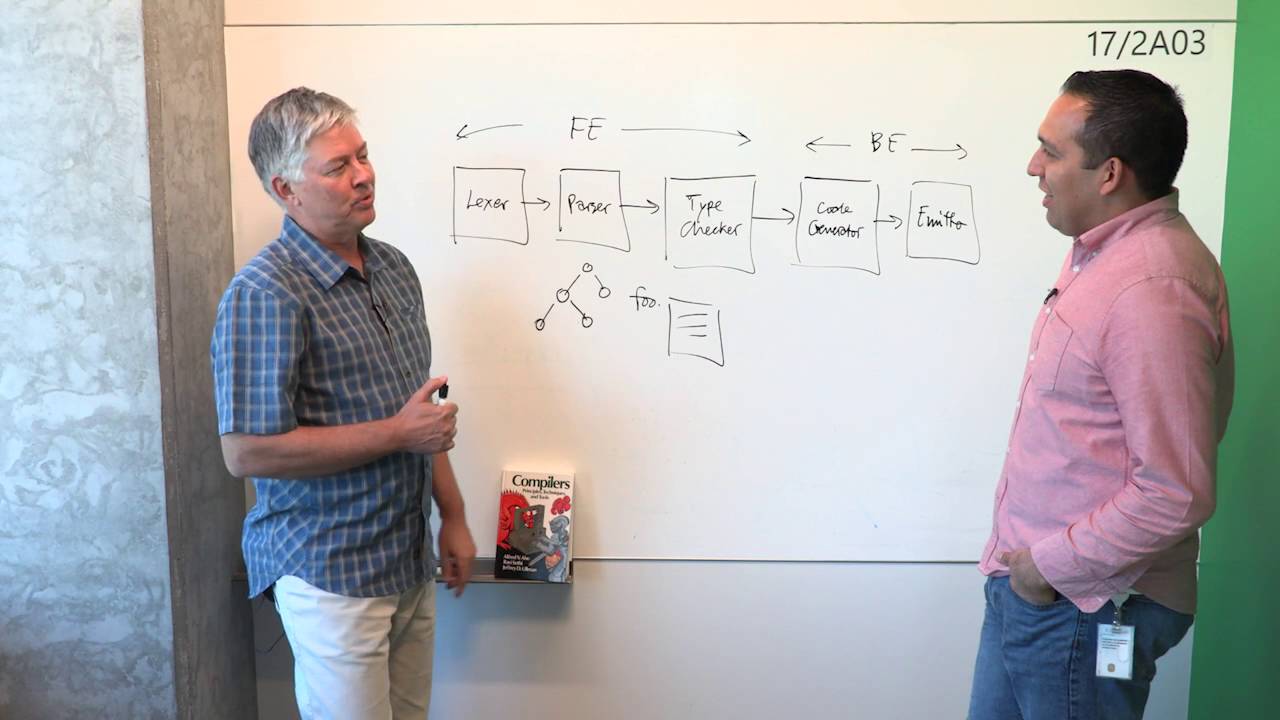
Anders diagrams the canonical architecture of a traditional compiler, dividing it cleanly into a front end and a back end. In this classical pipeline, raw source text enters the front end through a lexer (scanner), which breaks the character stream into discrete tokens. These tokens feed into a parser, which constructs an Abstract Syntax Tree (AST)—a hierarchical tree representation of the user's code. Following parsing, the compiler enters semantic analysis and type checking. Here, the pipeline constructs symbol tables, assigns data types to variables, and verifies that the program adheres to all language type rules.
```mermaid
flowchart LR
accTitle: Traditional Compiler Pipeline
accDescr: Data flow from raw source text through front-end lexing and parsing to back-end code generation and binary emission.
subgraph FrontEnd["Front End"]
direction LR
Lexer["Lexer (Scanner)"] -->|"Tokens"| Parser["Parser"]
Parser -->|"AST"| TypeChecker["Type Checker & Symbol Tables"]
end
subgraph BackEnd["Back End"]
direction LR
CodeGen["Code Generator"] -->|"Bytecode / IR"| Optimizer["Peephole Optimizer"]
Optimizer --> Emitter["Emitter"]
end
Once the front end verifies the code, control shifts to the back end. A code generator translates the tree into an intermediate representation or target bytecode, which can then undergo peephole optimizations. Finally, an emitter writes out the executable CPU instructions as binary `.obj` or `.exe` files. Seth points out that the process essentially converts human-readable programming language text into an opaque binary representation that a CPU executes. Anders notes that in traditional multi-pass compilers, the ASTs undergo several sequential transformations, tree rewrites, and intermediate passes. Because the compiler processes the entire program end-to-end in a long batch pipeline, compiling a full codebase traditionally takes considerable time—often minutes for large enterprise software.
- **Front End Components**: Lexer/Scanner (source text to tokens), Parser (tokens to ASTs), and Type Checker (symbol table generation and semantic verification).
- **Back End Components**: Intermediate code generator, optimization engine (such as peephole optimization passes), and machine-code emitter.
- **Traditional Execution Pattern**: A linear, batch-oriented pipeline performing whole-program analysis across multiple sequential passes before producing binary artifacts.
---
[05:00](https://www.youtube.com/watch?v=wSdV1M7n4gQ&t=300s) IDE Demands, Turbo Pascal Shortcuts, and the 100-Millisecond Budget
Anders contrasts the long batch compilation pipeline with the instantaneous feedback required when a programmer sits inside an editor. Early IDEs tackled syntax highlighting first because lexical analysis operates strictly locally: a lexer only needs to scan the immediate characters and whitespace around the cursor to turn keywords blue and identifiers white. Even if the lexer makes an error mid-stroke, the stakes are low. However, richer IDE features immediately demand deeper compiler representations:
* Collapsible code blocks (code folding) require parser-generated syntax trees to identify where structural blocks begin and end.
* Real-time red squiggly error underlines and member completion popups (such as typing `foo.`) require semantic type checking.
Anders notes that an editor cannot simply present every identifier in the file within an autocomplete list; it must know the exact type of `foo` to show only valid member methods and properties. If a developer picks an arbitrary name, it will fail to compile. However, computing full type information across a massive project is an expensive operation. This creates a severe performance conflict:
> “Yet we know from user studies that if you don't deliver this drop down in about a 100 milliseconds, people start to get irritated.”
A project containing 100,000 lines of code might take several minutes to run through a classic batch compiler, yet the editor must return accurate semantic member lists within 100 milliseconds of the user pressing the dot key. Reflecting on architectural trade-offs, Anders recalls writing Turbo Pascal, which was squeezed into just 32 kilobytes of total memory, encompassing the compiler, an on-screen editor, and the runtime library. Turbo Pascal accomplished its speed through radical simplifications: it did not build persistent syntax trees, and upon hitting its first error, it halted compilation immediately and snapped the cursor to that source location, avoiding error recovery entirely. Modern developers, however, expect an entirely different level of sophistication.
---
[08:25](https://www.youtube.com/watch?v=wSdV1M7n4gQ&t=505s) Inverting the Core Operating Assumption: Broken Code by Default
The most profound philosophical divide between a classic batch compiler and an IDE-integrated compiler lies in their foundational assumptions regarding source code correctness. A traditional batch compiler assumes that the program is complete and fundamentally correct; errors are treated as exceptions that interrupt the run, after which the developer must manually edit the code and restart the build. In an interactive code editor, that premise is completely inverted:
> “In an editor, your core operating assumption has to be exactly the reverse. Whenever the user is typing something, his code is probably broken right now because he's in the middle of typing.”
Because the developer is actively typing, the AST is almost perpetually in an invalid state. Curly braces are unmatched, expressions are half-finished, and identifiers are only partially typed. Consequently, the parser cannot panic or bail out. Instead, an IDE compiler must possess extraordinary error recovery capabilities. It must anticipate intent, recognize structural patterns, and maintain a resilient tree model even in the presence of severe syntax errors.
Anders reveals that modern editor parsers will deliberately parse grammar constructs that are illegal according to the official language specification. By intentionally recognizing common syntax errors or patterns that developers frequently attempt, the compiler can accept the invalid code structure gracefully and present an intuitive, human-friendly error message rather than emitting a generic, unhelpful `invalid token` crash.
[10:07](https://www.youtube.com/watch?v=wSdV1M7n4gQ&t=607s) The Problem of Two Compilers and the Genesis of Roslyn
As the whiteboard is cleared to make room for a new architectural diagram, the interviewer asks whether modern development essentially requires two distinct compilers—one invoked when hitting build and another running continuously during editing—or if components are shared between them. Anders Hejlsberg explains that historically in C#,.NET, and Visual Studio, that division was very real. When Microsoft initially created C#, they had no choice but to write the original compiler in C++ because C# itself did not yet exist. Once that C++ codebase grew large, the team was reluctant to throw it away and rewrite it immediately. Consequently, they maintained a classic batch compiler alongside a separate IDE language analyzer that performed partial parsing and analysis for editor tooling.
This dual-system architecture led to constant friction and divergence. Whenever the language team introduced a new syntax or feature into the native batch compiler, the IDE would immediately break because its analyzer could not parse the new constructs, forcing engineers to duplicate the implementation in both codebases. As Anders notes, “And so you sort of found yourself doing the work twice all all the time, right?” That chronic redundancy was the primary motivation behind Project Roslyn. The secondary motivation was opening up the compiler’s rich semantic insights to third parties. Anders explains that requiring developers to write an entire compiler from scratch just to build an analyzer, linter, or diagnostic plugin was an enormous barrier where “most people get off the wagon at that point.” To solve both issues, Microsoft decided to rebuild the compiler entirely as an API engineered specifically to serve both command-line compilation and the interactive language service inside the editor.
- The original C# compiler was authored in C++ out of necessity before C# existed.
- Dual implementations created constant synchronization bugs whenever new language features were introduced.
- Roslyn was designed to eliminate duplicated effort and expose deep semantic analysis to plugin authors via an API.
```mermaid
flowchart TD
accTitle: Evolution from dual compiler architecture to Roslyn API
accDescr: Diagram contrasting the legacy split compiler model with the unified Roslyn API model.
subgraph Legacy["Legacy C++ Architecture"]
direction LR
Batch["Batch Compiler (C++)"] --> BuildOut["Binary Output"]
IDEAnalyzer["IDE Analyzer"] --> EditorFeat["IntelliSense / Errors"]
end
subgraph Unified["Roslyn Unified API Architecture"]
direction LR
CoreAPI["Roslyn Compiler & Service API"]
CoreAPI --> CLIDriver["CLI Driver (Build)"]
CoreAPI --> IDEService["IDE Language Service"]
CoreAPI --> ExtPlugin["Analyzers & Linters"]
end
```
[13:04](https://www.youtube.com/watch?v=wSdV1M7n4gQ&t=784s) One Architecture for CLI and IDE: In-Memory Syntax Trees
Anders clarifies that in Roslyn, the command-line compiler and the IDE compiler are one and the same; the command-line executable is merely a thin driver sitting atop the underlying compiler service. Microsoft adopted this unified architecture across C# and Visual Basic, and applied the exact same design pattern to TypeScript—writing the TypeScript compiler in TypeScript/JavaScript so it could run anywhere JavaScript executes.
To illustrate why interactive tooling requires a fundamentally different internal engineering strategy than a classic compiler, Anders describes a typical medium-sized project containing roughly 200 files and around 100,000 lines of code. A classic compiler reads every single file from disk, builds an abstract syntax tree (AST), runs type checking across the whole project, and emits binaries. For an interactive editor providing statement completion, repeating this entire pipeline from scratch on every keystroke is completely unworkable. Because developers generally edit only one file at a time, the compiler can keep syntax trees in memory: when a user types in one file, the remaining 199 syntax trees remain completely valid and untouched.
However, full incremental updating is notoriously deceptively difficult. Anders points out that typing a single character—such as changing a type declaration from `Bar` to `Bars`—can instantly invalidate every member access on variables of that type across all 200 files. Trying to maintain a complex, mutable database of global dependencies and back-patching references when code changes inevitably breaks down under real-world complexity.
- The command-line compiler is simply a console driver over the reusable compiler service API.
- TypeScript was built using the identical architectural paradigm, implemented in JavaScript to ensure cross-platform execution.
- In-memory representations allow 99% of unchanged source files to retain their parsed ASTs across edits.
- Attempts to maintain an incremental mutable graph database across edits become untenable due to the cascading ripple effects of arbitrary keystrokes.
[16:20](https://www.youtube.com/watch?v=wSdV1M7n4gQ&t=980s) The Pull Model: Helicoptering In and the Functional Mental Model
Simply keeping syntax trees in memory does not solve statement completion on its own. When a developer types `foo.` and awaits IntelliSense suggestions, the editor must identify the precise type of `foo`, inspect its symbol table entry, determine its declaration file, and gather its members. Classical type checkers make multiple passes across all ASTs in sequence and take a noticeable amount of time to compute all diagnostics. An interactive editor cannot wait for a global pass; it must provide an answer within milliseconds at the exact location of the cursor.
To solve this, modern compilers invert the traditional execution pipeline into an on-demand "pull" model. Anders explains: “We call that a pull mode model instead of a push model where, you know, often compilers are constructed where they descend down from the top and they can carry along with them a bunch of contextual information that came from above.” Instead of pushing state downward through an exhaustive traversal, the compiler must be able to "helicopter in" to an isolated syntax node in the middle of a file and pull down only the minimal contextual information required to answer that immediate question. That query will walk up the syntax hierarchy, lazily binding types and symbols on demand.
To make this pull model reliable and avoid corrupt state, Anders emphasizes a functional approach: “Basically the way the view we take is that every time you type a character the whole world is erased.” Rather than attempting to patch a stateful cache, the compiler assumes that the program’s meaning has been wiped clean, then recalculates what is needed as fast as possible by reusing immutable, read-only data structures. The in-memory syntax trees of untouched files are safe and reusable precisely because they are immutable. Even within the edited file, the compiler can reuse intact subtrees rather than re-parsing tens of thousands of lines from scratch.
- Classical type checkers rely on multi-pass top-down push traversals that are too slow for real-time editor feedback.
- Modern compilers operate on a pull model, allowing queries to "helicopter in" to an arbitrary node and lazily demand-bind only the symbols required.
- The command-line compiler behaves effectively as if it helicoptered into every node in the entire program to ask all questions systematically.
- Immutability of ASTs guarantees safe reuse across keystrokes without the risk of stale or corrupted state.
[20:07](https://www.youtube.com/watch?v=wSdV1M7n4gQ&t=1207s) Persistent Syntax Trees and Spine Rebuilding
Anders Hejlsberg illustrates how modern compilers handle text edits efficiently by taking advantage of immutable, persistent data structures. When an edit occurs in an editor buffer, the system maps the exact location of the text change to a specific node within the syntax tree. Instead of regenerating the entire AST from scratch, the compiler reuses vast portions of the existing tree. It only constructs a new path—often called the "spine"—from the edited node directly up to the root.
```mermaid
flowchart TD
accTitle: Syntax Tree Spine Rebuilding
accDescr: Diagram showing how an edited node requires rebuilding only the spine up to the root while preserving existing sibling subtrees.
subgraph Reused["Unchanged Subtrees"]
B["Existing Subtree (Bush)"]
D["Sibling Nodes"]
end
As a developer types a single character, the compiler might only allocate three or four syntax nodes along that spine. Unaffected sibling subtrees—even massive branches representing thousands of syntax nodes—are simply re-plugged into the newly formed parent nodes. In fractions of a millisecond, the compiler has a completely updated, valid syntax tree covering hundreds of source files without having re-parsed the codebase.
- Only the nodes directly on the path between the edit and the root need allocation.
- Thousands of existing syntax nodes are directly shared across tree revisions.
- Entire syntax trees for hundreds of files become immediately available for type checking.
[21:08](https://www.youtube.com/watch?v=wSdV1M7n4gQ&t=1268s) Lazy Type Binding and "The Illusion of Starting from Scratch"
Once the tree structure is updated, the compiler binds semantic type information on demand rather than eagerly recomputing everything. The compiler assigns a unique ID to each syntax node, using that ID as a key into lookaside tables that cache binding results lazily. When an IDE requests information—such as tooltips or auto-completion at the cursor—the compiler computes only the bare minimum required to satisfy that specific request. If the user types another character, that lookaside cache can simply be discarded.
Anders points out the apparent contradiction at the heart of this architecture. It feels like starting with a clean slate on every keystroke, yet the engine secretly reuses prior structural work behind the scenes. This design eliminates the bugs that plague traditional stateful incremental compilers. In an old-school incremental system, tracking mutable transitions through an endless series of intermediate edits easily devolves into what Anders calls a "madness machine," where missing a single cache invalidation corrupts all downstream compiler state. With persistent trees and lookaside tables, the underlying syntax remains completely immutable, and semantic calculations start fresh without state accumulation.
Anders summarizes the power of this mental model:
> “The thing that saves you here is that it makes it possible for you to reason about the problem because because it is as if you started from scratch every time.”
- Semantic type information is stored in external lookaside tables keyed by syntax node IDs rather than mutated onto the nodes.
- When an edit occurs, discarding the semantic lookaside tables completely wipes away stale state.
- Because syntax trees are immutable and read-only, background threads can traverse them safely to collect diagnostics; if the user types again, the host can simply terminate that background worker without risking shared-memory corruption.
- A batch command-line compilation behaves conceptually the same as the IDE: it simply queries every question across the entire codebase instead of querying a localized spot.
[23:56](https://www.youtube.com/watch?v=wSdV1M7n4gQ&t=1436s) Applied Functional Programming and Infinite Types
Anders emphasizes that projects like Roslyn (the C# and Visual Basic compiler) and TypeScript serve as massive, real-world examples of applied functional programming. They rely fundamentally on persistent data structures, immutability, and lazy evaluation.
Lazy evaluation becomes critical the moment a language supports advanced type features like generics and self-referential types. In these systems, it is trivial to write circular or recursive generic definitions that expand infinitely when evaluated eagerly. A lazy compiler protects itself by never traversing deeper into a type graph than an explicit tooling or code generation query requires.
- Persistent data structures and lazy evaluation are essential architectural pillars of Roslyn and TypeScript.
- Generics with recursive or self-referential types can produce infinite expansions if evaluated eagerly.
- Lazy demand-driven evaluation guarantees that the compiler inspects only the finite surface area necessary to answer immediate questions.
[25:03](https://www.youtube.com/watch?v=wSdV1M7n4gQ&t=1503s) TypeScript: Tooling-First Compilers and Gradual Typing
The discussion turns to dynamic languages like JavaScript and how their tooling differs from traditional statically typed languages like C# or Java. Anders notes that TypeScript's backend is straightforward because it emits JavaScript instead of native machine code. The real complexity—and the primary value of the project—lies in its front-end tooling capabilities:
> “And really most of the usefulness of TypeScript actually comes from the front end and the tooling and so in a sense it's a compiler for tooling sake as opposed to a compiler for code generation sake right which also sort of is a change from how how things traditionally were.”
Because JavaScript is dynamic, TypeScript uses a gradual type system. In traditional languages, every value has a known, fixed type. TypeScript introduces `any`, which tells the type checker that a value can be anything, allowing users to analyze only as much of their code as they want. However, TypeScript also provides flags (such as `noImplicitAny`) to forbid untyped values. Eliminating `any` unlocks capabilities like safe global refactoring. If a variable `x` is typed as `any`, the compiler cannot know whether `x.foo()` refers to `TypeA.foo` or `TypeB.foo`. Once all types are known, renaming methods across large codebases becomes completely reliable.
Anders and Kasper contrast this with traditional compiler pedagogy:
- Anders highlights the key requirement: “Well, it has to be it has to behave well in the absence of knowledge, which compilers typically don't do.”
- Kasper reflects on his university training: “The compiler that I wrote in school was literally this character this character this character token read this character. And so there's no to me compilers have always been like very very strict.”
- Anders affirms the fundamental contrast: “Well the kinds of compilers we build are actually like very very different from what what you're taught to build.”
[28:56](https://www.youtube.com/watch?v=wSdV1M7n4gQ&t=1736s) Delivering Language Intelligence Across Diverse Editors
Toward the end of this discussion, Anders turns to the logistical challenge of bringing rich compiler intelligence into modern development environments. In the web ecosystem, developers do not use a single monolithic IDE; they write code across a diverse range of editors, including Sublime Text, Atom, Vim, Emacs, Visual Studio, and Visual Studio Code.
Writing separate, bespoke compiler integrations and language services for each individual editor—many of which are implemented in different programming languages—would require duplicate effort. Anders begins outlining the architectural need for a universal mechanism to connect the modern compiler's front end directly to any external editor.
[29:47](https://www.youtube.com/watch?v=wSdV1M7n4gQ&t=1787s) The Language Server and Out-of-Process Architecture
Anders Hejlsberg explains how the compiler architecture is packaged to integrate cleanly into modern code editors. Rather than keeping everything locked within a traditional single-binary batch compiler, the engine is packaged into an executable that can run as a standard command-line compiler, but it also has a mode that functions as an independent language server. An editor spins up this server as an out-of-process background daemon and communicates with it using a simple JSON protocol. Whenever the user is editing, the editor sends light, targeted messages: stating which file is open, the current line and column, and notifications whenever the user inserts characters or presses a trigger key like a period (`.`).
```mermaid
flowchart LR
accTitle: Out of Process Language Server Architecture
accDescr: The editor communicates with a background language server over a JSON protocol while maintaining shadow state.
subgraph Client["Editor (Sublime Text, VS Code, etc.)"]
E["Editor UI / Extension"]
end
subgraph Daemon["Out-of-Process Language Server"]
LS["tsserver.exe"]
ST["Shadow State (ASTs, Symbols, Types)"]
LS --- ST
end
E -->|"JSON: user typed '.', line X, col Y"| LS
LS -->|"JSON: completion list / diagnostics"| E
```
Because the intelligence lives entirely in a separate process, the language server acts as the keeper of all internal semantic data, keeping what Anders describes as a shadow state of the entire project. This out-of-process design completely decouples the editor from the compiler implementation. The host editor does not need to parse or understand the semantics of the language at all; it merely needs an extension capable of serializing and deserializing JSON. As Anders observes, “So that makes the act of of embedding the language into your editor so much easier.”
- The background process maintains an up-to-date shadow state of all open files and data structures in memory.
- Editors communicate edits incrementally (e.g., character insertions at specific coordinates) and request completions on demand.
- Because JSON is universal, extensions can be written in virtually any programming environment, such as Python, C, or JavaScript.
[31:27](https://www.youtube.com/watch?v=wSdV1M7n4gQ&t=1887s) Cross-Editor Parity, Watch Mode, and Open Source Ecosystem
This shared protocol provides a crucial advantage for language creators: it lets the compiler team control the quality of the developer experience across any environment. The host editor neither knows nor cares about the specific type rules of the language. Consequently, compiler teams can ship daily updates or bug fixes simply by swapping in a newer executable into the extension directory without waiting for editor updates. Anders notes how freeing this is: “And then now you got the latest language support because the the editor itself doesn't really know anything about the language nor does it care.” Seth Juarez contrasts this with the classic Dragon Book model, remarking how development has shifted from running a monolithic batch pass, inspecting the failure, and going back to fix lines in Vim, to parachuting live semantic information directly into the editor as the developer types.
Anders points out that tools like Sublime Text and Visual Studio Code run the exact same underlying server binary (`tsserver.exe`). A related, stripped-down variant of this mechanism powers the compiler's `--watch` mode, where a background file watcher monitors disk changes, keeps existing ASTs and symbol tables in memory, and incrementally recompiles only what is affected to maximize speed.
When Seth asks where developers can inspect these mechanisms firsthand, Anders points directly to the open-source repositories on GitHub. Both the TypeScript compiler (with its language server located right inside the `src/server` directory) and the Roslyn.NET compiler are open source. Seth notes that Roslyn uses this identical out-of-process architecture through the OmniSharp project, recalling times he broke his editor when Visual Studio Code lost track of the OmniSharp server daemon. Wrapping up the session, Seth thanks Anders for thoroughly updating everyone's mental model of modern compiler construction from the 1980s batch-oriented world to today's responsive, service-driven tooling.
- `tsserver.exe` drives TypeScript language tooling uniformly across diverse editors, including Visual Studio Code and Sublime Text.
- Command-line watch mode relies on the same internal incremental caches to bypass redundant parsing and type-checking work on disk events.
- OmniSharp provides the equivalent out-of-process language service pipeline for C# and Roslyn.
- The complete source code for both the TypeScript language server (`src/server`) and Roslyn is publicly accessible on GitHub.
## Notable quotes
> [08:25](https://www.youtube.com/watch?v=wSdV1M7n4gQ&t=505s) Whenever the user is typing something, his code is probably broken right now because he's in the middle of typing. — Anders Hejlsberg
> [25:03](https://www.youtube.com/watch?v=wSdV1M7n4gQ&t=1503s) most of the usefulness of TypeScript actually comes from the front end and the tooling and so in a sense it's a compiler for tooling sake as opposed to a compiler for code generation sake — Anders Hejlsberg
## Video description
Originally published on Channel 9
The way this story starts is pretty interesting: one day in the lunch room in building 25 I happened to have a chat with the great Anders Hejlsberg about compilers (yeah, it was pretty cool). One thing he mentioned (in passing I might add) was that there is a huge gap between the way compilers are taught in school and the way compilers are implemented nowadays. I mentioned (again in passing) that we should do a whiteboard on the the topic for Channel 9. He agreed!
In this video Anders a great foundation of compiler construction by describing the traditional methodologies that have been used in the last 30 or so years. He then uses that foundation to describe modern tooling needs and how compilers have adapted to meet increasing demands. The discussion was not only enlightening but also went a long way to show how Microsoft is taking great care to meet the modern needs of a wide array of developers. I hope you enjoy the discussion as much as I did!
## Background
该视频由频道 Kasper 于 2017 年 1 月 31 日发布在 YouTube 平台上(原发于微软 Channel 9),记录了主持人 Seth Juarez 与知名语言设计师、C# 和 TypeScript 之父 Anders Hejlsberg 的白板对谈。视频简介提到,谈话起因于两人在微软 25 号楼餐厅的偶遇闲聊,Anders 指出大学教学中的传统编译原理与现代工业界编译器的实际构建方式之间存在巨大鸿沟,由此促成了这场系统性拆解现代编译器演进的精彩讲解。
## TL;DR
Anders Hejlsberg 深度对比了传统批处理编译器与现代服务型编译器的核心差异。传统编译器遵循经典《龙书》的流水线架构,假设输入代码已完成且合法,以全量吞吐为核心;而现代 IDE 的智能体验要求编译器在 100 毫秒内响应,且必须假设代码始终处于未完成甚至残缺的状态。为化解这一矛盾,现代编译器演进为基于 API 的拉模式架构,运用不可变持久化数据结构、脊柱重构(Spine Rebuilding)和惰性求值实现极速增量分析。最后,Anders 阐述了 TypeScript 面向工具链的设计哲学,以及通过基于 JSON 协议的独立语言服务(如 tsserver)赋能多编辑器的现代架构范式。
## Atmosphere & style
整场对谈洋溢着工程师之间浓厚且极具感染力的技术兴奋感。Anders 站在白板前侃侃而谈,一边画图一边拆解底层原理,将数十年顶尖语言设计的实战经验与历史轶事(如早期 Turbo Pascal 的极限妥协)信手拈来,兼具学术严谨与工业级落地的通透。Seth 的互动风趣幽默且恰到好处,两人在轻松自然的问答推拉中直击痛点,让观众仿佛置身于微软总部的白板会议室,亲身感受顶级架构师化繁为简、重塑经典计算机学科范式的智识魅力。
## Bulletin
- [05:00](https://www.youtube.com/watch?v=wSdV1M7n4gQ&t=300s) 现代集成开发环境(IDE)要求代码自动补全等语义查询在约 100 毫秒内响应,迫使现代编译器从关注全量吞吐率的批处理管道转变为低延迟交互式服务。
- [07:22](https://www.youtube.com/watch?v=wSdV1M7n4gQ&t=442s) 与传统编译原理教材假设代码基本正确相反,IDE 编译器的核心前提是用户输入中的代码注定处于残缺状态,必须具备极强的容错、错误恢复及超纲解析意图的能力。
- [20:07](https://www.youtube.com/watch?v=wSdV1M7n4gQ&t=1207s) Roslyn 与 TypeScript 抛弃了维护复杂可变状态数据库的做法,全面采用持久化数据结构、惰性求值及不可变语法树的“脊柱重构”,实现极速的毫秒级局部增量解析。
- [29:47](https://www.youtube.com/watch?v=wSdV1M7n4gQ&t=1787s) 现代编译器将语义智能抽离为独立的语言服务进程(如 tsserver),通过标准 JSON 协议与各类编辑器跨进程通信,彻底解耦了 IDE 宿主与语言分析引擎。
## Key takeaways
- [00:00](https://www.youtube.com/watch?v=wSdV1M7n4gQ&t=0s) 高校以“龙书”为代表的经典编译原理教学与工业界现代编译器的工程实现存在巨大鸿沟,教科书几乎未系统讲授服务型编译器的核心技术。
- [02:07](https://www.youtube.com/watch?v=wSdV1M7n4gQ&t=127s) 经典编译器流水线由前端(词法、语法、类型检查)与后端(代码生成、发射器)构成单向批处理黑盒,处理大型项目耗时通常以分钟计。
- [05:00](https://www.youtube.com/watch?v=wSdV1M7n4gQ&t=300s) IDE 的核心交互需求(如 IntelliSense 补全与红色波浪线报错)存在 100 毫秒的延迟红线,传统全量扫描无法满足此响应速度。
- [07:22](https://www.youtube.com/watch?v=wSdV1M7n4gQ&t=442s) 传统编译器假设输入代码绝大多数是完整且合法的,而 IDE 编译器的底层假设完全颠倒:由于用户正处于打字过程中,代码在绝大多数时刻是注定损坏的。
- [10:07](https://www.youtube.com/watch?v=wSdV1M7n4gQ&t=607s) 早期 C# 编译器存在双重实现困境:命令行编译器与 IDE 语言分析器各自独立,新特性必须重复开发两次,促成了 Roslyn 将编译器重构为开放 API(Compiler as an API)的决断。
- [13:50](https://www.youtube.com/watch?v=wSdV1M7n4gQ&t=830s) 现代交互式编译器在架构上从自顶向下的“推模式”(Push)翻转为基于查询的“拉模式”(Pull),允许系统像直升机一样空降到代码局部按需绑定上下文。
- [20:07](https://www.youtube.com/watch?v=wSdV1M7n4gQ&t=1207s) 通过持久化数据结构与“脊柱重构”(Spine Rebuilding)技术,单次键盘输入仅需重新生成通向根节点的几个路径节点,项目其余成千上万个语法子树均以不可变形式原封不动地共享复用。
- [21:17](https://www.youtube.com/watch?v=wSdV1M7n4gQ&t=1277s) 类型推导等语义结果通过旁路表(Lookaside Table)以节点 ID 为键进行惰性缓存,不破坏语法树本身的纯净与只读状态,支持后台错误分析线程随时被安全取消与重启。
- [23:59](https://www.youtube.com/watch?v=wSdV1M7n4gQ&t=1439s) 现代语言引入泛型与自引用类型容易导致理论上的无界展开递归死循环,惰性求值不仅提升响应性能,更是现代类型系统规避非停机陷阱的关键屏障。
- [24:53](https://www.youtube.com/watch?v=wSdV1M7n4gQ&t=1493s) TypeScript 并不直接生成底层机器码,而是一款“为工具而生”的编译器;其渐进类型系统必须学会在存在 any 类型及知识缺失的环境中稳定运行,并在严格模式下保障跨文件安全重构。
- [29:47](https://www.youtube.com/watch?v=wSdV1M7n4gQ&t=1787s) 面对碎片化的编辑器生态,通过开辟后台常驻服务进程(tsserver)并采用标准化 JSON 协议传输增量变更与查询结果,实现了跨任意宿主编辑器的低成本复用。
- [32:01](https://www.youtube.com/watch?v=wSdV1M7n4gQ&t=1921s) 编译器的监视模式(--watch)本质上也是语言服务的轻量变体,现代开发者若想深入研究此类交互式服务架构,可直接研读开源的 TypeScript 与 Roslyn 源码。
## Detailed walkthrough
### [00:00](https://www.youtube.com/watch?v=wSdV1M7n4gQ&t=0s) 缘起:龙书、午餐闲聊与现代编译器的鸿沟
在微软 17 号楼的演播间里,来自 Channel 9 的主持人 Seth Juarez 与知名语言设计师、C# 和 TypeScript 之父 Anders Hejlsberg 坐到了一起。Seth 开玩笑称 Anders 不仅设计各种编程语言,还是一位“扭扭乐高手”(twister player)。谈话的契机源于两人此前在 25 号楼餐厅的一次偶遇闲聊。当时 Seth 提到大学时学编译原理用的是经典的“龙书”(Compilers: Principles, Techniques, and Tools),Anders 当场指出,虽然大家三十年前甚至现在上学都看这本书,但现代工业界造编译器的方式早就和书本里讲的大相径庭。
Anders 解释说,编译原理虽然是一门演进相对缓慢的经典学科,但过去十年左右,软件工程发生了翻天覆地的变化。开发者如今极度依赖各种智能集成开发环境(IDE)与现代工具,比如代码自动补全(statement completion)、重构(refactoring)、跳转到定义(Go to Definition)、代码导航(code navigation)以及实时自动刷新的错误提示列表。这些强大特性的底层本质上全靠编译器在驱动,然而这种“服务型编译器”与大学课堂上传授的批处理式传统编译器截然不同。Anders 直言:“And all of that stuff underneath the covers is powered by a compiler, but it's a very different compiler from what they teach you classically to build in school.” 如今构建现代编辑器底层服务所需的核心技术,几乎没有任何现存教科书在系统性地教授。
### [02:07](https://www.youtube.com/watch?v=wSdV1M7n4gQ&t=127s) 经典编译器的分层架构与批处理管道
为了讲透其中的巨大断层,Anders 开始在白板上勾勒经典编译器的标准架构。传统编译器通常划分为两个核心部分:前端(Front End)和后端(Back End)。前端依次由词法分析器(Lexer)、语法分析器(Parser)和类型检查器(Type Checker,包含符号表构建)组成;后端则包括代码生成器(Code Generator)与输出器(Emitter)。
```mermaid
flowchart LR
accTitle: 经典编译器流水线架构
accDescr: 展现从源代码经过前端词法语法类型检查到后端代码生成与输出的经典批处理流程
subgraph FrontEnd["编译器前端 (Front End)"]
direction LR
Lexer["词法分析器<br/>(Lexer)"]
Parser["语法分析器<br/>(Parser)"]
TypeChecker["类型检查器 / 符号表<br/>(Type Checker)"]
Lexer -->|"Tokens"| Parser
Parser -->|"AST 语法树"| TypeChecker
end
subgraph BackEnd["编译器后端 (Back End)"]
direction LR
CodeGen["代码生成 / 优化<br/>(Code Generator)"]
Emitter["发射器<br/>(Emitter)"]
CodeGen -->|"字节码 / 机器指令"| Emitter
end
SourceText["源代码文本<br/>(Source Text)"] --> FrontEnd
FrontEnd -->|"已检查的 AST / 符号"| BackEnd
BackEnd --> MachineCode["二进制文件 / 机器码<br/>(OBJ / EXE)"]
```
整个流水线的基本工作流程如下:
- **源代码输入**:人类编写的编程语言文本流入前端。
- **词法分析(Lexer)**:将字符流切分成语法记号流(Tokens)。
- **语法分析(Parser)**:把记号流组装成抽象语法树(AST),以树状层级表示代码的结构和语句。
- **类型检查(Type Checker)**:构建符号表(Symbol Tables),为变量和表达式推断并标注类型,验证语义一致性与类型安全。在此阶段 AST 可能经历多次遍历(multi-pass)与树重写。
- **代码生成与优化(Code Generator)**:将类型检查后的表示转换成中间表示(如字节码),进行窥孔优化(peephole optimization)等优化步骤。
- **发射器(Emitter)与链接器(Linker)**:最终将中间数据写出为 CPU 可直接执行的二进制目标文件(OBJ、EXE 等)。
Anders 指出,在经典模型中,这是一个漫长且单向的批处理流水线。为了把代码从人类可读的源文件变成人类看不懂的二进制机器码,系统要在整段代码上做大量复杂的变换,对于庞大的代码库,整个编译流程耗费数分钟甚至更久是常态。
### [05:00](https://www.youtube.com/watch?v=wSdV1M7n4gQ&t=300s) IDE 工具的爆发与 100 毫秒交互红线
将经典的批处理流水线置于编辑器交互场景中,矛盾便迅速爆发。Anders 梳理了现代 IDE 对语言服务需求的历史演进梯次:
1. **语法高亮(Syntax Coloring)**:这是早期 IDE 最早实现的能力,仅靠词法分析器(Lexer)即可完成。Lexer 只需要观察光标附近的局部字符,一旦识别出空格或新 Token,就能给关键字标蓝、标识符标白。即便用户打字打到一半出现局部混乱,高亮稍有闪烁也无伤大雅。
2. **代码折叠(Collapsible Regions)**:要想知道函数或控制块在何处开始、何处闭合,系统开始需要 Parser 生成的 AST,理解结构层级。
3. **语义级补全与即时报错(IntelliSense & Red Squigglies)**:当开发者输入 `foo.` 时,他们期待弹出一个下拉列表显示合法成员,或者在输入错误代码时立即看到红色波浪线提示。
许多初级做法只能简单粗暴地收集当前文件出现过的所有单词列在下拉列表里,赌其中有一个是对的;但一旦用户选了一个非法的标识符,立即就会制造语法或语义错误。开发者真正需要的是具备语义准确性的补全建议,而这必须依赖类型检查器(Type Checker)计算出的类型信息。
这就产生了一个极端严苛的性能矛盾。在传统编译器中,对整个大型项目进行类型检查极为耗时,且耗时随着代码规模急剧膨胀;然而人机交互研究表明,代码补全下拉框必须在极短时间内呈现。Anders 强调:“Yet we know from user studies that if you don't deliver this drop down in about a 100 milliseconds, people start to get irritated. This tool's too slow. I'm not going to use it anymore.” 哪怕面对十万行代码的庞大项目,全量编译可能需要数分钟,但只要敲下 `.`,语言服务就必须在 100 毫秒内准确算出会出现什么成员。
- 传统编译器关注全量吞吐率,耗时可以按分钟计;
- 现代交互式工具的核心指标是端到端延迟,硬性红线在 100 毫秒上下。
### [07:22](https://www.youtube.com/watch?v=wSdV1M7n4gQ&t=442s) 假设的颠倒:从“代码正确”到“代码注定破碎”
Seth 回忆起旧时代的单遍编译器,例如一旦出错就当场停止编译并报错。Anders 笑着回忆起自己早期开发的经典之作 Turbo Pascal:整整一套编译器、全屏幕编辑器加上运行时库,总共才挤在区区 32 KB 代码中。当时的 Turbo Pascal 充满了各种极致妥协与捷径——Parser 甚至不构造 AST,遇到第一个语法错误就立刻中止,把光标精准定位到报错扫描处,这样连复杂的错误恢复(Error Recovery)机制都省掉了。
但在现代编辑器中,用户要求的是极高的智能化,这就触及了现代编译器与传统编译器最底层的哲学断层——**基本假设完全相反**:
- **批处理编译器的底层假设**:假设代码基本上是写完且合法的(finished & correct code)。即便有错也是偶发的异常状态,只要报出来让用户去改就行。
- **IDE 编译器的底层假设**:Anders 总结道:“In an editor, your core operating assumption has to be exactly the reverse. Whenever the user is typing something, his code is probably broken right now because he's in the middle of typing.” 因为用户正处于打字输入的过程中,花括号往往未闭合、标识符只打了一半、表达式处于未完成状态。代码在绝大多数时刻是“注定处于损坏状态”(broken)的。
因此,现代编辑器的语言服务必须具备极度强大的容错与错误恢复能力。为了提供精准的补全与诊断,现代编译器甚至必须具备超前推测意图的能力,解析比正规语言语法规范更多的“非法模式”:
- 识别开发者常见的笔误和思维定势模式;
- 主动解析那些在语言定义中完全不合法的语法结构,而不是直接抛出粗暴的“无效标记”(invalid token)错误;
- 借助这种“超纲解析”(parsing more than the permitted syntax),推断出开发者原本想表达的真实含义,进而给出具有实际指导意义的高质量错误提示和补全候选。
### [10:07](https://www.youtube.com/watch?v=wSdV1M7n4gQ&t=607s) 双编译器分裂困境与 Roslyn 的诞生契机
对话开始时,Kasper 追问 Anders Hejlsberg:现代编译器与传统编译器的分歧究竟发生在何处?在日常开发中,究竟是存在两个编译器——一个在按下“生成”(Build)时运行,另一个在编辑代码时悄悄工作——还是说两者的组件交织在一起?Anders 一边擦拭白板腾出空间,一边回顾了 C#、.NET 以及 Visual Studio 早期的一段历史。
```mermaid
flowchart LR
accTitle: 早期 C# 双编译器分裂架构
accDescr: 展示了早期 C# 中 C++ 编写的命令行编译器与 IDE 语言分析器各自独立的双重实现架构。
subgraph CLI["命令行编译流水线"]
Src1["源代码"] --> CppComp["C++ 编写的经典编译器"]
CppComp --> Binary["二进制输出"]
end
subgraph IDE["IDE 内部流水线"]
Src2["源代码"] --> IdeAnalyzer["IDE 专用语言分析器"]
IdeAnalyzer --> Intellisense["语法高亮 / 智能感知"]
end
```
Anders 指出,在启动 Roslyn 项目之前,原始的 C# 编译器其实完全是用 C++ 编写的,原因很简单:“我们没法用它自己来写自己,因为当时它还不存在。”当团队用 C++ 写完整套编译器后,代码量已经极其庞大,大家都不愿意再花大量时间用 C# 重写一遍。这就导致了一个极其痛苦的系统分工:团队手里有一个用于命令行编译的经典编译器,同时在 Visual Studio 里又维护着一套独立的“IDE 语言分析器”。这两套系统不可避免地持续脱节:每当主编译器加入一个新语言特性并实现完毕,IDE 就会因为无法识别新语法而直接崩溃,工程师不得不把新特性在 IDE 里重新实现一遍。
面对 Kasper 询问这种“两头跑”的模式是否不可避免,Anders 明确表示绝非如此。这正是 Roslyn 项目的核心催化剂:
- **痛点一:双重工作负担**。团队无法容忍永远在主编译器和 IDE 分析器之间做两次重复劳动。正如 Anders Hejlsberg 所说:“We can't keep implementing everything twice.”(“我们不能一直把所有东西都实现两遍。”)
- **痛点二:编译器洞察力的封闭性**。编译器对代码拥有最透彻、最精准的语义洞察,但这些信息被锁死在黑盒里。如果不开放,外部开发者想写分析器(Analyzer)、代码检查器(Linter)或诊断工具,就必须自己从零手写一套编译器。正如 Anders Hejlsberg 所言:“Most people get off the wagon at that point.”(“大多数人在那一步就直接放弃了。”)
- **架构决断:Compiler as an API**。微软决定将编译器重构为一组开放的 API。它不仅能驱动命令行编译,更是直接作为编辑器后台运转的“智能引擎”(Intelligence Engine)。命令行编译器实际上蜕变成了直接调用该编译服务的一层驱动(Driver)。这一架构不仅在 Roslyn(C# 与 VB 共享)中落地,在后来的 TypeScript 中也延续了相同理念(TypeScript 编译器则完全用自身/JavaScript 编写,以保证能在任何 JavaScript 环境下运行)。
---
### [13:50](https://www.youtube.com/watch?v=wSdV1M7n4gQ&t=830s) 增量编辑与推拉模型的根本变革
为了说明现代编译器在 IDE 交互中面临的严苛挑战,Anders 举了一个典型项目场景:假设一个项目包含 200 个源文件(约 10 万行代码),光标正停留在其中一个文件的某一行,用户正在敲击键盘等待语句补全(Statement Completion)。
```mermaid
flowchart TD
accTitle: 推模式与拉模式编译器对比
accDescr: 对比传统自顶向下 push 模式编译器与现代基于查询的 pull 模式编译器的执行差异。
subgraph PushModel["经典推模式 (Push Model)"]
Top["根节点 AST"] -->|"自顶向下传递上下文"| Sub1["语法子树"]
Sub1 --> Sub2["全量绑定与类型检查"]
Sub2 --> FullDiag["全局错误列表 / 代码生成"]
end
subgraph PullModel["现代拉模式 (Pull Model / Roslyn)"]
Cursor["光标当前位置 (如 foo.)"] -->|"直升机空降按需请求"| Query["语义查询请求"]
Query -->|"向上回溯 AST"| ParentScope["父级作用域 / 符号表绑定"]
ParentScope -->|"仅拉取所需信息"| InstantResult["即时补全候选列表"]
end
```
在传统编译器中,每次处理都需要从磁盘重新读取所有文件、构建抽象语法树(AST),这在编辑器中显然慢得无法接受。最直观的初步优化是将所有文件的 AST 驻留在内存中。由于用户同一时刻只能编辑一个文件,其余 99 个(或 199 个)文件的语法树完全有效且无须改变;但关键难点在于:**用户每敲入一个字符,程序的语义可能在全局范围内被瞬间推翻**。例如,用户在某个全局变量 `foo` 的类型声明 `Bar` 后面敲了一个字母 `s`,它的类型立刻变成了 `Bars`;这就意味着整个程序中所有调用 `foo.` 的地方,可用的成员列表瞬间彻底改变。
试图通过全局依赖数据库在后台实时做后置修补(Back-patching)不仅极其繁琐,在工程上也极难保证正确性。更深层的挑战在于类型检查器(Type Checker):经典类型检查器需要对整棵语法树进行多轮自顶向下的扫描才能收集完所有类型错误,而编辑器要求在用户敲下 `.` 的数十毫秒内立刻列出成员:
- **直升机空降机制(Helicopter In)**:编译器不能等待全量分析,必须能够直接“空降”到程序中间任意一点,仅仅计算出满足当前请求所必需的最少语义信息。
- **推模式(Push)转向拉模式(Pull)**:传统编译器是“推模式”,由外向内、自顶向下遍历语法树,自上而下顺带传递上下文数据;现代 IDE 编译器则是“拉模式”,从叶子节点发起查询,若需要外层上下文,则主动向上遍历树结构,按需按次触发绑定期(Binding),正如 Anders 所形容,“整个编译器的运转方向在内部被完全翻转了”。
- **不可变性与纯函数式世界观**:团队放弃了维护复杂、易出错的可变状态数据库,而是采取函数式编程思维。正如 Anders Hejlsberg 所阐述的核心思想:“Basically the way the view we take is that every time you type a character the whole world is erased.”(“基本上我们的观点是:每次你敲入一个字符,整个世界就被抹去了。”)系统假设一切清空,但通过极快地重用旧有不可变(Read-only)数据结构中未受影响的分支,以极低代价瞬间恢复当前上下文。
- **大文件增量解析挑战**:对于没有被触及的外部文件,不可变 AST 可以 100% 毫无顾虑地直接重用;而在正在编辑的文件内部,即便文件长达 2 万行,现代编译器也通过结合旧语法树只做局部增量解析,避免重新解析整个文件的开销。
### [20:07](https://www.youtube.com/watch?v=wSdV1M7n4gQ&t=1207s) 不可变语法树与脊柱重构(Spine Rebuilding)
在讲解现代编译器的性能优化时,Anders Hejlsberg 详细演示了当用户在编辑器中修改代码时,语法树是如何在底层高效更新的。在实际编辑场景中,用户输入字符往往只发生在某个文件的狭小局部区域。编译器非常清楚这次变动落在语法树的哪个叶子节点上。此时完全不需要推倒整棵树重来,而是可以采用持久化数据结构(Persistent Data Structure)中的“脊柱重构”(Spine Rebuilding)技术:从发生变更的叶子节点出发,沿着父节点路径一路向上,仅重新构建通往树根的这一条“脊柱”(Spine),而周围庞大的其他语法子树(哪怕成千上万个节点)直接按原样复用并挂载到新的脊柱上。
通过这种做法,用户每敲击一次键盘,编译器实际只需重新创建三到四个语法节点,而海量的历史节点得以原封不动地共享。Anders 兴奋地解释道,这一机制让编译器瞬间拥有了全新的完整语法树,速度快到不可思议,用户完全感知不到停顿。正如 Anders Hejlsberg 所说:“And now you have yourself in no time flat complete syntax trees for your entire program, right?” Kasper 对此赞叹不已,这种设计看似每次都“假装从头构建”,实则在幕后以极低成本完成了数百棵语法树的瞬时重组。
```mermaid
flowchart TD
accTitle: 语法树脊柱重构示意图
accDescr: 展示编辑发生时仅重构自底向上的脊柱节点,其他子树完全复用
subgraph ReusedBranches ["复用子树(未修改)"]
B1["子树 Bush A<br/>(只读复用)"]
B2["子树 Bush B<br/>(只读复用)"]
end
subgraph SpinePath ["重新生成的脊柱路径"]
NewRoot["新根节点 New Root"]
NewMid["新中间节点 New Node"]
NewEdit["修改后的编辑节点 Edit Node"]
end
NewRoot --> NewMid
NewRoot --> B1
NewMid --> NewEdit
NewMid --> B2
```
- 局部变动仅需重构受影响节点到根节点的单条路径(脊柱),开销通常仅涉及几个对象的分配。
- 整个项目中其余成千上万个语法节点保持只读状态,直接引用并拼接到新树中。
- 即使项目规模达到数百个源文件,整套语法树也能在毫秒级内准备就绪,随时供后续分析使用。
### [21:17](https://www.youtube.com/watch?v=wSdV1M7n4gQ&t=1277s) 旁路表、惰性求值与并发线程
在极速获得全新的语法树后,编译器便开始为节点绑定类型信息。Anders 指出,类型绑定并不是直接修改语法树上的节点,因为语法树是不可变且只读的;相反,编译器为每个语法节点分配一个唯一标识(ID),并将计算出的类型信息保存在独立的“旁路表”(Lookaside Table)中。由于采用了惰性求值(Lazy Evaluation),编译器仅按需计算回答当前 IDE 请求(例如代码补全或悬停提示)所必需的最少类型信息。一旦用户键入下一个字符,这些局部的旁路缓存便被直接丢弃;若有需要,再重新按需建立。
Anders 将命令行编译器与 IDE 编译器的行为做了生动的对比:命令行编译就像是用户乘坐直升机降落到每个角落、把所有问题通通查个遍,耗时长是自然的;而 IDE 必须在局部极速作答。得益于无副作用的函数式数据结构,IDE 甚至可以安全地启动一个后台工作线程,让它去遍历整棵树收集所有的错误诊断信息。如果用户在此期间又键入了新字符,主线程可以直接果断干掉那个后台线程,然后基于最新不可变快照开启新一轮分析,完全无需担心锁争用或共享状态被破坏。
谈到这里,Kasper 笑着指出这听起来有一种奇妙的“自相矛盾”:表面上声称每次都从零开始、把旧东西全部丢弃,袖子里却悄悄藏着大量复用的旧数据。Anders 赞同这种奇妙感,但他严肃强调,正是这种“逻辑上每次全新、物理上按需复用”的架构,才把编译器作者从传统增量式编译的状态机泥潭中解救了出来。正如 Anders Hejlsberg 所指出的:“The problem with incremental systems is often that you can't foresee all the various ways that you first get into one state and then because of an edit you transition into a third state, another state and then into another and around and then oh over here you forgot to delete something and now over here someone picked and it it just becomes this madness machine.”
- **旁路表(Lookaside Table)设计**:语法节点保持纯净与只读,类型推导与语义结果以节点 ID 为键动态缓存。
- **命令行 vs IDE**:命令行编译器全量遍历所有代码,IDE 编译器通过惰性计算只解析光标上下文相关的最小切片。
- **线程可中断性**:后台错误检查线程随时可被取消并重启,不可变数据结构杜绝了并发读写的数据损坏隐患。
- **状态一致性**:彻底摒弃传统复杂增量编译器难以维护的多状态转换网,规避了状态残留和逻辑死角。
### [23:59](https://www.youtube.com/watch?v=wSdV1M7n4gQ&t=1439s) 函数式编程实践与惰性处理无界类型
Anders 强调,无论是现代的 TypeScript 还是 Roslyn(C# 编译器),它们本质上都是工业级应用函数式编程(Applied Functional Programming)的典型代表。整个架构依赖的核心支柱正是持久化数据结构(Persistent Data Structures)、惰性加载(Lazy Loading)以及惰性求值(Lazy Evaluation)。
Anders 补充了一个关键技术点:为什么现代类型系统必须具备惰性求值能力?原因在于现代语言大多引入了泛型(Generics)和自引用/递归类型定义。一旦类型系统支持泛型,开发者极易写出在理论上无限展开、永不终止的递归类型结构(例如每次请求某个成员时,该成员又被包装进另一层泛型)。如果编译器试图在加载时急切(Eagerly)解析并具象化所有类型,就会直接陷入无限死循环。因此,现代编译器必须保持高度节制,只在真正需要查询某个成员或属性时才深入一层,惰性系统正是解决类型无界展开的唯一救星。
对于函数式思想在两款旗舰编译器中的地位,Anders Hejlsberg 总结道:“So that's so so this is actually in a sense that that the TypeScript and the Roslin compilers are huge examples of applied functional programming because these are functional programming techniques you know and these are called persistent data structures um and lazy loading and lazy evaluation and and so forth...”
- Roslyn 与 TypeScript 充分吸纳了函数式理念,以数据不可变性作为架构的基石。
- 泛型系统与自引用类型天然存在无限展开的风险,全量即时展开会导致编译器崩溃。
- 惰性求值不仅服务于 IDE 的响应速度,更是现代类型系统避免理论上非停机陷阱的核心屏障。
### [24:53](https://www.youtube.com/watch?v=wSdV1M7n4gQ&t=1493s) 为工具而生的编译器与渐进类型系统(Gradual Typing)
Kasper 顺着讨论提出疑问:前面的分析似乎更多针对 C# 这种传统的静态类型语言,但当面对 JavaScript 这种动态脚本语言时,TypeScript 的设计是否需要发生根本性的变化?Anders 解释道,TypeScript 架构的一大特色在于它的后端极其简单——它并不生成底层机器码,而只是发射(Emit)JavaScript。因此,TypeScript 编译器绝大部分的价值和复杂度都集中在前端与语言工具链(Tooling)上。这从根本上颠覆了传统编译器的定位:它本质上是一款“为工具而生”的编译器,而非传统的“为代码生成而生”的编译器。
```mermaid
flowchart LR
accTitle: TypeScript 渐进类型与安全重构逻辑
accDescr: 说明严格模式消除 any 后,编译器如何实现跨引用的安全重构
subgraph InputCode ["源代码分析"]
X["表达式 x.foo"]
TypeA["类型 A { foo }"]
TypeB["类型 B { foo }"]
end
subgraph TypeState ["类型确定性"]
AnyState["存在 any 类型<br/>(x 类型不明)"]
StrictState["开启严格模式<br/>(无隐式 any,x 类型明确)"]
end
subgraph ToolingResult ["工具能力"]
Unsafe["重构不安全<br/>(无法确定重命名 A 还是 B)"]
Safe["安全重构<br/>(精准重命名所有引用处)"]
end
X --> AnyState --> Unsafe
X --> StrictState --> Safe
TypeA -.-> StrictState
TypeB -.-> StrictState
```
Anders 进一步阐述了渐进类型系统(Gradual Type System)的奥妙。像 C、C++、C# 或 Java 这种经典静态语言,每个变量都拥有预先确定的严格类型;而 TypeScript 面向 JavaScript 生态,必须接纳一个特殊类型:`any`。`any` 的存在意味着它可以代表任何可能的值。编译器允许用户自由选择类型分析的深度,并提供了配置选项(如禁止隐式 any 的编译开关)。一旦开发者开启该配置并显式消除未知类型,编译器就能给出极强的语义保障。例如,当代码中存在 `x.foo` 时,如果类型系统知道所有的明确归属,重构重命名 `foo` 就能精确命中并保证全局安全;但一旦 `x` 是 `any`,编译器就无法区分它到底属于类型 A 还是类型 B,重构就无法绝对安全。
Kasper 感慨,大学课堂教授的传统编译器通常是极其严苛的字符与 Token 扫描器,一旦语法或语义不符就会立即报错甚至中断退出;而在缺失知识(Absence of Knowledge)的情况下优雅运行并持续提供工具服务,是老派教学完全不涵盖的。针对传统编译器与现代工具型编译器的本质差异,Anders Hejlsberg 一针见血地指出:“Well, it has to be it has to behave well in the absence of knowledge, which compilers typically don't do.”
- **后端简化**:TypeScript 直接输出 JavaScript 文本,编译器工程的核心投入全在前端解析与 IDE 工具能力。
- **渐进类型体系**:既允许通过 `any` 类型包容动态语言的灵活性,也允许通过严格开关(如 `noImplicitAny`)追求极致的静态安全性。
- **安全重构保障**:在无未知类型干扰的前提下,编译器能够保证跨文件的符号查找与重命名 100% 精确。
- **容错与宽容度**:传统编译器“非黑即白”,现代编译器必须学会在信息缺失、代码残缺的动态环境中依然保持良好行为。
### [28:56](https://www.youtube.com/watch?v=wSdV1M7n4gQ&t=1736s) 多编辑器支持与语言服务架构初探
当编译器的前端能力进化为一个功能完备的“语言智能服务”后,团队面临着另一个极为现实的工程挑战:如何将这种代码智能无缝接入到广阔的开发者生态中?Anders 回忆道,尤其是在 Web 与 JavaScript 开发领域,编辑器的生态极其多元且分散——有人使用 Visual Studio 或 Visual Studio Code,有人钟情于 Sublime Text、Atom,还有大量极客依赖 Vim 或 Emacs。
每种编辑器的架构各不相同,它们的底层宿主语言也千奇百怪,很多甚至完全不是用 JavaScript 编写的。为每个流行的编辑器分别用其原生技术栈重写一套专属的语言解析与诊断服务,在工程成本上是不可接受的。正如 Anders Hejlsberg 所说:“Now we don't want to go write like a language service for each of them.” 这一挑战直接倒逼团队探索一种能够跨语言、跨编辑器宿主解耦复用编译器智能的全新接入协议与通信架构。
- 现代前端与跨平台开发者群体分散在多种编辑器之中(Sublime Text、Atom、Vim、Emacs、VS Code、Visual Studio)。
- 不同的编辑器基于不同语言与运行环境开发,不可能为每个编辑器单独维护一套独立的语言服务代码。
- 编译器核心必须从特定的 IDE 宿主进程中剥离出来,通过通用的协议与标准化接口向各色宿主编辑器提供语言智能。
### [29:47](https://www.youtube.com/watch?v=wSdV1M7n4gQ&t=1787s) 语言服务架构与基于 JSON 协议的跨编辑器集成
在现代工具链的实际落地中,编译器团队不仅将编译器打包为可直接在命令行运行的可执行程序,还构建了另一个版本作为独立的语言服务(Language Server / `tsserver`)进程运行。编辑器与该服务通过标准的 JSON 协议通信:编辑器向语言服务发送光标位置与交互事件,例如告知服务当前打开的文件名、行号、列号,以及用户刚按下了“点号”(`.`),询问当前该向用户展示什么补全内容。后台运行的语言服务进程则掌握并维护着所有的代码上下文信息。用户在前端编辑文本时,编辑器只需持续把增量变更推过去,告知这里插入了一个字符、那里又插入了一个字符,语言服务进程便在内部维持一份与现实完全平行的“影子状态”(shadow state),以便在编辑器发起请求时瞬间给出反馈。
```mermaid
flowchart LR
accTitle: Language Server Communication Flow
accDescr: Diagram showing how an editor interacts with an out-of-process language server via JSON.
subgraph EditorProcess["编辑器进程 (IDE / Editor)"]
UI["代码编辑界面\n(VS Code / Sublime)"]
Ext["编辑器插件\n(JSON Client)"]
UI -->|"用户输入变更 / 点号"| Ext
end
subgraph ServerProcess["后台独立进程 (Language Server)"]
TSServer["tsserver 语言服务"]
Shadow["影子状态与 AST 缓存\n(Shadow State)"]
TSServer <--> Shadow
end
Ext -->|"增量编辑 / 查询请求 (JSON)"| TSServer
TSServer -->|"补全项 / 诊断信息 (JSON)"| Ext
```
这种架构彻底打破了旧式的进程内集成方式。由于语言分析的智能完全来源于后台运行的独立进程,编辑器本体并不需要真正理解语言语义。任何编辑器扩展只需实现简单的 JSON 通信,无论是用 Python、C 还是其他语言编写插件,都能轻松对接。Anders Hejlsberg 指出,这正是 TypeScript 能迅速在如此多编辑器中获得卓越支持的关键原因:“And that makes the act of embedding the language into your editor so much easier. And that's why we have such great support in so many different editors is because we built this thing, you know, that we can reuse everywhere.”这种解耦还赋予了语言设计团队主导体验的自主权:团队即便每天发布新版本,只要底层 JSON 协议保持稳定,用户只需将新版服务文件放入插件目录即可直接获得最新语言特性的支持,前端编辑器无需随之重写或更新。
- 编辑器与语言服务属于不同的进程,两者完全基于 JSON 协议进行异步解耦通信。
- 语言服务内部持久化维护项目的全量“影子状态”,避免前端频繁传递完整源代码。
- 编辑器端仅需监听按键与光标位置,向后端提问,自身对复杂的语言语法和类型系统一无所知。
### [32:01](https://www.youtube.com/watch?v=wSdV1M7n4gQ&t=1921s) 龙书传统到实时服务的范式转变及开源生态
主持人 Seth Juarez 对现代编译器的演进进行了对比与总结:经典的《龙书》(Dragon Book)教学模式中,编译器是从头跑到尾的批处理黑盒,开发者往往是在 Vim 等老派编辑器写完代码后编译报错,再折返回去修改;而现代编译器则是实时“空降”信息,在敲击键盘的间隙动态提供反馈。不仅在官方 IDE 中如此,在第三方编辑器中,系统同样启动后台常驻服务来提供全套智能支持。Anders 确认了这一总结,并列举了具体实现:无论是在 Sublime Text 还是 Visual Studio Code 中,后台运行的都是完全相同的 `tsserver`。甚至当编译器运行在监视模式(`tsc --watch`)时,其内部使用的也是基于相同机制的文件监听器变体,它在磁盘文件变动时重编译,并始终复用旧的抽象语法树(AST)以获得极致速度。
当被问及开发者应如何深入学习这种现代编译器实现时,Anders 直截了当地建议直接阅读源码。目前这些体系已经全面开源在 GitHub 上,包括 TypeScript 仓库中的 `src/server` 目录,以及 C# 的 Roslyn 编译器项目。Seth 提到 Roslyn 在跨平台编辑器生态中对应的就是 OmniSharp 项目,它同样采用这种常驻后台持续喂送语义信息的模式,自己就曾遇到过 VS Code 报出“找不到 OmniSharp 服务”的排错经历。对谈最后,Seth 对 Anders 将编译器技术从传统象牙塔理论带入现代软件工程实践的白板讲解表达了感谢,圆满结束了本次关于现代编译器构建的专题讨论。
- Visual Studio Code 与 Sublime Text 依赖完全相同的 `tsserver` 二进制程序提供语言支持。
- 编译器的监视模式(`--watch`)本质是语言服务的轻量变体,常驻内存复用旧 AST 实现极速增量构建。
- TypeScript 的服务端架构完全位于其 GitHub 仓库的 `src/server` 目录下。
- C# 的 Roslyn 编译器在跨编辑器场景中通过 OmniSharp 项目以同构的服务模式运行。
## Notable quotes
> [00:00](https://www.youtube.com/watch?v=wSdV1M7n4gQ&t=0s) And all of that stuff underneath the covers is powered by a compiler, but it's a very different compiler from what they teach you classically to build in school. — Anders Hejlsberg
> [07:22](https://www.youtube.com/watch?v=wSdV1M7n4gQ&t=442s) In an editor, your core operating assumption has to be exactly the reverse. Whenever the user is typing something, his code is probably broken right now because he's in the middle of typing. — Anders Hejlsberg
> [05:00](https://www.youtube.com/watch?v=wSdV1M7n4gQ&t=300s) Yet we know from user studies that if you don't deliver this drop down in about a 100 milliseconds, people start to get irritated. This tool's too slow. I'm not going to use it anymore. — Anders Hejlsberg
## Mentioned
Anders Hejlsberg, Seth Juarez, Channel 9, Microsoft, Compilers: Principles, Techniques, and Tools, Turbo Pascal, C#, .NET, Visual Studio, Visual Studio Code, Roslyn, TypeScript, JavaScript, Sublime Text, Atom, Vim, Emacs, OmniSharp, GitHub
## Video description
Originally published on Channel 9
The way this story starts is pretty interesting: one day in the lunch room in building 25 I happened to have a chat with the great Anders Hejlsberg about compilers (yeah, it was pretty cool). One thing he mentioned (in passing I might add) was that there is a huge gap between the way compilers are taught in school and the way compilers are implemented nowadays. I mentioned (again in passing) that we should do a whiteboard on the the topic for Channel 9. He agreed!
In this video Anders a great foundation of compiler construction by describing the traditional methodologies that have been used in the last 30 or so years. He then uses that foundation to describe modern tooling needs and how compilers have adapted to meet increasing demands. The discussion was not only enlightening but also went a long way to show how Microsoft is taking great care to meet the modern needs of a wide array of developers. I hope you enjoy the discussion as much as I did!
[Source](https://www.youtube.com/watch?v=wSdV1M7n4gQ)
Source quotes
[0:00] Anders Hejlsberg: And all of that stuff underneath the covers is powered by a compiler, but it's a very different compiler from what they teach you classically to build in school.
[7:22] Anders Hejlsberg: In an editor, your core operating assumption has to be exactly the reverse. Whenever the user is typing something, his code is probably broken right now because he's in the middle of typing.
[5:00] Anders Hejlsberg: Yet we know from user studies that if you don't deliver this drop down in about a 100 milliseconds, people start to get irritated. This tool's too slow. I'm not going to use it anymore.
Source quotes
[8:25] Anders Hejlsberg: Whenever the user is typing something, his code is probably broken right now because he's in the middle of typing.
[25:03] Anders Hejlsberg: most of the usefulness of TypeScript actually comes from the front end and the tooling and so in a sense it's a compiler for tooling sake as opposed to a compiler for code generation sake
Original transcript
[0:00] Hey there, this is Seth Wars from
[0:02] Channel 9 coming to you from building 17
[0:04] and I'm here with the great Anders
[0:06] Hellsburg who not only writes languages
[0:08] but is a master twister player from what
[0:11] I understand.
[0:14] How you doing my friend? I'm I'm good.
[0:15] Yourself? So we met we I saw you in the
[0:18] lunchroom and we had we were talking
[0:20] about compilers, right? Because it's
[0:22] something you like. And you said
[0:23] something interesting to me that I
[0:24] thought we should talk about. You said
[0:26] because when I went to school we used
[0:28] this book. That's right. Well, when I
[0:30] did, we did too. I mean, this is the
[0:33] book that you use, right? It was
[0:34] published 30 years ago, and you told me
[0:38] we don't even do it that way anymore. Or
[0:40] you do, but there's some stuff that's
[0:42] changed, right? Right. I mean, it's
[0:45] it's, you know, compilers have I mean, a
[0:47] long storyried history, right? I mean,
[0:49] that book is we were just looking it's
[0:50] 30 years old or the first edition was
[0:53] published 30 years ago. Mhm. And you
[0:56] know it's a slowmoving art but but over
[0:59] the last
[1:01] I don't know decade or so um we've
[1:04] become very accustomed to very
[1:07] intelligent uh idees and development
[1:10] tools and we've been we've become
[1:12] accustomed to features like statement
[1:14] completion and refactoring and go to
[1:16] definition and code navigation and and
[1:19] error lists that are automatically
[1:21] populated. Do you know what I mean? And
[1:23] all of that stuff underneath the covers
[1:26] is powered by a compiler,
[1:30] but it's a very different compiler from
[1:32] what they teach you classically to build
[1:34] in in school. Um, and it's been
[1:37] diverging more and more, you know, and
[1:39] there are things that you need to do
[1:41] today when you build these these
[1:44] services that editors use that are
[1:46] actually compilers that that is just
[1:49] like not being taught anywhere that I
[1:51] know of. Uh and so that was what I was
[1:53] commenting about and that and so that
[1:55] like sparked my interest, right? So I
[1:57] thought we would start today and talk
[1:58] about okay how are we taught and then
[2:02] let's talk about where the gaps are
[2:04] starting to become important. So maybe I
[2:06] thought we'd just draw something up.
[2:07] Sure. Sure. So like okay classic
[2:09] compiler you know typically has a um you
[2:13] know a lexer
[2:15] say and it has a parser
[2:20] and then it has a
[2:23] type checker
[2:27] and then you know there's often then a
[2:31] uh code generator.
[2:36] See, and then there might be an emitter
[2:38] depending on you know I mean so
[2:42] and
[2:44] typically we call all of this this part
[2:46] here we sort of call the front end of
[2:49] the compiler and this we call the back
[2:53] end of the compiler right here.
[2:56] So so in comes source text. First the
[2:59] lexer breaks it into tokens. Then the
[3:01] parser build what's called abstract
[3:04] syntax trees okay or trees a tree
[3:06] representation of your source code then
[3:08] the type checker well then there might
[3:10] be multiple phases in here you know it
[3:13] gets a little fuzzier at this point but
[3:14] typically then you'll build up symbol
[3:16] tables and then you'll have a type
[3:18] checker that then assigns types to
[3:21] variables and then checks that
[3:23] everything is okay and then that
[3:24] information in turn then can guide a
[3:27] code generator here you may have a
[3:29] different representation that you you go
[3:31] into where you where you build some bite
[3:33] code for example then you can run some
[3:35] peole optimization on and then finally
[3:37] there's animator that's sort of your
[3:39] classic text to machine code compiler of
[3:43] of of lore I see so and books you know
[3:47] that's they'll teach you this so
[3:50] essentially then this is taking
[3:52] something that we can mostly understand
[3:54] which is programming language into
[3:55] something that we're not going to
[3:57] understand right no no right over here
[3:59] you have you have you have binary
[4:01] executable OBJ files or XE files that
[4:04] the CPU can run. And over here you have
[4:07] programming language text that a human
[4:08] wrote, right? Um, and of course there
[4:11] are more. There might be a linker, there
[4:13] might be all sorts of other stuff in
[4:14] here, but but
[4:17] that's sort of the classic picture. And
[4:19] then you know these these compilers here
[4:23] often you'll do after you build say all
[4:26] these abstract syntax trees that sort of
[4:28] looks like this you know with all your
[4:29] different statements or whatever and
[4:30] then you may do a whole number of passes
[4:33] over them and maybe you may you may even
[4:35] rewrite them into different trees before
[4:37] the type checker and then the code
[4:38] generator turns this kind of
[4:40] representation into another
[4:41] representation. So there's lots of
[4:43] transformations and lots of work that
[4:45] happens in a long pipeline and it takes
[4:48] a while to get from here to here
[4:50] obviously. I mean it can take a minute
[4:54] for orgages right like or I mean yeah it
[4:57] it takes a long time. Now, so keep that
[5:00] in the back of your mind and then think
[5:02] about now let's say I'm sitting in an
[5:04] editor and I'm editing my source code,
[5:06] right? Well, a lot of the information I
[5:09] want to know, first of all, I want
[5:10] syntax coloring, right? I want all my
[5:12] keywords to be blue and all my
[5:14] identifiers to be white or or whatever.
[5:15] So, that's something Alexa can do. Alexa
[5:18] and Alexa just looks at a little piece
[5:20] of the program. It just looks at right
[5:22] where you're typing, you know, and then
[5:23] whatever it is space, then it knows
[5:25] there's a new token and it's easy to
[5:28] syntax colorize. Sure. Sure. And if you
[5:30] think back at the history of IDs, that
[5:31] was sort of one of the first things that
[5:33] surfaced, right? Because hey, you don't
[5:35] need to we can do colorization. That's
[5:38] easy. Even when the user is typing, we
[5:39] can get that right. I mean, even if it
[5:40] messes up, it's not a problem. It's not
[5:42] fine, right? It's easy to do, right? Um,
[5:46] but then you also sort of want maybe to
[5:48] have collapsible regions and other
[5:51] things like that, right? And now you
[5:53] start to need more. Now you need trees.
[5:55] You need to understand how all of these
[5:57] keywords combine and where where
[6:00] constructs begin and end so to speak,
[6:02] right? And that starts to get a little
[6:04] more complicated. And then of course
[6:06] you'd like to see red squigglies when
[6:08] you make mistakes, right? And when you
[6:10] press dot, you'd like to see. So I type
[6:13] fu dot. You'd like to see a list of what
[6:16] could go here. Okay? And
[6:19] you know, well, you could just show the
[6:22] user all the identifiers that are in the
[6:24] file. They think it's probably one of
[6:25] them, right? But maybe it isn't, right?
[6:27] And and and clearly the minute you then
[6:30] select one of them, you might just have
[6:31] made something that's an error, right?
[6:32] So that's kind of pointless. You really
[6:34] sort of want to show people semantically
[6:36] what could go here. So now you need
[6:38] information that was produced by the
[6:39] type checker, right? Um and you see as
[6:42] as we get more and more intelligent, we
[6:44] need more and more expensive
[6:46] information. It takes in a classic
[6:48] compiler, it takes a while to type check
[6:50] a whole program, right? Especially a
[6:52] large one, right? Especially and the
[6:54] bigger it gets, the longer it takes,
[6:55] right? Yet we know from user studies
[6:59] that if you don't deliver this drop down
[7:01] in about a 100 milliseconds, people
[7:03] start to get irritated. This tool's too
[7:06] slow. I'm not going to use it anymore.
[7:07] And see, I mean, you know, and even
[7:08] though here I have a 100,000line program
[7:12] and I want you in a 100 milliseconds to
[7:13] tell me what can go here, you know,
[7:15] where it might take minutes to actually
[7:17] compile it, right? So, how do you do
[7:20] that? And and that's the interesting
[7:22] thing, right? Because before when I was
[7:24] looking at this, we essentially wrote a
[7:27] binary file that took our code and then
[7:31] just did this all in one pass. Mhm. And
[7:33] it either stopped here or it stopped
[7:36] here and said you have an error or it
[7:37] stopped here. I don't know. Oh, I mean
[7:39] the first compiler I wrote Turbo Pascal
[7:42] or that I worked all right was was this
[7:46] whole thing. Not not that it necessarily
[7:48] looked like this but that was all of it
[7:50] was 32k of code and that included an
[7:53] on-screen editor and a runtime library
[7:55] as well. Right. You clearly couldn't be
[7:58] all that fancy in what you did. And one
[8:00] of the and so Turbo was full of
[8:03] shortcuts, right? Yes, there was a lexer
[8:05] sort of the parser didn't actually build
[8:07] syntax tree. It just stopped on the
[8:09] first error.
[8:11] Hey, now we don't have to do error
[8:13] recovery. We don't have to do a whole
[8:15] bunch of things. We just stop and put
[8:16] the cursor right where we were scanning.
[8:18] And then do you know what I mean? And
[8:20] but people expect expect a little more
[8:23] sophistication today, right? So this
[8:25] feels this feels this feels easy up
[8:28] until the moment you start thinking
[8:30] about like I'm typing in code and I'm
[8:33] typing dot but I might not have correct
[8:36] syntax. I might not have correct
[8:39] semantics here, right? And but we still
[8:42] want something to happen, right? Well,
[8:43] one of one of the big differences
[8:45] between
[8:47] a compiler that works on your finish
[8:49] program and the kind of compiler that
[8:51] sits behind your ID is that the compiler
[8:53] that works on a finished program in a
[8:56] sense makes the assumption that
[8:57] everything is correct.
[8:59] And but sometimes there are errors, but
[9:01] then it just tells you and then you got
[9:02] to go fix them, right? But the the core
[9:04] operating assumption is we're working on
[9:06] correct code. In an editor, your core
[9:09] operating assumption has to be exactly
[9:10] the reverse. Whenever the user is typing
[9:13] something, his code is probably broken
[9:15] right now because he's in the middle of
[9:17] typing. He's not he's not done, right?
[9:19] So he may have unbalanced curies. his
[9:22] identifier is not fully typed yet or he
[9:24] may have an expression that is
[9:25] unbalanced and to so your error recovery
[9:28] has to be really good and you sort of
[9:31] almost have to anticipate what's coming
[9:33] next and you have to recognize patterns.
[9:36] you may even have to recognize more
[9:38] syntax than it's traditionally valid
[9:41] because you know that users make certain
[9:43] mistakes. And so instead of you, you
[9:46] know, just saying error invalid token or
[9:48] whatever, it's much better if you sort
[9:50] of parse out what you think the user
[9:53] will mean here and then give them a a
[9:55] more meaningful error message if you see
[9:57] a certain pattern that people think they
[9:58] can do but they can't actually do. So,
[10:01] so sometimes you actually parse more
[10:03] than the permitted syntax just so you
[10:05] can give better errors on it later.
[10:07] That's interesting. And so is that is
[10:09] that where the diver because the No, I
[10:11] I'll show it. I I'll tell you where the
[10:13] divergence comes in. Maybe we have to
[10:14] erase a little bit and and make some
[10:16] room and then let's let's sort of
[10:18] pretend that we are So, as you're
[10:21] erasing it, is it is it the case that
[10:23] you have two compilers then? one
[10:26] compiler for when you're just you're
[10:27] hitting build and another compiler for
[10:29] when you're editing or are there
[10:31] components of each that sort of are
[10:33] intertwined with one another? That's a
[10:35] good question and and actually if you
[10:37] think back on the history say let's just
[10:39] take C and and and .NET and Visual
[10:41] Studio and so forth. The the first
[10:45] version of the C compiler before we did
[10:47] the Roslin project. Uh so the original
[10:50] C# compiler was actually written in C++
[10:53] because we couldn't write itself because
[10:56] we didn't have it didn't exist yet. So
[10:57] and by the time we' written it it was
[10:59] like whoa that's a that's a lot of code.
[11:01] We don't want to just like spend a bunch
[11:03] of time rewriting it again. So so we
[11:05] actually had a a classic compiler. It
[11:07] looked a lot like this. And then we had
[11:10] an IDE language analyzer that did sort
[11:14] of some of what we had here before. But
[11:17] of course the two were always diverging,
[11:19] right? And we introduced a new feature
[11:22] in the main compiler implemented there,
[11:23] but then the IDE was broken because it
[11:26] didn't understand a new syntax and we
[11:27] had to go do it again. And so you sort
[11:30] of found yourself doing the work twice
[11:32] all all the time, right? But is it is it
[11:35] required to do that? I mean there so no
[11:37] no and so so and that was actually part
[11:39] of the genesis of the Roslin project was
[11:43] we can't keep implementing everything
[11:44] twice. That was that was problem number
[11:47] one. And problem number two is we really
[11:49] want we want people to be able to take
[11:52] take advantage of the incredible insight
[11:55] that a compiler has into your code. So
[11:58] they can write plugins like analyzers
[12:01] and diagnostic tools and what have you
[12:04] or llinters, you know, that that use
[12:08] that information to provide even more
[12:10] insights. Right? There's it's pointless
[12:12] to first every time you want to do
[12:15] something with a C# tool that first you
[12:17] got to go write your own compiler. Well,
[12:20] most people get off the wagon at that
[12:21] point. And some people did actually
[12:23] because I used to work for a company
[12:24] that wrote their own everything and they
[12:26] had in memory this the whole tree they
[12:29] had in memory all the tokens etc. Sure.
[12:32] Sure. But it's
[12:34] as the language gets bigger and more
[12:36] complicated and it's just that's a lot
[12:38] of pain, right? So we decided basically
[12:40] to build the compiler as an API. Um and
[12:44] that was that was what the Roslin
[12:46] project was about. And we decided to
[12:48] build it in a in a manner that was
[12:50] engineered to be precisely usable from
[12:54] an IDE not just as a command line
[12:56] compiler but also as the thing that that
[12:59] is the the the intelligence engine
[13:02] behind your editor if if you will.
[13:04] Right. So the compiler today in C
[13:06] obviously is Rosland. Yes. And there is
[13:08] there must be a common base of just
[13:10] things that like the lexer right and the
[13:12] token etc. But then where are the
[13:15] differences? Is there differences or is
[13:16] it just all the same thing? No, it's the
[13:18] same thing for for the command the
[13:20] command line compiler and the IDE
[13:22] compiler is it's it's one and the same.
[13:24] The command line driver is just a driver
[13:26] for the got it the the the service. And
[13:29] then we actually reuse a lot of the same
[13:32] infrastructure for C and VB. And on a
[13:34] TypeScript project, we built it using a
[13:36] very similar architecture, but of course
[13:39] we built it in in itself. So we built it
[13:41] in JavaScript because we want we want it
[13:44] to be be able to run wherever JavaScript
[13:46] code runs. But in principle it it it's
[13:48] very similar. Um and and so one of the
[13:51] things we do, let's just say for for the
[13:52] sake of argument that you're working on
[13:54] a large project, say a project with 200
[13:56] files in it, okay? And maybe a 100,000
[13:59] lines of code. And now hypothetically
[14:01] you're typing in some file and you let's
[14:04] let's see what what happens when you
[14:05] want statement completion. So imagine
[14:07] first you have you have 200 source files
[14:09] right? So bunch of source files right
[14:11] and 200 is not a lot. I mean it's it's
[14:14] average oh yeah you have an OBC project
[14:18] we're not trying to thousand. Yeah. Um
[14:22] now
[14:24] a classic compiler would literally read
[14:27] each of these files from disk build and
[14:29] abstract syntax tree transer blah blah
[14:31] blah. That obviously is stupid. You
[14:34] don't want to start from scratch every
[14:35] time, right? So you can keep an
[14:37] in-memory representation of a lot of
[14:39] this. So you can load up the source file
[14:40] and then you can you can lex and parse
[14:43] each of them into a syntax tree. So you
[14:45] get syntax trees here, here, here, here,
[14:46] here. and you just keep those around. Um
[14:50] because users only edit one file at a
[14:53] time and that means 199 of or 99 of the
[14:56] other files are perfectly fine. Those
[14:58] are fine syntax trees. There's no re
[15:00] nothing is changing in them. Right.
[15:02] Right. But when you're when you have
[15:03] your cursor here in this file and you're
[15:05] typing right here, um then obviously
[15:09] that file changes. So, one quick
[15:11] optimization you could do here is, well,
[15:13] let's only rebuild the syntax tree for
[15:16] this file every time you're typing
[15:18] something, right? But keep in mind that
[15:19] when you're typing in an editor, in a
[15:21] sense, every time you type a character,
[15:25] you you have potentially completely
[15:27] changed the meaning of your program,
[15:29] right? because you could be right in the
[15:32] middle of typing the name of a type
[15:34] where you have you know uh like some
[15:37] global called fu that's of type I don't
[15:41] know bar here right and now but now
[15:43] you're typing uh an an s and it's of a
[15:47] different type which means everything
[15:48] that's says fu dot now has different
[15:51] members and that could be spread all
[15:53] over your program right so it's
[15:54] impossible to do this stuff
[15:57] incrementally is is you you can't sort
[15:59] after the fact now try to find all the
[16:01] places where where you reference through
[16:03] and and change stuff if you're trying to
[16:05] keep a database of everything or
[16:07] whatever that that doesn't really work
[16:10] out but so
[16:12] anyway but anyway so one optimization
[16:14] you do keep all the syntax trees around
[16:16] and just modify one as you're typing and
[16:18] that that gets you fast but of course
[16:20] syntax trees aren't really delivering
[16:23] the answer when you say food dot and now
[16:25] you need to know what can what can go
[16:26] here you need to figure out well what's
[16:28] the type of foo Well, it's bar. Well,
[16:30] what members does bar have? Well, bar is
[16:32] an interface and it's declared which was
[16:34] over in this file and whatever. So, so
[16:37] clearly you need semantic information.
[16:39] And semantic information is something
[16:42] that requires you to first be able to
[16:43] look up foo in a symbol table, figure
[16:45] out which foo there got many foos,
[16:47] right? Then you have to figure out its
[16:48] type. Then you have to figure out etc
[16:50] etc etc. So, so it turns out that
[16:53] there's stuff that you attach to simple
[16:55] you you you you build simple tables and
[16:57] you can build those incrementally as
[16:59] well. But then when it comes time to
[17:02] type check, classically type checkers
[17:05] have just sort of done multiple passes
[17:07] over the syntax trees and built up all
[17:09] sorts of information. And type checkers
[17:12] typically take a while to produce all
[17:14] the errors in the program. You clearly
[17:16] can't do that either, right? And so what
[17:19] you have to do instead is you in a sense
[17:22] you have to build a system where you can
[17:23] helicopter in to the middle of something
[17:26] and say I need to know something about
[17:28] right here and I need to know it right
[17:30] now. And then you have to incrementally
[17:34] just build enough information to deliver
[17:36] the answer. Yet later you may have to do
[17:40] the same for everything
[17:43] because the command line compiler in a
[17:45] sense it's as if you helicopter into
[17:47] every point in the program and ask all
[17:48] the questions. Do do you know what I
[17:50] mean? Yeah. Um now that is a very
[17:52] different way of building a compiler. We
[17:55] call that a pull mode model instead of a
[17:57] push model where you know often
[18:00] compilers are constructed where they
[18:01] descend down from the top and they can
[18:03] they can carry along with them a bunch
[18:05] of contextual information that came from
[18:07] above. Do you know what I mean? And so
[18:10] but here you're helicoptering into the
[18:12] middle and if you need that information
[18:14] you sort of have to request it by going
[18:17] up the tree and and saying I need to
[18:19] know something from over here and that
[18:21] might then cause you to bind something
[18:23] over there. So it's almost like
[18:25] everything's turned upside down inside
[18:27] the compiler, you know. I see. So you're
[18:29] you're in this one node, say you're
[18:31] you're typing the symbol fu, that node
[18:34] is related to other things inside like
[18:36] it belongs in a particular member which
[18:38] belongs in a particular class and as you
[18:40] as you request information instead of
[18:42] saying okay let's go to this grandmaster
[18:44] database that might not exist and
[18:46] rebuild it. Instead let's just go out
[18:48] one. Yeah. Basically the way the view we
[18:51] take is that every time you type a
[18:55] character the whole world is erased.
[18:59] That that's sort of the mental model we
[19:01] have because because that way we know
[19:03] that the information we build up is
[19:05] going to be correct with your world
[19:07] view. And now it's just a question of us
[19:09] getting there fast enough as opposed to
[19:11] the model of we're going to try to keep
[19:13] a database correct at all times and then
[19:15] go back and back patch and whatever.
[19:18] That's too complicated. That I've never
[19:20] seen a system succeed that does that. So
[19:23] instead, we sort of take the functional
[19:25] view of the world that every time you
[19:27] type a character, erase everything. Now,
[19:29] let's get back to where we were as fast
[19:31] as we can by reusing pieces of the old
[19:34] data structures. And this is that's why
[19:37] they're read only, right? That's why
[19:38] they're read only. So So all of these as
[19:42] that we have in memory from all the
[19:44] files that you didn't touch, they're
[19:45] fine. We don't we can just reuse them as
[19:48] they are right inside the file where
[19:51] you're typing we could choose to
[19:53] completely rebuild the a but if this is
[19:55] like say 20,000 line file takes a while
[20:00] to parse just that file and build an a
[20:02] but you could sort of know that if
[20:04] you're in if you have an old syntax tree
[20:07] for the old file that looks something
[20:08] like this right you know exactly where
[20:11] you're editing you know that you're just
[20:12] editing in this little region there and
[20:14] you can relate that to the tree and then
[20:16] you can build a new tree that reuses
[20:18] pieces of the old tree. You know, in
[20:20] fact, when you're rebuilding trees, all
[20:22] you have to redo, if you're editing this
[20:24] node, you can actually reuse all of the
[20:28] nodes in this other tree just by
[20:30] rebuilding the spine going up. The only
[20:33] nodes that actually have to change are
[20:35] these nodes here. And let's say there's
[20:37] a big bush over here. Well, you can just
[20:39] plug that in. And so, the thing is, you
[20:42] don't need to edit you don't need to
[20:43] edit this. You don't need to edit this
[20:44] or this this or this because you're
[20:46] here. But you need to build a new spine
[20:49] up up to the top, right? So effectively
[20:52] that means you're just modifying one,
[20:54] two, three, four syntax nodes or so as
[20:56] you're typing and there might be
[20:58] thousands and thousands that you just
[21:00] reuse from the old tree. And now you
[21:02] have yourself in no time flat complete
[21:05] syntax trees for your entire program,
[21:07] right?
[21:08] Wow. even though you you you you sort of
[21:10] pretended to start from nothing, but you
[21:12] got yourself your 200 syntax trees back
[21:14] in no time flat. And now you can start
[21:17] binding types to them. And and you know,
[21:20] again, you you do all of that in loc.
[21:24] So as you're building the type
[21:25] information, you've you've given each
[21:26] node a unique ID and you can use that as
[21:28] a key in a locite table that you then
[21:31] gradually build up and then when the
[21:34] user types the next character, you throw
[21:35] all that away and then you build it up
[21:38] again if you need to. Do you see what
[21:39] I'm saying? But you're only throwing
[21:40] away what you're effectively changing.
[21:42] But you're only you're you're lazily
[21:44] building just enough information to
[21:48] deliver the answer. I see. It's it's
[21:50] kind of like and then the command line
[21:51] compiler is as if the user just
[21:53] helicoptered in to every place and asked
[21:55] all the questions, right? But but that's
[21:58] okay that that takes longer, right? And
[22:00] that so so now you can see how the IDE
[22:02] for example, it's capable of quickly
[22:04] delivering answers local to right here.
[22:06] And then meanwhile because we have
[22:08] functional data structures, we can reuse
[22:11] them even in a different thread and set
[22:13] off a different thread to collect all
[22:15] the error messages by traversing all the
[22:18] trees, you know. But if the user types
[22:20] another character, well then you just
[22:21] shoot that thread. Okay, fine. That that
[22:23] that then we'll start again.
[22:26] Do do you know what I mean? And you can
[22:27] reuse the same data structures because
[22:29] they're all read only and any new
[22:32] information you you keep in look aside
[22:34] tables that you gradually build up,
[22:35] right? And the interesting thing about
[22:37] this approach is it's it's completely
[22:41] sort of I don't know what the word is,
[22:42] but it feels like it's contradictory.
[22:45] It's like we have nothing. Yes. Yes, but
[22:47] don't look under my sleeve because I'm
[22:48] saving stuff, too. It's a really
[22:51] interesting approach to saying, well,
[22:54] but the thing that saves you here is
[22:56] that it makes it possible for you to
[22:59] reason about the problem because because
[23:01] it is as if you started from scratch
[23:04] every time. And that means you're going
[23:05] to get if you get the answer right,
[23:07] you're going to get it right. Mhm. The
[23:09] problem with incremental systems is
[23:12] often that you can't foresee all the
[23:15] various ways that you first get into one
[23:17] state and then because of an edit you
[23:19] transition into a third state, another
[23:21] state and then into another and then
[23:22] into another and around and then oh over
[23:24] here you forgot to delete something and
[23:26] now over here someone picked and it it
[23:29] just becomes this madness machine. Do
[23:31] you know what I mean? But where here
[23:32] you're just like well it's gone. It's
[23:35] all gone. Every time you type a
[23:36] character it's all gone.
[23:38] But and this is where the contradiction
[23:40] for me lies. But it's not it's it's all
[23:43] gone in the context of this. But over
[23:45] here it's not all gone. We don't care.
[23:47] It's not all gone. But but since it's
[23:49] read only, it's it's just the same. You
[23:51] can keep reusing it, right? You just
[23:53] can't store anything in there. U that's
[23:56] interesting. Yeah. So that's so so this
[23:59] is actually in a sense that that the
[24:01] TypeScript and the Roslin compilers are
[24:03] huge examples of applied functional
[24:05] programming because these are functional
[24:07] programming techniques you know and
[24:09] these are called persistent data
[24:10] structures um and lazy loading and lazy
[24:13] loading and lazy evaluation and and so
[24:16] forth and and lazy by the way is is also
[24:20] a thing that the minute you have
[24:21] generics in your type system and
[24:22] self-referential types and and whatever
[24:25] it is very easy to construct types that
[24:28] never terminate. So the only way that
[24:30] you can ever reason about anything is by
[24:33] being lazy and by not you, you know,
[24:36] like you can construct a type that you
[24:38] can keep pulling on it, right? And and
[24:40] every time you ask for the for a member,
[24:42] well, then it wraps itself in yet
[24:44] another generic type and then it never
[24:46] ends. So you have to like know not to go
[24:49] there and lazy systems are great at
[24:51] that, right? So from the from the
[24:53] perspective that I've been looking at it
[24:54] and the questions I've been asking, I've
[24:56] been thinking of strictly sort of uh uh
[25:00] uh languages that are not dynamic. So
[25:03] static type languages, that's the word I
[25:04] was looking for. Stat. So I've only
[25:06] think of static languages like C. Are
[25:08] there changes that need to be affected
[25:10] when you're working with a dynamic
[25:12] language like JavaScript with the case
[25:14] of TypeScript? Well, I mean I I think
[25:16] that the one thing that's interesting
[25:17] about the TypeScript project is that you
[25:20] saw me draw that picture of a what a
[25:22] compiler looks like, right? And there
[25:23] was a front end and a back end. Our back
[25:26] end in a sense is quite simple, right?
[25:28] We just emit JavaScript, you know, we
[25:30] don't emit machine code, right? Um
[25:34] but and really most of the usefulness of
[25:37] Typescript actually comes from the front
[25:39] end and the tooling and so in a sense
[25:42] it's a compiler for tooling sake as
[25:45] opposed to a compiler for code
[25:46] generation sake right um which also sort
[25:49] of is a change from how how things
[25:51] traditionally were and then what also
[25:54] makes it interesting is that that it is
[25:56] a it is a gradually type system right
[26:00] like classic language
[26:02] like well C and C++ and well C and Java
[26:05] you know they are they are basically
[26:07] strictly typed in in in the sense that
[26:10] everything has a type everything has a
[26:12] known type right um but in Typescript
[26:16] and JavaScript well everything does have
[26:18] a known type but one of the types is any
[26:20] which means it could be anything
[26:22] um and now you you're sort of analyzing
[26:25] only as much as you want to analyze um
[26:29] and and but you give users the option to
[26:31] say there can't be anyies in here unless
[26:36] I wrote them. I see. Because then I know
[26:39] what I'm doing, right? But but I don't
[26:40] want you to like implicitly have anyies
[26:43] in my program. And we have a flag for
[26:45] that. And once you turn that flag on,
[26:47] then we get a little stricter, but then
[26:49] we can also provide more guarantees for
[26:50] you. For example, we can now provide
[26:52] safe refactorings because we know that
[26:55] there are no unknowns in your program.
[26:58] Interesting. And that means that that we
[27:00] know that we will get all the places
[27:02] where this type is referenced because if
[27:03] there's an any well then we when when we
[27:06] see an xfoo and x is of type any well if
[27:10] you're saying I want to rename fu in
[27:12] type a
[27:15] but there's also fu and type b well we
[27:17] don't know which one x is if it's of
[27:19] type any but if but if there are no
[27:21] anyies then we do know and then we can
[27:23] safely refactor everything. So,
[27:26] so there are all sorts of interesting
[27:28] things that you never really thought
[27:29] about. And so, so we're still learning
[27:31] here, you know, and that's an
[27:32] interesting thing, right? Because I
[27:33] mean, you're effectively taking a
[27:35] dynamic language, adding static typing
[27:38] over the top to help with tooling, but
[27:41] at the same time, you want to be able to
[27:43] do back fidelity as well, which means
[27:45] that your compiler is going to have to
[27:47] be very forgiving. Well, it has to be it
[27:51] has to behave well in the absence of
[27:54] knowledge,
[27:55] which compilers typically don't do. They
[27:57] start they start bitching at you and
[27:59] tell you I need to know about this.
[28:00] Right? And that's funny because the
[28:01] compiler like the compiler that I wrote
[28:04] in school was literally this character
[28:06] this character this character token read
[28:10] this character. And so there's no to me
[28:12] compilers have always been like very
[28:14] very strict. And so this notion of for
[28:17] example not knowing what's going on when
[28:19] you're changing and glittering the word
[28:20] to me is craziness right from where
[28:22] where I was taught and then this other
[28:24] notion of of compiling within the
[28:27] absence of types is also very difficult
[28:30] for me to understand. Yes. Yes. And that
[28:32] was all of this in aggregate is what
[28:36] what caused me to tell you that well the
[28:37] kinds of compilers we build are actually
[28:39] like very very different from what what
[28:42] you're taught to build. So there the
[28:43] notion the notions are still there in
[28:45] nugget form but now your mindset is
[28:47] obviously different with this case and
[28:49] with that are there any other things in
[28:51] modern compilers that we build that
[28:53] would be surprising in the context well
[28:56] I think so so one of the things we do
[28:58] with all of this stuff right that we
[29:00] call the the compiler now is and then
[29:03] this is this is something that we're
[29:05] doing in typescript now and that we've
[29:06] done for for C as well is you know
[29:09] imagine that you want to plug
[29:12] intelligent
[29:13] language intelligence into some editor.
[29:16] Turns out like particularly in the web
[29:18] space there are lots of popular editors
[29:21] and lots of people who have their their
[29:23] you know some people like Sublime Text,
[29:24] some like Adam, some like Vim, some like
[29:26] Emacs, some like Visual Studio or Visual
[29:29] Studio Code or I mean there's a whole
[29:30] slew of Now we don't want to go write
[29:33] like a language service for each of
[29:36] them. Do do you know what I mean? Or or
[29:38] so so how can we best how can we best
[29:41] plug this in? And some of them are I
[29:43] mean like written in different
[29:44] languages. They're not even written in
[29:46] JavaScript. How do you how do you plug
[29:47] JavaScript into that? So, so what we do
[29:51] is with all this stuff, this compiler is
[29:53] we actually package it in an executable
[29:57] um that can function as a command line
[29:59] compiler, but then we have another
[30:00] version of the executable that functions
[30:02] as a language server that you can spin
[30:05] up as a process and then you can talk
[30:07] JSON to it and the editor can say to the
[30:11] the language service, hey, I'm in this
[30:13] file and I'm l on line this and that and
[30:15] column this and that and the user just
[30:17] pressed dot and I need to know what to
[30:19] show him. Tell me. Oh, I see. And then
[30:22] what that process does over there is
[30:24] it's the keeper of all this information.
[30:28] And the editor just tells it whenever
[30:30] the user edits, it just says, "Oh, the
[30:32] user inserted one more character here
[30:34] and one more here and one more here."
[30:35] And it keeps a literally a shadow state
[30:38] of the entire world in a separate
[30:40] process and is ready to serve up answers
[30:43] like that, you know, when the editor
[30:45] needs to know. But it really it goes
[30:48] through a JSON protocol. So So they're
[30:50] not even in the same process, these two
[30:52] things. So So all of the intelligence
[30:54] actually comes from another program
[30:57] that's running in the background, right?
[30:58] And that's crazy, right? And now we can
[31:00] plug that into all you got to do is
[31:02] implement the simple JSON protocol.
[31:05] Sure. From your editor extension and
[31:07] everyone talks JSON and you can talk
[31:08] JSON in Python or in C or in whatever.
[31:11] Do you know what I mean? So that makes
[31:13] the act of of embedding the language
[31:17] into your editor so much easier. And
[31:19] that's why we have such great support in
[31:22] so many different editors is because we
[31:24] built this thing, you know, that we can
[31:27] reuse everywhere. And that's interesting
[31:29] because then you can sort of as a
[31:31] language designer, you can also be the
[31:34] guardian of the language experience
[31:36] inside any editor. Exactly. We can
[31:38] actually and that's why we can release
[31:42] every day a new version and as long as
[31:45] we have the same JSON protocol for that
[31:47] thing, you just plop it on top in in
[31:49] whatever directory you know your your
[31:51] lang your your your editor extension is
[31:54] and then now you got the latest language
[31:56] support because the the editor itself
[31:58] doesn't really know anything about the
[31:59] language nor does it care. Yeah. Yeah.
[32:01] Yeah. And that's the cool thing. So I'm
[32:03] what I'm seeing then is from the old
[32:05] school, right? This is the dragon book
[32:06] as we affectionately call it. We're
[32:08] going from
[32:10] beginning to end. You do it, you see
[32:13] what's wrong, you go back and fix in Vim
[32:15] or whatever old school editor 2. Now
[32:17] we're parachuting in information live as
[32:20] we're typing. And if we're in an
[32:22] experience which we do not control, we
[32:24] literally have a service running that
[32:26] does this stuff as well. That's pretty
[32:29] impressive. Yeah, that's how so so for
[32:31] example in Sublime Text and Visual
[32:34] Studio Code, we use exactly the same.
[32:38] It's the same server tserver.exe that
[32:41] just runs in the background. And it's
[32:44] the same one also that you're using if
[32:45] you use the compiler in watch mode and
[32:47] ask it to sit. Then it's a file watcher.
[32:49] It's sort of a simpler version of it
[32:51] that just watches files and whenever it
[32:53] sees a file on this change, then it just
[32:55] recompiles. But again, it keeps around
[32:57] all the old a so it can go a little
[32:59] faster, right? I mean, so this is
[33:00] awesome. So where can people go to sort
[33:03] of look this up if they want to learn
[33:05] more? Well, they can look at the source
[33:06] code.
[33:08] That's awesome. No, actually it's all on
[33:10] GitHub, right? I mean, so this is this
[33:12] is all all this stuff I talk about like
[33:14] like the server is literally in the in
[33:17] the source uh server subdirectory. Um
[33:20] and we're not just talking about the the
[33:22] TypeScript, we're talking about the C
[33:23] compiler as well. The C# is all. Yeah.
[33:25] Both of them. Roslin Rosslin is on
[33:27] GitHub and Typescript is on GitHub and
[33:29] and so Yep. Yeah. And the the version of
[33:32] this for Rosslin actually is is the
[33:34] OmniSharp project. That's that's Yeah.
[33:36] Yeah. Which is the same thing. It's this
[33:38] thing that's running that's always
[33:39] feeding because I've broken Visual
[33:41] Studio Code and it's saying I don't know
[33:43] where the OmniSharp server is and then
[33:45] I've had to do some fixes obviously to
[33:47] make it work. Well, this is awesome,
[33:48] man. Thanks so much for spending some
[33:49] time with us. Yeah. Yeah. We have been
[33:51] thoroughly modernized on the usage of
[33:54] compilers here with Andrew Halberg.
[33:56] Hellsburg, thanks so much for being with
[33:57] us, my friend. You're welcome, Seth.
[33:58] Thanks very much for watching. This is
[33:59] Channel 9. My name is Seth Wararez.
[34:01] We'll see you next time. Take care.
[34:03] [Music]