CheerpX: a WebAssembly-based x86 virtual machine in the browser, Yuri Iozzelli
WebAssembly NA
AI-assisted summary of CheerpX: a WebAssembly-based x86 virtual machine in the browser, Yuri Iozzelli — original source. Check the original for full context.
Source published:
Key ideas
- Leaning Technologies introduced CheerpX, an execution engine written in C++ and compiled to WebAssembly that runs unmodified 32-bit x86 binaries in the browser using an interpreter and a dynamic JIT compiler. (4:18)
- To bypass the impending end-of-life of Flash support without relying on reverse-engineered emulators like Ruffle or Lightspark, CheerpX executes the original Linux Adobe Flash Player shared library directly via an emulated Pepper API (PPAPI) host. (17:27)
- Browser-level WebAssembly limitations, such as asynchronous compilation latency and tab crashes in Chrome when exceeding roughly 1,000 active Wasm modules, force CheerpX to batch multiple functions into single modules. (13:52)
- In addition to Linux user-space syscall emulation, CheerpX supports full-system hardware emulation, demonstrated live by booting MS-DOS and running the classic game Prehistorik. (20:41)
Detailed notes
## Background Published on YouTube by the WebAssembly NA channel on February 18, 2020, this video records Yuri Iozzelli's presentation at a Wasm SF meetup regarding CheerpX, an x86 virtual machine built for the web browser. The video description highlights how CheerpX leverages dynamic Just-In-Time compilation into WebAssembly to execute native applications, spotlighting its flagship use case of running the unmodified Linux Adobe Flash Player without browser plugins.
## TL;DR Yuri Iozzelli introduces CheerpX, a client-side x86 virtualization engine that executes native 32-bit Linux binaries and operating systems inside web browsers using a two-tier architecture of an x86 interpreter paired with a runtime WebAssembly JIT compiler. He explains the technical hurdles of bridging native machine code into WebAssembly's structured execution model, detailing optimizations for x86 status flag elimination, module batching strategies to avoid browser tab crashes, and sandboxed storage and networking workarounds. The presentation highlights CheerpX's headline deployment—preserving legacy Adobe Flash content by running the original Linux Pepper shared library—alongside full-system emulation booting MS-DOS and retro games like Prehistorik. In the concluding Q&A, Iozzelli discusses upcoming WebAssembly standard proposals, socket virtualization trade-offs, and why emulating native binaries achieves higher fidelity than reverse-engineered clean-room runtimes like Ruffle.
## Atmosphere & style The presentation has the relaxed, highly technical vibe of an intimate developer meetup, balancing low-level systems engineering with pragmatic transparency about the web platform's current limits. Iozzelli speaks with straightforward, understated competence, freely acknowledging performance bottlenecks, browser crash thresholds, and experimental workarounds without excessive marketing spin. The audience engages closely throughout the Q&A, creating an energetic and collaborative exchange that moves fluidly from granular compiler internals and digital preservation to shared laughter over WebAssembly-to-Flash compilation cycles and the inevitable test of running Doom.
## Bulletin - [04:18](https://www.youtube.com/watch?v=7JUs4c99-mo&t=258s) Leaning Technologies introduced CheerpX, an execution engine written in C++ and compiled to WebAssembly that runs unmodified 32-bit x86 binaries in the browser using an interpreter and a dynamic JIT compiler. - [17:27](https://www.youtube.com/watch?v=7JUs4c99-mo&t=1047s) To bypass the impending end-of-life of Flash support without relying on reverse-engineered emulators like Ruffle or Lightspark, CheerpX executes the original Linux Adobe Flash Player shared library directly via an emulated Pepper API (PPAPI) host. - [13:52](https://www.youtube.com/watch?v=7JUs4c99-mo&t=832s) Browser-level WebAssembly limitations, such as asynchronous compilation latency and tab crashes in Chrome when exceeding roughly 1,000 active Wasm modules, force CheerpX to batch multiple functions into single modules. - [20:41](https://www.youtube.com/watch?v=7JUs4c99-mo&t=1241s) In addition to Linux user-space syscall emulation, CheerpX supports full-system hardware emulation, demonstrated live by booting MS-DOS and running the classic game Prehistorik.
## Key takeaways - [00:29](https://www.youtube.com/watch?v=7JUs4c99-mo&t=29s) Executing arbitrary applications in the browser requires treating the browser as a full OS and hardware architecture with its own execution engines and system display APIs. - [04:18](https://www.youtube.com/watch?v=7JUs4c99-mo&t=258s) Unlike source recompilation tools (Cheerp/Emscripten) or bytecode engines (CheerpJ), CheerpX aims to run raw, unmodified 32-bit x86 Linux ELF binaries directly without source code. - [05:12](https://www.youtube.com/watch?v=7JUs4c99-mo&t=312s) CheerpX employs a two-tier execution model consisting of an x86 instruction interpreter for cold paths and profiling, alongside a JIT compiler that generates WebAssembly modules for hot basic blocks. - [05:12](https://www.youtube.com/watch?v=7JUs4c99-mo&t=312s) Complex x86 opcodes are decomposed into simpler primitives, requiring explicit emulation of EFLAGS calculations since WebAssembly does not generate CPU status flags automatically. - [07:18](https://www.youtube.com/watch?v=7JUs4c99-mo&t=438s) Because native binaries execute arbitrary, unstructured jumps whereas WebAssembly enforces structured control flow, CheerpX uses dynamically discovered Control Flow Graphs (CFGs) to group warm traces into callable WebAssembly functions. - [10:38](https://www.youtube.com/watch?v=7JUs4c99-mo&t=638s) The JIT compiler assumes guest native code is already optimized by compilers like GCC, focusing instead on virtualization overhead reduction such as dead-code elimination on intermediate EFLAGS calculations. - [13:52](https://www.youtube.com/watch?v=7JUs4c99-mo&t=832s) WebAssembly lacks synchronous native JIT execution; modules must be compiled asynchronously, forcing a delicate trade-off between function-level compilation granularity and browser engine memory limits. - [16:19](https://www.youtube.com/watch?v=7JUs4c99-mo&t=979s) Guest Linux binaries interact with an emulated sandbox environment that maps POSIX filesystem calls to IndexedDB and requires WebSocket relays or WebRTC to bridge the lack of raw networking sockets. - [17:27](https://www.youtube.com/watch?v=7JUs4c99-mo&t=1047s) Running the authentic Linux Flash Player .so binary via a bridged PPAPI architecture guarantees full fidelity across complex Flash content where clean-room implementations historically struggle. - [20:41](https://www.youtube.com/watch?v=7JUs4c99-mo&t=1241s) A unified core engine powers both application-level Linux system call translation and full-system hardware emulation capable of booting MS-DOS. - [10:38](https://www.youtube.com/watch?v=7JUs4c99-mo&t=638s) CheerpX currently relies on cooperative single-threaded time-slicing for concurrency, using experimental WebAssembly threads and SharedArrayBuffer strictly for timer interrupts and virtual time. - [32:33](https://www.youtube.com/watch?v=7JUs4c99-mo&t=1953s) Building a generalized x86 virtual machine provides reusable web virtualization infrastructure for legacy software preservation that outlasts single-application targets like Flash.
## Detailed walkthrough ### [00:29](https://www.youtube.com/watch?v=7JUs4c99-mo&t=29s) Introduction to Leaning Technologies and Running Code in the Browser
Leaning Technologies maintains two primary shipping products before expanding into virtualization. The first is Cheerp, a C++ compiler targeting WebAssembly and JavaScript. The second is CheerpJ, a solution designed to execute Java bytecode directly in WebAssembly and JavaScript. The speaker, Yuri Iozzelli, introduces their third project: CheerpX.
```mermaid flowchart TD accTitle: Browser Execution Layer Architecture accDescr: Diagram illustrating how an application requires both an execution engine and lower-level system capabilities to function inside the browser.
subgraph App["Application Layer"] Native["Native Application Logic"] end
subgraph Browser["Browser Environment (OS & Architecture)"] subgraph Engine["Execution Engine"] JS["JavaScript Engine"] Wasm["WebAssembly Runtime"] end subgraph SysCap["System Capabilities"] DOM["DOM / Canvas / WebGL (Display)"] APIs["System APIs (Audio, Network, Storage)"] end end
Native --> Engine Engine --> SysCap ```
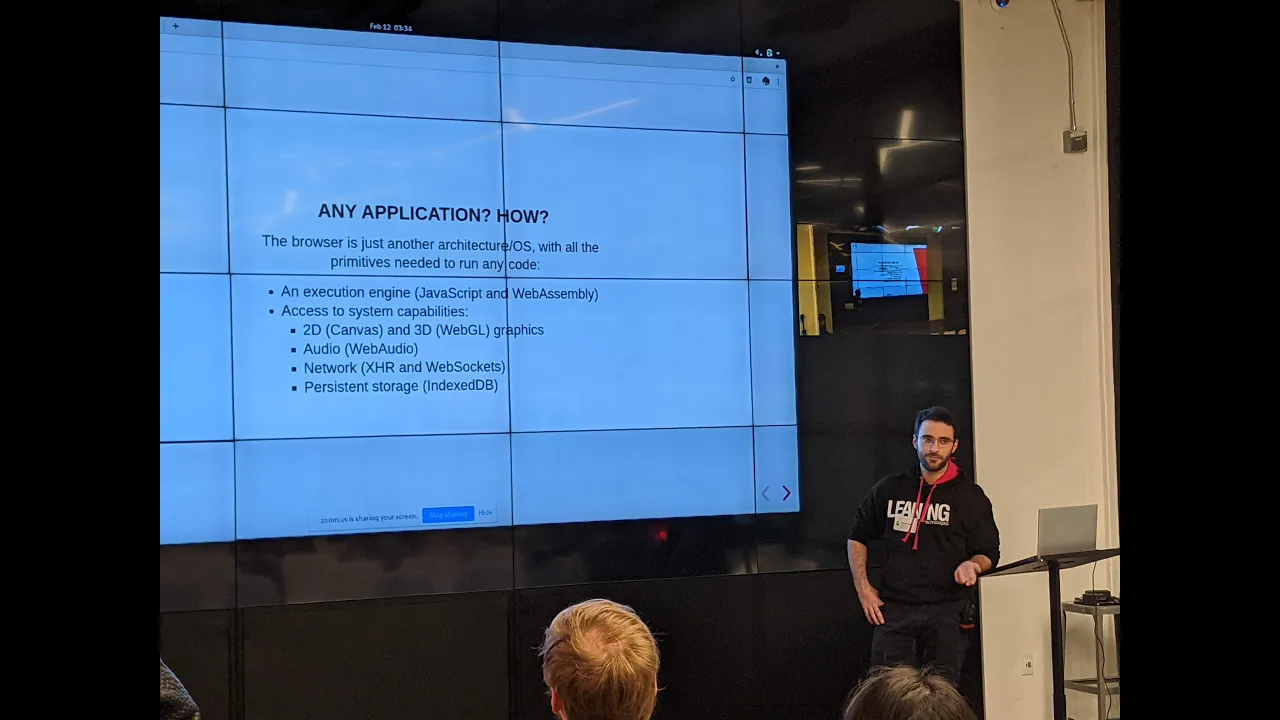
To explain the vision of CheerpX, Iozzelli addresses what it fundamentally means to run any arbitrary application inside a web browser: “We just need to see the browser as just another architecture and operating system.” Under this mental model, executing software requires two core components: 1. An **execution engine** capable of executing computational logic (which, inside browser environments, consists of native WebAssembly and JavaScript). 2. Direct access to **system capabilities** through low-level libraries that present output to the user, because without graphics or audio output, an application “is just making computation without showing anything.”
[01:26](https://www.youtube.com/watch?v=7JUs4c99-mo&t=86s) Porting C++ and Java: Emscripten, Cheerp, and CheerpJ
Traditional browser porting workflows depend on source re-compilation or bytecode translation alongside platform emulation layers. For C++, compilers such as Emscripten and Cheerp take source code and emit WebAssembly and JavaScript. Developers must recreate OS-level APIs (such as POSIX interfaces or SDL graphics libraries) using JavaScript or browser-compatible C++.
To demonstrate this concept, Iozzelli showcases *BZFlag* (rendered in the talk as a multiplayer game ported with Cheerp), a 3D multiplayer tank game written in C++. Running it in the browser presented two main porting hurdles: - **Graphics API mismatches:** The game was originally authored using legacy OpenGL 1.x, which does not map 1:1 to WebGL, requiring an emulation translation layer. - **Networking limits:** The original game relied on raw UDP sockets for network synchronization. Because raw UDP is unavailable to client-side web scripts, the port substituted WebRTC data channels to transport packets. Because WebRTC was used, both the client and the dedicated game server could run concurrently inside browser tabs.
When tackling Java applications via CheerpJ, source code is unnecessary. CheerpJ operates on Java bytecode, allowing full binary compatibility across any language that targets the JVM (including Kotlin or Scala). CheerpJ preserves dynamic class loading, reflection, and run-time verification. On the library side, Leaning Technologies recompiled the OpenJDK runtime itself into WebAssembly and JavaScript. This enables legacy desktop UI frameworks like Swing and AWT to render inside the DOM without modification. Iozzelli presents *OpenAstexViewer*, a Java applet used for visualizing 3D molecular structures and protein models, executing smoothly inside modern browsers without requiring the deprecated NPAPI Java browser plugin.
[04:18](https://www.youtube.com/watch?v=7JUs4c99-mo&t=258s) Dropping Linux ELF Binaries Directly into the Browser
While runtime reimplementations like CheerpJ work well for specific ecosystems, they require building dedicated compatibility layers for every runtime environment. Iozzelli argues for a radical alternative: “What if we just run a Linux ELF binary and solve the problem?”
To illustrate this, Iozzelli builds a basic C test program on the command line using standard native development tools. He demonstrates compiling with two specific compiler flags: - `-static`: Links all libraries into a single standalone binary that can be loaded straight into the browser interface without managing separate dynamic library dependencies. - `-m32`: Generates a standard x86 32-bit binary, matching CheerpX's current architectural support.
After inspecting the output with the `file` command to confirm it is an authentic `ELF 32-bit LSB executable, Intel 80386`, he selects the binary via a browser file picker. The unmodified binary executes immediately within the browser tab.
```mermaid flowchart LR accTitle: CheerpX Two-Tier Execution Flow accDescr: Flow diagram showing how execution cycles between the interpreter and compiled WebAssembly modules.
Sched["Thread Scheduler"] --> Check{"Code Compiled?"} Check -- "No (Cold)" --> Interp["x86 Interpreter"] Check -- "Yes (Hot)" --> Wasm["Native WebAssembly JIT Blocks"]
Interp -->|"Profile & Discover CFG"| JIT["JIT Compiler"] JIT -->|"Emit Wasm Module"| Wasm
Wasm -->|"Timer / Syscall / Page Fault"| Interp Interp -->|"Resume Scheduling"| Sched ```
[05:12](https://www.youtube.com/watch?v=7JUs4c99-mo&t=312s) Inside CheerpX: The Two-Tier Architecture and Opcode Decomposition
CheerpX is an execution engine written in C++ and compiled to WebAssembly. It operates on arbitrary 32-bit x86 binaries using two distinct execution tiers: - **An x86 Interpreter:** Interprets code one instruction at a time, handling infrequently executed ("cold") code paths and profiling runtime behavior. - **A Just-In-Time (JIT) Compiler:** Takes frequently executed ("hot") basic blocks and compiles them directly into WebAssembly modules at runtime.
CheerpX supports two execution targets: user-space Linux binary execution (intercepting Linux system calls) and full-system virtualization capable of booting an unmodified operating system.
Execution is managed by a thread scheduler. When a target program counter points to already-compiled WebAssembly, the runtime bypasses the interpreter to execute native WebAssembly directly at near-native speeds. If an event occurs—such as a timer interrupt, page fault, or system call (`syscall`)—control falls back to the interpreter, which handles the transition and resumes the scheduling loop.
Handling the x86 instruction set requires managing a large, variable-length instruction space. CheerpX breaks down complex x86 opcodes into simpler micro-operations (primitives). For example, an `ADD` instruction is broken into: 1. Loading source operands from registers or immediate values. 2. Executing the mathematical addition. 3. Manually computing and updating the x86 `EFLAGS` register. Hardware x86 CPUs automatically calculate flags (such as Carry, Zero, Sign, and Overflow) after every arithmetic operation, but WebAssembly instructions do not generate CPU flags automatically. 4. Writing back the computed result to the destination register.
Similarly, a comparison instruction (`CMP`) is broken down as a subtraction primitive where the arithmetic difference is discarded and only the resulting status flags are computed and preserved.
[07:18](https://www.youtube.com/watch?v=7JUs4c99-mo&t=438s) Control Flow Graph Discovery and JIT Compilation Strategy
The interpreter executes instructions sequentially while constructing metadata structures needed by the JIT compiler, specifically building a runtime Control Flow Graph (CFG). This profiling stage tracks indirect branches: because indirect jumps in native code typically target a consistent set of destinations, the interpreter records these targets to help optimize downstream compilation.
The CFG is composed of traces (equivalent to basic blocks in compiler terminology): unbroken linear sequences of instructions terminating in a control transfer, such as a jump, conditional branch, or function call.
```mermaid flowchart TD accTitle: Dynamic Trace Promotion in CheerpX accDescr: Diagram illustrating how execution traces transition from cold interpretation to hot WebAssembly function generation.
subgraph Memory["x86 Binary Memory"] T1["Trace 1 (Cold / Interpreter)"] T2["Trace 2 (Warm)"] T3["Trace 3 (Hot Entry Point)"] T4["Trace 4 (Warm)"] end
T1 --> T3 T3 --> T2 T3 --> T4
subgraph JIT_Module["Compiled WebAssembly Function"] T3_Compiled["Trace 3 Logic"] T2_Compiled["Trace 2 Logic"] T4_Compiled["Trace 4 Logic"] end
T3 -.->|"Promote Hot Root + Reachable Warm Traces"| JIT_Module ```
Generating WebAssembly from native machine code poses an architectural mismatch: - Native binaries can branch arbitrarily anywhere in memory using absolute addresses, mid-function jumps, or unaligned entry points. - WebAssembly enforces structured control flow and execution units scoped inside strict functions (`func`).
While assembly language contains `CALL` and `RET` mnemonics, binaries are not required to follow structured calling conventions: “There are the call and ret instructions, so you can say that a function is something that is a target of a call and it ends when you get the ret instruction, but the code is actually not required to do that at all.” Binaries can execute a `RET` without an associated `CALL`, jump across arbitrary stack offsets, or execute self-modifying code.
To bridge this gap, CheerpX uses its dynamically collected CFG data to infer functional boundaries: - Traces begin cold within the interpreter. - As execution counts rise, traces are promoted to "warm" and eventually "hot." - When a trace becomes hot, it serves as the root entry point for a new WebAssembly function. - CheerpX gathers the hot root trace and all contiguous, reachable traces that are at least warm, bundling them into a single WebAssembly function module. - If uncompiled paths subsequently become warm later in execution, CheerpX invalidates or updates the compiled WebAssembly function with the expanded trace set.
[10:38](https://www.youtube.com/watch?v=7JUs4c99-mo&t=638s) JIT Optimizations, Flags Redundancy, and Syscall Interception
When compiling traces into WebAssembly, CheerpX applies custom optimization passes. The JIT operates under the core assumption that the underlying application code is already well-optimized by native ahead-of-time compilers like GCC or Clang: “The code is already let's say optimal, but we want to optimize all the overhead of the virtualization.”
One of the largest virtualization overheads in x86-to-WebAssembly translation is computing the CPU status flags (`EFLAGS`). On real hardware, flags are updated for free alongside arithmetic; in WebAssembly, computing flags requires explicit bitwise calculations and state writes. CheerpX runs dead-code elimination across flag calculations: - If an `ADD` instruction is immediately followed by a `SUB` instruction, both instructions would normally write their results to the flag status register. - If no conditional jump or branching instruction reads the flags between the two instructions, the flags computation for the `ADD` is completely redundant. - CheerpX eliminates the intermediate flag generation primitives, avoiding unnecessary bit shifting and register updates. - It also performs common subexpression elimination, such as removing redundant loads when the contents of an x86 register (like `EBX`) are already cached in local WebAssembly variables.
``` Original Assembly: ADD EAX, EBX; Computes sum AND updates EFLAGS (unobserved) SUB EAX, ECX; Computes difference AND updates EFLAGS (observed by JNZ) JNZ target
CheerpX Optimization: [Load EAX, EBX] [Wasm i32.add] <-- Omit EFLAGS generation entirely [Load ECX] [Wasm i32.sub + Calc Flags] <-- Retain flag calculations only here [Branch on Flags] ```
Beyond arithmetic optimization, CheerpX handles concurrency and platform integration: - **Threading and Multiprocessing:** True parallel Web Workers are an intended future enhancement. CheerpX handles multi-threading on the browser's single main thread through cooperative time-slicing, round-robin scheduling across logical threads, and managing distinct address spaces for separate Linux processes. - **System Calls (Syscalls):** CheerpX intercepts standard Linux software interrupts and system calls (`int 0x80` / `sysenter`). Calls such as `open`, `read`, `write`, `close`, timing calls, and virtual memory mappings (`mmap`) are routed to native web browser APIs, local storage, or network backends.
Iozzelli concludes by comparing CheerpX's design to native dynamic binary translators: “What I explained so far is not so different than what software like QEMU does natively for example, right? Just generate some code.” However, running this architecture inside browser sandboxes encounters WebAssembly runtime limitations not present in native environments.
[13:52](https://www.youtube.com/watch?v=7JUs4c99-mo&t=832s) WebAssembly JIT Realities and Browser Limitations
Native virtual machines generate machine code and jump straight into execution. In WebAssembly, dynamic code execution is far more cumbersome. A runtime must wrap generated WebAssembly bytecode inside a module, compile that module asynchronously, wait for the compilation promise to resolve, and only then invoke the functions exported from that module. This creates an architectural dilemma regarding compilation granularity. While the ideal model would compile a single function per module for near-instant execution, browser implementation limits make this impossible.
```mermaid flowchart TD accTitle: WebAssembly JIT Module Batching Trade-off accDescr: The trade-off between compiling one function per module versus batching functions to avoid browser crashes.
subgraph Ideal ["Ideal Model: Function-Level Compilation"] I1["Compile 1 function"] --> I2["Wrap in 1 Wasm module"] I2 --> I3["Near-zero compilation latency"] I3 --> I4["1,000+ active modules"] I4 --> I5["Browser tab crashes (Chrome)"] end
subgraph Batch ["Current CheerpX Batching Model"] B1["Group multiple hot functions"] --> B2["Wrap batch into 1 Wasm module"] B2 --> B3["Compilation latency & interpreter overhead"] B3 --> B4["Avoids browser crashes"] B4 --> B5["Risk of memory leaks via shared function tables"] end ```
Yuri highlights the instability encountered in production browsers: “for example Chrome, after we have like 1,000 modules at the same time, just the browser tab crashes.” Because of this crash threshold, CheerpX batches multiple functions into a single module. However, bundling too many functions introduces compilation latency, forcing the virtual machine to spend excessive time running in the slower interpreter while awaiting the compiled code. Additional browser-level bugs complicate the implementation, such as memory leaks caused by sharing function tables across modules.
- Module compilation in WebAssembly is fundamentally asynchronous, introducing mandatory wait latency before code execution. - WebAssembly tail calls are critical for indirect branching; dispatching indirect branches using standard function calls blows the call stack. - Tail calls were supported in Chrome at the time of the presentation, while Firefox support remained pending. - CheerpX uses experimental WebAssembly threads and `SharedArrayBuffer`—not to execute guest threads directly, but to schedule hardware interrupts and keep virtual time.
---
[16:19](https://www.youtube.com/watch?v=7JUs4c99-mo&t=979s) Sandboxing Constraints: Filesystems and Networking
Running arbitrary x86 Linux binaries inside the browser forces the execution layer to adapt to web security models. A native program cannot access the underlying host machine's local storage directly because the browser enforces strict sandboxing. To resolve this, CheerpX provides an emulated virtual filesystem backed by IndexedDB.
```mermaid flowchart LR accTitle: CheerpX Browser Sandboxing and Emulation Layer accDescr: Mapping guest x86 filesystem and network requests through browser-compatible sandboxed equivalents.
subgraph GuestApp ["x86 Guest Binary"] G_FS["POSIX Filesystem Calls"] G_NET["Raw UDP / Sockets"] G_HTTP["HTTP Requests"] end
subgraph Emulation ["CheerpX Emulation Layer"] E_FS["IndexedDB Virtual FS"] E_WS["WebSocket Tunnel"] E_Fetch["Browser Fetch / XHR"] end
subgraph HostEnv ["Host / Remote"] H_Store[("Browser Storage")] H_Proxy["Proxy Relay Server"] H_Net["Remote UDP Destination"] H_Web["Cross-Origin HTTP APIs"] end
G_FS --> E_FS --> H_Store G_NET --> E_WS --> H_Proxy --> H_Net G_HTTP --> E_Fetch --> H_Web ```
Networking introduces similar architectural barriers. When an application attempts to open an arbitrary transport protocol, such as a UDP socket, the browser cannot service the request because raw networking APIs are not exposed to client-side scripts. CheerpX handles network transport using WebSockets, though Yuri explains that “WebSockets are not real sockets, so you still need some kind of proxy server that relays the WebSocket traffic.” Standard HTTP requests execute through normal web APIs, although they remain vulnerable to standard cross-origin (CORS) restrictions.
---
[17:27](https://www.youtube.com/watch?v=7JUs4c99-mo&t=1047s) The Primary Use Case: Adobe Flash Player Without Plugins
The flagship use case driving CheerpX development is preserving Adobe Flash applications without native NPAPI/PPAPI browser plugins. With official Flash support terminated at the end of 2020, existing preservation attempts have focused on clean-room reimplementations of the Flash runtime, such as the Rust-based Ruffle project or older efforts like Gnash and Lightspark. Yuri remains skeptical that reverse-engineered interpreters can ever achieve full fidelity. He notes that the founder of Leaning Technologies, who was the original author of Lightspark, concluded that running the original binary is the only path to 100% compatibility: “he's convinced that this is the only way to have everything working for real, and yeah, because we just run the original and nothing can go wrong, right?”
Because the Linux Flash Player was distributed as a shared library (`.so`) using Google's Pepper API (PPAPI) rather than a standalone executable, running it requires a split-host architecture:
```mermaid flowchart TD accTitle: Flash PPAPI Host Architecture in CheerpX accDescr: Architecture showing how CheerpX hosts the native Linux Flash shared library and bridges the Pepper API into JavaScript.
subgraph InVM ["CheerpX Virtual Machine (x86)"] F_SO["Linux Flash Player (.so)"] H_x86["x86 Pepper Host Helper"] F_SO <-->|"PPAPI"| H_x86 end
subgraph BrowserJS ["Browser JavaScript Environment"] H_JS["JavaScript Pepper Host Runtime"] WebAPIs["Web APIs / Canvas / Audio"] H_JS <--> WebAPIs end
H_x86 <-->|"Bridge RPC / Memory Sync"| H_JS ```
- Deployment on web pages is unobtrusive: site owners include a single script that detects all `<object>` tags and replaces them with HTML5 `<canvas>` elements managed by the CheerpX runtime. - Yuri demonstrates a live Flash game running within the browser. The execution exhibits minor stuttering and input latency, leading him to observe: “it's not super fast yet, but it works, so it's kind of incredible if you ask me that it's actually running.”
---
[20:41](https://www.youtube.com/watch?v=7JUs4c99-mo&t=1241s) Full-System Emulation and Commercial Roadmaps
Beyond syscall-level emulation for Linux binaries, CheerpX includes a full-system emulation mode. Instead of intercepting Linux system calls, this engine emulates underlying motherboard and CPU hardware, enabling unmodified operating systems to boot on top. The system-level mode shares the exact same core execution architecture—the identical interpreter and WebAssembly JIT compiler—used by the application-level sandbox.
Yuri demonstrates this capability by booting MS-DOS inside the browser and launching the classic DOS platform game *Prehistorik*, which runs at smooth, playable speeds.
```mermaid flowchart TD accTitle: Unified Execution Engine Modes in CheerpX accDescr: Diagram illustrating how the single execution engine supports both user-mode syscall emulation and hardware-level emulation.
subgraph CoreEngine ["Unified Core Execution Engine"] JIT["WebAssembly JIT Compiler"] Interp["x86 Interpreter"] end
subgraph SyscallMode ["Application Syscall Emulation"] Flash["Adobe Flash Player (Linux.so)"] SyscallInterp["Linux Syscall Translation"] Flash --> SyscallInterp --> CoreEngine end
subgraph SysMode ["Full Hardware Emulation"] DOS["MS-DOS / Prehistorik"] HW["PC Hardware Emulation (Real Mode)"] DOS --> HW --> CoreEngine end ```
- The hardware engine is currently limited to real-mode operation, with protected-mode x86 support under active development. - The company has executed a commercial agreement with an online Flash game distributor to deploy CheerpX across production gaming portals. - Enterprise demand centers on legacy business applications built with Adobe Flex and Adobe Spark. - Leaning Technologies runs an early-adopter program for enterprise clients, targeting commercially acceptable performance by summer 2020.
---
[23:29](https://www.youtube.com/watch?v=7JUs4c99-mo&t=1409s) Q&A: Wasm Working Group, Chrome Extensions, and CheerpJ GC
Following the presentation, audience members probe into Wasm standardisation, extension deployment, and memory management internals:
- **WebAssembly Community Group (CG) JIT Proposal:** An attendee notes that dynamically emitting Wasm bytes, instantiating modules, and fetching exported functions is awkward, mentioning that the WebAssembly Community Group is actively discussing first-class JIT capabilities. Yuri confirms he is attending the W3C meeting the following day to share CheerpX's architectural challenges with the working group. - **Automated Web Archives and Extension Packaging:** In response to whether CheerpX could run across the Internet Archive automatically, Yuri explains that while many sites still trigger runtime crashes, automated execution is theoretically straightforward. He points to Leaning Technologies' sister product, CheerpJ: “for our Java product we actually have a Chrome extension that is called CheerpJ Applet Runner, and you can use that extension to inject our script.” - **Firefox Extension Limitations:** When asked why the CheerpJ Applet Runner is only available on the Chrome Web Store, Yuri explains that the extension must inject execution shims extremely early in the document lifecycle: “there are a lot of workarounds that we put into the extension because we need to inject our stuff very, very early, and the APIs for extensions are not really letting us do all the stuff that we want.” These race-condition workarounds rely on Chrome-specific behaviors, though Firefox support remains constrained primarily by engineering team bandwidth. - **CheerpJ Garbage Collection Model:** An attendee asks how CheerpJ executes garbage collection without the ability to inspect the WebAssembly call stack. Yuri clarifies that CheerpJ compiles Java bytecode directly into JavaScript and relies on the browser engine's native garbage collector for object lifetimes. Only native JVM methods compile to WebAssembly; Leaning Technologies does not bundle a custom GC implementation. CheerpX itself manages raw x86 memory directly via its emulated physical memory model.
[28:44](https://www.youtube.com/watch?v=7JUs4c99-mo&t=1724s) Concrete Values and JIT Optimization Possibilities
An audience member asks about the specifics of the Just-In-Time (JIT) compiler. Noting that the engine compiles the front-end language into execution traces, they point out that during JIT execution, the engine runs on concrete runtime values. They wonder whether CheerpX uses those concrete values at runtime to perform specific optimizations that mutate or refine the trace graph, acknowledging that the question “might be a little bit too technical to be honest.”
Yuri Iozzelli explains that CheerpX currently does not leverage runtime concrete values to optimize trace generation, though he concedes it is a promising direction: “Now we are not we are not doing that but that's actually a cool thing to explore yeah yeah you're right that could be done but yeah we are not doing that yet.”
[29:53](https://www.youtube.com/watch?v=7JUs4c99-mo&t=1793s) Networking Challenges: Raw Sockets, WebSockets, and WebRTC
Another attendee asks how networking behaves when running native Linux or DOS binaries inside the browser—specifically whether an application can open a raw socket to execute a network service such as a web server. Yuri clarifies that network support is not yet implemented, largely due to the browser sandbox boundary. Because a native application expects to open raw sockets directly, CheerpX must translate those calls into browser-native networking primitives, which leaves two main alternatives:
```mermaid flowchart TD accTitle: Networking Bridging Strategies in CheerpX accDescr: Diagram illustrating trade-offs between WebSocket relay architecture and direct WebRTC peer connections.
subgraph Relayed ["WebSocket Strategy"] AppA["Browser Guest App"] -->|"WebSocket"| Relay["Relay Server"] Relay -->|"Native TCP/UDP"| NativeApp["Native Desktop App"] end
subgraph Direct ["WebRTC Strategy"] AppB["Browser Guest App A"] <-->|"WebRTC DataChannel"| AppC["Browser Guest App B"] end ```
If CheerpX uses WebRTC, the guest is confined to communicating only with endpoints running an identical WebRTC back-end, precluding direct communication with arbitrary native applications running outside the browser without specialized software. If CheerpX maps calls to WebSockets, it can employ an external relay server that opens normal sockets to interface between the browser guest and external native systems. However, for browser-to-browser use cases like multiplayer Flash games, WebRTC might be the cleaner choice. Yuri summarizes the situation by stating: “We still have to think about that and maybe the best thing is just case by case.”
The questioner then asks the room whether anyone from the Chrome team has an update on Project Fugu's raw socket and UDP capabilities. They observe that while Chrome Apps previously supported raw sockets, general web platform support remains limited, and Yuri agrees that while Chrome Apps could open sockets, “those are not anywhere everywhere but maybe one day.”
[32:33](https://www.youtube.com/watch?v=7JUs4c99-mo&t=1953s) Emulating x86 vs. Re-implementing the Flash Virtual Machine
An audience member asks why Leaning Technologies chose to build a full x86 virtualization layer rather than writing a dedicated Flash interpreter, given that their headline application is preserving Flash content. Yuri details the long, fraught history of open-source Flash reimplementations, pointing out previous efforts like Gnash and Lightspark, as well as modern projects like Ruffle. Because the Flash specification is massive and filled with edge cases, reverse-engineering it has historically led to broken compatibility:
> “Problem is that Flash is very complex and it's very difficult to get it right for example Gnash has been around for a lot of time and you couldn't run everything and also Lightspark was even beyond Flash in compatibility but also that one has its limitation so I don't know how Ruffle is going but yeah we think that it will never be exactly the same as the original Flash Player.”
Beyond fidelity, an x86 virtual machine provides an architectural investment that outlives Flash. Although Adobe Flash was scheduled for complete deprecation by browser vendors within the year, CheerpX's underlying engine remains entirely generic:
> “Right now we have a concrete application that is saving Flash this year because it's going away this year but we can reuse all these stuff to make other things too so we think that this is a better use of our time instead of implementing Flash yet another time and maybe not getting it right.”
In response to a follow-up asking whether CheerpX re-implements the Windows API or runs a full Windows OS underneath, Yuri clarifies their current setup: they run the original Linux Flash player binary directly within CheerpX's Linux emulation environment.
[34:56](https://www.youtube.com/watch?v=7JUs4c99-mo&t=2096s) DOS Emulation, Internet Archive Preservation, and Closing Banter
The discussion shifts to running older DOS software and whether users can boot arbitrary disk images with DOS games. Yuri indicates that basic DOS emulation works, though hardware compatibility remains incomplete. CheerpX's primary development focus is centered on the shared core components—specifically the JIT compiler and x86 execution pipelines—rather than emulating every specialized video mode and legacy peripheral device.
An attendee working as a contractor for the Internet Archive notes their interest in CheerpX, mentioning that the Internet Archive hosts a massive collection of MS-DOS games playable in the browser and that they want to connect after the talk to discuss technical overlap.
The session ends with lighthearted questions from the audience: - An attendee asks the mandatory benchmark question: “Can you play Doom on it?” Yuri laughs and admits, “We didn't try actually but it's the ultimate test.” - Another audience member brings up an ironic full-circle experiment seen at the WebAssembly Summit, where a speaker demonstrated compiling WebAssembly code back into Flash files. The attendee suggests pairing that compiler with CheerpX to convert WebAssembly to Flash, and then using CheerpX to execute that Flash binary back inside WebAssembly in the browser, closing the session to laughter.
## Notable quotes > [00:29](https://www.youtube.com/watch?v=7JUs4c99-mo&t=29s) We just need to see the browser as just another architecture and operating system. — Yuri Iozzelli
> [16:19](https://www.youtube.com/watch?v=7JUs4c99-mo&t=979s) WebSockets are not real sockets, so you still need some kind of proxy server that relays the WebSocket traffic. — Yuri Iozzelli
## Mentioned Leaning Technologies, Cheerp, CheerpJ, CheerpX, Yuri Iozzelli, WebAssembly, JavaScript, Emscripten, BZFlag, OpenGL, WebGL, WebRTC, OpenJDK, OpenAstexViewer, Swing, AWT, NPAPI, PPAPI, Linux, ELF, Intel 80386, GCC, Clang, QEMU, Google Chrome, Mozilla Firefox, IndexedDB, WebSocket, Adobe Flash Player, Ruffle, Gnash, Lightspark, MS-DOS, Prehistorik, Adobe Flex, Adobe Spark, WebAssembly Community Group, CheerpJ Applet Runner, Project Fugu, Internet Archive, Doom, WebAssembly Summit
## Video description Original event: https://www.meetup.com/wasmsf/events/268096535/
WebAssembly is a new web technology that promises to revolutionize the web ecosystem. In this talk, I will explore the very limits of what is possible to do with it, by describing CheerpX: A WebAssembly-based x86 virtual machine in the browser.
Similarly to modern native virtual machines, CheerpX features a Just-In-Time compiler capable of producing optimized WebAssembly code at runtime. This has the potential of speeding up the execution considerably and unlocking the possibility of running real-world native applications in the browser.
One such application that we are currently working on at Leaning Technologies to showcase the CheerpX potential is the Adobe Flash Player for Linux: This allows running unmodified Flash content on modern browsers without plugins.
[Source](https://www.youtube.com/watch?v=7JUs4c99-mo)