Apple VoiceOver Powers Real-Time Scene Readouts in iOS Magnifier
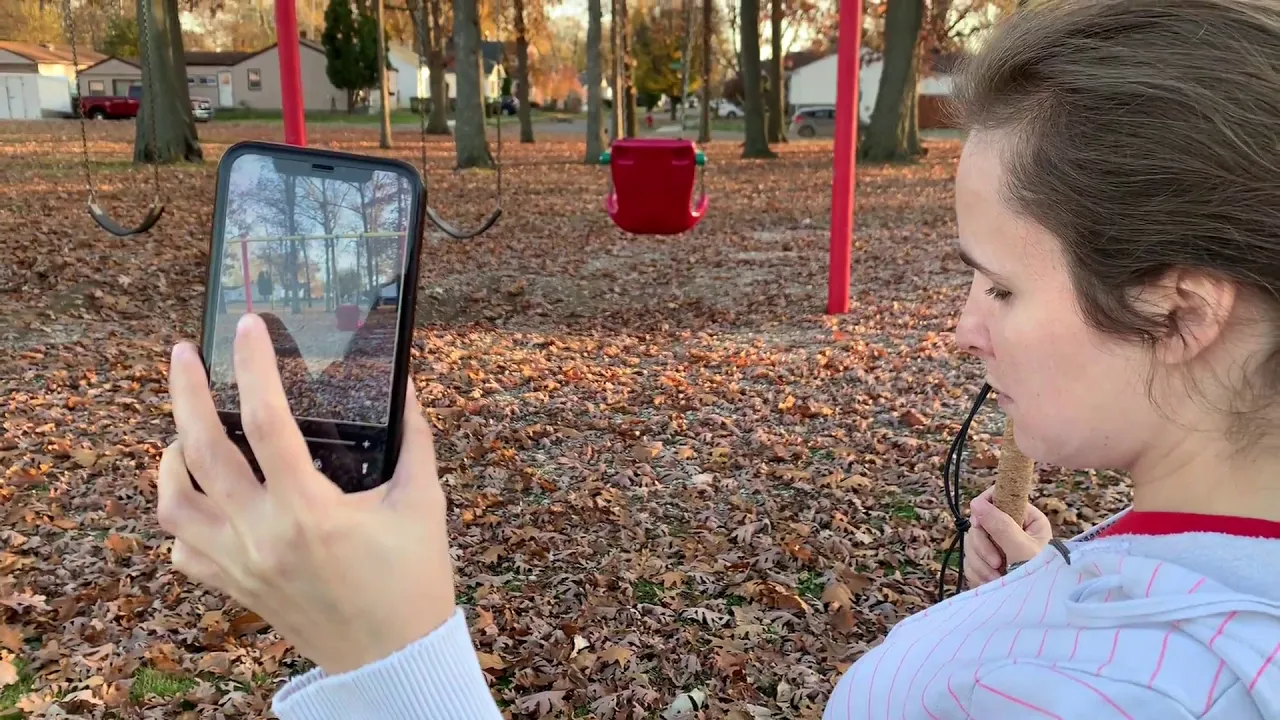
iPhone Magnifier and Voice over — Kristy Viers

Kristy Viers

Pairing Apple's native Magnifier with VoiceOver enables real-time scene recognition and spatial distance tracking for blind users without relying on third-party software.

AI-assisted summary of iPhone Magnifier and Voice over — original source. Check the original for full context.

Source published:

Key ideas

  • Pairing Apple's built-in iOS Magnifier tool with the VoiceOver screen reader enables automated, real-time auditory descriptions of surroundings for blind and visually impaired users. (0:02)
  • Live camera analysis through VoiceOver can identify specific mobility equipment, detecting people holding white canes or walking sticks across various terrain types. (0:58)
  • LiDAR-equipped devices like the iPhone 12 Pro expand Magnifier's utility with People Detection, measuring proximity to assist users with physical distancing and spatial awareness. (2:52)

Detailed notes

## Background Published on YouTube by Kristy Viers on November 8, 2020, this video explores a lesser-known accessibility workflow within iOS. According to the description, Viers demonstrates how the built-in Magnifier app pairs seamlessly with VoiceOver to verbally describe surroundings, offering an integrated alternative to third-party accessibility software.

## TL;DR Blind creator Kristy Viers demonstrates how pairing Apple's built-in iOS Magnifier tool with the VoiceOver screen reader transforms the camera into a real-time environmental narrator. Filming outdoors in a park, she tests the live viewfinder as it accurately announces surroundings, identifying pedestrians with white canes, playground gear, basketball hoops, and foliage. She explains that this native feature provides critical spatial context without requiring third-party downloads. Additionally, Viers highlights how newer hardware like the iPhone 12 Pro uses LiDAR for people detection and proximity measurement, making it a powerful navigation and social-distancing aid.

## Atmosphere & style The video carries an authentic, informative, and encouraging outdoor vlog feel, bathed in bright afternoon sunlight. Kristy's presentation is straightforward and grounded in real-world lived experience, sharing her accidental discovery with practical enthusiasm. The contrast between her relaxed, conversational delivery and the rapid, robotic cadence of VoiceOver processing the outdoor scene creates an engaging, eye-opening window into how assistive technology aids blind navigation.

## Bulletin - [00:02](https://www.youtube.com/watch?v=8CAafjodkyE&t=2s) Pairing Apple's built-in iOS Magnifier tool with the VoiceOver screen reader enables automated, real-time auditory descriptions of surroundings for blind and visually impaired users. - [00:58](https://www.youtube.com/watch?v=8CAafjodkyE&t=58s) Live camera analysis through VoiceOver can identify specific mobility equipment, detecting people holding white canes or walking sticks across various terrain types. - [02:52](https://www.youtube.com/watch?v=8CAafjodkyE&t=172s) LiDAR-equipped devices like the iPhone 12 Pro expand Magnifier's utility with People Detection, measuring proximity to assist users with physical distancing and spatial awareness.

## Key takeaways - [00:02](https://www.youtube.com/watch?v=8CAafjodkyE&t=2s) While iOS Magnifier is traditionally used to visually zoom in on small text for low-vision individuals, enabling VoiceOver converts it into an automated scene narrator. - [00:02](https://www.youtube.com/watch?v=8CAafjodkyE&t=2s) VoiceOver's scene recognition functions as an integrated navigation aid both inside the home and when traveling outdoors. - [00:02](https://www.youtube.com/watch?v=8CAafjodkyE&t=2s) Because the Magnifier feature is built natively into iOS, users do not need to rely on or install third-party navigation apps to access environmental descriptions. - [00:58](https://www.youtube.com/watch?v=8CAafjodkyE&t=58s) During live viewfinder testing, the camera accurately identified pedestrians, distinguishing white canes, walking sticks, sidewalks, and roadways. - [00:58](https://www.youtube.com/watch?v=8CAafjodkyE&t=58s) The automated system detected and described recreational infrastructure, such as basketball hoops, playgrounds, slides, and swing sets. - [00:58](https://www.youtube.com/watch?v=8CAafjodkyE&t=58s) VoiceOver's image recognition captures detailed outdoor context, including lighting conditions like sun glare, clear skies, and seasonal ground details like fallen autumn leaves. - [02:52](https://www.youtube.com/watch?v=8CAafjodkyE&t=172s) Hardware integration with LiDAR scanners on devices such as the iPhone 12 Pro allows Magnifier to calculate and announce distances to nearby people. - [02:52](https://www.youtube.com/watch?v=8CAafjodkyE&t=172s) LiDAR-based proximity detection provides practical utility for maintaining social distancing and overall spatial awareness without visual cues.

## Detailed walkthrough ### [00:02](https://www.youtube.com/watch?v=8CAafjodkyE&t=2s) Using Magnifier with VoiceOver as a Blind User

Kristy Viers introduces the video by explaining that she is exploring the built-in iOS Magnifier tool through the lens of a blind user pairing it with Apple's VoiceOver screen reader. Under standard circumstances, Magnifier functions primarily as visual magnification software designed for low-vision individuals who need to enlarge small print in a book or on a physical document. Typically, an iPhone user opens their device settings, navigates to the accessibility menu, and launches Magnifier to zoom in on targets they wish to inspect.

However, Kristy points out an alternative functionality when VoiceOver is enabled alongside the camera feed: the software actively articulates environmental details to the user in real time. Rather than merely enlarging an image on screen, the camera system analyzes scenes and announces what it detects. Kristy highlights the practical benefit for independent navigation, noting: “I learned that with VoiceOver on it will tell me my surroundings as it sees them so that's really cool if you're out and about or in your house and you can tell what's around you with VoiceOver on telling you what's there.”

```mermaid flowchart TD accTitle: iOS Magnifier with VoiceOver Flow accDescr: Diagram showing how camera input feeds into Magnifier and VoiceOver to output spoken scene descriptions.

subgraph Input ["Camera & Sensors"] CAM["Live Camera Viewfinder"] end

subgraph Processing ["iOS Accessibility Engine"] MAG["Magnifier App"] VO["VoiceOver Screen Reader"] CAM --> MAG MAG --> VO end

subgraph Output ["User Feedback"] AUD["Spoken Scene & Object Descriptions"] VO --> AUD end ```

[00:58](https://www.youtube.com/watch?v=8CAafjodkyE&t=58s) Live Demonstration: VoiceOver Environmental Readouts

Kristy points the iPhone camera around an outdoor environment to showcase the automated audio feedback generated by VoiceOver's viewfinder analysis. As the phone captures different angles, the system generates continuous descriptive readouts of the people, objects, and landscapes within frame. The camera first detects people walking nearby, identifying specific mobility tools and surfaces, before panning toward recreational park infrastructure, trees, and walkways under daylight conditions.

The automated VoiceOver descriptions identify a wide variety of elements during the demonstration: - “Viewfinder image: a person holding a walking stick and standing on a sidewalk / a person holding a walking stick and standing on the road” - “Viewfinder image: a person holding a white cane and standing on a paved surface with grass and a building in the background” - Scene recognitions identifying children holding mobility canes on paved pathways and roads - “A red and white basketball hoop hanging from a metal pole in front of a grass field / a red and white basketball hoop in front of a grassy field under a clear blue sky” - “Viewfinder image: a photo containing a sunrise or sunset and grass / a photo containing a sunrise or sunset, grass, and a path” - “Viewfinder image: a group of children playing on a playground / a group of people standing in front of a playground” - “Viewfinder image: a paved road next to a grassy area with trees and buildings in the background under blue sky” - Park elements including slides, playground equipment, stone staircases on grassy hills, and swing sets - Ground foliage descriptions, detailing trees with fallen brown and orange autumn leaves on dirt surfaces against backdrops of parked cars and afternoon sun glare

[02:52](https://www.youtube.com/watch?v=8CAafjodkyE&t=172s) LiDAR Distance Detection and Closing Thoughts

Kristy transitions to a concluding summary on how useful Magnifier can be when placed in the hands of someone who is blind or visually impaired. She reflects that while she personally stumbled upon the functionality, it remains an underutilized tool that many iOS users may not realize exists right inside their operating system without needing third-party downloads.

She also calls attention to newer hardware capabilities, specifically highlighting the iPhone 12 Pro equipped with a LiDAR scanner. Kristy explains that LiDAR integration expands the Magnifier app to include people detection, allowing blind users to measure spatial proximity. Kristy observes: “And I hear that on the iPhone 12 Pro with LiDAR, it'll give you the ability to tell how far away somebody is from you so if you're social distancing or anything like that, it can help you to know how close or far away people are from you and LiDAR will help with that.” Kristy closes by stating that she wanted to raise awareness about these tools and took advantage of the sunny day to film the demo outdoors, encouraging viewers to like and subscribe to the channel.

## Mentioned Kristy Viers, iPhone, iOS, Magnifier, VoiceOver, Apple, iPhone 12 Pro, LiDAR

## Video description In this video I demonstrate a lesser known feature of the iOS Magnifier feature. It works really well with voice over to describe your surroundings. I know there are other apps that do the same thing, but this is built into iOS so all iPhone users should already have it.

[Source](https://www.youtube.com/watch?v=8CAafjodkyE)

中文简报

苹果VoiceOver助力iOS“放大器”实现实时场景播报 苹果原生“放大器”与VoiceOver相结合,让视障用户无需依赖第三方软件即可实现实时场景识别与空间距离追踪。 视障创作者Kristy Viers展示了如何将苹果内置的iOS“放大器”工具与VoiceOver屏幕朗读功能相结合,将摄像头转化为实时环境播报器。在公园进行户外拍摄时,她测试了实时取景器,系统准确播报了周围环境,识别出行人、手持盲杖者、游乐场设施、篮球架及树木枝叶。她解释称,这一原生功能无需下载第三方应用即可提供关键的空间背景信息。此外,Viers还强调了iPhone 12 Pro等较新硬件如何利用激光雷达(LiDAR)进行人物检测和距离测量,使其成为辅助导航和保持社交距离的得力工具。 将苹果内置的iOS“放大器”工具与VoiceOver屏幕朗读功能相结合,可为盲人和视障用户提供自动化的实时周围环境语音描述。 (0:02) 通过VoiceOver进行的实时摄像头分析能够识别特定的辅助出行装备,在各类地形中检测出手持白手杖或盲杖的人员。 (0:58) 配备激光雷达(LiDAR)的设备(如iPhone 12 Pro)通过“人物检测”拓展了“放大器”的实用性,可测量距离以协助用户保持社交距离并增强空间感知。 (2:52)

Reading summary

Pairing Apple's built-in iOS Magnifier with the VoiceOver screen reader transforms a traditional visual zoom utility into an automated scene description system for blind and low-vision users, according to creator Kristy Viers. Repurposing Magnifier Beyond Standard Zoom (0:02) Under standard usage, iOS Magnifier operates primarily as an enlargement tool designed for low-vision users to inspect small text on physical documents or books. When accessed through accessibility settings with VoiceOver active, however, the software shifts from passive optical magnification to real-time auditory scene analysis. Rather than requiring the user to interpret a magnified image, the system processes the live camera feed and automatically verbalizes detected objects and environmental layouts. Automated Environmental Recognition in Practice (0:58) During an outdoor demonstration, the combined system successfully identifies complex landscape, infrastructure, and human elements in real time. The camera's viewfinder readouts distinguish between people using standard walking sticks and individuals using white mobility canes, noting surface transitions across sidewalks, paved roads, and grass. The system also articulates surrounding recreational equipment and environmental conditions. The readouts detect items such as basketball hoops, slides, swings, stone staircases, and children on playgrounds, while also interpreting environmental context, including autumn foliage, lighting conditions, and background structures. LiDAR Proximity Sensing and Native Accessibility (2:52) Beyond standard optical object recognition, Viers highlights hardware integrations introduced on devices like the iPhone 12 Pro equipped with LiDAR scanners. This sensor expands the Magnifier app's capabilities to include automated people detection and distance measurement, which assists blind users in assessing spatial proximity and maintaining physical distance from others. Viers emphasizes that these descriptive and spatial awareness tools are built directly into the iOS operating system, providing blind users with functional navigation and identification support without the need for third-party software.

精炼阅读摘要

视障创作者 Kristy Viers 指出,将 iOS 内置的放大器工具与 VoiceOver 屏幕朗读功能结合使用,能将常规的视觉放大应用转变为实时的环境识别与语音播报系统,辅助盲人用户进行独立出行与空间感知。 放大器与屏幕朗读协同工作原理 (0:02) 在常规使用场景中,iOS 放大器主要面向低视力群体,通过设备设置中的辅助功能菜单启动,用于放大书籍或纸质文档中的微小文字。Kristy Viers 发现,当盲人用户在开启实时取景框的同时启用 VoiceOver 屏幕朗读程序,该系统便突破了单纯的画面缩放功能,转为实时解析摄像头捕捉到的环境画面,并通过语音向用户播报周围场景与物体,为室内或户外的独立行动提供即时环境感知。 户外场景实测与画面细节识别 (0:58) 在户外演示中,系统取景框展现出对人物、行动辅助工具及基础设施的持续解析能力。VoiceOver 能够准确识别行进中的人员及其手持工具,例如播报手持手杖或白盲杖站在人行道、马路或铺装路面上的人员,并能区分草地与建筑背景。此外,系统还识别出行走在铺砌道路上的盲童,以及各种公共设施与自然景观。 该工具在解析过程中展现了多维度的环境识别细节。现场语音读出的内容包括金属杆上的红白篮球架、蓝天下的草坪、日落或日出光照效果,以及滑梯、秋千和草坡石阶等游乐场设施。系统还捕捉到泥土地表上的秋季落叶、停放的车辆以及午后阳光的眩光,证明了其在自然与人造环境交织场景下的视觉解析广度。 LiDAR 扩展与系统集成优势 (2:52) Kristy Viers 强调,这项功能完全集成在 iOS 系统内部,用户无需下载第三方应用程序即可使用,但目前许多视障用户仍未充分意识到该原生功能的存在。针对硬件升级,她指出配备 LiDAR 激光雷达扫描仪的机型(如 iPhone 12 Pro)进一步扩展了放大器的实用性,新增了人物距离检测能力,可帮助视障人士实时判断他人与自己的物理间距,从而在需要保持社交距离等场景中提供精准的空间距离参考。 该演示表明 iOS 辅助功能具有显著的实用价值,但 Kristy Viers 提及的 LiDAR 测距能力主要基于其听闻的硬件特性介绍,具体性能表现仍受设备型号与实际环境条件的影响。

Detailed notes — zh

## Background 该视频由视障博主 Kristy Viers 于 2020 年 11 月 8 日发布在 YouTube 频道上。视频简介指出,作者旨在演示苹果 iOS 系统自带“放大器”(Magnifier)中一项鲜为人知的无障碍功能,展示其如何与“旁白”(VoiceOver)协同工作来向视障用户实时描述周边环境。 ## TL;DR 视频中,Kristy 解释了原本用于放大细小文字的 iOS 放大器,在开启 VoiceOver 后能转化为功能强大的环境识别工具。她走入户外公园进行实景演示,展示了系统如何实时且精准地语音播报取景器捕获的画面,包括持盲杖的行人、篮球架、滑梯秋千、蓝天草地及地面落叶等细节。最后,Kristy 还分享了搭载激光雷达(LiDAR)的 iPhone 12 Pro 具备检测人物间距的能力,并呼吁更多视障伙伴善用这套系统内置的免费无障碍辅助功能。 ## Atmosphere & style 整个视频洋溢着真诚、质朴且极富感染力的分享热情,Kristy 的语气亲切自然,如同在向朋友分享一个令人惊喜的生活小技巧。户外阳光明媚的开阔感与手机中 VoiceOver 机械却流畅的语音播报交织在一起,生动呈现了科技转化为视障群体“第二双眼睛”的奇妙体验。从最初发现新功能的兴奋赞叹,到实景演示时的细致展示,再到期望帮助更多同伴的真挚呼吁,全片传递出一种温暖而坚定的技术向善力量。 ## Bulletin - [00:02](https://www.youtube.com/watch?v=8CAafjodkyE&t=2s) iOS 自带的“放大器”(Magnifier)与“旁白”(VoiceOver)深度结合,能够通过摄像头实时解析画面,并将周围环境(人物、设施、自然景观等)直接用语音朗读给视障用户。 - [00:58](https://www.youtube.com/watch?v=8CAafjodkyE&t=58s) 在户外实测中,该组合功能展示了出色的场景感知能力,不仅能辨识手持不同颜色盲杖的行人,还能精准识别篮球架、滑梯、树木眩光以及光照条件。 - [02:52](https://www.youtube.com/watch?v=8CAafjodkyE&t=172s) 配备激光雷达(LiDAR)的 iPhone 12 Pro 系列可进一步提供人物距离检测,有助于视障人士在出行或日常生活中判断人际间距与社交距离。 - [00:02](https://www.youtube.com/watch?v=8CAafjodkyE&t=2s) 相较于第三方同类视觉识别应用,放大器属于 iOS 预装的免费系统级辅助功能,开箱即用,极具普及价值。 ## Key takeaways - [00:02](https://www.youtube.com/watch?v=8CAafjodkyE&t=2s) 传统“放大器”多用于弱视人群阅读微小字体,但结合 VoiceOver 后演变为全盲与重度视障者的实时环境描述器。 - [00:02](https://www.youtube.com/watch?v=8CAafjodkyE&t=2s) VoiceOver 会在取景器捕捉到画面时自动生成语义级描述,无论用户在室内还是户外移动都能即时掌握周边状况。 - [00:58](https://www.youtube.com/watch?v=8CAafjodkyE&t=58s) 系统具备高精度的人物与盲杖识别能力,可播报手持白色或粉白相间盲杖的行人与儿童。 - [00:58](https://www.youtube.com/watch?v=8CAafjodkyE&t=58s) AI 视觉模型能准确判断特定运动设施,如位于草地前方、金属杆上的红白篮球架。 - [00:58](https://www.youtube.com/watch?v=8CAafjodkyE&t=58s) 环境描述涵盖丰富的光照与自然细节,例如蓝天、草地小山坡、木栅栏以及日出/日落时分的光线变化。 - [00:58](https://www.youtube.com/watch?v=8CAafjodkyE&t=58s) 系统对动态人群与游乐场所有良好辨别度,可快速识别滑梯、秋千及在游乐场玩耍的一群儿童。 - [00:58](https://www.youtube.com/watch?v=8CAafjodkyE&t=58s) 识别算法能够捕捉复杂的环境组合与视觉干扰,如铺砌道路旁的落叶树木、后方停靠的车辆以及树梢间的光晕眩光。 - [00:02](https://www.youtube.com/watch?v=8CAafjodkyE&t=2s) 作为系统级原生辅助功能,用户无需下载付费或复杂的第三方工具即可免费使用该环境感知能力。 - [02:52](https://www.youtube.com/watch?v=8CAafjodkyE&t=172s) 搭载 LiDAR 技术的 iPhone 12 Pro 机型支持感知他人与用户的具体距离,为视障者保持社交距离提供安全保障。 - [02:52](https://www.youtube.com/watch?v=8CAafjodkyE&t=172s) 许多视障人士尚不知晓此功能的存在,提高系统原生无障碍工具的普及率对视障社群意义重大。 ## Detailed walkthrough ### [00:02](https://www.youtube.com/watch?v=8CAafjodkyE&t=2s) iOS 放大器与旁白(VoiceOver)的结合使用简介 Kristy Viers 在视频开篇向观众问好,并开门见山地说明了本次分享的主题:作为一名视障人士,她平时是如何结合苹果 iOS 系统自带的“旁白”(VoiceOver)来使用“放大器”(Magnifier)功能的。她解释道,通常情况下,放大器是为那些视力不佳、阅读困难的人设计的,比如当书本或文件上的字体过于细小,需要将其放大以便看清时,用户往往会进入手机设置,在辅助功能中找到并打开放大器。 然而 Kristy 发现,当配合 VoiceOver 屏幕朗读功能使用时,放大器展现出了完全不同的强大价值——它能够通过摄像头实时“观察”画面,并直接将周围的环境状况朗诵给视障用户听。Kristy 兴奋地指出,无论是在户外散步还是在室内活动,这项功能都极为实用,她由衷地赞叹道:“and i learned that with voiceover on it will tell me my surroundings as it sees them so that's really cool if you're out and about or in your house and you can tell what's around you with voiceover on telling you what's there”(我发现只要开启旁白,它就会把看到的周围环境如实告诉我;无论你是在外面走动还是待在家里,旁白都能把周围有什么播报出来,这真的很酷)。 ### [00:58](https://www.youtube.com/watch?v=8CAafjodkyE&t=58s) 户外实景识别演示:取景器环境语音播报 随后,Kristy 拿起手机在户外进行了实景测试,视频中清晰传出 VoiceOver 机械却流畅的语音播报声。随着手机取景器朝向不同的角度,系统不断生成并朗读取景器图像(viewfinder image)所包含的视觉细节: - **行人与盲杖识别**:系统先后播报出“手持手杖站在人行道上的人”、“手持白色盲杖站在铺砌路面上的人,背景为草地与建筑物”,甚至能准确辨析出“手持粉白相间盲杖站在路面上的儿童”。 - **运动场地与天空**:当镜头转向开阔地带时,VoiceOver 识别出“金属杆上的红白篮球架,位于草地前方”、“晴朗蓝天下、草地前方的红白篮球架”,并能分辨出日光映照下“包含日出或日落光线、草地与小径的照片”。 - **公园游乐设施与人群**:摄像头扫过公园时,语音连续描述出“一群在游乐场玩耍的儿童”、“站在游乐场前的一群人”、“公园里的滑梯与其他游乐设施”,以及“晴天公园里的滑梯”和“公园内的秋千”。 - **自然景观与周边设施**:系统精准播报了“蓝天下带有石阶的草地小山坡”、“蓝天下带有木栅栏的草地”,以及道路与环境——“铺砌道路,旁边有草地,背景在蓝天下可见树木与建筑”、“地上散落褐色落叶的一排树木,背景停有车辆”,还有阳光穿过树梢时出现的“游乐场、树木与天空中的眩光”。 ```mermaid flowchart TD accTitle: VoiceOver 与放大器环境识别流程 accDescr: 展示 iPhone 放大器摄像头捕获周围画面并通过 VoiceOver 朗读环境描述的完整流程。 subgraph Input["视觉输入"] Cam["iPhone 摄像头捕捉现实场景"] Scene["人物 / 盲杖 / 道路 / 游乐设施 / 天空"] end subgraph Processing["系统处理"] Mag["iOS 放大器取景器 (Magnifier)"] VisionAI["内置视觉识别算法解析图像场景"] end subgraph Output["语音输出"] VO["VoiceOver 屏幕朗读器"] Audio["实时播报取景器画面文字描述"] end Cam --> Mag Scene --> Cam Mag --> VisionAI VisionAI --> VO VO --> Audio ``` ### [02:52](https://www.youtube.com/watch?v=8CAafjodkyE&t=172s) 辅助功能总结与 iPhone 12 Pro 激光雷达(LiDAR)人物距离检测 在结束户外实测后,Kristy 总结了这一功能对盲人和弱视群体的非凡意义。她感慨道,自己也是偶然学到了这一技巧,但并不清楚到底有多少视障同胞了解这个功能的存在。她希望通过制作这个视频,让更多视障人士知道手机里自带的这一免费、强大的无障碍辅助工具。 此外,Kristy 还特别提及了搭载激光雷达扫描仪(LiDAR)的 iPhone 12 Pro 系列手机。她提到该硬件能够提供感知人物距离的功能,并在疫情或日常生活中帮助视障人士确认安全距离:“i learned about it um and i don't know how many people know that feature exists and i hear that on the iphone 12 pro with lidar it'll give you the ability to tell how far away somebody is from you so if you're a social distancing or anything like that it can help you to know how close or far away uh people are from you and lidar will help with that”(我了解到这个功能后,不知道还有多少人知道它的存在;而且我听说在配备激光雷达的 iPhone 12 Pro 上,它还能让你知道别人离你有多远,如果你需要保持社交距离之类的,激光雷达就能帮你判断周围的人到底是离你近还是远)。最后,Kristy 表示自己正是想借着户外晴朗舒适的天气向大众普及这项功能,并呼吁观众点赞和订阅频道。 ## Mentioned Kristy Viers, iPhone, iOS, 放大器 (Magnifier), 旁白 (VoiceOver), iPhone 12 Pro, 激光雷达 (LiDAR) ## Video description In this video I demonstrate a lesser known feature of the iOS Magnifier feature. It works really well with voice over to describe your surroundings. I know there are other apps that do the same thing, but this is built into iOS so all iPhone users should already have it. [Source](https://www.youtube.com/watch?v=8CAafjodkyE)

Original transcript

[0:02] hey guys [0:04] today's video is covering magnifier [0:08] but in a way that i would be using it [0:10] with voiceover [0:12] being blind now normally [0:15] magnifier is used to make things bigger [0:18] for people [0:19] that might have trouble seeing like if [0:21] the print happens to be super small [0:23] in a book or um on a document and you [0:26] want to and [0:27] make it bigger so you can see it better [0:30] you would normally just [0:31] go in your settings and then [0:33] accessibility and then open [0:35] magnifier and use it and i learned [0:39] that with voiceover on it will tell me [0:42] my surroundings [0:44] as it sees them so that's really cool if [0:46] you're out and about [0:47] or in your house and you can tell what's [0:50] around you with voiceover on telling you [0:52] what's there [0:58] viewfinder image a person holding the [1:00] walking stick and standing on a sidewalk [1:02] a person holding the walking stick and [1:03] standing on the road [1:06] viewfinder image a person holding the [1:08] white cane and standing on a paved [1:09] surface with grass and a building in the [1:10] background a child [1:12] holding a pig and white stick and [1:13] standing on a road a child holding a [1:14] pagan white cane and standing on a page [1:16] server red and white basketball hoop [1:17] hanging from a metal pole in front of a [1:19] grass field a red and white basketball [1:20] hoop in front of a grassy field under a [1:22] clear blue sky [1:35] [Music] [1:37] viewfinder image a photo containing a [1:39] sunrise or sunset and grass a photo [1:40] containing a sunrise or sunset grass and [1:42] a path [1:46] viewfinder image a group of children [1:48] playing on a playground [1:51] viewfinder image a group of people [1:53] standing in front of a playground [1:54] a group of children playing on a [1:55] playground [1:57] viewfinder image a row in front of a [1:59] group of trees and buildings under a [2:00] clear blue sky [2:01] a paved road next to a grassy area with [2:03] trees and buildings in the background [2:04] under blue sky [2:05] viewfinder image a slide and slides into [2:07] park a slide another playground [2:09] equipment in a park [2:12] viewfinder image a slide at a park on a [2:14] sunny day [2:15] viewfinder image a grass field with a [2:17] stone staircase under a blue sky a [2:19] grassy hill with a staircase under a [2:20] blue sky a grass field with a wooden [2:22] fence under a blue sky [2:24] viewfinder image a swing set and a heart [2:26] a swing set an apartment [2:35] viewfinder image a group of trees with [2:37] brown leaves on the ground with a group [2:39] of cars in the background [2:40] a group of trees with orange leaves on a [2:41] dirt surface viewfinder [2:43] image a group of playground equipment on [2:45] a leaf covers surface in front of a [2:46] group of trees the playground in [2:48] apartment trees into sun glare in the [2:49] sky a group of playground equipment on a [2:51] leaf covered surface with trees in the [2:52] background [2:52] under us on the sky so that's my video [2:56] on how magnifier can be used [2:59] in the hands of somebody that's blind or [3:00] visually impaired [3:02] i learned about it um and i don't know [3:05] how many people know that feature exists [3:08] and i hear that on the iphone [3:11] 212 pro with lidar [3:14] it'll give you the ability to tell [3:18] how far away somebody is from you so if [3:20] you're a social distancing or anything [3:22] like that [3:23] it can help you to know how close or far [3:26] away [3:27] uh people are from you and lidar will [3:30] help with that [3:31] i just wanted to bring awareness to that [3:35] and take advantage of this beautiful day [3:37] to do it [3:38] i hope you liked today's video please [3:41] don't forget to like and subscribe [3:49] you