LangChain Launches Managed Deep Agents to Automate Production DevOps
LangChain
Packaging the Deep Agents harness directly with managed infrastructure eliminates the distributed systems, cross-surface identity, and memory hurdles that stall enterprise AI deployments.
AI-assisted summary of Managed Deep Agents | Deploying mission critical agents to production — original source. Check the original for full context.
Source published:
Key ideas
- LangChain launched Managed Deep Agents in public beta, packaging the Deep Agents harness with managed LangSmith infrastructure to deploy agents defined as directories of instructions, skills, and tools via the mda CLI. (5:32)
- The framework solves mid-task authentication bottlenecks using LangGraph interrupts, allowing agents to pause execution, prompt users for missing on-behalf-of OAuth tokens, and resume seamlessly from checkpointed state. (9:14)
- Biotech firm Madrigal reduced the development cycle for specialized pharmaceutical research agents from several weeks to mere hours using Deep Agents on LangSmith. (3:15)
- The 0.8 release introduces HTTP channels for arbitrary webhooks, direct sandbox file download APIs, Slack file transfers, channel-aware memory permissions, and zero-config Parallel web search. (14:18)
Detailed notes
## Background Published on YouTube by LangChain on October 9, 2026, this conference session features Product Manager Victor Moreira introducing Managed Deep Agents in public beta at Interrupt New York City. According to the page description, the talk explains how bundling the Deep Agents harness with managed LangSmith infrastructure enables developers to build, test, and deploy production-ready agents as simple folders using the mda CLI, addressing enterprise challenges like caller identity, mid-task authentication pauses, channel-scoped memory, and Harbor evaluations.
## TL;DR Victor Moreira breaks down the core architecture of Deep Agents, illustrating how a specialized harness manages context, virtual file systems, subagent delegation, and human-in-the-loop interrupts on top of the LangGraph runtime. He contrasts effortless local prototyping with the distributed systems bottlenecks of production—such as streaming connections, queuing, and cross-platform identity reconciliation. Managed Deep Agents solves these problems by bundling the harness with managed LangSmith infrastructure, allowing developers to scaffold, test, and deploy agents through three straightforward CLI commands. Real-world case studies from LangChain's internal GTM agent, Madrigal, and Consensus demonstrate how the platform safely handles on-behalf-of credentials, channel-aware memory boundaries, versioned Context Hub repos, and Harbor evaluations.
## Atmosphere & style The presentation carries the polished, pragmatic tone of an engineering-focused keynote delivered to an audience of active practitioners. Moreira speaks with measured clarity and product-minded realism, candidly acknowledging that production infrastructure is often seen as 'boring' yet represents the hardest part of delivering reliable agents. The talk maintains an empowering, solutions-oriented cadence that makes complex distributed systems concepts—like mid-task checkpointed authentication and channel-based memory gating—feel approachable, structured, and immediately actionable.
## Bulletin - [05:32](https://www.youtube.com/watch?v=XcsspzECTKA&t=332s) LangChain launched Managed Deep Agents in public beta, packaging the Deep Agents harness with managed LangSmith infrastructure to deploy agents defined as directories of instructions, skills, and tools via the mda CLI. - [09:14](https://www.youtube.com/watch?v=XcsspzECTKA&t=554s) The framework solves mid-task authentication bottlenecks using LangGraph interrupts, allowing agents to pause execution, prompt users for missing on-behalf-of OAuth tokens, and resume seamlessly from checkpointed state. - [03:15](https://www.youtube.com/watch?v=XcsspzECTKA&t=195s) Biotech firm Madrigal reduced the development cycle for specialized pharmaceutical research agents from several weeks to mere hours using Deep Agents on LangSmith. - [14:18](https://www.youtube.com/watch?v=XcsspzECTKA&t=858s) The 0.8 release introduces HTTP channels for arbitrary webhooks, direct sandbox file download APIs, Slack file transfers, channel-aware memory permissions, and zero-config Parallel web search.
## Key takeaways - [00:05](https://www.youtube.com/watch?v=XcsspzECTKA&t=5s) An agent harness encompasses everything built around a foundation model—including domain skills, external tools, context ingestion, and subagents—to ensure the model receives the right context at the right time. - [01:26](https://www.youtube.com/watch?v=XcsspzECTKA&t=86s) Deep Agents structures agent architecture across four core pillars: a virtual file system execution environment, sophisticated context management, subagent delegation, and human-in-the-loop interrupts. - [03:15](https://www.youtube.com/watch?v=XcsspzECTKA&t=195s) Madrigal demonstrated the power of deep agent harnesses by collapsing the setup time of literature-synthesizing research agents from weeks to hours. - [03:59](https://www.youtube.com/watch?v=XcsspzECTKA&t=239s) Transitioning from local prototypes to production introduces complex distributed systems challenges, including multi-surface routing, request queuing, streaming, and persistent checkpointing. - [05:32](https://www.youtube.com/watch?v=XcsspzECTKA&t=332s) Managed Deep Agents bundles Deep Agents with LangSmith Deployment, Sandboxes, Context Hub, and tracing, abstracting infrastructure maintenance away from developer teams. - [06:37](https://www.youtube.com/watch?v=XcsspzECTKA&t=397s) The development workflow is standardized around an agent folder structure in Python or TypeScript, managed via three core CLI commands: mda init, mda dev, and mda deploy. - [08:34](https://www.youtube.com/watch?v=XcsspzECTKA&t=514s) Production deployments require distinct handling for caller identity and data ownership, separating agent-scoped service credentials from user-scoped on-behalf-of permissions. - [09:14](https://www.youtube.com/watch?v=XcsspzECTKA&t=554s) When an agent encounters a missing user token mid-task, LangGraph state checkpointing pauses execution and presents an authentication prompt, resuming without data loss once verified. - [10:42](https://www.youtube.com/watch?v=XcsspzECTKA&t=642s) Channel-aware access controls prevent data leaks by suppressing private user memories and credentials when an agent is invoked in public team channels rather than private direct messages. - [11:40](https://www.youtube.com/watch?v=XcsspzECTKA&t=700s) Integration with Context Hub provides Git-like version control, diff reviews, and safe production promotion workflows for agent prompts, instructions, and skills. - [12:05](https://www.youtube.com/watch?v=XcsspzECTKA&t=725s) Running mda eval init provisions a local Harbor evaluation suite piped into LangSmith experiments, allowing developers to catch behavioral regressions before deploying changes. - [13:15](https://www.youtube.com/watch?v=XcsspzECTKA&t=795s) Consensus operates a centralized internal developer team that acts as agent consultants, deploying domain-tailored deep agents across multiple corporate departments on shared infrastructure. - [14:18](https://www.youtube.com/watch?v=XcsspzECTKA&t=858s) The 0.8 release expands connectivity beyond Slack with HTTP channels, sandbox file extraction APIs, and integrated zero-config Parallel search.
## Detailed walkthrough ### [00:05](https://www.youtube.com/watch?v=XcsspzECTKA&t=5s) What is an Agent Harness, and Why Does Context Matter?
Victor Moreira, a Product Manager at LangChain specializing in runtime products, introduces the core philosophy behind building and deploying mission-critical agents into production. He begins with a grounding refresher on what an agent actually is. At its fundamental level, an agent is simply a model utilizing tools to complete a given task. This architecture stems directly from the ReAct-style pattern (reasoning and action) that gained massive traction over a year earlier, where models iteratively reason over data and execute tool calls to achieve user goals.
Building on that premise, Moreira tackles a question his team frequently hears: what is an agent harness? In LangChain's framework, the harness encompasses "basically everything else that we bake in to create the agent"—from explicit domain skills and external tools to dynamic context ingestion and delegated subagents. The entire point of investing engineering effort into constructing a harness is context control. As Moreira explains, the underlying model is fundamentally constrained by what it sees:
> “So a lot of times when we're building an agent, we know that the model is only as powerful as the context that we give it.”
Therefore, the ultimate objective of an agent harness is ensuring the model receives precisely the right context at the right time.
[01:26](https://www.youtube.com/watch?v=XcsspzECTKA&t=86s) The Four Core Areas of a Deep Agent
Deep Agents represents a customizable base harness designed for arbitrary domain-specific tasks. LangChain developed it by distilling practical learnings from coding agents and real-world harness implementations into an adaptable architecture composed of four core technical areas:
1. **Virtual File System (Execution Environment):** Deep Agents introduces an abstraction layer between the model and the files it touches. Developers define a virtual boundary, meaning the backing storage can live anywhere—such as Amazon S3, a secure sandbox environment where agents can write and execute code, or lighter-weight computational cousins like a code interpreter or a REPL. 2. **Context Management:** Operating on top of this file system enables sophisticated context operations: - *Progressive disclosure of skills:* Revealing tool definitions or domain instructions only as needed. - *Cross-thread memory:* Persisting agent and user knowledge across distinct conversational threads. - *Summarization:* Compactly summarizing and storing conversation histories into the file system as conversational context windows expand. - *Context offloading:* Dumping massive tool payloads or large retrieval outputs directly into the file system rather than polluting the LLM's primary prompt window. 3. **Delegation:** The model can systematically create high-level plans, reason over execution steps, and spawn specialized subagents to carry out discrete tasks. 4. **Human-in-the-Loop:** Built directly on top of the LangGraph runtime, Deep Agents natively integrates LangGraph's signature `interrupt` primitive—after which LangChain's Interrupt conference itself is named—allowing agents to pause mid-execution for authorization, feedback, or review.
```mermaid flowchart TD accTitle: Anatomy of a Deep Agent accDescr: The four core architectural pillars of the Deep Agents harness built on LangGraph.
subgraph DeepAgent["Deep Agent Harness (LangGraph Runtime)"] VFS["Virtual File System\n(S3 / Code Sandbox / REPL)"] CM["Context Management\n(Progressive Skills, Offloading, Memory)"] DEL["Delegation & Planning\n(Reasoning & Subagents)"] HIL["Human-in-the-Loop\n(LangGraph interrupt)"] end
VFS <--> CM CM --> DEL DEL --> HIL ```
[03:15](https://www.youtube.com/watch?v=XcsspzECTKA&t=195s) Real-World Case Study: Madrigal's Research Agent
To illustrate how Deep Agents functions in a high-stakes setting, Moreira highlights LangChain customer Madrigal, a biotechnology firm. Madrigal needed a specialized pharmaceutical research agent capable of supporting domain researchers.
The workflow requires loading domain-specific knowledge bases tailored to an individual scientist's focus area, reasoning over dense scientific literature, synthesizing complex experimental findings, and compiling structured, cohesive research reports complete with formal citations. Prior to adopting the framework, building an agent for an individual researcher's domain was a heavy engineering lift taking several weeks. Using the customizable Deep Agents harness deployed directly onto LangSmith, Madrigal collapsed that development lifecycle from weeks down to a matter of hours.
[03:59](https://www.youtube.com/watch?v=XcsspzECTKA&t=239s) From Local Prototype to Production Reality
Transitioning an agent from an experimental local script to enterprise-grade production introduces significant architectural friction. Moreira breaks down agent development into three distinct tiers:
- **Business Logic:** The core expertise, custom instructions, and domain-specific skills that developers and teams bring to the table. Moreira emphasizes this as the highest-value work. - **The Harness:** Deep Agents provides the underlying framework for virtual file interactions, tool routing, subagent delegation, and context management. - **Infrastructure:** Often viewed as the "boring" layer, robust infrastructure is the hardest and most critical requirement for letting external users interact with an agent reliably.
When developers build locally, they easily validate the agent's core capability:
> “This is where we can kind of prove the magic of the agent, right? That the agent can actually do what we're designing it for.”
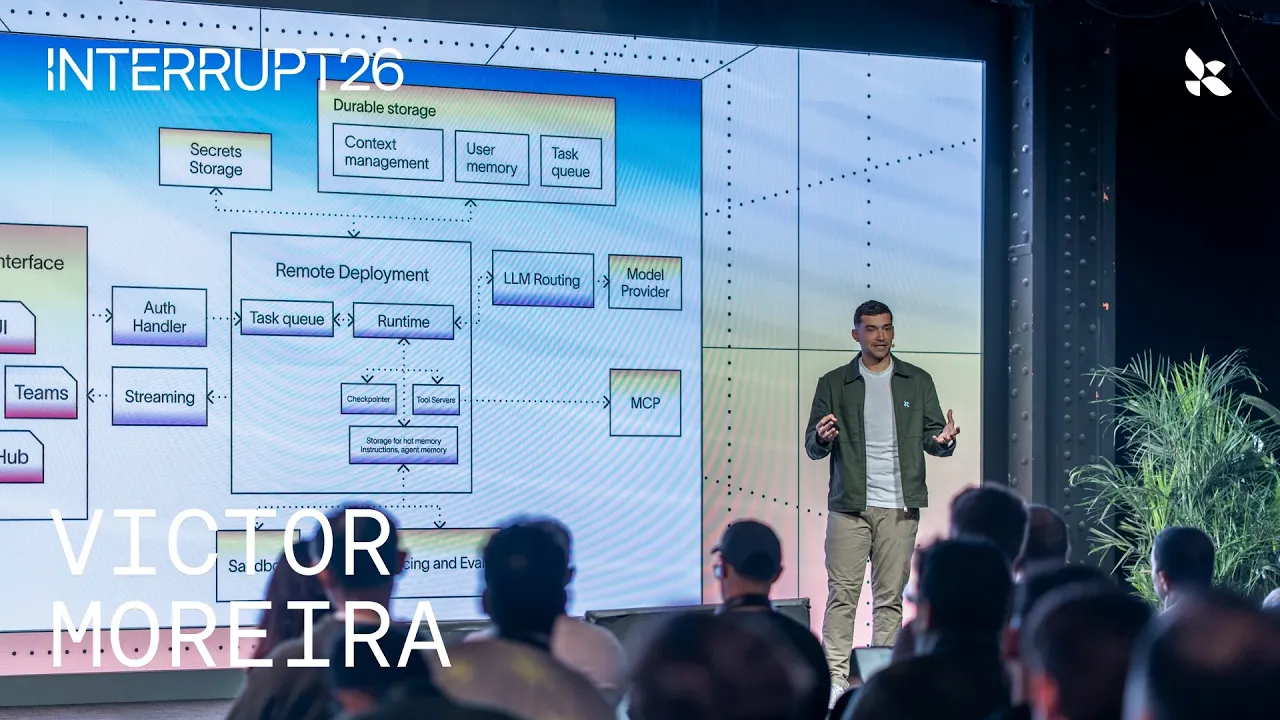
However, moving to production forces teams to resolve a barrage of distributed systems problems: supporting multiple front-end user surfaces, reconciling where incoming traffic connects into the runtime, implementing queuing mechanisms to manage bursty run volumes, maintaining stable streaming connections, and setting up persistent checkpointing.
```mermaid flowchart LR accTitle: Local Prototyping vs Production Infrastructure accDescr: Contrast between running an agent locally and handling the distributed systems requirements of production.
subgraph Local["Local Prototyping"] Proto["Single Machine Prototyping\n(Validate Logic & Magic)"] end
subgraph Prod["Production Infrastructure Requirements"] Surfaces["Multi-surface Channels\n(Slack, Web, APIs)"] Queue["Run Queuing & Checkpointing"] Stream["Real-time Streaming Engine"] Auth["Auth & Identity Handlers"] end
Proto -->|"Deploy to Prod"| Surfaces Surfaces --> Queue Queue --> Stream Stream --> Auth ```
[05:32](https://www.youtube.com/watch?v=XcsspzECTKA&t=332s) Managed Deep Agents: Bundling the Harness and Infrastructure
Managed Deep Agents eliminates infrastructure overhead by packaging the customizable Deep Agents harness directly with managed LangSmith infrastructure. This architecture liberates engineering teams from maintaining backend plumbing so they can focus on prompt engineering, tracing, evaluations, and refining business logic.
The managed architecture unifies several platform components: - **LangSmith Deployment:** Powers production streaming, state checkpointing, and authentication handlers. - **LangSmith Sandboxes:** Provides isolated compute environments for executing agent-generated code safely. - **LangSmith Context Hub:** Acts as a centralized repository where developers and business stakeholders collaborate on, version, and iterate upon agent instructions and skills. - **LLM Gateway & Tracing:** Out-of-the-box observability, routing, and experiment tracking. - **Unified Agent Interface:** Normalizes diverse caller interfaces on the front end into a single execution runtime.
[06:37](https://www.youtube.com/watch?v=XcsspzECTKA&t=397s) Project Structure and the `mda` CLI Workflow
Managed Deep Agents formalizes an agent as a clean directory structure rather than monolithic application code, supporting both TypeScript (`agent.ts`) and Python (`agent.py`). Key primitives—such as system prompts, modular skills, external tool definitions, and user authentication—map cleanly to designated folders and configuration files.
The development lifecycle is driven entirely through three simple commands using the `mda` CLI:
- `mda init <agent-name>`: Scaffolds a new project directory containing the standard file layout for skills, tools, instructions, and agent definitions. - `mda dev`: Boots a local Agent Server identical to the server backing LangSmith Deployment in production, enabling developers to test edge cases locally with complete environment parity. - `mda deploy`: Deploys the agent directory directly onto LangSmith's managed cloud infrastructure with zero custom DevOps setup.
[07:43](https://www.youtube.com/watch?v=XcsspzECTKA&t=463s) Internal Example: LangChain's Go-to-Market Agent
To demonstrate how file mapping translates to business value, Moreira shares LangChain’s internal Go-to-Market (GTM) agent, a tool accessible to anyone across the company for sales and revenue workflows. A typical request sent to the agent looks like: *"Prep me for a certain meeting and draft an email for me to review."*
This workflow maps across the standard project structure: - **Instructions & Skills folders:** Store the GTM playbooks detailing how the agent should structure meeting briefings or format email drafts. - **Tools folder:** Contains integrations connecting into internal SaaS platforms such as Salesforce and Gong. - **Identity & Memory configurations:** Manage user authentication credentials and govern cross-conversation memory persistence.
[08:34](https://www.youtube.com/watch?v=XcsspzECTKA&t=514s) Production Challenges: Identity, Data Ownership, and Permissions
Deploying enterprise agents into shared organizational environments surfaces four distinct security and operational challenges: 1. *Caller Identity:* Identifying precisely who is making the request across different entry points. 2. *Data Ownership:* Determining whose credentials, scopes, and data access permissions the agent must inherit. 3. *Memory Permissions:* Deciding which cross-thread memories the agent can safely read or update without leaking sensitive context. 4. *Access Gaps:* Managing workflows gracefully when an agent encounters missing authentication or permission walls during an active run.
Managed Deep Agents addresses caller reconciliation out of the box by providing first-class abstractions for communication channels. Whether an employee invokes the GTM agent via a dedicated Slack application or accesses it from an internal web surface, the runtime maps the caller back to a consistent enterprise identity to enforce authorization and credential boundaries.
[09:14](https://www.youtube.com/watch?v=XcsspzECTKA&t=554s) User Reconciliation and the Connections Primitive
When moving an agent out of a sandbox and into real-world production environments, developer teams immediately run into identity hurdles. A user might interact with the agent through Slack one minute, and through an internal web application or proprietary platform the next. Forcing that user to constantly re-authenticate and re-permission tools across every individual surface area destroys the user experience. To solve this, Managed Deep Agents introduces a dedicated authentication handler that reconciles user identities across various touchpoints and passes that unified identity directly into the runtime.
```mermaid flowchart TD accTitle: Mid-Task On-Behalf-Of Authentication Flow accDescr: An illustration of how Managed Deep Agents handles missing user credentials during task execution using LangGraph interrupts. subgraph RequestPhase ["Task Execution"] A["User Task Request"] --> B{"Requires On-Behalf-Of Tool?"} B -->|"No"| C["Execute with Service Account"] B -->|"Yes"| D{"User Token Exists?"} end
subgraph AuthPhase ["Human-in-the-Loop Interruption"] D -->|"No"| E["Pause & Checkpoint State in LangGraph"] E --> F["Send Auth Link to User"] F --> G["User Authenticates"] end
subgraph ResumePhase ["Execution Resumption"] G --> H["Resume Checkpointed Task"] D -->|"Yes"| H H --> I["Access Tool e.g., Salesforce CRM"] end ```
Once identity is resolved, the next critical architectural question is deciding whose credentials the agent should execute against. Developers can configure specific tools to operate strictly on behalf of the caller or use dedicated service accounts. For instance, if an employee sends a direct message asking, "Prep me for this meeting," the agent needs to invoke tools like Salesforce using that specific caller’s Salesforce permissions rather than an all-powerful admin account. In other scenarios, an agent-scoped credential or shared service token is more appropriate. Managed Deep Agents standardizes this through its connections primitive, allowing developers to define credentials and token-handling behavior cleanly.
Crucially, Managed Deep Agents addresses what happens when an on-behalf-of token is missing mid-task without crashing the workflow. Leveraging the built-in human-in-the-loop capabilities of Deep Agents and the LangGraph runtime, the agent can gracefully suspend execution. As Victor Moreira explains: “So since we have built-in human in the loop in Deep Agents and in the LangGraph runtime, what happens is when you make a request and the agent doesn't have a particular token for a particular user and it's an on-behalf-of token, it's actually able to really easily pause, ask the user to go ahead and authenticate.” Because interrupts are checkpointed in state, the workflow can safely pause indefinitely until the user clicks the verification link and completes authentication, after which execution seamlessly resumes.
- **Unified Auth Handler**: Reconciles user identities across Slack, custom web applications, and internal platforms without repeated permission prompts. - **Caller-Scoped vs. Agent-Scoped Credentials**: Configure tools (such as CRM lookups) to run on behalf of the individual user or via system-level service accounts. - **Checkpointed Mid-Task Interrupts**: If a required token is missing, LangGraph checkpoints state, triggers an authentication prompt, and resumes without losing progress.
[10:42](https://www.youtube.com/watch?v=XcsspzECTKA&t=642s) Channel-Aware Memory and Context Hub Versioning
Memory in production agents requires nuanced boundaries rather than a single monolithic vector store. Managed Deep Agents separates memory into two distinct conventions: agent-level procedural memory (which captures operational workflows and organizational rules over time) and user-level memory (which tracks individual preferences and personal facts). Storing these memories is only half the battle; the real engineering challenge lies in enforcing strict access control depending on where the conversation takes place.
To prevent sensitive leaks, Managed Deep Agents allows developers to define access control primitives tied directly to the source channel. In a private one-on-one Slack direct message, the agent is permitted to draw upon and record personal user memories and private credentials. However, if that same user summons the agent inside a shared public channel alongside teammates, the system suppresses those private memories so the agent does not inadvertently expose confidential information.
Beyond runtime memory, managing the agent's instructions and skills demands proper engineering rigor. Managed Deep Agents integrates natively with Context Hub, giving teams Git-like version control over prompts, operational guidelines, skills, and memory repositories. As Victor Moreira notes: “Another really nice part of Managed Deep Agents is we get version control for our agent context with Context Hub.” This integration enables multi-disciplinary teams to collaborate directly inside the LangSmith interface, iterate on system prompts, review diffs, and safely promote tested instructions to production.
- **Dual Memory Conventions**: Separates procedural agent-level knowledge from individual user preferences. - **Channel-Based Access Control**: Prevents personal user data from being exposed when an agent is invoked in shared team channels versus private DMs. - **Context Hub Integration**: Treats instructions, tools, and skills as versioned context repos inside LangSmith, streamlining team collaboration and production promotions.
[12:05](https://www.youtube.com/watch?v=XcsspzECTKA&t=725s) Harbor Evals and Built-In Search with Parallel
Pushing behavioral changes to production agents can be daunting because subtle prompt or skill tweaks can introduce silent regressions across complex workflows. As Victor Moreira puts it: “Promoting it to production, though, can be scary.” To provide confidence, Managed Deep Agents bakes in deep integration with Harbor, an evaluation framework tailored for complex agent workflows. Recognizing that customers often struggle with the initial setup curve of comprehensive evals, LangChain streamlined the entire onboarding flow into a single command-line call: running `mda eval init`.
This CLI initialization automatically provisions a local Harbor evaluation environment complete with baseline evaluation tasks and validation checks. Every evaluation run is piped into LangSmith, populating the experiments tab with comprehensive execution traces. This telemetry allows engineers to rerun identical benchmark suites, isolate regressions, and hill-climb agent performance locally on their own machines before deploying updates to production users.
Alongside evaluation tooling, the release introduces a native integration with web search provider Parallel. Built directly into the Managed Deep Agents runtime, the Parallel search tool requires zero setup friction—developers can equip their agents with web search without needing to register for an external account, provision API keys, or configure custom environment variables. The integration is provided completely free of charge throughout the public beta period.
- **Frictionless Evals**: The `mda eval init` command automates the scaffolding of tasks and assertion checks using the Harbor eval framework. - **LangSmith Experiments**: Evaluation runs log directly to LangSmith trace trees, enabling side-by-side comparisons across iterations. - **Zero-Config Web Search**: Built-in Parallel search integration functions out of the box without requiring external API keys during the public beta.
[13:15](https://www.youtube.com/watch?v=XcsspzECTKA&t=795s) Customer Stories: Consensus and Kyth
The architecture behind Managed Deep Agents was shaped through extensive internal usage alongside early design partners. Internally, LangChain relies on the harness to run its own mission-critical workloads, such as its internal go-to-market agent and Open SWE—an internal software factory agent that automates software engineering workflows. These internal environments served as a proving ground for stress-testing credential handling, state checkpoints, and contextual memory under daily operational load.
External customer collaborations provided vital insights into real-world organizational dynamics. Zahid from Kyth worked closely with the LangChain team to refine how non-technical business stakeholders and no-code contributors collaborate on agent definitions, while directly informing how the connections and memory primitives were architected.
At Consensus, a centralized developer team led by Derek demonstrated the intended scaling model for Managed Deep Agents across an enterprise. Rather than building one-off, fragile infrastructure for every department, Derek’s team acts as internal agent consultants, fanning out across different business units to rapidly stand up deep agents tailored to specific departmental needs. Victor Moreira observes: “And because Managed Deep Agents handles all of the infrastructure, they're able to really easily kind of go and deploy these agents.” By offloading orchestration, state persistence, and authentication scaffolding to the managed runtime, Consensus dramatically expanded the volume of production agents operating across its organization.
- **Internal LangChain Workloads**: In-house deployments include the Go-To-Market sales agent and Open SWE, an automated software engineering agent. - **Kyth (Zahid)**: Informed the design of connection management, memory ergonomics, and collaboration workflows for non-technical business users. - **Consensus (Derek)**: Scaled deployment by deploying an internal development team that builds domain-specific agents for distinct corporate departments on top of shared managed infrastructure.
[14:18](https://www.youtube.com/watch?v=XcsspzECTKA&t=858s) What's New in the Managed Deep Agents 0.8 Release
The presentation closes with a summary of the capabilities landing in the 0.8 public beta release of Managed Deep Agents. While native Slack connectivity has been a core showcase, the new release introduces HTTP channels, a flexible primitive enabling developers to wire deep agents into arbitrary bespoke surfaces. Developers can configure custom event listeners, define how the agent responds to external webhooks, and deliver agent outputs to custom web frontends, internal portals, or third-party enterprise tools.
```mermaid flowchart LR accTitle: Managed Deep Agents 0.8 Release Features accDescr: Overview of core capabilities introduced in the 0.8 public beta of Managed Deep Agents. subgraph MDA08 ["Managed Deep Agents 0.8"] direction TB C1["HTTP Channels"] C2["Sandbox File APIs"] C3["User-Scoped Memory"] C4["Connections Primitive"] C5["Slack File Transfers"] C6["Built-In Parallel Search"] end ```
The release also upgrades filesystem capabilities within the agent execution sandboxes. In addition to the agent inspecting and manipulating its workspace files, developers now have structured APIs allowing their client applications and front ends to directly access and download artifacts generated inside the sandbox. In workplace environments like Slack, this enables first-class file collaboration: an agent can generate formatted deliverables, such as PowerPoint decks or PDF summaries, and upload them directly into the Slack conversation for immediate human review and iteration.
Rounding out the release are user-scoped memory, the standardized connections primitive for user- and agent-level authentication, and zero-configuration Parallel search. Moreira concludes by inviting attendees to build production-grade, domain-specific agents on the new release: “We're really excited to announce Managed Deep Agents in our 0.8 release, and we can't wait to see what you build with it and build your domain-specific agents.”
- **HTTP Channels**: Custom event and webhook routing to deploy deep agents to any client surface beyond Slack. - **Sandbox Filesystem APIs**: Front-end applications can programmatically read and extract artifacts generated inside execution sandboxes. - **Slack File Transfers**: First-class generation and sharing of rich documents (PDFs, presentations) directly within Slack conversation threads. - **Connections & Memory Primitives**: Full availability of user-scoped memories alongside fine-grained user and service-level tool authentication. - **Built-in Parallel Search**: Pre-wired internet search enabled across all managed agents without credential configuration.
## Notable quotes > [00:05](https://www.youtube.com/watch?v=XcsspzECTKA&t=5s) So a lot of times when we're building an agent, we know that the model is only as powerful as the context that we give it. — Victor Moreira
## Mentioned Victor Moreira, LangChain, Managed Deep Agents, Deep Agents, LangSmith, LangGraph, LangSmith Sandboxes, LangSmith Context Hub, LangSmith Deployment, Harbor, Parallel, Madrigal, Consensus, Kyth, Zahid, Derek, Open SWE, Salesforce, Gong, Slack, Amazon S3, mda CLI, Interrupt NYC
## Video description Victor Moreira, Product Manager at LangChain, introduces Managed Deep Agents, now in public beta, which bundles the Deep Agents harness with managed LangSmith infrastructure so you can define an agent as a folder of instructions, skills, and tools, test it locally, and deploy it with the mda CLI. Using LangChain's internal go-to-market agent as the example, he walks through the questions that come up in production and how Managed Deep Agents answers them: caller identity across Slack and web surfaces, user and agent-scoped credentials that can pause mid-task for a user to authenticate, memory with access control by channel, versioned context in Context Hub, and Harbor evals traced to LangSmith experiments. He also shares how Madrigal built a pharmaceutical research agent with Deep Agents on LangSmith and how the team at Consensus builds agents for different parts of its organization, and closes with what is new in the 0.8 release, including HTTP channels, user-scoped memory, Slack file transfers, and built-in search powered by Parallel.
This session was captured at Interrupt New York City, the agent conference by LangChain.
LangChain products in this talk: Managed Deep Agents, Deep Agents, LangGraph, LangSmith, LangSmith Deployment, LangSmith Sandboxes, LangSmith Context Hub
Speakers: Victor Moreira, Product Manager, LangChain
Chapters: 0:00 What is an agent harness, and why does context matter? 1:26 The four core areas that make up a deep agent 3:15 Madrigal spins up research agents in hours instead of weeks 3:59 What changes when a local agent goes to production? 5:32 How Managed Deep Agents bundles harness and infrastructure 6:37 An agent as a folder, shipped with three mda commands 7:43 How LangChain's GTM agent maps onto files 8:34 Who is asking, and whose account should the agent use? 10:42 Which memories can the agent use in a DM or shared channel? 11:40 Versioned context in Context Hub and evals with Harbor 13:15 How Consensus builds agents for different parts of its org 14:18 What's new in the Managed Deep Agents 0.8 release
Resources: → Managed Deep Agents docs: https://docs.langchain.com/langsmith/python/managed-deep-agents-overview → Deep Agents: https://www.langchain.com/deep-agents → LangSmith Deployment: https://www.langchain.com/langsmith/deployment → LangSmith: https://www.langchain.com/langsmith → Interrupt, the agent conference by LangChain: https://interrupt.langchain.com
[Source](https://www.youtube.com/watch?v=XcsspzECTKA)